
Loremaster
English | 한국어
Every team has lore. Most of it gets lost. Loremaster keeps it alive.
An AI scrum-master / PM skill pack for Hermes Agent. Eleven skills that run a small team's planning loop around a lore vault — a per-project wiki repo that stays the single source of truth while the AI proposes, detects, and refines, and humans decide.
Extracted from a production system running a real multi-project team (Slack + Jira + GitHub), not written for a demo. The constraints are the product:
- Detect, don't decide. The AI surfaces conflicts, gaps, and drift; judgment belongs to humans. It never picks a side, never auto-assigns, never auto-confirms.
- Approval gates. Every write to an external system (Jira, wiki commits, superseding a decision) goes through an explicit per-item human approval.
- No invention. Nothing enters the wiki that is not traceable to raw source docs — every wiki
entry carries
sources; blanks are flagged, never filled in. - One-way derivation.
raw/→wiki/→ knowledge graph →[[wikilinks]]. Humans never hand-edit derived layers. - Channel = project. Memory, prompts, and graph are isolated per project.
Architecture
flowchart TD
    subgraph PLAN["Planning loop — Slack"]
        DEV(("Developer"))
        LM["Loremaster<br/>(Hermes Agent)"]
    end
    subgraph VAULT["Lore vault — git repo"]
        RAW["raw/ — PRD + decision log<br/><b>the only truth</b>"]
        WIKI["wiki/ — refined concepts"]
        KG["graphify-out/ — knowledge graph"]
    end
    subgraph BUILD["Building loop — each developer's machine"]
        CA["Coding agent<br/>(Claude Code, Cursor, …)"]
        REPO["Product repo"]
    end
    JIRA["Jira"]
    OBS["Obsidian<br/>(humans browse the wiki)"]

    DEV -- "plan-change requests / questions" --> LM
    LM -- "proposals + Allow/Deny buttons" --> DEV
    LM -- "approved edits only" --> RAW
    RAW -- "refine-wiki (one-way)" --> WIKI
    WIKI -- "semantic extraction" --> KG
    KG -- "derived wikilinks" --> WIKI
    LM -- "backlog proposals<br/>(per-item approval)" --> JIRA
    DEV -- "delegates implementation" --> CA
    VAULT -. "source of truth, via git" .-> CA
    CA -- "backlog-kickoff / backlog-complete<br/>(pre-push conflict check)" --> REPO
    CA -- "issue transition on complete" --> JIRA
    VAULT -. "git pull (Obsidian Git)" .-> OBS
Two loops, one truth: the planning loop (Slack) may only change raw/ through human
approval, and everything below raw/ is machine-derived; the building loop (each dev's
coding agent) reads that truth and checks for plan conflicts before every push. Jira is
written from both loops — never without a human decision.
Skills
| Group | Skill | What it does |
|---|---|---|
| Getting Started | loremaster-setup |
Interactive onboarding: installs the pack, creates your lore vault, wires the channel prompt, smoke-tests |
| Scrum Ceremonies | daily-scrum |
Daily stand-up digest from the vault, Jira, and recent activity |
sprint-planning |
Sprint scoping with AI-seeded planning poker (Slack Block Kit voting) | |
sprint-retro |
Retro agenda + evidence from what actually happened in the sprint | |
meeting-agenda |
Meeting agendas grounded in open conflicts and pending decisions | |
| Backlog Management | backlog-proposal |
Proposes backlog items with externally-verifiable done criteria — humans select, per-item approval creates them in Jira |
backlog-update |
Second-line backlog reconciliation (propose-only; status transitions stay with developers) | |
| Conflict & Change Governance | conflict-detection |
Detects contradictions between raw planning docs; surfaces, never judges |
resolve-conflicts |
Walks a human through resolving a detected conflict; applies the outcome only after approval | |
impact-analysis |
Knowledge-graph ripple analysis: what else does this change touch? | |
| Project Wiki & Knowledge | refine-wiki |
Refines raw docs into the wiki layer + incremental graph build + derived wikilinks |
wiki-qa |
Answers questions strictly from the wiki, with sources |
Quick start
Prerequisite: Hermes Agent v0.17+ with a chat platform connected (Slack recommended).
hermes skills tap add loremaster-ai/loremaster
hermes skills install loremaster-ai/loremaster/skills/loremaster-setup --yes
Then, in chat with your agent:
run loremaster-setup
The setup skill walks you through everything interactively — it installs the other skills, fetches the helper scripts, creates your first lore vault, wires the project channel prompt (with your approval before it touches config), and finishes with a smoke test. Every write is proposed first; you approve each one.
Installs are trust-level community: Hermes quarantines each skill, runs its security scanner,
and shows a third-party risk prompt before enabling. Set GITHUB_TOKEN (or gh auth login) to
avoid the unauthenticated GitHub API rate limit.
hermes skills browse --source github        # note: plain `browse` can skip GitHub taps
for s in backlog-proposal backlog-update conflict-detection daily-scrum impact-analysis \
         meeting-agenda refine-wiki resolve-conflicts sprint-planning sprint-retro wiki-qa; do
  hermes skills install "loremaster-ai/loremaster/skills/$s" --yes
done
The first
search/browseafter adding the tap may come back empty while the hub index warms up — just run it again.
Then follow the Helper scripts and Configuration sections below.
What it costs to run
Loremaster is MIT and adds no paid services of its own — you pay only for what Hermes already needs:
- The LLM brain — any model Hermes supports. We run production on a subscription-OAuth provider (no per-token billing on top of a subscription we already had). API-key providers and OpenAI-compatible endpoints (local/self-hosted models) are configurable in Hermes — though we haven't validated these skills on small local models.
- Knowledge graph — nothing extra: the shipped pipeline deliberately uses graphify's keyless path (your session model does the semantic extraction; no separate graphify API key).
- Slack — free plan works; the approval buttons reuse the gateway's own queue (no second app).
- Jira — optional; the free tier is fine.
Approval buttons plugin
plugins/loremaster-approval ships the request_approval tool the skills call before every
external write — it posts real Slack Block Kit [Allow]/[Deny] buttons and blocks until a
human clicks, by reusing the gateway's own exec-approval queue (no second Slack app, no core
patch, any Slack plan):
hermes plugins install loremaster-ai/loremaster/plugins/loremaster-approval --enable
hermes gateway restart
To update, re-run the install with --force (subdirectory installs can't use
hermes plugins update).
⚠️ The plugin imports private Hermes internals (
tools.approval._await_gateway_decisionet al.) — tested against Hermes Agent v0.17.0. If it breaks after a Hermes upgrade, pin your hermes version. Hermes ≥ v2026.7.7 ships a public approval surface (pre_tool_call→request_tool_approval, confirmed in NousResearch/hermes-agent#66927) — migration is tracked in #1.
The developer side (Claude Code & friends)
The server agent proposes and refines — but the last mile of an issue happens in each
developer's local coding agent. client-template/ ships four skills that live inside your
product repo's .claude/skills/ (they follow the agentskills.io
standard, so Claude Code, Cursor, and other compatible clients all pick them up):
| Skill | When you use it |
|---|---|
backlog-kickoff |
Starting work on an issue — scaffolds its decision doc + progress checklist from the wiki |
backlog-complete |
Done implementing — pre-push conflict check → resolve → commit/push (issue key in the message) → Jira transition |
backlog-recall |
The plan changed under you — re-kickoff the issue against the updated wiki |
project-onboard |
One-time onboarding of an existing project into the docs model |
Installing them is just a commit (the setup skill offers this step):
cp -r client-template/.claude your-product-repo/
Everyone on the team gets them on their next git pull — no per-developer install. This is the
other half of the conflict story: conflicts are caught locally, before the push, by
backlog-complete; the server's conflict-detection is the safety net.
Helper scripts
scripts/ ships four deterministic (LLM-free) helpers some skills call:
cp scripts/*.py ~/.hermes/scripts/
loremaster-poker.py— Slack planning-poker cards + vote tally (used bysprint-planning)loremaster-graphify-plan.py/loremaster-graphify-build.py— incremental knowledge-graph pipeline on top of graphify: the agent's session model does semantic extraction (no extra API key), the scripts do deterministic cache/merge/buildloremaster-derive-wikilinks.py— derives[[wikilinks]]from graph edges (one-way)
Configuration
- Jira: copy
examples/jira.env.example→~/.hermes/keys/jira.envandexamples/jira-projects.tsv.example→~/.hermes/keys/jira-projects.tsv. - Timezone: skills date-stamp artifacts with
TZ="$TEAM_TZ"— setTEAM_TZto your team's IANA timezone (e.g.Asia/Tokyo,America/New_York). - Lore vault: each project's Slack channel prompt tells the agent its vault path. A vault is a
git repo shaped as
raw/PRD.md+raw/decisions/*.md(truth) →wiki/concepts/*.md+wiki/index.md(derived) →graphify-out/(graph artifacts).
View your lore in Obsidian (recommended)
The lore vault is a plain markdown repo — open it as an Obsidian vault and your team gets a browsable, linked wiki for free:
- Wiki pages carry
related[[wikilinks]]derived from the knowledge graph, so Obsidian's graph view visualizes the team's lore — clusters, hubs, and how a decision ripples. - Install the community Obsidian Git plugin (auto pull on a timer) so everyone's Obsidian
follows the wiki as the agent refines it. Humans read
wiki/and editraw/; the derived layers stay machine-written. - Add
.obsidian/to the vault's.gitignore— editor state is per-person.
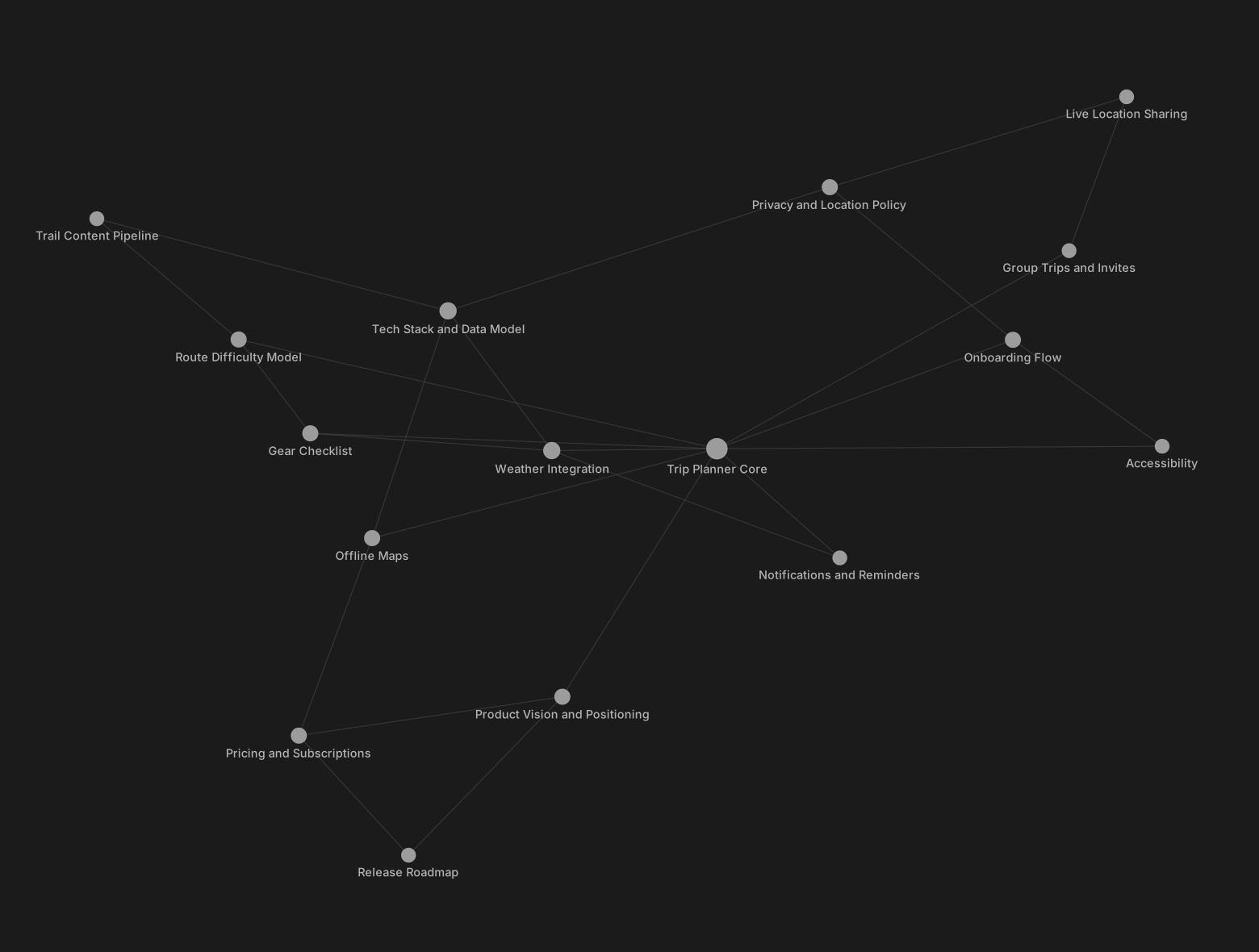
What a vault's lore looks like — every node a wiki concept page, every edge a link derived by
the shipped pipeline (this graph was generated from
examples/demo-vault, a complete fictional-product vault you can open
in Obsidian right now):
Roadmap
- v0.1 — the 11 server skills + helper scripts
- v0.2 (in progress) —
loremaster-setuponboarding skill, the Slack approval-button plugin (request_approvalwith real Block Kit Allow/Deny buttons), and the client-side developer skills (client-template/:backlog-kickoff,backlog-complete,backlog-recall,project-onboard) - next — the webhook → refine worker pipeline (GitHub push → vault raw → wiki) and a lore-vault template repo
No comments yet
Be the first to share your take.