
lora-dataset-prep
Turn a folder of raw photos into a clean, captioned, validated LoRA training dataset — in one command.




Quick start · How it works · Captioning · Validation · Agent skill · Reference
Training a LoRA is easy. Preparing the dataset is where it goes wrong: duplicate frames overfit a pose, an uncaptioned uniform becomes part of the character, one repeated adjective makes every generation warm-lit. This tool catches all of that before you spend GPU hours.
Built for Ostris AI Toolkit / Z-Image Turbo. Character LoRA first; style, object, clothing, and environment supported.
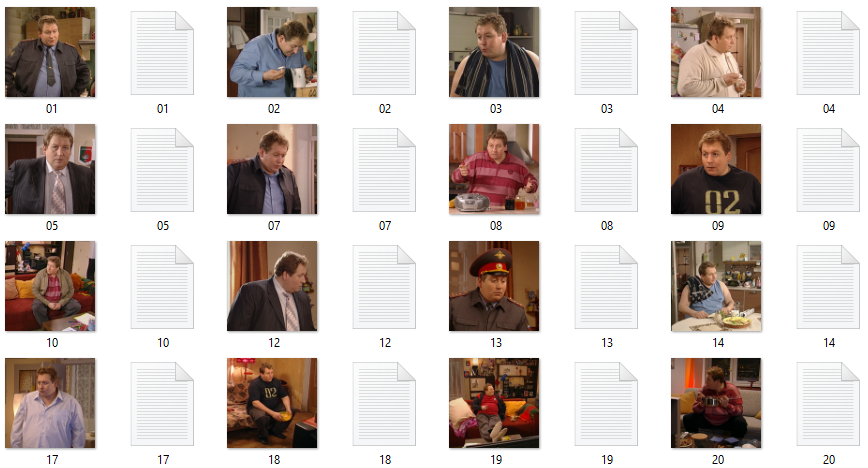
 raw_photos/                      my_dataset/
 ├── IMG_4032.jpg                 ├── train/
 ├── фото (3).png        ──►      │   ├── 01.png • 01.txt   caption sidecars
 ├── screenshot.webp              │   ├── 02.png • 02.txt
 └── ...                          │   └── ...
                                  ├── raw/                  originals, untouched
                                  ├── README.md             auto-generated dataset card
                                  └── metadata.json         full provenance
Quick start
No dependencies needed for the core workflow — Python standard library only.
# 1 · Dry-run: prints the full plan, changes nothing
python prepare_dataset.py --source ./raw_photos --output ./my_dataset \
    --type character --trigger mychar01

# 2 · Apply
python prepare_dataset.py --source ./raw_photos --output ./my_dataset \
    --type character --trigger mychar01 --execute

# 3 · Hand-edit captions, then re-check (read-only)
python prepare_dataset.py --validate-only --output ./my_dataset
Prefer questions over flags? Just run python prepare_dataset.py.
How it works
| Stage | What happens |
|---|---|
| 1 · Scan | Finds .jpg / .jpeg / .png (WebP via --convert-webp; subfolders via --recursive), skips junk |
| 2 · Quality gate | Flags small images, blur, EXIF-rotated phone photos, exact duplicates (SHA-256), near-duplicates (perceptual dHash) |
| 3 · Organize | Sequential zero-padded names, originals backed up to raw/ |
| 4 · Caption | Writes a .txt sidecar per image — four modes, see below |
| 5 · Validate | 20+ checks on the finished dataset |
| 6 · Document | Dataset card (README.md) + machine-readable metadata.json |
Every run is a dry-run by default. Files change only with --execute.
Caption modes
| Mode | Output | Best for |
|---|---|---|
template |
Structured captions with [BRACKET] placeholders to fill in |
Default starting point |
minimal |
mychar01, portrait photo stubs |
Writing everything by hand |
vlm |
Real descriptions via Claude Vision API | Best quality, hands-off |
local |
Florence-2 or BLIP, fully offline | No API key available |
vlmneedspip install anthropic+ANTHROPIC_API_KEY. Raw BLIP output violates the caption formula and must be rewritten — details in reference.md.
The captioning rule
Describe what you do not want the LoRA to learn. Everything left out of the caption gets bound to the trigger token.
So the face is never described — and clothing, pose, lighting, and background always are, keeping them flexible at inference:
+ zvqmark, a still from a TV show, medium shot of a man wearing a dark police
+ uniform with a blue shirt and tie, standing in a kitchen with hands on hips,
+ looking down with a stern expression, warm interior lighting

- zvqmark, masterpiece, best quality, handsome man, detailed face, 8k
The full guide — formula, include/omit tables, per-type strategies, typical mistakes — lives in reference.md.
What gets validated
Structure — image↔caption pairing, orphans, duplicate basenames, unsafe filenames
Captions — trigger presence and position, length (15–35 word target),
unfilled [BRACKET] placeholders, filler phrases, multiple subjects,
failed-VLM markers
Attribute sticking — any content phrase repeated in ≥ 50 % of captions is flagged; the silent killer that bakes one lighting or gaze into every generation
Images — minimum dimensions, blur heuristic (tunable via
--blur-threshold, 0 disables), EXIF rotation flags (phone photos that
would train sideways — --resize bakes the rotation into the pixels),
exact and near-duplicate detection
Use as an Agent Skill
Drop the folder into your skills directory — the agent picks it up whenever you ask it to prepare a dataset, write captions, or choose a trigger word:
| Agent | Path |
|---|---|
| Claude Code | ~/.claude/skills/lora-dataset-prep/ |
| Cursor | ~/.cursor/skills/lora-dataset-prep/ |
The agent reads SKILL.md for the workflow and reference.md for captioning rules, then drives the CLI for you.
Options
| Flag | Purpose |
|---|---|
--type |
character · style · object · clothing · environment |
--captions |
template · minimal · vlm · local |
--resize 1024 |
Shortest side to 1024 px; aspect preserved; never upscales; bakes EXIF rotation into pixels |
--recursive |
Include subfolders when scanning the source (hidden folders skipped) |
--repeats 10 |
kohya-style 10_trigger/ folder naming |
--convert-webp |
WebP → PNG (many trainers can't read WebP) |
--blur-threshold 50 |
Blur sensitivity; 0 disables |
--validate-only |
Read-only check of an existing dataset |
--execute |
Apply changes — without it, always a dry-run |
Complete table: SKILL.md → Options Reference.
Development
pip install pytest Pillow
python -m pytest test_prepare_dataset.py -q        # 79 tests, ~3 s
The suite covers caption generation, hashing, perceptual dedupe, resize, EXIF-orientation handling, every validation rule, attribute-sticking detection, and the VLM path (mocked API — no key needed). CI runs the same suite on Python 3.9–3.12 for every push; releases are tagged and summarised in CHANGELOG.md.
lora-dataset-prep/
├── SKILL.md                   agent entry point + full options table
├── reference.md               captioning & dataset guide
├── prepare_dataset.py         the tool — stdlib-only core
├── test_prepare_dataset.py    test suite
└── LICENSE                    MIT
If this saved you a failed training run, a star is appreciated.
No comments yet
Be the first to share your take.