
LLM Gateway
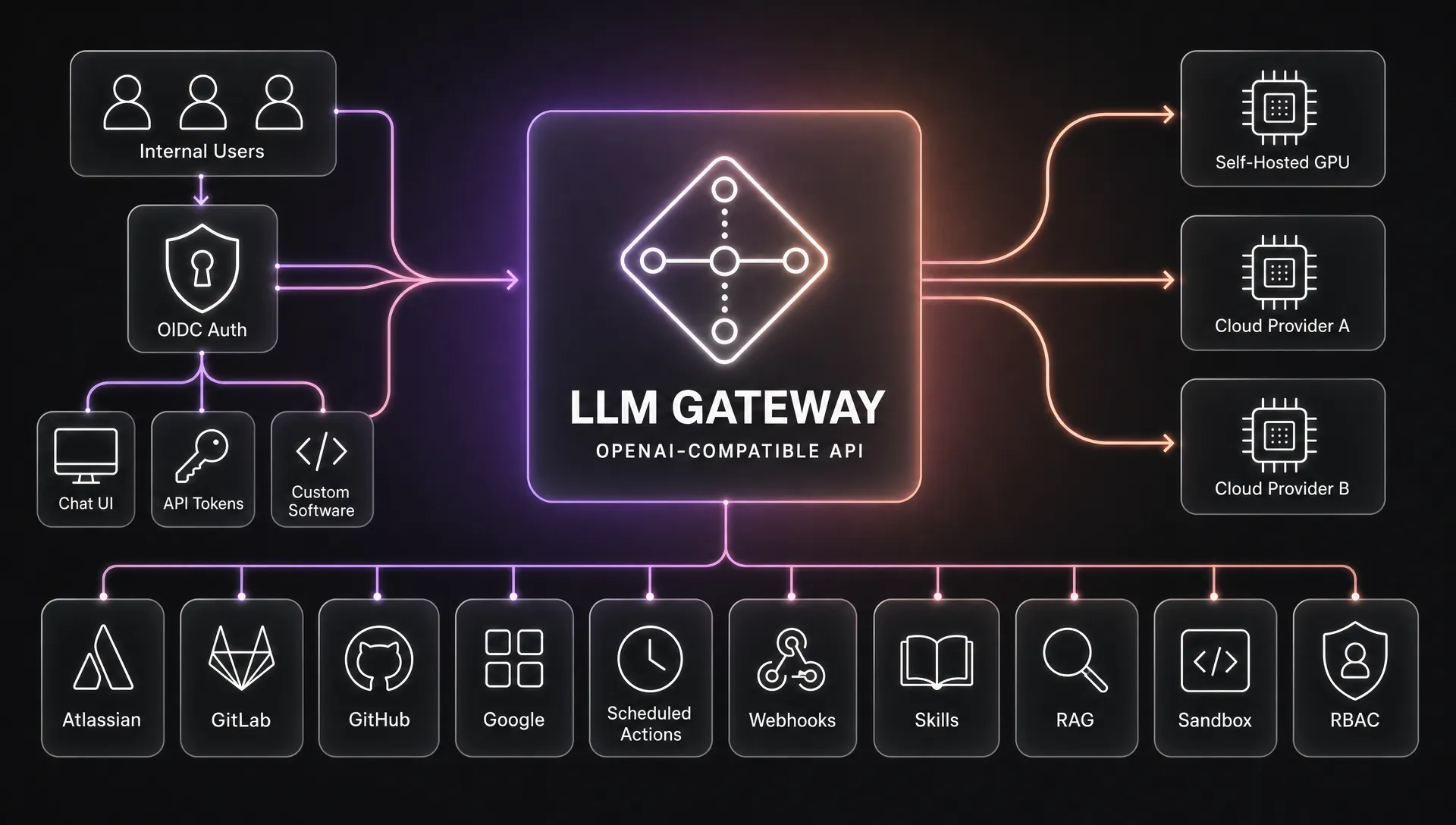
One endpoint for all your LLM backends — that also makes them agentic. LLM Gateway is an OpenAI-API-compatible reverse proxy: point any OpenAI SDK at it and it routes across your self-hosted and cloud models (health checks, failover, stable aliases), then runs tools mid-completion — web search, code sandbox, document rendering, RAG, per-user MCP connectors — so plain clients get tool use with zero agent code of their own. Team-ready with OIDC login, per-user tokens, and RBAC, plus a built-in chat UI for people who don't speak curl. Ships as a single self-hosted binary (Rust, SQLite) — no compose file, no vector DB, no separate frontend.
Contents
- What it does
- Tools the model can call
- The built-in web UI
- Scheduled actions
- Conversation compaction
- Voice conversation
- Integrations (per-user MCP connectors)
- Quick start (local development)
- Configuration
- Using the gateway
- Production deployment (container + systemd)
- Documentation
- Contributing
- License
What it does
- OpenAI-compatible API —
POST /v1/chat/completions(streaming + non-streaming),POST /v1/embeddings,POST /v1/images/generations+POST /v1/images/edits,POST /v1/audio/transcriptions,POST /v1/audio/speech(text-to-speech, when a speech pool is configured), andGET /v1/models. Point any OpenAI SDK at it. - Multi-backend routing — named upstream pools (
chat/transcription/embedding/image/speechkinds). Each pool load-balances across its backends (round-robin or least-in-flight) with per-backend health probes. Models are discovered live from each backend's/modelsendpoint, so loading a model on a backend makes it routable with no config change. - Model aliases + fallback — give clients a stable name (a per-backend alias like
qwen) that routes to whatever real model is loaded, so swapping the model needs no client change; the same alias on several backends is a load-balanced group. Optional fallbacks cover an unknown model name or a known model whose backends are all down. All configured per backend/pool at/admin/upstreams. Seedocs/upstreams.md. - OIDC login — browser sign-in against your identity provider; the gateway then issues its own
gwk_…API tokens. Provider secrets come only from the environment. - Per-user tokens + RBAC — tokens are SHA-256-hashed at rest and revocable. Roles (mapped from OIDC claims) gate which models and server-side tools each user may use.
- Usage accounting, rate limits & quotas — every call is metered per user/token/model (requests, tokens, and — with per-model prices — spend), shown on
/usage. Set hard rate limits and quotas at/admin/limits(requests / tokens / cost, over a rolling hour / day / week / month), scoped globally, per-role, or per-user; over-budget callers get a429. Self-hosted pools can be marked exempt (a per-pool toggle at/admin/upstreams) so their usage is still recorded and shown on/usage, but never counts against a limit or quota. - Server-side tools — the gateway runs tools mid-completion (web search, fetch-URL, document rendering, code execution, RAG, network lookups, and more); the client just sees a normal completion. Full list in Tools the model can call.
- Chat UI — a server-rendered, mobile-friendly chat at
/chatwith persisted multi-conversation history, token-by-token streaming, file attachments, voice dictation, shareable/exportable conversations, and resume-on-reconnect (every turn is written to SQLite as it happens). - RAG — operator-managed, indexed codebases that the chat model can search.
- Agent Skills — drop a
SKILL.mdbundle (or.skillarchive) in and the chat model loads it on demand to follow your house style, brand, or domain playbooks — progressive disclosure, no fine-tuning. Admins upload/view/delete global skills at/admin/skills(live, no restart, RBAC-gated per role); every user can also add their own private skills at/skills, usable only in their own chats. See Agent Skills. - Scheduled actions — per-user prompts that run on a cron schedule (hourly / daily / weekly / monthly, or a raw cron expression), each evaluated in its own timezone. A friendly builder assembles the cron and shows the next run times live; every fire opens a chat you can read back in the UI — a fresh one each time, or (optionally) continuing the previous run's conversation as history. See Scheduled actions.
- Integrations (per-user MCP connectors) — an admin-curated catalog of MCP servers (Google Workspace, GitHub, Atlassian, GitLab, …) that each user connects to with their own account at
/integrations. OAuth (with dynamic client registration where supported) or a user-supplied token; tokens are encrypted at rest and refreshed in the background. The connected servers' tools then become available to the model, scoped to that user's own permissions. See Integrations.
Tools the model can call
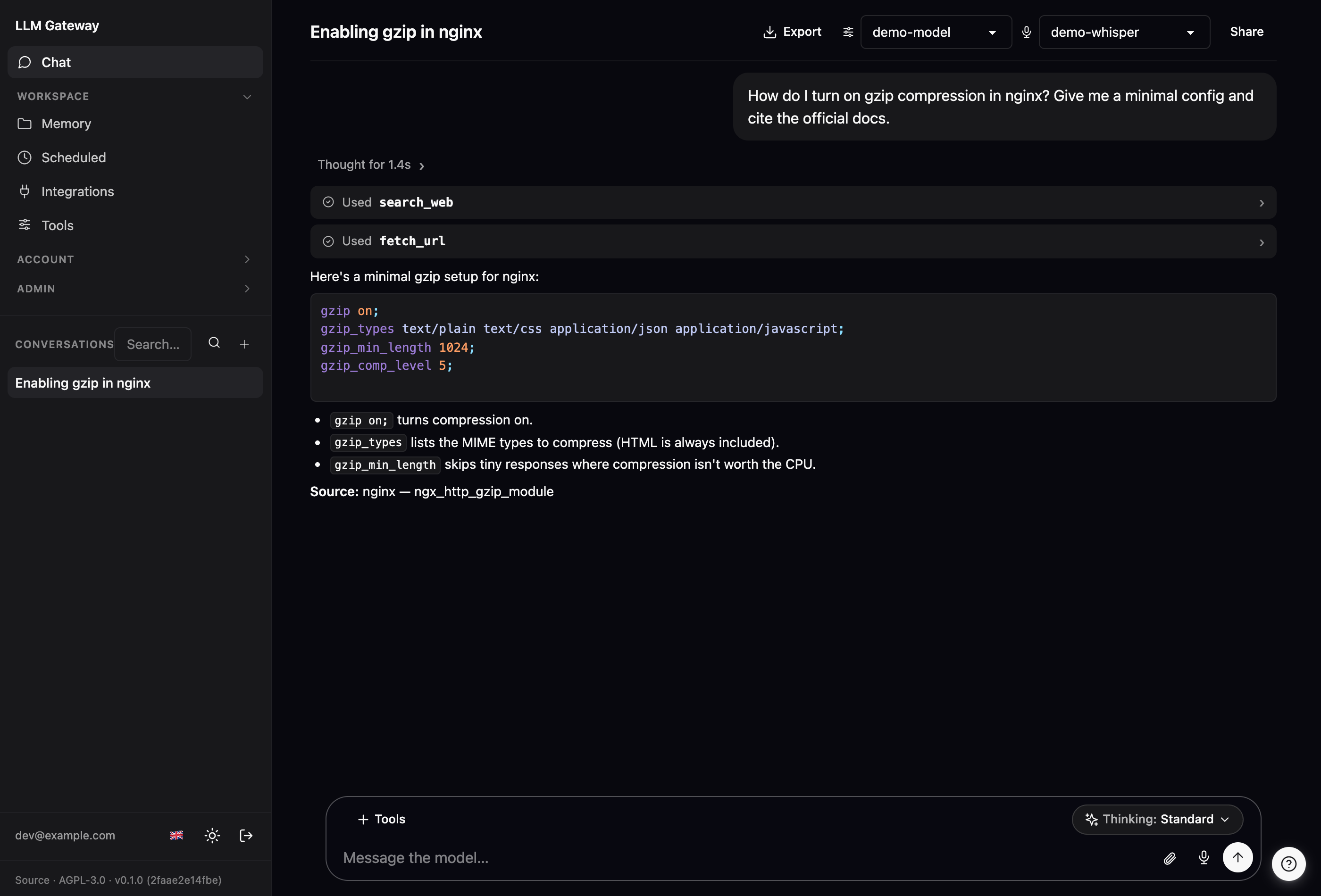
This is the part most "OpenAI-compatible proxy" projects don't have. The gateway can execute tools server-side, in the middle of a completion: the model asks to search the web, read a PDF you attached, render a branded PDF, run code in a throwaway sandbox, or query an indexed codebase — the gateway runs it, feeds the result back, and the client just receives one ordinary completion with the finished answer. It works identically through the raw /v1/chat/completions API and the built-in chat UI.
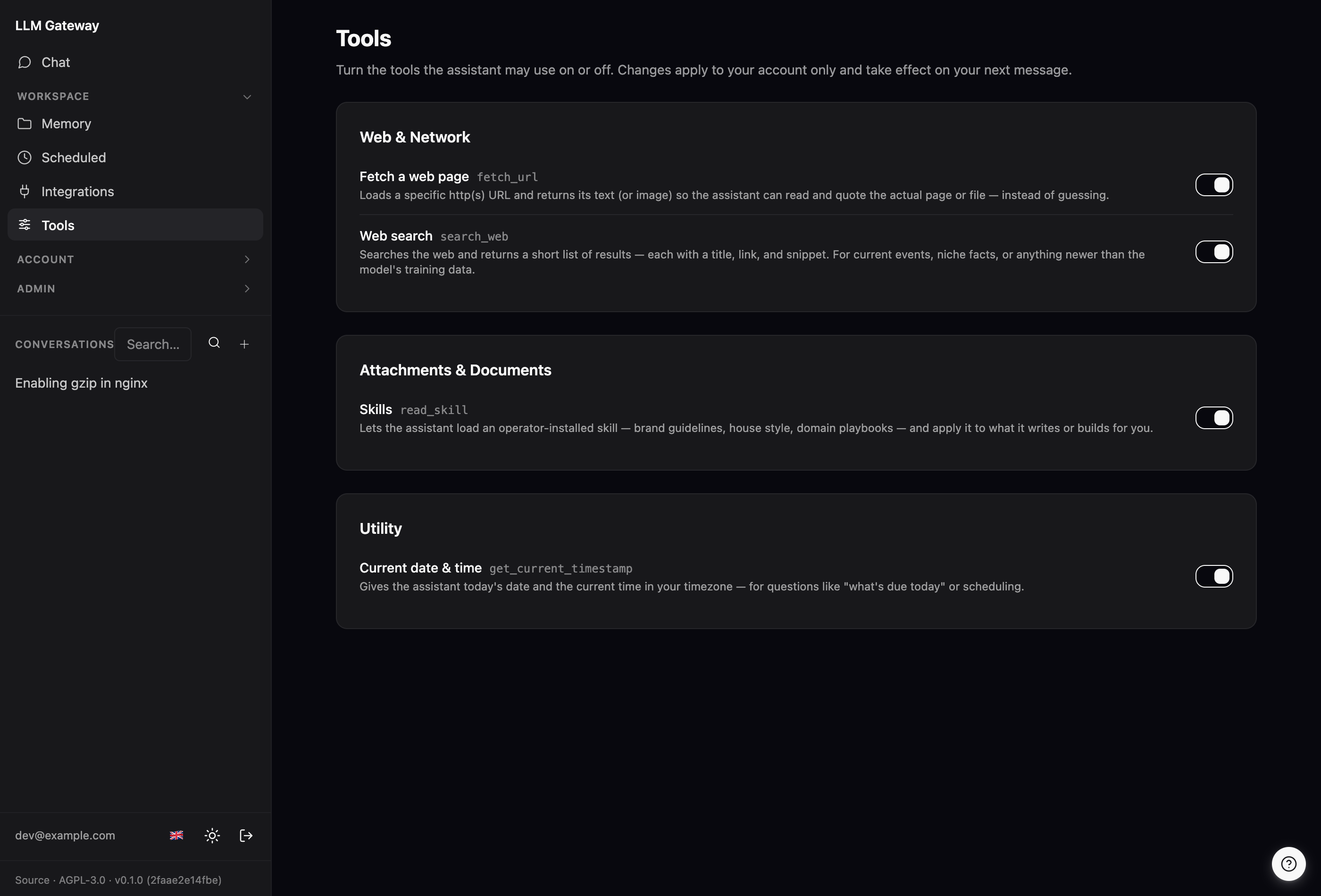
Every tool is RBAC-gated per role, and each user can flip their own grants on and off on the /tools page:
| Category | Tools | What the model can do |
|---|---|---|
| Web & retrieval | search_web, fetch_url, wikipedia |
Search the web (SearXNG or Brave — configured under Web search on /admin/models, with optional per-query domain and recency filters), fetch any URL (HTML is reduced to readable text — headings, lists, links, tables and code survive, scripts and markup don't, so a page costs a few KB instead of a few hundred; raw: true when the markup itself is the point — images → viewable, other binary → metadata), and pull encyclopedic summaries. |
| Documents | fetch_attachment, upload_attachment, offer_download, import_file, list_attachments, typst_* |
Read files the user attached — including two-tier PDF reading (extract the text layer first; rasterize scanned pages for a vision model if that comes back empty) with page ranges so a long document is read one window at a time instead of only its first pages — attach files back into its own reply, hand over any file the conversation already holds as a download (copied inside storage, so a big payload never gets pasted into the reply as text), pull a text file into the editable canvas so it can be changed a passage at a time instead of rewritten, list every file in the conversation (uploads + earlier tool outputs) so assets get reused instead of regenerated (attachments resolve by id or bare filename, newest wins), and render PDF/PNG documents from operator-defined Typst templates (invoices, letters, reports) whose field data lives in the canvas — visible, versioned, downloadable, and editable by hand. |
| Automatic document OCR (opt-in) | baidu/Unlimited-OCR via the internal ocr pool |
Send uploaded images, and PDFs without a usable text layer, to the PDF-aware OCR sidecar and add the result as untrusted document context — cached by document hash, page-ordered, metered, with per-document status in the chat UI. The feature is inactive unless [chat.ocr].enabled = true and a healthy ocr backend are both configured. See docs/ocr.md. |
| Document canvas | create_document, edit_document, delete_document, … |
Build up a long document (report, spec, article) across turns and edit it section-by-section in a live side panel, then export it to PDF/DOCX/PPTX — instead of regenerating the whole thing every reply. Every change is a new version; the model can list the history and roll back (list_document_versions, restore_document_version), and several documents can coexist per conversation. You can edit any document by hand in the panel — your save is a version of its own, labelled as yours, and the assistant is told the document moved under it (with the id to re-read) so its next edit builds on your wording instead of reverting it. Abandoned drafts can be cleared away without losing anything: delete_document is a soft delete — the document leaves the canvas and the model's listing but keeps its history, and undelete_document brings it back. Formats: markdown, text, html, json, toml, typst (draft the source in the canvas, render via render_typst/export_document — sections anchor on = headings), and yaml (text-edited so comments survive). See docs/file-conversions.md. |
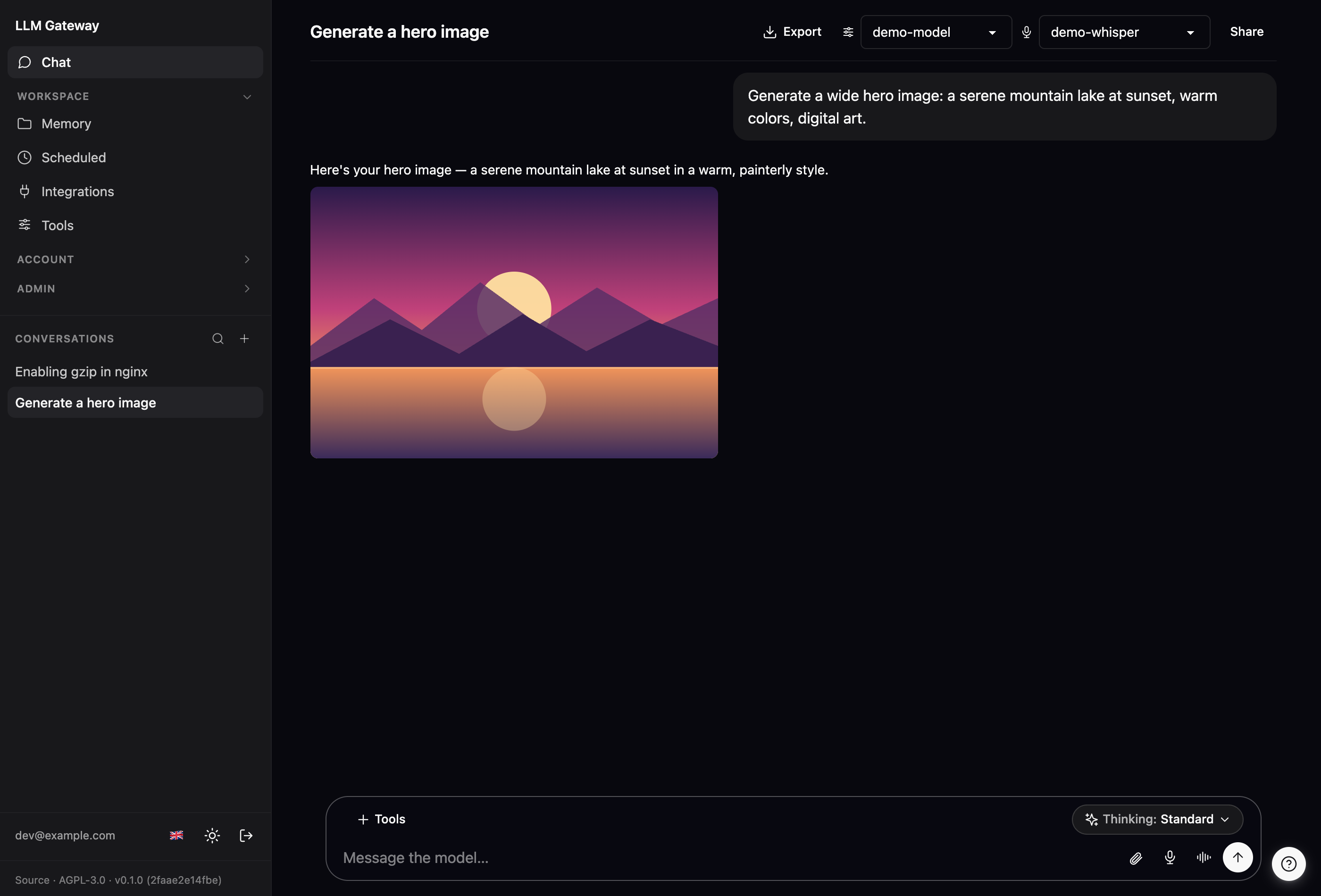
| Images | generate_image, edit_image |
Generate an image from a text prompt (diagrams, mockups, marketing visuals) and, where the backend supports it, edit an existing image (image-to-image) — rendered inline in the reply. Routes to an image-kind upstream pool (any OpenAI /images/*-compatible backend: a hosted provider or a self-hosted model). edit_image appears only when a backend advertises edit support, and is refused against non-GDPR-compliant backends. |
| QR codes | generate_qr_code |
Generate a QR code natively in the gateway (no sandbox, no backend) — URLs, WiFi access, vCard/MeCard contacts, mailto:/tel:/geo:, SEPA GiroCode payments — as PNG or SVG, with custom colors and an optional centered logo from a chat attachment (error correction auto-raised to H). Attached inline in the reply. |
| Code & sandbox (opt-in) | run_in_sandbox, generate_document, export_document, convert_document, edit_presentation, capture_webpage, browse_page, render_typst, render_excalidraw, read_sandbox_output |
Run Python/shell in an isolated gVisor VM (data crunching, format conversion, plotting; run_in_sandbox persists its workdir across a conversation turn so the model can iterate), turn Markdown into PDF/DOCX/PPTX, convert between office/PDF/image formats, edit an uploaded .pptx in place, screenshot a web page, drive a browser across several steps (browse_page — click, fill a form, get past a consent banner, then read the result: the session stays open for the whole turn), render Typst or Excalidraw, and page through a large sandbox result without pulling it all into context. The web tools appear only when the sandbox runner is configured for network egress — the gateway asks it at startup, so on an offline runner the model is never offered a browser it cannot use, and run_in_sandbox doesn't even show a network option. Enabled by the [sandbox] block — see docs/sandbox.md and docs/file-conversions.md. |
| Memory | remember, recall, update_memory, forget |
Persist durable facts about the user (preferences, projects) and recall them in later conversations — and correct or drop one when it changes, so a changed fact replaces the old one instead of leaving two contradicting memories behind. |
| Scheduled actions | schedule_action, list_scheduled_actions, delete_scheduled_action |
Set up recurring prompts from inside a conversation — "every Monday, summarise last week's tickets" — reaching the same cron scheduler the /scheduled page drives. Each run opens a conversation you can read afterwards, on the model you were talking to. Creating or deleting one needs your confirmation (via ask_user) and an action created this way always runs without tools: a scheduled prompt later runs as you, unattended, so it is not something a model should be able to plant on its own. |
| Notifications | notify_user |
Reach you when you're not watching the conversation — long sandbox work finished, or a scheduled action found something worth knowing — as a Web Push notification on your phone or desktop. Hard-limited to one per reply, and only where you enabled notifications. |
| Asking you | ask_user |
When a choice would change what it builds and guessing would waste the work, the assistant asks — inline, mid-answer, with optional buttons plus a free-text field — and waits for your reply instead of ending the turn with a question. Times out and proceeds on a stated assumption if nobody answers. |
| Network & ops | dns_lookup, whois_lookup, tls_cert, lookup_ip |
DNS-over-HTTPS records, RDAP domain registration, TLS-certificate inspection ("is this cert about to expire?"), and GeoIP for any IP or hostname. |
| Location | get_user_location |
Use the approximate IP-based location that's always in context, or ask the browser for precise GPS when the task needs it. |
| Utility | convert_currency, get_current_timestamp, company_echo |
Convert currencies at daily ECB rates, get the timezone-aware current time, and echo a message back verbatim (company_echo is a built-in smoke test for the tool-call loop). |
| Knowledge base | rag_list_collections, rag_search, rag_grep |
Search operator-indexed codebases/corpora and get back the matching chunks with file paths, line ranges, and scores. Search is hybrid — dense vectors fused with FTS5/BM25 — so exact identifiers land as well as paraphrase, and a path_glob scopes a query to part of the corpus. rag_grep covers what ranking can't express: a regular expression over the indexed text, returning matching lines with line numbers and context (bounded by result/row/time limits, since it has no index behind it). |
| Integrations | mcp__<server>__* |
Call the tools of any bridged MCP server. Each server's tools are namespaced so two servers can't collide. |
| Skills | read_skill |
Load an operator-installed skill — brand guidelines, house style, domain playbooks — then apply it: pull the SKILL.md, then any referenced asset (e.g. an SVG to inline). |
Tools turn themselves on. Tools start off to keep the model's tool list short — short lists are cheaper and the model picks tools more accurately. When a request needs a capability the model doesn't currently have, it calls a built-in enable_tools tool to switch the relevant ones on; their real schemas appear on the next turn and stay on for the rest of the conversation. So the model reaches for exactly what it needs, when it needs it, without the operator wiring per-conversation tool lists — all still bounded by what the user's role permits.
The built-in web UI
Beyond /chat, the gateway ships a small operator and account UI — no separate dashboard to deploy. Admin pages are gated to the admin role.
The UI is fully localized — English, German, French, Spanish, Russian, and Chinese. Switch languages from the flag icon in the sidebar (or on the login page); the choice is stored in a cookie, so it applies immediately and persists across sessions.
 |
 |
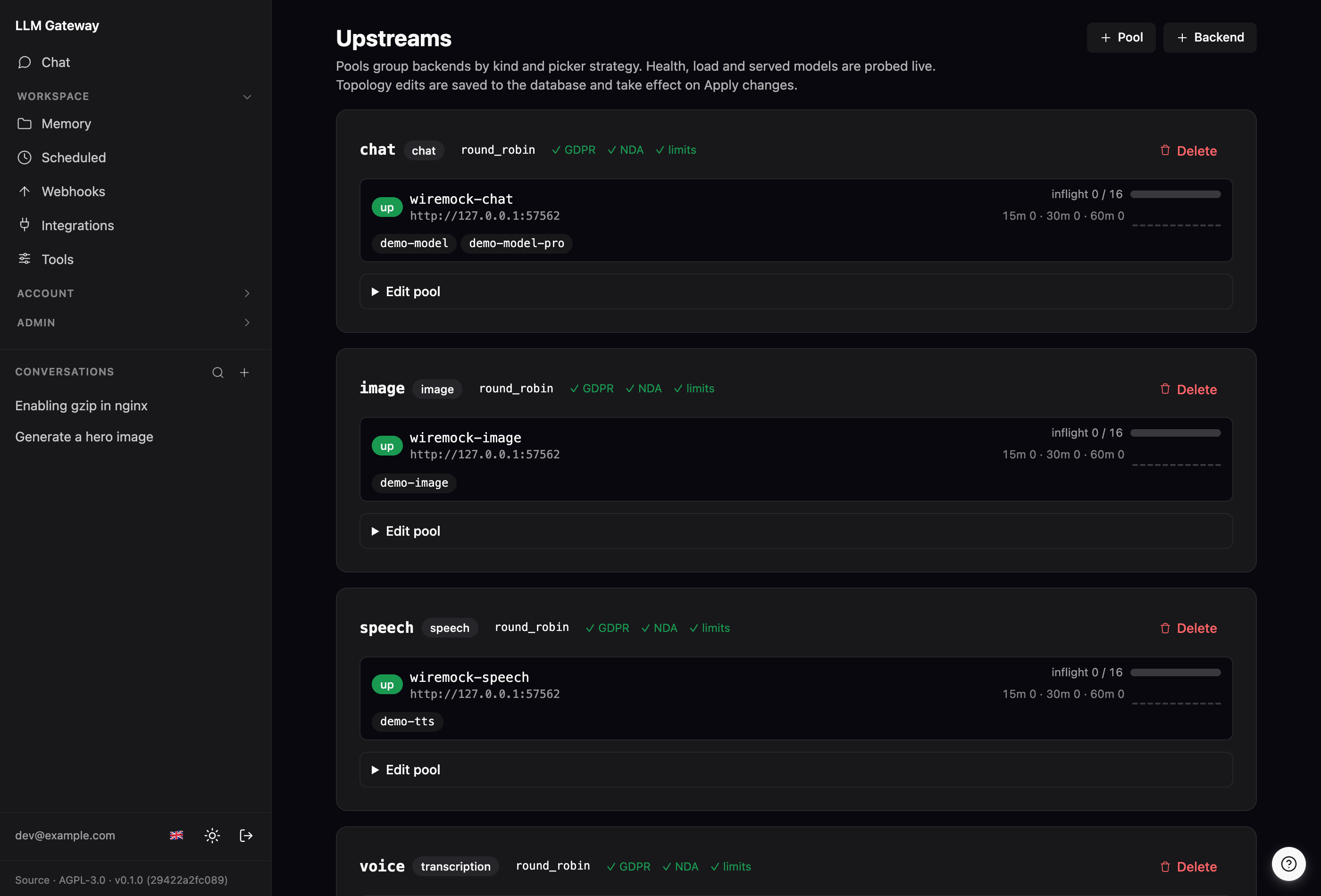
Upstreams (/admin/upstreams) — one page for pools and backends: live health, in-flight load, and discovered models per pool, with inline add/edit/delete of pools and backends (API key stored encrypted, so a new backend goes live on "Apply changes" without a restart). A sticky bar counts unapplied topology edits until you reload the runtime registry. |
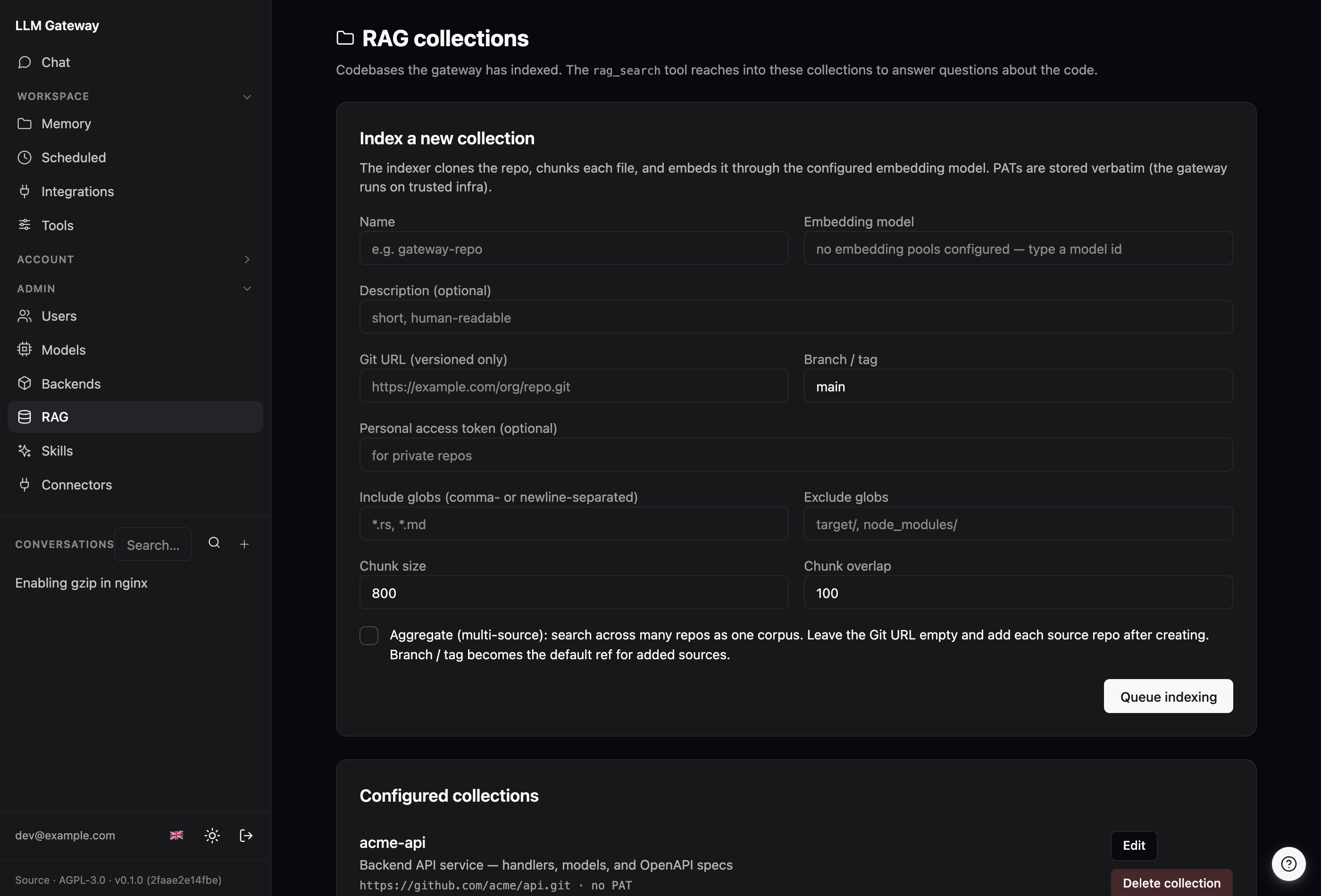
RAG (/rag) — index a codebase from a git URL and watch it go from pending to ready. |
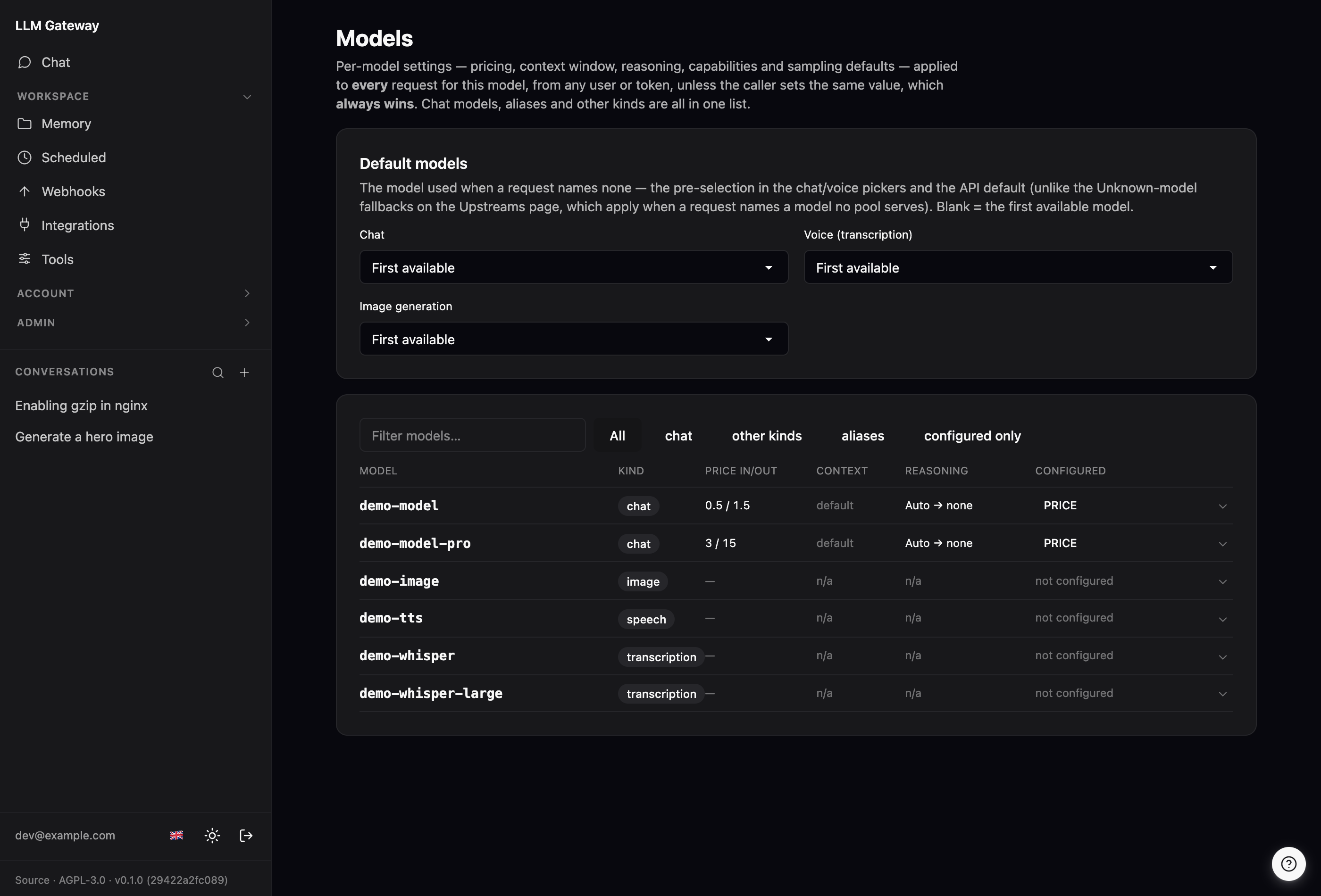
There's also /tokens (mint, rotate, and revoke your gwk_… API tokens — and scope each token to a subset of your tools), /usage (your own request/token usage, plus spend when per-model prices are set), /memory (view and edit what the assistant has remembered about you), /scheduled (prompts that run on a cron schedule — see Scheduled actions), /admin/models (server-wide sampling defaults, per-model reasoning budgets, per-model context windows that drive conversation compaction, per-model prices (input/output per 1M tokens) that turn token usage into spend on /usage, the per-feature default model pre-selected for chat, voice, image generation, and the RAG embedding picker, and the web-search backend the search_web tool uses — SearXNG URL or Brave API key, the key encrypted at rest), /admin/limits (rate limits & quotas — see below), and /admin/users (registered users with their resolved roles). The users page can also let an admin impersonate another user for debugging — every impersonation is audited and shows a persistent banner, and an impersonation session expires 8 hours after it started (it never gets the sliding renewal an ordinary login does). Impersonation is opt-in: it's off unless you set [gateway].allow_impersonation = true (default false), in which case the Impersonate buttons appear and POST /admin/users/impersonate is accepted; otherwise the buttons are hidden and that endpoint returns 403.
 |
 |
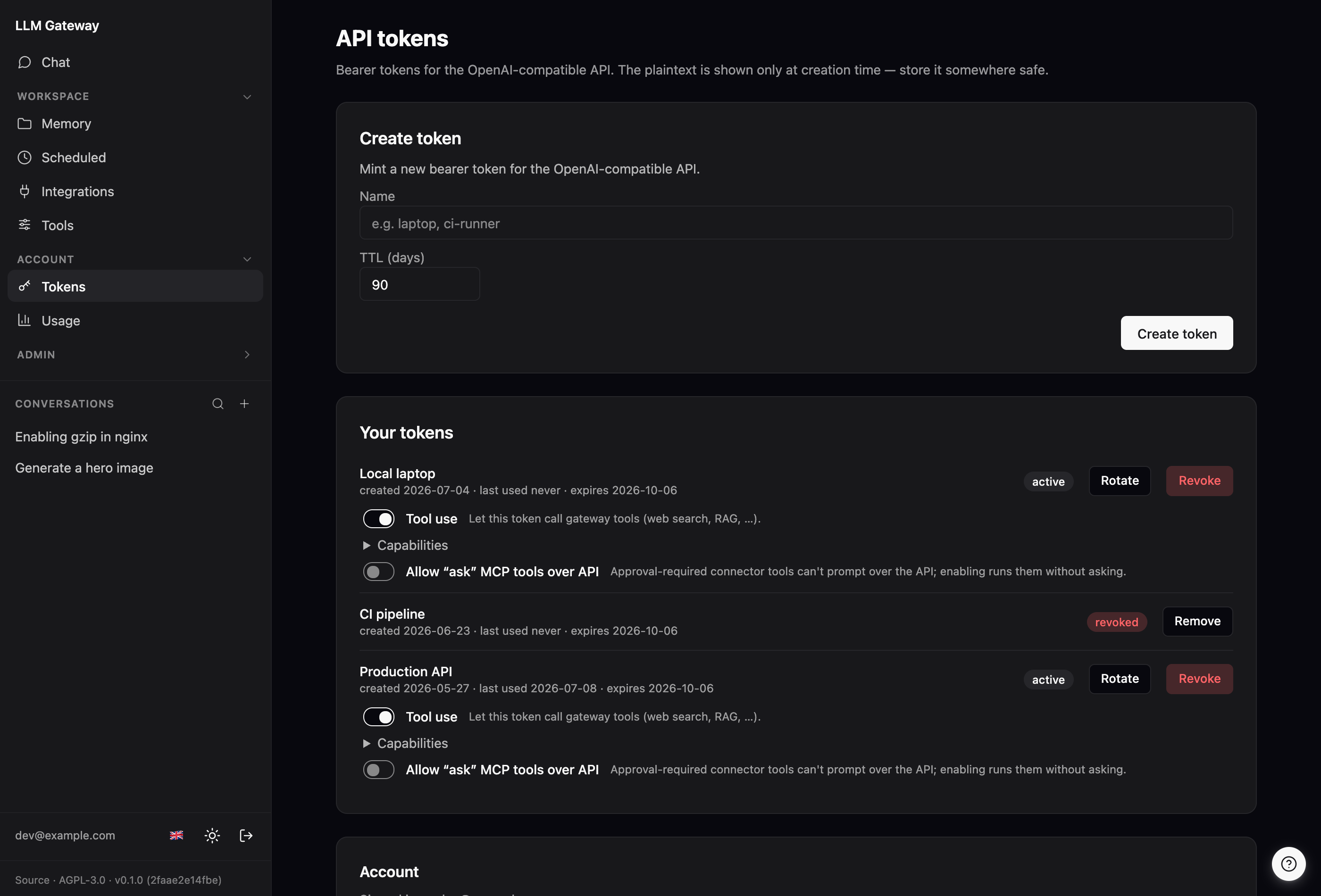
API tokens (/tokens) — mint, rotate, revoke, and per-token tool scoping. |
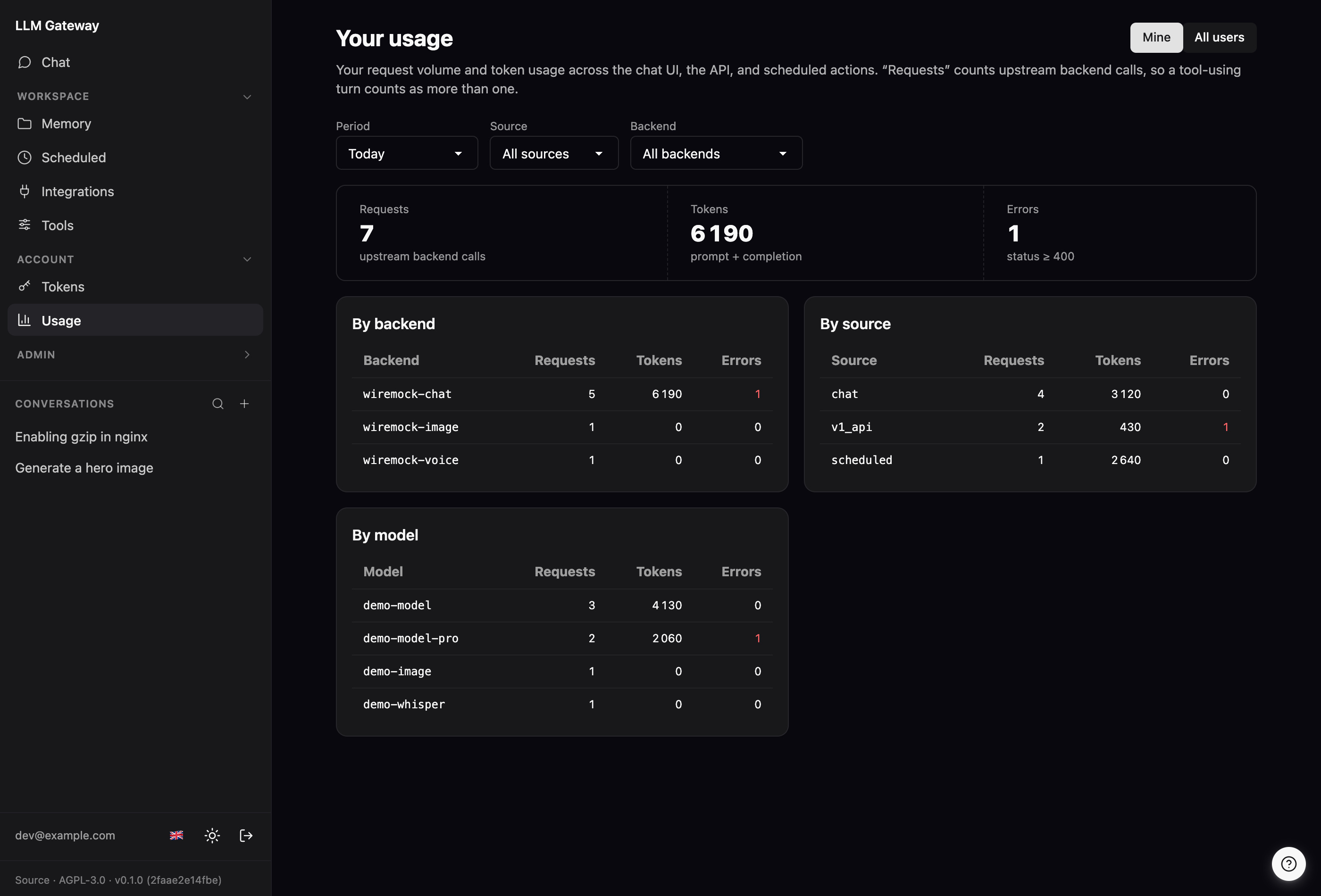
Usage (/usage) — your own request/token volume, broken down by backend, source, and model. |
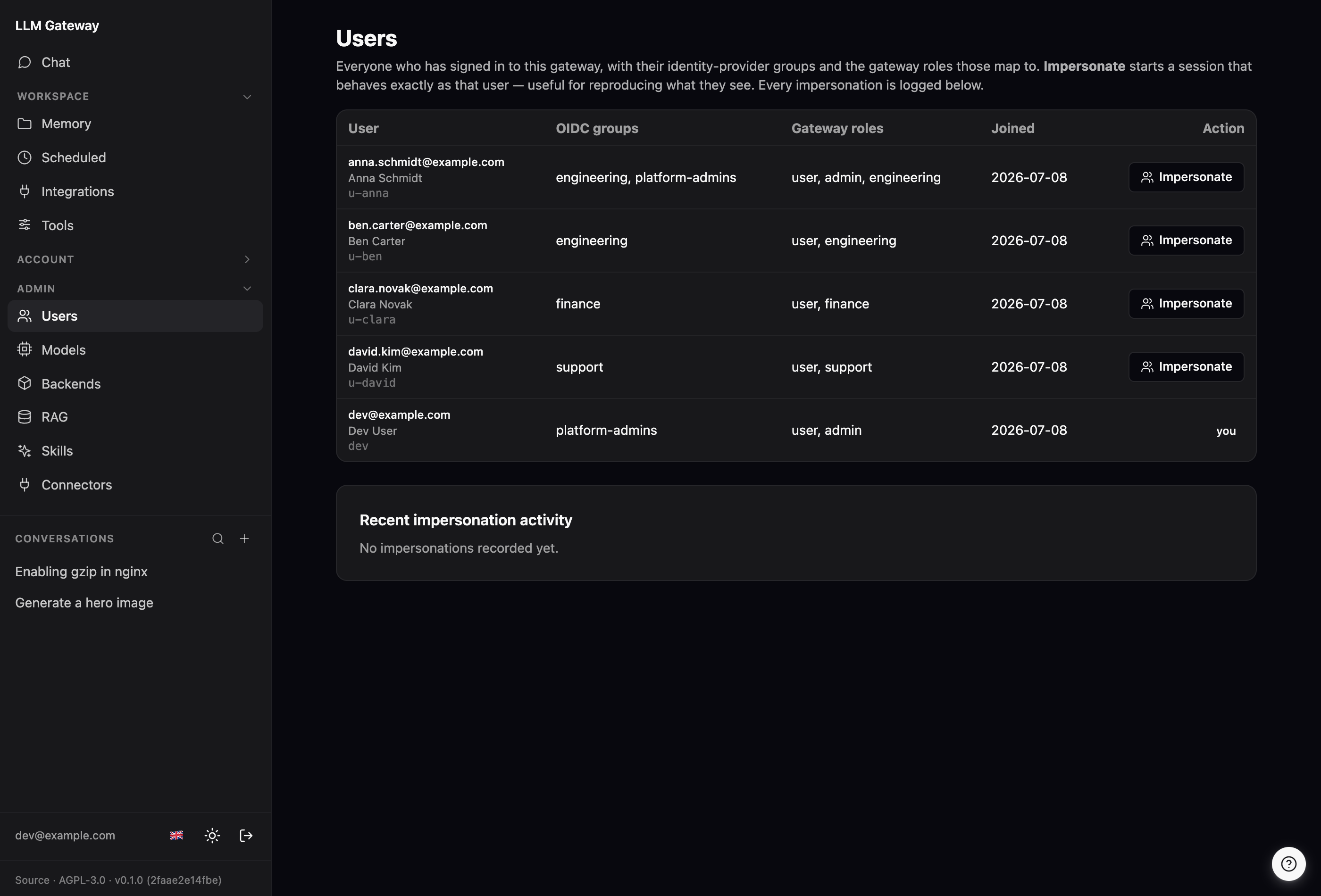
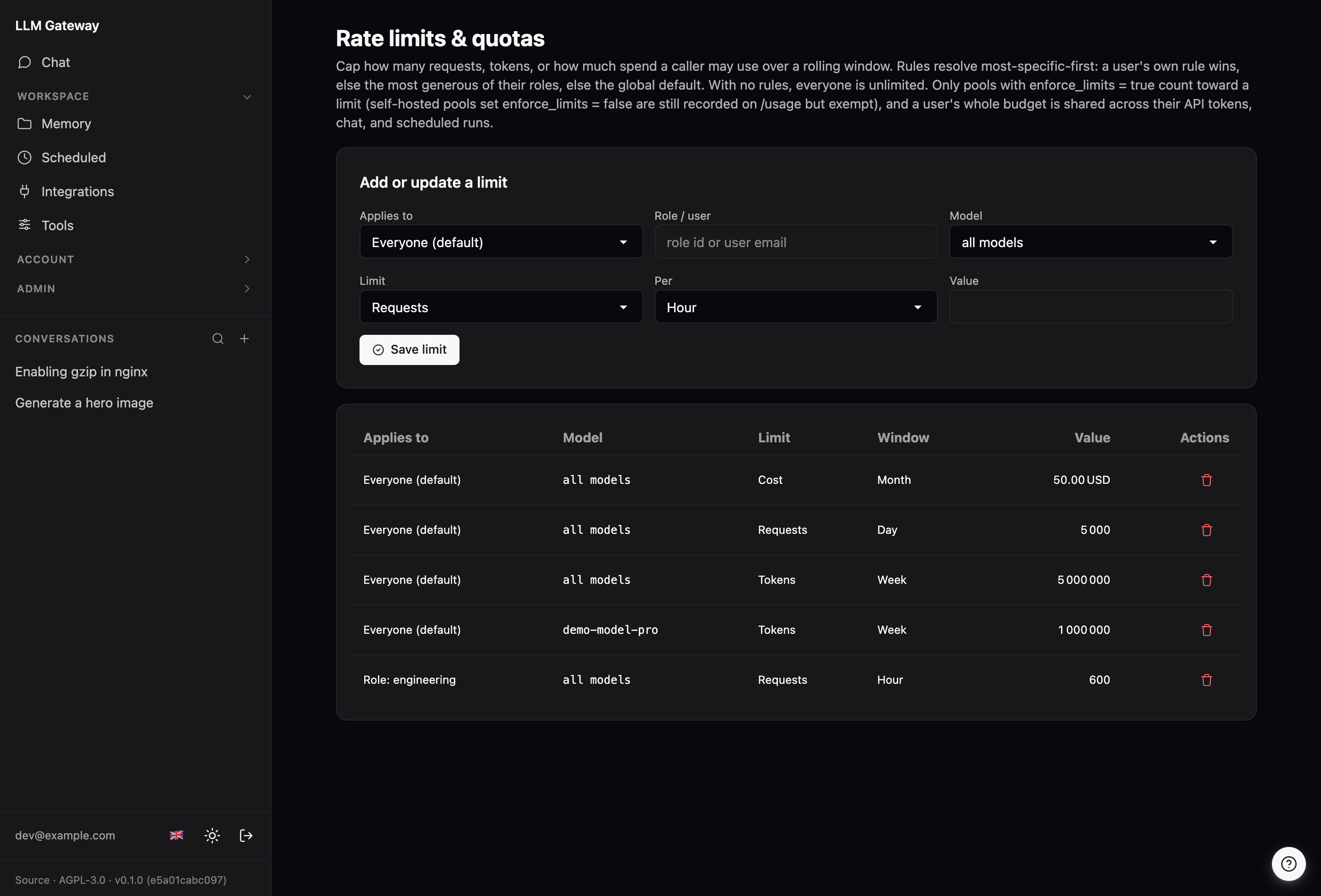
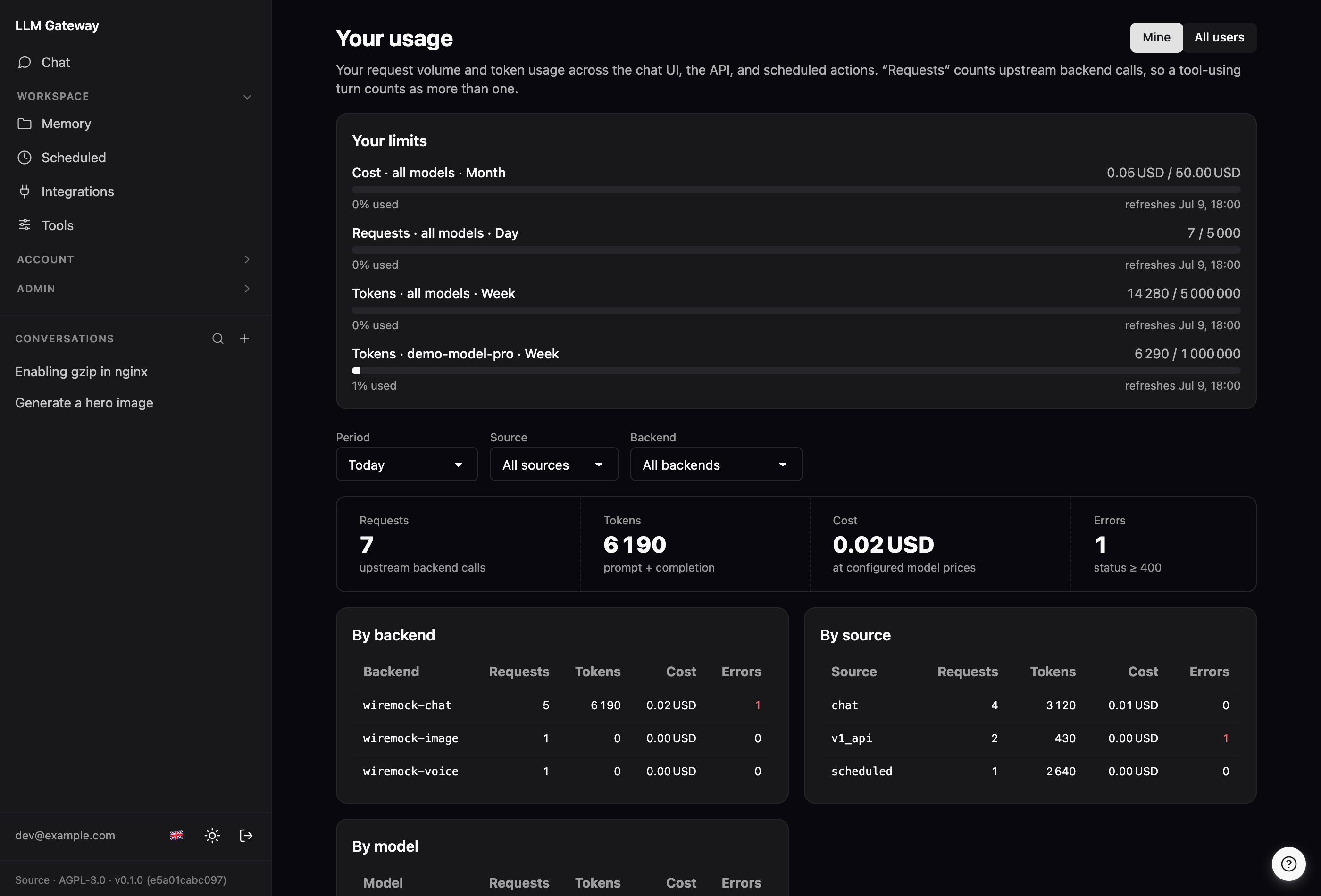
Rate limits & quotas. At /admin/limits, cap how many requests, how many tokens, or how much spend a caller may use over a rolling hour / day / week / month — scoped globally, per role, or per user. Rules resolve most-specific-first (user → most-generous role → global default); with none configured everyone is unlimited. A user's whole budget is shared across their API tokens, chat, and scheduled runs, and an over-budget caller gets a 429 (or a graceful notice in chat). Self-hosted pools can be marked exempt at /admin/upstreams so their usage is still recorded on /usage but never counts against a limit. Everyone sees their own live limit bars on /usage.
 |
 |
Rate-limit editor (/admin/limits) — global / role / user rules across requests, tokens, and cost. |
Your limits (/usage) — live bars of used-vs-limit with reset times, plus spend once models are priced. |
The /chat page itself does more than stream replies: fork a conversation, share it via a public link, pin favourites, export to Markdown or PDF, edit-and-retry a turn, dictate with the voice button, and set per-conversation reasoning effort. See docs/ui.md.
Mobile. The whole UI is responsive — on a phone the sidebar collapses into a hamburger drawer and the chat, composer, and admin pages reflow to a single column, so the gateway is fully usable from a browser on the go.
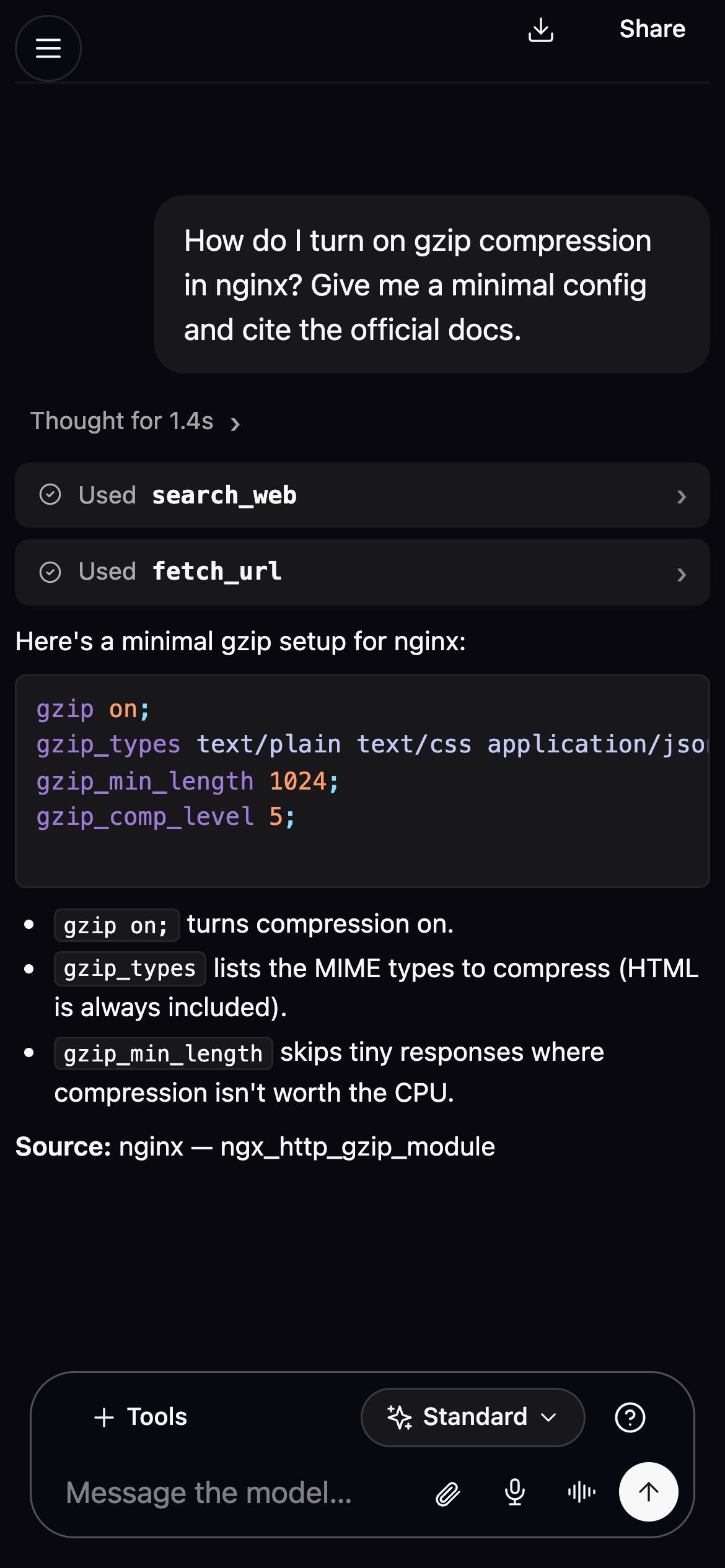 |
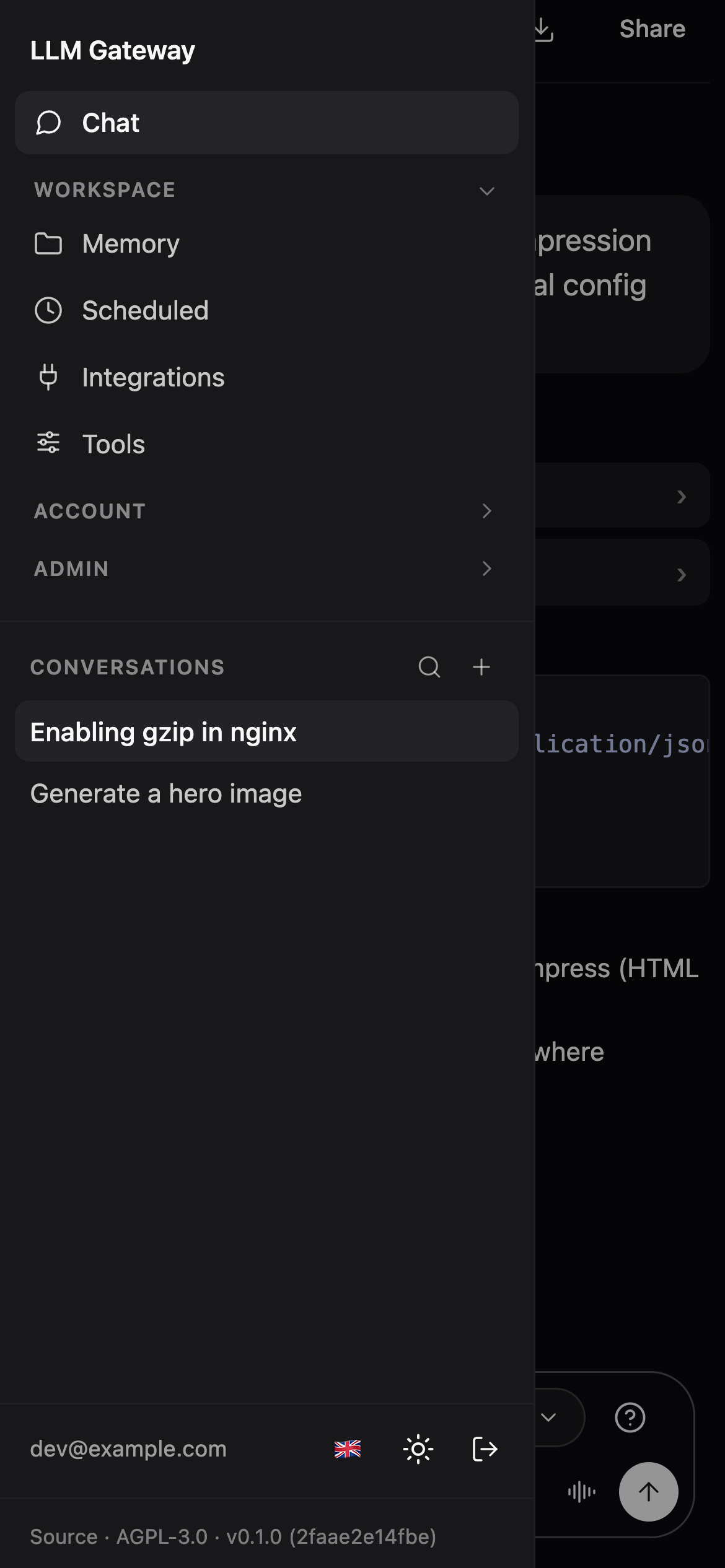 |
Scheduled actions
Every signed-in user can have prompts run automatically on a schedule at /scheduled — a daily standup digest, a weekly repo summary, an hourly health check. Each scheduled action is just a saved prompt plus a model, a schedule, and a timezone; when it fires, the gateway opens a chat session driven by the same engine as the interactive /chat page, so the result lands as an ordinary conversation you can open and read afterward. By default each run starts a fresh conversation; turn on reuse and each run instead continues the previous run's chat — replaying the last few rounds as history — so the model builds on what it said last time. Schedules are per-user and private (scoped by user, behind the normal session login — no admin role needed).
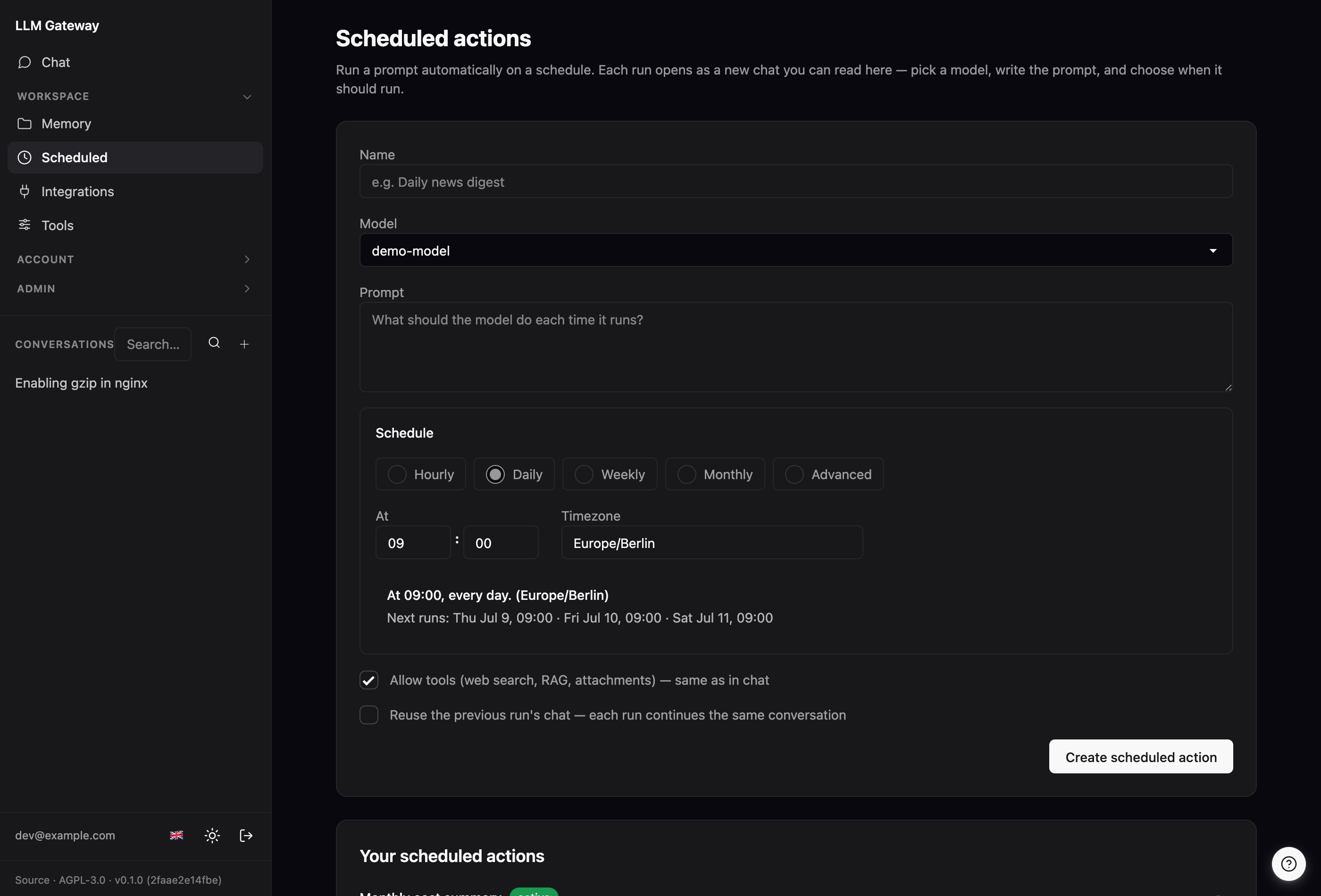
The schedule builder. Pick Hourly, Daily, Weekly, Monthly, or Advanced. The friendly modes expose just the fields they need (a minute; a time; weekday checkboxes; a day-of-month) and the gateway assembles a standard 5-field cron expression from them — non-technical users never have to see cron. Advanced takes a raw minute hour day-of-month month day-of-week expression for anything the presets can't express. Either way the expression is evaluated in the IANA timezone you choose (e.g. Europe/Berlin), and a live preview — computed server-side via POST /scheduled/preview so it can't drift from what the scheduler actually does — shows a plain-English summary plus the next three run times. Each action also has a tools toggle (web search, RAG, attachments — same set as in chat).
How runs fire. A background worker polls every 30 seconds and runs every action whose next occurrence is due, claiming each one atomically first so a slow run or a restart can't double-fire. If the gateway was down across one or more scheduled slots, the missed occurrences collapse into a single catch-up run on the first poll after startup rather than replaying as a backlog. Actions can be paused (the worker skips them) and resumed, edited, or deleted from the same page.
Webhooks
The event-driven twin of scheduled actions: instead of a clock, an inbound HTTP call fires the run. At /webhooks a signed-in user saves a prompt plus a model, gets back a secret trigger URL (/hooks/gwh_…), and points any external service at it — a CI pipeline, a GitHub or Discord webhook, a monitoring alert, a form handler, or a quick curl. When something calls the URL, the gateway appends whatever the caller sends in the request body (JSON or plain text) to the saved prompt as a clearly delimited untrusted block, then runs it through the same engine as /chat, so the result lands as an ordinary conversation you can open afterward.
Sync or async. A per-webhook checkbox picks the behaviour: an async webhook returns 202 Accepted immediately and runs in the background; a synchronous webhook makes the caller wait and returns the model's answer as a JSON envelope ({"status","session_id","output"}) — handy for integrations that want the reply inline.
Fresh chat or reuse. Like scheduled actions, a webhook either opens a fresh chat per fire (the default) or reuses the previous fire's chat so the model sees prior fires as history (a running incident log, a rolling digest) — with a replay-rounds cap so the context can't grow without bound.
Run history. Every fire — and every rerun — is logged. Each webhook has a Runs page listing its most recent runs (up to 50), each showing when it fired, whether it succeeded, and a link to its generated chat for the full details. From there you can rerun any past run: its exact payload is replayed with a prompt you can tweak, into a fresh chat you watch live. So you can iterate on the prompt without asking the external service to re-send anything.
Security. The secret in the URL is the credential — only its hash is stored, so the full URL is shown once on create (rotate to mint a new one; the old URL stops working immediately). Tools default off: because a webhook is triggered by an anonymous external caller feeding attacker-controllable text to a model that would run as you, granting it your tools (web search, RAG, connectors) is a deliberate, warned opt-in. Webhooks are per-user and private, and can be paused, edited, rotated, or deleted from the same page. (Rate limiting and quotas are handled separately, across all request surfaces.)
Conversation compaction
A chat replays its whole history to the model on every turn, so a long conversation's prompt grows until it crowds the model's context window. The gateway compacts automatically: once a turn's measured prompt size (the upstream's own prompt_tokens) crosses a fraction of the model's context window, a background task — off the turn's critical path, like title generation — summarises the oldest turns into a single dense summary. The next turn then replays [request context] + [summary] + [most recent turns verbatim] instead of the full history. As the conversation keeps growing it's re-compacted: the previous summary plus the newly-aged turns fold into a fresh summary, so context stays bounded across an arbitrarily long chat.
Nothing is lost from the UI — the summarised turns stay in the transcript, scrollable above an "earlier messages condensed" divider; they're just not sent upstream. Tool results from the folded turns are fed into the summariser (they're never replayed as normal history, yet are often the load-bearing context).
Tuning lives in [chat.compaction] (all optional): enabled (default true), trigger_ratio (fraction of the window at which it fires, default 0.7), default_context_window (fallback window in tokens for models without a per-model value, default 32768), keep_recent_turns (how many recent turns stay verbatim, default 6), min_turns_to_compact (anti-thrash floor, default 4), and summary_max_tokens (default 1024). Per-model context windows are set in /admin/models; a blank field falls back to default_context_window.
Voice conversation
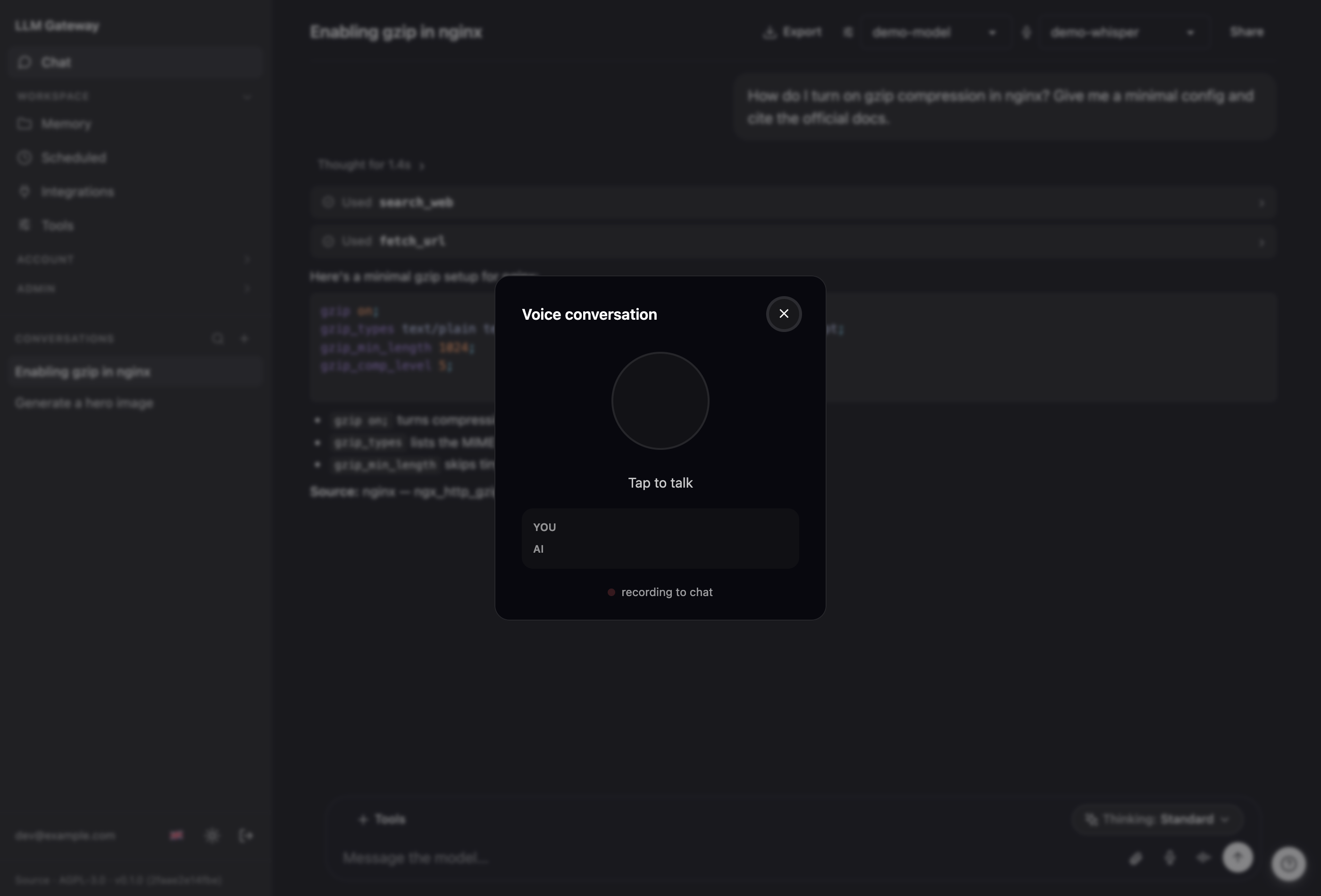
Talk to the assistant and hear it answer. Voice mode is a pipeline — the gateway is not the AI, it wires access to one: your speech is transcribed (Voxtral, the existing transcription pool), sent to the normal chat model with a voice directive that keeps replies to a spoken sentence or two, and the reply is spoken back through a text-to-speech pool you configure. Every exchange persists as an ordinary chat turn in plain text, so you can scroll back and read (or continue in text) any time.
It appears in the chat composer only when a speech upstream pool is configured and a transcription model is available — otherwise the toggle is simply absent (like transcription, it degrades away). Same access layer as everything else: TTS is also exposed to API callers at POST /v1/audio/speech.
Configure it by adding a speech-kind pool at /admin/upstreams — self-hosted (Qwen3-TTS, Kokoro, XTTS via openedai-speech, LocalAI) or cloud (OpenAI api.openai.com/v1, or any provider that speaks OpenAI's /v1/audio/speech). An optional per-language voice map picks a voice per spoken language (de, en, …; the default applies when none matches). Flag the pool's compliance on a non-EU provider (e.g. OpenAI) — voice mode sends the spoken text there. See docs/upstreams.md.
Which voice you hear is the user's own choice, not just the operator's. Fill the pool's selectable voices list (one id per line) and a voice picker appears in the chat header next to the mic-model one; the pick is stored per user and beats the language map on every synthesis. It stays hidden while there is nothing to choose, and a voice the operator later removes from the list silently falls back to the language default instead of reaching the provider as an unknown id. The language map keeps answering the other question — which voice a given spoken language defaults to — and holds one voice per language, which is why the menu is its own list.
How it works: push-to-talk (hold the mic) → release → the transcript is submitted with the voice directive → as the reply streams, complete sentences are spoken one at a time. Non-speakable bits (code, tables) become a short spoken marker like "the code is shown on screen." It's half-duplex — while the assistant speaks, the mic is inert (no echo loop). The reply's language follows what you spoke; only the opening greeting uses the UI language. Always-listening (voice-activity) mode and barge-in are a planned next phase.
- Rust (edition 2024, toolchain pinned to 1.95 via mise) — a workspace of 5 crates:
gateway,session-core,cli,shared, andsandbox-runner. - rama 0.3.0-rc1 — HTTP server, router, middleware, and proxying.
- plait — type-checked, auto-escaping server-rendered HTML (
html! { … }). - datastar — client-side reactivity over SSE, self-hosted from the binary.
- daisyUI v5 + Tailwind v4 — design system, compiled to a single CSS file at build time.
- sqlx + SQLite — persistent state (users, tokens, sessions, chat history, RAG collection registry). Bulk RAG content — chunk text, lexical index, vectors — lives in per-collection stores under
[rag].data_dir, not in the main DB.
The CSS bundle and datastar.js are baked into the binary via include_bytes!, so the runtime image needs no asset directory.
Integrations (per-user MCP connectors)
Each signed-in user can connect their own accounts — Gmail/Calendar/Drive, GitHub, Atlassian (Jira/Confluence), GitLab, Slack, Kiwi.com flight search, and any other MCP server — at /integrations, so the model can act on their behalf with their permissions. It's a self-hosted, per-user connector store comparable to the connectors in desktop AI apps.
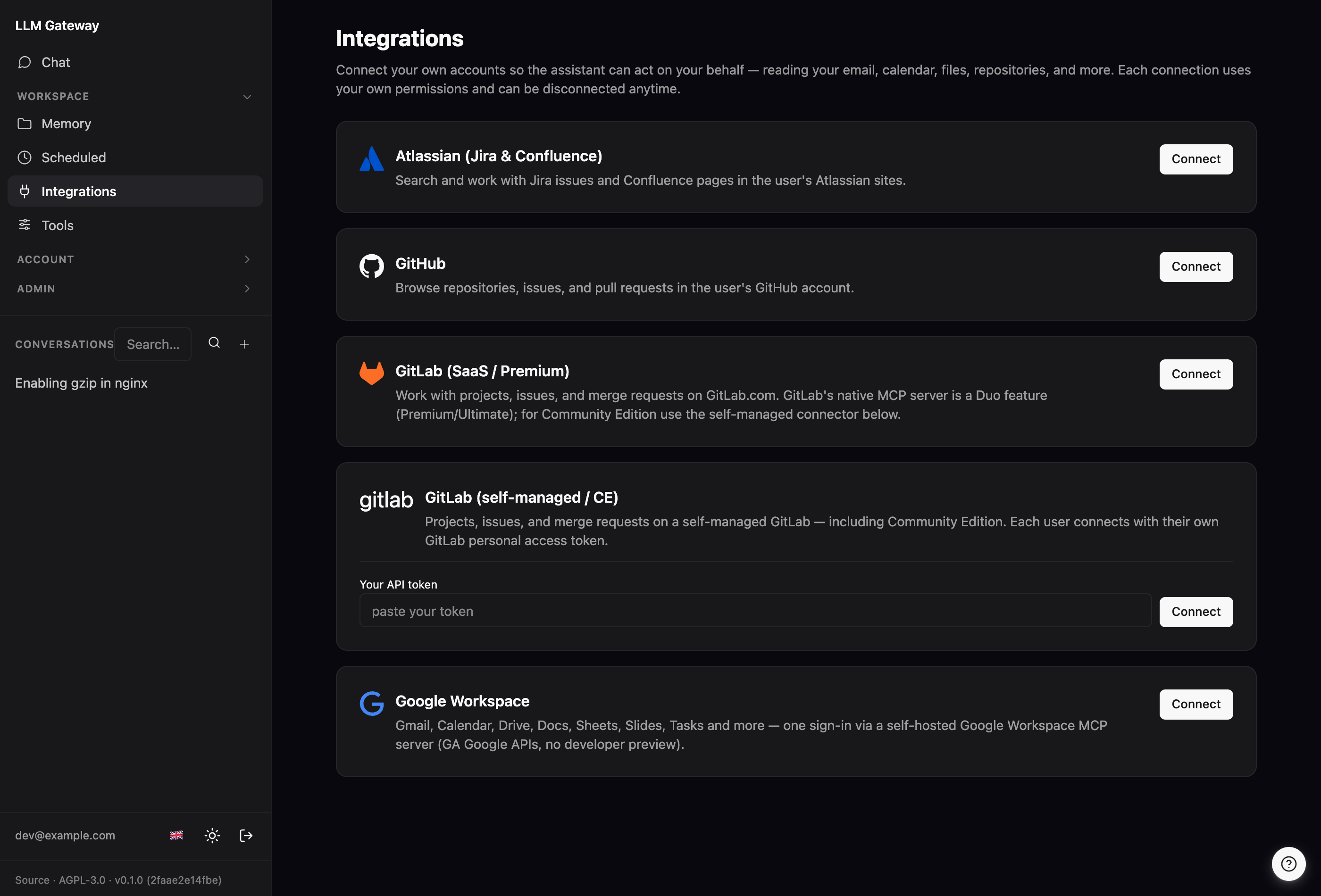
An admin curates which servers the catalog offers at /admin/connectors; users just click Connect. Four auth models are supported, chosen per connector:
- OAuth 2.1 + dynamic client registration — nothing to configure beyond a URL (e.g. Atlassian, GitLab.com, a self-hosted Google Workspace server).
- OAuth 2.1 with a manual client — the admin registers one OAuth app once (e.g. GitHub, Slack).
- User-supplied token — each user pastes their own API token / PAT (e.g. self-managed GitLab CE).
- None — a public, unauthenticated server (e.g. Kiwi.com flight search); users still connect individually to opt its tools into their own chats.
Per-user OAuth tokens are encrypted at rest (AES-256-GCM) and refreshed in the background so connections don't silently expire. Each connected server's tools are namespaced (mcp__<server>__*) and obey the same per-tool always/ask/off controls as the built-in tools. Provider and deployment setup — including the self-hosted Google Workspace and GitLab CE bridges — is in deploy/README.md and docs/connectors.md.
Quick start (local development)
You need mise, which manages the Rust + Node toolchains.
mise install                      # Rust 1.95 + Node 24
cp gateway.example.toml gateway.toml
$EDITOR gateway.toml              # set [oidc] to sign in + an admin role in [rbac]; add backends in the UI after
mise run dev                      # runs the gateway (debug build) on http://localhost:8080
If you're editing the UI, run the asset watchers in separate terminals (the committed bundles mean these are optional for plain backend work):
mise run watch-css                # rebuild app.css on change
mise run watch-js                 # rebuild app.js on change
Open http://localhost:8080. Signing in / minting tokens needs an [oidc] block (see below).
UI-only shortcut (no OIDC): mise run dev-ui boots a real server with mock backends and a pre-seeded session, and prints a session cookie you can paste into a browser or Playwright.
Full developer workflow: docs/dev-workflow.md.
Configuration
Configuration is a single TOML file — gateway.toml in the working directory, or wherever $GATEWAY_CONFIG points. gateway.example.toml is the fully-commented reference; copy it and trim to taste.
Secrets never live in the file. The config holds the names of environment variables (e.g. session_key_env = "GATEWAY_SESSION_KEY"); the gateway reads the actual values from its own environment at startup.
A minimal but complete config:
[bind]
host = "127.0.0.1"     # bind loopback; put a TLS-terminating reverse proxy in front
port = 8080

[db]
path = "gateway.sqlite"

[gateway]
public_url          = "https://gateway.example.com" # external URL; used to build the OIDC callback
token_ttl_days      = 90
session_key_env     = "GATEWAY_SESSION_KEY"          # names the env var holding a 64-hex (32-byte) key
session_ttl_days    = 30                             # sliding idle timeout for browser logins (renewed on use)
session_absolute_max_days = 90                       # hard cap since login; activity never extends it
allow_impersonation = false                          # opt-in admin impersonation (default false); see below

# Needed for sign-in + token minting. Without it, /auth/login and the /login
# page don't work — and since you configure everything else through the signed-in
# admin UI, this is what bootstraps a new install.
[oidc]
issuer            = "https://id.example.com/realms/company"
client_id         = "llm-gateway"
client_secret_env = "GATEWAY_OIDC_CLIENT_SECRET"
scopes            = ["email", "profile", "groups"]
roles_claim       = "groups"

# Make your own account an admin so you can reach /admin/*. An admin role is a
# role flagged `admin = true`; you hold it by mapping one of your OIDC groups to
# it. Without this, nobody can open the admin UI — where all upstream and model
# config now lives — so a new install needs it to get off the ground.
[rbac]
default_role = "user"                    # every signed-in user gets this baseline role

[[rbac.mapping]]
oidc_claim = "groups"
oidc_value = "platform-admins"           # an OIDC group you belong to
role       = "admin"

[[roles]]
id = "user"                              # baseline: can chat, mint to
No comments yet
Be the first to share your take.