
A r.uby.dev project.
Welcome to the canonical llm.rb repository.
llm.rb is an advanced runtime for building agentic AI applications on CRuby. It has zero runtime dependencies by default, it supports concurrent and parallel tool execution and has a single coherent API that spans 13+ providers. Streaming, tools, guards, compaction, the REPL, builtin MCP/A2A support and the database integrations all build on the same three concepts: providers, contexts, and agents.
Once you learn the fundamentals, everything else falls into place naturally. Some features, such as ActiveRecord support, require optional dependencies that are opt-in.
Install
gem install llm.rb
Quick start
Agents
The
LLM::Agent
class is the default high-level interface,
and it is recommended for most use-cases. It manages tool execution
automatically and
guards against infinite loops,
manages conversation state, and much more.
require "llm"

llm = LLM.deepseek(key: ENV["KEY"])
agent = LLM::Agent.new(llm, stream: $stdout)
agent.talk "hello world"
Streams can be simple IO objects or subclasses of
LLM::Stream
with structured callbacks for content,
reasoning, tool calls, tool returns, and compaction.
Streams can also observe message transformers, which rewrite
outgoing messages before they reach the provider.
See the deepdive.md to learn more.
class MyStream < LLM::Stream
  # Visible assistant output.
  def on_content(content)
    print content
  end

  # Reasoning output streamed separately from visible content.
  def on_reasoning_content(content)
    warn content
  end

  # A streamed tool call has been fully parsed.
  def on_tool_call(tool)
  end

  # Queued streamed tool work has returned.
  def on_tool_return(tool, result)
  end

  # Before a transformer rewrites an outgoing message.
  def on_transform(transformer)
  end

  # Aftter a transformer rewrites an outgoing message.
  def on_transform_finish(transformer)
  end

  # Before a compactor trims the conversation.
  def on_compaction(compactor)
  end

  # After a compactor trims the conversation.
  def on_compaction_finish(compactor)
  end

  # Before a skill's subagent runs.
  def on_skill_call(skill)
  end

  # After a skill's subagent runs.
  # The subagent that ran it, the skill, and its response are passed
  # through, so you can introspect the agent, tally skill usage, or
  # track costs.
  def on_skill_return(agent, skill, result)
  end

  # A request was rate limited and will be retried.
  def on_rate_limit(error)
  end
end

llm = LLM.deepseek(key: ENV["KEY"])
agent = LLM::Agent.new(llm, stream: MyStream.new)
agent.talk "Explain Ruby fibers."
Subclasses of
LLM::Tool
are plain Ruby classes with
an optional set of typed parameters. The model can choose to
call them on your behalf, and they're one of the most powerful features
for extending the feature set or abilities of a model.
The runtime also ships with a catalog of built-in tools for filesystem, search, and shell operations. See the deepdive.md to learn more.
class ReadFile < LLM::Tool
  name "read-file"
  description "Read a file"
  parameter :path, String, "The filename or path"
  required %i[path]

  def call(path:)
    {contents: File.read(path)}
  end
end

llm = LLM.deepseek(key: ENV["KEY"])
agent = LLM::Agent.new(llm, tools: [ReadFile], stream: $stdout)
agent.talk "summarize README.md"
A skill turns a markdown file into a callable tool. When the model calls it, the runtime spawns a subagent with the skill's instructions as its system prompt and the skill's own tool set. The subagent runs one turn and returns the result, then is discarded. Each call is fresh and stateless.
A LLM::Stream
can be notified as a skill starts and when it returns. The on_skill_return
callback hands back the subagent that ran the skill, so you can inspect
its conversation, measure its usage, track costs or add a verification
step (eg subagent.talk("verify your work")).
See the deepdive.md to learn more.
summary.md
---
name: summary
description: Reads recent git history and writes a summary
tools: all
---

Collect the recent git log, analyze each commit,
and write a summary to summary.txt.
agent.rb
require "llm"

llm   = LLM.deepseek(key: ENV["KEY"])
agent = LLM::Agent.new(llm, skills: ["summary.md"])
agent.talk "Summarize the last week of work"
The runtime supports six different concurrency strategies that have different attributes. The choice between all of them often depends on the requirements of your application.
IO-bound tools are a good fit for the :async, :thread,
and :fiber strategies while true parallelism can be achieved
with the :fork and :ractor strategies. The
:sequential strategy runs tools one at a time and is the default.
The :fork strategy also provides a separate process that offers
isolation from its parent.
See the deepdive.md to learn more.
require "llm"
require "llm/tools"

llm   = LLM.deepseek(key: ENV["KEY"])
tools = LLM::Tool.subclasses
agent = LLM::Agent.new(llm, tools:, concurrency: :fork)
agent.talk "Run the tools in parallel"
Abort a request mid-stream and interrupt any running tools with
LLM::Agent#interrupt!
(or cancel!), from any thread. The runtime raises
LLM::Interrupt
on the caller and on every active tool. A forked tool gets interrupted over
the control channel, a ractor via message passing, and pending tools
are stopped before they run. The in-flight HTTP request is closed
too, so a turn you no longer want stops without burning tokens.
See the deepdive.md to learn more.
llm = LLM.deepseek(key: ENV["KEY"])
agent = LLM::Agent.new(llm)
Thread.new { sleep(1); agent.cancel! }

begin
  agent.talk "write a very long poem", stream: $stdout
rescue LLM::Interrupt
  puts "cancelled"
end
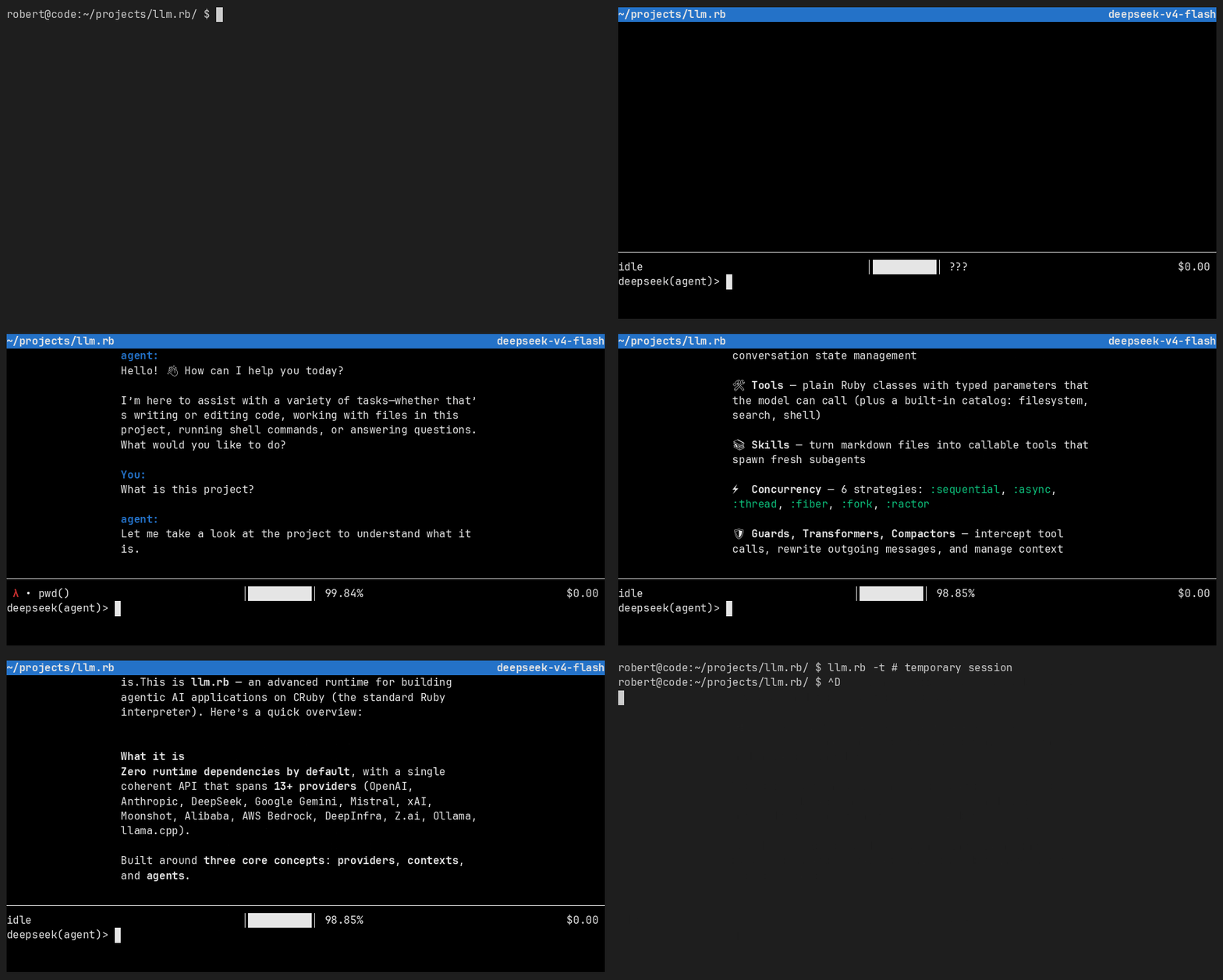
The LLM::Agent#repl
method drops you into a highly capable read-eval-print loop (REPL)
that is built on top of curses. It can help you debug agents,
test your tools, connect to MCP servers, and even A2A agents.
The REPL stands out because it connects to the surrounding
runtime and it can be extended by your code. Think of it as
binding.pry but for agents.
See the deepdive.md to learn more.
Demo
Watch in high quality on asciinema
Installation
The REPL is distributed with llm.rb so you don't have to install a separate gem but it requires a number of optional dependencies to be installed separately. The following gems provide the full experience:
gem install curses kramdown xchan.rb test-cmd.rb
Persistence
The path: option can be set on an agent for automatic persistence
across REPL sessions. The tools: option attaches extra tools
for the duration of the session. Recall previous turns with Ctrl+P and
Ctrl+N.
require "llm"
require "llm/tools"

llm = LLM.deepseek(key: ENV["KEY"])
agent = LLM::Agent.new(llm, name: "my-agent", path: "agent.json")
agent.repl(tools: LLM::Tool.subclasses)
CLI
The llm.rb executable is available on your PATH after installation.
It starts a REPL session from any directory.The CLI auto-detects your
provider from standard environment variables (DEEPSEEK_API_KEY,
OPENAI_API_KEY, ANTHROPIC_API_KEY, etc.). Persistent sessions are
stored under ~/.llm.rb/ and restored automatically on your next visit.
llm.rb                     # auto-detect from $DEEPSEEK_API_KEY
llm.rb -p openai           # use OpenAI explicitly
llm.rb -t                  # temporary session, no persistence
Set path: on an agent for automatic filesystem persistence;
the agent restores conversation history from the file on startup
and saves it back after every turn, with no manual serialization
code. For database-backed persistence, ActiveRecord and Sequel
integrations are also available. All persistence options use the same
underlying serialization.
See the deepdive.md to learn more.
require "llm"

llm = LLM.deepseek(key: ENV["KEY"])
agent = LLM::Agent.new(llm, path: "session.json")
agent.talk "remember my name is robert"

# Next time, the conversation is restored automatically:
agent = LLM::Agent.new(llm, path: "session.json")
agent.talk "what's my name?"
Because both
LLM::Context and
LLM::Agent
can be serialized to JSON and stored in a simple string, both ActiveRecord
and Sequel support can be implemented within a single column on a single row.
The runtime includes first-class support for both ActiveRecord / Sequel, and
for both Rack-based / Rails-based applications. On databases
where it is supported, such as PostgreSQL, the column can be optimized by using
the jsonb type.
See the deepdive.md to learn more.
require "active_record"
require "llm"
require "llm/active_record"

class Agent < ApplicationRecord
  acts_as_agent do |agent|
    agent.set name: "my-agent",
              instructions: "solve the user's query",
              model: "deepseek-v4-pro",
              tools: [Research, ActOnResearch],
              concurrency: :async
  end

  def research
    talk("start the research")
  end

  def act_on_research!
    talk("act on the research")
  end

  private

  ##
  # By convention, this method defines the provider for a model.
  # If necessary, it can be renamed with: provider: :your_method.
  def set_provider
    LLM.deepseek(key: ENV["KEY"])
  end

  ##
  # By convention, this method returns the context options given
  # to LLM::Context or LLM::Agent. This method can be left undefined.
  def set_context
    {}
  end
end

agent = Agent.create!
agent.research
agent.act_on_research!
The Model Context Protocol (MCP) has first-class support
in llm.rb. The stdio and http transports work out of the
box. MCP tools are translated into subclasses of
LLM::Tool that can be
used with
LLM::Context or
LLM::Agent.
See the deepdive.md, and the deepdive.md on persistent connections to learn more.
require "llm"

llm   = LLM.deepseek(key: ENV["KEY"])
mcp   = LLM::MCP.stdio(argv: ["ruby", "server.rb"])
agent = LLM::Agent.new(llm, stream: $stdout, tools: mcp.tools)
agent.talk "Run the tool"
The Agent 2 Agent (A2A) protocol has first-class support
in llm.rb. The http and jsonrpc transports work out of the
box. A2A skills are translated into subclasses of
LLM::Tool that can be
used with
LLM::Context or
LLM::Agent.
See the deepdive.md, and the deepdive.md on persistent connections to learn more.
require "llm"

llm   = LLM.deepseek(key: ENV["KEY"])
a2a   = LLM::A2A.rest(url: "https://remote-agent.example.com")
agent = LLM::Agent.new(llm, stream: $stdout, tools: a2a.skills)
agent.talk "Run the skill"
LLM::Schema
subclasses produce typed, structured
output from any model call. Pass a schema to
LLM::Context#talk,
LLM::Agent#talk,
or
LLM::Provider#complete
to receive validated JSON instead of free text. Schemas work alongside tools and streams.
LLM::Schema
can define objects, arrays, enums, nested schemas,
and more. It is also used internally by
LLM::Tool for parameter
definitions, so you already benefit from it when you declare tool
parameters.
The
LLM::DeepSeek
provider includes runtime-level optimisations such as structured
output support (despite no official structured outputs API) and
SVG image generation. This example uses
LLM::Schema with
DeepSeek:
class Weather < LLM::Schema
  property :city, String, "The city name"
  property :temperature, Number, "Current temperature"
  property :conditions, String, "Weather conditions"
  required %i[city temperature conditions]
end

llm = LLM.deepseek(key: ENV["KEY"])
agent = LLM::Agent.new(llm, schema: Weather)
res = agent.talk "Weather in Paris?"
res.content!  # => {city: "Paris", temperature: 15.0, conditions: "Cloudy"}
LLM::Guard
is the hook that sees every tool call before it runs. A guard
can let a call through, cancel it, block it with an error, or
even answer for it. Because it runs before the tool, anything
it intercepts never executes. Policy, validation, quotas, and
cost ceilings all live here.
LLM::Agent
enables
LLM::Guard::Loop
by default, so agents get loop protection out of the box. To
write your own guard, subclass
LLM::Guard
and implement
LLM::Guard#call.
The pending call arrives as function:. Return a value to close
the call, or nil to let it run:
See the deepdive.md to learn more.
class PolicyGuard < LLM::Guard
  def call(function:)
    if function.name == "shell"
      function.return(error: true, type: "policy_error",
                      message: "shell is disabled")
    end
  end
end

llm = LLM.deepseek(key: ENV["KEY"])
agent = LLM::Agent.new(llm, guard: PolicyGuard)
It is possible to rewrite outgoing messages before they reach the provider with
LLM::Transformer.
Create a subclass and implement call(message:) to scrub sensitive data,
inject context, or normalize content. The transform runs automatically
on every turn, so you never have to change your prompt code.
See the deepdive.md to learn more.
class RedactEmails < LLM::Transformer
  def call(message:)
    content = message.content.to_s.gsub(/[\w.+-]+@[\w-]+\.[\w.]+/, "[EMAIL]")
    LLM::Message.new(message.role, content, message.extra)
  end
end

llm = LLM.deepseek(key: ENV["KEY"])
agent = LLM::Agent.new(llm, transformer: RedactEmails)
agent.talk "Contact [email protected] for help"
Every model has a context window: the finite number of tokens it can consider in a single request. Generally a compactor will drop or summarize older messages to keep the conversation within that window, and it runs automatically before every turn. By default it is disabled so it is a feature you must opt into.
LLM::Compactor::Truncate
keeps the most recent messages via an integer count or a percentage like
"80%". It preserves tool call and return pairs so the conversation
never contains an orphaned result. It is also possible to subclass
LLM::Compactor
to implement your own compactor with its own logic. Streams can observe the
process through the
LLM::Stream#on_compaction
and
LLM::Stream#on_compaction_finish
callbacks.
See the deepdive.md to learn more.
llm = LLM.deepseek(key: ENV["KEY"])
agent = LLM::Agent.new(
  llm,
  compactor: LLM::Compactor::Truncate,
  compactor_options: {keep: 64}
)
agent.talk "Hello"
Rate-limited requests are retried automatically by default. Agents
retry a 429 up to five times with a growing backoff before giving
up, so most request failures resolve on their own. Set retry_budget
to change the number of retries, or retry_budget: 0 to disable
them.
require "llm"

llm = LLM.deepseek(key: ENV["KEY"])
agent = LLM::Agent.new(llm, retry_budget: 0)
agent.talk "Hello"
Trace what an agent is doing by attaching a tracer. Hook into requests, tool calls, and other runtime events to debug a misbehaving agent, monitor latency, or export spans to an observability backend. All built-in tracers share one interface, so switching between them means changing a class name:
LLM::Tracer::PrettyLogger: human-readable single-line logs to stderr, ideal during development.LLM::Tracer::Telemetry: exports spans via OTLP for OpenTelemetry in production.LLM::Tracer::Logger: structured JSON to stdout or a file.
See the deepdive.md to learn more.
llm = LLM.deepseek(key: ENV["KEY"])
agent = LLM::Agent.new(llm, tracer: LLM::Tracer::PrettyLogger.new(llm))
agent.talk "Hello"
LLM::Agent.set
is a class-level DSL that accepts a Hash of properties. Each key resolves to a
corresponding class accessor: name, description, model, tools,
instructions, schema, stream, tracer, concurrency, confirm,
path, skills, tool_budget, and retry_budget. All options are
optional; zero or more can be set.
An error is raised for unknown keys so that typos are caught early.
require "llm"
require "llm/tools"

class Agent < LLM::Agent
  set name: "sysadmin",
      description: "system administration agent",
      model: "deepseek-v4-pro",
      tools: [LLM::Tool::Shell]
end

llm = LLM.deepseek(key: ENV["KEY"])
agent = Agent.new(llm)
agent.talk "Run 'date'"
Providers
Each provider is constructed with a class-level factory method on
LLM, and the resulting instance is passed to
LLM::Context
or
LLM::Agent. The
same API drives every one of them, so switching models is a one-line
change. See the deepdive
for a full provider reference.
What providers does llm.rb support?
- Anthropic (
LLM.anthropic) - Google (
LLM.google) - OpenAI (
LLM.openai) - DeepSeek (
LLM.deepseek) - DeepInfra (
LLM.deepinfra) - xAI (
LLM.xai) - Z.ai (
LLM.zai) - Moonshot (Kimi) (
LLM.moonshot) - Alibaba (Qwen3) (
LLM.alibaba, alsoLLM.aliyun) - Mistral (
LLM.mistral) - AWS Bedrock (
LLM.bedrock) - Ollama (
LLM.ollama) - llama.cpp (
LLM.llamacpp)
Cloud providers can infer their API key automatically from a set of common defaults that are defined by the models.dev registry that is also distributed with llm.rb.
llm = LLM.openai
llm = LLM.anthropic
llm = LLM.deepseek
llm = LLM.alibaba  # also: LLM.aliyun
llm = LLM.moonshot
llm = LLM.mistral
The key option can also be providied explicitly, and certain
providers (eg ollama, llamacpp) usually do not require an API
key at all.
llm = LLM.openai(key: ENV["OPENAI_API_KEY"])
llm = LLM.anthropic(key: ENV["ANTHROPIC_API_KEY"])
llm = LLM.deepseek(key: ENV["DEEPSEEK_API_KEY"])
llm = LLM.alibaba(key: ENV["DASHSCOPE_API_KEY"]) # also: LLM.aliyun
llm = LLM.moonshot(key: ENV["MOONSHOT_API_KEY"])
llm = LLM.mistral(key: ENV["MISTRAL_API_KEY"])
Each provider ships its model catalog, pricing, limits, and modalities with the gem, sourced from models.dev. Reach it from any provider, context, or agent, enumerate models, or sort them by price.
See the deepdive.md to learn more.
require "llm"

llm      = LLM.openai
registry = llm.registry                # => LLM::Provider#registry
cheapest = registry.models.sort.first  # => LLM::Model
cheapest.id                            # => "text-embedding-3-small"
cheapest.context_window                # => 8191
cheapest.structured_output?            # => false
The transport: option selects which HTTP library a provider uses for
network communication. Three backends ship out of the box: net/http
is always available and the default, net/http/persistent pools
connections for many requests to the same host, and curb wraps
libcurl. They share one interface, so switching is a one-word change.
See the deepdive.md to learn more.
llm = LLM.deepseek(
  key: ENV["KEY"],
  transport: :net_http_persistent
)
RAG
Most providers offer an embedding model that can be used for semantic search, or similarity search. An embedding model can generate embeddings that can then be stored in a database that is optimized for storing and querying vectors, such as SQLite's sqlite-vec or PostgreSQL's pg-vector.
llm.rb also includes support for OpenAI's vector store API. It provides a vector database as a HTTP service but we won't cover that here.
See the deepdive.md to learn more.
require "llm"

llm  = LLM.openai(key: ENV["KEY"])
body = "llm.rb is Ruby's capable AI runtime."
embedding = llm.embed([body]).embeddings.first

# Document is your ActiveRecord or Sequel model
# with a vector column (e.g. sqlite-vec or pgvector)
Document.create!(
  title: "llm.rb",
  body:,
  embedding:,
)
Images
A handful of providers can generate images from a text prompt. OpenAI, Google, xAI, and DeepInfra all support it. The API is the same across providers:
require "llm"

llm = LLM.openai(key: ENV["KEY"])
res = llm.images.create(prompt: "a dog on a rocket to the moon")
IO.copy_stream res.images[0], "rocket.png"
DeepSeek
DeepSeek does not have a dedicated image model, but the runtime
generates SVG vector graphics through its text model. Each
generation produces a valid SVG document that can be converted
to PNG with tools like rsvg-convert. Pass an existing agent
to maintain a session across generations:
require "llm"
llm = LLM.deepseek(key: ENV["KEY"])

##
# First generation
res = llm.images.create(prompt: "a rocket on the moon")
IO.copy_stream res.images[0], "rocket.svg"

##
# Refine with follow-up prompts (shares context)
res = llm.images.create(prompt: "add a dog next to the rocket",
                        agent: res.agent)
IO.copy_stream res.images[0], "rocket-with-dog.svg"
FAQ
- Ollama
- Llamacpp
The llm.rb project is quite large and maintained primarily by one person. It would be near impossible for me to maintain both the codebase and its documentation, especially the deepdive.md so I have written agents that maintain the documentation assets and that allows me to put more focus on the code.
The following agents are available for those tasks, and some of them use the most cost effective option: DeepSeek. Feel free to use them in your own fork.
##
# Maintains the deepdive and API docs
rake agents:scribe:yardoc
rake agents:scribe:coverage
rake agents:scribe:regressions
rake agents:scribe:style
rake agents:scribe:changelog
rake agents:scribe:repl

##
# Maintains the release
rake agents:rel:release
rake agents:rel:repl

##
# Maintains mruby-llm backports
rake agents:mruby:research
rake agents:mruby:code
rake agents:mruby:repl

##
# Refresh the data/ registry
rake models.dev:download
Resources
If you like what you read so far, check out the deepdive.md to learn more. Unfortunately it wasn't possible to cover every feature without the README becoming a small book. The r.uby.dev homepage also includes more learning material and resources.
License
This software is released under the terms of the MIT license. See LICENSE for details.
No comments yet
Be the first to share your take.