
linksee-memory
Your agent forgets everything when a session ends. Worse — it silently drifts from what you decided last week.
Linksee Memory catches when your project drifts from its own decisions — the option abandoned at a fork, the pipeline that quietly stalled, the code that contradicts what you agreed — and a re-injection guard re-surfaces the locked decision before the agent acts. Rules you've explicitly hardened get blocked.
Underneath sits a local-first cross-LLM memory MCP — one SQLite file that Claude Code, Cursor, Windsurf, OpenAI Codex, and Gemini CLI all read from. Not just "what happened" but WHY: 6-layer structured memory with precision recall and an AST-aware diff cache (50–99% token savings on re-reads).
npx -y linksee-memory setup— one command, done.




🌐 Landing page: linksee-site.vercel.app (includes non-developer onboarding for Claude Desktop / Cursor / Claude Code / OpenAI Codex / Gemini CLI) 📖 Docs: docs.linksee.app — full reference: the product map & drift, install, and all 11 tools
🪄 Three spells to remember
| Say this | What happens |
|---|---|
| "use linksee" | Recalls relevant memories before acting |
| "linksee this" | Saves the decision / lesson right now |
| "what's drifting?" | Reconciles reality against your locked decisions |
Make it automatic: add "Use Linksee Memory" to your system prompt /
CLAUDE.md.
🗺️ Not just memory — a product map
Memory is the entry point. Tie it to a map.yaml of how your product fits together, and the linksee-memory map CLI catches drift with file:line evidence:
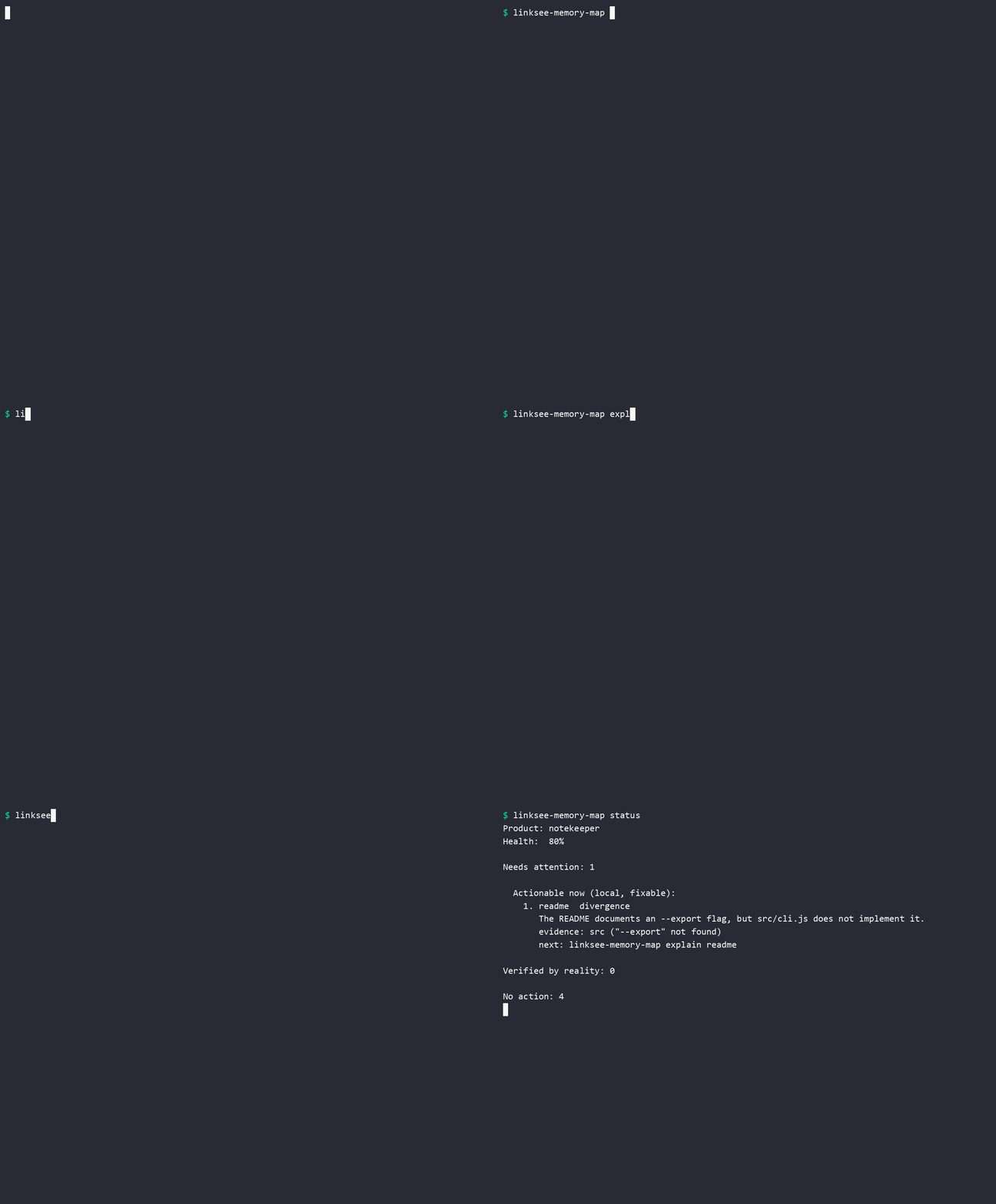
The 30-second demo above: the README says --export. The code doesn't. Linksee catches it — and shows what else a change would touch.
npx -y linksee-memory map where README.md   # this file belongs to the README node — and what it touches
npx -y linksee-memory map explain readme    # README promises --export; the code doesn't implement it — drift, with evidence
npx -y linksee-memory map affects readme    # changing the README also touches docs, the CLI help, and the npm listing
→ see The Map for the full flow.
📣 As featured on
- Zenn: あなたの Claude Code、 実は前回のセッションを完全に忘れている — 73 ♡ on Zenn, 165+ users on Hatena Bookmark, picked up by tech blogs + YouTube shorts (May 2026)
- Zenn: あなたの MCP server、 実は Tools しか使ってない (5 blocks 全実装 / v0.3.0) — the 1% of MCP servers that implement all 5 blocks
- Zenn: あなたの Claude memory、 実は Claude にしか残らない (5 LLM 横断する方法) — cross-LLM memory pattern (May 12, 2026)
- Zenn: Glama listing で 3 週間止まった話 (5 つの罠と解決策) — npm + Glama deployment retrospective
「Cordex/Cursor/Code/Gemini 全部につなげられるから、 横断的にできてる MCP ってところがこれのすごいところ」 — Hatena Bookmark, May 2026 (165+ users)
🎬 See it in action
Drift, caught. Decisions don't survive session boundaries — but their consequences do. Ask any session:
You:    What's drifting right now?
Agent:  [calls drift_status]

        28 anchors: ⚪ 1 held · 🔵 27 aligned

        Needs attention:
        ⚪ HELD — "Focus on 4 areas: Recipe layer, agent-native API,
           Japanese market, Agent Insights"
           ↻ Reopens 2026-07-04

        Everything else is aligned — no unaccounted divergence.
The memory underneath. Drift detection only works because the why survives the session boundary:
Without linksee-memory — Monday morning, new Claude session:
You:    We deployed last week but it crashed. How did we fix it?
Claude: I don't have access to previous sessions. Can you describe
        what happened and walk me through the problem?

[30 minutes of log-spelunking and re-explanation]
With linksee-memory — Same question, different outcome:
You:    We deployed last week but it crashed. How did we fix it?
Claude: Let me check my caveats...

        🧠 [caveat] NextAuth sessions invalidate when JWT_SECRET
           rotates — redeploy all affected projects in parallel.
           (from session 2026-04-13, importance: 0.9)

        Is this the deploy you're asking about? We hit it when
        we rotated secrets mid-flow.

You:    Yes, exactly. Let's not repeat that.
That single caveat memory is what separates "flat fact storage" from "the agent actually remembers the WHY". linksee-memory stores it across six explicit layers so retrieval stays explainable.
🔍 Drift Detection — "Intent Datadog"
Most teams make decisions, then forget them. The agent from last week decided "we'll use FTS5 instead of vector search" — but this week a new session installs pgvector without knowing why that was rejected. That's drift. Not a bug. Not malice. Just forgotten context.
Memory tools remember what you did. Nothing notices when you drift from what you decided — that's the layer Linksee Memory adds. Think "Datadog for product decisions": unaccounted divergences surface as drift, intentional evolution (recorded as supersede/fix) stays quiet.
How it works
- Declare decisions as anchors:
declare_anchor({ kind: "decision", statement: "We use FTS5, not vector search", violation_signal: ["pgvector", "embedding"] }) - The engine detects when committed code reality diverges from these anchors
- State derivation classifies each anchor:
- 🔴 Drift — reality diverges with no recorded resolution
- 🟡 Review — a soft signal awaits your decision
- ⚪ Held — you acknowledged the gap, parked it with a review date
- 🔵 Aligned — reality matches intent, or a recorded resolution explains the change
- Resolve with
fix,supersede,acknowledge, ordismiss— plus two gates:harden(PreToolUse will block) andsoften(back to a warning)
The make-or-break rule: a divergence accounted for by a recorded resolution (supersede/fix/acknowledge) is NOT drift. Only unaccounted gaps are flagged. This means intentional evolution stays quiet while silent abandonment gets caught.
4-species taxonomy
Anchors are classified into four species with different display formats:
| Species | Icon | Display Format | Example |
|---|---|---|---|
| Hypothesis | 🧪 | Decision Card (journal format) | "We'll launch English-first on HN" |
| Constraint | 🔒 | Rule (pass/fail checklist) | "All writes go through remember()" |
| Commitment | 🔁 | Heartbeat (alive/dead) | "Ship a new version every week" |
| Source of Truth | 📍 | Reference (stable anchor) | "MCP server runs on stdio, single SQLite" |
🗺️ The Map — linksee-memory map
Drift detection (above) checks individual anchors. The Map lifts it to the whole product: a map.yaml describing how value reaches your user (discover → understand → try → adopt → retain → monetize → expand), with typed dependencies between the pieces — README, npm listing, onboarding, the engine that powers them. The reconciler checks that map against your real code, and the CLI answers the question an engineer actually has:
I'm touching this file — where is it on the map, and what else must move?
1. Where am I? — locate a file (or, with no argument, infer from your recent edits):
$ npx -y linksee-memory map where README.md
"README.md" belongs to this Map node:

  readme  [understand]  convergence
    changes ripple to:
      must fix together (hard):  lp, docs-site
      should align (soft):       onboarding, client-configs
      fyi (may ripple):          telemetry-contract
The blast radius is graded — must fix together vs should align vs fyi — so a wide ripple isn't flat noise.
2. Why is it in this state? — the diagnosis, with file:line evidence:
$ npx -y linksee-memory map explain readme

STATUS
  declared: healthy (active)
  reality:  implemented / matches
  verdict:  declared and reality agree (verified)

EVIDENCE
  ✓ README's Tools section lists where_am_i
      README.md:424 — found "where_am_i" in section "Tools"
Declared state and the reality verdict are shown separately — a hand-declared suspect the scanner refutes reads as "declared suspect, refuted by reality (→ convergence)", not a confusing mix.
3. Whole-project triage: npx -y linksee-memory map status — a health %, what is fixable now in code vs external checks, and any deferral with no expiry (so "accounted-for" can't quietly become a drift graveyard).
How it works
map.yaml(repo root) is the desired-state source of truth: a journey spine × surface/implementation layers × typed edges (must-stay-consistent-with/should-align-with/realizes).reconcilechecks each node's declaredrealityagainst the code (signal/regex/section_contains/ file checks) and overlays a verdict — reality overrides what you hand-declared, with evidence.where_am_iis also an MCP tool, so a coding agent can re-anchor itself mid-task.
Commands: where · affects · explain · status · next · reconcile · inspect --json · blueprint. Add --lang ja for Japanese labels.
🛡 Re-injection Guard — enforce decisions before the action
Drift detection (above) is post-hoc — it tells you reality diverged after the change lands. The re-injection guard is the pre-action half: it re-surfaces the decision you locked before the agent runs the tool that would break it.
It exists for one specific, infuriating failure mode (anthropics/claude-code#15443): "Claude read the rule, understood it, and still used cp." Having the rule in context isn't enough — so the guard runs outside the agent's volition, as a Claude Code hook:
| Hook event | Fires on | What it does |
|---|---|---|
PreToolUse |
Edit / Write / Bash |
Checks the pending action against your accepted anchors. A gate_mode:'hard' contradiction is denied; a softer match re-injects the decision as a reminder; no match → nothing happens. |
SessionStart |
startup / resume / compact |
Replays your locked decisions + open forks into the fresh session — killing the "groundhog day" amnesia where a new agent repeats last week's call. |
It is fail-open by construction: any parse / DB / logic error surfaces nothing and lets the action through. The only thing that ever blocks is an explicit hard contradiction on a decision you declared.
Enable it
npx -y linksee-memory setup offers to wire this into your project's .claude/settings.json (Step 4). To do it by hand, drop this block into .claude/settings.json at your project root — it points at the globally-installed linksee-memory-guard bin, so no build step is needed:
{
  "hooks": {
    "SessionStart": [
      {
        "matcher": "startup|resume|compact",
        "hooks": [
          { "type": "command", "command": "npx -y linksee-memory guard", "timeout": 15 }
        ]
      }
    ],
    "PreToolUse": [
      {
        "matcher": "Edit|Write|Bash",
        "hooks": [
          { "type": "command", "command": "npx -y linksee-memory guard", "timeout": 8 }
        ]
      }
    ]
  }
}
It's project-scoped on purpose — the guard enforces this repo's decisions, and you opt in per project rather than letting it deny tool calls everywhere (the Stop hook from setup, by contrast, is user-global). Declare what it should watch with declare_anchor(...); set card_policy.gate_mode:'hard' on an anchor to make a contradiction block instead of just warn (the soft default only re-injects). Anchors that are stale (at_risk), superseded, or card-disabled never gate.
Developing linksee-memory itself? The repo dogfoods the guard via a (gitignored)
.claude/settings.jsonthat points at the local build (node ${CLAUDE_PROJECT_DIR}/dist/bin/guard-hook.js) so it runs against your uncommitted changes. End-user projects should use the publishednpx -y linksee-memory guardform above.
What it does
Most "agent memory" services (Mem0, Letta, Zep) save a flat list of facts. Then the agent looks at "edited file X 30 times" and has no idea why. And none of them notice when this week's work contradicts last week's decision. linksee-memory keeps the WHY — and watches the drift.
It is a Model Context Protocol (MCP) server with 11 tools that gives any AI agent structured memory + drift detection:
| Mem0 / Letta / Zep | Claude Code auto-memory | linksee-memory | |
|---|---|---|---|
| Drift detection | ❌ | ❌ | ✅ intent ↔ reality divergence tracking |
| Cross-agent | △ (cloud) | ❌ Claude only | ✅ single SQLite file |
| 6-layer WHY structure | ❌ flat | ❌ flat markdown | ✅ goal / context / emotion / impl / caveat / learning |
| File diff cache | ❌ | ❌ | ✅ AST-aware, 50-99% token savings on re-reads |
| Active forgetting | △ | ❌ | ✅ Ebbinghaus curve, caveat layer protected |
| Local-first / private | ❌ | ✅ | ✅ |
Four pillars
- Drift detection — declare decisions as anchors, then the engine automatically detects when committed reality diverges from stated intent. Think "Datadog for product decisions" — unaccounted divergences surface as drift, intentional evolution (recorded as supersede/fix) stays quiet.
- Cross-agent portability — single SQLite file at
~/.linksee-memory/memory.db. Same brain for Claude Code, Cursor, Windsurf, OpenAI Codex, Gemini CLI. - WHY-first structured memory — six explicit layers (
goal/context/emotion/implementation/caveat/learning). Solves "flat fact memory is useless without goals". - Token savings via
read_smart— sha256 + AST/heading/indent chunking. Re-reads return only diffs. Measured 86% saved on a typical TS file edit, 99% saved on unchanged re-reads.
🧠 The 6-layer structure
┌─────────────────────────────────────────────────────────────┐
│ 🎯 goal           ← what the user is working toward         │
├─────────────────────────────────────────────────────────────┤
│ 🧭 context        ← why this, why now — constraints, people │
├─────────────────────────────────────────────────────────────┤
│ 💗 emotion        ← user tone signals (frustration, etc.)   │
├─────────────────────────────────────────────────────────────┤
│ 🛠  implementation ← how it was done (+ what failed)         │
├─────────────────────────────────────────────────────────────┤
│ ⚠️  caveat         ← "never do this again" · auto-protected │
├─────────────────────────────────────────────────────────────┤
│ 🌱 learning       ← patterns distilled from cold memories   │
└─────────────────────────────────────────────────────────────┘
                            │
                            ▼
           Ranked recall via relevance × heat × momentum × importance
                  Returns match_reasons explaining each hit
Every memory is tagged with exactly one layer. caveat-layer entries are protected from auto-forgetting. Cold low-importance memories are auto-consolidated into learning entries on server startup.
Quick Start — One Command
npx -y linksee-memory setup
This does everything:
- Registers the MCP server with Claude Code
- Installs the agent skill (teaches the agent when to recall/remember)
- Configures auto-capture (every session saved to your local brain)
- Offers to wire the re-injection guard into this project (pre-action decision enforcement)
Restart Claude Code, then just chat normally. Add "Use Linksee" to any prompt to trigger memory recall.
Manual setup (if you prefer step-by-step)
Install & register:
claude mcp add -s user linksee -- npx -y linksee-memory
Tools appear as mcp__linksee__remember, mcp__linksee__recall, mcp__linksee__read_smart.
Install the skill (auto-invocation):
npx -y linksee-memory install-skill
Copies SKILL.md to ~/.claude/skills/linksee-memory/. Agent auto-fires on phrases like "前に…", "また同じエラー", "覚えておいて", new task starts, file edits, etc.
Configure auto-capture (Stop hook):
Add to ~/.claude/settings.json:
{
  "hooks": {
    "Stop": [
      {
        "matcher": "",
        "hooks": [
          { "type": "command", "command": "npx -y linksee-memory sync" }
        ]
      }
    ]
  }
}
Each turn end takes ~100 ms. Failures are silent. Logs at ~/.linksee-memory/hook.log.
Other editors / CLIs
Linksee Memory is a standard MCP server (stdio). Any tool that speaks MCP can connect:
Add to ~/.cursor/mcp.json:
{
  "mcpServers": {
    "linksee": {
      "command": "npx",
      "args": ["-y", "linksee-memory"]
    }
  }
}
Restart Cursor. Memory tools appear in the agent panel.
Add to ~/.codeium/windsurf/mcp_config.json:
{
  "mcpServers": {
    "linksee": {
      "command": "npx",
      "args": ["-y", "linksee-memory"]
    }
  }
}
codex mcp add linksee -- npx -y linksee-memory
Or add to ~/.codex/config.toml:
[mcp_servers.linksee]
command = "npx"
args = ["-y", "linksee-memory"]
Add to ~/.gemini/settings.json:
{
  "mcpServers": {
    "linksee": {
      "command": "npx",
      "args": ["-y", "linksee-memory"]
    }
  }
}
Add the same stdio command to claude_desktop_config.json:
{
  "mcpServers": {
    "linksee": {
      "command": "npx",
      "args": ["-y", "linksee-memory"]
    }
  }
}
Config file: macOS ~/Library/Application Support/Claude/, Windows %APPDATA%\Claude\. Restart Claude Desktop.
All editors share the same ~/.linksee-memory/memory.db. A decision made in Claude Code is recalled in Cursor. A caveat recorded in Windsurf prevents the same mistake in Codex.
Database location
Default: ~/.linksee-memory/memory.db. Override with LINKSEE_MEMORY_DIR env var.
Uninstall
# 1. Remove the MCP server registration
claude mcp remove linksee

# 2. Remove the hooks from settings.json (edit the file, delete the linksee entries):
#    ~/.claude/settings.json          → the Stop hook running "npx -y linksee-memory sync"
#    <project>/.claude/settings.json  → the SessionStart/PreToolUse hooks running "npx -y linksee-memory guard"

# 3. Remove the installed skill and all local memory (optional)
rm -rf ~/.claude/skills/linksee-memory
rm -rf ~/.linksee-memory   # deletes all stored memory — nothing is kept anywhere else
Nothing ever leaves your machine, so step 3 fully erases everything Linksee stored.
What's new in v0.9
| Feature | Detail |
|---|---|
| Re-injection guard | The pre-action half of drift detection. A Claude Code PreToolUse hook re-surfaces (or, on a hard contradiction, blocks) an accepted decision before the agent runs Edit/Write/Bash; a SessionStart boot digest replays your locked decisions into each fresh session. Fail-open by design. See Re-injection Guard. |
| Shippable hook wiring | linksee-memory-setup now offers to merge the guard hooks into your project's .claude/settings.json (pointing at the published linksee-memory-guard bin), and the block is documented for copy-paste. Previously the wiring lived only in a gitignored dogfood config. |
What's new in v0.8
| Feature | Detail |
|---|---|
| 4 drift detection tools | drift_status, check_decision, declare_anchor, resolve_drift — agents can now query and act on intent ↔ reality divergence. The biggest gap in agent memory (decisions are forgotten across sessions) is now closed. |
| Truth engine | State derivation logic (drift/review/held/aligned) now lives in the MCP engine, not just the dashboard. Any MCP client can query drift status. |
| 4-species taxonomy | Anchors classified as hypothesis/constraint/commitment/source_of_truth with species-appropriate display formats. |
| Resolution priority | When multiple resolutions exist for an anchor, the most recent one wins (prevents stale acknowledge from shadowing a newer fix). |
| Feature | Detail |
|---|---|
| 3-tool unified surface | 8 tools → 3: remember (create + update + delete), recall (search + file history + overview), read_smart (token-saving reads). Fewer tools = better cross-LLM consistency. Follows Context7's proven pattern. |
| Auto-consolidate | Consolidation runs automatically on server startup (non-blocking, 7-day threshold). No manual consolidate() calls needed. |
| Deprecation guidance | Old tool names (forget, recall_file, etc.) return specific migration examples instead of silent failures. |
| "Use Linksee Memory" trigger | Add "Use Linksee Memory" to any prompt to force memory recall — same adoption pattern as Context7. |
| Claude Code Plugin | claude plugin add -- linksee-memory — ships MCP server + auto-invocation skill in one install. |
| Feature | Detail |
|---|---|
| One-command setup | npx -y linksee-memory setup — registers MCP server, installs skill, configures auto-capture hook. One command instead of three. |
| Structured memory v2 | 3-axis classification (altitude × type × state) for every memory. Auto-extraction from sessions produces machine-scannable JSON, not raw chat dumps. |
| Precision recall guide | SKILL.md now teaches agents HOW to write effective queries, WHEN to recall vs skip, and WHEN to proactively surface caveats before risky actions. |
| Five MCP Blocks | Tools + Resources + Prompts + Sampling + Roots + Elicitation. Most MCP servers expose only Tools; linksee-memory implements all five primitives. |
11 Tools
Memory tools
| Tool | What it does |
|---|---|
remember |
Save / update / delete memories. Auto-classifies into 6 layers. Modes: create (default), update (memory_id + fields), delete (forget: true + memory_id). |
recall |
Search / file history / overview. Modes: search (query), file history (path), entity overview (no params). FTS5 + heat × momentum ranking with match_reasons. |
read_smart |
Token-saving file reader with AST diff caching. First read = full content. Re-read unchanged = ~50 tokens. Re-read modified = changed chunks only. |
Drift tools (v0.8.0)
| Tool | What it does |
|---|---|
drift_status |
"What's drifting right now?" Returns the truth map with 4-species classification (hypothesis/constraint/commitment/source_of_truth) and per-node state (🔴 drift / 🟡 review / ⚪ held / 🔵 aligned). |
check_decision |
Deep-dive into a specific decision. Returns the full context: what was decided, why, what reality says, pending candidates, and drift edges. |
declare_anchor |
Record a decision as a truth-map anchor. The drift detector checks these against committed reality. Supports v9 fields (domain, confidence, lifecycle, review_after). |
resolve_drift |
Close the loop. Record a resolution: fix (reality now matches), supersede (intent evolved), acknowledge (parking with review date), or dismiss (false positive). |
where_am_i |
"Where on the Map am I, and what else does this touch?" Locates the current topic/file on the Current Truth Map and returns its journey stage + blast radius (the must-stay-consistent-with / should-align-with dependents) + the decision behind it. The per-turn re-anchor that stops you optimizing one node while silently breaking its neighbors. |
Fork-point tools (v0.10)
| Tool | What it does |
|---|---|
flag_proposals |
Record orphaned proposals — options you presented that the user never addressed. Conversations are tree-shaped but experienced linearly; the branches nobody engaged with become unresolved fork points that both you and the user lose track of. |
dream |
Consolidate orphaned proposals against the North Star. Returns the project's direction/goals/ICP alongside unresolved proposals; the evaluating agent decides per candidate: surface (genuinely important fork) or dismiss (outdated / irrelevant / implicitly resolved). |
resolve_proposal |
Record the verdict for each dreamed proposal: surface (keep visible on the dashboard for human decision) or dismiss (remove from the dashboard). |
Previous versions exposed 3 tools — v0.8.0 added 4 drift tools that let agents query and act on product-level intent ↔ reality divergence; v0.10 added the fork-point trio for orphaned-proposal triage; where_am_i adds the Current Truth Map's per-turn positional re-anchor. The memory tools are unchanged.
CLI utilities
| Command | Purpose |
|---|---|
npx -y linksee-memory setup |
One-command setup: MCP server + skill + Stop hook, then offers to wire the re-injection guard into this project. Idempotent — skips what's already done. |
npx linksee-memory |
MCP server (stdio) |
npx -y linksee-memory sync |
Claude Code Stop-hook entry point |
npx -y linksee-memory guard |
Re-injection guard hook: PreToolUse gate (Edit/Write/Bash) + SessionStart boot digest. Wired per-project (see Re-injection Guard); fail-open. |
npx -y linksee-memory import |
Batch-import Claude Code session JSONL history |
npx -y linksee-memory install-skill |
Install the Claude Code Skill that teaches the agent when to call recall/remember/read_smart |
npx -y linksee-memory stats |
Summary of the local DB (entity count / layer breakdown / top entities / top edited files). Add --json for machine-readable output. |
The 6 memory layers
Each entity (person / company / project / file / concept) can have memories across six layers. Since v0.4, each memory uses the 3-axis structured format (altitude × type × state):
{
  "title": "freee OAuth token expires in 24h",
  "altitude": "implementation",
  "type": "outcome",
  "state": "done",
  "what": "freee OAuth token expires in 24 hours. Must refresh proactively.",
  "why": "freee uses short-lived tokens unlike most SaaS (usually 30-90 day expiry)",
  "affects": ["src/integrations/freee/auth.ts"],
  "next_action": null
}
caveatmemories are auto-protected from forgetting (pain lessons, never lost).goalmemories bypass decay while the goal is active.statetracks lifecycle:open→decided→in_progress→done/stalled/superseded.
Architecture
A single SQLite file (better-sqlite3 + FTS5 trigram tokenizer for JP/EN) contains five layers:
- Layer 1 —
entities(facts: people / companies / projects / concepts / files) - Layer 2 —
edges(associations, graph adjacency) - Layer 3 —
memories(6-layer structured meanings per entity) - Layer 4 —
events(time-series log for heat / momentum computation) - Layer 5 —
file_snapshots+session_file_edits(diff cache + conversation↔file linkage)
The conversation↔file linkage is the key. Every file edit captured by the Stop hook is stored alongside the user message that drove the edit. So recall({ path: "server.ts" }) returns "this file was edited 30 times across 3 days, and here are the actual user instructions that motivated each change".
Why the design choices
- Local-first — your conversation history is private. Nothing leaves your machine.
- Single file —
memory.dbis one portable artifact. Backup = file copy. - MCP stdio — works with every agent that speaks MCP, no plugins per host.
- Reuses proven schemas —
heat_score/momentum_scoreported from a production sales-intelligence codebase. Rule-based, no LLM dependency in the hot path.
Roadmap
- ✅ 3-tool unified surface (remember / recall / read_smart) — v0.7.0
- ✅ Auto-consolidate on server startup — v0.7.0
- ✅ Claude Code Plugin (
claude plugin add -- linksee-memory) - ✅ Five MCP Blocks (Tools + Resources + Prompts + Sampling + Roots + Elicitation)
- ✅ Stop-hook auto-capture for Claude Code
- ✅ JP/EN trigram FTS5
- ✅ One-command setup (
npx -y linksee-memory setup) - ✅ Structured memory v2 (3-axis classification: altitude × type × state)
- ✅ Cross-LLM: Claude Code, Cursor, Windsurf, OpenAI Codex, Gemini CLI
- ✅ Landing page (linksee-site.vercel.app)
- ✅ Drift detection engine + 4 MCP drift tools — v0.8.0
- ✅ 4-species truth map (hypothesis/constraint/commitment/source_of_truth) — v0.8.0
- ✅ Dashboard with Decision Register visualization
- 🔮 Obsidian plugin (read truth map in your vault)
- 🔮 Vector search via
sqlite-vec(already in deps, embedding backend pending) - 🔮 Cross-device cloud sync (Pro tier)
Comparison with Claude Code auto-memory
Claude Code ships a built-in memory feature at ~/.claude/projects/<path>/memory/*.md — flat markdown notes for user preferences. linksee-memory complements it:
- auto-memory = your scrapbook of "remember I prefer X"
- linksee-memory = structured cross-agent brain with file diff cache and per-edit WHY
Use both.
Security & privacy
linksee-memory runs locally and is built to read — and send — as little as possible.
- Local-first. Memory is one SQLite file at
~/.linksee-memory/memory.db. No account, no cloud, no API key. - Telemetry is opt-in and OFF by default.
setupasks once; nothing is sent unless you agree there (or setLINKSEE_TELEMETRY=basic). Even then it never sends your source code, file contents, prompts, conversation, entity/project names, or the memory DB — only anonymous counters (details). - No automatic repo crawling. linksee reads: memory you explicitly save, your
map.yaml, the specific files a map reality-check points at, the local SQLite DB, and — when the Stop hook fires — your Claude Code session transcript (locally, to capture what happened). It does not crawl your repo, read.env/secrets/node_modules, or touch your home directory on its own. - Clean MCP transport. The server writes only JSON-RPC to stdout; all logs go to stderr.
- Hooks are documented and removable.
setupadds a Stop hook (session capture) and an optional guard hook. They make no network calls by default, are time-bounded, fail-open (a hook error never breaks your session), and are listed under Uninstall. - No shell-injection surface. Subcommands run via
spawnwith array args andshell: false, from a fixed allowlist;map.yamlis parsed with the safeyamlparser (no arbitrary tag execution). - Supply chain. MIT, published from a single owner.
npx -y linksee-memoryruns the published package — pin a version in CI if you need reproducibility.
Found a security issue? See SECURITY.md.
Telemetry (opt-in, off by default)
linksee-memory ships with opt-in anonymous telemetry that helps us understand which MCP servers and workflows actually work in the wild. Nothing is sent unless you explicitly enable it. No conversation content, no file content, no entity names, no project paths — ever.
Enable
export LINKSEE_TELEMETRY=basic     # opt in
export LINKSEE_TELEMETRY=off       # opt out (or just unset the variable)
# `linksee-memory setup` also asks once and records your choice in
# ~/.linksee-memory/telemetry-consent (delete that file to be asked again).
Exactly what gets sent (Level 1 contract)
After each Claude Code session ends, the Stop hook sends one POST to https://linksee-site.vercel.app/api/telemetry/linksee containing only these fields:
| Field | Example | What it is |
|---|---|---|
anon_id |
d7924ced-3879-… |
Random UUID generated locally on first opt-in. Stored at ~/.linksee-memory/telemetry-id — delete the file to reset. |
linksee_version |
0.0.3 |
Package version |
session_turn_count |
120 |
How many turns the session had |
session_duration_sec |
3600 |
How long the session lasted |
file_ops_edit/write/read |
12, 2, 40 |
Counts only |
mcp_servers |
["kansei-link","freee","slack"] |
Names of MCP servers configured (from ~/.claude.json). Names only — never command paths. |
file_extensions |
{".ts":60,".md":30} |
Percent distribution of file extensions touched |
read_smart_*, recall_* |
counts | Tool usage counters |
What is NEVER sent:
- ❌ Conversation messages (user or assistant)
- ❌ File contents
- ❌ Entity names, project names, file paths, URLs
- ❌ Memory-layer text (goal / context / emotion / impl / caveat / learning)
- ❌ Authentication tokens, API keys, secrets
- ❌ Your IP address (only a one-way hash for abuse detection)
Why we ask
Aggregated MCP-usage data helps the KanseiLink project rank which agent integrations actually work for real developers. If you're happy to contribute, LINKSEE_TELEMETRY=basic takes 1 second to set and helps the entire MCP ecosystem improve.
The full payload schema and validation logic is open-source — read src/lib/telemetry.ts if you want to verify exactly what leaves your machine.
Pricing
Free forever.
linksee-memory is local-first and runs entirely on your machine. There is no hosted component you need to pay for. The SQLite DB lives in your home directory; backup = file copy.
No account, no credit card, no API key. Just install and use.
Troubleshooting
- Verify the skill was installed:
If absent, runls ~/.claude/skills/linksee-memory/SKILL.mdnpx -y linksee-memory install-skill. - Restart Claude Code. Skills are indexed on session start.
- Check that the MCP is registered under the name
linksee(the skill expectsmcp__linksee__*tool names):
If it's registered as something else, either re-register or editclaude mcp list | grep linksee~/.claude/skills/linksee-memory/SKILL.mdto match.
- Check the hook log:
cat ~/.linksee-memory/hook.log - Run a manual test:
echo '{"session_id":"test","transcript_path":"/path/to/some.jsonl"}' | npx -y linksee-memory sync - Make sure the
Stophook in~/.claude/settings.jsonpoints tonpx -y linksee-memory sync(not the old-import).
v0.0.6+ fixed the entity detection bug that collapsed all memories into the session's starting cwd. To re-index existing history with correct project attribution, run:
npx -y linksee-memory import --all
The importer is idempotent (wipes existing session data before re-inserting). Typical runtime: a few minutes for hundreds of sessions. Expect a dramatic improvement in recall precision afterward.
Reduce max_tokens:
recall({ query: "...", max_tokens: 800 }) // default is 2000
Or narrow with entity_name and layer:
recall({ query: "...", entity_name: "my-project", layer: "caveat" })
rm -rf ~/.linksee-memory # nuke everything; next run creates a fresh DB
Or delete individual memories via remember({ forget: true, memory_id: <id> }).
Consolidation runs automatically on server startup (7-day threshold). It clusters old cold memories into compressed learning-layer summaries. Caveat and active-goal layers are always preserved.
If you want to force a manual consolidation, restart the MCP server — auto-consolidate triggers on every startup.
FAQ
Drift = when your code reality silently diverges from what you decided. Example: Last week you decided "FTS5, not vector search" but this week a new agent session installs pgvector without knowing the history.
Linksee Memory tracks this by letting you declare decisions as "anchors" and then automatically checking committed code against them. The make-or-break rule: intentional evolution (recorded as fix/supersede) stays quiet, while unaccounted gaps get flagged. It's like Datadog but for product decisions instead of server metrics.
You don't need to use drift detection to benefit from linksee-memory — the 3 memory tools (remember/recall/read_smart) work independently. Drift tools are an additional layer for teams and solo devs managing multiple projects.
Three axes:
- Local-first: those tools require cloud accounts and send your data to their servers. linksee-memory runs entirely on your machine — one SQLite file, no network calls by default.
- WHY-layered: they store flat facts or knowledge-graph nodes. linksee-memory has 6 explicit layers (
goal/context/emotion/implementation/caveat/learning) so retrieval returns structured reasoning, not just data. - File diff cache:
read_smarttool saves 86–99% of tokens on file re-reads via AST-aware chunking. None of the memory services do this — it's a feature usually shipped in IDEs.
Claude Code's auto-memory is Claude-only (doesn't help if you switch to Cursor, OpenAI Codex, or Gemini CLI) and stores flat markdown with no structure. linksee-memory is the same local-first principle but:
- Works across Claude Code, Cursor, OpenAI Codex, Gemini CLI (shared SQLite)
- Structured 6-layer format makes recall explainable
- Auto-consolidation compresses cold memories on startup; caveats are permanently protected
Yes — see tools/bench-read-smart.ts in the repo. The read_smart tool:
- Hashes file content on first read, returns full c
No comments yet
Be the first to share your take.