
latex2arxiv








Submit to arXiv without the headache. One command cleans your project, catches rejection-causing errors, and walks you through the upload.
Tested in CI on Ubuntu and macOS across Python 3.10 to 3.13: 680+ tests, an enforced 85% coverage gate, and a live pdflatex+biber compile check.
In a terminal: pip install latex2arxiv, one command. In Overleaf: the Chrome extension adds a "Clean for arXiv" button inside the editor (privacy).
A paper that compiles fine locally can still be rejected for reasons nobody warned you about: shell-escape packages, a missing .bbl, oversized figures. latex2arxiv catches those before you upload and writes a copy-paste-ready walkthrough of the submission form.
Your original project is never modified — all output goes to a new
_arxiv.zip.
Quickstart
- In Overleaf: Menu → Download → Source saves
my_project.zip. - Clean and verify:
pip install latex2arxiv latex2arxiv my_project.zip --compile --guide - Upload: a new
my_project_arxiv.zipappears next to the input — upload it at arxiv.org/submit. The--guidetext file walks you through every field on the form.
New to the terminal? The step-by-step Overleaf → arXiv guide covers opening a terminal, PATH fixes, and git-synced projects.
Also useful for: gating a paper repo in CI (latex2arxiv paper.zip --dry-run exits non-zero on errors) and stripping revision markup like \added{} / \textcolor{red}{} (custom rules →).
Try the demo first
latex2arxiv --demo --compile --guide
No file needed. The bundled demo project is itself the tutorial: it compiles to a short PDF that documents every feature by demonstrating it on its own source, and the run writes a sample upload guide alongside.
Before / After
On a real statistics paper (arXiv:2504.11630): 934 → 40 files, 80.6 MB → 3.1 MB.
| Before (Overleaf export) | After (latex2arxiv output) |
|---|---|
| 📁 Images/ | 📁 Images/ |
| 📄 JASA_main.tex | 📄 JASA_main.tex |
| 📄 JASA_main_backup.tex | 📄 ref.bib |
| 📄 main_bak_svm.tex | 📄 Supplementary_Materials.tex |
| 📄 cover_letter.md | |
| 📄 response.tex | |
| 📄 ref.bib | |
| 📄 JASA_main.aux/.log/.bbl/.pdf | |
| 📁 jasa_comments/, jasa_revision/ | |
| ... (and ~930 more) | |
| 934 files, 80.6 MB | 40 files, 3.1 MB |
What it does
| Feature | What it does | |
|---|---|---|
| 📦 | One command, any input | Accepts a .zip, directory, or git URL; outputs an arXiv-ready .zip; optionally compiles and opens the PDF for review |
| ✂️ | Prunes your project to submission-ready | Keeps only files reachable from your main .tex; removes build artifacts, editor files, cover letters, unused figures |
| 🧹 | Cleans your .tex |
Strips comments, removes \todo{} / \hl{} / draft packages, handles nested braces correctly (\deleted{see \cite{x}} works) |
| 🚨 | Catches submission blockers before you upload | [error] for shell-escape packages that will fail on arXiv (minted, pythontex); [warn] for biblatex .bbl version mismatches, missing index files, oversized output, undefined citations, problematic filenames — full list |
| 🗺️ | Guides you through upload | --guide extracts title, authors, abstract, page/figure/table counts and writes a step-by-step arXiv upload walkthrough |
Also: --flatten (single-file output, docs), --json (CI integration, schema), --resize (image downscaling), --dry-run (preview without writing), BibTeX normalization, \pdfoutput=1 injection.
Dependency tracking respects \input, \include, \subfile, \includegraphics, \graphicspath, \bibliography, and biblatex's \addbibresource (optional arguments included). Citation analysis understands natbib and the biblatex families (\autocite, \parencite, \textcite, multicite forms) and reads both BibTeX and biblatex .bbl formats. Commented-out commands are ignored.
How it works
- Extract the input (zip, directory, or a shallow git clone) into a temporary workspace.
- Resolve the dependency graph from the main
.tex; anything unreachable is dropped. - Clean the kept sources: comments, draft markup, config rules, BibTeX normalization.
- Run the pre-flight checks against arXiv's submission rules.
- Repack as
_arxiv.zip; optionally compile the result and write the upload guide.
Upload guide (--guide)
Pass --guide and latex2arxiv writes a plain-text file alongside your output zip with everything you need for the arXiv upload form:
── arXiv Upload Guide ──

📋 Your metadata (copy-paste ready):

  Title:
    Statistical Modeling of Combinatorial Response Data

  Authors:
    Yu Zheng, Malay Ghosh, Leo Duan

  Abstract:
    There is a rich literature for modeling binary and polychotomous responses...

  Comments:
    53 pages, 13 figures, 6 tables

📌 Step 1: Start a new submission or replace an existing one
📌 Step 2: Choose license
📌 Step 3: Select category
📌 Step 4: Upload files (arXiv may warn about .sty — ignore it)
📌 Step 5: Check processing
📌 Step 6: Fill in metadata (paste from above)
📌 Step 7: Preview and submit

📁 Files in your zip:
    JASA_main.tex ← main file
    ref.bib
    Supplementary_Materials.tex
    Images/
    ...
No more guessing what goes where.
Same engine, five surfaces
The same Python pipeline runs in all five. Pick what fits.
Terminal — latex2arxiv
Full flag surface, fastest path. latex2arxiv paper.zip --compile --guide. Installs via pip or brew (details below).
Chrome extension — Overleaf
"Clean for arXiv" button inside the editor. The full Python pipeline runs in your browser through Pyodide (WebAssembly); project bytes never leave the machine. Get it on the Chrome Web Store. Source: browser-extension/.
| Validate | Clean for arXiv | Collapse |
|---|---|---|
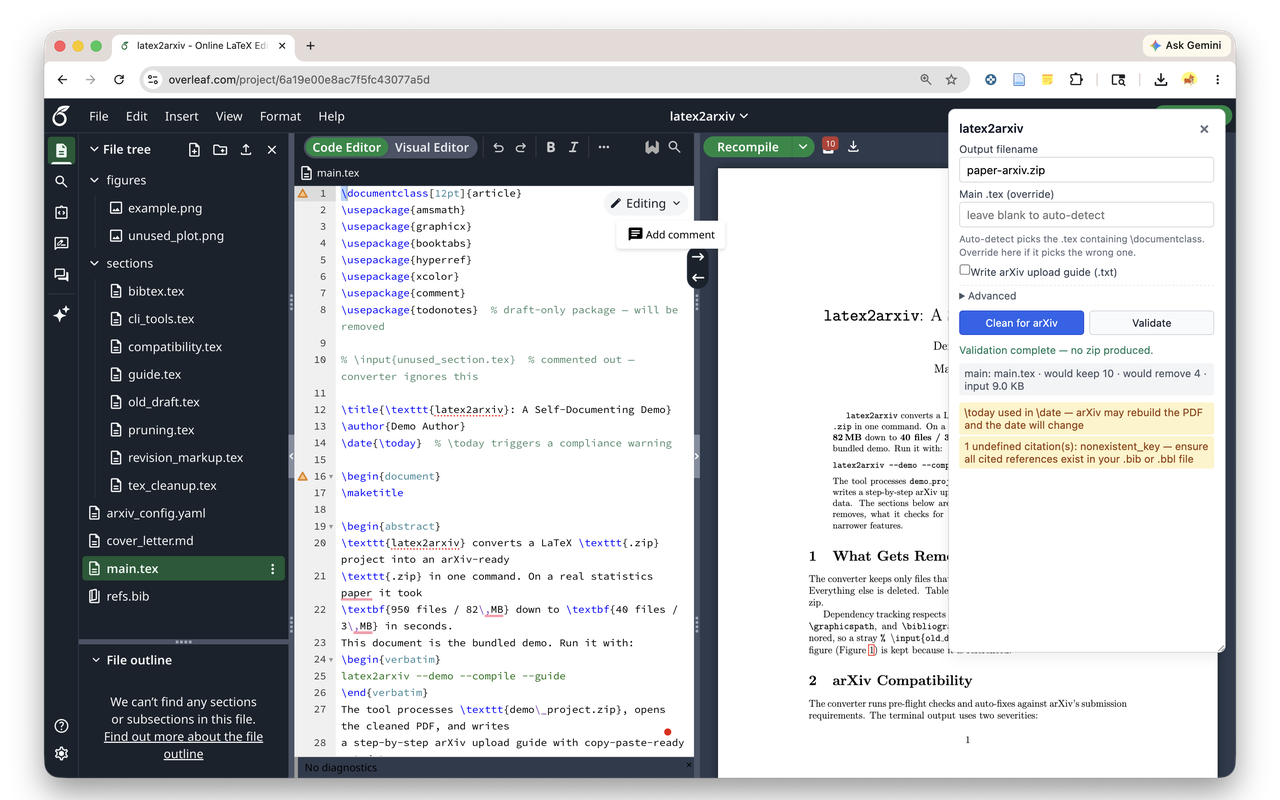 |
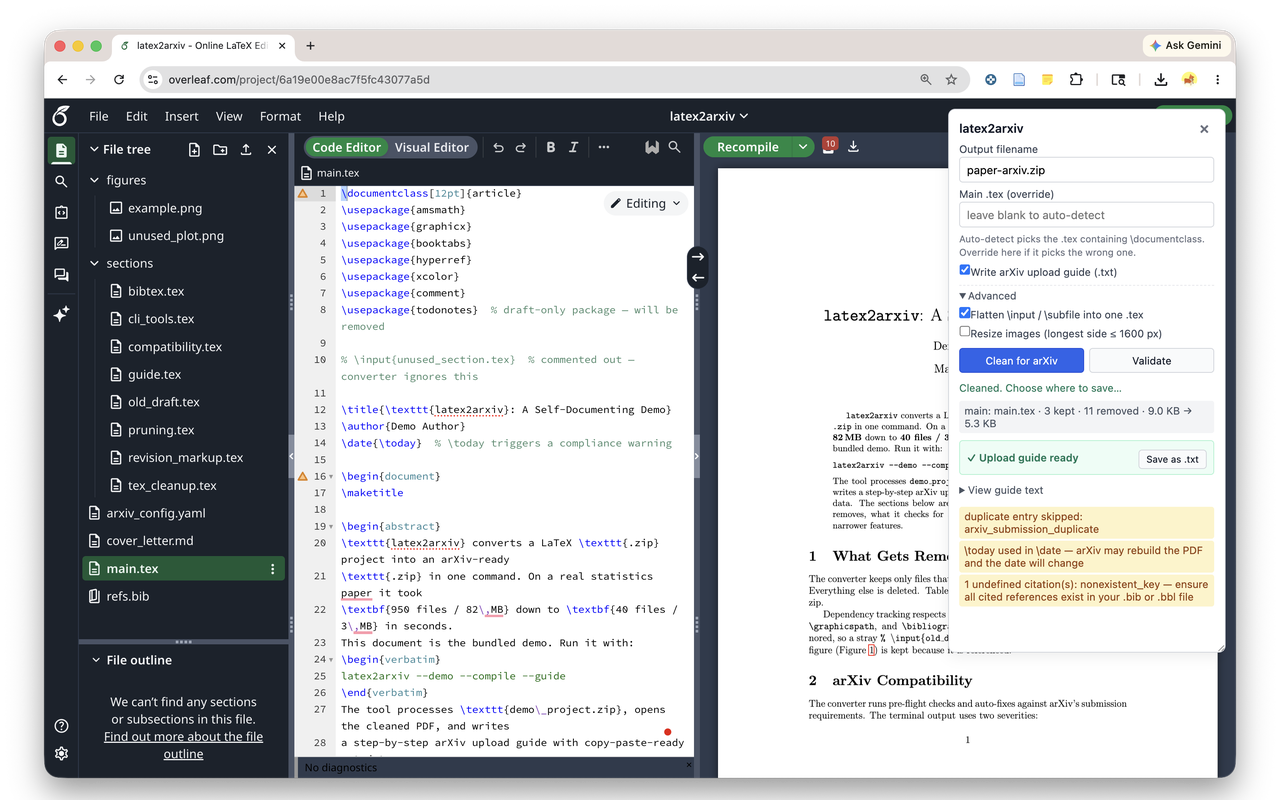 |
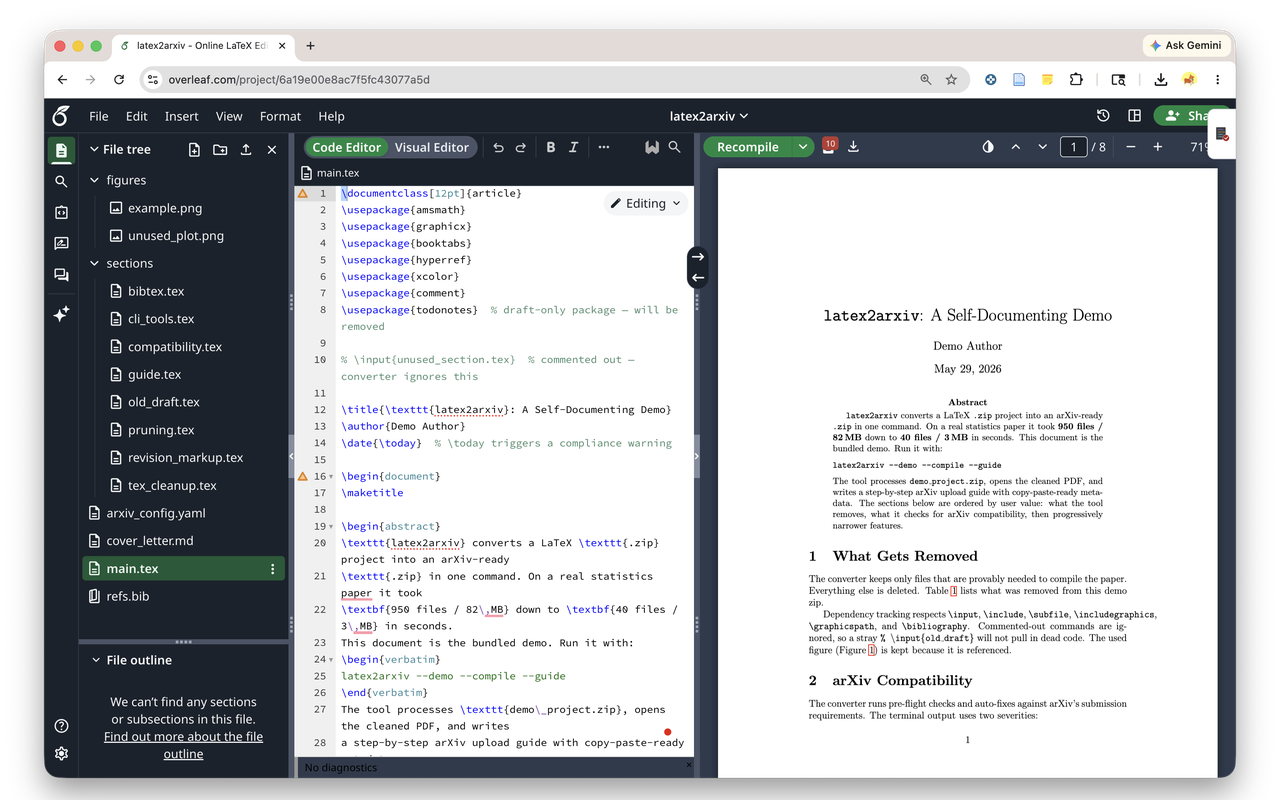 |
MCP — Claude, Cursor, Copilot, Windsurf, Zed
pip install "latex2arxiv[mcp]"
{"mcpServers": {"latex2arxiv": {"command": "latex2arxiv-mcp"}}}
Per-editor paths: materials/mcp.md.
GitHub Action — CI gate
- uses: YuZh98/latex2arxiv@main
  with:
    input: paper/
Fails the build on [error] issues. Also ships as a pre-commit hook (latex2arxiv-dryrun). Action inputs and details.
VS Code
ext install YuZh98.latex2arxiv. Status-bar action on the active .tex file.
Installation
pip install latex2arxiv
If you get an
externally-managed-environmenterror frompip, usepipx:
brew install pipx
pipx install latex2arxiv
On macOS, install via Homebrew (no Python toolchain required):
brew tap YuZh98/latex2arxiv
brew install latex2arxiv
First
brew installbuilds Pillow from source. To avoid 5+ min silence, add--verboseto monitor installation progress.
Or from source:
git clone https://github.com/YuZh98/latex2arxiv
cd latex2arxiv
pip install .
pdflatex is required only for --compile (install via TeX Live or MacTeX).
Usage
latex2arxiv input [output.zip] [options]
input can be a .zip file, a directory of LaTeX sources, or a git URL (https or ssh). Directories are zipped internally; git URLs are cloned with --depth 1.
| Flag | Description |
|---|---|
--main FILENAME |
Specify the main .tex file (e.g. JASA_main.tex). Auto-detected via \documentclass if omitted. |
--resize PX |
Resize images so longest side ≤ PX pixels (e.g. --resize 1600). Requires Pillow. |
--config FILE |
YAML config file for custom removal rules (see below). |
--compile |
Run pdflatex on the output and open the resulting PDF. |
--guide |
Write a detailed arXiv upload guide (metadata + step-by-step instructions) to a text file alongside the output. |
--dry-run |
Preview what would be removed/processed without writing any output. |
--flatten |
Inline every \input / \include / \subfile into the main .tex for single-file output. Details. |
--json |
Emit a machine-readable JSON summary on stdout; route progress to stderr. Schema. |
--demo |
Run the built-in demo project (no input file needed). |
--clean-demo |
Remove demo output files (demo_project_arxiv*). |
--version |
Print version and exit. |
Examples
latex2arxiv paper.zip                                  # zip input
latex2arxiv paper/                                     # directory input
latex2arxiv https://github.com/user/paper.git          # git URL input
latex2arxiv paper.zip out.zip --main main.tex --compile
latex2arxiv paper.zip --resize 1600 --compile          # shrink images
latex2arxiv paper.zip --config arxiv_config.yaml       # custom rules
latex2arxiv paper.zip --compile --guide                # full pipeline + upload guide
latex2arxiv paper.zip --dry-run                        # preview without writing
latex2arxiv --demo --compile --guide                   # run the built-in demo
Pre-flight checks
Before producing the output zip, latex2arxiv validates the project against arXiv's LaTeX submission guide. [error] lines block submission (the tool exits non-zero, useful for CI gating); [warn] lines are advisory and do not affect the exit code.
$ latex2arxiv paper.zip --dry-run
  [error] \usepackage{minted} requires shell-escape — arXiv compiles without it; this submission will fail to build
  [error] \usepackage{psfig} — arXiv no longer supports the psfig package
  [warn]  \today used in \date — arXiv may rebuild the PDF and the date will change
  [warn]  .eps image found: photo.eps — pdflatex does not support .eps; convert to .pdf or .png
  [warn]  \printindex used but no .ind file at root — build locally and re-run latex2arxiv

Summary: 2 errors, 7 warnings
Either [error] line would have caused arXiv to reject the submission after upload. The exit code is non-zero on errors, so a CI step like latex2arxiv paper.zip --dry-run fails the build before the bad submission ever leaves the repo.
See materials/pre-flight.md for the full list of checks and silent fixes.
Custom removal rules (--config)
For revision markup and other project-specific cleanup, create a YAML config file. A template is in arxiv_config.yaml.
If your project root contains
arxiv_config.yaml, it is applied automatically — no need to pass--config.
# Remove command AND its argument (text is lost)
commands_to_delete:
  - \deleted
  - \revision

# Remove command but KEEP its argument text
commands_to_unwrap:
  - \color{red}       # \color{red}text → text
  - \textcolor{red}   # \textcolor{red}{text} → text
  - \added            # \added{new text} → new text

# Remove entire environments
environments_to_delete:
  - response

# Raw regex (last resort — prefer the verbs above when they fit).
replacements:
  - pattern: '\\textcolor\{[^}]*\}\{([^}]*)\}'
    replacement: '\1'
The brace-balanced matcher correctly handles nested commands like \deleted{see \cite{x}}. Unknown top-level keys warn — typos like command_to_delete (singular) no longer silently no-op.
Image size reduction
latex2arxiv covers cleaning, pre-flight validation, and producing the upload-ready .zip. For aggressive image transcoding it pairs cleanly with arxiv_latex_cleaner, which adds PDF compression (Ghostscript) and PNG → JPG conversion — run it first, then latex2arxiv. Or stay in one tool with the built-in latex2arxiv --resize PX.
Known limitations
Dynamically constructed filenames — \includegraphics{\figpath/fig1} cannot be resolved statically and the image will be deleted. Expand path macros before running.
\subfile vs \input path resolution — \input/\include paths resolve relative to the project root; \subfile paths resolve relative to the subfile's own directory. Unusual nested setups may cause images to be incorrectly pruned; use --compile to verify.
--compile is a local sanity check — a successful local compile doesn't guarantee arXiv will compile it. arXiv pins specific TeX Live versions. Always check the arXiv submission preview after uploading.
FAQ
1. arXiv rejected my submission even though latex2arxiv said it was clean. Pre-flight catches the documented submission-blocking patterns. arXiv pins specific TeX Live versions and occasionally surfaces new edge cases — always run the arXiv submission preview after upload. If you hit a reproducible miss, file an issue with your project zip.
2. What's the difference between [error] and [warn]?
Errors block submission and exit the tool non-zero — use them to gate CI. Warnings are advisory: the build will likely succeed on arXiv but a human should look. Example: missing .bbl is a warn (arXiv will run BibTeX); \usepackage{minted} is an error (shell-escape isn't allowed).
3. My main .tex isn't being auto-detected correctly.
Auto-detection ranks files containing \documentclass by \input reference count. For ambiguous projects (response letters next to the paper, multiple \documentclass files), pass --main paper.tex explicitly.
4. Will this modify my original files?
No. All output goes to a new _arxiv.zip (or whatever path you pass). The source project is read-only.
5. My CI step keeps failing on what I thought were just warnings.
Warnings don't fail CI. If your build is failing, it's an [error] — read the message. Use --json for a machine-readable summary.
6. Why does brew install hang for 5+ minutes?
Homebrew compiles Pillow's C extensions from source and suppresses progress output. Add --verbose to see what's happening.
⭐ Found this useful? Star on GitHub — it helps others find the tool.
🐛 Issues or feature requests: github.com/YuZh98/latex2arxiv/issues
📦 Install: pip install latex2arxiv · brew install latex2arxiv (after brew tap YuZh98/latex2arxiv)
🎬 Try the demo: latex2arxiv --demo --compile --guide
Made by Hugh Zheng (GitHub) · MIT License
No comments yet
Be the first to share your take.