
Intervals.icu Tools
A Python project and MCP server for fetching, analyzing, and exporting cycling training data from intervals.icu — and for uploading AI-generated training plans back to the calendar. The project includes ready-to-use system prompts and a coaching logic library with domain knowledge based on Joe Friel's training principles, so you can connect your AI assistant and start coaching conversations immediately.
Description
intervals-icu-sync provides two ways to work with your intervals.icu training data:
- Local Python scripts — run directly on your machine, exchange JSON files with your AI coach manually
- Publicly hosted MCP server at intervals-mcp.training-architect.com — connect Claude, ChatGPT, or Microsoft Copilot directly, no local setup required
Both expose the same coaching workflow:
- Fetch raw activity and wellness data from intervals.icu
- Analyze training quality per week using Joe Friel principles
- Export simplified summaries for an AI coach
- Evaluate carbohydrate fueling quality per session
- Track performance metrics (FTP, VO2Max, CTL/ATL, HRV)
- Upload planned rides generated by the AI coach back to intervals.icu
Prerequisites
For the analysis to work properly, the following conditions should be met:
-
Power meter data: Activities should contain power data. Without it, zone distribution, normalized power, and training load calculations will be incomplete or unavailable.
-
Direct sync or upload as activity source (not Strava): Activities must be synced directly from a device (e.g. Garmin Connect, Wahoo, Zwift) or uploaded manually — not via Strava. The intervals.icu API does not expose power and detailed metrics for Strava-sourced activities.
-
Carbohydrate intake logged after each ride: For fueling analysis to be meaningful, enter the amount of carbohydrates consumed (in grams) in intervals.icu after each session. This is the basis for the fueling ratio and coaching recommendations.
-
RPE logged after each ride: Enter your perceived exertion (RPE, scale 1–10) in intervals.icu after each session. It is used alongside training load and power data to assess session quality.
-
Optional but very helpful: Use the description in "Notes" after a ride to comment on your training given the "AI Coach" more context.
-
Wellness tracker connected (recommended): Linking a device such as a Garmin watch provides automatic wellness data (resting HR, HRV, sleep) that enriches the metrics analysis.
-
Body weight maintained in intervals.icu: Keep your weight up to date in intervals.icu so that calculated metrics like VO2Max are accurate.
-
Activity tags set in intervals.icu (recommended): Tag your completed activities in intervals.icu using the tag scheme described in the Coaching Logic section (e.g.
vo2max-high,lactate-threshold-moderate). Tags take priority over automatic session classification and lead to more accurate coaching output. -
Training plan created in intervals.icu using the Target Generator (recommended): Create a training plan in intervals.icu via the Target Generator (Plans → Target Generator). This places PLAN events (mesocycle blocks, e.g. Base / Build / Peak) and TARGET events (weekly TSS or time targets) in your calendar.
get_training_plan.pyreads these events and adds the current phase name and weekly target — as well as the following week's target — to the coach input. TSS targets are exposed asweekly_load_target; iftime_target_hoursis also present, treat it as an upper time cap. Ifweekly_load_targetis missing,weekly_time_target_hoursbecomes the weekly target. It also propagates day-level constraints (for example Sick/Travel days) when available. Without a plan the training plan section will be empty.
Coaching Logic
The coaching system is split across two directories:
prompts/system_prompt.md — The base system prompt for the LLM (ChatGPT, Claude, etc.). It contains a placeholder block:
## Athlete Profile

<<INSERT ATHLETE / DISCIPLINE BLOCK HERE>>
Before passing the prompt to the coach, copy the contents of the matching discipline_*.md file into that block:
| File | Athlete type |
|---|---|
discipline_climber.md |
Climber / FTP-focused athlete |
discipline_criterium.md |
Criterium racer / W' and repeatability focus |
discipline_roadrace.md |
Road racer / aerobic durability and FTP focus |
discipline_marathon.md |
Mountain marathon (L'Etape du Tour, Ötztaler) / ultra-long endurance focus |
This keeps the base prompt stable while allowing the athlete profile to be swapped out per use.
coach-logic/ — Modular dxocumentation of the coaching domain knowledge:
| File | Content |
|---|---|
coaching-principles.md |
Training philosophy and foundational coaching principles based on Joe Friel |
interpretation-rules.md |
Data interpretation thresholds and classifier rules (form, fueling, limiter detection) |
decision-process.md |
How interpreted data is turned into concrete weekly planning actions |
training-zones.md |
Power, HR and RPE zone definitions used by the coach |
input-schema.md |
Description of the JSON input schema passed to the coach |
workout-library.md |
Workout catalog by domain and dose level, including canonical tags |
The combination of:
- structured data (intervals.icu)
- domain-specific prompt (
prompts/system_prompt.md) - LLM reasoning
creates a lightweight but powerful coaching system. The full system prompt is maintained in prompts/system_prompt.md.
How to Use
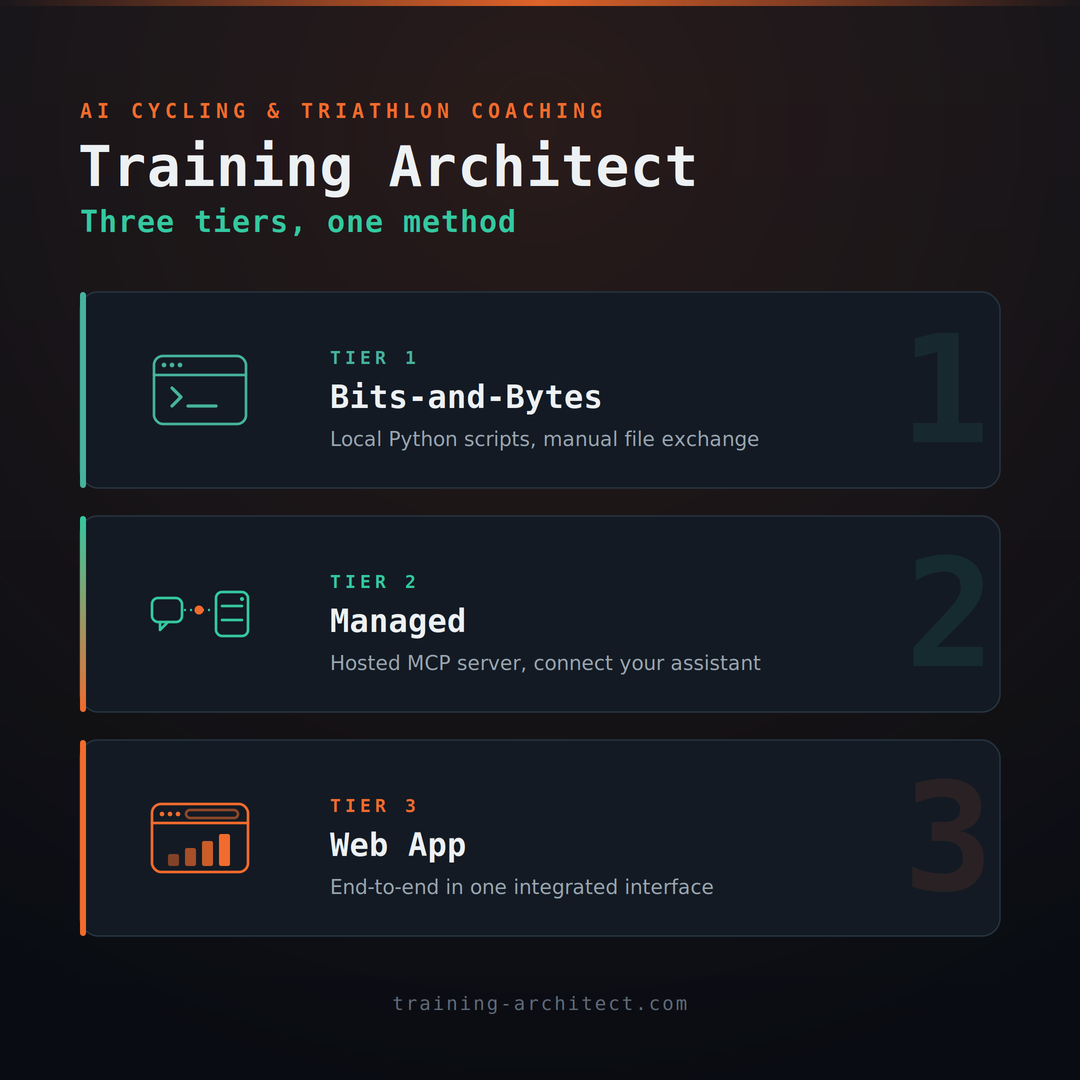
The tools in this project can be used in three different ways, depending on your technical comfort level and setup preferences.
Option 1 – "Bits-and-Bytes" (Local scripts + manual file exchange)
Run the Python scripts locally and exchange JSON files with your AI coaching tool manually.
What you do each week:
- Run
prepare_week_for_coach.pyto pull all data from intervals.icu and produce a single coaching input file. - Upload or paste that file into your AI assistant (ChatGPT, Claude, etc.) along with the system prompt.
- Discuss the week with your coach, receive a JSON training plan, save it locally.
- Run
validate_plan.pyto validate the plan JSON against the upload schema. - Run
upload_plan.pyto push the plan to intervals.icu.
Best for: Users who want full control, prefer no external dependencies, or want to understand the tooling in detail.
Details: See Setup, Data Flow and Scripts further below.
Option 2 – "Managed" (Public MCP Server)
Use the publicly hosted MCP server at intervals-mcp.training-architect.com. No local Python environment required — connect your AI assistant directly to the server via the Model Context Protocol.
What you do each week:
- Connect Claude or another MCP-capable AI assistant to the public server (one-time setup).
- Authenticate with your intervals.icu Athlete ID and API Key
- Ask your coach to fetch your training data, analyse it, and generate a plan — all within the conversation.
- Confirm the plan; the server uploads it directly to your intervals.icu calendar.
Best for: Users who prefer a managed, zero-install experience without running any local scripts.
Step-by-step guide: docs/gen_ai_setup_step_by_step.md
Option 3 – "Integrated Web App"
Use the live web app at training-architect.com for an end-to-end coaching workflow in one interface — no local setup and no manual file exchange.
Project repository: github.com/rbrands/training-architect
Files
intervals-icu-sync/
├── scripts/                        # Runnable entry-point scripts
│   ├── get_activities.py           # Fetch activities → data/raw/
│   ├── get_metrics.py              # Fetch athlete metrics → data/processed/
│   ├── get_training_plan.py        # Fetch active training plan → data/processed/
│   ├── analyze_week.py             # Analyze current calendar week (Joe Friel)
│   ├── prepare_activities_for_coach.py  # Export simplified JSON for coach/ChatGPT
│   ├── prepare_planned_workouts_for_coach.py  # Format planned workouts → data/processed/
│   ├── fueling_analysis.py         # Analyze carbohydrate fueling quality
│   ├── fueling_planner.py          # Generate carbohydrate targets per session
│   ├── validate_plan.py            # Validate week_plan JSON against upload schema
│   ├── check_plan_tss.py           # Check plan TSS against deterministic step-based reference
│   ├── upload_plan.py              # Upload JSON training plan to intervals.icu
│   ├── wbal_analysis.py            # Compute W'bal time series from power stream
│   ├── prepare_week_for_coach.py   # Run all scripts in sequence
│   ├── get_latest_activities.py    # Print compact activity list (mirrors MCP get_latest_activities)
│   ├── get_activity_streams_sampled.py  # Fetch sampled activity streams for one activity locally
│   ├── list_workouts.py            # List workout library entries with duration, TSS and tags
│   ├── generate_week_data_schema.py # Generate JSON Schema for consolidated week_data payload
│   └── mcp_server.py               # FastMCP server exposing data as tools/resources
├── prompts/
│   ├── system_prompt.md            # System prompt for the AI coach (LLM instructions)
│   ├── discipline_climber.md       # Athlete profile block: climber / FTP focus
│   ├── discipline_criterium.md     # Athlete profile block: criterium / W' focus
│   ├── discipline_marathon.md      # Athlete profile block: mountain marathon / ultra-long endurance
│   └── discipline_roadrace.md      # Athlete profile block: road race / durability focus
├── coach-logic/
│   ├── coaching-principles.md      # Underlying training philosophy and core principles (Joe Friel)
│   ├── interpretation-rules.md     # Interpretation thresholds for fatigue, durability, fueling and limiters
│   ├── decision-process.md         # Decision flow to turn interpretation into weekly training actions
│   ├── training-zones.md           # Power, HR and RPE zone definitions
│   ├── input-schema.md             # JSON input schema description for the AI coach
│   ├── workout-library.md          # Workout catalog by domain and dose level (with canonical tags)
│   └── skill/
│       └── SKILL.md                # Foundry skill manifest used by foundry-agent/deploy_agent.py
├── contracts/
│   └── week-data/
│       ├── week-data.schema.json   # JSON Schema for consolidated week_data payload
│       ├── WeekDataDto.cs          # C# DTOs for consolidated week_data payload (System.Text.Json)
│       └── WeekDataJson.cs         # C# JSON serialize/deserialize helper for WeekDataDto
├── foundry-agent/
│   ├── agent.yaml                  # Microsoft Foundry prompt agent definition (MCP + coach-logic knowledge)
│   ├── deploy_agent.py             # Deploy/update agent versions and refresh vector store
│   ├── invoke_agent.py             # Invoke agent locally (single-turn and chat mode)
│   ├── requirements.txt            # Foundry-agent specific Python dependencies
│   ├── infra/
│   │   ├── main.bicep              # Foundry control-plane IaC (account, project, model, RBAC)
│   │   ├── main.bicepparam         # Parameter template for Foundry infra deployment
│   │   └── main.local.bicepparam   # Local parameter file for Foundry infra deployment (git-ignored)
│   └── README.md                   # Setup: structured inputs, vector store, MCP server, deployment
├── docs/
│   ├── 2026-05 Next Level intervals-icu.pdf           # Webinar slides (German)
│   ├── 2026-05 Next Level intervals-icu Step by Step.pdf  # Step-by-step setup guide (English)
│   ├── webinar_notes.md            # Webinar companion guide (German)
│   └── prompt_library.md           # Copy-paste prompts for ChatGPT / Claude (DE + EN)
├── notebooks/
│   └── week_summary.ipynb          # Interactive weekly training overview
├── src/
│   └── intervals_icu/
│       ├── __init__.py
│       ├── client.py               # HTTP client (intervals.icu API)
│       ├── config.py               # Loads API_KEY, ATHLETE_ID from .env
│       ├── week_data_schema.py     # Pydantic models for consolidated week_data JSON schema
│       └── wbal.py                 # Shared W'bal computation (Skiba differential model)
├── data/
│   ├── raw/                        # Raw API responses (git-ignored)
│   ├── processed/                  # Derived JSON exports (git-ignored)
│   └── plans/                      # Training plan JSON files
├── tests/
│   └── test_upload_plan_regressions.py  # Regression tests for upload_plan.py and ZWO generation
├── .env.example
├── .pre-commit-config.yaml       # Git hook config (strips Jupyter outputs before commit)
├── CHANGELOG.md                  # Project change history (Keep a Changelog format)
├── requirements.txt
├── VERSION                       # Current project version (SemVer)
├── Run-ProjectPython.ps1         # Run any Python command with .venv (Python 3.14)
├── Start-Chainlit.ps1            # Start Chainlit with .venv312 (Python 3.12)
├── start_mcp_server.ps1            # Start/stop the MCP server in SSE mode (Windows PowerShell)
├── config.example.ps1              # Template for deployment/config values (copy to config.ps1)
├── setup.ps1                       # Helper script: generate local params and optionally push GitHub secrets
├── webservice/                     # MCP server deployed as Azure App Service (see webservice/README.md)
│   ├── mcp_server.py               # ASGI webservice host for FastMCP endpoints
│   ├── oauth_provider.py           # OAuth 2.0 provider for hosted MCP authentication
│   ├── context.py                  # Request context/auth helper utilities
│   ├── Check-Deployment.ps1        # Post-deployment smoke checks for webservice endpoints
│   ├── requirements.txt            # Webservice-specific Python dependencies
│   ├── infra/
│   │   ├── main.bicep              # App Service infrastructure as code for hosted MCP server
│   │   ├── main.local.bicepparam   # Local parameter file for webservice infra deployment
│   │   └── modules/                # Reusable Bicep modules used by webservice infra
│   └── README.md                   # Webservice deployment and operations guide
└── README.md
Setup
macOS note: if
python/pipare not available (or point to Python 2), usepython3andpip3for all commands below.
1. Create a virtual environment
python -m venv .venv
source .venv/bin/activate   # Windows: .venv\Scripts\activate
2. Install requirements
pip install -r requirements.txt
2b. Prevent Jupyter output-only commits (recommended)
Enable the notebook output stripping hook:
pre-commit install
This project includes .pre-commit-config.yaml with nbstripout, so notebook output and execution-count-only changes are removed automatically at commit time.
2c. Launcher scripts (parallel Python versions)
This repository includes two helper scripts so you can keep Python 3.14 for the main project and Python 3.12 for Chainlit in parallel:
# Run project scripts/tools with .venv (Python 3.14)
.\Run-ProjectPython.ps1 scripts\prepare_week_for_coach.py

# Start Chainlit with .venv312 (Python 3.12)
.\Start-Chainlit.ps1 -Port 8013 -Watch
On macOS/Linux (PowerShell Core), run:
pwsh ./Start-Chainlit.ps1 -Port 8013 -Watch
If .venv312 does not exist yet:
py -3.12 -m venv .venv312
.\.venv312\Scripts\python.exe -m pip install -r foundry-agent/requirements.txt
macOS/Linux equivalent:
python3.12 -m venv .venv312
./.venv312/bin/python -m pip install -r foundry-agent/requirements.txt
3. Set your API key
cp .env.example .env
# Edit .env and set INTERVALS_API_KEY and ATHLETE_ID
- INTERVALS_API_KEY: found in intervals.icu under Settings → Developer Settings
- ATHLETE_ID: your athlete ID, also under Settings → Developer Settings
Only needed if you use the MCP server with a Cloudflare tunnel (or other reverse proxy):
FASTMCP_ALLOWED_HOST=your-tunnel-hostname.example.comSet this to the public hostname of your tunnel (e.g.
intervals-icu-mcp-local.my-brands.com). The MCP server uses it to accept incoming requests that carry thatHostheader. Leave it unset if you only run the MCP server locally (no tunnel).
Versioning and Releases
This project follows Semantic Versioning.
- Current version source:
VERSION - Change history:
CHANGELOG.md - Release artifacts: Git tags and GitHub Releases
Release process
- Add upcoming changes under
## [Unreleased]inCHANGELOG.md. - Bump
VERSIONto the new release version. - Move release-ready entries from
Unreleasedto a dated## [x.y.z] - YYYY-MM-DDsection. - Commit the release changes.
- Create and push the Git tag (for example
v0.1.0). - Publish a GitHub Release for that tag.
Data Flow
flowchart TD
    API([intervals.icu API])

    API --> GA[get_activities.py]
    API --> GM[get_metrics.py]
    API --> GTP[get_training_plan.py]
    API --> PA[prepare_activities_for_coach.py]
    API --> FA[fueling_analysis.py]
    API --> AW[analyze_week.py]
    API --> FP[fueling_planner.py]

    GA --> RAW[(data/raw/\nactivities_date.json)]
    GM --> METRICS[(data/processed/\nmetrics_date.json)]
    GTP --> TPLAN[(data/processed/\ntraining_plan_date.json)]
    PA --> COACH_A[(data/processed/\ncoach_input_monday.json)]
    FA --> FUELING[(data/processed/\nfueling_analysis_monday.json)]
    AW --> SUMMARY[(data/processed/\nweek_summary_monday.json)]
    FP --> FPLAN[(data/processed/\nfueling_plan_monday.json)]
    TPLAN --> PPW[prepare_planned_workouts_for_coach.py]
    PPW --> PLANNED[(data/processed/\nplanned_workouts_monday.json)]

    RAW & METRICS & COACH_A & FUELING & SUMMARY & FPLAN & PLANNED --> PW[prepare_week_for_coach.py]
    PW --> CONSOLIDATED[(data/processed/\ncoach_input_monday.json\nconsolidated)]

    CONSOLIDATED --> COACH[[Coach\nChatGPT / Claude]]
    COACH --> PLAN[(data/plans/\nweek_plan.json)]
    PLAN --> UP[upload_plan.py]
    UP --> CAL([intervals.icu\ncalendar])
prepare_week_for_coach.py runs all scripts above in order and then consolidates the results (metrics, week summary, activities, fueling analysis, planned workouts) into a single coach_input_{monday}.json.
That means: Run
python ./scripts/prepare_week_for_coach.py
to get the current version of
data/processed/coach_input_{monday}.json
for the week. Share this file with your "coach" (ChatGPT, Claude etc ...) and discuss the outcome and the plan for the week.
Ask your "coach" to create a plan for the week as JSON file. The format of the JSON is described in the system prompt above. Copy this JSON into data/plan/week_plan.json and run
python ./scripts/upload_plan.py
to upload the plan to intervals.icu
Scripts
get_activities.py
Fetches cycling activities from intervals.icu (Monday of previous week → today) and saves them to data/raw/.
Included activity types are Ride, MountainBikeRide, and GravelRide (plus VirtualRide for indoor/platform rides).
Missing or invalid icu_training_load values are treated as 0 during filtering.
python scripts/get_activities.py
Output: data/raw/activities_{date}.json
get_metrics.py
Fetches athlete performance metrics: FTP, FTP classification by age/sex (including W/kg), VO2Max, VO2Max classification by age/sex, eFTP, W', weight, CTL, ATL, resting HR, HRV, and the 42-day power profile.
In consolidated coach_input payloads, ctl and atl are surfaced under week_summary (together with form fields) to keep readiness metrics in one place.
Also exports wellness_trends for weight, resting_hr, and hrv with only: current, avg_7d, avg_prev_7d, and trend_7d.
Weight values are normalized to kilograms (kg). If the athlete account stores weight in pounds, get_metrics.py converts it to kg before writing outputs.
Power Profile Type: Adds a heuristic rider type estimate to metrics.power_profile using the 42-day power curve (p15s, p1min, p5min, p20min, curve_slope). Exposed fields are type, type_key, heuristic_score, type_scores, and type_method (currently heuristic_v1).
VO2Max Classification: Classification by age group (13–19, 20–29, 30–39, 40–49, 50–59, 60+) and sex (male/female). Categories: very poor, poor, average, good, very good, excellent. Includes delta to next category and thresholds for range.
python scripts/get_metrics.py
Output: data/processed/metrics_{date}.json
analyze_week.py
Analyzes the current calendar week (Mon–Sun) using Joe Friel training principles. Classifies sessions (VO2max / Threshold / Endurance), computes aerobic decoupling (for Base/Pyramidal/Threshold rides ≥ 90 min only), and prints a coaching interpretation.
The weekly summary keeps training-distribution fields focused on these three categories; long-ride counting for fueling decisions is handled in fueling_analysis.weekly_summary.number_of_long_rides.
Also computes Form % based on CTL (fitness) and ATL (fatigue), and writes ctl/atl alongside form fields into week_summary, including weeks with no qualifying rides yet:
form_absolute = CTL − ATLform_pct = (CTL − ATL) / CTL— relative to current fitness level- Form zones:
fresh(> 0%) ·transition(0 to −10%) ·optimal(−10 to −30%) ·high_risk(< −30%) - Coaching recommendations adapt based on form zone (combined with HRV if available)
Session distribution semantics in week_summary:
vo2_sessions: sessions classified as VO2max.threshold_sessions: sessions classified as threshold.endurance_sessions: catch-all bucket for sessions that are neither VO2max nor threshold. This includes long steady rides that are not classified as VO2max/threshold.
Long-ride counting for fueling is tracked separately in
fueling_analysis.weekly_summary.number_of_long_rides.
Current rule: duration >= 2.5 h and no structured intervals.
python scripts/analyze_week.py
Output: console + data/processed/week_summary_{monday}.json
prepare_activities_for_coach.py
Exports a simplified JSON of rides in the active lookback window (LOOKBACK_DAYS, default: 7) for sharing with a coach or ChatGPT. Includes duration, training load, power, HR (avg/max), RPE, interval summary, compact interval HR analysis (interval_hr_analysis with hr_start_avg, hr_end_avg, hr_drift_pct, hr_power_decoupling), decoupling, and carbohydrate intake. The HR interval summary is computed only from eligible WORK intervals (minimum 120 seconds and minimum 95% FTP intensity). Decoupling labels are only classified for Base/Pyramidal/Threshold rides ≥ 90 min; shorter or high-intensity rides show "limited durability signal".
Ride-level W' fields use icu_w_prime; if that value is missing or 0, the scripts automatically fall back to icu_rolling_w_prime.
Activities in the exported list are sorted by date/time with the newest ride first.
python scripts/prepare_activities_for_coach.py
Output: data/processed/coach_input_{monday}.json
fueling_analysis.py
Analyzes carbohydrate fueling quality per activity and for the active lookback window (LOOKBACK_DAYS, default: 7). Classifies fueling based on duration (no fueling needed / optional / required), computes carbs/h and fueling ratio, detects underfueled sessions, and generates coaching recommendations. Long rides in this context are counted with the script's long-ride rule and surfaced as weekly_summary.number_of_long_rides.
python scripts/fueling_analysis.py
Output: console report + data/processed/fueling_analysis_{monday}.json
fueling_planner.py
Generates per-session carbohydrate intake targets based on tag-derived ride type, duration, and current fatigue (Form %).
Reads from coach_input_{monday}.json (specifically activities[].fueling plus workout tags; if a legacy ride_type is present it is still honored).
Target ranges by ride type:
| Ride Type | Target (g/h) |
|---|---|
| Long Ride | 80–90 |
| Threshold | 50–70 |
| VO2max | 40–60 |
| Endurance ≥ 2 h | 60–80 |
| Endurance < 2 h | 30–50 |
| Recovery | 0–30 |
When Form % < −20% (high fatigue), targets are raised by +10 g/h to offset elevated carbohydrate demand.
For each session the plan includes target g/h, total grams, and a practical strategy (gels, bottles, solid food).
python scripts/fueling_planner.py
Output: console plan + data/processed/fueling_plan_{monday}.json
prepare_planned_workouts_for_coach.py
Reads the most recent training_plan_*.json and extracts the planned workouts for the current and next ISO week. Simplifies each workout to the fields relevant for coaching (date, name, type, duration, planned load, description, zone distribution, step structure) and saves the result.
python scripts/prepare_planned_workouts_for_coach.py
Output: data/processed/planned_workouts_{monday}.json
prepare_week_for_coach.py
Runs all scripts in the correct order:
get_activities.py → get_metrics.py → get_training_plan.py → prepare_activities_for_coach.py → prepare_planned_workouts_for_coach.py → fueling_analysis.py → analyze_week.py
Aborts immediately if any script fails.
python scripts/prepare_week_for_coach.py
generate_week_data_schema.py
Generates contract artifacts for the consolidated week_data / coach_input payload returned by prepare_week_data.
By default it writes both the JSON Schema and the C# DTO classes.
python scripts/generate_week_data_schema.py
python scripts/generate_week_data_schema.py --schema-output ./contracts/week-data/week-data.schema.json
python scripts/generate_week_data_schema.py --dto-output ./contracts/week-data/WeekDataDto.cs
Output:
contracts/week-data/week-data.schema.jsoncontracts/week-data/WeekDataDto.cs
get_latest_activities.py
Reads the most recent coach_input_{monday}.json (run prepare_week_for_coach.py first) and prints a compact JSON summary in the same format that the webservice MCP tool get_latest_activities returns. Useful for locally inspecting or testing the compact activity list without the full webservice stack.
Returns 9 fields per activity: id, date, name, duration_hours, training_load, avg_hr, max_hr, rpe, tags.
python scripts/get_latest_activities.py            # last 10 activities (default)
python scripts/get_latest_activities.py --limit 5  # last 5 activities
Output: JSON to stdout
get_activity_streams_sampled.py
Fetches a single activity's time-series streams from intervals.icu, applies optional time/distance filtering, and down-samples the selected streams to a manageable size. This mirrors the MCP tool get_activity_streams_sampled and is designed for local testing of power/HR stream analysis without using the hosted stack.
python scripts/get_activity_streams_sampled.py --id i175554112
python scripts/get_activity_streams_sampled.py --id i175554112 --streams time,distance,heartrate --max-points 250
Output: JSON to stdout with compact stream arrays under streams.
list_workouts.py
Lists all workouts from the athlete's intervals.icu workout library and shows the key planning fields per workout: folder, duration, TSS, and tags. By default it prints a table to stdout; with --json it returns normalized JSON output. The MCP equivalent additionally returns library_workout_id so generated plans can reference the exact stored workout.
python scripts/list_workouts.py
python scripts/list_workouts.py --json
Output: table or JSON to stdout
get_training_plan.py
Fetches the athlete's currently active training plan from intervals.icu (if one is assigned). Exports active phase(s), current and next-week TSS or time targets, and day-level constraints (e.g. Sick/Travel/Unavailable) derived from calendar NOTE and availability markers. For NOTE events, explicit training_availability values (for example LIMITED) take precedence over label keyword inference. If a constrained day has a max duration in intervals.icu, it is exported as day_constraints[].max_training_time_hours.
The consolidated coach input also includes a top-level training_load_history array for the last four completed calendar weeks. Each entry contains week_starting, the Ride weekly_load_target when available, server-aggregated Ride total_training_load, and achievement_pct. The current week is excluded because its target and actual load already belong to week_summary. Historical load is queried directly from the intervals.icu athlete-summary API and does not depend on older local export files.
python scripts/get_training_plan.py
Output: data/processed/training_plan_{date}.json
wbal_analysis.py
Fetches the power stream for one or more activities from intervals.icu and computes the W'bal (anaerobic energy reserve) time series using the Skiba differential model:
- Depletion (P ≥ CP): W'bal decreases by
P − CPjoules per second - Reconstitution (P < CP):
W'bal += (W' − W'bal) × (1 − e^(−1/τ))whereτ = W' / (CP − P̄_sub_cp) - W' and CP are read from
icu_w_primeandicu_ftpin the raw activity data
Per-activity output includes:
| Field | Description |
|---|---|
wbal_min_j |
Minimum W'bal reached (joules) |
wbal_usage_pct |
Maximum depletion as % of W' |
seconds_below_30pct |
Seconds with W'bal < 30 % of W' |
seconds_below_10pct |
Seconds with W'bal < 10 % of W' |
wbal_depletion_events |
Number of times W'bal drops below 40 % and recovers above 50 % |
wbal_recovery_ratio |
Average ratio of W' recovered vs. W' depleted per event (0–1, null if no events) |
Plus the full second-by-second W'bal series.
# All qualifying rides from the latest raw activities file
python scripts/wbal_analysis.py

# Single activity by id
python scripts/wbal_analysis.py --id i143131711

# Show a matplotlib plot (requires matplotlib)
python scripts/wbal_analysis.py --id i143131711 --plot
Output: data/processed/wbal_{activity_id}.json
mcp_server.py
FastMCP server that exposes the training data pipeline and plan upload as MCP tools. It also offers a compact latest-activities method for clients that truncate large tool outputs and a sampled activity-stream tool for sub-km analysis. The stream tool supports optional stream selection, bounding by time or distance, and a fixed point cap (default 300) to keep outputs compact. See MCP Server Integration for setup and usage.
check_plan_tss.py
Checks whether a generated plan's stated TSS values match the deterministic step-based calculation and whether the weekly total is within the requested target tolerance.
# Check a generated plan file against the target load
python scripts/check_plan_tss.py --plan /tmp/plan.json --load-target 300 --tolerance-pct 10

# Use the default tolerance of 10%
python scripts/check_plan_tss.py --plan data/plans/my_plan.json --load-target 300
The script accepts either a bare workout array or an object shaped like { "workouts": [...] }. For workouts with library_workout_id, the tss value is kept as-is. For generated workouts with steps, TSS is recomputed from the step durations and power values and compared against the stated value using a ±5% tolerance floor of 2 TSS points.
Output: a JSON object with workouts, week, valid, and issues keys.
upload_plan.py
Uploads a JSON training plan to intervals.icu as planned WORKOUT events.
Reads from data/plans/week_plan.json by default (or any path passed via --plan). The plan file is git-ignored; the data/plans/ folder is tracked via a .gitkeep file.
Each entry in the JSON file must have:
date— ISO 8601 datetime string, e.g."2026-04-12T09:00:00"name— display name shown in intervals.icuduration_minutes— planned duration (integer or float)
Optional per entry: description (free-text notes), tags (list of tag strings, e.g. ["vo2max-moderate", "race-specific-low"]), steps (structured workout intervals → uploaded as a ZWO file), and library_workout_id (copies the exact stored library workout, including its workout_doc, instead of generated steps).
Plan JSON Schema: contracts/week-plan/week-plan.schema.json (supports both accepted top-level formats: bare workout array or { "week": "...", "workouts": [...] }).
Field limits on upload: name is truncated to 127 characters and description/notes to 512 characters.
Tag handling: the plan format should always use tags, including for a single tag. For backward compatibility, upload_plan.py still accepts a legacy single tag string and internally treats it as a one-item tags list.
Duplicate handling: before creating events, the script fetches existing WORKOUT events for the date range and indexes them by (name, date). If a match is found the existing event is updated (PUT); otherwise a new event is created (POST). Re-running the script is safe and will never produce duplicates.
# Preview without making API calls
python scripts/upload_plan.py --dry-run

# Upload the default plan
python scripts/upload_plan.py

# Upload a custom plan file
python scripts/upload_plan.py --plan data/plans/my_plan.json

# Delete all WORKOUT events for the date range, then re-upload
python scripts/upload_plan.py --clear
Output: one Created or Updated line per workout, summary of counts.
validate_plan.py
Validates a plan JSON file against the upload schema before calendar upload.
Default inputs:
- Plan:
data/plans/week_plan.json - Schema:
contracts/week-plan/week-plan.schema.json
# Validate default plan file
python scripts/validate_plan.py

# Validate a custom plan file
python scripts/validate_plan.py --plan data/plans/my_plan.json

# Print more than 10 validation errors
python scripts/validate_plan.py --max-errors 25
Exit code behavior:
0when the plan is valid1when the plan/schema file is missing, JSON is invalid, or validation fails
Notebook
notebooks/week_summary.ipynb
Interactive Jupyter notebook that loads the consolidated coach_input_{monday}.json and displays a structured overview of the current training week:
- Athlete Metrics: FTP, eFTP, VO2Max, W', HRV, weight — FTP values shown in W and W/kg
- Week Summary: total load, time, ride count, session types (VO2 / Threshold / Endurance), aerobic decoupling (only from rides ≥ 90 min; shows
"no durability data"if no eligible rides exist) - Form & Fatigue Analysis: CTL, ATL, Form (absolute and % relative to fitness), Form Zone, HRV — with coaching interpretation based on form zone (
ctl/atlare read fromweek_summary) - Activities Table: per-ride details including power, RPE, zone distribution, decoupling (labeled only for Base/Pyramidal/Threshold rides ≥ 90 min), and carbohydrate data
- Zone Distribution Chart: bar charts per activity showing Z1+2 / Z3+4 / Z5+ split
- Integrated Fatigue & Fueling Analysis: combines Form % and weekly fueling quality into a single coaching interpretation with recommendation
- Fueling Analysis: per-ride fueling status, carbs/h, fueling ratio, and weekly recommendations
Run prepare_week_for_coach.py first to generate the input file, then open the notebook:
python scripts/prepare_week_for_coach.py
jupyter lab notebooks/week_summary.ipynb
Docs
docs/2026-05 Next Level intervals-icu.pdf
Language: German (Deutsch)
Slides of webinar „Next Level intervals.icu – Vom Datenchaos zur Coaching-Entscheidung" (Mai 2026).
docs/2026-05 Next Level intervals-icu Step by Step.pdf
Language: English
Step-by-step setup guide accompanying the webinar. Walks through the full installation and configuration of the intervals.icu AI coach integration — from API key setup to MCP server and ChatGPT connection.
docs/webinar_notes.md
Language: German (Deutsch)
Webinar companion guide for „Next Level intervals.icu – Vom Datenchaos zur Coaching-Entscheidung".
Covers the core workflow: fetching data from intervals.icu, enriching it with the AI coach logic, generating a weekly training plan, and uploading it back to the calendar. Intended as a readable walkthrough for participants who want to understand or reproduce the setup without a live demo.
docs/prompt_library.md
Languages: German (Deutsch) + English
A curated collection of copy-paste prompts for use with ChatGPT, Claude, or any other AI assistant. Each prompt is provided in both German and English.
Covers five use cases:
| Prompt | Purpose |
|---|---|
| Single Workout Analysis | Deep-dive analysis of the most recent session (quality, fueling, W' usage, recovery) |
| Weekly Analysis | Full weekly review: metrics, load balance, training quality, fueling, and limiter |
| Training Plan Generation | Generate a structured training plan for the coming week |
| Fueling Analysis | Dedicated fueling strategy review with pattern detection and recommendations |
| Metrics & Wellness Summary | Compact overview of current performance metrics, HRV, sleep, and form state with load recommendation |
All prompts assume the MCP server connection or a manually pasted coach_input_{monday}.json as data source.
contracts/week-data/WeekDataDto.cs
C# DTO set (System.Text.Json) for the consolidated week_data payload generated by prepare_week_data / coach_input.
The classes use JsonPropertyName for snake_case mapping and JsonExtensionData for forward-compatible extra fields.
The file is generated by scripts/generate_week_data_schema.py.
contracts/week-data/WeekDataJson.cs
C# utility helpers for deserialization/serialization with safe default JsonSerializerOptions for WeekDataDto.
contracts/week-data/week-data.schema.json
Generated JSON Schema artifact for the same week_data contract, intended for CI/build consumption and cross-language validation.
Tests
Regression tests live in tests/. They use Python's built-in unittest framework and require no real credentials — dry_run=True prevents any API calls.
Run all tests:
python -m unittest discover -s tests -v
Run a specific test file:
python -m unittest tests/test_upload_plan_regressions.py -v
tests/test_upload_plan_regressions.py
Covers regression cases for upload_plan.py and the ZWO generation logic:
| Test | What it checks |
|---|---|
test_steps_to_zwo_accepts_seconds_and_percent_fields |
_steps_to_zwo produces correct ZWO XML (Duration, Power) from duration_seconds / power_pct_ftp fields |
test_create_activity_sends_raw_workout_doc_unchanged |
create_activity sends a native library workout_doc unchanged without converting it to ZWO |
test_upload_plan_dry_run_supports_top_level_steps |
upload_plan accepts steps directly at the plan-entry level |
test_upload_plan_dry_run_supports_nested_workout_steps |
upload_plan accepts steps nested under a ` |
No comments yet
Be the first to share your take.