
imprint
Teach your AI agent any website. Once.
Record a real browser session, get a deterministic MCP tool back.
No tokens burned on exploration. No "the LLM clicked the wrong button."
The recording is the executable.




Quick Start · Examples · How It Works · Docs
Quick Start
bun install -g imprint-mcp
imprint teach southwest --url https://www.southwest.com
A browser opens. You drive the workflow and narrate what you're doing. Imprint records every request and interaction, then compiles a deterministic MCP tool your agent can call forever.
Want to try a finished MCP before recording anything?
imprint install google-flights --source examples --platform claude-desktop
That registers the checked-in Google Flights example as an MCP server in your client. Swap claude-desktop for claude-code, codex, openclaw, or hermes, or add --print to see the config without changing anything.
On a Hermes agent or Docker host, register the examples directly into Hermes:
for site in google-flights google-hotels southwest discoverandgo echo; do
  imprint install "$site" --source examples --platform hermes --no-interactive
done
When HERMES_HOME is set, Imprint writes Hermes MCP entries to $HERMES_HOME/config.yaml; outside Hermes it uses ~/.hermes/config.yaml. For browser-backed MCPs, imprint install also installs Playwright Chromium into $HERMES_HOME/.cache/ms-playwright and writes PLAYWRIGHT_BROWSERS_PATH into the MCP config so Hermes can find it. Use --skip-browser-install only for offline builds where you preinstall the browser yourself. In a fresh Linux image that is missing browser system libraries, install those during image build with bunx playwright install --with-deps chromium.
See It in Action
Teach once. imprint teach google-flights records real browser flows and compiles a 6-tool MCP server — the compile agent reverse-engineers Google's batchexecute wire format itself and wires the staged search→booking token chain, with no hand-written request code. Here is the actual run behind the example snapshot:
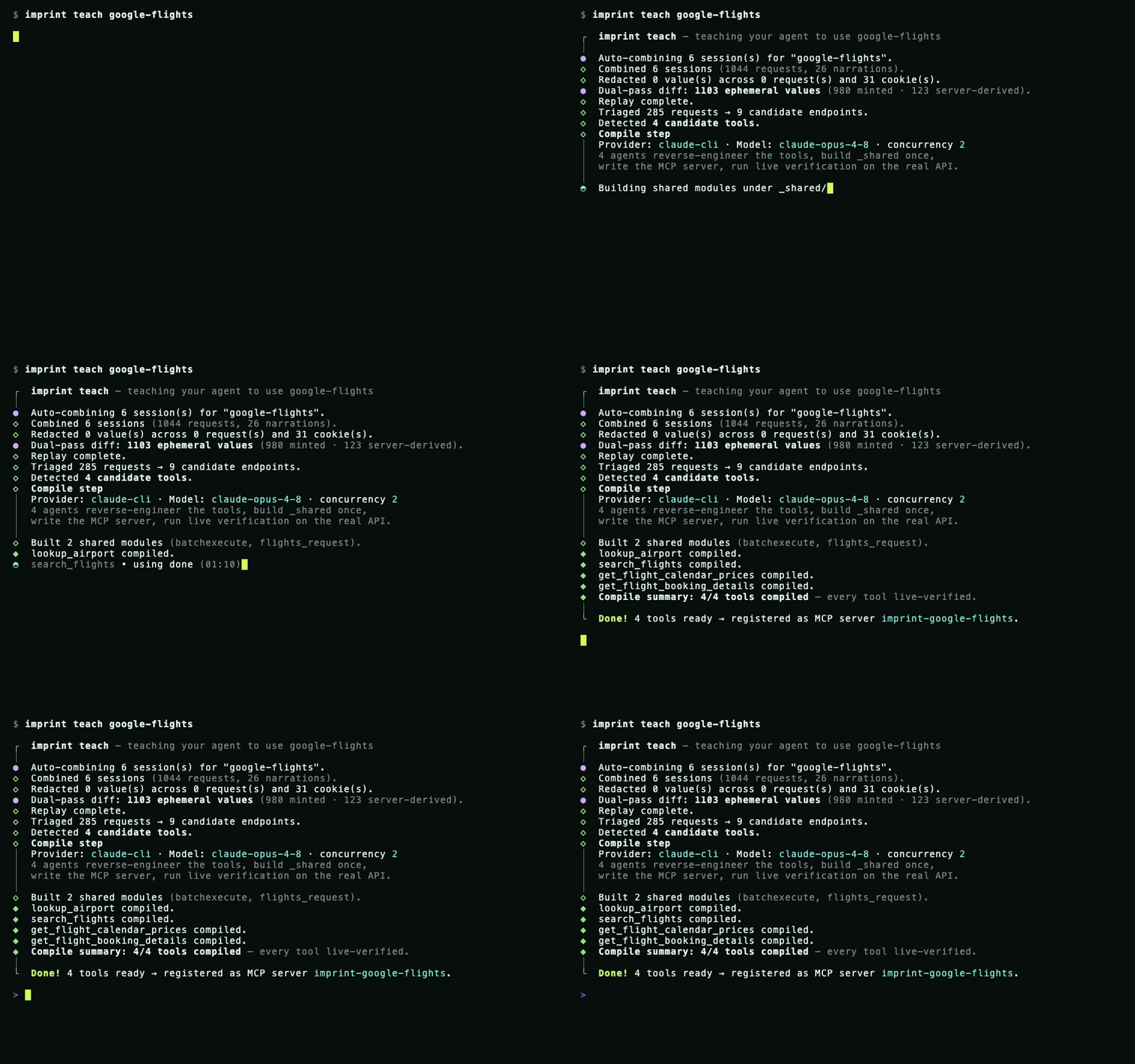
Then your agent calls those tools like any other — real-time results through a live trusted-Chrome (cdp-replay) backend:
$ claude "cheapest nonstop SJC→SAN the first week of July, with a carry-on"

  Alaska     AS1623   SJC→SAN   6:00a→7:32a   nonstop   $137
  Southwest  WN2412   SJC→SAN   8:15a→9:45a   nonstop   $158
  Delta      DL2901   SJC→SAN   7:10a→8:44a   nonstop   $169
The current example snapshot includes six live-verified tools, including staged
multi-city search and booking. (The terminal above is a faithful replay —
regenerate/record it with bun scripts/demo-teach.ts.)
How It Works
[!TIP] All three steps happen in a single
imprint teachcommand. Credentials and PII are redacted automatically before anything reaches the LLM.
When one recording yields multiple tools, all candidates are selected by default.
Imprint automatically includes upstream lookup/producer tools required by any
selected downstream tool. Use --primary-tool to compile only the primary tool
and its prerequisites; --all-tools makes the default full-set selection explicit.
The recorder also has a bounded fallback for Next.js React Server Component
responses that Chromium evicts before Network.getResponseBody can read them.
It streams only narrowly identified GET navigation/prefetch and POST Server
Action responses, keeps normal body capture authoritative, and writes fallback
bytes only when the normal read actually fails. The candidate policy and
resource limits are documented in the capture protocol.
Why Imprint?
Other browser-tool frameworks ask the LLM to decide every click at runtime. Imprint takes a fundamentally different approach:
| Imprint | browser-use / Computer Use | |
|---|---|---|
| Approach | Record once, replay deterministically | LLM decides every click at runtime |
| Token cost | Zero at runtime | Scales with workflow complexity |
| Reliability | Deterministic — same input, same output | Variable — exploration can diverge |
| Bot detection | Real Chromium + stealth-fetch | Detectable automation fingerprint |
| Fallback | Automatic ladder (API → DOM) | None |
| Speed | 200ms – 9s | 30s+ |
Installation
Recommended
bun install -g imprint-mcp
Requires Bun >= 1.3. Or run without installing:
bunx imprint-mcp teach <site> --url <url>
Standalone Binary
curl -fsSL https://raw.githubusercontent.com/ashaychangwani/imprint/main/scripts/install.sh | bash
From Source
git clone https://github.com/ashaychangwani/imprint.git && cd imprint
bun install && bun link
Browser commands (teach, record, login, playbook) and browser-backed imprint install targets auto-install Playwright Chromium when it is missing. For offline CI or prebuilt Linux images where you pass --skip-browser-install, preinstall it ahead of time:
bunx playwright install chromium
LLM providers are auto-detected. Run imprint doctor to see what's available.
| Priority | Provider | Detected via |
|---|---|---|
| 1 | Claude Code | claude on PATH |
| 2 | Codex CLI | codex on PATH |
| 3 | Anthropic API | ANTHROPIC_API_KEY env var |
| 4 | Cursor | cursor on PATH |
Override with --provider <name> and --model <name>.
The Backend Ladder
When an API call gets blocked, Imprint doesn't jump to DOM replay. It escalates through the cheapest backend that works:
  fetch            ~200ms    Plain APIs, persisted cookies
    │
    ▼
  fetch-bootstrap  browser   Mints cookies, CSRF tokens, storage
    │               + API
    ▼
  cdp-replay       ~2-35s    API calls run inside a live, trusted Chrome —
    │                        a protected POST refreshes its anti-bot token
    │                        between calls (multi-step state-changing flows)
    ▼
  stealth-fetch    ~1-12s    Defeats Akamai, Cloudflare, DataDome
    │
    ▼
  playbook         ~9s       Full DOM replay — universal fallback
The full order is fetch → fetch-bootstrap → cdp-replay → stealth-fetch → playbook; auto mode walks it and stops at the first backend that works.
For bot-protected sites, imprint probe-backends <site> --tool <toolName> writes a backends.json preference cache so cron and MCP start from the known-good backend instead of rediscovering blocked rungs. Use imprint probe-backends <site> --all to refresh every tool in a multi-tool site; imprint mcp status reports stale or invalid backend caches before they quietly fall back to the default ladder. CDP replay records both cold and warm timings when it succeeds: a timeout-safe cold start may rank by its fast warm runtime, but a cold start above the preferred threshold stays behind cold-safe backends in durable cache order.
During imprint teach, the independent final verifier uses the same probe before it runs the compiler-written integration suite. Probe time is separate from the suite timeout, and verification pins the selected backend. Compiler revisions reuse that proven preference without probing; only a transport/network/browser failure can prompt a reprobe. Semantic failures return directly to the compiler. Live verifier progress and retained suite receipts are written beside the generated tool as .live-verifier-log.jsonl and .live-verification-evidence.json.
Every recording compiles to both workflow.json and playbook.yaml, so the ladder always has a DOM fallback.
Platform Support
At the end of imprint teach, pick your AI platform and Imprint wires it up:
| Platform | Integration |
|---|---|
| Claude Code | Automatic — runs claude mcp add |
| Codex CLI | Automatic — runs codex mcp add |
| Claude Desktop | Paste-ready JSON config |
| OpenClaw | MCP config + SKILL.md export |
| Hermes | MCP config + SKILL.md + cron mapping |
Each site registers as its own MCP server (imprint-southwest, imprint-google-flights, ...) so tools never collide.
Examples
Every example below was one-shot compiled from a single real browser-session recording (imprint teach) — the generated artifacts are committed verbatim as a proof of concept of what the compiler produces, not as maintained integrations. Recording-derived defaults (dates, geo) age out; pass explicit values.
★ Star examples — multi-tool suites, each compiled from one recording and scored by the headless differential audit:
| Example | Tools | Audit | What it shows |
|---|---|---|---|
| google-flights | 6 | live-verified | batchexecute wire-format decode + staged multi-city search→booking token chain, live cdp-replay |
| google-hotels | 4 | 91.7% | autocomplete → search → reviews/booking producer-token chaining |
Other examples:
| Example | Description |
|---|---|
| southwest | Live fare search — defeats Akamai bot detection |
| discoverandgo | Authenticated booking via per-site credential store |
| echo | MCP smoke-test fixture |
Install any example into your MCP client:
imprint install google-flights --source examples --platform claude-desktop
Examples are real generated MCPs, not handwritten SDK samples. imprint install <site> --source examples points the MCP server at this repo's examples/ directory with IMPRINT_HOME, ensures Playwright Chromium for browser-backed tools, and lets your client list and call the checked-in tools immediately:
imprint install google-hotels --source examples --platform codex
imprint install southwest --source examples --platform claude-code
imprint install echo --source examples --platform claude-desktop --print
For your own generated tools, leave off --source examples:
imprint install mysite --platform claude-code
imprint install mysite --platform codex
CLI Reference
imprint --help              # all commands
imprint <command> --help    # per-command options
| Category | Commands |
|---|---|
| Pipeline | teach · record · redact · generate · compile-playbook · emit |
| Runtime | cron · mcp-server · playbook · probe-backends · audit |
| Credentials | credential set · credential list · credential export · credential import · credential migrate |
| Utilities | mcp · login · assemble · check · doctor · install · uninstall |
Sharing Skills
Teach on your laptop, ship to a remote agent. Generated MCP folders contain the portable tool artifacts: workflow.json, playbook.yaml, index.ts, optional shared modules, and cron/backend metadata. Copy ~/.imprint/<site> into the receiver's ~/.imprint/<site> or commit it to a private repo, install Imprint there, then register it:
bun install -g imprint-mcp
imprint install mysite --platform claude-code
Credentials stay separate. Skill folders contain zero plaintext credentials — only ${credential.NAME} placeholders and a manifest listing what the receiver must provision.
# Export (encrypted with libsodium + argon2id)
imprint credential export southwest --out southwest.imprintbundle

# Import on another machine
imprint credential import southwest southwest.imprintbundle
Send the bundle over any channel. Pass the passphrase out-of-band.
See Sharing Skills for the full flow.
Documentation
| Getting Started | Full walkthrough |
| Architecture | Data flow and module map |
| Integrations | Per-platform setup |
| Security | Redaction, credential handling, what gets stored |
| Sharing Skills | Credential export/import and remote provisioning |
| MCP Maintenance | Audit, disable, restore, and prune MCP state |
| Troubleshooting | Common failures and fixes |
| Tracing | OpenTelemetry tracing, Phoenix-owned cost tracking, and setup |
- Decisions — design rationale
- Glossary — terms and concepts
- Capture Protocol — CDP recording details
- Playbook Debugging — DOM replay debugging
- Notifications — alert setup
Contributing
Conventional Commits enforced in CI. Run bun run check before submitting.
Good first contributions: replay backends, notification predicates, auth extractors, example sites, docs.
See CONTRIBUTING.md for full guidelines.
No comments yet
Be the first to share your take.