
Headless360 Voice
Build on Salesforce any way you want. No browser required.
A reference implementation of Salesforce's Headless 360 thesis — powered by Gemini 3.1 Flash Live + the Salesforce hosted Model Context Protocol (MCP) platform. Talk to your org, watch live dashboards and tables stream into the canvas in real time.
Live demo: https://gemini-voice-mcp-51bdc573ba6f.herokuapp.com/
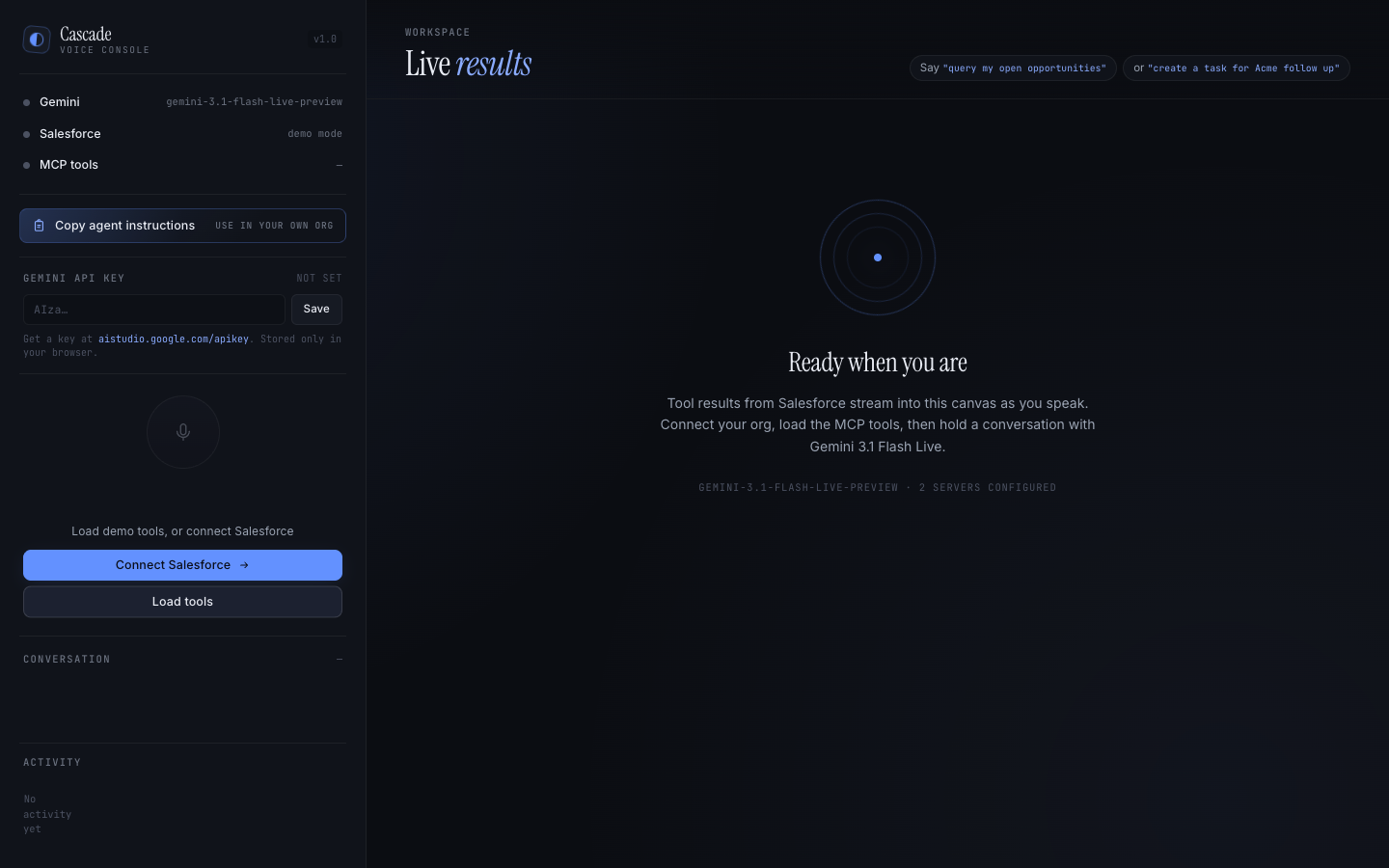
Voice in, live Salesforce data out. The left sidebar handles audio + the conversation transcript; the right canvas renders whatever MCP tool the model just called.
Why Headless360 Voice
Salesforce Headless 360 reframes the platform for a post-browser world: developers should be able to compose solutions on Salesforce from any surface — mobile, embedded devices, custom web stacks, or AI agents — without being bound to standard UI.
This project takes that idea literally: there is no Salesforce page in sight. Users speak; a Gemini Live session interprets intent and invokes Salesforce hosted MCP tools directly; results stream back as typed visualizations. The org is completely headless — we never render a single Aura/LWC component.
Highlights
- 🎙 Real-time voice — Gemini 3.1 Flash Live bidirectional audio. 16 kHz PCM capture via AudioWorklet, 24 kHz playback scheduled through Web Audio.
- ✋ Interruption / barge-in — speak over the agent mid-response and it
actually stops. Scheduled audio buffers are cancelled the moment Gemini
reports
interrupted, and the cut-off line is flagged in the transcript. - 🧠 Full conversation context — one long-lived Live session per browser tab. Stopping the mic doesn't lose history; follow-ups like "what about the second one?" land in context.
- 🔌 Salesforce hosted MCP via the reference SDK
(
StreamableHTTPClientTransport, JSON-RPC 2.0 over HTTPS). - 🔐 OAuth 2.0 PKCE against an External Client App (the only OAuth
app type that can request the
mcp_apiscope today). - 🧰 Native tool calling — discovered MCP tools become Gemini
FunctionDeclarations, so the model routes calls itself. The system prompt enumerates the loaded tools so the agent knows what it can do without guessing. - 📊 Typed rendering with View/JSON toggle — tables, big-number metric
cards, animated SVG pipeline charts, status confirmations. Every card has a
segmented
View / JSONtoggle so business users see polished visuals and power users can pop the raw payload. - ⚙️ Zero-install settings — a gear icon opens a modal for Gemini API key
- External Client App credentials. Values live in
localStorageand are sent to the server per session. Anyone can point the hosted app at their own org without a redeploy.
- External Client App credentials. Values live in
- 🪄 Mock fallback — seven realistic Salesforce tools (opportunities, accounts, cases, contacts, tasks, dashboards) kick in when no live MCP endpoint is reachable, so demos always work.
- 📋 "Copy agent instructions" — a button in Settings copies a complete Markdown runbook to the clipboard, ready to paste into any AI coding agent (Claude Code, Cursor) to wire a fresh org to the app in minutes.
Architecture
┌────────────┐    WebSocket    ┌─────────────┐   WSS    ┌──────────────┐
│  Browser   │ ───audio in───► │   Express   │ ───────► │ Gemini Live  │
│  (mic +    │ ◄──audio out─── │   + ws      │ ◄─tool── │ (function    │
│   UI)      │ ◄──UI events─── │             │   calls  │  calling)    │
└────────────┘                 └─────────────┘          └──────────────┘
                                     │
                                     │ HTTPS (OAuth 2.0 PKCE + mcp_api)
                                     ▼
                          ┌───────────────────────────┐
                          │  Salesforce Hosted MCP    │
                          │  api.salesforce.com/      │
                          │    platform/mcp/v1/...    │
                          │  ─ sobject-all            │
                          │  ─ analytics/tableau-next │
                          │  ─ automation/flow        │
                          │  ─ ai/prompt-builder      │
                          └───────────────────────────┘
If the org can't issue MCP-scoped tokens (some orgfarm / demo orgs currently
reject mcp_api), Headless360 Voice transparently falls back to a mock
Salesforce toolset so the end-to-end voice + tool-calling experience still
works for demos.
Screens
First run
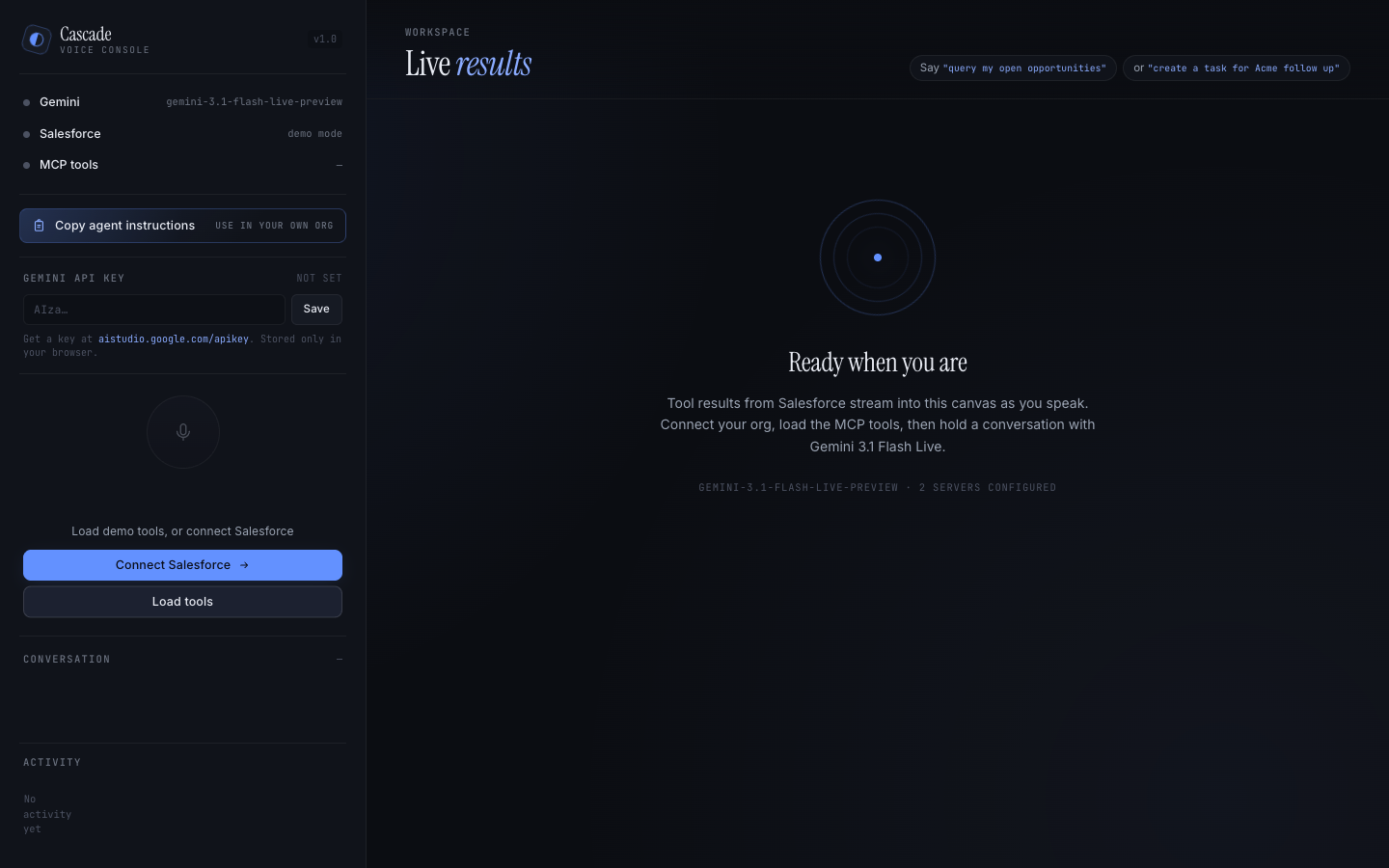
Empty canvas, pulse-animated orbit, a single prompt: "Open Settings, paste a Gemini key, load tools, then hold a conversation."
Live dashboard
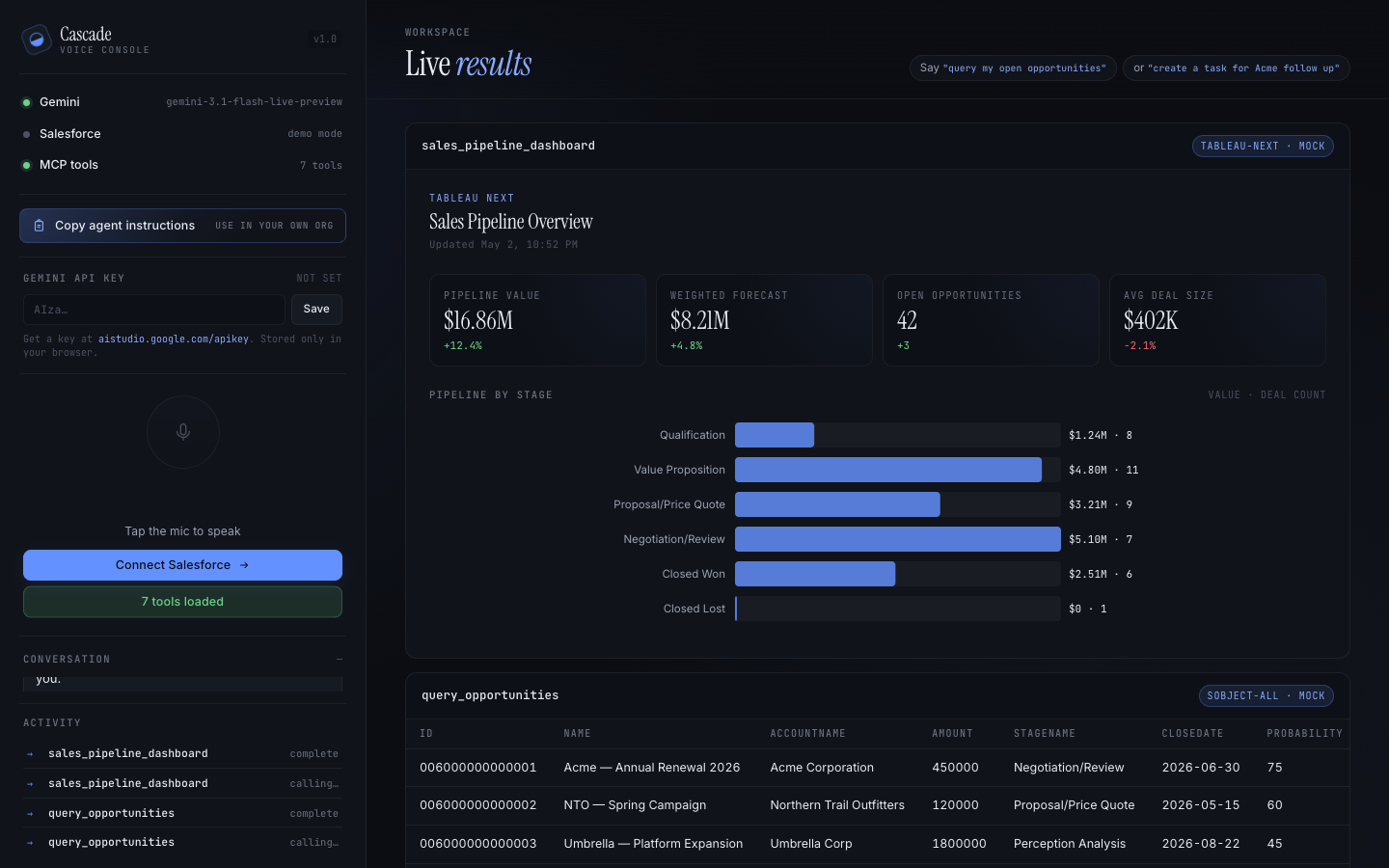
Tableau Next payloads — or any chart-shaped MCP response — render as
editorial metric cards and an animated SVG bar chart. Hit the JSON tab on
any card to inspect the raw payload.
Full conversation
A live turn in progress: transcript bubbles on the left, tool results pouring into the canvas on the right, activity log tracking each call with its server label.
Try the hosted app
- Go to https://gemini-voice-mcp-51bdc573ba6f.herokuapp.com/.
- Click the ⚙ gear icon in the top-left — Settings modal opens.
- Paste your Gemini API key (get one at aistudio.google.com/apikey). Optionally paste your Salesforce External Client App consumer key + callback URL. Leave it blank to use the built-in mock toolset.
- Save settings → click Load tools → tap the mic → say "Show me the sales pipeline dashboard."
Everything (keys, Salesforce credentials, conversation state) stays in your browser. The server is a thin relay.
Run locally
git clone https://github.com/jonjakk/headless360-voice.git
cd headless360-voice
npm install
npm run build
npm start
# → http://localhost:3000
You don't need any environment variables for local development. Open the app, open Settings, paste a Gemini key, and go. If you want to connect a real Salesforce org you can either configure it in the UI or set these env vars:
# Optional — only used as fallback when the client hasn't sent its own config
SF_LOGIN_URL=https://login.salesforce.com
SF_CLIENT_ID=3MVG9…
SF_CLIENT_SECRET=…         # only if your ECA requires one
SF_REDIRECT_URI=http://localhost:3000/auth/callback
GEMINI_MODEL=gemini-3.1-flash-live-preview
GEMINI_VOICE=Zephyr
PORT=3000
The Gemini API key is always sourced from the browser — never from the environment. This prevents the server operator's key being shared across visitors.
Wire up your own Salesforce org
Headless360 Voice needs an External Client App (ECA) with the mcp_api
and refresh_token scopes. Connected Apps don't work — only ECAs can request
mcp_api today.
Fastest path: let an AI agent do it
Open Settings → scroll to Set up your org → click
Copy agent instructions. You now have a self-contained Markdown runbook
on your clipboard. Paste it into Claude Code (or any coding agent with access
to the sf CLI) and it will:
- Enable Hosted MCP Servers in Setup.
- Write and deploy the
ExtlClntAppGlobalOauthSettingsmetadata. - Pull the generated
OauthConsumerKeyvia Tooling API. - Hand back the values to paste into the Settings modal.
The full runbook is also checked in at
public/agent-instructions.md.
Minimum metadata
<!-- force-app/main/default/extlClntAppGlobalOauthSettings/Headless360_Voice.extlClntAppGlobalOauthSettings-meta.xml -->
<?xml version="1.0" encoding="UTF-8"?>
<ExtlClntAppGlobalOauthSettings xmlns="http://soap.sforce.com/2006/04/metadata">
  <callbackUrl>https://your-host.example.com/auth/callback</callbackUrl>
  <isConsumerSecretOptional>true</isConsumerSecretOptional>
  <isPkceRequired>true</isPkceRequired>
  <ipRelaxation>Bypass</ipRelaxation>
  <scopes>
    <scope>MCPApi</scope>
    <scope>RefreshToken</scope>
  </scopes>
</ExtlClntAppGlobalOauthSettings>
After deploy, grab the consumer key:
sf data query --use-tooling-api \
  --query "SELECT DeveloperName, OauthConsumerKey FROM ExternalClientApplication WHERE DeveloperName = 'Headless360_Voice'"
Then paste it into Settings → Salesforce → Consumer key.
Deploy your own copy to Heroku
heroku create my-headless360-voice
git push heroku main
No config vars required. Users configure everything through the Settings
modal. If you want a default fallback (so the app pre-populates for your
demo), the same SF_* env vars from the local section work here.
Project layout
src/
  index.ts         Express + WS server, Gemini↔MCP bridge, /api/session
  gemini-live.ts   GoogleGenAI live session, transcript buffering, interruption
  mcp-client.ts    MCP SDK client setup, tool discovery, tool invocation
  tool-bridge.ts   Translates MCP schemas → Gemini FunctionDeclarations
  auth.ts          OAuth 2.0 PKCE flow with per-session SF config override
  mock-tools.ts    7 fallback Salesforce tools for mock mode
  config.ts        Env + MCP server registry
  types.ts         Shared WS message types
public/
  index.html       Single-page UI (sidebar + canvas + settings modal)
  app.js           WebSocket client, audio IO, settings, renderers
  style.css        Editorial dark theme
  audio-processor.js  AudioWorklet: mic → Int16 PCM chunks
  agent-instructions.md  Markdown runbook the Settings "Copy" button uses
docs/screenshots/  README imagery
Troubleshooting
The agent keeps talking when I start speaking. Make sure your mic picks
up speech above the model's output — Gemini's server-side VAD needs to
actually hear you. Once it reports interrupted, the client stops all
scheduled audio.
"Salesforce is not configured" when clicking Connect Salesforce. Open Settings → fill in Login URL, Consumer key, and Callback URL. Save. Then click Connect Salesforce again.
OAUTH_APPROVAL_ERROR_GENERIC — your OAuth app is a Connected App, not
an External Client App. Only ECAs can request the mcp_api scope.
401 Invalid token when calling an MCP endpoint — known issue on
orgfarm/demo orgs where the edge rejects otherwise-valid tokens. The app
auto-falls-back to mock tools so the voice + tool-calling experience still
works end-to-end.
"0 tools loaded" — either no MCP servers are activated in Setup, or the authenticated user lacks MCP permissions. Verify in Setup → Einstein → Agents → Hosted MCP Servers.
Identity verification blocks the consumer key in the UI. Use Tooling API
instead: sf data query --use-tooling-api --query "SELECT OauthConsumerKey FROM ExternalClientApplication WHERE DeveloperName = '...'".
Stack
- Gemini 3.1 Flash Live via
@google/genai - Model Context Protocol SDK
- Salesforce hosted MCP (External Client App OAuth)
- Node 22 · Express · ws · TypeScript (ESM)
- AudioWorklet (16 kHz capture) · Web Audio API (24 kHz playback with scheduled cancellation for interruption)
- Inter · Instrument Serif · JetBrains Mono
License
MIT — see LICENSE.
Headless 360 is a Salesforce initiative. This project is an independent reference implementation and is not officially affiliated with or endorsed by Salesforce, Inc.
No comments yet
Be the first to share your take.