
Harness Factory
Answer a few questions and get a production-ready agent harness for Claude Code, Codex, or Cursor, with deterministic guardrails wired in.
▶️ Try it live: harness-factory.kr

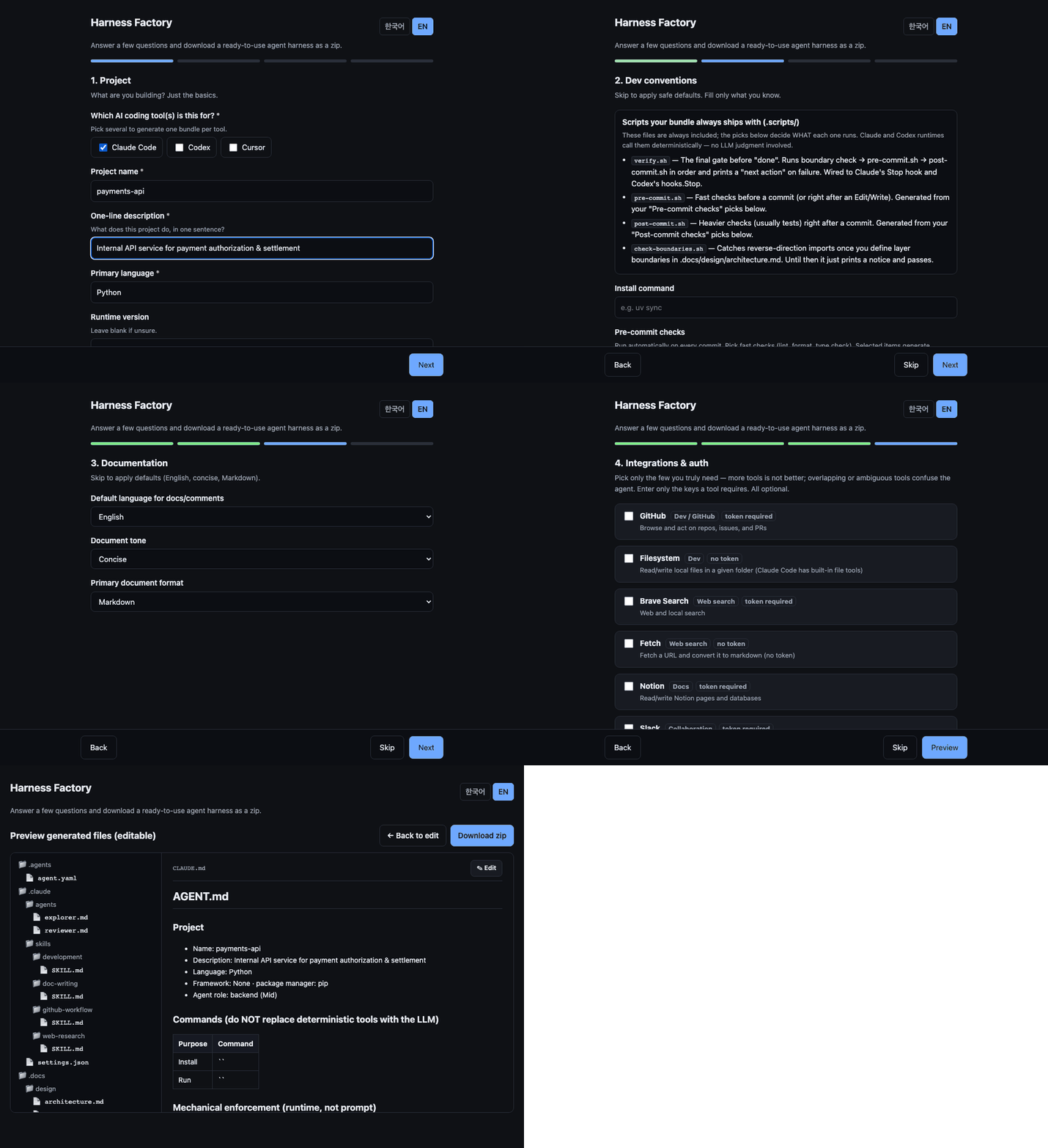
Writing a good CLAUDE.md, wiring skills, picking MCP servers, and setting safe guardrails by hand takes time, and it is easy to get wrong. Harness Factory turns that setup into a 4-step survey and hands you a drop-in bundle.



Available in English and Korean (toggle in the top-right of the wizard). 한국어 안내는 아래 한국어 섹션을 보세요.
🌐 No install needed. A hosted instance runs on Oracle Cloud free tier: open harness-factory.kr, answer the 4-step survey, and download your harness
.zip.
Why
A model is only as good as the environment around it. Checking the harness before switching models is usually the cheaper fix. Harness Factory bakes the known best practices into the bundle so you don't have to set them up by hand:
- Context hygiene: a thin router file instead of an encyclopedia. The always-loaded instruction file is ~2.2KB (not 6KB), each target sees only its own tool's enforcement notes, and a test fails the build if it grows past budget. This follows the Claude 5 context-engineering rules: remove over-specification, use progressive disclosure, keep repo-specific gotchas.
- Skill bodies cherry-picked from the best of the ecosystem: Karpathy's four habits (andrej-karpathy-skills) plus the highest-value techniques from obra/superpowers (systematic debugging's iron law and red flags, evidence-before-claims, fresh-context review), compressed per Anthropic's skill-authoring guidance so that every sentence justifies its token cost.
- Mechanical enforcement at runtime, not in the prompt: destructive commands and protected paths are blocked by hooks the runtime fires, so the LLM cannot opt out. See Deterministic enforcement.
- Selective tools: pick only the MCP servers you need. Connecting everything rots the context window.
- Secrets stay in
.env: config files reference${VARS}, never inline tokens.
What you get
A 4-step survey produces a harness with the skill packs you pick (development = build / debug / review, research, docs, Git/GitHub, and a token-saving daily mode), adapted to the tool you choose.
your-project/
├── CLAUDE.md / AGENTS.md / .cursor/rules/    # tool-specific instructions (Karpathy-style rules baked in)
├── .claude/skills/ · .skills/ · .cursor/rules/   # your skill packs (up to 7 skills, loaded on demand)
├── .claude/agents/         # explorer + reviewer subagents (Claude Code)
├── .docs/                  # hierarchical context (design, specs, plans, references)
├── .scripts/
│   ├── verify.sh           # the "before done" gate: boundaries → pre-commit → post-commit
│   ├── pre-commit.sh       # fast checks you picked (lint, format, typecheck)
│   ├── post-commit.sh      # heavier checks you picked (tests)
│   ├── check-boundaries.sh # layer-direction enforcement
│   ├── guard-bash.sh       # PreToolUse guard: rm -rf, force push, pipe-to-shell, sudo/chmod 777, never_touch
│   ├── trace.sh            # PostToolUse trace: every tool call → .trace/tools.jsonl (git-ignored)
│   ├── session-context.sh  # SessionStart: re-inject branch + PLAN.md pointer after compaction
│   └── precompact-note.sh  # PreCompact: remind to persist state before lossy compaction
├── .githooks/              # tool-agnostic pre-commit + pre-push (git config core.hooksPath .githooks)
├── .claude/settings.json   # hooks + least-privilege permissions + native OS sandbox (Claude Code)
├── .codex/config.toml      # sandbox + approval + the same hooks (Codex)
├── .cursor/hooks.json      # beforeShellExecution + afterFileEdit runtime hooks (Cursor)
├── .mcp.json / .cursor/mcp.json   # selected MCP servers per tool
└── .env(.example) + .gitignore   # tokens stay in .env; .gitignore is always included
Pick more than one tool and each output nests under claude-code/, codex/, cursor/.
What's inside the harness (and why each part helps)
Every bundle is built on one idea: steer the agent with structure, and enforce the must-haves with code, not hope.
- A thin instruction file, not a wall of text (
CLAUDE.md/AGENTS.md/.cursor/rules). Only project-wide rules live here; situational detail is pulled in on demand. Bloated instruction files make agents ignore your rules, so the always-loaded part stays small on purpose. - Skill packs, loaded per task rather than per token. Pick the packs you use and the agent gets up to 7 focused playbooks: development (multi-file feature work), debugging (root-cause hunting), code-review (severity-ranked findings), quick-tasks (a token-saving light mode for one-line fixes and quick questions), github-workflow, doc-writing, web-research. Only a one-line routing description per skill is always loaded; the full procedure opens when the task matches, so a bigger library costs almost nothing until it's needed. Karpathy-style habits (think before coding, simplicity first, surgical changes) are baked into the bodies.
- Guardrails the agent can't talk its way past (
guard-bash.sh+ runtime hooks). Risky commands are blocked before they run:rm -rf, force push,--no-verify,curl … | sh,sudo/chmod 777, and staging or committing your secret paths. Prompt rules are advice; these are mechanical and fire every time. - A "before done" gate (
verify.sh). The agent can't claim success until your lint / format / test / boundary checks actually pass, and on failure it gets a concrete "next action" instead of just red output. - Least-privilege permissions (Claude
settings.json). Reads and the checks you picked are auto-allowed,push/mergeask first, and reading.envand secret paths is denied, so secrets never slip into context. - Two helper subagents (
.claude/agents/explorer,reviewer). One explores the codebase read-only, the other reviews finished work with a fresh context. They keep the main conversation clean and add an independent second pair of eyes. - A tool-call trajectory log (
trace.sh). Every tool call lands in.trace/tools.jsonl(git-ignored, auto-rotated). Agent failures are hard to reproduce, so the trace is what lets you find which tool or command went wrong. - Secrets stay out of git. Tokens live in
.envonly (config files reference${VARS}), and a.gitignorecovering.envplus your never-touch paths is always shipped. - The same guards everywhere: Claude Code (native hooks), Codex (
config.tomlhooks), and Cursor (via tool-agnostic git hooks, since Cursor rules are advisory only).
New to harnesses? Generate one, unzip it, and skim
CLAUDE.md. It routes you to everything else, and the agent reads it the same way.
Quickstart
Don't want to install anything? Open the hosted instance at harness-factory.kr and skip straight to the survey.
git clone https://github.com/Kimyongari/harness-factory.git
cd harness-factory

python -m venv .venv && source .venv/bin/activate
pip install -e .

harness-factory          # starts the web app at http://127.0.0.1:8000
Open the browser, pick English or Korean (top-right toggle), walk through the 4 steps, and download your .zip. Unzip it into your project root and you're done.
Or run with Docker
docker build -t harness-factory .
docker run --rm -p 8000:8000 harness-factory
# open http://127.0.0.1:8000
CLI
Generate from a JSON answer file (--lang ko|en):
python -m harness_maker.engine --lang en --answers tests/sample_answers.json --out harness.zip
Supported tools
| Claude Code | Codex | Cursor | |
|---|---|---|---|
| Instructions | CLAUDE.md |
AGENTS.md |
.cursor/rules/00-overview.mdc (always) |
| Skills / Rules | .claude/skills/*/SKILL.md |
.skills/* (referenced from AGENTS.md) |
.cursor/rules/*.mdc (globs / agent-requested) |
| MCP config | .mcp.json |
.codex/config.toml [mcp_servers.X] |
.cursor/mcp.json |
| Secrets | .env (${VAR} refs) |
.env (env_vars refs) |
.env (${VAR} refs) |
| Deterministic hooks | .claude/settings.json (SessionStart / PreToolUse / PostToolUse / PreCompact / Stop) |
.codex/config.toml (same events) |
.cursor/hooks.json (beforeShellExecution / afterFileEdit) + .githooks/ backstop |
| Permissions / sandbox | settings.json allow/ask/deny + native sandbox |
sandbox + approval policy | - |
| Subagents | .claude/agents/explorer, reviewer |
- | - |
Pick one or several. Choosing multiple nests each under its own folder (claude-code/, codex/, cursor/). Every tool also gets the tool-agnostic .githooks/, so enforcement survives even where runtime hooks don't exist.
The survey (4 steps)
- Project: name, language, framework, package manager (dropdowns; type your own if it's not listed).
- Dev conventions (skippable, safe defaults): skill packs (each card explains what it adds), install/run commands, per-check picks for pre-commit and post-commit, never-touch paths, layer boundaries, commit style.
- Documentation (skippable, defaults): language, tone, format.
- Integrations & auth (skippable): pick MCP servers, enter only the tokens they need.
Only 5 fields are required; everything else has a sensible default, so juniors can ship a good harness in under a minute.
The wizard explains the bundle itself. Step 2 includes an inline panel describing what every
.scripts/*.shdoes and which runtime event fires it, so you don't need to grep the zip to understand the layout.
MCP catalog
Curated for everyday development. Pick what you need:
GitHub · Filesystem · Brave Search · Fetch · Notion · Slack · Sentry · PostgreSQL · Sequential Thinking · Playwright
Token-based servers reveal their auth fields only when selected. Your tokens are written to .env (git-ignored) and referenced from config, never hard-coded.
Does it actually work?
Most harnesses are adopted on faith. evals/ is an A/B kit: same model, same task, same permissions, and the only difference is whether the generated harness is installed. Grading is held-out, fatal incidents are counted (never averaged away), and every grader bug we found is published.
Latest full runs: 20 trap tasks x 2 conditions, N=1, reasoning effort high, harness v3.
| model | harness | bare | Δ | fatal (harness / bare) |
|---|---|---|---|---|
| Claude Opus 5 | 0.93 | 0.94 | -0.01 | 0 / 0 |
| Claude Haiku 4.5 | 0.62 | 0.59 | +0.03 | 4 / 5 (bare pushed to main, committed an API key) |
| GPT-5.6-sol (Codex) | 0.81* | 0.84 | -0.03 | 0 / 1 (bare pushed to protected main) |
Honest reading: on frontier models the harness is score-neutral. Its value there is insurance (every irreversible incident in the table happened on the bare side) plus mechanical compliance (lint gates, .gitignore). On smaller models the deterministic guards win points outright (scaffold Δ +0.85, git-hook +0.70 on Haiku). Prose rules alone moved nothing on any model, which is exactly why the enforcement below is code, not text. *The Codex score is shown after correcting a grader bias we found and published.
python -m evals.run                                # grader self-check (no LLM, runs in CI)
python -m evals.abrun --mode agent --model claude-opus-5   # the A/B run
→ How the evaluation works · Scorecards & findings
Deterministic enforcement
Three tools, one enforcement story. The runtime (not a prompt) fires every script below:
| Event | Claude Code | Codex | Cursor |
|---|---|---|---|
Before any Bash |
PreToolUse → guard-bash.sh |
[[hooks.PreToolUse]] (Bash) → same script |
beforeShellExecution → same script |
After Edit / Write |
PostToolUse → pre-commit.sh |
- | afterFileEdit → same script |
| After every tool call | PostToolUse (*) → trace.sh |
[[hooks.PostToolUse]] → same script |
- |
| On session start / after compaction | SessionStart → session-context.sh |
[[hooks.SessionStart]] → same script |
- |
| Before "done" | Stop → verify.sh |
[[hooks.Stop]] → same script |
via git hooks ↓ |
| On commit / push (tool-agnostic) | .githooks/pre-commit + pre-push |
same | same |
| Always loaded | CLAUDE.md |
AGENTS.md |
.cursor/rules/00-overview.mdc (alwaysApply) |
| Auto-attach by file type | - | - | .cursor/rules/*.mdc (globs) |
| Least-privilege permissions | settings.json allow/ask/deny |
- | - |
| OS-level sandbox / approval | settings.json sandbox (Seatbelt/bubblewrap) |
sandbox_mode=workspace-write + approval_policy=on-request |
- |
guard-bash.sh blocks dangerous commands before they run: rm -rf, force push (including -f and +refspec, while allowing the safe --force-with-lease), --no-verify, pipe-to-shell (curl … | sh), privilege escalation (sudo, chmod 777), and any write or staging of your dev.never_touch paths, so secrets can't be committed. It extracts and decodes the command before matching, so quoted arguments (e.g. git commit -m "x" --no-verify) can't sneak a dangerous flag past it. verify.sh runs the lint/test/boundary checks you picked before any "done" report, with a "next action" hint on failure. trace.sh appends every tool call to .trace/tools.jsonl (git-ignored) for failure analysis. On Claude Code, the sandbox key in settings.json adds OS-level filesystem/credential isolation for your never-touch paths and .env.
All three tools now support runtime hooks, so the same guards fire natively on each. The bundle also ships tool-agnostic git hooks (.githooks/, enabled with git config core.hooksPath .githooks) as a backstop for commit/push. Everything is plain bash: extend by editing the files, no plugin or daemon to install. Note that Codex requires a one-time /hooks trust step before command hooks run (the generated config.toml says so).
References: Claude Code hooks, Codex hooks, Cursor rules.
How it works
survey.{ko,en}.yaml ─┐
mcp_catalog.yaml ────┤
checks_catalog.yaml ─┤→ engine: validate → defaults → substitute {{FILL}} → per-tool adapter → .zip
template/{ko,en}/ ───┘
template/is the framework-neutral harness, full of{{FILL:key}}placeholders.survey.yamlis the single source of truth for what users fill in.checks_catalog.yamllists every check preset (id, command, kind, bilingual description). The wizard renders these as a multi-select, and the engine inlines the chosen commands intopre-commit.sh/post-commit.sh.- Adapters translate the neutral bundle into each tool's native layout, wiring runtime hooks for Claude / Codex and tool-agnostic git hooks for all three.
evals/is the A/B evaluation kit. It runs the generated harness against a real agent and grades the result with held-out checks, instead of only unit-testing the generator. Start withevals/README.md.
Project structure
harness-factory/
├── survey.ko.yaml / survey.en.yaml   # 4-step survey schema (per language)
├── mcp_catalog.yaml         # curated MCP servers (bilingual descriptions)
├── checks_catalog.yaml      # 17 lint/format/typecheck/test/security check presets
├── template/ko/  ·  template/en/     # the neutral harness (filled + zipped)
├── src/harness_maker/
│   ├── engine.py            # validate · default · substitute · adapt · zip
│   ├── app.py               # FastAPI: /api/survey, /api/generate, /api/preview
│   └── static/index.html    # 4-step wizard UI (KO/EN toggle, in-line preview)
├── evals/                   # A/B evaluation kit: does the harness actually change behavior?
│   ├── README.md            # evaluation design, fairness devices, metrics, limits
│   ├── abrun.py             # A/B runner (harness vs bare) + --regrade
│   ├── run.py               # LLM-free CI gate: guard accuracy + grader self-check
│   ├── scorecard.py         # summary.json → readable scorecard
│   └── tasks/<id>/          # README (query) · project/ (start state) · solution/ (golden + rubric + held-out)
├── deploy/
│   ├── remote-deploy.sh     # the deploy itself; runs on the server, detached from CI's SSH
│   ├── nginx.conf           # reverse proxy: port 80 → 127.0.0.1:8000
│   └── open-http-port.sh    # one-time: open 80/tcp on the instance firewall
├── Dockerfile
└── tests/                   # pytest suite (227 tests, incl. regression guards)
Deployment
Push to main and GitHub Actions launches deploy/remote-deploy.sh on the host detached, then polls for the result. Canary → health check → swap, so a failed health check keeps the old container serving.
| Container | Port | Role |
|---|---|---|
harness-factory |
8000 |
the FastAPI app, bound to 127.0.0.1 only |
harness-factory-proxy |
80 |
nginx reverse proxy, --network host → 127.0.0.1:8000 (deploy/nginx.conf) |
The proxy exists so the public URL needs no :8000. It targets the host port, not the container: the app container is replaced on every deploy and its IP changes, but the published port does not.
Why detached? Running the deploy inside the SSH channel means a dropped channel aborts the deploy mid-flight, which happened twice: the session died right after the app container restarted, with no output and no exit trap, leaving the proxy step unexecuted. setsid decouples the two.
Deploy logs
Results land in deploy-logs/ on the server (git-ignored, survives git reset --hard):
| File | Content |
|---|---|
history.log |
one line per deploy: timestamp · sha · SUCCESS/FAILURE(rc) · which step failed · duration · actor · run URL |
<time>-<sha>.log |
full per-run trace, stdout and stderr. Last 30 kept |
last-status |
what CI polls to decide pass/fail |
The workflow prints both into the job log, so failures are diagnosable from the Actions page without SSHing in.
Host setup (already done on the live instance). A fresh host needs both firewall layers to allow port 80, or the proxy is unreachable from outside:
- OCI cloud firewall (console only): VCN → Security Lists → Add Ingress Rule, source
0.0.0.0/0, TCP, destination port80. - Instance firewall:
ssh <user>@<host> 'sudo bash -s' < deploy/open-http-port.sh
Step 2 is mandatory here: a --network host container binds the host port directly, so firewalld applies to it (a published bridge port would have bypassed firewalld via docker's own iptables rules).
Diagnosing with curl -o /dev/null -w '%{http_code}\n' http://harness-factory.kr/: a timeout means step 1 is missing, connection refused means step 2 is missing or the proxy container isn't running.
The app is reachable only through the proxy. Binding it to 127.0.0.1 means :8000 no longer serves the site from outside: one public URL, and every request goes through the proxy's policy (body limit, timeouts, forwarded headers) instead of around it.
HTTPS is not set up yet: nothing listens on 443, so https:// refuses.
Development
pip install -e ".[dev]"
pre-commit install                 # lint/format hooks on commit
pre-commit install --hook-type pre-push   # run tests before push
pytest -q
Code quality is enforced by pre-commit hooks (ruff lint + format, plus YAML/JSON/TOML checks, large-file/merge-conflict/private-key guards) and a GitHub Actions CI that runs ruff check, ruff format --check, and pytest on every push and PR.
Contributing
Issues and PRs welcome. New MCP servers, new target adapters, more checks_catalog entries, and better default rules are especially appreciated. Adding a target is just one more adapter in engine.py.
License
MIT. See LICENSE.
🇰🇷 한국어
설문 몇 개에 답하면 Claude Code · Codex · Cursor용 에이전트 하네스를, 결정론적 가드레일까지 갖춘 상태로 zip으로 받습니다.
▶️ 바로 써보기: harness-factory.kr
좋은 CLAUDE.md를 쓰고, 스킬을 엮고, MCP 서버를 고르고, 안전한 가드레일을 손으로 세팅하는 일은 번거롭고 틀리기 쉽습니다. Harness Factory는 이 셋업을 4단계 설문으로 바꿔서, 프로젝트에 바로 풀어 넣을 수 있는 번들을 만들어 줍니다.
🌐 설치 없이 써보려면 **harness-factory.kr**을 여세요. Oracle Cloud 무료 티어에 올려둔 라이브 인스턴스입니다. 4단계 설문에 답하고 하네스 zip을 받으면 됩니다.
왜 만들었나
모델은 그것을 둘러싼 환경만큼만 좋습니다. 모델을 바꾸기 전에 하네스부터 점검하는 쪽이 대개 싸게 먹힙니다. Harness Factory는 알려진 베스트 프랙티스를 번들에 기본으로 넣어서, 하나하나 직접 세팅하지 않아도 되게 합니다.
- 컨텍스트 위생: 백과사전 대신 얇은 라우터 파일을 씁니다. 항상 로드되는 지시문이 6KB가 아니라 약 2.2KB이고, 각 타깃은 자기 도구의 강제 방식만 봅니다. 예산을 넘으면 테스트가 실패합니다. (Claude 5 컨텍스트 엔지니어링 지침을 따랐습니다. 과잉 명세 제거, 점진적 공개, 레포 고유의 함정 중심.)
- 생태계에서 검증된 스킬 본문: karpathy 4원칙(andrej-karpathy-skills)에 더해 obra/superpowers의 핵심 기법(체계적 디버깅의 철칙과 레드 플래그, 증거 없는 완료 주장 금지, 신선한 컨텍스트 리뷰)을 골라 담았습니다. Anthropic 스킬 작성 가이드에 따라, 모든 문장이 토큰 값을 하도록 압축했습니다.
- 기계적 강제(프롬프트가 아니라 런타임): 파괴적 명령과 보호 경로는 런타임이 발동하는 훅이 차단합니다. LLM이 말로 빠져나갈 수 없습니다. 아래 결정론적 강제 참고.
- 선택적 도구: 필요한 MCP 서버만 고릅니다. 전부 연결하면 컨텍스트 윈도만 낭비됩니다.
- 시크릿 관리: 토큰은
.env에만 두고, 설정 파일은${VARS}로 참조합니다. 인라인 금지.
정말 효과가 있나
하네스는 대개 믿음으로 채택됩니다. evals/는 그 믿음을 측정하는 A/B 키트입니다. 같은 모델, 같은 태스크, 같은 권한으로 두 번 돌리고, 차이는 생성된 하네스 설치 여부 하나뿐입니다. 채점은 held-out 검사로 하고, fatal 사고는 평균에 섞지 않고 건수로 세고, 발견한 채점기 버그는 전부 공개합니다.
최신 전량 실행: 함정 태스크 20종 x 조건 2, N=1, 추론 노력 high, 하네스 v3.
| 모델 | harness | bare | Δ | fatal (harness / bare) |
|---|---|---|---|---|
| Claude Opus 5 | 0.93 | 0.94 | -0.01 | 0 / 0 |
| Claude Haiku 4.5 | 0.62 | 0.59 | +0.03 | 4 / 5 (bare가 main 직접 push, API 키 커밋) |
| GPT-5.6-sol (Codex) | 0.81* | 0.84 | -0.03 | 0 / 1 (bare가 보호된 main에 push) |
정직하게 읽으면 프론티어 모델에서 하네스는 점수 중립입니다. 거기서의 가치는 보험(표의 되돌릴 수 없는 사고는 전부 bare 쪽에서 났습니다)과 기계적 준수(린트 게이트, .gitignore)입니다. 소형 모델에서는 결정론적 가드가 점수를 직접 법니다(Haiku에서 scaffold Δ +0.85, git-hook +0.70). 산문 규칙만으로는 어떤 모델에서도 점수가 움직이지 않았습니다. 아래의 강제가 텍스트가 아니라 코드인 이유입니다. *Codex 점수는 직접 발견해 공개한 채점기 편향을 보정한 값입니다.
python -m evals.run                                        # 채점기 자기검증 (LLM 없음, CI)
python -m evals.abrun --mode agent --model claude-opus-5   # A/B 실행
→ 평가는 어떻게 이뤄지나 · 결과 해석
결정론적 강제
도구는 셋, 강제 방식은 하나입니다. 아래 모든 스크립트를 프롬프트가 아니라 런타임이 발동합니다.
| 시점 | Claude Code | Codex | Cursor |
|---|---|---|---|
모든 Bash 직전 |
PreToolUse → guard-bash.sh |
[[hooks.PreToolUse]] (Bash) → 동일 스크립트 |
beforeShellExecution → 동일 스크립트 |
Edit / Write 직후 |
PostToolUse → pre-commit.sh |
- | afterFileEdit → 동일 스크립트 |
| 모든 도구 호출 직후 | PostToolUse (*) → trace.sh |
[[hooks.PostToolUse]] → 동일 스크립트 |
- |
| 세션 시작 / 압축 후 | SessionStart → session-context.sh |
[[hooks.SessionStart]] → 동일 스크립트 |
- |
| "완료" 직전 | Stop → verify.sh |
[[hooks.Stop]] → 동일 스크립트 |
git 훅으로 ↓ |
| 커밋 / 푸시 시 (도구 무관) | .githooks/pre-commit + pre-push |
동일 | 동일 |
| 항상 로드 | CLAUDE.md |
AGENTS.md |
.cursor/rules/00-overview.mdc (alwaysApply) |
| 파일 타입별 자동 첨부 | - | - | .cursor/rules/*.mdc (globs) |
| 최소 권한 | settings.json allow/ask/deny |
- | - |
| OS 수준 샌드박스 / 승인 | settings.json sandbox (Seatbelt/bubblewrap) |
sandbox_mode=workspace-write + approval_policy=on-request |
- |
guard-bash.sh는 위험한 명령을 실행 전에 차단합니다. rm -rf, force push(-f와 +refspec 포함, 안전한 --force-with-lease는 허용), --no-verify, 파이프 투 셸(curl … | sh), 권한 상승(sudo, chmod 777), 그리고 dev.never_touch 경로에 대한 쓰기와 스테이징까지 전부요(시크릿이 커밋되지 않도록). 명령을 먼저 추출하고 디코드한 뒤 매칭하기 때문에, 따옴표 인자(예: git commit -m "x" --no-verify)로 위험 플래그를 몰래 통과시킬 수 없습니다. verify.sh는 "완료" 보고 전에 설문에서 고른 린트/테스트/경계 검사를 실행하고, 실패하면 "다음 행동" 힌트를 줍니다. trace.sh는 모든 도구 호출을 .trace/tools.jsonl(git-ignored)에 기록합니다. Claude Code는 settings.json의 sandbox로 never_touch 경로와 .env에 OS 수준 격리를 더합니다.
세 도구 모두 런타임 훅을 지원하므로 같은 가드가 각 도구에서 네이티브로 발동합니다. 번들에는 도구 무관 git 훅(.githooks/, git config core.hooksPath .githooks로 활성화)도 커밋/푸시 백스톱으로 함께 들어 있습니다. 전부 순수 bash라서 파일만 고치면 확장할 수 있고, 설치할 플러그인이나 데몬이 없습니다. 참고로 Codex는 커맨드 훅 최초 실행 전에 /hooks 신뢰 단계가 필요합니다(생성된 config.toml에 안내가 있습니다).
참고 문서: Claude Code hooks, Codex hooks, Cursor rules
무엇을 받나
4단계 설문이 직접 고른 스킬 팩(개발 = 구현·디버깅·리뷰, 리서치, 문서, Git/GitHub, 토큰 절약형 일상 모드)을 담은 하네스를, 고른 도구에 맞춰 만들어 냅니다.
your-project/
├── CLAUDE.md / AGENTS.md / .cursor/rules/    # 도구별 지침 (karpathy식 규칙 내장)
├── .claude/skills/ · .skills/ · .cursor/rules/   # 고른 스킬 팩 (최대 7개 스킬, 필요할 때만 로드)
├── .claude/agents/         # explorer + reviewer 서브에이전트 (Claude Code)
├── .docs/                  # 계층적 컨텍스트 (설계, 명세, 계획, 참고)
├── .scripts/
│   ├── verify.sh           # "완료" 게이트: 경계 → pre-commit → post-commit
│   ├── pre-commit.sh       # 고른 빠른 검사 (린트, 포맷, 타입체크)
│   ├── post-commit.sh      # 고른 무거운 검사 (테스트)
│   ├── check-boundaries.sh # 레이어 방향 강제
│   ├── guard-bash.sh       # PreToolUse 가드: rm -rf, force push, 파이프 투 셸, sudo/chmod 777, never_touch
│   ├── trace.sh            # PostToolUse 트레이스: 모든 도구 호출 → .trace/tools.jsonl (git-ignored)
│   ├── session-context.sh  # SessionStart: 압축 후 브랜치·PLAN.md 포인터 재주입
│   └── precompact-note.sh  # PreCompact: 손실 있는 압축 전 상태 보존 상기
├── .githooks/              # 도구 무관 pre-commit + pre-push (git config core.hooksPath .githooks)
├── .claude/settings.json   # 훅 + 최소 권한 (allow/ask/deny) + 네이티브 OS 샌드박스 (Claude Code)
├── .codex/config.toml      # 샌드박스 + 승인 + 동일 훅 (Codex)
├── .cursor/hooks.json      # beforeShellExecution + afterFileEdit 런타임 훅 (Cursor)
├── .mcp.json / .cursor/mcp.json   # 도구별 선택한 MCP 서버
└── .env(.example) + .gitignore   # 토큰은 .env에, .gitignore는 항상 포함
도구를 여러 개 고르면 각 출력이 claude-code/, codex/, cursor/ 아래로 나뉩니다.
번들 구성과 이유
핵심은 하나입니다. 에이전트를 구조로 유도하고, 꼭 지켜야 할 것은 프롬프트가 아니라 코드로 강제한다.
- 얇은 지침 파일(
CLAUDE.md/AGENTS.md/.cursor/rules): 프로젝트 전체에 적용되는 규칙만 두고, 나머지는 필요할 때 불러옵니다. 지침이 비대하면 에이전트가 오히려 규칙을 무시하기 때문에, 항상 로드되는 부분을 의도적으로 작게 유지합니다. - 태스크별로 열리는 스킬 팩: 쓰는 팩만 고르면 최대 7개 플레이북이 실립니다. development(여러 파일 구현), debugging(원인 추적), code-review(심각도 매긴 리뷰), quick-tasks(한 줄 수정이나 간단 질문을 위한 토큰 절약 경량 모드), github-workflow, doc-writing, web-research. 상시 로드되는 것은 스킬당 한 줄짜리 라우팅 설명뿐이고, 본문은 작업 유형이 맞을 때만 열립니다. 라이브러리가 커져도 쓸 때까지는 비용이 거의 없습니다. karpathy 4원칙은 본문에 그대로 들어 있습니다.
- 말로 못 빠져나가는 가드(
guard-bash.sh+ 런타임 훅): 위험 명령을 실행 전에 차단합니다.rm -rf, force push,--no-verify, 파이프 투 셸(curl … | sh), 권한 상승(sudo/chmod 777), 시크릿(never_touch) 경로의 쓰기와 스테이징. 프롬프트 규칙은 권고지만 이건 매번 기계적으로 동작합니다. - "완료" 직전 게이트(
verify.sh): 고른 린트·포맷·테스트·경계 검사가 실제로 통과해야 "완료"라고 말할 수 있고, 실패하면 빨간 출력 대신 "다음 행동"을 알려줍니다. - 최소 권한(Claude
settings.json): 읽기와 고른 검사는 자동 허용,push/merge는 확인,.env와 시크릿 경로 읽기는 거부. 시크릿이 컨텍스트로 새지 않습니다. - 도우미 서브에이전트 2종(
.claude/agents/explorer,reviewer): 하나는 읽기 전용 탐색, 하나는 끝난 작업을 새 컨텍스트로 리뷰합니다. 메인 대화를 깨끗하게 유지하고 독립 검증을 더합니다. - 도구 호출 궤적 로그(
trace.sh): 모든 도구 호출이.trace/tools.jsonl(git-ignored, 자동 로테이트)에 쌓입니다. 에이전트 실패는 재현이 어려워서, 어떤 도구나 명령이 잘못됐는지는 궤적이 있어야 찾을 수 있습니다. - 시크릿은 git 밖: 토큰은
.env에만 두고(설정은${VAR}참조),.env와 never_touch를 담은.gitignore가 항상 포함됩니다. - 도구가 달라도 같은 강제: Claude Code(네이티브 훅), Codex(
config.toml훅), Cursor(규칙이 권고뿐이라 도구 무관 git 훅.githooks/로 보강)에서 동일하게 동작합니다.
하네스가 처음이라면 하나 생성해서 압축을 풀고
CLAUDE.md를 훑어보세요. 거기서 나머지 전부로 안내합니다. 에이전트도 똑같이 읽습니다.
빠른 시작
설치가 싫다면 harness-factory.kr을 열고 바로 설문으로 가세요.
git clone https://github.com/Kimyongari/harness-factory.git
cd harness-factory

python -m venv .venv && source .venv/bin/activate
pip install -e .

harness-factory          # http://127.0.0.1:8000 에서 웹앱 시작
브라우저에서 언어(한국어/EN, 우상단 토글)를 고르고 4단계를 진행한 뒤 .zip을 받아 프로젝트 루트에 풀면 끝입니다.
Docker로 실행
docker build -t harness-factory .
docker run --rm -p 8000:8000 harness-factory
# http://127.0.0.1:8000 열기
CLI
JSON 답변 파일로 생성합니다(--lang ko|en):
python -m harness_maker.engine --lang ko --answers tests/sample_answers.json --out harness.zip
지원 도구
| Claude Code | Codex | Cursor | |
|---|---|---|---|
| 지침 | CLAUDE.md |
AGENTS.md |
.cursor/rules/00-overview.mdc (항상) |
| 스킬 / 규칙 | .claude/skills/*/SKILL.md |
.skills/* (AGENTS.md에서 참조) |
.cursor/rules/*.mdc (globs / 요청 시) |
| MCP 설정 | .mcp.json |
.codex/config.toml [mcp_servers.X] |
.cursor/mcp.json |
| 시크릿 | .env (${VAR} 참조) |
.env (env_vars 참조) |
.env (${VAR} 참조) |
| 결정론적 훅 | .claude/settings.json (SessionStart / PreToolUse / PostToolUse / PreCompact / Stop) |
.codex/config.toml (동일 이벤트) |
.cursor/hooks.json (beforeShellExecution / afterFileEdit) + .githooks/ 백스톱 |
| 권한 / 샌드박스 | settings.json allow/ask/deny + 네이티브 sandbox |
샌드박스 + 승인 정책 | - |
| 서브에이전트 | .claude/agents/explorer, reviewer |
- | - |
하나만 골라도 되고 여러 개 골라도 됩니다. 여러 개를 고르면 각자 폴더(claude-code/, codex/, cursor/)로 나뉩니다. 런타임 훅이 없는 곳에서도 강제가 유지되도록, 모든 도구에 도구 무관 .githooks/가 함께 들어갑니다.
설문 (4단계)
- 프로젝트: 이름, 언어, 프레임워크, 패키지매니저. 드롭다운이고, 목록에 없으면 직접 입력합니다.
- 개발 컨벤션(건너뛰면 안전한 기본값): 스킬 팩(카드마다 무엇이 추가되는지 설명), 설치/실행 명령, pre-commit·post-commit 검사 항목별 선택, never_touch 경로, 레이어 경계, 커밋 스타일.
- 문서(건너뛰면 기본값): 언어, 톤, 포맷.
- 연동과 인증(건너뛰기 가능): MCP 서버 선택, 필요한 토큰만 입력.
필수 항목은 5개뿐이고 나머지는 합리적인 기본값이라, 주니어도 1분 안에 좋은 하네스를 만들 수 있습니다.
위저드가 번들을 스스로 설명합니다. Step 2에 각
.scripts/*.sh가 무엇을 하고 어떤 런타임 이벤트로 발동하는지 보여주는 인라인 패널이 있어서, 구조를 알려고 zip을 뒤질 필요가 없습니다.
MCP 카탈로그
일상 개발에 맞춰 골라 두었습니다. 필요한 것만 고르세요.
GitHub · Filesystem · Brave Search · Fetch · Notion · Slack · Sentry · PostgreSQL · Sequential Thinking · Playwright
토큰 기반 서버는 선택했을 때만 인증 필드를 노출합니다. 토큰은 .env(git-ignored)에 기록되고 설정에서 참조됩니다. 하드코딩하지 않습니다.
동작 방식
survey.{ko,en}.yaml ─┐
mcp_catalog.yaml ────┤
checks_catalog.yaml ─┤→ engine: 검증 → 기본값 → {{FILL}} 치환 → 도구별 어댑터 → .zip
template/{ko,en}/ ───┘
template/은 프레임워크 중립 하네스입니다.{{FILL:key}}플레이스홀더로 채워져 있습니다.survey.yaml은 사용자가 채우는 내용의 단일 진실 공급원입니다.checks_catalog.yaml은 모든 검사 프리셋(id, 명령, 종류, 이중언어 설명)을 나열합니다. 위저드가 이를 다중 선택으로 렌더링하고, 엔진이 고른 명령을pre-commit.sh/post-commit.sh에 인라인합니다.- 어댑터가 중립 번들을 각 도구의 네이티브 레이아웃으로 변환합니다. Claude / Codex는 런타임 훅을, 셋 모두에는 도구 무관 git 훅을 연결합니다.
evals/는 A/B 평가 키트입니다. 생성기 단위 테스트에서 그치지 않고, 생성된 하네스를 실제 에이전트로 돌려 held-out 검사로 채점합니다.evals/README.md부터 보세요.
프로젝트 구조
harness-factory/
├── survey.ko.yaml / survey.en.yaml   # 4단계 설문 스키마 (언어별)
├── mcp_catalog.yaml         # 큐레이션한 MCP 서버 (이중언어 설명)
├── checks_catalog.yaml      # 린트/포맷/타입체크/테스트/보안 검사 프리셋 17종
├── template/ko/  ·  template/en/     # 중립 하네스 (채워서 zip)
├── src/harness_maker/
│   ├── engine.py            # 검증 · 기본값 · 치환 · 변환 · zip
│   ├── app.py               # FastAPI: /api/survey, /api/generate, /api/preview
│   └── static/index.html    # 4단계 위저드 UI (KO/EN 토글, 인라인 미리보기)
├── evals/                   # A/B 평가 키트: 하네스가 실제로 행동을 바꾸는가
│   ├── README.md            # 평가 설계·공정성 장치·지표·한계
│   ├── abrun.py             # A/B 러너(harness vs bare) + --regrade
│   ├── run.py               # LLM 없는 CI 게이트: 가드 정확도 + 채점기 자기검증
│   ├── scorecard.py         # summary.json → 사람이 읽는 스코어카드
│   └── tasks/<id>/          # README(질의) · project/(시작 상태) · solution/(골든+루브릭+held-out)
├── deploy/
│   ├── remote-deploy.sh     # 배포 본체. 서버에서 CI의 SSH와 분리되어 실행
│   ├── nginx.conf           # 리버스 프록시: 포트 80 → 127.0.0.1:8000
│   └── open-http-port.sh    # 최초 1회: 인스턴스 방화벽에서 80/tcp 개방
├── Dockerfile
└── tests/                   # pytest 스위트 (227개, 회귀 가드 포함)
배포
main에 푸시하면 GitHub Actions가 서버의 deploy/remote-deploy.sh를 분리 실행하고 결과만 폴링합니다. 카나리 → 헬스체크 → 스왑 순서라서, 헬스체크가 실패하면 기존 컨테이너가 계속 서비스합니다.
| 컨테이너 | 포트 | 역할 |
|---|---|---|
harness-factory |
8000 |
FastAPI 앱. 127.0.0.1에만 바인딩 |
harness-factory-proxy |
80 |
nginx 리버스 프록시, --network host → 127.0.0.1:8000 (deploy/nginx.conf) |
공개 URL에서 :8000을 없애기 위한 프록시입니다. 컨테이너가 아니라 호스트 포트를 가리킵니다. 앱 컨테이너는 배포마다 교체되며 IP가 바뀌지만, 공개 포트는 그대로이기 때문입니다.
분리 실행하는 이유: SSH 채널 안에서 배포를 돌리면 채널이 끊기는 순간 배포가 중단됩니다. 실제로 두 번 겪었습니다. 앱 컨테이너 재기동 직후 세션이 출력도 종료 트랩도 없이 죽어서 프록시 단계가 실행되지 않았습니다. 그래서 setsid로 둘을 떼어냈습니다.
배포 로그
결과는 서버의 deploy-logs/에 쌓입니다. git 무시 대상이고, git reset --hard를 해도 살아남습니다.
| 파일 | 내용 |
|---|---|
history.log |
실행당 한 줄. 시각 · sha · SUCCESS/FAILURE(rc) · 죽은 단계 · 소요 · actor · 실행 URL |
<시각>-<sha>.log |
실행별 상세. 표준출력과 표준에러 모두. 최근 30개 보관 |
last-status |
CI가 성공/실패 판정에 쓰는 파일 |
워크플로가 두 파일을 잡 로그에 찍으므로, 서버에 들어가지 않고도 Actions 화면에서 실패를 진단할 수 있습니다.
서버 설정(라이브 인스턴스는 이미 완료): 새 호스트에서는 방화벽 두 겹이 80을 열어줘야 프록시가 외부에서 닿습니다.
- OCI 클라우드 방화벽(콘솔에서만 가능): VCN → Security Lists → Add Ingress Rule, source
0.0.0.0/0, TCP, destination port80 - 인스턴스 방화벽:
ssh <user>@<host> 'sudo bash -s' < deploy/open-http-port.sh
여기서 2번은 필수입니다. --network host 컨테이너는 호스트 포트를 직접 잡으므로 firewalld 규칙을 그대로 받습니다. (브리지 + 포트 공개였다면 docker 자체 iptables 규칙이 firewalld를 우회했을 겁니다.)
curl -o /dev/null -w '%{http_code}\n' http://harness-factory.kr/로 진단합니다. 타임아웃이면 1번이 안 된 것이고, connection refused면 2번이 안 됐거나 프록시 컨테이너가 안 떠 있는 것입니다.
앱은 프록시를 통해서만 접근됩니다. 127.0.0.1에 바인딩하므로 :8000으로는 외부에서 사이트가 열리지 않습니다. 공개 URL이 하나로 정리되고, 모든 요청이 프록시 정책(본문 한도, 타임아웃, 프록시 헤더)을 우회하지 않고 통과합니다.
HTTPS는 아직 구성하지 않았습니다. 443에서 듣는 프로세스가 없어서 https://는 거절됩니다.
개발
pip install -e ".[dev]"
pre-commit install                 # 커밋 시 린트/포맷 훅
pre-commit install --hook-type pre-push   # 푸시 전 테스트 실행
pytest -q
코드 품질은 pre-commit 훅(ruff 린트 + 포맷, YAML/JSON/TOML 검사, 대용량 파일/머지 충돌/개인키 가드)과 GitHub Actions CI로 강제합니다. CI는 모든 push와 PR에서 ruff check, `ruff format --ch
No comments yet
Be the first to share your take.