
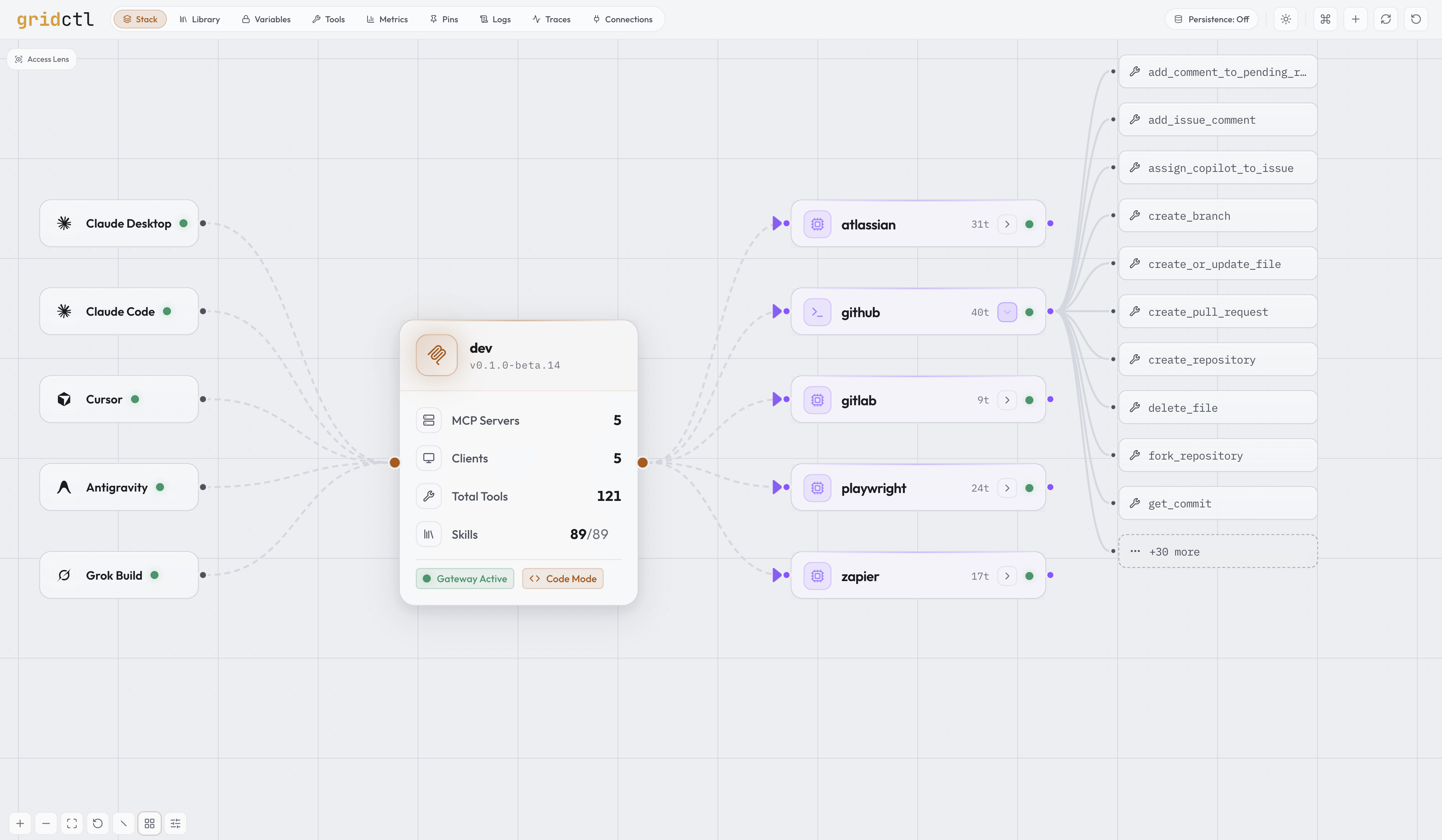
Gridctl aggregates tools from MCP servers into a single gateway and serves Agent Skills as MCP prompts to upstream clients. Define your stack in YAML, apply with one command, and connect Claude Desktop (or any MCP client) through one endpoint.
gridctl apply stack.yaml
Designed for fast, ephemeral, stateless environments, inspired by Containerlab.
⚡️ Why gridctl
MCP servers are everywhere: different transports, different hosting models, different .json files accumulating like dust. Skills are a separate sprawl on top. Switching projects shouldn't mean rewriting every client config.
Gridctl gives you one declarative file for everything you want connected, one local endpoint your client talks to, and a UI that shows you what's actually running. Build fast, throw it away, rebuild it tomorrow.
version: "1"
name: daily

#  Secret set passed in at runtime
secrets:
  sets:
    - dev

network:
  name: daily-net
  driver: bridge

# Global gateway configuration
gateway:
  name: dev
  code_mode: on

# LLM clients auto-linked to this gateway on apply
link:
  - claude
  - claude-code
  - cursor
  - antigravity
  - grok

# Downstream MCP servers behind the gateway
mcp-servers:

  # Jira and Confluence via Atlassian's hosted remote MCP
  - name: atlassian
    command:
      - npx
      - mcp-remote
      - https://mcp.atlassian.com/v1/mcp

  # GitHub repos, issues, and PRs (containerized stdio server)
  - name: github
    image: ghcr.io/github/github-mcp-server:latest
    transport: stdio
    env:
      GITHUB_PERSONAL_ACCESS_TOKEN: ${var:GITHUB_PERSONAL_ACCESS_TOKEN}

  # Browser automation and page inspection
  - name: playwright
    command:
      - npx
      - '@playwright/mcp@latest'

  # SaaS app actions through Zapier's hosted MCP endpoint
  - name: zapier
    command:
      - npx
      - mcp-remote
      - https://mcp.zapier.com/api/v1/connect
      - --header
      - 'Authorization: Bearer ${var:ZAPIER_MCP_TOKEN}'
🪛 Install
curl -fsSL https://raw.githubusercontent.com/gridctl/gridctl/main/install.sh | sh
Installs the latest release to ~/.local/bin/gridctl. Full instructions for Homebrew, pre-built binaries, building from source, container runtime setup, and updating/uninstalling are in the Installation guide.
🚦 Quick Start
# Or scaffold your own starter stack.yaml
gridctl init

# Apply the example stack
gridctl apply examples/getting-started/skills-basic.yaml

# Check what's running
gridctl status

# Open the web UI
open http://localhost:8180

# Clean up
gridctl destroy examples/getting-started/skills-basic.yaml
🖥️ Connect LLM Application
The easiest way to connect is with gridctl link, which auto-detects installed LLM clients and injects the gateway configuration:
gridctl link              # Interactive: detect and select clients
gridctl link claude       # Link a specific client
gridctl link --all        # Link all detected clients at once
Declaring a link: block in stack.yaml (as above) does the same thing on every gridctl apply: each listed client is linked idempotently once the gateway is healthy, and clients that aren't installed warn and skip. gridctl destroy --unlink removes those entries again.
Already have MCP servers configured in your clients? gridctl import runs the same detection in reverse: it scans those configs (read-only), dedupes the servers it finds, and appends your selection to stack.yaml, offering plaintext secrets into the encrypted variable store on the way.
Supported clients: Claude Desktop, Claude Code, Cursor, Windsurf, VS Code, Gemini, Antigravity, OpenCode, Grok Build, Continue, Cline, AnythingLLM, Roo, Zed, Goose
Most Applications
{
  "mcpServers": {
    "gridctl": {
      "url": "http://localhost:8180/mcp"
    }
  }
}
Claude Desktop
{
  "mcpServers": {
    "gridctl": {
      "command": "npx",
      "args": ["-y", "mcp-remote", "http://localhost:8180/mcp", "--allow-http"]
    }
  }
}
Restart Claude Desktop after editing. All tools from your stack are now available.
Antigravity
{
  "mcpServers": {
    "gridctl": {
      "serverUrl": "http://localhost:8180/mcp"
    }
  }
}
Antigravity borrows Windsurf's serverUrl field but speaks streamable HTTP, so point it at the /mcp endpoint (not /sse). The IDE and CLI share ~/.gemini/config/mcp_config.json on Antigravity 2.0. Since Antigravity caps each MCP server at 100 tools, pair a large stack with gateway.code_mode: on.
🎬 Features
Stack as Code
Declarative, version-controlled MCP environments. Validate before you commit, plan before you apply, and detect the moment your environment drifts from what's in version control. Drift detection runs in the background: the canvas flags servers running but absent from your spec, and declarations in your spec that haven't been deployed.
gridctl search postgres        # Find servers in the catalog and the MCP Registry
gridctl add github             # Append a catalog server to stack.yaml by name
gridctl validate stack.yaml    # Lint and schema-check the spec (exit 0/1/2)
gridctl plan stack.yaml        # Diff against running state
gridctl apply stack.yaml       # Apply the spec
gridctl export                 # Reverse-engineer stack.yaml from a running stack
Learn more → Configuration Reference
gridctl optimize & Usage Observability
Every tool call's arguments and results are token-counted per server, replica, client, and tool, and the Metrics workspace charts throughput, call counts, and the savings from output format conversion (measured from the gateway's own before/after counts). gridctl optimize scans the running gateway and surfaces actionable findings with projected weekly token impact (unused servers, unused tools, schema overhead, and format-conversion shortfalls), plus a paste-ready YAML remediation for each.
gridctl optimize                          # styled findings table
gridctl optimize --format json            # machine-readable OptimizeReport
gridctl optimize --severity warn,critical # narrow to actionable findings
Learn more → Usage Observability
Output Format Conversion
Tool call results default to JSON. Set output_format at the gateway or per-server level to convert structured responses into TOON or CSV before they reach the client, reducing token consumption by 25–61% for tabular and key-value data. Non-JSON responses and payloads over 1 MB are passed through unchanged.
gateway:
  output_format: toon      # Default for all servers: json, toon, csv, text

mcp-servers:
  - name: analytics
    output_format: csv     # Override per server
Learn more → Configuration Reference
Tool Surface Control
A large stack floods the client's context with tools it will never call. Three axes compose: the per-server tools: whitelist narrows what exists, groups: bundle tools across servers behind their own endpoint at /groups/{name}/mcp, and clients: restricts what each linked client may touch.
groups:
  release:
    servers: [github]                      # every tool of these servers
    tools: [gitlab__create_merge_request]  # plus specific prefixed tools
    exclude: [github__delete_repo]         # subtract, applied last
gridctl groups                     # Groups, member counts, and endpoints
gridctl link cursor --group release
Learn more → Tools Workspace
Rate Limits
Cap call rates per client, server, or tool, enforced at tool-call dispatch, so a runaway agent stops at the limit instead of hammering a server. Omitting the block limits nothing.
limits:
  rate_limits:
    - server: github
      calls_per_minute: 30
      burst: 10
gridctl limits # Every rate limit and its state
Learn more → Configuration Reference
Schema Pinning
Gridctl pins every tool definition the first time it sees it and flags drift on later applies, so a server that quietly rewrites a tool's description or schema surfaces as a reviewable diff instead of reaching your agent unnoticed. Pinned definitions are also scanned for injection signals: hidden instructions, sensitive-file references, hidden Unicode, and cross-server tool shadowing. Skill documents get the same trust-on-first-use treatment (gridctl skill pins): per-file digests over the whole document set, drift held for human approval, and the same injection heuristics as advisory findings.
gridctl pins verify                # Exit 1 on drift
gridctl pins diff github           # Per-tool before/after plus scan findings
gridctl pins approve github        # Re-pin after review
Learn more → Configuration Reference
Downstream Authorization
For OAuth-protected remote servers, gridctl is the OAuth client: one browser login serves every connected LLM client, with tokens encrypted on disk and refreshed automatically. An unauthorized server deploys in a needs auth state rather than failing the stack.
mcp-servers:
  - name: notion
    url: https://mcp.notion.com/mcp
    auth:
      type: oauth
gridctl auth login notion
gridctl auth status
Learn more → Configuration Reference
Skill Library
Every SKILL.md in your registry surfaces to upstream MCP clients as a prompt. Author in the Library workspace in the web UI (or via gridctl skill * on the CLI), activate, and the prompt becomes available to Claude Desktop, Claude Code, Cursor, Codex, or anything that speaks MCP.
gridctl skill list                        # Show what's in the registry
gridctl skill add <git-repo>              # Import skills (and agents) from a remote repo
gridctl activate my-skill                 # Promote a draft → active
Skills follow the agentskills.io specification: author them as plain markdown with frontmatter and they work with every skill-aware client, not just gridctl.
The registry holds more than skills. The same import pipeline discovers Claude Code subagent definitions (agents/*.md), and gridctl skill project sync places both onto disk for clients that read files instead of MCP: identity copies for Claude Code, rendered dialects for OpenCode, Copilot, and Gemini CLI. A shared lockfile tracks every projected file, so drift is detected, hand edits are adoptable, and unsync removes exactly what gridctl wrote. The global context can likewise become a library of rule fragments with per-client assembly; see Global Context Sync.
Learn more → Skills guide
Packs
A pack is a git repo with a gridctl-pack.yaml manifest: a versioned selection of skills, agents, rule fragments, and gateway wiring that imports and applies as one unit, so a team setup is one command instead of a checklist.
gridctl pack add <git-repo>               # Clone, scan, and import the manifest's selection
gridctl pack apply team-pack              # Project everything to detected clients
gridctl pack remove team-pack             # Cascade removal by pack tag, never by name match
Every projection a pack applies is tagged with the pack name in the lockfile, which is what makes pack status and removal exact: resources you created yourself are never claimed or deleted.
Learn more → Packs guide
📙 Examples
| Example | What It Shows |
|---|---|
mcp-basic.yaml |
Stack with multiple MCP servers and tool filtering |
local-mcp.yaml |
Local process and SSH-tunneled MCP transports |
openapi-basic.yaml |
Turn a REST API into MCP tools via OpenAPI spec |
code-mode-basic.yaml |
Gateway code mode with search + execute meta-tools |
github-mcp.yaml |
GitHub MCP server integration |
registry-basic.yaml |
Skills registry with a single server |
var-basic.yaml |
Reference variable-store secrets with ${var:KEY} syntax |
per-client-scoping.yaml |
Restrict which servers and tools each linked client may touch |
declarative-link/stack.yaml |
Auto-link LLM clients on apply with a link: block |
autoscale-basic.yaml |
Reactive replica autoscaling for a stdio server |
otlp-jaeger.yaml |
Export traces to Jaeger via OTLP |
portable-pack/ |
Team pack: skills, agents, and wiring from one manifest |
📖 Documentation
- Getting started: Installation
- Reference: CLI · Configuration · REST API
- Guides: Skills · Packs · Tools Workspace · Global Context Sync · Scaling · Usage Observability
- Operations: Project Status · Troubleshooting
Full index at docs/.
🤝 Contributing
See CONTRIBUTING.md. PRs welcome for new transport types, example stacks, and documentation improvements.
No comments yet
Be the first to share your take.