
graphmind


Your codebase has a shape. Now your AI can see it. And remember it.
GraphMind turns your codebase into a knowledge graph your AI can query, navigate, and remember. Ask about dead code, dependencies, or blast radius — and get answers grounded in your actual architecture.
Up to 5,700× fewer tokens than raw search (~10M tokens saved per session). Works with Claude Code, Cursor, Windsurf, Cline, Zed, Continue, and any MCP-compatible AI assistant.
Why GraphMind
Every new AI session starts from zero. Your assistant re-reads the entire codebase, re-discovers architecture, and forgets every decision you explained last time. Across multiple projects, there's zero visibility into shared dependencies.
graphmind fixes this with four layers:
- Structural graph — function-level knowledge graph per repo (AST-based, tree-sitter, 30+ languages)
- Semantic embeddings — vector search over symbols (local ONNX, OpenAI, or Voyage AI)
- Persistent memory — declarative store for decisions, patterns, conventions — survives across sessions
- Cross-project links — dependencies and relationships between registered repos
Everything runs locally. No cloud. No open ports by default. No telemetry.
Benchmark
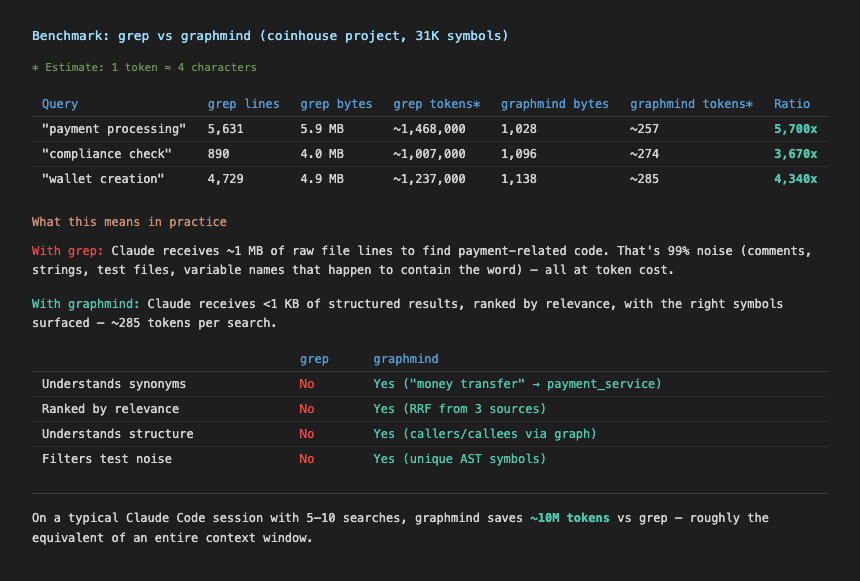
Comparison of token usage: grep -r (raw file search) vs graphmind search for the same query on a ~100k LOC codebase. graphmind returns ranked, structured results in under 300 tokens vs 1.5M+ for raw grep output.
Install
Desktop app (macOS) — recommended
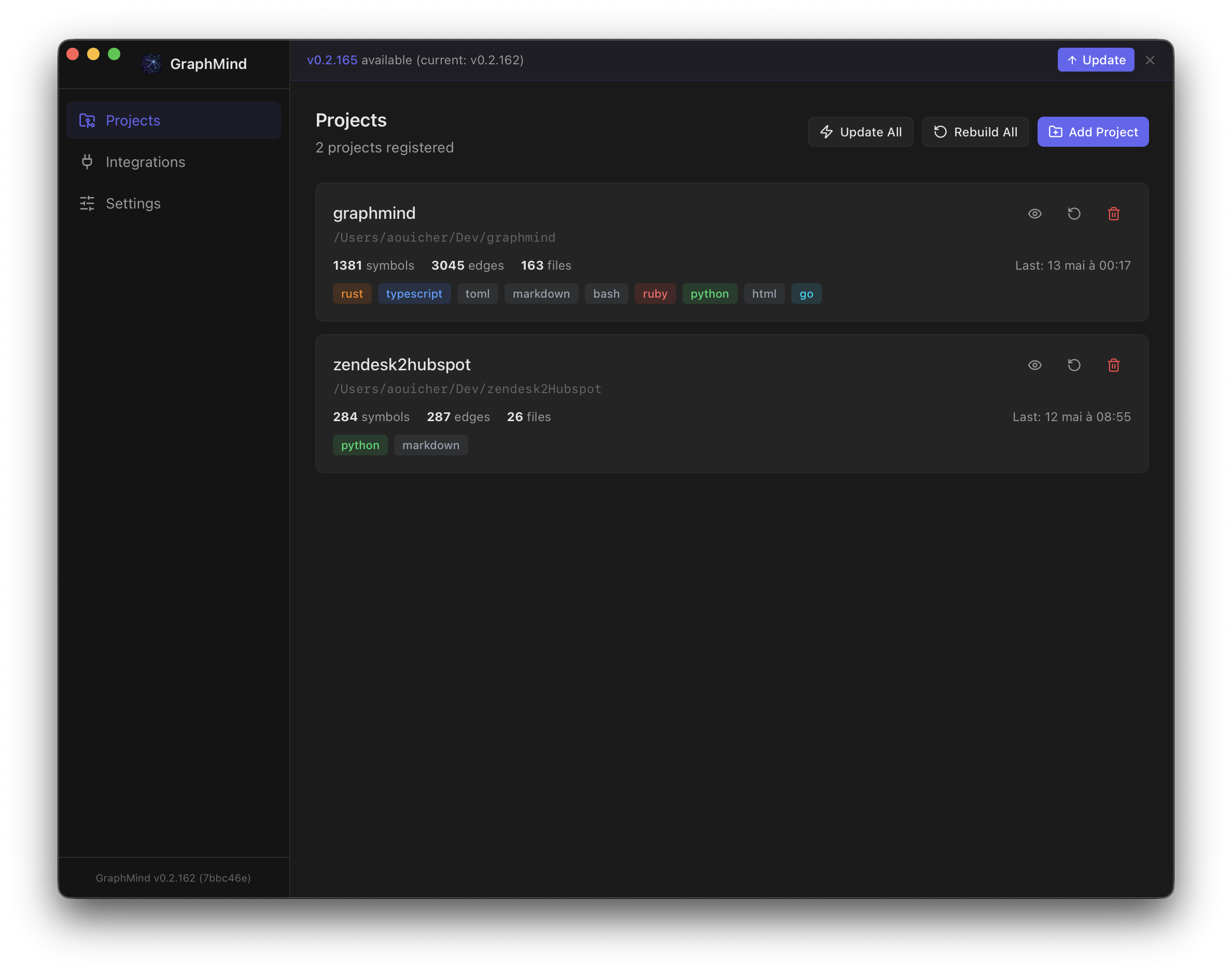
Download the .dmg from Releases. The app installs the CLI for you and runs a guided onboarding that configures MCP, hooks, skill, and embeddings — no terminal needed.
| Platform | Asset |
|---|---|
| macOS (Apple Silicon) | GraphMind-macos-arm64.dmg |
| macOS (Intel) | GraphMind-macos-x64.dmg |
Linux / Windows: CLI only — use the shell script or direct download below.
CLI — shell script (macOS/Linux)
curl -fsSL https://raw.githubusercontent.com/aouicher/graphmind/main/scripts/install.sh | bash
Then run graphmind setup once to configure Claude Code, hooks, and skill.
Homebrew (macOS/Linux)
brew install aouicher/graphmind/graphmind # CLI
brew install --cask aouicher/graphmind/graphmind # Desktop app (macOS only)
CLI — Linux (direct download)
curl -fsSL https://github.com/aouicher/graphmind/releases/latest/download/graphmind-cli-linux-x64 -o ~/.local/bin/graphmind
chmod +x ~/.local/bin/graphmind
From source
git clone https://github.com/aouicher/graphmind
cd graphmind
cargo build --release -p graphmind-cli
cp target/release/graphmind ~/.local/bin/
Quick Start
graphmind setup # once — configures Claude Code, Claude Desktop, hooks, skill
cd ~/projects/myapp
graphmind init # per project — registers, installs git hooks, builds graph
That's it. Claude Code, Claude Desktop, Cursor, and VS Code will use graphmind automatically.
graphmind setup (once, global)
Configures your machine so all AI tools can use graphmind:
- Shell PATH (
~/.zshenv,~/.zshrc,~/.bashrc) - Claude Code hooks (rewrites grep/find, injects session context, pre-fetches on prompts)
- Claude Code skill (
/gm+ 19 sub-skills) - Claude Desktop MCP (
~/Library/Application Support/Claude/claude_desktop_config.json) - Claude Code MCP (
~/.claude/settings.json) - OpenCode MCP (
~/.config/opencode/opencode.jsonc) - Cursor global MCP (
~/.cursor/mcp.json) — available in all Cursor projects - CLAUDE.md instruction block (
~/.claude/CLAUDE.md)
graphmind init (per project)
Registers and indexes a project, then writes MCP config for editors that support project-level config:
- Registers current directory in the graphmind registry
- MCP project configs — written automatically:
- Claude Code:
~/.claude.jsonunderprojects.<path>.mcpServers(local scope) - VS Code:
<project>/.vscode/mcp.json
- Claude Code:
- Git hooks (auto-rebuild on commit, impact check on push)
- Builds the code graph
cd ~/projects/api && graphmind init
cd ~/projects/web && graphmind init
cd ~/projects/lib && graphmind init
Both commands are idempotent — safe to re-run.
Manual setup (if you prefer granular control)
MCP server for Claude Code (global)
claude mcp add graphmind -- graphmind mcp
Or manually in ~/.claude/settings.json:
{
  "mcpServers": {
    "graphmind": {
      "command": "/home/user/.graphmind/bin/graphmind",
      "args": ["mcp"],
      "env": { "PATH": "/home/user/.graphmind/bin:/usr/local/bin:/usr/bin:/bin" }
    }
  }
}
MCP server for Claude Code (per project)
graphmind init writes this automatically to ~/.claude.json:
{
"projects": {
"/absolute/path/to/project": {
"mcpServers": {
"graphmind": {
"type": "stdio",
"command": "/home/user/.graphmind/bin/graphmind",
"args": ["mcp"],
"env": { "PATH": "/home/user/.graphmind/bin:/usr/local/bin:/usr/bin:/bin" }
}
}
}
}
}
MCP server for Claude Desktop
Claude Desktop does not inherit your shell PATH. Use the full path:
{
"mcpServers": {
"graphmind": {
"command": "/opt/homebrew/bin/graphmind",
"args": ["mcp"],
"env": { "PATH": "/opt/homebrew/bin:/usr/local/bin:/usr/bin:/bin" }
}
}
}
Config file location:
- macOS:
~/Library/Application Support/Claude/claude_desktop_config.json - Windows:
%APPDATA%\Claude\claude_desktop_config.json
Tip: Run
which graphmindto find the correct path on your system.
MCP server for Cursor (global)
graphmind setup writes this automatically to ~/.cursor/mcp.json:
{
  "mcpServers": {
    "graphmind": {
      "command": "/home/user/.graphmind/bin/graphmind",
      "args": ["mcp"],
      "env": { "PATH": "/home/user/.graphmind/bin:/usr/local/bin:/usr/bin:/bin" }
    }
  }
}
MCP server for VS Code (per project)
graphmind init writes this automatically to <project>/.vscode/mcp.json:
{
  "servers": {
    "graphmind": {
      "type": "stdio",
      "command": "/home/user/.graphmind/bin/graphmind",
      "args": ["mcp"],
      "env": { "PATH": "/home/user/.graphmind/bin:/usr/local/bin:/usr/bin:/bin" }
    }
  }
}
Claude Code search hook
graphmind install hook-claude
Registers hooks in ~/.claude/settings.json for:
- PreToolUse — rewrites grep/find/rg to
graphmind search, provides graph results for Grep/Glob/LS tools - SessionStart — loads project context (stats, structure) at session start
- UserPromptSubmit — pre-fetches relevant graph context based on the user's prompt
- PostToolUse — enriches results with graph-aware suggestions
Built-in intelligence:
- Exhaustive search bypass — detects "find all occurrences",
grep -c, pipes towc/sortand lets them through - Cache deduplication — identical searches within 5 minutes are skipped (0 tokens cost)
- Pattern extraction — extracts meaningful search terms from grep, find, fd, rg commands and Agent prompts
Claude Code skill
graphmind install skill
CLAUDE.md sync
graphmind sync                # updates CLAUDE.md in current project
graphmind sync --all          # updates CLAUDE.md for all registered projects
Git hooks
graphmind install hook-git
Architecture
┌─────────────────────────────────────────────┐
│  Claude Code / MCP Client                    │
├─────────────────────────────────────────────┤
│  MCP Server (rmcp SDK, stdio) — 27 tools     │
│  gm_query · gm_fn · gm_file · gm_deps      │
│  gm_outline · gm_who_calls_chain · gm_dead  │
│  gm_export · gm_similar · gm_listeners      │
│  gm_memory_search · gm_cross_query          │
│  gm_status · gm_context · gm_diff_impact    │
├─────────────────────────────────────────────┤
│  Layer 1: Structural Graph (SQLite + FTS5)   │
│  Symbols · Edges · Call sites                │
├─────────────────────────────────────────────┤
│  Layer 2: Semantic Embeddings (SQLite)       │
│  Cosine search · Graph expansion · RRF      │
├─────────────────────────────────────────────┤
│  Layer 3: Semantic Memory (JSONL)            │
│  Decisions · Patterns · Conventions          │
├─────────────────────────────────────────────┤
│  Layer 4: Cross-Project Links (JSONL)        │
│  Shared symbols · Inferred relationships     │
├─────────────────────────────────────────────┤
│  Rust Core (tree-sitter + napi-rs)           │
│  Multi-language parsing · Symbol extraction  │
└─────────────────────────────────────────────┘
Search & Embeddings
graphmind search combines three retrieval strategies into a single ranked result:
graphmind search "<query>"          # hybrid search (FTS + semantic + graph)
graphmind search "<q1>; <q2>"       # multi-query with RRF ranking
graphmind search "<query>" --kind function
How search works
- FTS5 — exact text matching on symbol names, signatures, docs
- Semantic embeddings — cosine similarity finds conceptually related symbols (e.g. "money transfer" →
payment_service) - Graph expansion — top results are expanded with 1-hop callers/callees from the structural graph
Results are fused via Reciprocal Rank Fusion (RRF, k=60). Each result shows its source: [FTS], [SEM], [GRAPH], or combinations like [FTS+SEM+G].
Embedding providers
Configured in ~/.graphmind/config.json:
{
  "embedding": {
    "mode": "voyage",
    "model": "voyage-code-3",
    "api_keys": {
      "voyage": "pa-..."
    }
  }
}
| Mode | Model (default) | Notes |
|---|---|---|
local |
nomic-embed-text-v1.5 (768d) |
ONNX, no API key needed |
openai |
text-embedding-3-small (1536d) |
Supports custom openai_base_url |
voyage |
voyage-code-3 (1024d) |
Code-specialized, recommended |
disabled |
— | No embeddings — default for new installs |
Embeddings are computed automatically during graphmind build when a provider is configured. If the model changes, the embedding index is rebuilt automatically.
OpenAI-compatible providers (Azure, proxies) can set a custom base URL:
{
  "embedding": {
    "mode": "openai",
    "model": "text-embedding-3-large",
    "openai_base_url": "https://your-proxy.example.com/v1",
    "api_keys": { "openai": "sk-..." }
  }
}
Persistent Memory
graphmind gives Claude persistent memory across sessions — not just code, but decisions, patterns, conventions, and context.
How it works
Memory is fully automatic:
- Auto-recall — at each prompt, the hook searches memory for relevant context and injects it into the conversation. No action needed.
- Auto-save — Claude proactively saves important facts (decisions, patterns, conventions, bugs, context) without asking. You'll see a brief mention of what was saved.
This works for both Claude Code (via hooks) and Claude Desktop (via MCP instructions).
What gets saved
| Type | Examples |
|---|---|
decision |
Architecture choices, tech decisions, trade-off resolutions |
pattern |
Recurring approaches, solutions, code patterns |
convention |
Naming rules, workflow conventions, style guides |
bug |
Known issues, workarounds, gotchas |
context |
Business context, project goals, user preferences |
Storage
Memories are stored as JSONL files in ~/.graphmind/memory/:
global.jsonl— cross-project knowledge (user preferences, team conventions)<project-slug>.jsonl— project-specific facts
Manual control
graphmind memory add "<fact>" [--project <slug>] [--global]
graphmind memory search "<query>"
graphmind memory list
graphmind memory delete <id>
Memories persist indefinitely until explicitly deleted. They are recalled automatically — you never need to ask "do you remember X?".
Commands
Setup & Init
graphmind setup                   # global one-time (hooks, MCP, skill)
graphmind init [path]             # per-project (register, git hooks, build)
graphmind init --skip-build       # per-project without building
Registry
graphmind register [path]     # register current dir
graphmind unregister <slug>   # remove project
graphmind list                # all projects
graphmind status              # health check
Build
graphmind build [slug]        # incremental build
graphmind build --all         # all projects
graphmind build --full        # force full rebuild
graphmind build --watch       # watch mode (debounced 2s)
graphmind clean [slug]        # remove graph cache (forces full rebuild)
graphmind clean --all         # clean all projects
Query
graphmind query <symbol>                          # find symbol + connections
graphmind query <symbol> --file <path>            # filter to a specific file
graphmind query <symbol> --kind function          # filter by kind
graphmind query <symbol> --limit 20 --offset 0   # paginate callers/callees
graphmind fn <symbol>                             # full detail with source + callers/callees
graphmind fn <symbol> --file <path>               # disambiguate by file
graphmind fn <symbol> --kind function             # filter by kind
graphmind fn <symbol> --limit 20 --offset 0      # paginate callers/callees
graphmind fn <symbol> --include-content           # include source code in output
graphmind fn <symbol> --no-tests                  # skip test files
graphmind deps <file>                             # file dependency map
graphmind impact <file>                           # transitive reverse deps
graphmind fn-impact <symbol>                      # blast radius
graphmind diff-impact                             # impact of current git changes
graphmind diff-impact --staged
graphmind map [slug]                              # most-connected files
graphmind cycles [slug]                           # circular dependencies
graphmind outline <file>                          # hierarchical symbol tree for a file
graphmind file <file>                             # raw file content from project root
graphmind who-calls <symbol>                      # transitive caller chain (BFS)
graphmind who-calls <symbol> --depth 5            # limit traversal depth
graphmind dead-code                               # symbols with no incoming edges
graphmind dead-code --kind function               # filter by kind
graphmind dead-code --limit 50                    # cap results
graphmind similar <symbol>                        # structurally similar symbols
graphmind similar <symbol> --limit 10             # cap results
graphmind listeners <event>                       # find listeners for an event name
Search
graphmind search "<query>"                        # hybrid FTS + semantic + graph
graphmind search "<q1>; <q2>"                     # multi-query
graphmind search "<query>" --kind class
graphmind search "<query>" --offset 10            # paginate results
graphmind search "<query>" --include-content      # include source code in output
Embeddings
graphmind embed                     # show embedding index status
graphmind embed --run               # generate embeddings for current project
graphmind embed --run --all         # generate embeddings for all projects
Memory
graphmind memory add "<fact>" [--project <slug>] [--global]
graphmind memory search "<query>"
graphmind memory list
graphmind memory delete <id>
Cross-Project
graphmind cross query <symbol>      # search across ALL projects
graphmind cross deps <slug>         # who depends on this project
graphmind cross links               # all cross-project relationships
graphmind cross link add <a> <b>    # manual link
graphmind cross link infer          # auto-detect shared symbols
Export
graphmind export [slug] -f dot            # Graphviz dot format
graphmind export [slug] -f mermaid        # Mermaid diagram
graphmind export [slug] -f json           # JSON graph
graphmind export --cross -f mermaid       # cross-project diagram
graphmind export --obsidian ~/vault/      # Obsidian vault with [[wikilinks]]
Exclude
graphmind exclude list                    # show all patterns
graphmind exclude add grafana-data        # exclude from current project
graphmind exclude add grafana-data --global
graphmind exclude remove grafana-data
Team Sync (Pro/Team tiers)
Share your code graph and architectural memories across your team. Every member gets the same structural understanding without re-indexing.
graphmind team init [--team-id <id>]   # connect to a team
graphmind team push [slug]             # push graph + shared memories
graphmind team push --memories-only    # push memories only
graphmind team push --graph-only       # push graph only
graphmind team push --all              # push all projects
graphmind team pull [slug]             # pull latest from team
graphmind team status                  # sync status per project
- Auto-sync (Team tier): graph is pushed automatically after each
graphmind build - Memory privacy: memories marked private (
is_shared: false) never leave the machine - MCP tools:
gm_team_memories(shared context) ·gm_team_who_knows(who documented a symbol)
Sessions
graphmind session start [slug]      # log session start
graphmind session save ["message"]  # save session summary
graphmind session history [slug]    # recent sessions
Install / Uninstall
graphmind install hook-claude     # Claude Code search hook
graphmind install hook-git        # git hooks (post-commit + pre-push)
graphmind install skill           # Claude Code skill
graphmind uninstall hook-claude   # remove Claude Code hook
graphmind uninstall hook-git      # remove git hooks
graphmind uninstall all [--purge] [--yes]  # remove ALL integrations (reverse of setup+init); --purge also deletes ~/.graphmind data
graphmind sync [slug]             # inject graph context into CLAUDE.md
graphmind sync --all              # update CLAUDE.md for all projects
Update
graphmind update                  # download and install latest version
graphmind update --check          # check for updates without installing
If installed via Homebrew, use brew upgrade graphmind instead. The desktop app also checks for CLI updates at startup and offers one-click update.
Token Optimization
MCP responses are optimized for LLM consumption — minimal tokens, maximum signal.
Compact format (default): One-line-per-symbol text output instead of verbose JSON. Example:
>> 5 result(s) for "auth" [FTS+semantic+graph]:

  AuthService [Class] src/services/auth.ts:3 (0.95) [FTS+SEM]
    implements Service
  validate_token [Function] src/services/auth.ts:15 (0.82) [FTS+G]
    (token: string, scope?: string) -> TokenResult
Field pruning: No id, no null signature/doc/content, no redundant total_found/projects_searched fields. Only useful information is returned.
Smart limits: Default 15 results (not 50). Truncation indicators (+N more...) shown only when results are capped.
Content opt-in: Symbol source code is omitted by default. Pass include_content: true to any tool to get it.
JSON mode: Pass format: "json" to any tool to get structured JSON output instead of compact text.
Hook cache deduplication: The Claude Code hook skips duplicate searches within a 5-minute window. Same query → instant skip (0 tokens). Cache is per-session at /tmp/graphmind-hook-cache.txt.
MCP Tools Reference
graphmind exposes 25 tools via MCP (Model Context Protocol):
| Tool | Description |
|---|---|
gm_query |
Find symbol and its connections |
gm_fn |
Function detail with source + callers/callees |
gm_deps |
File-level dependency map |
gm_impact |
Transitive reverse dependencies |
gm_fn_impact |
Blast radius for a symbol |
gm_diff_impact |
Impact of current git changes |
gm_map |
Most-connected files |
gm_cycles |
Circular dependency detection |
gm_search |
Hybrid search (FTS + semantic + graph) |
gm_listeners |
Find event listeners by event name |
gm_outline |
Hierarchical file structure with qualified names |
gm_file |
Raw source content of a file |
gm_who_calls_chain |
Transitive caller chain (BFS) |
gm_dead_code |
Find symbols with no incoming edges |
gm_export |
Export subgraph as Mermaid/DOT |
gm_similar |
Find structurally similar symbols |
gm_memory_search |
Search stored decisions/patterns |
gm_memory_add |
Store a fact (requires confirmation) |
gm_memory_list |
List memory entries |
gm_cross_query |
Symbol search across all projects |
gm_cross_deps |
Cross-project dependency graph |
gm_cross_links |
List all cross-project links |
gm_status |
Project health and stats |
gm_context |
Full project context for session start |
gm_list_projects |
All registered projects |
gm_team_memories |
Shared team memories and context (Pro/Team) |
gm_team_who_knows |
Who documented a given symbol (Pro/Team) |
Security
- No open ports by default — MCP uses stdio.
- Path traversal protection — all file ops restricted to registered paths +
~/.graphmind/. - No network calls by default — everything runs locally. Embedding API calls only when explicitly configured. Team sync (Pro/Team tiers) is opt-in and never runs automatically on Free.
- API keys stored locally — in
~/.graphmind/config.json, never sent anywhere except the configured provider. - Atomic writes — memory JSONL writes use tmp+rename to prevent corruption.
- MCP write confirmation —
gm_memory_addrequires explicit confirmation.
Language Support
| Language | Extensions | Status |
|---|---|---|
| TypeScript | .ts, .tsx |
Stable |
| JavaScript | .js, .jsx, .mjs |
Stable |
| Python | .py |
Stable |
| Go | .go |
Stable |
| Rust | .rs |
Stable |
| Ruby | .rb |
Stable |
| Terraform (HCL) | .tf, .tfvars |
Stable |
| YAML | .yml, .yaml |
Stable |
| Markdown | .md |
Stable |
| C | .c, .h |
Stable |
| Objective-C | .m, .mm |
Stable |
| Java | .java |
Stable |
| PHP | .php |
Stable |
| Swift | .swift |
Stable |
| Bash | .sh, .bash, .zsh |
Stable |
| Perl | .pl, .pm |
Stable |
| CSS | .css |
Stable |
| SCSS | .scss, .sass |
Stable |
| HTML | .html, .htm |
Stable |
| TOML | .toml |
Stable |
| Dockerfile | Dockerfile |
Stable |
| SQL | .sql |
Stable |
| C++ | .cpp, .cc, .cxx, .hpp |
Stable |
| C# | .cs |
Stable |
| Kotlin | .kt, .kts |
Stable |
| Dart | .dart |
Stable |
| Scala | .scala, .sc |
Stable |
| R | .r, .R |
Stable |
| GraphQL | .graphql, .gql |
Stable |
| PowerShell | .ps1, .psm1 |
Stable |
Data Storage
All data lives in ~/.graphmind/:
~/.graphmind/
├── config.json          # registered projects + embedding settings
├── memory/              # JSONL memory files
├── graphs/<slug>/
│   ├── graph.db         # structural graph (SQLite + FTS5)
│   ├── embeddings.db    # vector embeddings (SQLite)
│   ├── meta.json        # build stats
│   └── cache/           # incremental build cache
├── cross-links/         # cross-project relationships
└── sessions/            # daily session logs
Everything is plaintext or SQLite — fully inspectable with standard tools.
Contributing
Contributions are welcome. graphmind is MIT licensed.
Setup
git clone https://github.com/aouicher/graphmind
cd graphmind
cargo build --release -p graphmind-cli
cargo clippy --workspace -- -D warnings
cargo test --workspace
Branch model
| Branch | Purpose |
|---|---|
main |
Stable, protected. Only maintainers merge here. |
feat/<name> |
New features |
fix/<name> |
Bug fixes |
chore/<name> |
Tooling, deps, CI |
All changes go through a pull request targeting main. Direct pushes to main are blocked.
Opening a PR
- Fork the repo and create a branch from
main - Make your changes — keep commits atomic and descriptive
- Run
cargo clippy --workspace -- -D warningsandcargo test --workspace— both must pass - Open a PR against
mainwith a clear description of what and why - One maintainer review required before merge
Tagging and releases
Releases are triggered by pushing a semver tag:
git tag v0.3.0
git push origin v0.3.0
The CI will build binaries for macOS (arm64, x64) and Linux (x64), create a GitHub release, update the Homebrew formula, and publish the Tauri auto-updater manifest — all automatically.
Use -rc suffix for pre-releases: v0.3.0-rc1 (published as pre-release, skipped by Homebrew).
Reporting issues
Open a GitHub issue with steps to reproduce, your OS, and the output of graphmind status.
For security vulnerabilities, see SECURITY.md.
No comments yet
Be the first to share your take.