
Gissen
The headless visual editor for Vue. Agent-native, self-hostable, MIT-licensed.

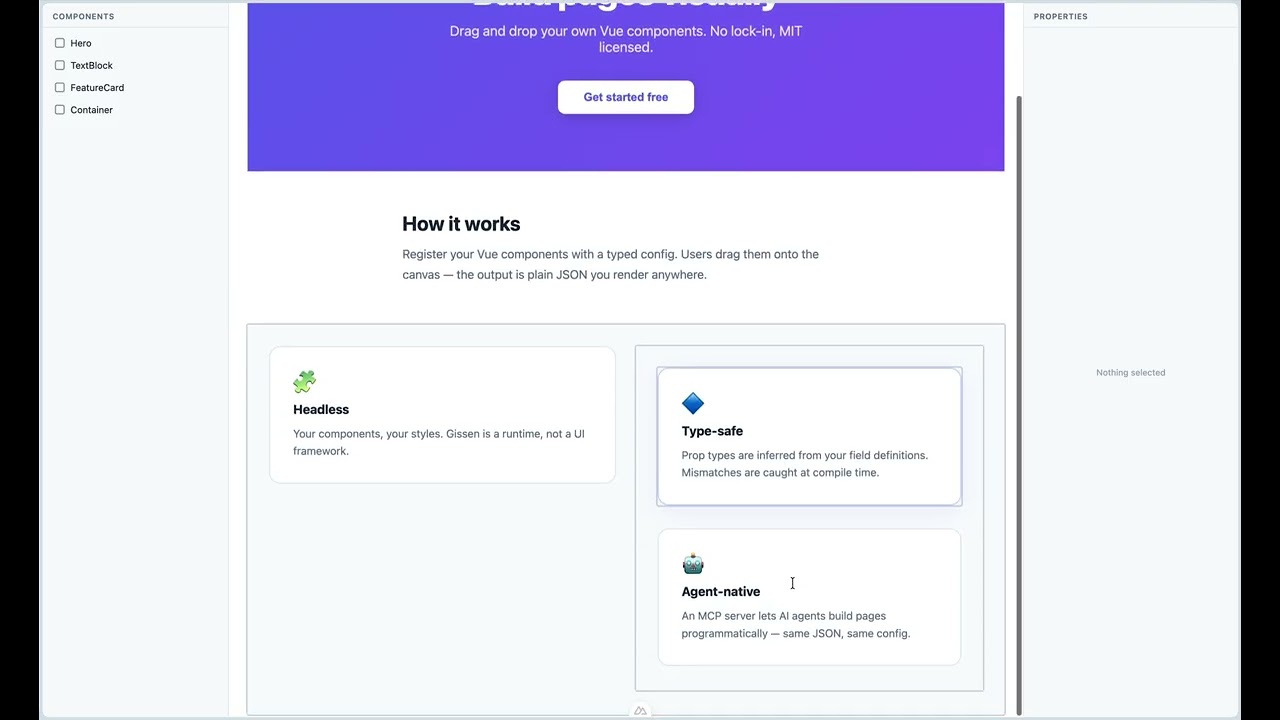
Gissen is an open-source headless visual editor for Vue 3. Developers register their existing Vue components with a typed config object; end-users (or AI agents, via an MCP server) drag and drop those components onto a canvas to build pages. The output is JSON describing the page tree, which the developer renders back into real Vue components in their app.
It is the Vue equivalent of Puck, the React-based visual editor.
Status: pre-alpha. APIs are unstable. The editor canvas with drag-and-drop, the properties panel, undo/redo history, viewport preview, and the production renderer (
<GissenRender>, SSR-ready) are functional.
Demo & deep dive
📝 Building a headless visual editor for Vue: the Vue answer to Puck — a technical deep dive on dev.to.
Quickstart
npm install gissen
1. Register your components — a typed config maps component names to editable fields and the Vue component that renders them:
// gissen.config.ts
import { defineGissenConfig } from 'gissen/render'
import Hero from './components/Hero.vue'

export default defineGissenConfig({
  components: {
    Hero: {
      fields: {
        title: { type: 'text', label: 'Title' },
      },
      defaultProps: { title: 'Hello world' },
      render: Hero,
    },
  },
})
2. Edit — drop <GissenEditor> on a page; users build the page tree
visually, and the document is plain JSON you can persist anywhere:
<script setup lang="ts">
import type { GissenData } from 'gissen'
import { GissenEditor } from 'gissen'
import { ref } from 'vue'
import config from './gissen.config'
import 'gissen/style.css'

const data = ref<GissenData>({ root: { props: {} }, content: [] })

function save() {
  localStorage.setItem('page', JSON.stringify(data.value))
}
</script>

<template>
  <button @click="save">
    Save
  </button>
  <GissenEditor v-model:data="data" :config="config" style="height: 100vh;" />
</template>
3. Render — put <GissenRender> on the real page with the saved JSON.
Imported from gissen/render, it ships without the editor stack, emits zero
wrapper elements, and is SSR-safe:
<script setup lang="ts">
import type { GissenData } from 'gissen/render'
import { GissenRender } from 'gissen/render'
import config from './gissen.config'

const data: GissenData = JSON.parse(localStorage.getItem('page') ?? '{"root":{"props":{}},"content":[]}')
</script>

<template>
  <GissenRender :config="config" :data="data" />
</template>
See the documentation and the basic-nuxt example for the full tour, including SSR.
Monorepo structure
gissen/
├── packages/
│   ├── core/                # gissen — editor + renderer library
│   ├── mcp/                 # gissen-mcp — MCP server for AI agents
│   └── create-gissen-app/   # create-gissen-app — project scaffolder
├── apps/
│   └── docs/                # VitePress documentation site
└── examples/
    └── basic-nuxt/          # Example Nuxt 4 app using Gissen
Development
This is a pnpm workspace. Requires Node 20+.
pnpm install     # install all workspace dependencies
pnpm dev         # run dev servers across packages
pnpm build       # build all packages
pnpm test        # run tests across packages
pnpm lint        # lint the whole repository
pnpm typecheck   # type-check across packages
See CONTRIBUTING.md for more.
No comments yet
Be the first to share your take.