
ForkTTY
Linux-native workspace terminal with embedded Ghostty, a programmable local socket API, first-class git worktrees, and prompt-aware notifications.
ForkTTY runs shells and coding agents in isolated workspaces, keeps terminal attention visible, exposes a user-local Unix socket for automation, and can place work in dedicated git worktrees without tying the UI to one agent vendor.




Website · Docs · Agent context · Download v0.2.0-alpha.20 AppImage
Status: Early alpha (v0.2.0-alpha.20). ForkTTY is Linux-only and the GTK/Ghostty runtime is now the primary implementation. The AppImage is the primary Linux download for this alpha; the Debian package remains available for Debian/Ubuntu users.
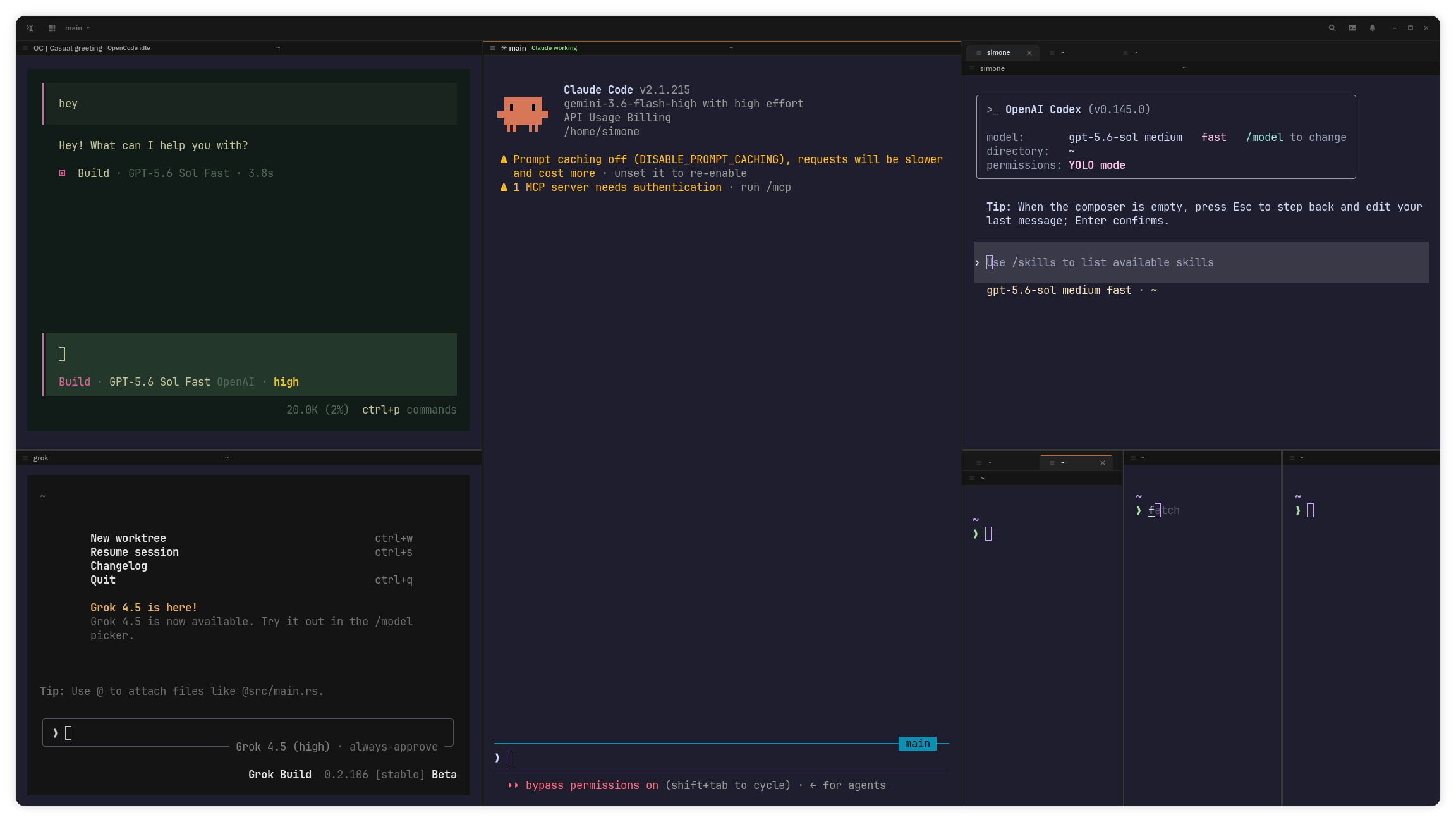
For the fastest local walkthrough, read GETTING_STARTED.md. For local quality targets, read METRICS.md. For the complete user guide, read forktty.dev/docs. For agent-oriented retrieval, start with llms.txt or the single-file llms-full.txt. This README covers the project overview, supported install paths, and the shortest useful workflows; the linked guides carry the detailed contracts.
Why ForkTTY
- Process-agnostic automation: the same socket and CLI primitives work for shells, editors, Codex, Claude Code, Pi, Antigravity CLI, OpenCode, and custom tools.
- Attention without orchestration policy: OSC and hook notifications, unread state, status/progress metadata, and the Agent HUD make terminal work visible while the process inside each pane owns its own coordination.
- First-class worktree workflows: create, attach, remove, and merge isolated worktree workspaces from the primary or a linked checkout through native
git2operations and optional.forktty/setup/.forktty/teardownhooks. - Native Linux terminal stack: GTK4/libadwaita shell with embedded Ghostty-backed terminals, a compact overlay or pinned workspace sidebar, split panes, session restore, notifications, command palette, settings, and quake mode.
- Local-first posture: no crash reporting or product event tracking, an anonymous daily usage ping that can be disabled, owner-only Unix socket permissions, bounded request/session/config files, and argv-based command execution. Optional update checks hit GitHub Releases at most once per day and can also be disabled.
Install
The fastest paths are the prebuilt artifacts from the v0.2.0-alpha.20 release. Each release ships:
forktty-0.2.0-alpha.20-x86_64.AppImage— recommended portable Linux package.forktty-0.2.0-alpha.20-x86_64.AppImage.zsync— AppImage delta-update metadata for external AppImage managers.forktty_0.2.0.alpha.20_amd64.deb— Debian/Ubuntu package.SHA256SUMS— checksums for release artifacts.
After downloading, verify checksums:
sha256sum -c SHA256SUMS
AppImage
chmod +x forktty-0.2.0-alpha.20-x86_64.AppImage
./forktty-0.2.0-alpha.20-x86_64.AppImage
The AppImage carries ForkTTY's private Ghostty libraries and a bundled
GTK4/libadwaita fallback. In auto mode it uses host GTK only when an eager
loader probe succeeds for both ForkTTY and the embedded Ghostty library;
otherwise it selects the bundled stack. Override the choice with
FORKTTY_APPIMAGE_GTK_RUNTIME=auto, host, or bundled. The host still
provides glibc, display/session services, fonts, and graphics drivers, so test
the artifact on the target distro and desktop.
ForkTTY checks GitHub Releases at most once per day by default. A writable AppImage can update itself after confirmation and SHA256 verification; extracted, read-only, or otherwise unsafe paths fall back to the release page so external AppImage managers remain in control. If the UI renders incorrectly, retry with the alternate GTK OpenGL renderer name:
GSK_RENDERER=gl ./forktty-0.2.0-alpha.20-x86_64.AppImage
# or
GSK_RENDERER=ngl ./forktty-0.2.0-alpha.20-x86_64.AppImage
Use GSK_RENDERER=cairo only as a slower software-rendering fallback. More
diagnostics are available in SUPPORT.md.
Debian / Ubuntu (.deb)
The .deb targets Debian 13/Trixie or newer and Ubuntu 24.04 LTS or newer.
Debian 12/Bookworm is below the package baseline because it does not provide
libadwaita 1.4+.
sudo apt install ./forktty_0.2.0.alpha.20_amd64.deb
# or, if apt cannot read the file path directly:
sudo dpkg -i forktty_0.2.0.alpha.20_amd64.deb
sudo apt -f install
The package installs the forktty binary, the desktop entry, and the
icon. Removing it (sudo apt remove forktty) cleans up
/usr/bin/forktty and the desktop integration.
Build from source
Requirements:
- Linux
- Rust 1.96+
- GTK4 and libadwaita development files
git, Zig, and the full Ghostty source submodule for the vendored Ghostty terminal libraries- No system Ghostty package is required; source and packaged builds use the pinned vendored Ghostty libraries
Developer repository checks also expect the full Ghostty source submodule:
git submodule update --init vendor/ghostty
Debian / Ubuntu:
sudo apt install build-essential libssl-dev libgtk-4-dev libadwaita-1-dev git zig desktop-file-utils
Fedora:
sudo dnf install gcc gcc-c++ openssl-devel gtk4-devel libadwaita-devel git zig desktop-file-utils
Arch / CachyOS:
sudo pacman -S base-devel openssl gtk4 libadwaita git zig desktop-file-utils
Source builds require libadwaita 1.4+, matching Debian 13/Trixie, Ubuntu
24.04 LTS, and newer distro packages. Release AppImages include GTK4 and
libadwaita as a fallback plus private gtk4-layer-shell; auto mode still uses a
compatible host GTK stack when its eager loader probe succeeds.
Clone and run:
git clone https://github.com/Lucenx9/forktty.git
cd forktty
git submodule update --init vendor/ghostty
scripts/ghostty-gtk-lib-probe.sh --ensure --print-path
cargo run -p forktty-ui-gtk
Packaged builds are GTK/Ghostty-only. The experimental WebKitGTK browser pane
remains in source behind the opt-in browser feature; it is not shipped in
the AppImage or .deb for this alpha.
For the explicit terminal-only build used by release artifacts:
cargo run -p forktty-ui-gtk --no-default-features --features gtk-ghostty
For the source-only browser experiment, install WebKitGTK 6 development files and opt in:
cargo run -p forktty-ui-gtk --no-default-features --features browser
Contributor setup and the complete local gate live in CONTRIBUTING.md. Packaging, signing, and artifact smoke tests live in RELEASING.md and docs/release-qa.md.
First Run
Check the environment
After install, confirm the runtime looks healthy:
forktty --version
forktty doctor
forktty doctor is a local-only inspector. It reports the resolved
config, session, socket, hook config paths, and known recovery behaviors,
and exits 0 on a clean environment or 2 with explicit warnings. Use
forktty --json doctor when you also need the socket doctor report with
environment, executable, and hook config paths.
Default workspace and shortcuts
ForkTTY opens the current directory as the main workspace. Use the
command palette for most navigation and pane actions:
Ctrl+Shift+P: command paletteCtrl+Shift+N: new workspaceCtrl+Shift+O: open workspaceCtrl+Shift+H: split pane rightCtrl+Shift+E: split pane downCtrl+Shift+T: new tab in the focused paneCtrl+Shift+W: close paneCtrl++/Ctrl+=,Ctrl+-,Ctrl+0: zoom terminal panesCtrl+BorF9: toggle the workspace sidebar; unpinned it overlays panes, while pinned it reserves space beside them- Agents: titlebar button or command palette
Ctrl+Shift+M: notificationsCtrl+?(F1also works): keyboard shortcutsCtrl+,: settingsF10: main menu when focus is outside terminal content; terminal panes keep plainF10for TUI apps
Socket CLI
The same forktty binary exposes a user-local Unix socket and CLI for terminal
workspace automation. The socket is intentionally limited to primitives that
are useful for shells, editors, scripts, and coding agents alike: workspaces,
panes, terminal text, notifications, status/progress/log metadata, worktrees,
project actions, remotes, and a thin agent-session lifecycle adapter.
Diagnostic commands work even when the GTK app is not running:
forktty --help
forktty --version
forktty doctor
forktty worktree-doctor --cwd "$PWD" --json
Common live-socket commands:
forktty ping
forktty list
forktty focus main
forktty surfaces --workspace-name main
forktty split-surface --axis horizontal
forktty read-screen --scope visible
forktty capture-tail --lines 40
forktty notify "Build complete" --title Build
forktty notifications --limit 50
forktty context-snapshot --workspace-name main --json
forktty worktree-list --cwd "$PWD"
Use forktty capabilities --json for the runtime method list and
forktty examples for compact examples. ForkTTY exposes terminal and workspace
primitives, not task routing, provider-neutral team state, a built-in MCP
server, or managed agent skills.
Socket requests are one JSON-RPC object per line over the owner-only Unix
socket at $XDG_RUNTIME_DIR/forktty.sock (with an owner-only fallback under
/tmp/forktty-<uid>/). Before sending requests, official CLI and hook clients
verify that the connected server's SO_PEERCRED uid matches their effective
uid. Request/response bounds, notification cursors, worktree transaction
guarantees, shutdown behavior, and stability tiers are documented in
SPEC.md and
docs/socket-api.md.
Upgrading from orchestration builds
Older releases may have left marker-owned MCP registrations or a managed agent skill in external tool configuration. The current binary deliberately leaves those files untouched. Follow the ownership-safe removal procedure in docs/socket-api.md.
Agent Hooks
Install hook templates for Codex, Claude Code, Antigravity CLI, and OpenCode:
forktty hooks setup                       # install default agents
forktty hooks setup codex                 # install just one
forktty hooks setup codex claude --dry-run
forktty hooks setup --full claude         # include Claude per-tool hooks
forktty hooks remove opencode             # remove ForkTTY-managed hooks/plugin
forktty hooks remove gemini               # cleanup legacy Gemini config only
--dry-run previews the merge. Setup writes atomically, preserves unrelated
entries, and creates timestamped backups when content changes. Hooks remain
optional and are never installed or refreshed automatically. Claude uses its
lower-frequency lifecycle profile by default; --full adds per-tool hooks.
hooks remove gemini exists only for legacy cleanup and does not enable Gemini
setup.
Settings > Agent hooks shows the installed providers before any action. Setup, update, and repair require confirmation; Remove deletes only ForkTTY-managed entries and leaves unrelated agent configuration untouched. Hooks report lifecycle and attention state; they never move focus or rearrange panes.
Diagnose an installed integration with:
forktty hooks doctor codex     # inspect socket, launcher, env, hook config
forktty hooks test codex       # round-trip a status update through the socket
Hooks publish lifecycle, progress, logs, and prompt notifications through the same local socket without taking over task planning. Installation paths, provider event coverage, disable variables, trust checks, and lifecycle semantics are documented in hooks/README.md and docs/agents.md.
If a lifecycle hook keeps the workspace id but loses or carries a stale pane id, ForkTTY can recover the session from its live learned target or one unique same-cwd surface inside that workspace. Ambiguous or missing targets fail without publishing a hidden agent status, and a corrected hook retry remains eligible.
Codex can run hooks from a shared app-server that lacks the terminal pane's
FORKTTY_* environment. ForkTTY still restores the workspace badge for a
local codex-tui session when exactly one unclaimed Codex TUI process has the
same cwd and belongs to one eligible ForkTTY surface. An additional Codex TUI
in that cwd, including one outside ForkTTY, makes the fallback fail closed.
Configuration
Config file: ~/.config/forktty/config.toml. All fields are optional. The
Settings dialog intentionally does not edit general.shell; change the shell by
editing this file or your login shell environment.
[general]
shell = "/bin/bash"
worktree_layout = "nested" # "nested", "sibling", or "outer-nested"
enable_pr_lookup = false
notification_command = ""
persist_terminal_processes = false

[appearance]
persistent_scrollback_lines = 0
sidebar_position = "left" # "left" or "right"
sidebar_visible = true
sidebar_pinned = false
window_mode = "normal" # "normal" or "quake"

[notifications]
desktop = true
sound = true
blocked_terminal_apps = []
blocked_terminal_types = []

[updates]
auto_check = true

[telemetry]
anonymous_ping = true
notification_command uses validated argv execution rather than sh -c.
persistent_scrollback_lines stores a bounded plain-text tail, while
persist_terminal_processes uses dtach when available so plain local terminal
processes can survive a GTK restart. Both are off by default; agent, SSH,
browser, and project-action panes keep their own lifecycle rules.
Terminal fonts, colors, scrollback, scrollbar, bell, cursor, and cell sizing
come from Ghostty's config at ~/.config/ghostty/config.ghostty (or the legacy
~/.config/ghostty/config). No system Ghostty installation is required.
updates.auto_check = true checks GitHub Releases no more than once every 24 hours. The stamp is written on both success and failure so offline machines are not probed on every launch.
telemetry.anonymous_ping = true sends at most one GTK-startup ping per UTC day to https://forktty.dev/api/telemetry/ping. The JSON body is limited to schema, kind, app, version, and date; it contains no install id, username, hostname, cwd, repository path, branch, shell, agent metadata, terminal buffer, socket payload, or crash data. Set it to false to disable the ping.
See SPEC.md for the full list of validated fields and their bounds.
Session Restore
GTK/Ghostty sessions are stored as:
~/.local/state/forktty/session-v2.json
ForkTTY imports legacy session.json when present, but saves the native runtime as v2. By default restore re-spawns fresh Ghostty-backed terminals; scrollback restore is limited to the opt-in plain-text tail controlled by persistent_scrollback_lines, and embedded Ghostty panes source that tail from the bounded end of full scrollback when the limited ABI is available. With general.persist_terminal_processes = true and dtach available, plain terminal process trees survive through the broker and restored panes re-attach by persisted surface id. If the setting is false on startup, old ForkTTY-managed broker sessions are cleaned before restore. Corrupt or structurally invalid session files are quarantined.
Security Summary
- Local Linux desktop threat model; same-user processes remain part of the local trust boundary.
- Unix socket defaults to
$XDG_RUNTIME_DIR/forktty.sockwith/tmp/forktty-<uid>/forktty.sockfallback and owner-only permissions; the server authenticates connecting peers, and official clients authenticate the server peer before sending requests. - Socket request lines, config files, and session files are size bounded.
- Shell paths, hooks, and custom notification commands use validated argv execution, not shell pipelines.
- Worktree names, socket-provided repo paths, and hook locations are validated before mutation or execution.
- ForkTTY makes no crash-reporting or product event-tracking network calls. With
telemetry.anonymous_ping = true, the GTK app sends one anonymous daily usage ping; set it tofalseto disable it. Withupdates.auto_check = true, the GTK app checks GitHub Releases at most once per day; browser panes and PR lookup remain optional/user-directed network paths. The shipped AppImage and.debdo not embed a browser runtime.
See SECURITY.md and PRIVACY.md.
Known Limitations
- Linux only. There are no supported macOS or Windows builds.
- libadwaita 1.4+ is required by the native terminal integration.
- The AppImage ships a bundled GTK4/libadwaita fallback plus Ghostty and gtk4-layer-shell, but prefers the host GTK stack only when the eager loader compatibility probe succeeds; it still relies on the host's glibc, fontconfig, OpenGL/Vulkan/Mesa driver stack, display-server libraries, and desktop session services. Test it on the target distro/desktop environment; prefer the
.debon Debian/Ubuntu when package-manager integration matters. - PTY/process persistence is opt-in for plain terminal panes through
general.persist_terminal_processesand requiresdtach; by default restored sessions spawn fresh shells. Scrollback persistence is opt-in, plain-text only, and bounded. - OSC 9 and basic OSC 99 terminal notifications are parsed from the Ghostty-owned PTY stream and rate-limited per surface; OSC 99 title/body base64 payloads and same-id title/body chunks are decoded with multipart title/body kept separate, same-id update/close controls affect ForkTTY's notification model, and in-app Open/Dismiss/Clear All plus basic same-id buttons can send OSC 99 reports. Targeted desktop notifications expose a best-effort Open action, notification dismiss/clear closes matching desktop and OSC 99 tracked notifications, icon names, application-name icon fallback, application/type filtering metadata, occasion filtering, urgency, expiry, and sound metadata inform notification handling, positive
wexpiry values dismiss in-app notifications, and boundedp=icondata can be cached byg; broader chunk lifecycle behavior remains partial. - Quake global shortcuts and layer-shell placement depend on desktop/compositor support.
- Agent hibernation/suspend UI, provider-side session existence checks, full theme customization, multi-window, and browser history/bookmark GTK address-bar integration are backlog items.
- Browser panes are source-only and experimental in this alpha; use
--features browseronly when intentionally testing that path.
Troubleshooting
forktty doctoris the first stop: it explains config, session, socket, and hook config problems before they trigger a launch failure. Useforktty --json doctorfor socket, environment, executable, and hook diagnostics.- If terminal panes report
ghostty-gtk-embed.soas missing in a source tree, rungit submodule update --init vendor/ghosttyandscripts/ghostty-gtk-lib-probe.sh --ensure --print-path. For packaged builds, rebuild or reinstall withbash scripts/build-deb.shorbash scripts/build-appimage.sh; the packagers install the verified library intousr/lib. - If the GTK app refuses to start, run it from a terminal to see GLib/GTK error output, then re-run
forktty doctor. - The local socket lives at
$XDG_RUNTIME_DIR/forktty.sock(or/tmp/forktty-<uid>/forktty.sock). Stale or foreign sockets are refused on startup; remove them by hand only after confirming no other ForkTTY instance owns them. - A corrupt
~/.config/forktty/config.tomlor~/.local/state/forktty/session-v2.jsonis renamed aside as*.bad-<timestamp>so the app can start with defaults; the rename reason is logged to stderr. - Local logs live under
~/.local/share/forktty/logs/.
Support
For usage questions and bug reports, start with SUPPORT.md
and include the output of forktty doctor, your distro/desktop
environment, install method, and the exact command or workflow that
failed. Security reports should follow SECURITY.md.
Contributing
Start with CONTRIBUTING.md for the development environment, workflow, and complete pre-PR gate. Architecture and scope live in SPEC.md and ROADMAP.md; maintainers should follow RELEASING.md and docs/release-qa.md when cutting an alpha.
Inspiration
Built from scratch for Linux, inspired by cmux and other multi-agent terminal workflows.
License
GNU Affero General Public License v3.0 (AGPL-3.0-only)
No comments yet
Be the first to share your take.