
fetchira
Free web search, page reading, deep research and image generation for your coding agent — one binary, zero monthly bill.
The problem
Your agent needs the web constantly, and paid search APIs bill by the call. Meanwhile a real amount of free search goes unused every month: Serper, Tavily, Exa and Parallel give away search credits, Firecrawl reads pages, Steel drives a headless browser — and your logged-in Gemini, Grok and ChatGPT accounts add search, multi-step deep research, image generation and file Q&A on top. Together they cover most of an agent's research, for free.
The catch is the bookkeeping. Each provider has its own API, its own key, its own quota
and its own reset window. To live on the free tiers you have to remember which key goes
where, track who is exhausted this month, and switch to another provider the moment one
starts returning 429. Nobody wants to do that by hand, and an agent certainly can't.
The solution
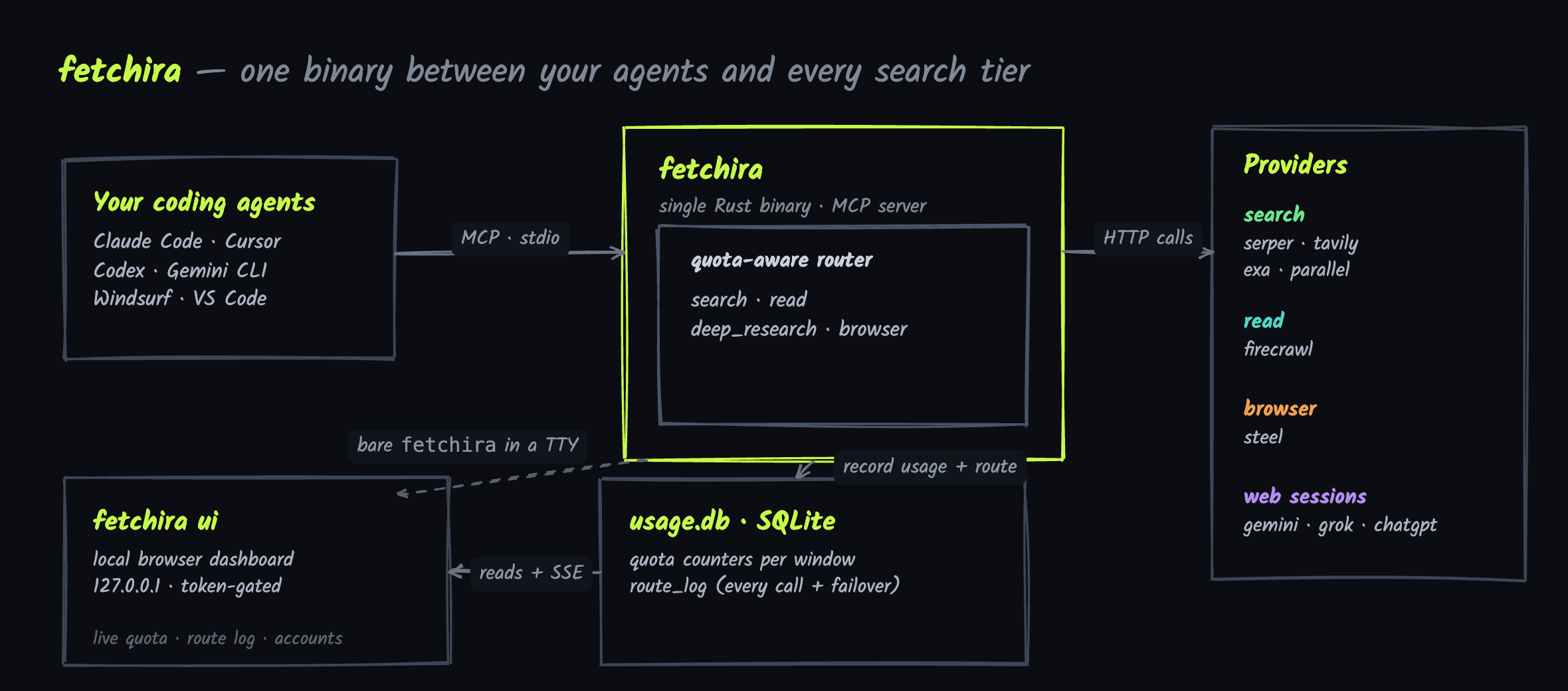
fetchira is that bookkeeping, turned into a program. It is a single Rust binary that speaks
MCP (the Model Context Protocol) to your coding agent. The agent asks for a generic
capability — search this, read this URL, do deep research, drive a browser — and
fetchira walks that capability's provider order (built-in, or set yours with fetchira priority), picks the least-exhausted account of each provider, and fails over to the next
the moment one errors or runs out. It keeps a running count of what each account has left,
so the free quota gets spent evenly instead of one key burning out while the rest sit idle.
It also ships with a local dashboard so a human can watch the same thing in real time and manage accounts without touching a config file.
Quickstart
# macOS, or Linux with Homebrew:
brew install ImmuneFOMO/tap/fetchira
# Linux (or macOS without Homebrew) — grabs the prebuilt binary into ~/.local/bin:
curl -fsSL https://raw.githubusercontent.com/ImmuneFOMO/fetchira/main/install.sh | sh

fetchira                                # opens the dashboard: connect a provider, try a search, register your coding tools
Prefer the terminal? fetchira setup (guided TUI) + fetchira install do the same.
Restart your coding tool and ask it to search the web — fetchira takes it from there.
The details: picking providers,
registering tools, web sessions,
configuration.
Or let your agent set it up
Don't want to touch a terminal? Paste this into Claude Code (or any coding agent with shell access) and it will install fetchira, walk you through providers, and register itself:
Install and set up fetchira (https://github.com/ImmuneFOMO/fetchira) for me:

1. Install: `brew install ImmuneFOMO/tap/fetchira`, or without Homebrew:
   `curl -fsSL https://raw.githubusercontent.com/ImmuneFOMO/fetchira/main/install.sh | sh`
2. Run `fetchira providers`, then help me pick 1-3 to start (serper + firecrawl for
   search + reading on API keys, or gemini_web for everything with just a Google login).
3. For API-key providers: give me the signup link, wait for me to paste the key, then run
   `fetchira add <provider> --key <KEY>`. Never run `add` without `--key` — it prompts
   interactively and will hang on you.
4. For gemini_web / grok_web / chatgpt_web: run `fetchira add <provider>` and tell me a
   browser window will open — I log in there myself; it waits up to 5 minutes.
5. Register the MCP server with the tool you are running in. For Claude Code:
   `claude mcp add fetchira -s user -- $(which fetchira)`. For other tools add
   `{"mcpServers": {"fetchira": {"command": "<path from which fetchira>"}}}` to their
   mcp config. Do not use `fetchira install` or `fetchira setup` — they are interactive
   TUIs and do nothing when you run them.
6. Verify with `fetchira list`: every account should show `key` or `session`, not
   `NO KEY` / `NEEDS LOGIN`.
7. Tell me to restart my coding tool, then test by asking it to search for something
   current.

Never run bare `fetchira` yourself — piped, it becomes the MCP server and hangs.
What you get
| Capability | The agent calls | fetchira routes to (default order — reorder with fetchira priority) |
|---|---|---|
| search | search |
tavily → serper → exa → parallel → gemini_web → grok_web → chatgpt_web |
| read | read |
firecrawl → tavily → serper → exa (then auto-escalates to a headless browser) |
| deep research | deep_research |
gemini_web → chatgpt_web → parallel → exa → grok_web → tavily |
| image | create_image |
chatgpt_web → gemini_web → grok_web |
| file Q&A | search / deep_research + file |
attach local files to a grok / gemini / chatgpt turn and ask about them |
| browser | browser |
steel |
| usage | usage |
live balance + per-tier limits + model/mode catalog, and a per-provider capability sheet |
- Quota-aware routing. Every call goes to the account with the most free quota left for
that capability. A
429/402marks that budget exhausted for the period and the router stops sending to it until the window resets. - Automatic failover. If the chosen account errors, fetchira moves to the next one for the
same capability and the agent never sees the hiccup. Force a single backend with
provider: "exa"and it fails over only among that provider's own accounts. - Many accounts per provider. Add
exa-1,exa-2, … and the router load-balances across them by remaining quota. - A sticky proxy per account. Give each account its own outbound IP (
proxy = "pool"from a Webshare pool, or a pinned URL) so multiple free accounts don't share one address. - Real balances, live. Where a provider exposes it, fetchira reads the actual figure from the
account instead of guessing from a nominal cap — credits for serper / tavily / firecrawl, a real
dollar balance for exa / parallel / steel (shown as
$balance · ≈N requests). - Niche research, not just keywords.
searchanddeep_researchtaketopic(web / news / academic),recency,domains(include, or-to exclude) anddepth— each mapped to the backend's native filter (Google News / Scholar, exa categories, date ranges) or folded into the query.usage(provider=…)returns that backend's full sheet: its niches,modeescape hatches, and ready-to-copy example calls. - Web sessions, not just API keys. gemini_web / grok_web / chatgpt_web authenticate with your
real logged-in browser cookies and return a synthesized answer with sources — plus multi-step
Deep Research (Gemini, Grok and ChatGPT), image generation and file Q&A.
usagereports each session's live per-tier limits and its selectable model/mode catalog. See Web sessions below. - A local dashboard. Live quota, a streaming route log, and full account management in the browser — covered next.
The dashboard
fetchira ui # opens http://127.0.0.1:7878 in your browser
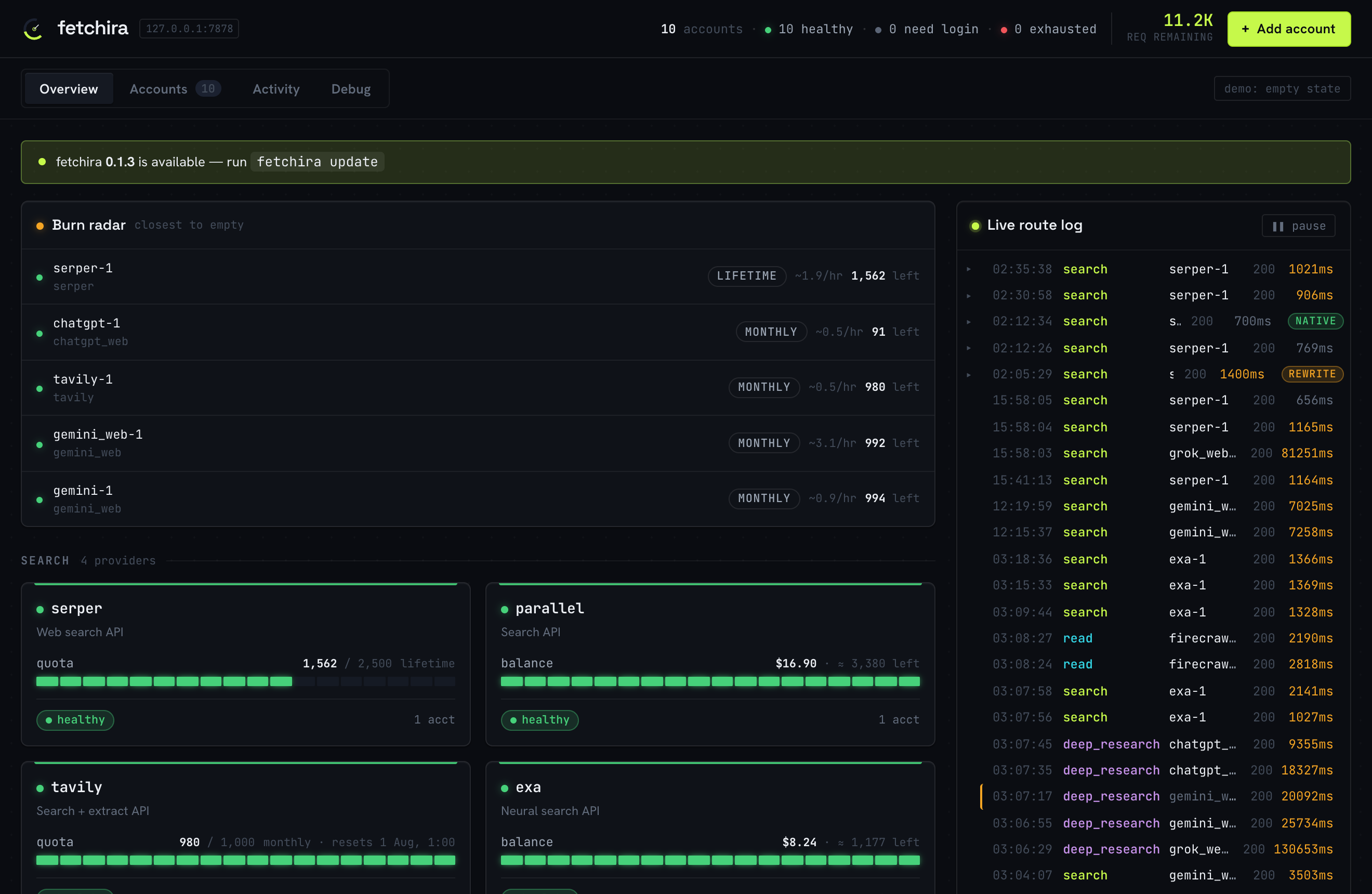
An instrument panel for the router. The Overview groups every provider by capability and
shows, per account, how much free quota is left and when it resets — next to a live log of
calls as they happen. A Routing priority panel on the same tab reorders which provider each
capability tries first (the same order fetchira priority sets on the CLI).
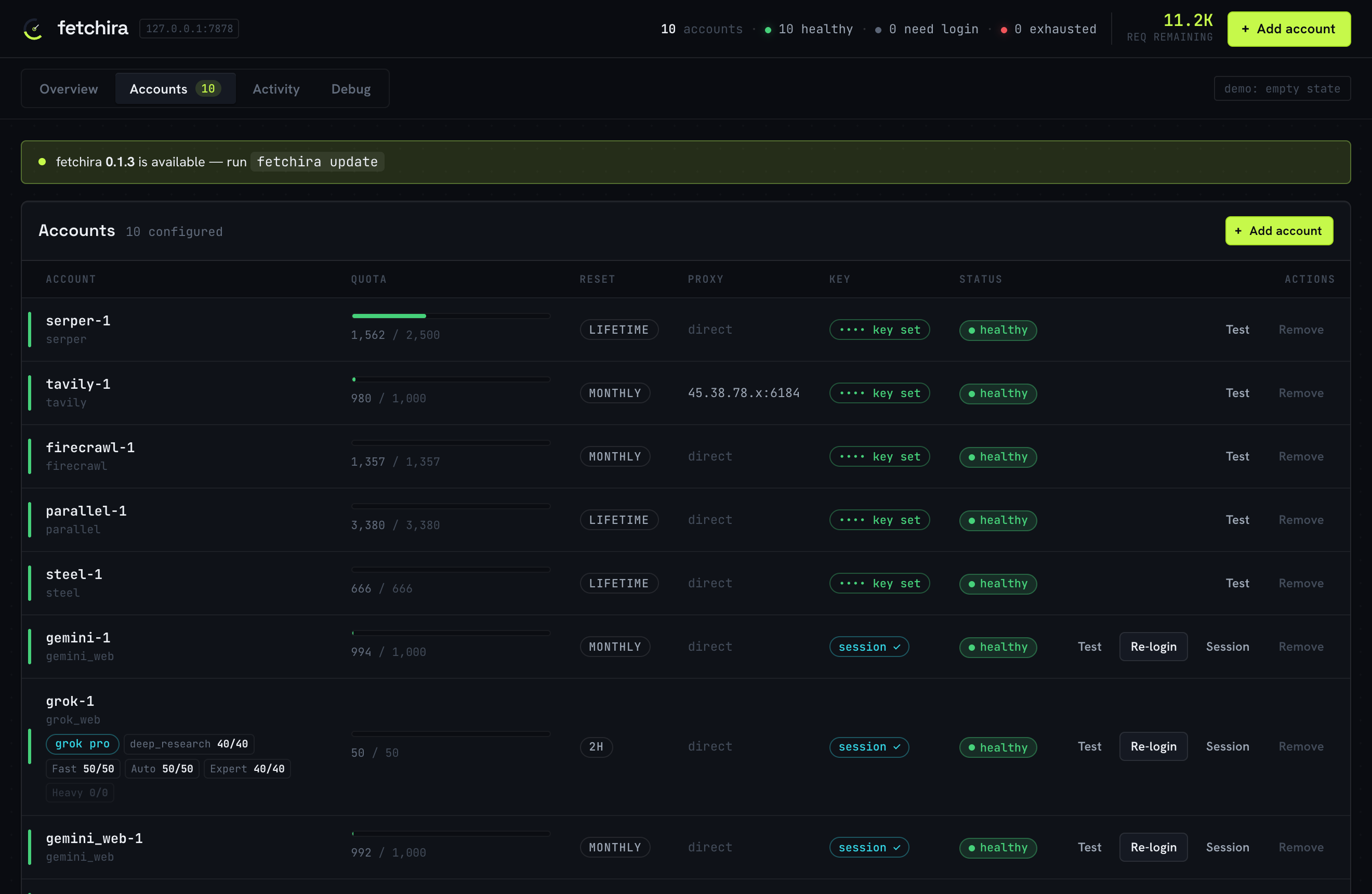
Accounts is the management surface: every account with its quota bar, reset window, proxy,
key/session status and health. Add, remove, re-login or send a real "Test" probe to any
account, all from here — it writes the same config file the CLI does. Secrets are never sent
to the browser (keys show as •••• key set, proxy credentials are masked).
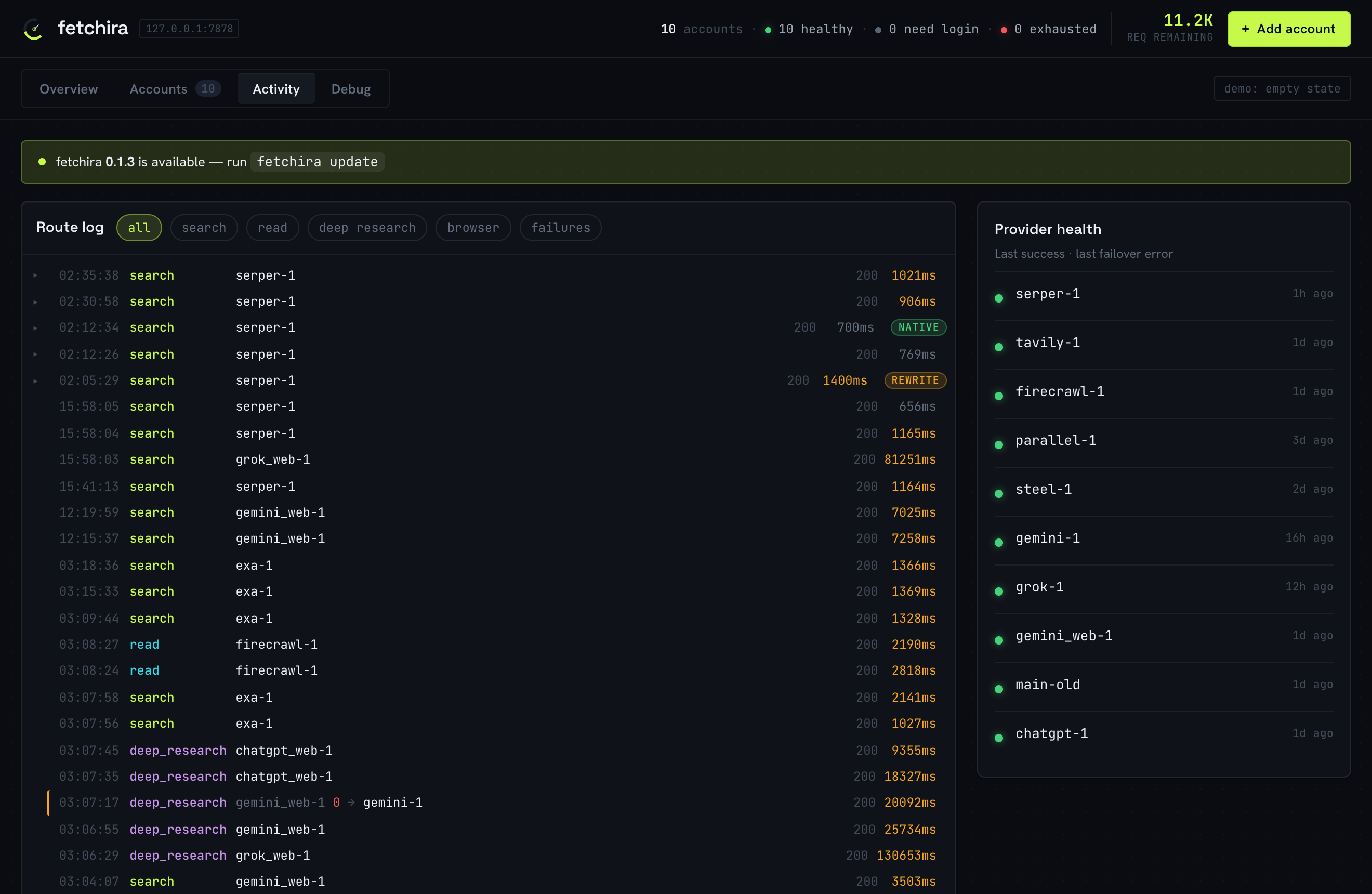
Activity is the full route log with filters, per-provider health, and the failover story
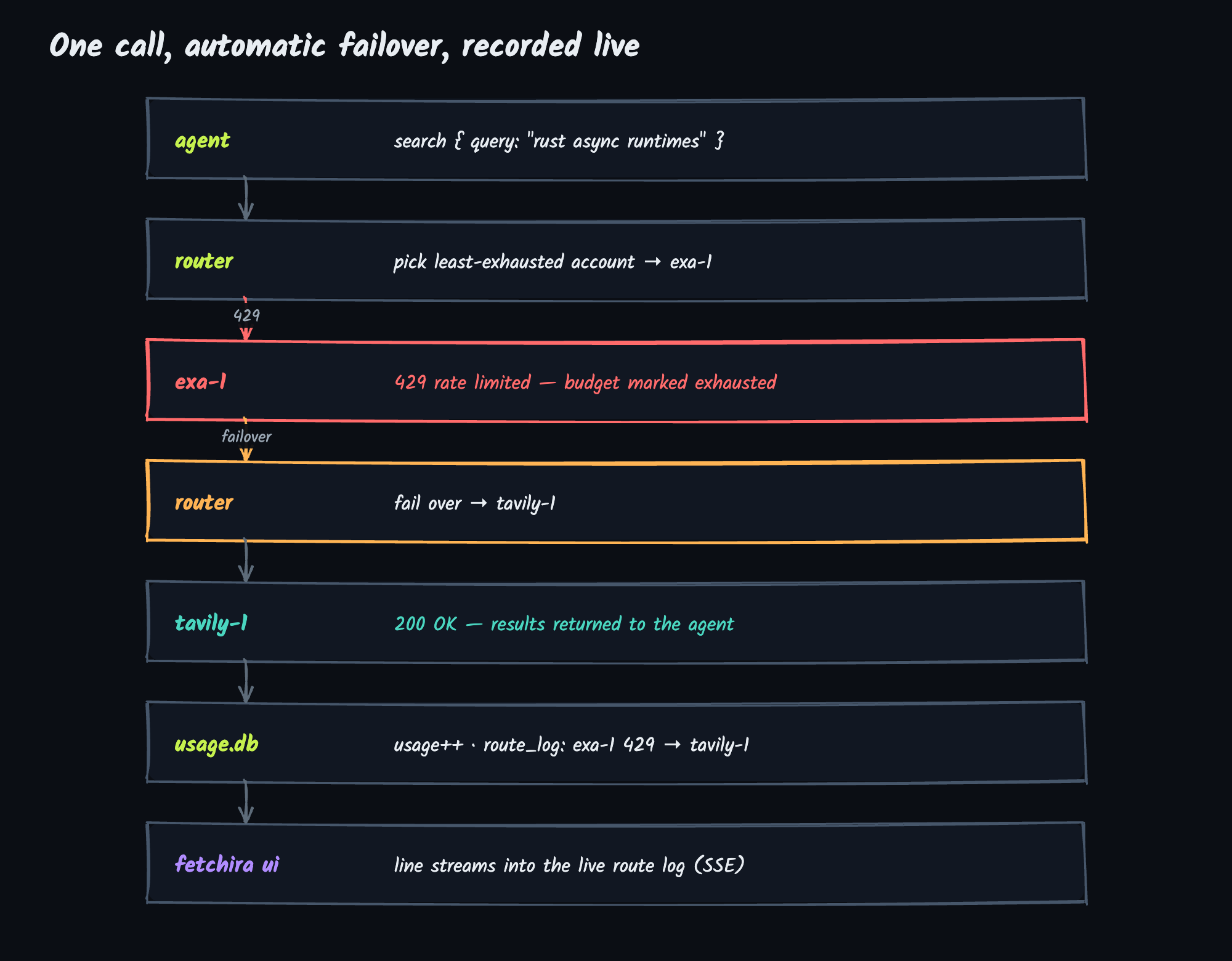
written out — exa-1 429 → tavily-1, last success and last error per provider. Click any call to
open what it sent and got back; the Debug tab keeps that same per-request detail with the raw
HTTP — headers and body, secrets redacted — for when something needs tracing.
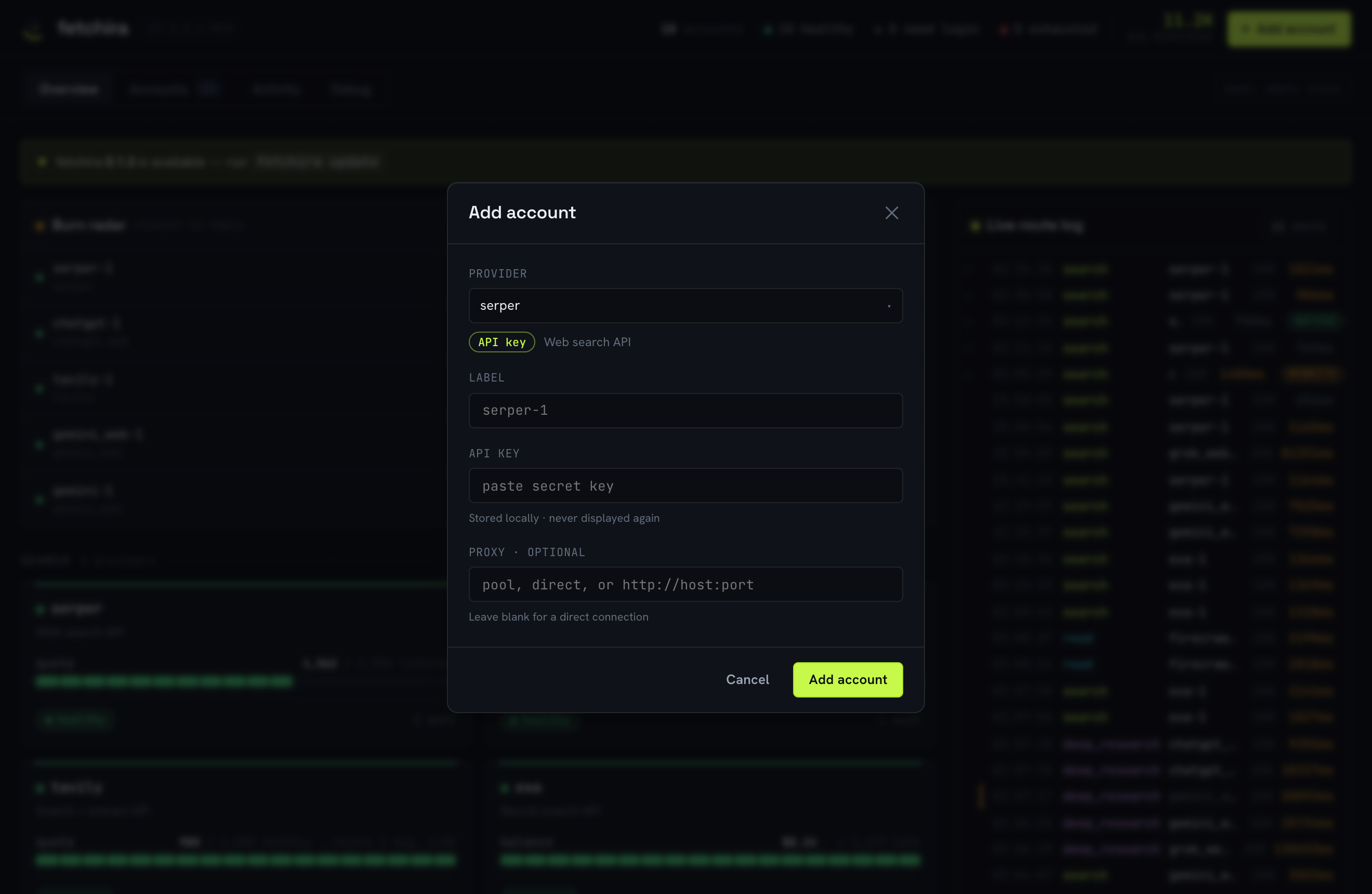
Adding an account is a small form — pick a provider, paste a key (or log in, for web sessions), optionally pin a proxy:
The whole dashboard is self-contained and offline: the assets (including React) are embedded
in the binary, so there is no Node, no build step and no CDN. It binds to 127.0.0.1 only and
is gated by a per-session token in the URL plus Host/Origin checks.
How it works
One capability call turns into "pick an account, call it, fall back if it fails, record what happened" — and the dashboard sees the result live:
Quota tracking. Usage lives in a SQLite file (usage.db), keyed by (account, period)
where the period is YYYY-MM (monthly), YYYY-MM-DD (daily) or lifetime. Each window is a
fresh row, so quotas reset automatically when the calendar turns over. A successful call
increments the counter; a 429/402 marks the budget exhausted for the period. These are
soft local guards — the provider's 429 is always the source of truth and is what triggers
failover. Deep research is tracked on its own daily budget per web provider, because those
limits are tighter and time-windowed.
The dashboard is a separate process. Your agent runs one fetchira process (the MCP server);
fetchira ui is another. They never talk directly — they share the one usage.db. Every call
the router serves is appended to a route_log table (including failover hops), and the
dashboard reads quota and the route log straight from that file, streaming new lines to the
browser over Server-Sent Events. That is why the live log keeps working no matter which process
actually handled the request.
One binary, two modes. The same executable is both the MCP server and the dashboard. Run
bare fetchira from an interactive terminal and it opens the UI; when a coding tool launches it
over piped stdio it serves MCP exactly as before. Force either with fetchira serve /
fetchira ui, or set FETCHIRA_NO_UI=1.
Install and set up
Homebrew (macOS + Linux):
brew install ImmuneFOMO/tap/fetchira
Or curl | sh — downloads the prebuilt binary for your platform into ~/.local/bin:
curl -fsSL https://raw.githubusercontent.com/ImmuneFOMO/fetchira/main/install.sh | sh
Prebuilt Linux binaries are x86_64 (macOS ships both Intel and Apple Silicon). On arm64 Linux, use Cargo (below) to build from source.
With Cargo — builds from source, works on any platform Rust targets (incl. arm64 Linux):
cargo install --git https://github.com/ImmuneFOMO/fetchira            # tip of main
cargo install --git https://github.com/ImmuneFOMO/fetchira --tag v0.1.12   # pin a release
Needs a C toolchain + cmake on the build host (the TLS-impersonation dep bundles BoringSSL).
The binary lands in ~/.cargo/bin; update later with the same command or fetchira update.
From a checkout (builds with cargo, also seeds config):
./install.sh # builds, installs the binary to ~/.local/bin
Then configure providers:
fetchira setup # guided: pick providers, paste API keys, log into the web ones
Update later with brew upgrade fetchira (Homebrew) or fetchira update (curl|sh / manual install).
setup walks every provider, asks which you want, prompts for the API key (key-based) or opens
a browser to log in (web-session), and writes everything to global config in
~/.config/fetchira/ — no manual .env editing. Re-run any time. Config lives in
$FETCHIRA_HOME or ~/.config/fetchira (fetchira.toml + usage.db), so the binary works no
matter which directory an MCP client launches it from.
Picking providers
Every provider is optional — add what you have and the router routes around the rest. Two good
starting points: serper + firecrawl (solid search + read on generous free keys), or just
gemini_web (one Google login gives search, deep research, images and file Q&A with no API
key at all). Add more later with fetchira add <provider>; they slot into the routing order
automatically.
| Provider | Auth | Gives you | Free tier (approx.) | Get it |
|---|---|---|---|---|
serper |
API key | Google results: search, scholar, news, places, patents, page scrape | 2,500 one-time credits | serper.dev |
tavily |
API key | LLM-tuned search + answers, page extract, site crawl | 1,000 credits/mo | app.tavily.com |
exa |
API key | neural/semantic search, deep research | up to 20,000 requests/mo | exa.ai |
parallel |
API key | async multi-round deep research | $20–$80 signup credit + $5/mo | parallel.ai |
firecrawl |
API key | read/scrape/crawl pages to clean markdown | 1,000 credits/mo | firecrawl.dev |
steel |
API key | headless-browser scrape: JS pages, screenshots, PDFs | $30 one-time credit | steel.dev |
gemini_web |
browser login | Gemini search, deep research, images, file Q&A | your Google account | fetchira login gemini_web |
grok_web |
browser login | Grok search, deepsearch, images, file Q&A | your X/Grok account | fetchira login grok_web |
chatgpt_web |
browser login | ChatGPT chat + web search, deep research, images | your OpenAI account | fetchira login chatgpt_web |
Free tiers drift; the column is a rough guide. Once an account is added, the dashboard and
usage show the real live balance read from the provider, not these estimates. Web
sessions ride whatever plan the account has — a paid tier (Gemini Pro, SuperGrok, ChatGPT
Plus) simply shows up as bigger live limits.
CLI
fetchira ui                     # open the local dashboard (live quota, accounts, route log)
fetchira providers              # list every available provider and what it does
fetchira list                   # your accounts + remaining quota + login status
fetchira add <provider>         # add an account (prompts for key, or logs in if web)
                                #   flags: --label L  --key K  --proxy pool|URL
fetchira remove <label>         # delete an account (and its session/usage)
fetchira login <provider>       # (re)capture a web-session login via a browser
fetchira session <label>        # attach a web session by hand (cookies JSON on stdin or --file)
fetchira priority [cap]         # show or set the provider order per capability
                                #   e.g. fetchira priority search grok_web,serper   (reset: … search reset)
fetchira install                # register fetchira with your coding tools
fetchira update                 # download & install the latest release (or `brew upgrade`)
fetchira --version              # print the installed version
fetchira help
fetchira add tavily asks for the key; fetchira add gemini_web opens a browser to log in (or,
with no browser, falls back to fetchira session — see Web sessions). Multiple
accounts per provider are fine (--label tavily-2); the router balances by remaining quota.
Register with your coding tools
The binary is the MCP server (stdio). The easy way is to let it write each tool's config:
fetchira install
It detects and supports Claude Code, Codex CLI, OpenCode, Gemini CLI, Cursor, Windsurf, VS Code and Claude Desktop — multi-select, then it writes the right config shape for each (merging, never clobbering your existing servers). Restart the tool to pick it up.
Manual registration is just as easy — point any MCP client at the binary:
claude mcp add fetchira -s user -- ~/.local/bin/fetchira # Claude Code
// generic mcp.json (Cursor, Windsurf, Gemini CLI, Claude Desktop)
{ "mcpServers": { "fetchira": { "command": "/Users/you/.local/bin/fetchira" } } }
stdout is the MCP channel; logs go to stderr (RUST_LOG=debug for more). For Claude Code there
is also a skill in skills/fetchira/SKILL.md — copy it to ~/.claude/skills/fetchira/SKILL.md
so the agent knows when and how to use the tools.
Web sessions
gemini_web, grok_web and chatgpt_web use your logged-in browser cookies instead of an API key, via a Chrome-impersonating client. One-time setup per provider:
fetchira login gemini_web   # opens a browser; log in, then it captures the session
fetchira login grok_web
fetchira login chatgpt_web
fetchira login <provider> launches a real browser against a dedicated profile, waits for you to
finish logging in, captures the cookies (HttpOnly included) and stores them in usage.db. It uses
Chrome/Chromium/Edge/Brave (over the DevTools protocol) if present, otherwise Firefox
(read straight from its plaintext cookies.sqlite, since Firefox dropped CDP). Set
FETCHIRA_BROWSER=chrome|firefox to force one. These accounts get the same sticky-proxy support
as API accounts.
Headless / no browser? On a server with no GUI, log in on any other machine (or any browser), export the cookies as JSON, and attach them by hand — no browser needed on the box that runs fetchira:
fetchira add gemini_web --label gemini_web-1      # saved even though the browser login is skipped
fetchira session gemini_web-1 --file cookies.json # or: paste/pipe the JSON on stdin
The JSON is a cookie array ([{"name":"sso","value":"…","domain":".grok.com"}]) or
{"cookies":[…]} — the shape a "Cookie Editor" browser extension exports. The dashboard has the
same paste box (Add account → or paste a session, or the Session button on any web account).
Conversations, models, modes. Web results end with a ⟦session: …⟧ token; pass it back as
session to continue the same chat with full history. Optional model and mode select per
provider (best-effort; subscription features may be locked):
search { "query": "...", "provider": "gemini_web" }                       // -> answer + session token
search { "query": "follow-up", "session": "gemini_web:c_…,r_…" }          // continues the chat
Deep Research. Gemini and ChatGPT run the real plan-based flow — deep_research returns a plan
plus a session; send "start" on that session to run it (or a revised request to replace the
plan). Gemini returns the report in the same call (~1-3 min); ChatGPT then runs for ~5-30 min, so it
hands back a session you call again to fetch the finished report. Grok runs deep research directly
on its heavy tier (no plan step), and exa / parallel do true multi-round research over the API.
Images and file Q&A. create_image generates from a text prompt — grok and gemini render
in-process over HTTP, chatgpt drives the browser. To edit an existing image, pass its absolute path
in file and describe the change in prompt; to keep editing a ChatGPT result, pass its returned
session back to create_image. The image is written to disk and the result names the file (pass
path to pick where; default ~/.config/fetchira/images/). The same file attachment syntax is
available on search and deep_research for file Q&A. Both take an optional provider and fail
over like everything else.
Live limits. usage polls each web session for its real per-tier limits and the model/mode
catalog it can select (with thinking levels) — a mode locked by your subscription (e.g. Grok
Expert/Heavy on a lapsed plan) shows as 0/0.
Caveats, inherent to reverse-engineered web access:
- Sessions expire. Cloudflare's
cf_clearancelasts ~30 min to a few hours and cannot be minted headless. Re-runfetchira login <provider>(or re-attach withfetchira session) when a provider returns session/403 errors; the router fails over to the API providers meanwhile. - Grok is intermittent. fetchira forges the anti-bot
x-statsig-idper request, which gets past grok.com, but grok is aggressive on IP reputation and rate. Better odds: a fresh login, a residentialproxy, and no bursting. The router fails over when grok blocks. - ChatGPT drives a real browser. chatgpt.com gates every send behind a Turnstile challenge pure HTTP can't pass, so chatgpt_web submits through the logged-in browser profile (reads like limits stay pure HTTP). It needs Chrome/Chromium available; deep-research polls resume over plain HTTP.
- Browser login needs Chrome/Chromium/Edge/Brave or Firefox installed (Linux names like
google-chrome,chromium,firefoxare resolved on$PATH). With none — or a headless box — usefetchira sessioninstead. The first build compiles BoringSSL (needscmake+ a C/C++ toolchain — Xcode CLT on macOS,build-essentialon Linux).
Configuration
Everything lives in the fetchira home dir — $FETCHIRA_HOME, default ~/.config/fetchira:
fetchira.toml (accounts + settings), .env (secrets referenced as env:VAR), usage.db
(quota counters, web sessions, route/debug logs). setup, add, priority and the dashboard
all write the same fetchira.toml, so hand-editing is never required — but it is plain TOML
if you want to (see fetchira.toml.example and .env.example):
db_path = "usage.db"              # relative paths resolve against the fetchira home dir

[debug_log]                       # full request/response capture (the Debug tab)
enabled = true                    # default on; bounded by retention + row/size caps
retention_hours = 24

[proxy_pool]                      # optional: accounts with proxy = "pool" draw a sticky IP here
webshare_url = "https://proxy.webshare.io/api/v2/proxy/list/download/<token>/…"
# proxies = ["http://user:pass@host:port"]   # or a static list

[priority]                        # optional: your provider order per capability
search        = ["grok_web", "serper"]       # listed ones are tried first, in this order;
deep_research = ["gemini_web"]               # unlisted providers follow in the built-in order.
                                             # capabilities: search, read, deep_research, image

[[account]]
provider = "tavily"
label    = "tavily-1"             # unique name; shows up in the dashboard and route log
api_key  = "env:TAVILY_API_KEY"   # literal key, or env:VAR resolved from .env / the environment
proxy    = "pool"                 # "pool" | "http://user:pass@host:port" | omit for direct

[[account]]
provider = "gemini_web"           # web sessions carry no api_key — cookies live in usage.db
label    = "gemini-1"
quota    = 5000                   # nominal chat/search budget (web providers have no balance endpoint)
reset    = "monthly"              # monthly | daily | once
dr_quota = 100                    # separate deep-research budget — set it to match your plan
dr_reset = "daily"
Quota numbers. API providers report their real remaining balance live, so their rows need no
tuning. Web sessions have no balance endpoint — quota/dr_quota are soft failover guards, and
the provider's own 429 is always the source of truth.
Environment variables. FETCHIRA_HOME — config dir override. FETCHIRA_BROWSER=chrome|firefox
— force the login-capture browser. FETCHIRA_NO_UI=1 — bare fetchira in a terminal serves MCP
instead of opening the dashboard. FETCHIRA_NO_OPEN=1 — fetchira ui prints the URL without
opening a browser. RUST_LOG — log verbosity (logs go to stderr).
Build and verify
cargo build --release
cargo fmt --check && cargo clippy --all-targets -- -D warnings && cargo test
Research notes that shaped the design live in research/.
No comments yet
Be the first to share your take.