
A self-hosted AI agent you can talk to, steer, and trust with real work.
Chat · Act · Automate · Extend


Docs · Getting started · CLI · Web UI · Architecture
Elowen is a personal AI agent that runs on your machine. Chat with it in the terminal, from the Web UI, Discord, or WhatsApp; it keeps the same projects, permissions, tools, and durable memory across every surface. It can investigate code, edit files, use a terminal, plan tasks, delegate focused work — and stop to ask when a decision belongs to you.
It is deliberately self-hosted: a Node.js daemon, SQLite, a Next.js Web UI, and plugins you can inspect, enable, or remove. Your provider accounts and project data stay under your control.
Start here
One-line install — provisions a fresh box end to end (Node.js, the elowen package, tmux, the services, the first admin) and leaves a running daemon and Web UI:
# Linux (Debian/Ubuntu) — run with sudo access; provisions systemd services
curl -fsSL https://raw.githubusercontent.com/dragocz95/elowen/main/install.sh | bash

# macOS — run as yourself (no sudo; needs Homebrew); provisions per-user launchd agents
curl -fsSL https://raw.githubusercontent.com/dragocz95/elowen/main/install.sh | bash
# Windows — installs into WSL2 (run in an elevated PowerShell)
irm https://raw.githubusercontent.com/dragocz95/elowen/main/install.ps1 | iex
Already have Node.js 22+? Install locally and onboard by hand:
npm install -g elowen
elowen setup
elowen
elowen setup walks through the local account, a project, an AI provider, optional memory embeddings, and code intelligence. A bare elowen opens the terminal chat; elowen doctor explains what is ready and what still needs attention.
Requirements: Node.js 22+ and tmux. The one-line installer takes care of both (macOS additionally needs Homebrew); on Windows it runs inside WSL2 because tmux and systemd are Linux-only.
The bootstrap script is deliberately thin — it does only what has to happen before Elowen exists on the machine, then hands the rest to elowen install, the project's own provisioner:
- Preflight — confirms a Debian/Ubuntu (apt) system or macOS with Homebrew, and ensures
curl. - Node.js — installs Node.js 22+ (NodeSource on Linux, Homebrew on macOS) when it is missing or too old; a suitable Node already present is left untouched.
- Package — installs the global
elowenpackage from npm (ELOWEN_VERSIONpins a specific release). - Provision — hands over to
elowen install, which sets up tmux, the services, and the first admin. The interactive wizard runs on the real terminal even undercurl … | bash; passELOWEN_INSTALL_ARGS='--unattended …'for a fully non-interactive run.
On Linux the provisioner runs as root: it creates a dedicated service user, installs the systemd units (elowen-daemon, elowen-web, hourly auto-update) and can configure an optional reverse proxy with HTTPS for a public domain.
On macOS everything runs as you, with no sudo anywhere: the provisioner writes per-user launchd agents (io.elowen.daemon, io.elowen.web, plus an hourly io.elowen.update check) into ~/Library/LaunchAgents, bound to localhost. They start at login and restart on failure; manage them with launchctl (launchctl kickstart -k gui/$(id -u)/io.elowen.daemon) or just run elowen for the menu. Logs live in ~/.config/elowen/logs/.
It is safe to re-run: an existing install is never reprovisioned without confirmation (or ELOWEN_FORCE=1), and a globally-linked development checkout is refused outright so a reinstall can't detach it.
On Windows the PowerShell script enables WSL2, installs Ubuntu if needed, turns on systemd inside the distro, and then runs the exact same install.sh — a first-time WSL setup needs one reboot, after which you re-run the command. The Web UI is reachable from Windows at http://localhost:4500.
elowen chat                         # interactive terminal chat
elowen run "review this repository" # one streamed, non-interactive turn
elowen status                       # daemon and Web UI health
elowen up | down                    # manage local services
What you get
| Talk anywhere | One agent across terminal, Web UI, Discord, and WhatsApp — same projects, memory, and permissions on every surface. |
| Persistent goals | Give a conversation a concrete outcome, subgoals, a turn budget, and a hard safety ceiling. It pauses when it needs you and resumes with its bearings intact. |
| Delegation | Hand focused work to a sub-agent — on your model, or on a different model from a different provider entirely. Its live status, tool activity, and result stay attached to the parent conversation — never a black box. |
| Workflows | Let the agent decompose a job into a DAG of sub-agents and run it: independent steps in parallel, dependents waiting for what they need, and every node free to run on its own model — a cheap fast model for mechanical steps, a frontier model for the hard ones, mixed providers in one graph. The dependency tree, each node's progress and its transcript stay in the conversation — during the run and long after it. |
| Missions | Turn one outcome into ordered phases, with an optional dedicated pilot to plan and an overseer to judge progress and reviews. |
| Permissions | Per-user model ceilings and granular tool rules decide what may run, what must ask, and what is denied. Approval is a real pause in the work, not a best-effort ping. |
| Durable memory | Memory that carries across surfaces and is scoped to the project you are working in, so one client's context never bleeds into another's. Each memory carries a vitality score that rises with use and decays with time, so the store tidies itself instead of growing forever — and nothing is ever hard-deleted. Recall runs again mid-turn, not only when a turn starts. A durable queue holds your mid-turn follow-up instead of dropping it. |
| Worktrees & PRs | A mission can run in an isolated Git worktree with a pull-request workflow, keeping concurrent work off a shared checkout and gating publication behind verification. |
| Plugins | Files, terminal, MCP, skills, scheduling, codebase search, chat platforms, and more — declared by manifest, scoped by a registry API, deny-by-default. |
| Scheduling | Recurring jobs and one-shot wake-ups (daily 07:30, every 15m, standard cron), read on your clock. |
| Self-hosted | A Node.js daemon, SQLite, and a Next.js Web UI. Your accounts and data stay yours. |
One agent, several useful surfaces
| Surface | What it gives you |
|---|---|
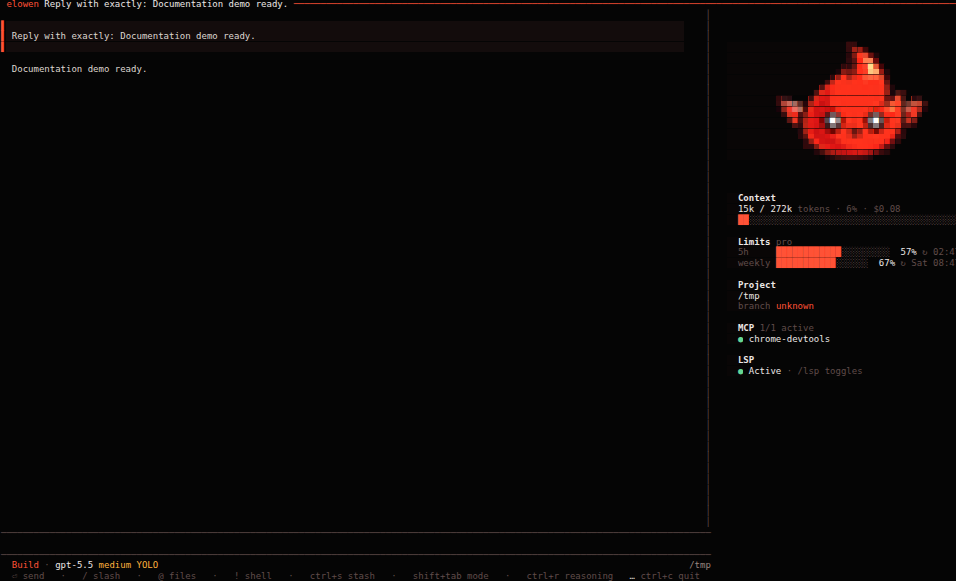
| Terminal | A full agent interface, not a thin command wrapper: streamed replies, tool calls, diffs, approvals, todos, sub-agent activity, and a telemetry rail for model, project, branch, context, and usage. @ attaches files, !command feeds a local command's output into the next turn, slash commands drive the session. |
| Web UI | A calm operational view — Tasks, Kanban, Sessions, Timeline, Projects, Editor, Memory, Stats, Settings, Users — sharing the same server-side conversation model as the terminal. |
| Discord & WhatsApp | Reach the same agent from your phone. Same projects, memory, permissions, and conversation state — changing surfaces never means starting your agent over. |
A look at Elowen
Built for work that lasts longer than a prompt
Elowen does more than answer the next message. A persistent goal gives a conversation a concrete outcome, subgoals, a turn budget, and a hard safety ceiling; it can pause when it needs you and resume with its bearings intact. While one turn is working, a durable message queue keeps your follow-up instead of losing it, and context compaction preserves the useful thread rather than resetting the conversation.
When one agent is not the right shape for the job, Elowen can delegate focused work to sub-agents on a different model — or a different provider entirely, and a workflow can mix them per node: a cheap fast model for the mechanical steps, a frontier model where the thinking happens. Their live status, tool activity, model, and result stay attached to the parent conversation, so delegation never becomes a black box. For larger work, missions turn one outcome into ordered phases and can assign a dedicated pilot to plan it and an overseer to judge progress, reviews, and uncertain decisions — each with its own executor, selected per mission rather than forced globally.
That autonomy stays deliberate. Per-user model ceilings and granular tool rules decide what may run, what must ask, and what is denied; approval is a real pause in the work, not a best-effort notification. A mission can also use an isolated Git worktree and pull-request workflow, keeping concurrent work away from a shared checkout and holding publication behind its verification gate.
A brain that has context without becoming opaque
Elowen's embedded brain is an in-process, provider-agnostic agent. It exposes a per-user model catalog, configurable limits, optional reasoning, permission gates, goals, and a durable queue for mid-turn messages. Before a normal user turn, Elowen assembles the relevant policy, memory, skills, and plugin context. Dynamic plugin context can be placed before or after the user's text, remains ephemeral, and is never written into the conversation history — so time, runtime state, and other live signals stay fresh without being treated as durable instructions.
Architecture in one view
Browser ──> Next.js Web UI ──> Elowen daemon ──> SQLite
                                      │
Terminal CLI ─────────────────────────┤
Chat-platform plugins ────────────────┤
                                      └──> tmux workers / embedded brain
The daemon owns state, scheduling, agent sessions, plugins, and the API. The Web UI talks through a same-origin backend-for-frontend proxy; the CLI is a client of the same daemon. See Architecture for the precise boundaries.
Documentation
The full user guide lives at elowen.run and in docs/site:
| Guide | Covers |
|---|---|
| Getting started | First run, setup wizard, your first conversation |
| Installation | Requirements, providers, non-interactive setup |
| Tasks & missions | Units of work, epics, phases, autonomy |
| Agents & autonomy | Goals, delegation, pilots and overseers, permissions |
| Web UI | The operational surfaces and how they fit together |
| CLI | Terminal chat, commands, session control |
| Brain & chat | The embedded agent, models, context assembly |
| Memory | Durable memory, project scope, vitality and retention |
| Channels | Discord, Telegram, Teams and WhatsApp surfaces |
| Plugins | Bundled plugins, manifests, the registry API |
| Projects & workflow | Projects, editor, Git worktrees, pull requests |
| Configuration | Settings, providers, limits, embeddings |
| Account & security | Users, roles, permissions, isolation |
| Architecture | Daemon, BFF proxy, boundaries |
Contributor references: development · plugin development · API · testing.
Development
npm test              # backend test suite
npm run build         # type-check and build the daemon
npm run check         # lint + knip + depcruise + typecheck + language sync
cd web && npm test    # web test suite
cd web && npm run dev # run the Web UI in dev mode
See CONTRIBUTING before opening a pull request.
Built with
Elowen is a small, self-hosted stack of stable, modern tooling — no external services required.
| Area | Technology |
|---|---|
| Runtime | Node.js 22+ (ESM), distributed on npm |
| Agent core | The PI SDK — pi-ai, pi-coding-agent, and the pi-tui terminal UI |
| Daemon & API | Hono on @hono/node-server, with ws for the WebSocket terminal |
| Storage | better-sqlite3 — a single SQLite file |
| Web UI | Next.js (standalone) + React |
| Agent execution | tmux sessions, with node-pty for live PTY streaming |
| Tools & channels | Model Context Protocol SDK, Baileys (WhatsApp), qrcode, web-push |
| Validation | Zod and TypeBox for typed, validated boundaries |
License
MIT © the Elowen authors
No comments yet
Be the first to share your take.