



Build & Unit Tests, E2E, and MCP Conformance all run on stock GitHub-hosted runners (cloud CI) — no docker image, no self-hosted runner. E2E and Conformance run against EDT 2026.2 (build 2026.2, Eclipse 4.38 / Java 25): the setup step installs a headless EDT of that version on the runner via
p2 director. E2E additionally imports the test fixtures into an empty workspace via the plugin's headless bootstrap (EDT_MCP_IMPORT_PROJECTS) and skips the live-infobase tools, so no 1C platform is needed. Each badge reflects its latest run.
EDT MCP Server
MCP (Model Context Protocol) server plugin for 1C:EDT, enabling AI assistants (Claude, GitHub Copilot, Cursor, etc.) to interact with EDT workspace.
[!TIP] Contributing / making changes? Read CLAUDE.md first — it's the code-conduct "minefield map": hard don'ts and the stop-and-think-twice zones for this codebase (BM transactions, the bilingual ru/en model, cascading rename, etc.). Detailed how-to lives in the skills under
.claude/skills/.
[!IMPORTANT] EDT version compatibility: Supports 1C:EDT 2026.1 and 2026.2 (Ruby) from a single build. The plugin is COMPILED against the 2026.1 target platform (the oldest supported EDT — Eclipse 4.30 / Java 17) so one artifact resolves on both, and the e2e + protocol-conformance gates run it on 2026.2 (Eclipse 4.38 / Java 25), the newest.
Features
- 🔧 MCP Protocol 2025-11-25 - Streamable HTTP transport with SSE support
- 📊 Project Information - List workspace projects and configuration properties
- 🔴 Error Reporting - Get errors, warnings, problem summaries with filters
- 📝 Check Descriptions - Get check documentation from markdown files
- 🔄 Project Revalidation - Trigger revalidation when validation gets stuck
- 🔖 Bookmarks & Tasks - Access bookmarks and TODO/FIXME markers
- 💡 Content Assist - Get type info, method hints and platform documentation at any code position
- 🧪 Query Validation - Validate 1C query text in project context (syntax + semantic errors, optional DCS mode)
- 🧩 BSL Code Analysis - Browse modules, inspect structure, read/write methods, search code, and analyze call hierarchy
- 🖼️ Form Inspection - Get PNG screenshots and YAML layout snapshots from the form WYSIWYG editor
- 🚀 Application Management - Get applications, update database, launch in debug mode, terminate EDT-launched 1С clients
- 🎯 Status Bar - Real-time server status with tool name, execution time, and interactive controls
- ⚡ Interruptible Operations - Cancel long-running operations and send signals to AI agent
- 🏷️ Metadata Tags - Organize objects with custom tags, filter Navigator, keyboard shortcuts (Ctrl+Alt+1-0), multiselect support
- 📁 Metadata Groups - Create custom folder hierarchy in Navigator tree per metadata collection, with a toolbar toggle to hide groups temporarily
- ✏️ Metadata Refactoring - Create top-level objects with EDT default content; rename/delete metadata objects, their members and managed-form elements with full cascading updates across BSL code, forms and metadata; add new attributes to existing objects
- 🛠️ Tool Management - Enable/disable tools by group, presets (Analysis Only, Code Review, Development), per-tool parameter defaults
Installation
From Update Site
- In EDT: Help → Install New Software...
- Add update site URL:
https://ditrixnew.github.io/EDT-MCP/ - Select EDT MCP Server Feature
- Restart EDT
From Windows command line - "one shot" very fast install
Close your EDT (!) and run:
rem Here  "%VER_EDT% = 2025.2.3+30"  just for example - please, set YOUR actual version !
set VER_EDT=2025.2.3+30

"\your\path\to\EDT\components\1c-edt-%VER_EDT%-x86_64\1cedt.exe" -nosplash ^
    -application org.eclipse.equinox.p2.director ^
    -repository https://ditrixnew.github.io/EDT-MCP/ ^
	-installIU com.ditrix.edt.mcp.server.feature.feature.group ^
	-profileProperties org.eclipse.update.reconcile=true
Installation Result
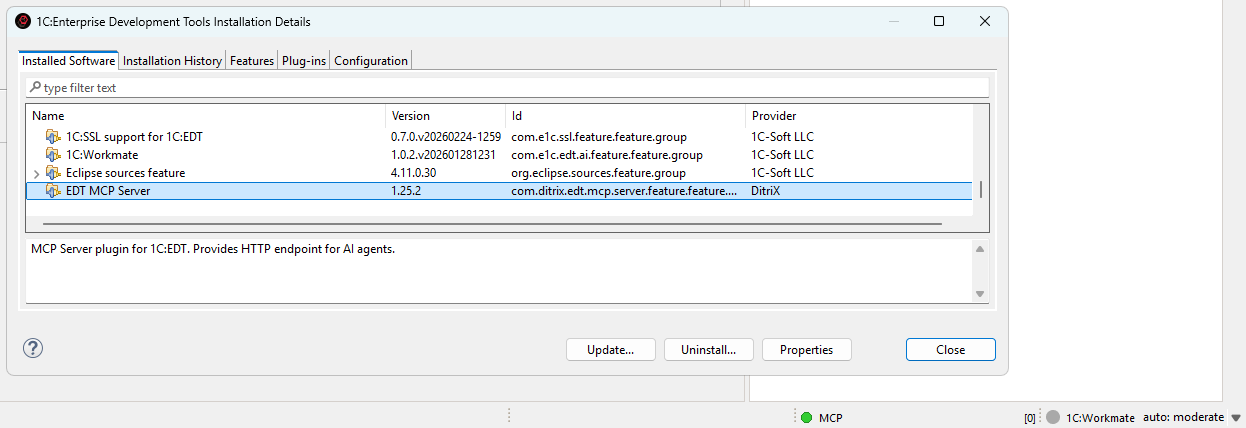
After that, EDT will automatically monitor the update site and install available updates when detected.
As well, we can also manually check via Help → About → Installation Details → Select MCP → Update
Required JVM flag for form screenshots
The get_form_screenshot and get_form_layout_snapshot tools need EDT to be launched with the following JVM flag:
-DnativeFormBufferedLayoutRender=true
Without it, both tools return blank output (gray PNG / empty elements list).
Why: EDT's NativeRenderService reads nativeFormBufferedLayoutRender once at class-load time. If it was unset at JVM startup, the singleton HippoLayoutService is constructed without its offscreen buffer handler, the C++ form renderer never writes captureable pixels back to Java, and the screenshot helper falls through to an SWT Control.print() of the native window — which on Windows produces a gray rectangle. Setting the flag at runtime via reflection does not help because the singleton has already been built.
How to add it (persistent, recommended):
-
Close EDT.
-
Open
1cedt.ini(next to1cedt.exe, e.g.C:\Program Files\1C\1CE\components\1c-edt-2025.2.6+4-x86_64\1cedt.ini). -
After the
-vmargsline, add:-DnativeFormBufferedLayoutRender=true -
Start EDT.
How to add it (one-shot, no install changes):
"<path-to-EDT>\1cedt.exe" -data "<workspace>" -vmargs -DnativeFormBufferedLayoutRender=true
The same flag is also recommended for production EDT use — it enables the buffered native renderer that EDT itself benefits from.
If your screenshots still come back blank after adding the flag, verify with -vmargs actually appears before it in 1cedt.ini (Eclipse stops parsing -vmargs block once it hits a non--D line) and that EDT was fully restarted.
Configuration
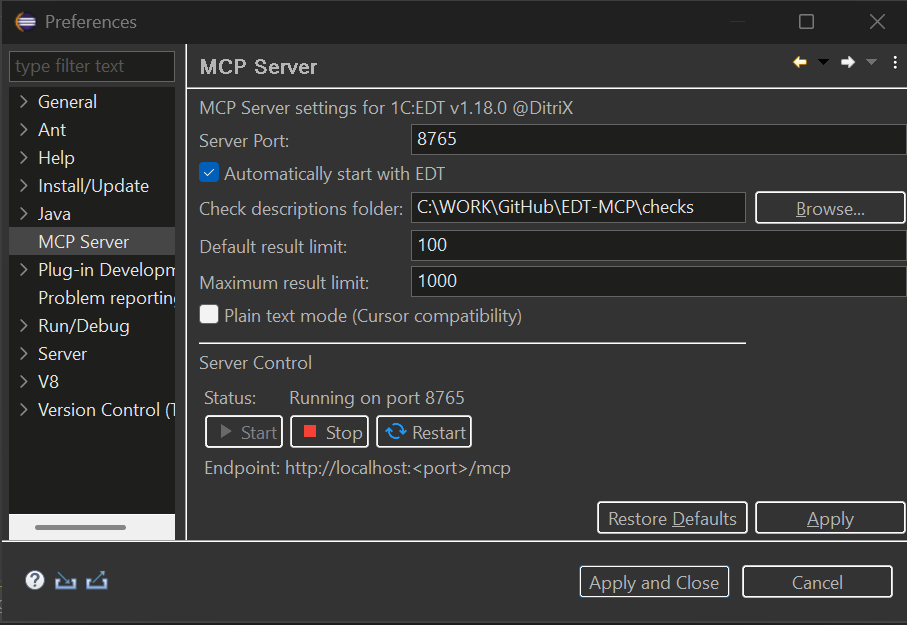
Go to Window → Preferences → MCP Server. The settings page has two tabs:
[!NOTE] Display language. The settings page and the tag dialogs are bilingual (Russian / English) and follow the Eclipse/EDT display language — the same
-nllaunch argument (or OS locale) that localizes the rest of EDT. Launch EDT with-nl rufor Russian or-nl enfor English; any other locale falls back to English. The MCP tool surface itself (tool names, descriptions and errors) stays English regardless, as it is the AI wire contract.
General Tab
- Server Port: HTTP port (default: 8765)
- Check descriptions folder: Path to check description markdown files
- Auto-start: Start server on EDT launch
- Plain text mode (Cursor compatibility): Returns results as plain text instead of embedded resources (for AI clients that don't support MCP resources)
- Show tags in Navigator: Display tags as decorations in the Navigator tree
- Tag decoration style: How tags are displayed — all tags as suffix, first tag only, or tag count
- Server control: Start, stop, and restart the MCP server directly from preferences
Tools Tab
Manage which tools are available to AI assistants. Tools are organized into groups that can be enabled or disabled together. See Tool Management for details.
Status Bar Controls
The MCP server status bar shows real-time execution status with interactive controls.
Status Indicator:
- 🟢 Green - Server running, idle
- 🟡 Yellow blinking - Tool is executing
- ⚪ Grey - Server stopped
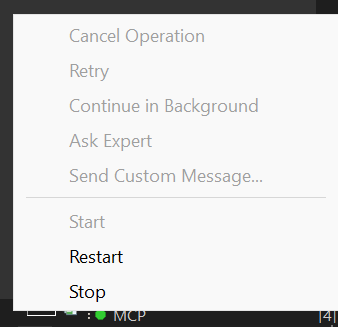
During Tool Execution:
- Shows tool name (e.g.,
MCP: update_database) - Shows elapsed time in MM:SS format
- Click to access control menu
When a tool is executing, you can send signals to the AI agent to interrupt the MCP call:
| Button | Description | When to Use |
|---|---|---|
| Cancel Operation | Stops the MCP call and notifies agent | When you want to cancel a long-running operation |
| Retry | Tells agent to retry the operation | When an EDT error occurred and you want to try again |
| Continue in Background | Notifies agent the operation is long-running | When you want agent to check status periodically |
| Ask Expert | Stops and asks agent to consult with you | When you need to provide guidance |
| Send Custom Message... | Send a custom message to agent | For any custom instruction |
How it works:
- When you click a button, a dialog appears showing the message that will be sent to the agent
- You can edit the message before sending
- The MCP call is immediately interrupted and returns control to the agent
- The EDT operation continues running in the background
- Agent receives a response like:
USER SIGNAL: Your message here

Signal Type: CANCEL
Tool: update_database
Elapsed: 20s

Note: The EDT operation may still be running in background.
Use cases:
- Long-running operations (full database update, project validation) blocking the agent
- Need to give the agent additional instructions
- EDT showed an error dialog and you want agent to retry
- Want to switch agent's focus to a different task
Tool Management
Control which MCP tools are exposed to AI assistants. This lets you reduce context window usage and restrict AI to read-only operations when needed.
Tool Groups
All tools are organized into 10 semantic groups:
| Group | Description | Tools |
|---|---|---|
| Core / Project | Essential server, project, configuration, history, and XML export/import tools | get_edt_version, get_server_status, get_tool_guide, list_toolsets, enable_toolset, list_projects, get_configuration_properties, clean_project, revalidate_objects, resync_to_disk, get_check_description, export_configuration_to_xml, import_configuration_from_xml, delete_project, create_project, get_event_log, get_mcp_history |
| Errors & Problems | Error reporting, validation, and workspace markers (bookmarks, tasks) | get_problem_summary, get_project_errors, get_markers, apply_quick_fix, validate_xdto_package |
| Code Intelligence | Content assist, documentation, metadata and common-picture browsing, and references | get_content_assist, get_platform_documentation, get_metadata_objects, get_metadata_details, list_subsystems, get_subsystem_content, find_references, list_common_pictures, export_common_picture |
| Tags | Metadata tag management | get_tags, get_objects_by_tags |
| Applications & Testing | Application and infobase management, external-object builds, launch, testing, background jobs, and Workmate | get_applications, list_configurations, create_launch_config, delete_launch_config, create_infobase, delete_infobase, update_database, debug_launch, terminate_launch, run_yaxunit_tests, ask_workmate, get_job_status, cancel_job, build_external_objects, set_infobase_credentials |
| Debugging | Breakpoints, stepping, variables, expression evaluation, and profiling | set_breakpoint, remove_breakpoint, list_breakpoints, wait_for_break, get_variables, set_variable, step, resume, evaluate_expression, debug_yaxunit_tests, debug_status, start_profiling, stop_profiling, get_profiling_results |
| BSL Code | Module source reading/writing, structure, search, call hierarchy, navigation, and forms | read_module_source, write_module_source, get_module_structure, list_modules, search_in_code, read_method_source, get_method_call_hierarchy, get_outgoing_structures, go_to_definition, get_symbol_info, get_form_layout_snapshot, get_form_screenshot, get_template_screenshot, validate_query |
| Refactoring | Metadata create, rename, adopt, delete, and property management | rename_metadata_object, delete_metadata, create_metadata, modify_metadata, adopt_metadata_object |
| Translation (LanguageTool) | Translation strings generation, configuration synchronization, project info | generate_translation_strings, translate_configuration, get_translation_project_info |
| Git | Git operations: the git command tool (disabled by default), branch listing/switching, and the branch-to-infobase binding |
git, list_git_branches, switch_git_branch, create_git_branch, set_branch_infobase |
Enable or disable entire groups or individual tools from the Tools tab in Window → Preferences → MCP Server. Disabled tools are filtered out of tools/list responses. If a client calls a disabled tool directly through tools/call, the server returns a message explaining that the tool is disabled.
Presets
Quickly switch between common tool configurations using presets:
| Preset | Description |
|---|---|
| All Tools | All tools enabled (default) |
| Analysis Only | Read-only analysis — Core, Errors, Code Intelligence, Tags |
| Code Review | Analysis + BSL code reading (excludes write_module_source) |
| Development | Full development without debugging tools |
Select a preset from the dropdown in the Tools tab. The preset auto-detects based on the current enabled/disabled state and shows "Custom" when the configuration doesn't match any built-in preset.
Per-Tool Parameter Defaults
Some tools have configurable default values for parameters like result limits. These defaults are used when the AI client doesn't specify the parameter explicitly:
| Tool | Parameter | Default | Range |
|---|---|---|---|
get_project_errors |
Result limit | 100 | 1–1000 |
get_markers |
Result limit | 100 | 1–1000 |
get_metadata_objects |
Result limit | 100 | 1–1000 |
get_content_assist |
Result limit | 100 | 1–1000 |
search_in_code |
Max results | 100 | 1–500 |
search_in_code |
Context lines | 2 | 0–5 |
read_module_source |
Max lines | 500 | 100–50000 |
terminate_launch |
Termination timeout (sec) | 10 | 1–120 |
Configure these in the Tools tab by selecting a tool that has configurable parameters — the parameter editors appear in the details panel below the tool tree.
Progressive Tool Disclosure (dynamic toolsets)
For clients that work better with a small initial tool surface, the server can expose
only a core toolset up front and reveal the rest on demand — shrinking the
always-loaded tools/list. This is off by default (the full list is exposed,
unchanged); turn it on with the Progressive disclosure preference (or the
EDT_MCP_PROGRESSIVE_DISCLOSURE=true environment variable for headless/CI runs).
When on, only the core toolset (navigation, source read, metadata discovery, and the
two management tools) appears in tools/list. To use more tools:
- Call
list_toolsetsto see the groups (core,metadata,code,debug,testing,profiling,forms,tags,translation,project,git) and their tools. - Call
enable_toolsetwithtoolsets=[ids](e.g.["code","debug"]). - Re-request
tools/list— the revealed tools now appear.
This server does not push notifications/tools/list_changed, so the client must
re-list after enabling (the enable_toolset response says so). A hidden tool is only
hidden from tools/list; it remains callable by name. These progressive-disclosure
toolsets are distinct from the Tool Groups above (which the Tools tab uses to
enable/disable tools persistently).
Connecting AI Assistants
VS Code / GitHub Copilot
Create .vscode/mcp.json:
{
  "servers": {
    "EDT MCP Server": {
      "type": "sse",
      "url": "http://localhost:8765/mcp"
    }
  }
}
Cursor IDE
Note: Cursor doesn't support MCP embedded resources. Enable "Plain text mode (Cursor compatibility)" in EDT preferences: Window → Preferences → MCP Server.
Create .cursor/mcp.json:
{
  "mcpServers": {
    "EDT MCP Server": {
      "url": "http://localhost:8765/mcp"
    }
  }
}
Claude Code
Note: By editing the file
.claude.jsoncan be added to the MCP either to a specific project or to any project (at the root). If there is no mcpServers section, add it.
Add to .claude.json (in Windows %USERPROFILE%\.claude.json):
"mcpServers": {
  "EDT MCP Server": {
    "type": "http",
    "url": "http://localhost:8765/mcp"
  }
}
Claude Desktop
claude_desktop_config.json accepts only stdio servers (a command), not a direct url, so bridge the HTTP endpoint with mcp-remote (requires Node.js):
{
  "mcpServers": {
    "EDT MCP Server": {
      "command": "npx",
      "args": ["-y", "mcp-remote", "http://localhost:8765/mcp"]
    }
  }
}
The Settings → Connectors ("custom connector") route needs an HTTPS server reachable from Anthropic's cloud, so a plain-HTTP
localhostendpoint must go through themcp-remotestdio bridge above. You could expose it over an HTTPS tunnel (ngrok / Cloudflare Tunnel) to use a connector — but this server can write code into your configuration and start a debugger, so putting it on the public internet is a serious security risk and is not recommended.
Cline - extension for VSCode.
{
  "mcpServers": {
    "EDTMCPServer": {
      "type": "streamableHttp",
      "url": "http://localhost:8765/mcp"
    }
  }
}
Antigravity
{
    "mcpServers": {
        "EDTMCPServer": {
            "serverUrl": "http://localhost:8765/mcp"
        }
    }
}
1C:Workmate in-process bridge
When 1C:Workmate (com.e1c.edt.ai* 1.0.5) runs in the same EDT JVM, integration
works in both directions:
ask_workmatestarts Workmate's full conversation/tool loop in a bounded background job and returns a pollablejobId, so the MCP transport request does not stay open for the full cloud round-trip. Poll that id with the sharedget_job_statustool;cancel_jobfirst previews and only acts withconfirm=true, and it never claims that a request already handed to Workmate was cancelled. The Workmate bundles remain optional and are loaded only at runtime through OSGi/reflection; they are not part of this project's target platform. The tool ships disabled — it sends the question to an external cloud service and Workmate may change the configuration with its own tools — so enable it under Preferences → EDT MCP Server → Tools first.- The OSGi service
com.ditrix.edt.mcp.server.bridge.IEdtMcpBridgelets Workmate/JShell list and call EDT-MCP tools without importing EDT-MCP packages.callToolgoes through the same dispatcher as MCPtools/calland returns its JSON-RPC response.
Two details decide whether this actually works, both measured against Workmate 1.0.5:
- The skill.
ConversationFacadedefaults toraw, under which the cloud answers from the model alone — one assistant message, no tool call, no look at the project.ask_workmatetherefore sendscustom(the skill Workmate's own autopilot uses), which runs the full tool loop. Override withskillNameonly if you know the name is accepted; the cloud refuses most others outright. - The question carries the bridge. Workmate's chat reads a project's
.workmaterules, but this Java path does not, soask_workmateprefixes the question with the bridge instructions and the list of tool NAMES (full descriptions stay behindget_tool_guide, which it calls when it needs one). PassshareMcpTools=falseto send the question verbatim instead.
The same instance is published under the JDK types BiFunction<String,String,String>
(callTool) and Supplier<String> (listTools), both carrying the service property
edt.mcp.bridge=v1. Prefer that alias: it needs no reflection and no access to the
bridge package, which matters for callers whose rules forbid unproven Java API - such
as Workmate's JShell tool.
// Take the context from an ALWAYS-ACTIVE bundle, not from EDT-MCP's own: this bundle
// uses lazy activation, so `Platform.getBundle("com.ditrix.edt.mcp.server")
// .getBundleContext()` can hand back null and the next line then fails with
// "because ctx is null". OSGi services are global, so any live context finds this one.
var bundleContext = org.osgi.framework.FrameworkUtil
    .getBundle(org.eclipse.core.runtime.Platform.class).getBundleContext();
var references = bundleContext.getServiceReferences(
    java.util.function.BiFunction.class, "(edt.mcp.bridge=v1)");
if (references.isEmpty()) {
    throw new IllegalStateException("EDT-MCP bridge service is not registered");
}
var mcp = bundleContext.getService(references.iterator().next());
System.out.println(mcp.apply("get_edt_version", "{}"));
A consumer that prefers the named contract can still resolve it by string name and invoke it reflectively:
var serviceReference = bundleContext.getServiceReference(
    "com.ditrix.edt.mcp.server.bridge.IEdtMcpBridge");
var bridgeService = bundleContext.getService(serviceReference);
try {
    var callTool = bridgeService.getClass().getMethod(
        "callTool", String.class, String.class);
    System.out.println((String) callTool.invoke(
        bridgeService, "get_edt_version", "{}"));
} finally {
    bundleContext.ungetService(serviceReference);
}
Letting Workmate's chat use the bridge
Workmate's agentic chat holds its JShell tool but not JShellSession, and
JShell rejects every call whose repl_session_id it cannot resolve. The chat can
therefore execute code but cannot obtain the one value executing code requires.
EDT-MCP breaks that deadlock: shortly after startup it registers a JShell session
under the constant id edt-mcp (retried in the background while Workmate comes
up, and again if Workmate ever evicts it). Together with jshell_edt_canonical_imports
— a fixed entry in Workmate's own scenario catalogue — both values JShell demands are
constants, so a project's rules can name them literally and nothing has to be passed
around at runtime:
repl_session_id = "edt-mcp"
manual_ids      = ["jshell_edt_canonical_imports"]
tests/TestConfiguration/.workmate/WORKMATE.md
is a working example of such a rules file; copy it into <project>/.workmate/ to give
the chat the same access in your own configuration. Note that the chat cannot reach the
HTTP endpoint at all — java.net.URL, java.net.Socket and ProcessBuilder are on
Workmate's restricted-types list — so the in-process bridge is its only route.
Multi-EDT Proxy
Running more than one EDT instance at once? edt-mcp-proxy is a standalone router that exposes a single, stable MCP endpoint on :8764 and forwards each call to the right EDT-MCP instance by projectName, discovering live instances in the background. It ships as edt-mcp-proxy-<version>.jar alongside the plugin archive in every release. See proxy/README.md for setup, CLI options and configuration.
Available Tools
The full per-tool reference lives in docs/tools/ — one page per
tool (what it does, every parameter, and how it works), generated from the live MCP
server (get_tool_guide) so it never drifts from the code. Index below; re-generate
with python docs/generate_tool_docs.py.
89 tools, grouped by toolset. Full per-tool pages under docs/tools/.
Core
Always-on essentials: project/module navigation, source read, metadata discovery, and the toolset-management tools (list_toolsets / enable_toolset).
| Tool | Description |
|---|---|
enable_toolset |
Reveal (or hide) tool groups for progressive disclosure. Pass toolsets=[ids] from list_toolsets to reveal them, then RE-REQUEST tools/list to see the newly r… |
get_edt_version |
Returns the running 1C:EDT version as a plain version string. Returns "Unknown" when the version cannot be determined. |
get_metadata_details |
Get detailed properties of one or more 1C metadata objects (basic info by default, or every reflected section with 'full: true'). Use it after get_metadata_o… |
get_metadata_objects |
Get a flat list of 1C configuration metadata objects (Name, Synonym, Comment, Type, ObjectModule, ManagerModule) as a Markdown table. Use it to discover what… |
get_module_structure |
Get structure of a BSL module: all procedures/functions with signatures, line numbers, regions, execution context (&AtServer, &AtClient), export flag, and pa… |
get_server_status |
Self-diagnosis snapshot of the running MCP server: listening port, MCP protocol version, plugin version, EDT version, enabled/total tool counts, the plainTex… |
get_tool_guide |
Get the full on-demand how-to for a tool: its description, every parameter (type, required, allowed values) and extended examples/preconditions kept OUT of t… |
list_modules |
List BSL modules in an EDT project as a table (module path, module type, parent type, parent name). Use it to discover module paths before reading or editing… |
list_projects |
List all workspace projects with properties (name, path, type, natures). format='md' (default) returns the human Markdown table; format='json' returns the ma… |
list_toolsets |
List the tool groups (toolsets) used by progressive tool disclosure: each toolset's id, title, description, member tools, and whether it is currently visible… |
read_module_source |
Read BSL module source code from an EDT project, whole file or a line range. Returns YAML frontmatter (including a contentHash revision token to round-trip i… |
search_in_code |
Literal/regex full-text search across all BSL modules in a project. Matching is purely textual and NOT ru/en dialect-aware, so a query in one BSL language wo… |
Metadata
Metadata objects: discovery, create/modify/delete/rename/adopt, subsystems, configuration.
| Tool | Description |
|---|---|
adopt_metadata_object |
Adopt a base-configuration metadata object or member (object / form / attribute / tabular section / ...) into a configuration EXTENSION so the extension can… |
create_launch_config |
Create a 1C:EDT runtime-client launch configuration (thin/thick/web). The SAME config works for both run and debug (mode is chosen at launch time by debug_la… |
create_metadata |
Create a metadata node addressed by a 1C full-name FQN: a top-level object (Catalog.Products) or a subordinate member (Catalog.Products.Attribute.Weight, Inf… |
delete_launch_config |
Delete a 1C:EDT launch configuration by name (runtime client or Attach). Destructive: guarded by a confirm-preview - call without confirm to preview (no chan… |
delete_metadata |
Delete a metadata node addressed by a 1C full-name FQN - a top object, an mdclass MEMBER (attribute / tabular section / dimension / resource / enum value), a… |
export_common_picture |
Export a 1C CommonPicture (общая картинка) as PNG and list its picture variants (dpi, theme, interface variant, direction, template flag, glyph size). Resolv… |
get_configuration_properties |
Get 1C:Enterprise configuration properties (name, synonym, comment, script variant, compatibility mode, etc.) |
get_subsystem_content |
Get one 1C subsystem's content: properties, its metadata objects (Type/Name/Synonym/FQN) and child subsystems, identified by FQN (e.g. 'Subsystem.Sales.Subsy… |
list_common_pictures |
List a 1C configuration's CommonPicture objects and the variants each carries in its Picture.zip (DPI, theme, interface variant, template flag, glyph size, p… |
list_configurations |
List EDT launch configurations (runtime client + Attach + other 1C types) with their running state. This is the discovery step before debug_launch / run_yaxu… |
list_subsystems |
List 1C subsystems of a configuration as a flat table (FQN, Synonym, Comment, InCommandInterface, content count, children count). Walks the whole tree by def… |
modify_metadata |
Set properties of a metadata node - an object, a member, or a FORM member (item / attribute / command / handler) - addressed by a 1C full-name FQN, as proper… |
rename_metadata_object |
Rename a metadata object, one of its members, or a managed-form element (attribute / command / field / button / group / decoration / table / attribute column… |
Code
BSL code: write/read methods, call hierarchy, go-to-definition, references, content assist, queries.
| Tool | Description |
|---|---|
find_references |
Find every place a metadata object is used: BSL code modules (with line numbers), other metadata, forms, roles, subsystems, etc. Pass the object FQN; the typ… |
get_content_assist |
Get code-completion proposals at a 1-based line/column in a BSL module - the members, globals and variables valid at that caret (e.g. after a '.'). May retur… |
get_method_call_hierarchy |
Trace which BSL methods call a method or are called by it; optional depth walks the chain transitively for impact analysis (callers only, max 5). Finds STATI… |
get_outgoing_structures |
For each outgoing qualified call in a BSL module (or one method), report the top-level literal keys of the Structure passed as its first argument (local .Ins… |
get_symbol_info |
Get type/hover info about a symbol at a position in a BSL module. Returns inferred types, signatures, and documentation. |
go_to_definition |
Go to the definition of a symbol (the inverse of find_references): a qualified method 'ModuleName.MethodName', a bare 'MethodName' (also pass modulePath), or… |
read_method_source |
Read a specific procedure/function from a BSL module by name. Returns source code with metadata. Lists available methods if not found. Use this for one metho… |
validate_query |
Validate 1C:Enterprise query language (QL) text against a project, returning syntax and semantic errors with line numbers. Use to check a query before embedd… |
write_module_source |
Write BSL source code to a 1C metadata object module. Use to edit a module: searchReplace a fragment (default, needs oldSource), replace the whole file, or a… |
Debug
Runtime debugging: launch/attach, breakpoints, step/resume, variables, expression evaluation.
| Tool | Description |
|---|---|
debug_launch |
Start an EDT debug session: either an existing config by launchConfigurationName (runtime client OR Attach, the latter needed to debug server-side code), or… |
debug_status |
Report active debug sessions: applicationId (real or synthetic 'attach:' / 'launch:'), launch configuration name/type, mode (debug/run), whether… |
evaluate_expression |
Evaluate a BSL expression in the context of a suspended stack frame. Pass frameRef from wait_for_break and the expression text. WARNING: this executes arbitr… |
get_applications |
Get list of applications (infobases) for a project. Returns application ID, name, type, and update state. Application ID is required for update_database and… |
get_variables |
Read variables from a stack frame of a suspended debug thread. Pass frameRef from wait_for_break (preferred) or threadId+frameIndex. Use expandPath to drill… |
list_breakpoints |
List active line breakpoints. Optionally filter by projectName. |
remove_breakpoint |
Remove a 1C BSL line breakpoint. Either pass breakpointId (returned from set_breakpoint) or projectName+module+lineNumber to look it up by coordinates. |
resume |
Resume a suspended debug thread or all threads of a debug target. Pass threadId (from wait_for_break) or applicationId. applicationId accepts ANY id form for… |
set_breakpoint |
Set a line breakpoint on a 1C BSL module. Accepts either an EDT module-relative path (e.g. 'CommonModules/Foo/Module.bsl') or an absolute filesystem path. Us… |
set_variable |
Set a BSL variable's value in a suspended debug frame. WRITE/side-effect: EXECUTES the entered value as a BSL literal/expression live in the running 1C appli… |
step |
Step a suspended debug thread. kind ∈ {over, into, out}. Blocks until the next SUSPEND event (or timeout) and returns the new frame snapshot. |
terminate_launch |
Terminate one or more 1C launches started from THIS EDT instance; externally launched 1C clients are never touched. Select ONE target mode: launchConfigurati… |
wait_for_break |
Wait for a debug suspend event (e.g. breakpoint hit) on the given application. Returns the suspended thread/frame snapshot, or {hit:false} on timeout. applic… |
Testing
YAXUnit unit testing, 1C:Workmate assistance, and shared background-job polling.
| Tool | Description |
|---|---|
ask_workmate |
Start a background question to the 1C:Workmate plugin and return its jobId. Poll the job with get_job_status instead of calling ask_workmate again. Requires… (not enabled by default) |
cancel_job |
Preview or cancel a background job by jobId. A confirmed job uses its owning tool's declared cancellation capability when one exists; unsupported committed… |
debug_yaxunit_tests |
Deprecated alias for run_yaxunit_tests with debug=true. A short named job returns the launch handle; Pending returns jobId for get_ |
No comments yet
Be the first to share your take.