
dsclaude — Claude Code & Claude Desktop launchers for alternative backends
A collection of launchers and configurators that point Claude Code and Claude Desktop at third-party model backends (DeepSeek, MiMo, Qwen, GLM, Kimi, Ark, LongCat, MiniMax, TokenHub, SiliconFlow, etc.).
Tools
| Tool | What it does | Platform | Backend |
|---|---|---|---|
| dsclaude | Claude Code CLI launcher | macOS / Linux | DeepSeek |
| dsclaude.ps1 | Claude Code CLI launcher | Windows | DeepSeek |
| mmclaude | Claude Code CLI launcher | macOS / Linux | Xiaomi MiMo |
| mmclaude.ps1 | Claude Code CLI launcher | Windows | Xiaomi MiMo |
| qwclaude | Claude Code CLI launcher | macOS / Linux | Alibaba Cloud Bailian (Qwen) |
| qwclaude.ps1 | Claude Code CLI launcher | Windows | Alibaba Cloud Bailian (Qwen) |
| glmclaude | Claude Code CLI launcher | macOS / Linux | ZhipuAI GLM |
| glmclaude.ps1 | Claude Code CLI launcher | Windows | ZhipuAI GLM |
| kmclaude | Claude Code CLI launcher | macOS / Linux | Moonshot AI Kimi |
| kmclaude.ps1 | Claude Code CLI launcher | Windows | Moonshot AI Kimi |
| arkclaude | Claude Code CLI launcher | macOS / Linux | Volcengine Ark (doubao/Kimi/DeepSeek/GLM…) |
| arkclaude.ps1 | Claude Code CLI launcher | Windows | Volcengine Ark (doubao/Kimi/DeepSeek/GLM…) |
| lcclaude | Claude Code CLI launcher | macOS / Linux | Meituan LongCat |
| lcclaude.ps1 | Claude Code CLI launcher | Windows | Meituan LongCat |
| mxclaude | Claude Code CLI launcher | macOS / Linux | MiniMax |
| mxclaude.ps1 | Claude Code CLI launcher | Windows | MiniMax |
| hyclaude | Claude Code CLI launcher | macOS / Linux | Tencent TokenHub (HY3/DeepSeek/Kimi/GLM…) |
| hyclaude.ps1 | Claude Code CLI launcher | Windows | Tencent TokenHub (HY3/DeepSeek/Kimi/GLM…) |
| sfclaude | Claude Code CLI launcher | macOS / Linux | SiliconFlow (DeepSeek/Kimi/GLM/Qwen/Yi…) |
| sfclaude.ps1 | Claude Code CLI launcher | Windows | SiliconFlow (DeepSeek/Kimi/GLM/Qwen/Yi…) |
| xclaude | Unified auto-detect launcher | macOS / Linux | Any (auto-detects from API keys) |
| dsclaude-desktop | Claude Desktop GUI configurator | macOS | DeepSeek |
| dsclaude-desktop.ps1 | Claude Desktop GUI configurator | Windows | DeepSeek |
| mmclaude-desktop | Claude Desktop GUI configurator | macOS | Xiaomi MiMo |
| mmclaude-desktop.ps1 | Claude Desktop GUI configurator | Windows | Xiaomi MiMo |
| qwclaude-desktop | Claude Desktop GUI configurator | macOS | Alibaba Cloud Bailian (Qwen) |
| qwclaude-desktop.ps1 | Claude Desktop GUI configurator | Windows | Alibaba Cloud Bailian (Qwen) |
| glmclaude-desktop | Claude Desktop GUI configurator | macOS | ZhipuAI GLM |
| glmclaude-desktop.ps1 | Claude Desktop GUI configurator | Windows | ZhipuAI GLM |
| kmclaude-desktop | Claude Desktop GUI configurator | macOS | Moonshot AI Kimi |
| kmclaude-desktop.ps1 | Claude Desktop GUI configurator | Windows | Moonshot AI Kimi |
| arkclaude-desktop | Claude Desktop GUI configurator | macOS | Volcengine Ark |
| arkclaude-desktop.ps1 | Claude Desktop GUI configurator | Windows | Volcengine Ark |
| lcclaude-desktop | Claude Desktop GUI configurator | macOS | Meituan LongCat |
| lcclaude-desktop.ps1 | Claude Desktop GUI configurator | Windows | Meituan LongCat |
| mxclaude-desktop | Claude Desktop GUI configurator | macOS | MiniMax |
| mxclaude-desktop.ps1 | Claude Desktop GUI configurator | Windows | MiniMax |
| hyclaude-desktop | Claude Desktop GUI configurator | macOS | Tencent TokenHub |
| hyclaude-desktop.ps1 | Claude Desktop GUI configurator | Windows | Tencent TokenHub |
| sfclaude-desktop | Claude Desktop GUI configurator | macOS | SiliconFlow |
| sfclaude-desktop.ps1 | Claude Desktop GUI configurator | Windows | SiliconFlow |
| skills/deepseek-vision | Vision skill (zero deps) | macOS / Linux | DashScope Qwen |
| dsvision-mcp | Vision MCP server | macOS / Linux | DashScope Qwen |
How it works
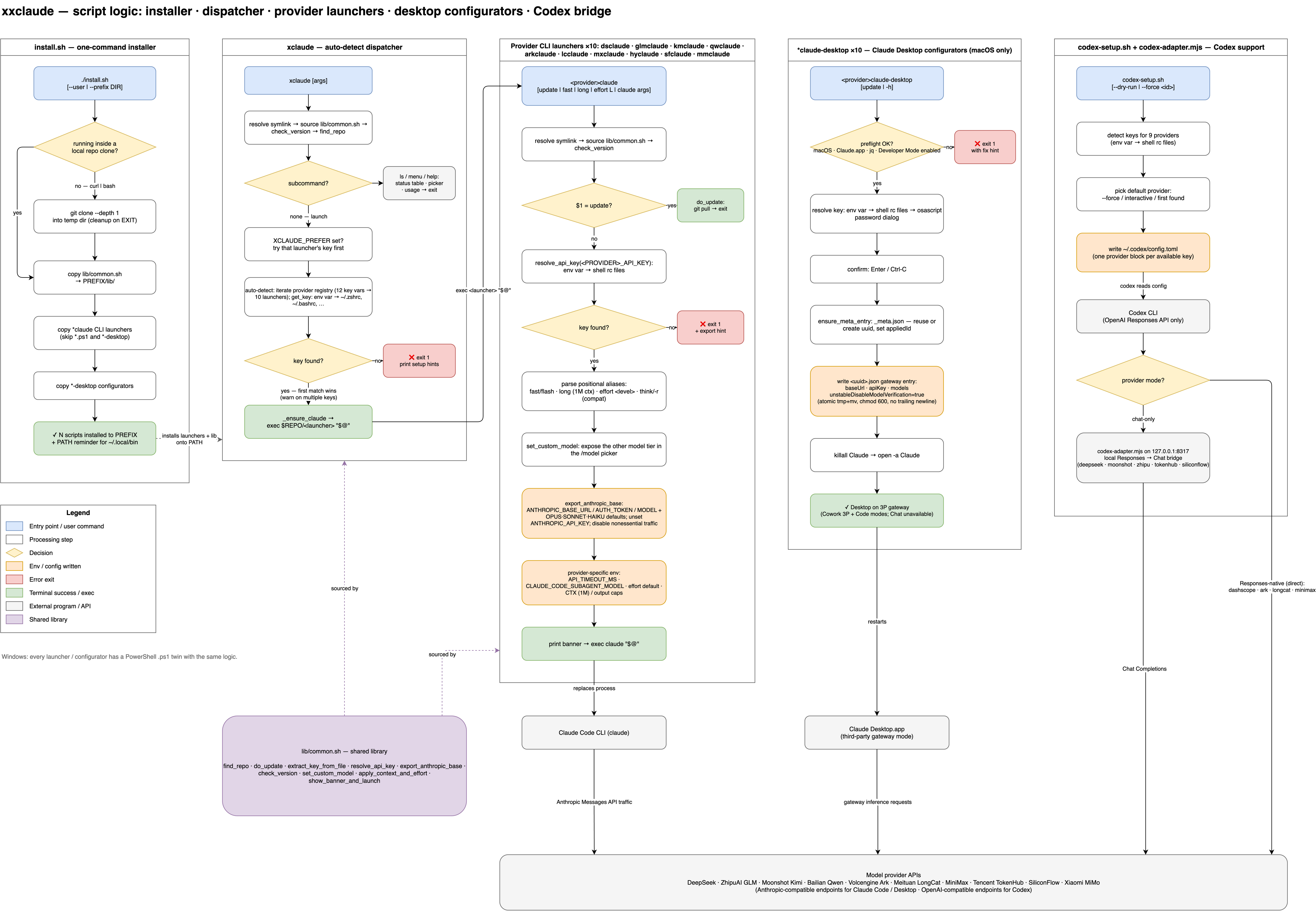
Script-logic overview: the installer, the xclaude auto-detect dispatcher, the provider CLI launchers, the Claude Desktop configurators, and the Codex bridge — all sharing lib/common.sh. The PNG has the draw.io XML embedded, so opening it in draw.io recovers the editable diagram (source · 中文版).

Quick start on macOS
# One-line install (recommended):
curl -fsSL https://raw.githubusercontent.com/Agents365-ai/dsclaude/main/install.sh | bash
# Or user install (no sudo):
curl -fsSL https://raw.githubusercontent.com/Agents365-ai/dsclaude/main/install.sh | bash -s -- --user
# Or manual:
git clone https://github.com/Agents365-ai/dsclaude.git
cd dsclaude
chmod +x xclaude
./xclaude
Quick start on Windows
# One-line install (PowerShell as admin recommended):
irm https://raw.githubusercontent.com/Agents365-ai/dsclaude/main/install.ps1 | iex
# Install with auto-PATH:
irm https://raw.githubusercontent.com/Agents365-ai/dsclaude/main/install.ps1 | iex -AddToPath
# Then launch:
pwsh -File xclaude.ps1
xclaude — Unified auto-detect launcher
Don't remember which script to run? xclaude auto-detects your API key and delegates to the right backend.
# Set any one of these in your ~/.zshrc:
export DEEPSEEK_API_KEY=sk-... # → dsclaude
export GLM_API_KEY=... # → glmclaude
export KIMI_API_KEY=sk-... # → kmclaude
export ARK_API_KEY=... # → arkclaude
# ... or any other supported key
xclaude # auto-detect and launch
xclaude fast # ...with fast/flash tier
xclaude long effort max # ...with 1M context + max effort
xclaude kimi # forwarded: on Ark → kimi model, etc.
All positional args (model aliases, fast, long, effort, etc.) are forwarded to the underlying launcher. If multiple keys are set, the first found wins; set XCLAUDE_PREFER=dsclaude to force a specific provider.
dsclaude — Claude Code on DeepSeek
Follows the DeepSeek Anthropic API guide.
export DEEPSEEK_API_KEY=sk-xxxxxxxxxxxxxxxxxx # add to ~/.zshrc
dsclaude # default: deepseek-v4-pro (full reasoning)
dsclaude fast # deepseek-v4-flash (cheaper / faster)
dsclaude long # request 1M context window
dsclaude long fast # 1M + flash
Sets the DeepSeek-recommended env vars (ANTHROPIC_BASE_URL, model mappings, CLAUDE_CODE_EFFORT_LEVEL=max), and exposes the alternate model in Claude Code's /model picker. Override context window via DSCLAUDE_MAX_TOKENS and effort via DSCLAUDE_EFFORT.
Both models natively support 1M-token context. The
[1m]suffix (e.g.deepseek-v4-pro[1m]) is required in Claude Code —dsclaudesets it automatically.Windows (PowerShell 7+):
pwsh -File ./dsclaude.ps1(same flags).
mmclaude — Claude Code on Xiaomi MiMo
export MIMO_API_KEY=sk-xxxxxxxxxxxxxxxxxx # pay-as-you-go
# or
export MIMO_API_KEY=tp-xxxxxxxxxxxxxxxxxx # Token Plan
mmclaude # start on mimo-v2.5-pro
mmclaude fast # start on mimo-v2.5 (cheaper / faster flash tier)
mmclaude update # git pull
Auto-detects base URL from the key prefix (sk-* → public, tp-* → Token Plan); override with MIMO_BASE_URL. Main/opus/sonnet slots run mimo-v2.5-pro while the haiku and subagent tiers run mimo-v2.5 (flash); mmclaude fast flips the main model to flash, and the other tier is exposed in the /model picker for mid-session switching. Unsets ANTHROPIC_API_KEY (per MiMo docs). Override the tiers with MIMO_MODEL / MIMO_FLASH_MODEL.
Windows (PowerShell 7+):
pwsh -File ./mmclaude.ps1(same flags).
qwclaude — Claude Code on Alibaba Cloud Bailian (Qwen)
# One key per plan — each comes from a different Bailian console entry:
export DASHSCOPE_API_KEY=sk-xxxxxxxxxxxxxxxxxx # pay-as-you-go
export DASHSCOPE_CP_API_KEY=sk-xxxxxxxxxxxxxxxxxx # Coding Plan
export DASHSCOPE_TP_API_KEY=sk-xxxxxxxxxxxxxxxxxx # Token Plan team edition
# macOS / Linux — three model tiers
qwclaude # pay-as-you-go, qwen3.7-max (Beijing) → DASHSCOPE_API_KEY
qwclaude plus # qwen3.7-plus (balanced, ~1/6 cost of max)
qwclaude max # explicit qwen3.7-max
qwclaude fast # qwen3.6-flash as the main model
qwclaude intl # pay-as-you-go on the Singapore endpoint
qwclaude coding # Coding Plan (qwen3.7-plus recommended) → DASHSCOPE_CP_API_KEY
qwclaude coding plus # Coding Plan, qwen3.7-plus (default)
qwclaude coding fast # Coding Plan, qwen3.6-plus
qwclaude token # Token Plan (qwen3.7-max) → DASHSCOPE_TP_API_KEY
qwclaude token plus # Token Plan, qwen3.7-plus
qwclaude update # git pull
# Windows (PowerShell 7+)
pwsh -File ./qwclaude.ps1 coding
Picks the base URL, model lineup, and API-key variable per billing plan and model tier. Three model tiers:
| Tier | Pay-as-you-go & Token Plan | Coding Plan |
|---|---|---|
| max (default) | qwen3.7-max (flagship) |
N/A |
| plus | qwen3.7-plus (balanced, ~1/6 cost) |
qwen3.7-plus (recommended) |
| flash (subagent/haiku) | qwen3.6-flash |
qwen3.6-plus |
Main/opus/sonnet slots run the selected tier (default qwen3.7-max) while the haiku + subagent tiers always use the flash model. fast flips the main model to flash; plus flips to qwen3.7-plus. The other tier is exposed in the /model picker for mid-session switching. Sets CLAUDE_CODE_DISABLE_NONESSENTIAL_TRAFFIC=1 and unsets ANTHROPIC_API_KEY to keep traffic on Bailian. Override via QWEN_PLAN / QWEN_REGION / QWEN_MODEL / QWEN_PLUS_MODEL / QWEN_FLASH_MODEL / QWEN_BASE_URL.
The Windows port (
qwclaude.ps1) requires PowerShell 7+ (winget install Microsoft.PowerShell) — run it withpwsh -File.
glmclaude — Claude Code on ZhipuAI GLM
Follows ZhipuAI's Anthropic-compatible API.
export GLM_API_KEY=your_zhipu_api_key # add to ~/.zshrc
# Get your key at: https://open.bigmodel.cn/usercenter/apikeys
glmclaude # default: glm-5.2 (full reasoning)
glmclaude fast # glm-4.7 (cheaper / faster)
glmclaude update # git pull
Sets the ZhipuAI-recommended env vars (ANTHROPIC_BASE_URL, model mappings), and exposes the alternate model in Claude Code's /model picker. Main/opus/sonnet slots run glm-5.2 while the haiku and subagent tiers run glm-4.7; glmclaude fast flips the main model to flash, and the other tier is exposed in the /model picker for mid-session switching.
By default uses the China endpoint (https://open.bigmodel.cn/api/anthropic). For the international endpoint, set GLM_BASE_URL:
export GLM_BASE_URL=https://api.z.ai/api/anthropic
glmclaude
Override the tiers with GLM_MODEL / GLM_FLASH_MODEL.
Windows (PowerShell 7+):
pwsh -File ./glmclaude.ps1(same flags).
kmclaude — Claude Code on Moonshot AI Kimi
export KIMI_API_KEY=sk-xxxxxxxxxxxxxxxxxx # add to ~/.zshrc
# Get your key at: https://platform.moonshot.cn/console/api-keys
kmclaude # start on kimi-k3 (flagship)
kmclaude fast # start on kimi-k2.5 (cheaper / faster tier)
kmclaude update # git pull
Uses the official Kimi Anthropic-compatible endpoint (https://api.moonshot.cn/anthropic). Main/opus/sonnet slots run kimi-k3 while the haiku and subagent tiers run kimi-k2.5; kmclaude fast flips the main model to k2.5, and the other tier is exposed in the /model picker for mid-session switching. Unsets ANTHROPIC_API_KEY to avoid credential shadowing. Override the tiers with KIMI_MODEL / KIMI_FLASH_MODEL and the base URL with KIMI_BASE_URL.
Windows (PowerShell 7+):
pwsh -File ./kmclaude.ps1(same flags).
dsclaude-desktop — Claude Desktop GUI configurator
One-command configurator for Claude Desktop's built-in Third-Party Inference feature (Developer menu), pre-filled for DeepSeek.
Prerequisites
- Claude Desktop installed (claude.ai/download)
- Developer Mode enabled (Help → Troubleshooting → Enable Developer Mode, once)
DEEPSEEK_API_KEYenvironment variable set
Usage
export DEEPSEEK_API_KEY=sk-xxxxxxxxxxxxxxxxxx
./dsclaude-desktop # configure and restart
./dsclaude-desktop -h # help
Generates an entry under ~/Library/Application Support/Claude-3p/configLibrary/, sets it as appliedId in _meta.json, then restarts the app. Existing GUI-added entries are preserved.
Switching modes
Claude Desktop's launch chooser handles Anthropic ↔ Gateway switching natively — no --revert flag. Click your profile → Disconnect (or sign out), then pick the other option at next launch.
Classic Chat (claude.ai-style) is unavailable in Gateway mode — it depends on Anthropic-hosted features not exposed via the inference API. Switch back to Anthropic mode to use it.
Windows
$env:DEEPSEEK_API_KEY = "sk-xxxxxxxxxxxxxxxxxx"
pwsh ./dsclaude-desktop.ps1
Writes to %APPDATA%\Claude-3p\configLibrary\. > Untested by the maintainer — please open an issue if anything misbehaves.
Prerequisites: Claude Desktop installed (Store or standard), DeepSeek API key. Unlike macOS, Developer Mode is auto-enabled by the script — no manual GUI toggle needed.
Config path: %LOCALAPPDATA%\Claude-3p\configLibrary\ (for Store/MSIX installs, the script also writes to the sandboxed package path as a fallback).
Tested on Windows 11 with Claude Desktop 1.7196 (Windows Store, arm64).
mmclaude-desktop — Claude Desktop on Xiaomi MiMo
Same configurator as dsclaude-desktop, pre-filled for Xiaomi MiMo. Reads MIMO_API_KEY and auto-detects the base URL from the key prefix (tp-* → Token Plan, else pay-as-you-go; override with MIMO_BASE_URL). Configures mimo-v2.5-pro + mimo-v2.5.
export MIMO_API_KEY=sk-xxxxxxxxxxxxxxxxxx # or tp-... for Token Plan
./mmclaude-desktop # configure and restart (macOS)
./mmclaude-desktop -h # help
# Windows (PowerShell)
$env:MIMO_API_KEY = "sk-xxxxxxxxxxxxxxxxxx"
pwsh ./mmclaude-desktop.ps1
qwclaude-desktop — Claude Desktop on Alibaba Cloud Bailian (Qwen)
Same configurator, with per-plan base URL, models, and key variable. Pay-as-you-go (DASHSCOPE_API_KEY) and Token Plan (DASHSCOPE_TP_API_KEY) default to qwen3.7-max + qwen3.6-flash; Coding Plan (DASHSCOPE_CP_API_KEY) configures qwen3.7-plus + qwen3.6-plus. Add plus to use qwen3.7-plus for any plan.
export DASHSCOPE_API_KEY=sk-xxxxxxxxxxxxxxxxxx # pay-as-you-go
export DASHSCOPE_CP_API_KEY=sk-xxxxxxxxxxxxxxxxxx # Coding Plan
export DASHSCOPE_TP_API_KEY=sk-xxxxxxxxxxxxxxxxxx # Token Plan
./qwclaude-desktop # pay-as-you-go (Beijing), qwen3.7-max, then restart
./qwclaude-desktop plus # pay-as-you-go, qwen3.7-plus
./qwclaude-desktop intl # pay-as-you-go, Singapore endpoint
./qwclaude-desktop coding # Coding Plan (qwen3.7-plus)
./qwclaude-desktop token # Token Plan, qwen3.7-max
./qwclaude-desktop token plus # Token Plan, qwen3.7-plus
# Windows (PowerShell)
pwsh ./qwclaude-desktop.ps1 -Plan coding
pwsh ./qwclaude-desktop.ps1 -Plan token -ModelTier plus
The
.ps1Windows ports mirrordsclaude-desktop.ps1and are untested by the maintainer — please open an issue if anything misbehaves. Both configurators setunstableDisableModelVerificationso Claude Desktop accepts the non-Anthropic model names, and (likedsclaude-desktop) disable Chat mode while the gateway is active.
glmclaude-desktop — Claude Desktop on ZhipuAI GLM
Same configurator, pre-filled for ZhipuAI GLM. Reads GLM_API_KEY. Configures glm-5.2 + glm-4.7.
export GLM_API_KEY=your_zhipu_api_key
./glmclaude-desktop # configure and restart (macOS)
./glmclaude-desktop -h # help
# Windows (PowerShell)
$env:GLM_API_KEY = "your_zhipu_api_key"
pwsh ./glmclaude-desktop.ps1
Override the base URL with GLM_BASE_URL (default: https://open.bigmodel.cn/api/anthropic).
kmclaude-desktop — Claude Desktop on Moonshot AI Kimi
Same configurator, pre-filled for Moonshot Kimi. Reads KIMI_API_KEY. Configures kimi-k3 + kimi-k2.5.
export KIMI_API_KEY=sk-xxxxxxxxxxxxxxxxxx
./kmclaude-desktop # configure and restart (macOS)
./kmclaude-desktop -h # help
# Windows (PowerShell)
$env:KIMI_API_KEY = "sk-xxxxxxxxxxxxxxxxxx"
pwsh ./kmclaude-desktop.ps1
Override the base URL with KIMI_BASE_URL (default: https://api.moonshot.cn/anthropic).
arkclaude — Claude Code on Volcengine Ark (Coding Plan)
Volcengine Ark's Coding Plan aggregates multiple model families under one subscription — doubao, Kimi, DeepSeek, GLM, MiniMax, and more. One API key, one endpoint, many models.
export ARK_API_KEY=your_ark_api_key # add to ~/.zshrc
# Get your key at: https://console.volcengine.com/ark
# Three doubao tiers + provider aliases for quick model switching
arkclaude # doubao-seed-2.0-code (code specialist, default)
arkclaude plus # doubao-seed-2.0-pro (balanced flagship)
arkclaude fast # doubao-seed-2.0-lite (cheap / fast)
arkclaude kimi # kimi-k2.7-code (Kimi code model)
arkclaude kimi-pro # kimi-k2.6
arkclaude deepseek # deepseek-v4-pro
arkclaude deepseek-flash # deepseek-v4-flash
arkclaude glm # glm-5.2
arkclaude minimax # minimax-m2.7
arkclaude update # git pull
Uses the Ark Coding Plan endpoint (https://ark.cn-beijing.volces.com/api/coding). Main/opus/sonnet slots run the chosen model while the haiku + subagent tiers always use the cheapest model in the same family (or doubao-seed-2.0-lite as fallback). The /model picker exposes a smart alternate based on your selection — Pro ↔ Code when using doubao, K2.6 ↔ K2.7-code when using Kimi, etc. Sets CLAUDE_CODE_DISABLE_NONESSENTIAL_TRAFFIC=1 and unsets ANTHROPIC_API_KEY to keep traffic on Ark. Override via ARK_MODEL / ARK_PLUS_MODEL / ARK_FLASH_MODEL / ARK_BASE_URL.
Windows (PowerShell 7+):
pwsh -File ./arkclaude.ps1(same flags).
arkclaude-desktop — Claude Desktop on Volcengine Ark
Same configurator, pre-filled for Ark Coding Plan. Reads ARK_API_KEY. Supports all model aliases for picking the inference model.
export ARK_API_KEY=your_ark_api_key
./arkclaude-desktop # configure with doubao-seed-2.0-code and restart
./arkclaude-desktop plus # doubao-seed-2.0-pro
./arkclaude-desktop kimi # kimi-k2.7-code
./arkclaude-desktop deepseek # deepseek-v4-pro
./arkclaude-desktop glm # glm-5.2
./arkclaude-desktop minimax # minimax-m2.7
./arkclaude-desktop -h # help
# Windows (PowerShell)
$env:ARK_API_KEY = "your_ark_api_key"
pwsh ./arkclaude-desktop.ps1 -ModelTier kimi
Override the base URL with ARK_BASE_URL (default: https://ark.cn-beijing.volces.com/api/coding).
lcclaude — Claude Code on Meituan LongCat
LongCat-2.0 is a 1.6T-param MoE model built entirely on Chinese-manufactured compute. It ranked #2 globally in Claude Code monthly call volume on OpenRouter. Free during public beta — 500K tokens/day.
export LONGCAT_API_KEY=lc-xxxxxxxxxxxxxxxxxx # add to ~/.zshrc
# Get your free key at: https://longcat.chat/platform
lcclaude # LongCat-2.0 (1M context, flagship)
lcclaude fast # LongCat-Flash-Chat (cheaper / faster)
lcclaude think # LongCat-Flash-Thinking (deep reasoning)
lcclaude update # git pull
Uses the LongCat Anthropic-compatible endpoint (https://api.longcat.chat/anthropic). Main/opus/sonnet slots run the chosen model while the haiku + subagent tiers use LongCat-Flash-Chat. The /model picker exposes the alternate tier. Override via LONGCAT_MODEL / LONGCAT_FLASH_MODEL / LONGCAT_THINK_MODEL / LONGCAT_BASE_URL.
Windows (PowerShell 7+):
pwsh -File ./lcclaude.ps1(same flags).
lcclaude-desktop — Claude Desktop on Meituan LongCat
Same configurator, pre-filled for LongCat. Reads LONGCAT_API_KEY. Configures LongCat-2.0 + LongCat-Flash-Chat.
export LONGCAT_API_KEY=lc-xxxxxxxxxxxxxxxxxx
./lcclaude-desktop # configure and restart (macOS)
./lcclaude-desktop -h # help
# Windows (PowerShell)
$env:LONGCAT_API_KEY = "lc-xxxxxxxxxxxxxxxxxx"
pwsh ./lcclaude-desktop.ps1
Override the base URL with LONGCAT_BASE_URL (default: https://api.longcat.chat/anthropic).
mxclaude — Claude Code on MiniMax
MiniMax-M3 is a 1M-context flagship model optimized for agentic reasoning, tool use, and coding. Requires a Coding Plan (Token Plan) API key — not pay-as-you-go.
export MINIMAX_API_KEY=your_minimax_api_key # add to ~/.zshrc
# Get your key at: https://platform.minimaxi.com
mxclaude # MiniMax-M3 (1M context, flagship)
mxclaude fast # MiniMax-M2.5 (cheaper / faster)
mxclaude long # request 1M context window
mxclaude effort max # set reasoning effort (low|medium|high|xhigh|max)
mxclaude update # git pull
Uses the MiniMax Anthropic-compatible endpoint (default: https://api.minimaxi.com/anthropic for China; override with MINIMAX_BASE_URL for international https://api.minimax.io/anthropic). Main/opus/sonnet slots run the chosen model while the haiku + subagent tiers use MiniMax-M2.5. The /model picker exposes the alternate tier. Override via MINIMAX_MODEL / MINIMAX_FLASH_MODEL / MINIMAX_BASE_URL / MINIMAX_CTX / MINIMAX_OUTPUT / MINIMAX_EFFORT.
Windows (PowerShell 7+):
pwsh -File ./mxclaude.ps1(same flags).
mxclaude-desktop — Claude Desktop on MiniMax
Same configurator, pre-filled for MiniMax. Reads MINIMAX_API_KEY. Configures MiniMax-M3 + MiniMax-M2.5.
export MINIMAX_API_KEY=your_minimax_api_key
./mxclaude-desktop # configure and restart (macOS)
./mxclaude-desktop -h # help
# Windows (PowerShell)
$env:MINIMAX_API_KEY = "your_minimax_api_key"
pwsh ./mxclaude-desktop.ps1
Override the base URL with MINIMAX_BASE_URL (default: https://api.minimaxi.com/anthropic; international: https://api.minimax.io/anthropic).
hyclaude — Claude Code on Tencent TokenHub
Tencent TokenHub is a multi-model aggregator — one subscription gives access to Hunyuan (HY3), DeepSeek, GLM, Kimi, MiniMax, Qwen, and more.
export HY_API_KEY=your_api_key # add to ~/.zshrc
# Get your key at: https://cloud.tencent.com/product/lkeap
hyclaude # hy3-preview (Tencent default)
hyclaude fast # hy-mt2-lite (cheap / fast)
hyclaude deepseek # deepseek-v4-pro
hyclaude kimi # kimi-k2.7-code
hyclaude glm # glm-5.2
hyclaude minimax # minimax-m3
hyclaude qwen # qwen3.5-plus
hyclaude long # request max context window
hyclaude effort max # set reasoning effort (low|medium|high|xhigh|max)
hyclaude update # git pull
Uses the TokenHub Anthropic-compatible endpoint (default: https://api.lkeap.cloud.tencent.com/plan/anthropic). Main/opus/sonnet slots run the chosen model while haiku + subagent tiers use hy-mt2-lite (or a same-family flash model for non-HY selections). The /model picker exposes a smart alternate. Override via HY_MODEL / HY_FLASH_MODEL / HY_BASE_URL / HY_CTX / HY_OUTPUT / HY_EFFORT.
Windows (PowerShell 7+):
pwsh -File ./hyclaude.ps1(same flags).
hyclaude-desktop — Claude Desktop on Tencent TokenHub
Same configurator, pre-filled for TokenHub. Reads HY_API_KEY. Supports model aliases for the backend model.
export HY_API_KEY=your_api_key
./hyclaude-desktop # configure with hy3-preview and restart
./hyclaude-desktop kimi # kimi-k2.7-code
./hyclaude-desktop deepseek # deepseek-v4-pro
./hyclaude-desktop glm # glm-5.2
./hyclaude-desktop minimax # minimax-m3
./hyclaude-desktop qwen # qwen3.5-plus
./hyclaude-desktop -h # help
# Windows (PowerShell)
$env:HY_API_KEY = "your_api_key"
pwsh ./hyclaude-desktop.ps1 -ModelTier kimi
Override the base URL with HY_BASE_URL (default: https://api.lkeap.cloud.tencent.com/plan/anthropic).
sfclaude — Claude Code on SiliconFlow
SiliconFlow (硅基流动) is a multi-model platform aggregating DeepSeek, Kimi, GLM, MiniMax, Qwen, Yi, and more. Models use the provider/Model-Name convention (e.g. deepseek-ai/DeepSeek-V4-PRO).
export SF_API_KEY=sk-xxxxxxxxxxxxxxxxxx # add to ~/.zshrc
# Get your key at: https://cloud.siliconflow.cn/account/ak
sfclaude # deepseek-ai/DeepSeek-V4-PRO (default)
sfclaude fast # deepseek-ai/DeepSeek-V3 (cheaper)
sfclaude kimi # moonshotai/Kimi-K2-Instruct-0905
sfclaude glm # Pro/zai-org/GLM-5
sfclaude minimax # Pro/MiniMaxAI/MiniMax-M2.5
sfclaude qwen # Qwen/Qwen2.5-Coder
sfclaude yi # 01-ai/Yi-1.5
sfclaude r1 # deepseek-ai/DeepSeek-R1 (deep reasoning)
sfclaude long # request max context window
sfclaude effort max # set reasoning effort (low|medium|high|xhigh|max)
sfclaude update # git pull
Uses the SiliconFlow Anthropic-compatible endpoint (https://api.siliconflow.cn/). Main/opus/sonnet slots run the chosen model while haiku + subagent tiers use deepseek-ai/DeepSeek-V3. Override via SF_MODEL / SF_FLASH_MODEL / SF_BASE_URL / SF_CTX / SF_OUTPUT / SF_EFFORT.
Windows (PowerShell 7+):
pwsh -File ./sfclaude.ps1(same flags).
sfclaude-desktop — Claude Desktop on SiliconFlow
Same configurator, pre-filled for SiliconFlow. Reads SF_API_KEY. Supports model aliases.
export SF_API_KEY=sk-xxxxxxxxxxxxxxxxxx
./sfclaude-desktop # deepseek-ai/DeepSeek-V4-PRO and restart
./sfclaude-desktop kimi # moonshotai/Kimi-K2-Instruct-0905
./sfclaude-desktop r1 # deepseek-ai/DeepSeek-R1
./sfclaude-desktop -h # help
# Windows (PowerShell)
$env:SF_API_KEY = "sk-xxxxxxxxxxxxxxxxxx"
pwsh ./sfclaude-desktop.ps1 -ModelTier kimi
deepseek-vision skill — Vision (zero-dependency)
Gives text-only agents (like DeepSeek) the ability to "see" images. When the agent encounters an image, it calls analyze-image, which sends it to Qwen3.6-Flash and returns a text description.
export DASHSCOPE_API_KEY=sk-xxxxxxxxxxxxxxxxxx
./skills/deepseek-vision/analyze-image /path/to/screenshot.png "What error is shown?"
./skills/deepseek-vision/analyze-image https://example.com/diagram.png
Works with any agent that loads SKILL.md (Claude Code, Cowork, etc.). Default model qwen3.6-flash; override via DSVISION_MODEL and DSVISION_BASE_URL.
Limitation: requires a file path or URL — inline images (drag-drop, paste, "+ → Add files or photos") aren't supported. Use dsvision-mcp below for that.
dsvision-mcp — Vision (MCP server)
Same functionality as the skill above, but runs as an MCP server — bypassing two Cowork sandbox limitations:
- Network egress — the skill's DashScope API calls are firewalled inside Cowork's VM; the MCP server runs outside it
- Inline images — auto-picks the latest cached image from
~/.claude/image-cache/, so drag-drop/paste/"+" workflows work (macOS only; Windows Cowork doesn't cache inline images to disk)
Setup
pip3 install fastmcp requests
export DASHSCOPE_API_KEY=sk-xxxxxxxxxxxxxxxxxx # add to ~/.zshrc
cd /path/to/dsclaude && pwd # note the absolute path
Add to the MCP config file matching your mode:
| Mode | Config file |
|---|---|
3P/Gateway (DeepSeek via dsclaude-desktop) |
~/Library/Application Support/Claude-3p/claude_desktop_config.json |
| Standard Anthropic | ~/Library/Application Support/Claude/claude_desktop_config.json |
{
  "mcpServers": {
    "dsvision": {
      "command": "/absolute/path/dsclaude/dsvision-mcp"
    }
  }
}
Restart Claude Desktop. The analyze_image tool appears automatically.
Usage
analyze_image()                           # auto: latest cached image
analyze_image(image_path="/abs/path/foo.png")
analyze_image(focus="What error is shown?")
Troubleshooting
| Symptom | Check |
|---|---|
| Tool doesn't appear | Wrong config file path / invalid JSON (validate with python3 -m json.tool) |
| Tool errors | DASHSCOPE_API_KEY not set |
ModuleNotFoundError |
Use pip3 not pip |
| Image not found | Pass absolute path, or check ~/.claude/image-cache/ exists |
Skill vs MCP: which to use
| Scenario | Use |
|---|---|
| Claude Code (CLI), explicit paths | skills/deepseek-vision (zero deps) |
| Cowork / Desktop with inline images | dsvision-mcp (only option that works) |
| Cowork with explicit paths, sandbox tweaks OK | either |
Support
If these scripts save you time, consider supporting the author:
Author
Agents365-ai · Bilibili · GitHub
License
CC BY-NC 4.0 — free for non-commercial use. Commercial use requires permission.
No comments yet
Be the first to share your take.