
🚀 DotnetPilot
A .NET development assistant plugin for Claude Code
Roslyn-backed DI verification · EF Core migration safety · Clean-architecture enforcement · Convention-aware scaffolders




29 commands · 14 specialized agents · 11 hooks · 16 skill packs · 16 Roslyn MCP tools
Quick Install
/plugin marketplace add zdanovichnick/dotnet-pilot
/plugin install dotnet-pilot@dotnet-pilot-marketplace
/reload-plugins
dotnet tool install -g DotnetPilot.Mcp.Roslyn   # first install
dotnet tool update  -g DotnetPilot.Mcp.Roslyn   # update to latest
Strongly recommended — enable auto-update (one-time setup). GitHub-sourced marketplaces have auto-update disabled by default; without this step you'll have to update manually each release. Add to ~/.claude/settings.json:
{
  "extraKnownMarketplaces": {
    "dotnet-pilot-marketplace": { "autoUpdate": true }
  }
}
That's it. Open Claude Code in your .sln / .slnx directory and run /DotnetPilot:utility:help.
Why DotnetPilot?
AI coding tools make these .NET mistakes constantly — DotnetPilot fixes them at the source:
| Without DotnetPilot | With DotnetPilot |
|---|---|
| Creates services, forgets DI registration | dnp-di-wiring-checker catches it immediately |
| Manually edits EF migration files (breaks the chain) | add-migration always uses dotnet ef migrations add |
| Puts domain models in the wrong project layer | dnp-architect enforces clean architecture in real time |
Skips dotnet build verification |
Build hook verifies after every scaffold |
| Ignores existing patterns in your codebase | Every scaffolder reads your conventions before writing code |
📦 Installation
Step 1 — Install the plugin
/plugin marketplace add zdanovichnick/dotnet-pilot
/plugin install dotnet-pilot@dotnet-pilot-marketplace
/reload-plugins
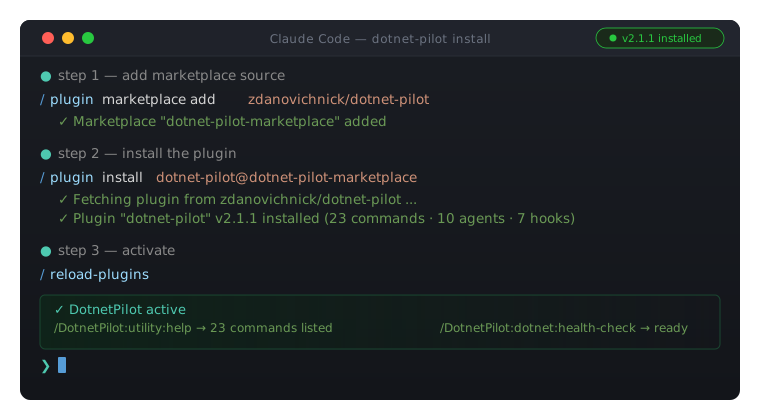
Verify it worked:
/DotnetPilot:utility:help            → should list 29 commands
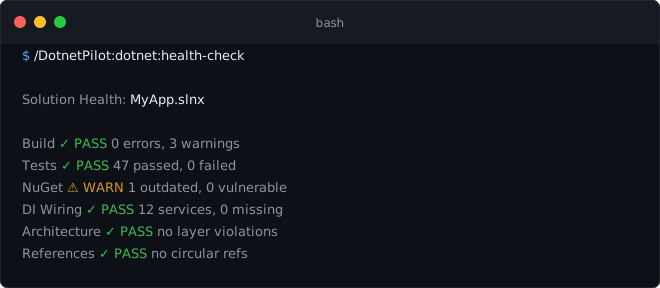
/DotnetPilot:dotnet:health-check     → validates build, tests, DI, architecture
Keeping it up to date.
Easiest: Open the plugin manager (/plugin → Installed tab → dotnet-pilot) and click "Update now". Then /reload-plugins to activate.
CLI alternative:
/plugin marketplace update dotnet-pilot-marketplace
/reload-plugins
Auto-update (GitHub-sourced marketplaces disable it by default). Enable once via the /plugin UI (Marketplaces tab → dotnet-pilot-marketplace → Enable auto-update), or persist it in .claude/settings.json:
{
  "extraKnownMarketplaces": {
    "dotnet-pilot-marketplace": { "autoUpdate": true }
  }
}
Once the plugin lands in
claude-plugins-official, the install collapses to/plugin install dotnet-pilot— auto-update on by default.
Alternative: install from a local clone
Use this when you cloned the repo and want to run your own build, or contribute changes.
# Windows  (type in Claude Code chat)
/plugin marketplace add C:\path\to\dotnet-pilot

# macOS / Linux
/plugin marketplace add /path/to/dotnet-pilot
Then activate:
/plugin install dotnet-pilot@dotnet-pilot-marketplace
/reload-plugins
Session-only (plugin active only while this Claude Code process is running):
# Windows
claude --plugin-dir "C:\path\to\dotnet-pilot"

# macOS / Linux
claude --plugin-dir "/path/to/dotnet-pilot"
After editing plugin source (commands, agents, hooks), run
/reload-pluginsto pick up changes without restarting.
Step 2 — Install the Roslyn MCP server
dotnet tool install -g DotnetPilot.Mcp.Roslyn   # first install
dotnet tool update  -g DotnetPilot.Mcp.Roslyn   # update to the latest release
The plugin's .mcp.json auto-starts dnp-roslyn when Claude Code loads. It requires a .sln or .slnx file in your working directory.
Step 3 — Enable Context7 (recommended)
In Claude Code, enable the Context7 MCP server at the account level — planning agents use it for live NuGet / ASP.NET Core / EF Core documentation.
Step 4 — Verify
/DotnetPilot:utility:help            → should list 29 commands
/DotnetPilot:dotnet:health-check     → validates build, tests, DI, architecture
⚡ Quick Start
Initialize your project (once per solution)
/DotnetPilot:project:init
Scans your solution, detects architecture style / test framework / EF contexts, and creates a user-scoped .planning/ directory. Then asks three questions: what are you building, who is it for, what constraints exist.
Create a full entity in one command
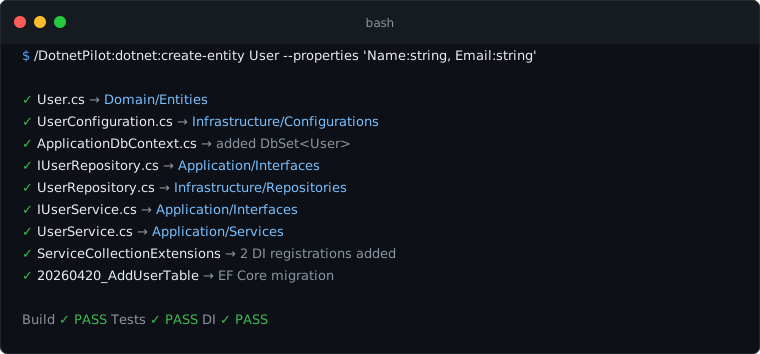
Or go even faster with the shorthand
/DotnetPilot:dotnet:create-entity Category --properties 'Name:string, SortOrder:int'
/DotnetPilot:dotnet:create-api Category
/DotnetPilot:dotnet:add-migration AddCategoryTable
🗺️ Architecture
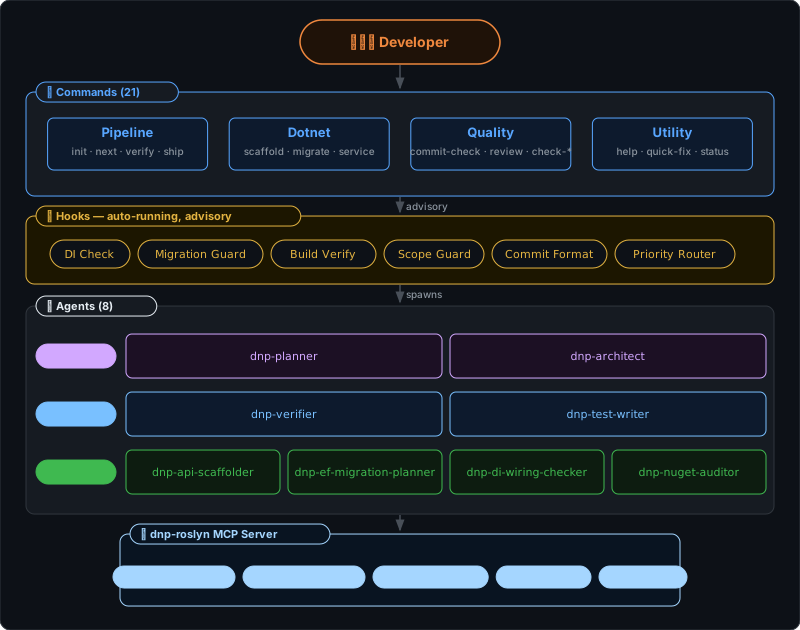
Flow: Developer invokes a /DotnetPilot:* command → the command spawns the right agent → the agent calls the Roslyn MCP server for semantic C# analysis (DI completeness, architecture violations, EF Core models, symbol references). Hooks run automatically on file writes and git events, feeding advisory feedback back to the command layer — they never block by default.
v2.0.0 breaking change: Commands were renamed for clarity.
pipeline:*→project:*,scaffold-*→create-*,audit-*→check-*, and several others. See the tables below for full mapping.
📋 Commands
Project — project lifecycle
| Command | Usage | What it does |
|---|---|---|
project:init |
/DotnetPilot:project:init [--refresh] |
Initialize for a .NET solution — discover projects, create .planning/ directory, generate PROJECT.md and solution map |
project:next |
/DotnetPilot:project:next |
Auto-detect and suggest the next project step based on current state |
project:verify |
/DotnetPilot:project:verify |
Verify readiness before shipping — build, tests, DI completeness, and architecture check |
project:ship |
/DotnetPilot:project:ship [--draft] |
Create a pull request for completed work — runs final checks and invokes gh pr create |
project:checkpoint |
/DotnetPilot:project:checkpoint |
Ordered quality gate: build → tests → format check → architecture warning → DI warning → git status summary with a suggested commit message |
Dotnet — scaffolding & solution management
| Command | Usage | What it does |
|---|---|---|
dotnet:create-entity |
create-entity <name> [--properties '...'] |
Create a full entity stack: entity class, EF configuration, repository, service, DI registration, and migration |
dotnet:create-api |
create-api <entity> [--minimal] |
Create API controller or minimal API endpoint with DTOs, validation, DI registration, and OpenAPI attributes |
dotnet:add-service |
add-service <name> [--lifetime scoped|transient|singleton] |
Create a service with interface, implementation, DI registration, and test scaffold |
dotnet:add-endpoint |
add-endpoint <controller> <method> <route> [--with-dto] |
Add an endpoint to an existing controller or endpoint group |
dotnet:add-migration |
add-migration <name> [--context <Name>] |
Plan and generate an EF Core migration safely — validates chain, detects breaking changes, targets correct DbContext |
dotnet:add-project |
add-project <name> <type> |
Add a new project to the solution with correct references and layer placement |
dotnet:write-tests |
write-tests <class-or-method> [--style unit|integration|e2e] |
Generate tests for existing code — unit, integration, or WebApplicationFactory tests |
dotnet:tdd |
tdd <task> [--complexity easy|hard] |
Implement a feature using TDD — writes failing tests first, then production code |
dotnet:run-tests |
run-tests [project] [--coverage] [--filter ...] |
Run tests with coverage reporting and failure diagnosis |
dotnet:health-check |
health-check [--fix] |
Validate full solution health — build, tests, NuGet, project references, DI completeness |
dotnet:scaffold |
scaffold <FeatureName> [--arch vsa|clean|ddd] |
Detect solution architecture via Roslyn, then scaffold a feature with the appropriate style — delegates to dnp-api-scaffolder with full context |
dotnet:build-fix |
/DotnetPilot:dotnet:build-fix |
Run dotnet build, capture output, and auto-fix errors iteratively — up to 5 cycles, then halts and reports what remains |
Quality — safety checks
| Command | Usage | What it does |
|---|---|---|
quality:commit-check |
/DotnetPilot:quality:commit-check |
Commit quality gate — build, test, format check, DI verification, and architecture check |
quality:review |
review [--depth quick|standard|deep] |
Code review current changes with .NET-specific focus — async patterns, LINQ, naming, DI |
quality:check-packages |
/DotnetPilot:quality:check-packages |
Package vulnerability scan, version consistency check, and upgrade recommendations |
quality:check-architecture |
/DotnetPilot:quality:check-architecture |
Scan for clean architecture layer violations — forbidden project references, DI issues, package placement |
quality:security-scan |
/DotnetPilot:quality:security-scan |
Three-phase audit: dotnet list package --vulnerable → dnp-security-auditor OWASP scan → combined CRITICAL findings report |
quality:de-sloppify |
de-sloppify [--scope path] |
Safe refactoring pass — dead code removal, naming normalization, duplication elimination. Requires tests passing first |
Utility — housekeeping
| Command | Usage | What it does |
|---|---|---|
utility:help |
/DotnetPilot:utility:help |
Show all commands with descriptions |
utility:quick-fix |
quick-fix <task description> |
Quick fix — bypass the full pipeline for small changes |
utility:status |
/DotnetPilot:utility:status |
Show current project state — phase, progress, recent activity |
utility:settings |
settings [key] [value] |
View and modify DotnetPilot configuration |
utility:show-solution |
/DotnetPilot:utility:show-solution |
Show the .NET solution structure — projects, references, packages, namespaces, layers |
utility:statusline |
statusline [--manual] |
Install the .NET-aware statusline and wire it into ~/.claude/settings.json (backs up any existing statusLine) |
🤖 Agents
Commands are thin orchestrators — all heavy work happens in one of these 14 agents, each with scoped tool access and a pinned model ID.
Planning & verification
| Agent | Model | Role |
|---|---|---|
dnp-planner |
Opus | Emits a .NET-aware, DI-conscious task list that maps 1:1 to TaskCreate entries |
dnp-verifier |
Sonnet | Goal-backward verification: build, tests, DI completeness, migration state, architecture rules |
Expert domain agents
| Agent | Model | Role |
|---|---|---|
dnp-architect |
Opus | Solution architecture, clean-arch layer enforcement, project-reference and package-placement validation |
dnp-test-writer |
Sonnet | Test writer — xUnit/NUnit with mocking, WebApplicationFactory integration tests, convention-aware assertions |
dnp-tdd-developer-easy |
Haiku | Fast TDD for routine .NET tasks — writes both tests and production code following RED-GREEN-REFACTOR |
dnp-tdd-developer-hard |
Sonnet | Deep TDD for complex .NET tasks — architectural decisions, ambiguous edge cases, cross-layer integration |
dnp-build-error-resolver |
Haiku | Iterative build-error fixing — parses MSBuild output, applies targeted fixes, max 5 cycles before halting |
dnp-security-auditor |
Sonnet | OWASP Top 10 for .NET APIs — injection, secrets exposure, auth config, CORS, dependencies, input validation |
dnp-performance-analyst |
Sonnet | Async hotspots, EF Core N+1 queries, missing CancellationToken, caching gaps, benchmark design |
dnp-refactor-cleaner |
Sonnet | Dead code removal, naming normalization, duplication elimination — behavior preserved, verified by tests after each step |
Mechanical agents (fast, focused)
| Agent | Model | Role |
|---|---|---|
dnp-api-scaffolder |
Haiku | Generates controllers or minimal API endpoints with DTOs, validation, OpenAPI attributes, DI registration |
dnp-ef-migration-planner |
Haiku | Plans safe EF Core migrations — detects breaking changes, validates chain integrity, targets correct DbContext |
dnp-di-wiring-checker |
Haiku | Cross-references constructor injection against DI registrations — finds missing services and captive dependencies |
dnp-nuget-auditor |
Haiku | Scans for vulnerable, outdated, and version-inconsistent NuGet packages across the solution |
dnp-test-writerwrites tests only (given existing production code).dnp-tdd-developer-*agents own the full TDD loop: write failing test → implement production code → refactor — and handle DI registration, architecture verification, and build checks as part of the cycle.Models are pinned to dated IDs so agent behavior doesn't drift when Anthropic releases new versions.
🪝 Hooks
Hooks run automatically during Claude Code sessions. Advisory hooks warn but don't block, and they respect per-project toggle settings in .planning/config.json. The sync hook keeps the global CLAUDE.md up to date with the plugin's rule set. One hook (Git Auto-Approve) is non-advisory by design — it speaks the PreToolUse permission protocol to skip prompts on safe git/gh commands.
| Hook | Trigger | What it does |
|---|---|---|
| Global CLAUDE.md Sync | Before any tool use (once per version) | Injects/updates the DotnetPilot rule block in ~/.claude/CLAUDE.md — runs once after plugin install/update, then fast-path skips |
| Git Auto-Approve | Before git/gh Bash commands |
Returns permissionDecision: allow for safe single git/gh commands (status/diff/log/add/commit/branch/push, gh pr create) so commit + PR run without a prompt; falls through to the normal prompt for chained/unsafe commands. Toggle hooks.git_autoapprove: false to disable |
| DI Registration Check | After writing/editing .cs files |
New services missing DI registration |
| Migration Guard | Before writing/editing migration files | Warns when manually editing EF migration files |
| Project Scope Guard | After writing/editing any file | Warns when editing outside the current phase's focused projects |
| Build Verify | After dotnet build runs |
Parses failures, tracks consecutive errors, aborts after 5 |
| Post-Edit Format | After Write/Edit/MultiEdit on .cs files |
Runs dotnet format --include <file> on the nearest project; skips obj/, bin/, Migrations/, generated files |
| Commit Format | Before git commit |
Enforces type(scope): message conventional commit format |
| Priority Router | Before spawning an Agent | Detects .NET projects and injects DotnetPilot agent routing priority over generic equivalents; also steers C# code inspection to mcp__roslyn__ over mcp__*code-analyzer__. Toggle hooks.dotnet_priority: false to disable |
| Code-Analyzer Redirect | Before a code-analyzer MCP tool call |
When the call targets C# (a .cs file, a .NET project_path, or a .NET cwd), nudges toward the C#-aware mcp__roslyn__ tools — the Python/TS/JS code-analyzer has no C# support. Advisory only; never blocks. Toggle hooks.code_analyzer_redirect: false to disable |
| Statusline Sync | On session start/resume/clear/compact | Refreshes the installed statusline script at ~/.claude/dnp-statusline.js when the plugin ships a newer version. Only wires ~/.claude/settings.json when statusline.auto_enable: true (default off) — never clobbers an existing statusLine without opt-in |
📊 Statusline
A compact, .NET-aware statusline. Install it with /DotnetPilot:utility:statusline:
- Line 1 (always):
<model> │ ⚙ <effort> │ CTX <pct>% · <tokens> │ GIT <branch> ✚<dirty> ↑<ahead>↓<behind> │ ⏱ <elapsed> │ $<cost> - Line 2 (only inside a .NET solution):
SLN <name> │ TFM <framework> │ BUILD ✗ <n>x - Line 3 (only inside a .NET solution):
TIP <rotating DotnetPilot command hint>— a slowly-rotating pointer to the plugin's commands, for discovery
⚙ <effort> shows the live per-turn reasoning-effort level (low/medium/high/xhigh/max) when Claude Code pipes it — it reflects mid-session /effort changes and the resolved level under auto (not a static config value), and is color-coded by level (brightest at the top of the scale) so a change is obvious at a glance; omitted when the model doesn't support effort.
BUILD ✗ Nx reflects the same failure state the Build Verify hook records (so it also surfaces dotnet test failures); absence means "no recent failure recorded", not a guaranteed green build.
Claude Code plugins cannot register a statusLine directly, and ${CLAUDE_PLUGIN_ROOT} is not expanded in statusLine command strings — so the command installs the script to a stable path (~/.claude/dnp-statusline.js) and points settings.json at it. It detects and backs up any existing statusLine before replacing (or run with --manual to print the snippet instead). To activate automatically every session, set statusline.auto_enable: true in .planning/config.json; it coexists with — never silently replaces — another statusline unless you opt in. Honors NO_COLOR.
📚 Skill Packs
Skills are on-demand knowledge packs loaded by agents when needed — they encode .NET conventions that would otherwise require repeated prompting.
| Skill | What it teaches |
|---|---|
aspnet-api-patterns |
Minimal APIs, controller patterns, middleware, filters, OpenAPI |
ef-core-patterns |
DbContext design, migrations, query optimization, owned entities |
testing-dotnet |
xUnit conventions, NSubstitute, WebApplicationFactory, Testcontainers |
clean-architecture |
Layer rules, project layout, dependency direction, shared kernel |
blazor-patterns |
SSR vs WASM, component lifecycle, forms, state management |
dotnet-project-init |
Solution setup, NuGet config, CI scaffolding |
modern-csharp |
C# 12–14: primary constructors, collection expressions, records, pattern matching, field keyword |
error-handling |
Result<TValue,TError>, ProblemDetails, GlobalExceptionHandler, exception boundaries |
resilience |
Polly v8 ResiliencePipelineBuilder, retry, circuit breaker, timeout, hedging, IHttpClientFactory |
caching |
HybridCache (.NET 9+), IOutputCache, cache-aside, IMemoryCache, typed cache keys |
authentication |
JWT bearer, ASP.NET Identity, OIDC, policy-based auth, IAuthorizationHandler |
vertical-slice |
Feature folders, IEndpointGroup, endpoint filters, no shared base classes |
ddd |
AggregateRoot<TId>, value objects, strongly-typed IDs, domain events, repository interfaces |
convention-learner |
6-step protocol: detect naming, folder structure, DI style, test framework, DTO style, error handling before writing any code |
logging |
Serilog setup, message templates (not interpolation), LogContext, request logging, PII rules |
opentelemetry |
ActivitySource, IMeterFactory, OTLP config, Aspire AddServiceDefaults(), Serilog correlation |
📖 Use Cases
1. Scaffold a CRUD entity end-to-end in 30 seconds
> /DotnetPilot:dotnet:create-entity Category --properties 'Name:string, Description:string?, SortOrder:int'

Created 9 files:
  src/ECommerce.Domain/Entities/Category.cs
  src/ECommerce.Infrastructure/Configurations/CategoryConfiguration.cs
  src/ECommerce.Infrastructure/Data/ApplicationDbContext.cs        (added DbSet<Category>)
  src/ECommerce.Application/Interfaces/ICategoryRepository.cs
  src/ECommerce.Infrastructure/Repositories/CategoryRepository.cs
  src/ECommerce.Application/Interfaces/ICategoryService.cs
  src/ECommerce.Application/Services/CategoryService.cs
  src/ECommerce.Api/Extensions/ServiceCollectionExtensions.cs      (2 DI registrations added)
  Migration: 20260420_AddCategoryTable

Build: PASS · Tests: PASS · DI: PASS

> /DotnetPilot:dotnet:create-api Category

Created 4 files:
  src/ECommerce.Api/DTOs/CreateCategoryRequest.cs
  src/ECommerce.Api/DTOs/CategoryResponse.cs
  src/ECommerce.Api/Controllers/CategoriesController.cs
  src/ECommerce.Api/Validators/CreateCategoryRequestValidator.cs

Build: PASS
2. Safely migrate a project with multiple DbContexts
> /DotnetPilot:dotnet:add-migration AddCompanyNameToTenant


Multiple DbContexts detected. Which one?
  1. ApplicationDbContext (Infrastructure, 12 entities)
  2. TenantDbContext (Infrastructure, 4 entities)
→ 2

Checking for breaking changes...
  Analysis: Adding nullable column CompanyName — safe, no data loss.
  Chain: 7 existing migrations, chain valid.

Running: dotnet ef migrations add AddCompanyNameToTenant
  --project src/ECommerce.Infrastructure
  --startup-project src/ECommerce.Api
  --context TenantDbContext

Build: PASS · Dry run: PASS
Committed: feat(Infrastructure): add migration AddCompanyNameToTenant
3. Catch architecture violations before they ship
> /DotnetPilot:quality:check-architecture

Architecture Audit: ECommerce.slnx
  Style: clean

  Violations (1):
    [ERROR] ECommerce.Domain → ECommerce.Infrastructure
            Domain should not reference Infrastructure.
            Fix: Move the shared helper to Domain, or create an interface
            in Application that Infrastructure implements.
4. Find and fix missing DI registrations
> /DotnetPilot:dotnet:health-check

  DI Wiring:    FAIL (15 services, 2 missing)

  Missing:
    IPaymentGateway      → consumed by OrderService (Application/Services/OrderService.cs:14)
    INotificationService → consumed by OrderCompletedHandler (Application/Handlers/...:9)

> /DotnetPilot:dotnet:health-check --fix

  Fixed ServiceCollectionExtensions.cs:
    + services.AddScoped<IPaymentGateway, StripePaymentGateway>();
    + services.AddScoped<INotificationService, EmailNotificationService>();

  DI Wiring:    PASS (17 services, 0 missing)
5. Pre-commit quality gate
> /DotnetPilot:quality:commit-check

  [PASS] Build:        0 errors
  [PASS] Tests:        72 passed
  [WARN] Format:       2 files need formatting
  [PASS] DI Wiring:    all services registered
  [PASS] Architecture: no violations

  Ready to commit. Run `dotnet format` to fix formatting issues.
6. Deep code review before a PR merge
> /DotnetPilot:quality:review --depth deep


  [HIGH]   UserService.cs:45
           Async method calls .Result on a Task — deadlocks under ASP.NET Core.
           Fix: await the call instead.

  [HIGH]   UsersController.cs:28
           SQL injection: string interpolation in LINQ query with user input.
           Fix: use parameterized queries or LINQ expressions.

  [MEDIUM] OrderRepository.cs:62
           N+1 query: .Include() inside a loop. Use eager loading outside.

  [LOW]    OrderService.cs:15
           ILogger injected but never used. Remove or add error-path logging.

  4 issues found: 2 high · 1 medium · 1 low
⚙️ Configuration
After /DotnetPilot:project:init, configuration lives at ~/.claude/projects/<flat-repo-path>/.planning/config.json.
{
  "dotnet": {
    "solution_path": "MyApp.slnx",
    "target_framework": "net10.0",
    "test_framework": "xunit",
    "ef_contexts": ["ApplicationDbContext"],
    "architecture_style": "clean",
    "use_minimal_api": false,
    "central_package_management": false
  },
  "hooks": {
    "di_check": true,
    "migration_guard": true,
    "project_scope_guard": true,
    "build_verify": true,
    "post_edit_format": true,
    "commit_format": true
  },
  "statusline": {
    "auto_enable": false
  },
  "workflow": {
    "build_after_task": true,
    "test_after_task": true,
    "di_check_on_write": true
  }
}
Use /DotnetPilot:utility:settings <key> <value> to change values without editing JSON directly.
| Setting | Change to | Reason |
|---|---|---|
hooks.di_check |
false |
DI advisory is too noisy for your workflow |
hooks.project_scope_guard |
false |
You routinely edit across multiple projects at once |
hooks.commit_format |
false |
Skip conventional-commit enforcement |
statusline.auto_enable |
true |
Auto-install + wire the .NET statusline every session (backs up any existing statusLine once) |
workflow.build_after_task |
false |
Skip automatic build after every scaffold |
🔬 What the Roslyn MCP Server provides
dnp-roslyn gives DotnetPilot semantic understanding of your C# code — not regex guessing.
| Tool | What it does |
|---|---|
get_solution_structure |
Projects, references, frameworks, document counts |
get_class_outline |
Member signatures (no bodies) for a class |
get_method_body |
Full source of a specific method/constructor/property |
find_references |
Cross-solution symbol references |
find_implementations |
Interface/abstract class implementations |
find_di_registrations |
All service registrations (AddScoped, AddTransient, etc.) |
find_di_consumers |
All constructor-injected types |
check_di_completeness |
Missing registrations + captive dependency detection |
check_architecture_violations |
Clean architecture layer rule enforcement |
get_ef_models |
DbContexts, entities, properties, navigations |
find_symbol |
Locate any type, method, or property by name across the solution |
find_callers |
Find all callers of a specific method (call graph, not text search) |
find_dead_code |
Identify unreferenced types and members — confidence-scored by accessibility |
detect_antipatterns |
Syntax-level scan: async void, .Result/.Wait(), new HttpClient(), log interpolation, Thread.Sleep, missing CancellationToken, broad catch (Exception), DateTime.Now |
detect_circular_dependencies |
DFS cycle detection across project reference graph |
Without dnp-roslyn, DI checking falls back to regex-based hooks (less accurate). Roslyn tools only activate when Claude Code is opened inside a
.sln/.slnxdirectory.
🚫 What DotnetPilot does NOT do
DotnetPilot deliberately avoids wrapping stock Claude Code capabilities — use them directly:
| Task | Native Claude Code alternative |
|---|---|
| Multi-step planning | Plan Mode (EnterPlanMode) + TaskCreate |
| General code review | Stock code-reviewer agent |
| Security audit | Stock /security-review command |
| Library research | Context7 MCP or WebSearch |
| Tracking work within a conversation | TaskCreate / TaskUpdate |
| Gathering user intent | AskUserQuestion |
| Initial CLAUDE.md | Stock /init |
DotnetPilot wins only for .NET-specific behavior: Roslyn semantics, EF migration chains, DI wiring across project boundaries, clean-architecture layer rules, and scaffolders that match your existing project conventions.
🔍 Troubleshooting
"Failed to reconnect to plugin:dotnet-pilot:roslyn"
dnp-roslyn couldn't find a .sln or .slnx file in the current directory. Navigate to your solution directory and restart Claude Code there.
dnp-roslyn doctor # shows solution detection status
"DotnetPilot not initialized"
Most commands work without init. If project:next or utility:status reports this, run /DotnetPilot:project:init once to create the .planning/ directory.
Hooks are too noisy
{ "hooks": { "di_check": false, "project_scope_guard": false } }
Or: /DotnetPilot:utility:settings hooks.di_check false
Build keeps failing after scaffolding
DotnetPilot aborts after 5 consecutive build failures. Check that dotnet build works manually, then run /DotnetPilot:dotnet:health-check --fix for auto-repair.
Commands missing after update (e.g. dotnet:tdd not found)
Claude Code caches the plugin at install time. After a major version update, new command files may not appear until the cache is refreshed.
Option 1 — UI (easiest): /plugin → Installed → dotnet-pilot → "Update now" → /reload-plugins
Option 2 — short CLI reset:
/plugin uninstall dotnet-pilot
/plugin install dotnet-pilot@dotnet-pilot-marketplace
/reload-plugins
Option 3 — full reset (if Options 1 & 2 don't work):
/plugin uninstall dotnet-pilot
/plugin marketplace remove dotnet-pilot-marketplace
/plugin marketplace add zdanovichnick/dotnet-pilot
/plugin install dotnet-pilot@dotnet-pilot-marketplace
/reload-plugins
Verify: /DotnetPilot:utility:help — should list 29 commands including dotnet:tdd, dotnet:build-fix, and quality:security-scan.
"Context7 tools not available"
Context7 must be enabled at the account level in Claude Code settings.
📅 Roadmap
| Version | Status | Changes |
|---|---|---|
| v0.1 | ✅ shipped | Core pipeline + agents + hooks |
| v0.2 | ✅ shipped | Roslyn MCP server: DI analysis, solution structure, file-level queries, architecture checker |
| v0.3 | ✅ shipped | Roslyn: EF Core model introspection, verbose stderr logging |
| v1.0.0 | ✅ shipped | Scope narrowed; retired spec-driven pipeline; pinned model IDs; hardened hooks; hook test harness |
| v1.1.0 | ✅ shipped | pipeline:init/next/status merged to core; pipeline:verify added; user-scoped .planning/ path; planner & architect upgraded to Opus 4.7; plugin published to Claude Platform as dotnet-pilot |
| v2.0.0 | ✅ shipped | Breaking: 12 commands renamed for clarity (pipeline:* → project:*, scaffold-* → create-*, audit-* → check-*, and others). New: dotnet:write-tests and dotnet:tdd commands (21 → 23). New: global CLAUDE.md sync hook auto-injects .NET code-style rules on plugin install/update (5 → 6 hooks). Marketplace version synced. |
| v2.1.1 | ✅ shipped | New: .NET priority routing hook — auto-detects .NET projects and injects DotnetPilot agent routing priority before generic agents are spawned (6 → 7 hooks). |
| v2.2.0 | ✅ shipped | Major content expansion. +10 skills (modern C#, error handling, resilience, caching, auth, VSA, DDD, convention learner, logging, OpenTelemetry). +9 knowledge docs (anti-patterns, package recommendations, common infrastructure snippets, breaking changes, 5 ADRs). +4 agents (build-error-resolver, security-auditor, performance-analyst, refactor-cleaner). +5 commands (scaffold, build-fix, security-scan, de-sloppify, checkpoint). +5 templates (web-api, modular-monolith, blazor-app, worker-service, class-library). Post-edit auto-format hook. |
| v2.2.1 | ✅ shipped | Fix: ship the 5 Roslyn MCP tools that were referenced by agents but never implemented — find_symbol, find_callers, find_dead_code, detect_antipatterns, detect_circular_dependencies. Roslyn server bumped to 0.5.0. Tool count 10 → 15. |
| v2.2.2 | ✅ shipped | Model routing: every agent switched from pinned/dated model IDs to tier aliases (opus/sonnet/haiku) so frontmatter auto-tracks each tier's current default and needs no bump on future model releases (e.g. Opus 4.8). Synced the model columns in README.md and CLAUDE.md, the command delegate-notes, and the architecture diagram. Also adds a Git rule to the injected global CLAUDE.md — fetch CODEOWNERS reviewers when opening PRs. |
| v2.3.0 | ✅ shipped | New: Git Auto-Approve hook — returns permissionDecision: allow for safe single git/gh commands (status/diff/log/add/commit/branch/push, gh pr create, heredoc commit) so commit + PR skip the permission prompt (7 → 8 hooks). Plus doc-drift fixes and hook robustness hardening. |
| v2.4.0 | ✅ shipped | .NET-first tooling priority. New Code-Analyzer Redirect advisory hook + extended Priority Router steer C# code inspection to mcp__roslyn__ over kouhesion's Python code-analyzer (which has no C# support); adds a .NET-First Tooling Priority rule to the injected global CLAUDE.md; shared _lib/dotnet.js detection (with parent walk-up); both priority hooks are now config-toggleable (8 → 9 hooks). |
| v2.5 | 🔜 planned | MAUI / mobile support |
Requirements
| Dependency | Version | Purpose |
|---|---|---|
| Claude Code | Latest | AI coding assistant (CLI, desktop, or IDE) |
| .NET SDK | 10+ | Your .NET project must build |
| Node.js | 18+ | Hooks are JS scripts executed by Claude Code |
| dnp-roslyn | v0.3+ | Roslyn MCP for semantic C# analysis |
| Context7 | latest | Live docs for planning agents (recommended) |
| jq | any | Better JSON parsing in commit-format hook (optional) |
| GitHub CLI | any | Required only for project:ship (optional) |
.NET SDK
winget install Microsoft.DotNet.SDK.10   # Windows
brew install dotnet-sdk                  # macOS
sudo apt-get install -y dotnet-sdk-10.0  # Ubuntu/Debian
Node.js
winget install OpenJS.NodeJS   # Windows
brew install node              # macOS
sudo apt-get install -y nodejs # Ubuntu/Debian
dnp-roslyn
dotnet tool install -g DotnetPilot.Mcp.Roslyn
dotnet tool update  -g DotnetPilot.Mcp.Roslyn
dnp-roslyn version
jq (optional)
winget install jqlang.jq   # Windows
brew install jq            # macOS
sudo apt-get install -y jq # Ubuntu/Debian
GitHub CLI (optional)
winget install GitHub.cli  # Windows
brew install gh            # macOS
sudo apt-get install -y gh # Ubuntu/Debian
Nick Zdanovych · [email protected]
MIT License · © 2026
No comments yet
Be the first to share your take.