
.NET Clean Architecture Skills
29 AI-ready skills that teach your coding assistant how to generate production-grade .NET code — Clean Architecture, CQRS, DDD — without explaining the patterns every time.
Works with: Claude Code | Codex | GitHub Copilot | Cursor
Before (plain prompt)
"Create a Product entity with name, price, and category"
Your assistant generates a basic class with public setters, no validation, no events, inconsistent patterns.
After (with skills installed)
"Using skill
04-dotnet-domain-entity-generator, create a Product aggregate root with Name (required, max 200), Price (positive decimal), and a CategoryId foreign key"
Your assistant generates a proper DDD entity with private setters, a Create() factory method, domain events, typed errors, and a repository interface — matching the patterns already in your codebase.
Get started in 30 seconds
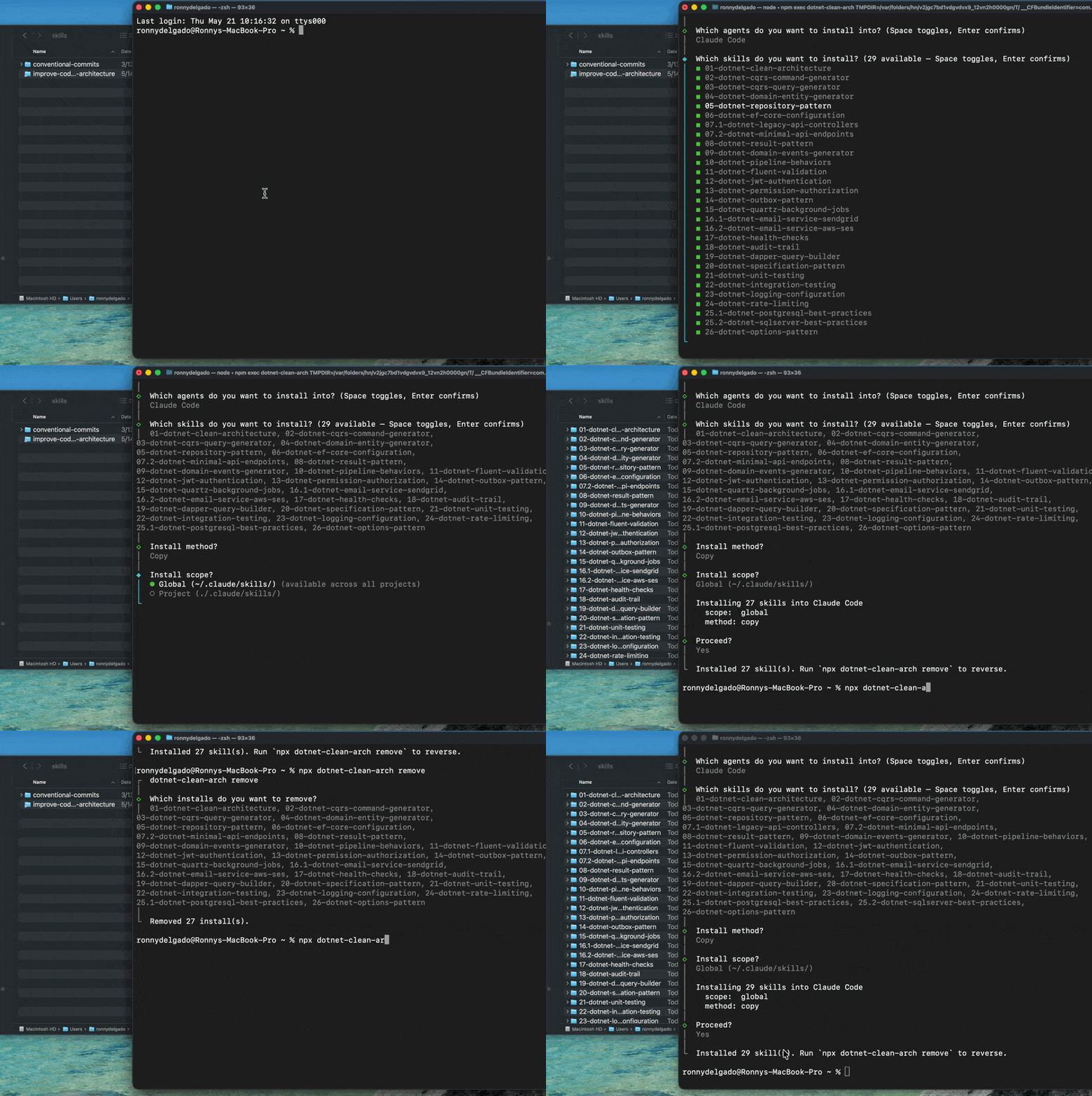
npx dotnet-clean-arch
Interactive installer: pick your agent (Claude Code, Codex, Cursor, GitHub Copilot), cherry-pick the skills you want, done. No clone required. See dotnet-clean-arch on npm for full CLI docs.
Prefer to clone or symlink directly? See Installation below for alternatives.
Then follow Recipe 0: Scaffold a New Project or jump to Recipe 1: Add a CRUD Feature if you already have a solution.
Skills Index
Why the
dotnet-prefix? Every skill in this collection is namespaced withdotnet-so the pack is identifiable in mixed-pack environments and addressable in conversation. Instead of remembering an exact skill name, you can say "use thedotnet-skill for CQRS commands" and the agent will narrow down the candidates. The prefix also prevents collisions with other skill packs that might use generic names likerepository-patternorunit-testing. Skill folders follow the pattern<NN>-dotnet-<topic>/, where the numeric prefix establishes a stable learning order and thedotnet-<topic>portion matches thenamefield in each skill's frontmatter.
Core Architecture Skills
| # | Skill | Description | Key Templates |
|---|---|---|---|
| 1 | dotnet-clean-architecture | Project scaffolding | Solution structure, layer setup, DI configuration |
| 2 | dotnet-cqrs-command-generator | Write operations | Commands, Handlers, Validators |
| 3 | dotnet-cqrs-query-generator | Read operations | Queries, Dapper SQL, Response DTOs |
| 4 | dotnet-domain-entity-generator | Domain modeling | Entities, Value Objects, Factory methods |
| 5 | dotnet-repository-pattern | Data access abstraction | Repository interfaces, EF Core implementations |
| 6 | dotnet-ef-core-configuration | Database mapping | Fluent API, Relationships, Indexes |
| 7.1 | dotnet-legacy-api-controllers | REST API controllers | Controllers, Authorization, Versioning |
| 7.2 | dotnet-minimal-api-endpoints | Minimal API endpoints | MapGet/MapPost, Filters, Versioning |
| 8 | dotnet-result-pattern | Error handling | Result, Result<T>, Error types |
| 9 | dotnet-domain-events-generator | Event-driven design | Domain Events, Handlers, Outbox pattern |
| 10 | dotnet-pipeline-behaviors | Cross-cutting concerns | Logging, Validation, Transaction behaviors |
Validation Skills
| # | Skill | Description | Key Templates |
|---|---|---|---|
| 11 | dotnet-fluent-validation | Input validation | AbstractValidator, Custom validators, Async validation |
Security Skills
| # | Skill | Description | Key Templates |
|---|---|---|---|
| 12 | dotnet-jwt-authentication | JWT Bearer auth | JwtService, Token validation, Refresh tokens |
| 13 | dotnet-permission-authorization | Permission-based access | HasPermission attribute, Policy provider |
Infrastructure Skills
| # | Skill | Description | Key Templates |
|---|---|---|---|
| 14 | dotnet-outbox-pattern | Reliable messaging | OutboxMessage, Processor job, Idempotency |
| 15 | dotnet-quartz-background-jobs | Scheduled jobs | IJob, Cron scheduling, Job configuration |
| 16.1 | dotnet-email-service-sendgrid | Email integration | IEmailService, SendGrid, Templates |
| 16.2 | dotnet-email-service-aws-ses | Email integration | IEmailService, AWS SES, Local Templates |
| 17 | dotnet-health-checks | Dependency monitoring | PostgreSQL, HTTP, Custom checks |
| 18 | dotnet-audit-trail | Change tracking | IAuditable, EF interceptor, Soft delete |
Data Access Skills
| # | Skill | Description | Key Templates |
|---|---|---|---|
| 19 | dotnet-dapper-query-builder | Optimized reads | Multi-mapping, Pagination, CTEs |
| 20 | dotnet-specification-pattern | Query encapsulation | ISpecification, Composable queries |
Testing Skills
| # | Skill | Description | Key Templates |
|---|---|---|---|
| 21 | dotnet-unit-testing | Unit tests | xUnit, NSubstitute, FluentAssertions |
| 22 | dotnet-integration-testing | Integration tests | WebApplicationFactory, Testcontainers, Respawn |
Cross-Cutting Skills
| # | Skill | Description | Key Templates |
|---|---|---|---|
| 23 | dotnet-logging-configuration | Structured logging | Serilog, ILogger, Log enrichment |
| 24 | dotnet-rate-limiting | API protection | Fixed/Sliding window, Token bucket, Concurrency |
Database Skills
| # | Skill | Description | Key Templates |
|---|---|---|---|
| 25.1 | dotnet-postgresql-best-practices | PostgreSQL optimization | Naming, Indexing, xmin concurrency, Extensions |
| 25.2 | dotnet-sqlserver-best-practices | SQL Server optimization | Naming, Indexing, rowversion, Temporal tables |
| 26 | dotnet-options-pattern | Typed configuration | IOptions, IOptionsSnapshot, IOptionsMonitor, Validation |
Recipes — Where to Start
Skills are building blocks. Recipes show you which skills to combine and in what order for common tasks.
| Recipe | What You Get |
|---|---|
| Scaffold a New Project | Complete solution structure with logging, health checks, and audit trail |
| Add a CRUD Feature | Entity + commands + queries + validation + API — the most common workflow |
| Add JWT Authentication | JWT tokens, refresh tokens, and permission-based authorization |
| Add Background Processing | Domain events with Outbox pattern and Quartz scheduled jobs |
| Add Email Notifications | Transactional emails triggered by domain events |
| Add Testing | Unit tests with NSubstitute + integration tests with Testcontainers |
New project? Start with Recipe 0, then Recipe 1. Everything else is optional and independent.
See the full Recipes guide for the suggested order and dependency tree.
Architecture Overview
┌───────────────────────────────────────────────────────────────────┐
│                          API Layer                                │
│  • Endpoints (dotnet-minimal-api-endpoints)                       │
│  • Controllers (dotnet-legacy-api-controllers)                    │
│  • Request/Response DTOs                                          │
│  • Middleware                                                     │
│  • Authentication (dotnet-jwt-authentication)                     │
│  • Authorization (dotnet-permission-authorization)                │
├───────────────────────────────────────────────────────────────────┤
│                      Application Layer                            │
│  • Commands (dotnet-cqrs-command-generator)                       │
│  • Queries (dotnet-cqrs-query-generator)                          │
│  • Validators (dotnet-fluent-validation)                          │
│  • Pipeline Behaviors (dotnet-pipeline-behaviors)                 │
│  • Event Handlers (dotnet-domain-events-generator)                │
├───────────────────────────────────────────────────────────────────┤
│                    Infrastructure Layer                           │
│  • Repositories (dotnet-repository-pattern)                       │
│  • EF Core Configurations (dotnet-ef-core-configuration)          │
│  • Dapper Queries (dotnet-dapper-query-builder)                   │
│  • Outbox Pattern (dotnet-outbox-pattern)                         │
│  • Background Jobs (dotnet-quartz-background-jobs)                │
│  • Email Service (dotnet-email-service-*)                         │
│  • Audit Trail (dotnet-audit-trail)                               │
│  • Health Checks (dotnet-health-checks)                           │
├───────────────────────────────────────────────────────────────────┤
│                       Domain Layer                                │
│  • Entities (dotnet-domain-entity-generator)                      │
│  • Value Objects (dotnet-domain-entity-generator)                 │
│  • Domain Events (dotnet-domain-events-generator)                 │
│  • Result Pattern (dotnet-result-pattern)                         │
│  • Specifications (dotnet-specification-pattern)                  │
└───────────────────────────────────────────────────────────────────┘
Technology Stack
| Technology | Version | Purpose |
|---|---|---|
| .NET | 8+ | Framework |
| MediatR | 12+ | CQRS implementation |
| FluentValidation | 11+ | Request validation |
| Entity Framework Core | 8+ | ORM (write side) |
| Dapper | 2+ | Micro ORM (read side) |
| PostgreSQL | 15+ | Database |
| SQL Server | 2019+ | Database |
| Quartz.NET | 3+ | Background jobs |
| Serilog | 3+ | Logging |
| xUnit | 2.6+ | Testing framework |
| NSubstitute | 5+ | Mocking |
| Testcontainers | 3+ | Integration testing |
Installation
Pick whichever option fits your setup.
Option 1: Interactive installer via npx (recommended)
npx dotnet-clean-arch
A TUI walks you through:
- Agent: Claude Code (global or project), Codex (global or project), Cursor (project), GitHub Copilot (project)
- Skill selection: cherry-pick the skills you want, or accept all
- Install method: copy (default) or symlink
Every install is recorded in ~/.dotnet-clean-arch/manifest.json, so npx dotnet-clean-arch remove cleanly reverses only what the CLI installed — it never touches files you've placed there by other means.
Other useful commands:
npx dotnet-clean-arch list      # show all 29 skills + their descriptions
npx dotnet-clean-arch remove    # reverse previous installs from the manifest
The CLI source lives in cli/ and the package on npm is dotnet-clean-arch.
Option 2: Symlink globally for Claude Code (manual)
If you'd rather avoid the npm CLI, clone the repo and run the symlink script:
git clone https://github.com/ronnythedev/dotnet-clean-architecture-skills.git
cd dotnet-clean-architecture-skills
./scripts/link-skills.sh
The linker is re-runnable (symlinks are refreshed on git pull) and ships an unlinker:
./scripts/unlink-skills.sh   # removes ONLY the symlinks pointing back into this repo
./scripts/list-skills.sh     # prints every SKILL.md path, handy for piping into other tools
The unlinker is safe: it never touches symlinks that point elsewhere or real directories you've installed by other means.
Option 3: Clone in-place (Claude Code + GitHub Copilot)
If you want to work on top of the repo directly (e.g. you're tweaking skills):
git clone https://github.com/ronnythedev/dotnet-clean-architecture-skills.git
- GitHub Copilot reads skills from
skills/at the repo root. - Claude Code reads skills from
.claude/skills/, which is a symlink toskills/.
Windows note: Git symlinks require either Developer Mode enabled or running Git as administrator. If symlinks don't resolve, run
git config core.symlinks trueand re-clone.
Option 4: Copy individual skills into your project
Pick the skills you need and copy them into the appropriate location for your tool:
Claude Code:
# Copy a single skill
cp -r skills/01-dotnet-clean-architecture your-project/.claude/skills/

# Or copy all skills
cp -r skills/* your-project/.claude/skills/
Codex:
# Copy a single skill
cp -r skills/01-dotnet-clean-architecture your-project/.agents/skills/

# Or copy all skills
cp -r skills/* your-project/.agents/skills/
GitHub Copilot:
# Copy a single skill
cp -r skills/01-dotnet-clean-architecture your-project/skills/

# Or copy all skills
cp -r skills/* your-project/skills/
The plugin manifest
The repository includes native manifests for both supported plugin systems:
.claude-plugin/plugin.jsondeclares the plugin and its skill paths for Claude Code..codex-plugin/plugin.jsondeclares the plugin metadata and sharedskills/directory for Codex.
These manifests make the repository installable as a plugin instead of requiring users to copy individual skill directories. If you add or rename a skill, keep both manifests valid so external tooling stays in sync.
Using the skills
Once installed, ask your coding agent to apply the patterns to your specific use case. Each skill contains:
- Overview and purpose
- Quick reference table
- Complete code templates
- Usage examples
- Best practices
- Anti-patterns to avoid
- Related skills
Credits
Skills 25.1 (dotnet-postgresql-best-practices) and 26 (dotnet-options-pattern) were inspired by johnpuksta/clean-architecture-agents, a fork that extends this collection with a multi-agent orchestration system.
Have suggestions or want to contribute? Open an issue or PR on GitHub. Let's make .NET Clean Architecture accessible to everyone.
No comments yet
Be the first to share your take.