
docx-cli
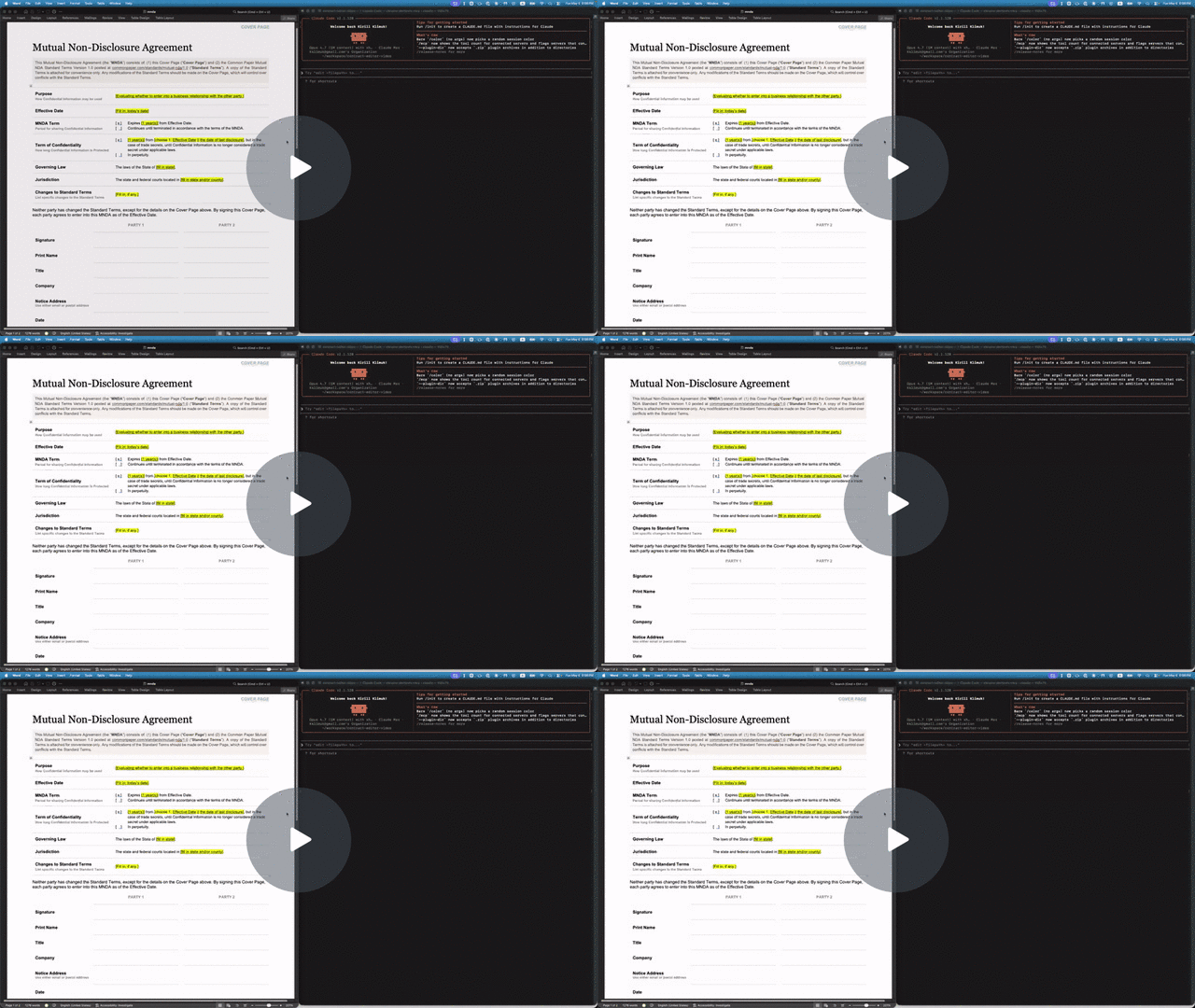
A .docx CLI built for AI agents. Leave comments, suggest redlines, and edit Word documents without breaking the formatting or losing content — a human accepts or rejects in Word afterward.
- Hand a
.docxto Claude or Codex and get back a redlined copy with comments — open it in Word, accept or reject as usual. - Agents address text by stable locators with character offsets (
p3:5-20); humans see normal Word formatting on disk. - Custom styles, theme colors, embedded objects — all of it survives. The CLI mutates XML in place rather than re-emitting from a lossy model.
Why docx-cli?
The default way agents edit Word docs is to unzip the .docx and hand-write the OOXML inside. That takes a strong model to get right, burns tokens, and routinely produces a file Word won't open. docx-cli hands the agent plain commands plus an annotated-Markdown read view, so it never has to reason about the XML.
We measured it — a controlled A/B bake-off: six real document tasks (fill an NDA, fill an invoice, restyle a résumé, redline a contract, finalize a contract, author a journal), the same starting files, and one independent judge grading every result from the Word-rendered pages. Three runs per arm at each of two model tiers. Haiku columns: July 2026 rerun on v0.20.4; Sonnet columns: June 2026 bake-off (not Sonnet 5):
| Haiku (weak, cheap) | Sonnet (strong, June run — not Sonnet 5) | |||
|---|---|---|---|---|
| docx-cli | default skill | docx-cli | default skill | |
| Tasks solved (of 6) | 5.0 (5–5) | 0.7 (0–2) | 6.0 (6–6) | 4.0 (4–4) |
| Rendered correctly (of 6) | 6.0 | 4.3 | 6.0 | 4.7 |
| Outright-broken documents | 0 | ~1.3/run (up to 2) | 0 | 0 |
| Effective input tokens | 3.2M | 7.9M (2.5×) | 1.6M | 3.6M (2.2×) |
| Output tokens | 78k | 155k (2.0×) | — | — |
| Wall-clock | 1,186 s | 2,438 s (2.1× slower) | 1,175 s | 2,029 s (1.7× slower) |
- The correctness gap is widest on the cheap Haiku tier (~7×), and a frontier model never closes it — the default skill caps at 4/6, losing the contract redline and the résumé every Sonnet run.
- The cost and speed penalties are model-independent — ~2.2–2.5× more input tokens and ~1.7–2.1× slower at both tiers, with token/time ranges that never overlap. (Output tokens, measured in the July rerun: 2× more for the default skill. The June Sonnet run measured input only.)
- Word couldn't reliably open the default skill's work — in the July Haiku runs it failed to open 4 of the skill's 18 outputs (both legal-redline deliverables in 2 of 3 runs); all 18 of docx-cli's opened on the first try.
Full methodology, per-task rubrics, and the harness that produced these numbers: .claude/skills/weak-agent-test.
Install
npm — the simplest path (requires Bun >= 1.3):
bun add -g bun-docx
# or run without installing:
bunx bun-docx read doc.docx
Standalone binary (no Bun required). Every release publishes prebuilt binaries, the installer, and a SHA256SUMS manifest covering all of them; the installer verifies the binary's SHA-256 before installing:
curl -fsSLO https://github.com/kklimuk/docx-cli/releases/latest/download/install.sh
sh install.sh
install.sh is a release asset, not a file served from a moving branch — so it is immutable per release and listed in that release's SHA256SUMS. (Published from v0.23.0 onward; on earlier releases use the npm path above.) To verify it before running it:
curl -fsSLO https://github.com/kklimuk/docx-cli/releases/latest/download/SHA256SUMS
shasum -a 256 -c SHA256SUMS --ignore-missing   # or: sha256sum -c …
sh install.sh
Honors PREFIX (default $HOME/.local/bin) and VERSION (default latest). Pre-built for linux/x64, linux/arm64, darwin/x64, darwin/arm64, windows/x64. Prefer to skip the script entirely? Download docx-<platform> + SHA256SUMS from the latest release, verify, chmod +x, and put it on PATH.
Quick example: filling out an NDA
The repo includes a Common Paper Mutual NDA template at tests/fixtures/mnda.docx. Below are the primitives an agent would compose to fill in the cover page and leave redline edits — the same flow shown in the video above. Every command was verified end-to-end against the fixture:
# Make a copy first — there's no undo (git is the history; the CLI overwrites in place)
cp tests/fixtures/mnda.docx mnda-filled.docx

# Read the cover-page table so the agent knows what placeholders exist
docx read mnda-filled.docx --from t1 --to t1

# Fill the yellow-highlighted bracketed placeholders
docx replace mnda-filled.docx "Fill in: today's date" "May 6, 2026"
docx replace mnda-filled.docx "fill in state and/or county" "California"
docx replace mnda-filled.docx "fill in state" "California"
docx replace mnda-filled.docx "Fill in, if any." "None."

# Verify nothing's left to fill (bare locator lines, one per match; nothing → exit 0)
docx find mnda-filled.docx '\[(Fill|fill)[^]]*\]' --regex --all

# Flip on tracked changes for the redline pass
docx track-changes mnda-filled.docx on

# Tighten "having a reasonable need to know" in the Use & Protection clause
docx replace mnda-filled.docx \
    "having a reasonable need to know" \
    "with a documented need to know"

# Leave a comment for the human reviewer — addresses an existing span with --at
docx comments add mnda-filled.docx --at p7:0-30 \
    --text "Should we narrow 'representatives' to a named list?"
Open mnda-filled.docx in Word: tracked changes and comments appear in the review pane, ready to accept, reject, or reply. Or run docx track-changes accept mnda-filled.docx --all to bake them in from the CLI.
Use as an agent skill
docx-cli ships as an Agent Skill — one SKILL.md that works across Claude Code, Codex, Pi, and the other harnesses that read the open skill format. The skill teaches the locator model and the redline / comment / fill workflows, then defers to docx <command> --help at runtime, so it can't go stale.
Why a skill? docx-cli is built for the weakest, cheapest agents. In our weak-agent benchmark — 6 real document tasks (fill a contract, redline, comment, restyle, author from scratch), graded against Word renders, 3 runs each — Haiku driving docx-cli completed 5.0/6 tasks versus 0.7/6 for the default Claude skill (~7×), at roughly 2.5× fewer input tokens and 2× fewer output tokens; with Sonnet (June run — not Sonnet 5) it's 6/6 vs 4/6, with roughly 2x fewer tokens. And every docx-cli output opened cleanly in Word on the first try — it never emits a file the renderer rejects. (Methodology and harness: .claude/skills/weak-agent-test.)
Install
Any agent (skills.sh) — one cross-harness command, installs into whichever agent you're using:
npx skills add kklimuk/docx-cli
Claude Code — one-line plugin install:
/plugin marketplace add kklimuk/docx-cli
/plugin install docx-cli@docx-cli
Codex — add the marketplace (the plugin's skills auto-discover):
codex plugin marketplace add kklimuk/docx-cli
Pi — one-command install (the pi manifest in package.json pulls in the skill), then invoke /skill:docx-cli:
pi install git:github.com/kklimuk/docx-cli      # global; add -l for a project (team-shared) install
# manual alternative: pi --skill /path/to/docx-cli/skills/docx-cli
Any harness / manual — drop skills/docx-cli/ into your agent's skills directory (e.g. ~/.claude/skills/ or the cross-tool ~/.agents/skills/). On first activation the skill's scripts/bootstrap.sh installs the docx binary (and self-updates a stale one).
Keeping the skill current
The binary is the source of truth: docx info skill prints the canonical SKILL.md for the installed version, and a CI test fails if the committed copy drifts. Regenerate after any change with:
docx info skill > skills/docx-cli/SKILL.md
docx <command> --help is the authoritative contract
Agents: run
docx <command> --helpbefore composing a call. Every command's--helpis the source of truth for its flags, locator forms, and exact output shape — this README is a map, not the territory. Two more must-reads:
docx info locators— the canonical locator grammar (--jsonfor a machine-readable form). The top-leveldocx --helpsays it outright: "It is highly recommended to agents to rundocx info locatorsto understand their capabilities."docx info schema— the AST type definitions (--tsfor TypeScript source) thatread --astemits.
Command reference
docx <verb> and docx <noun> <verb>. Every command has --help. Two groups: read/query commands print data to stdout; mutate commands change the file (and accept --dry-run, -o/--output PATH, -v/--verbose).
Read & query (print to stdout, never write the file)
docx read    FILE [--from LOC] [--to LOC] [--accepted | --baseline | --current] [--comments]
docx read    FILE --ast                  # JSON-AST instead of Markdown (disables the markdown-only flags)
docx find    FILE QUERY [--regex] [--ignore-case] [--all] [--nth N] [--current | --baseline] [--exact] [--json]
docx find    FILE (--highlight COLOR|any | --color HEX | --bold | --italic | --underline) [--all] [--json]   # find by formatting (no QUERY)
docx find    FILE --batch queries.jsonl [--json]   # many independent text/format queries, one read; --batch - reads stdin
docx wc      FILE [LOCATOR] [--accepted | --baseline | --current] [--json]
docx outline FILE [--style-prefix S] [--json]
docx diff    FILE --against SRC [--from LOC] [--to LOC] [--comments] [--json]   # what changed vs another version
docx validate FILE [--json]              # ECMA-376 schema check, per WML part (exit 0 = clean)
docx raw get FILE --at LOCATOR [--json]  # a block's exact XML — the read half of the raw patch loop
docx styles  FILE [--used] [--at STYLEID] [--json]   # the style catalog (not in the body) — what --style NAMEs exist
docx styles  --catalog [--json]                      # built-in styles you can apply on demand (Title, Heading1–9, Quote, …), no FILE needed
docx styles  set    FILE --at STYLEID [--bold --color HEX --size PT --font NAME --space-before PT --indent-left IN …]   # restyle every paragraph/run that uses the style
docx styles  create FILE STYLEID [--type paragraph|character] [--name "…"] [--based-on STYLEID] [--next STYLEID] [formatting]   # define a new custom style
docx render  FILE [--out DIR] [--engine word|libreoffice|auto] [--dpi N] [--pages 1-N] [--format png|jpg]

docx comments      list FILE [--open] [--thread cN]
docx footnotes     list FILE
docx endnotes      list FILE
docx headers       list FILE
docx footers       list FILE
docx images        list FILE
docx hyperlinks    list FILE
docx track-changes list FILE

docx info schema   [--ts]
docx info locators [--json]
find --batch reads one JSON object per line: either {"query":"…"} with
optional regex/ignoreCase/nth/view fields, or a formatting filter such as
{"highlight":"yellow"} / {"bold":true}. Plain output flattens locators in
entry order; --json preserves each query's totalMatches and matches inside
a batch array. It opens the document once and never mutates it.
docx diff shows what you changed as a git-style unified diff — it renders both
the current file and a baseline to their read markdown and diffs them, so + lines
are what you added and - lines what you removed (a one-line edit shows inline as
[-removed-]{+added+}). There's no undo/history, so snapshot before editing and
diff against the snapshot:
cp report.docx report.orig.docx          # keep the original
docx edit report.docx --at p3 --text "…" # make changes
docx diff report.docx --against report.orig.docx
--against also takes a saved docx read output (a text file), or - to read the
baseline from stdin — so you can diff against a git branch without any git integration:
git show main:report.docx | docx diff report.docx --against -. Positional locators
(<!-- p3 -->, cell/row ids) are normalized out so a structural edit doesn't renumber
every following line; formatting/structure changes (shading, borders, tracked-changes
state) still show. It's a read-only report, not a patch to apply.
docx read surfaces structural facts the Markdown body can't show as HTML-comment
annotations (<!-- docx:TYPE … -->). These are read-time visibility hints — the
agent can SEE the structure, but the importer drops them (the structure survives
normal edits in place, read --ast is the lossless view, and docx sections /
docx tables … manage it). They're emitted deviation-only
(only when a value differs from the document default, so a plain document stays
clean):
- Per-paragraph style/spacing/indent — the most common annotation — rides a
<!-- docx:p pN style="Caption" align="center" space-after="6pt" line-spacing="1" indent-left="0.25in" -->note, emitted deviation-only (only the attrs that differ from the style/document default). Each attribute maps to the matchingedit/insertflag (--style,--alignment,--space-before/--space-after,--line-spacing,--indent-left/--indent-right/--first-line/--hanging), so an agent reads a value and re-applies it. The paragraph's locator rides this note as its leadingpNtoken, so an annotated paragraph does NOT also get a bare<!-- pN -->(only undeviating paragraphs get the bare locator). Full properties are inread --ast. - Section breaks render as
<!-- docx:section sN cols="2" type="continuous" -->on their own line — never a bare---(that's a thematic break, and emitting it for a section silently turned layout into border paragraphs). A hand-authored---now unambiguously means a thematic break. - Page geometry rides a leading
<!-- docx:page sN orientation="landscape" size="…in" margins="…in" text-width="…in" -->note when the page deviates from US-Letter-portrait-1″ —text-widthis the usable column width, and the leadingsNis the section to re-apply against. Avaries="by-section"attribute is added when a later section's page setup differs from the leading one — and in that case the note fires even if page 1 is plain default Letter-portrait-1″ (it then shows justtext-width+varies="by-section"), warning that the geometry shown describes only the leading section; useread --astfor every section's exact geometry. Exact twips are inread --ast(on each section break:pageWidth/pageHeight/pageOrientation/margin*). Set it for the WHOLE document withdocx sections --orientation/--size/--margins(no--at→ every section gets it, so a multi-section doc doesn't leave the trailing section behind), one section withdocx sections --at sN …, or atcreatetime; under track-changes it records as one<w:sectPrChange>per section (accept/reject in Word). Changing margins/size also auto-realigns right-edge tab columns (résumé dates/locations): a LEFT tab calibrated to the old margins would overflow and wrap at the new width, so page setup converts each to a RIGHT tab flush at the new margin and reports how many it fixed — no second--tabs rightstep needed. - Tables carry a leading
<!-- docx:table t0 widths="1,2,3in" borders="double" -->when columns are uneven or borders deviate from the default. Within each cell, a trailing<!-- docx:cell t0:r0c0 gridSpan="2" vMerge="continue" shading="FFE699" -->note follows the cell content and its paragraph locators — so structure invisible in GFM is visible (Table.borders/TableCell.shadinginread --ast). A plain empty cell emits<!-- t0:r0c0 -->: pass that bare handle directly toedit --atorinsert --atto fill its mandatory empty paragraph without creating a blank extra line. Where a bare cell target is refused — a merged cell, or any cell of a merged/grid-shifted row — the empty cell emits the explicit<!-- t0:r0c1:p0 -->paragraph locator instead (in front of itsdocx:cellnote, when it has one). Pass back whichever form you see rather than deriving one by counting columns: in a merged row the printed cell ids no longer line up with logical column numbers. - Content controls (Word's
<w:sdt>— template placeholders, form fields, data-bound regions) are transparent: the paragraphs and tables inside one read as ordinarypN/tNblocks and edits land inside the control, with acontent-control="Governing Law"pair on the block's note so you know Word may have locked it. - Images trail a
<!-- docx:image img0 size="6.2x4.1in" float="yes" wrap="square" align="center" overflow="yes" -->note:sizealways (thealone doesn't say "6in wide"), andfloat/wrap/align/overflowonly when they deviate (an inline, in-bounds image shows just its size).overflowflags an image wider than the usable text column (ImageRun.floating/wrap/align+ EMU extents inread --ast). - Headers / footers surface as
<!-- docx:header hdr0 text="Quarterly Report" -->/<!-- docx:footer ftr0 text="Page {page} of {pages}" -->notes — led by the marginal'shdrN/ftrNid, the handleraw get --atandheaders/footers set/clear --ataccept (thetypeattr appears only forfirst/even). Fields read as tokens —{page}{pages}{date}{time}{styleref:NAME}{filename}{title}{author}({time}read-only). A marginal that's the same on every section rides the top; one that differs by section renders at that section's start (alongside thedocx:sectionnote, which also renders at the section's start withapplies-to="… (below)"), so each hint reads right before the content it governs. The text lives in the comment attribute so the importer drops it (it can't re-inject into the body); full entries are inread --astunderheaders/footers(Marginal[]). Set withdocx headers/docx footers. - Track-changes state always rides a head
<!-- docx:track-changes on|off -->line — it's the one read hint that states its default too (an agent shouldn't have to infer "off" from a missing line), so you can see whether subsequent edits will be redlined without inspectingsettings.xml. Toggle it withdocx track-changes FILE on|off; the three tracked-change read views (--accepted/--current/--baseline) are covered under the review loop below.
Mutate (change FILE in place; --dry-run, -v everywhere; -o PATH on every mutator except create, whose positional FILE is already the output)
docx create FILE [--title T] [--author A] [--text "..." | --text-file PATH | --from PATH.md | --from -] [--orientation O] [--size SIZE] [--margins M] [--header "..."] [--footer "..." | --page-numbers] [--force]
docx insert FILE --at LOCATOR <content>                  # after a block; INTO a bare simple cell (fills/reuses blank p0)
docx insert FILE (--after | --before) LOCATOR <content>   # explicit block side or bare-cell end/start boundary
docx insert FILE (--at-start | --at-end) <content>        # no locator — prepend / append to the document
docx edit   FILE --at LOCATOR <content>                   # LOCATOR = pN | pN:S-E | pN-pM | tN:rRcC | tN:rRcC:pK[:S-E]; bare CELL requires one direct paragraph
docx delete FILE --at LOCATOR                             # LOCATOR = pN | pN-pM | tN | sN | tN:rRcC:pK (cell paragraph)
docx sections FILE [--at LOCATOR] [--columns N] [--type T] [--orientation O] [--size SIZE] [--margins M]   # LOCATOR = pN-pM | pN (wrap a range in N columns) | sN (edit one section's columns/type/page geometry). Multi-column layout AND page setup live HERE. PAGE GEOMETRY (margins/orientation/size) with NO --at applies to the WHOLE document (every section); --at sN targets one. Columns/type need --at.
docx styles set-default-font FILE "Font Name" [--size N] [--all]   # document-wide font: sets styles.xml docDefaults + theme major/minor; --all also repoints styles/runs that pin their own font
docx replace FILE PATTERN REPLACEMENT [--at pN] [--regex] [--ignore-case] [--all] [--limit N] [--current | --baseline] [--exact] [--clear ATTRS] [run-formatting] [--track] [--dry-run]
#   Keeps the run's formatting (bold/font) and any tabs by default — the no-rebuild way to fill a
#   formatted/tabbed template line (e.g. "**Org Name**⇥Date"); don't hand-build --runs to refill it.
#   Add --bold/--italic/--color/--highlight/--font/--size/… to format ONLY the replacement text;
#   --clear highlight (or a comma list / all) strips inherited properties first. Clear runs before set,
#   so an explicit format flag wins. The same fields work per-entry under replace --batch.
#   A TAB matches as one character (pattern "City State Zip" fills a tab-separated line), and
#   TAB/NBSP/bullet-glyph variants match their plain equivalents unless --exact.
#   --at pN (or a cell paragraph tT:rRcC:pN) CONFINES the replace to one paragraph — use it when the
#   SAME placeholder repeats across the doc (a résumé's "City, State" in every entry) and you want THE
#   one in a specific paragraph, instead of find → edit --at pN:S-E span surgery. Batch entries take "at" too.
#   MULTI-LINE (editor-style): "\n" in PATTERN matches a line break OR a paragraph boundary
#   (consecutive paragraphs in the body or one table cell; never across a table/section break/cell wall); the REPLACEMENT's own
#   "\n"s then define the result — single-line replacement MERGES the paragraphs (first one's
#   formatting governs), "\n" in the replacement inserts a paragraph mark (splits). Untracked
#   only: refuses under tracking rather than skip the journal. Block ids shift; re-read after.

# Query batch — many independent searches against ONE immutable read.
docx find    FILE --batch queries.jsonl      # { query, regex?, ignoreCase?, nth?, … } OR { highlight|color|bold|italic|underline }; --json preserves per-query results

# Mutation batch — apply many changes from ONE read. Keys on each JSONL line
# mirror the command's flags; all locators address the doc as read. Every batch
# surface accepts --batch - to read JSONL from stdin.
docx edit    FILE --batch fills.jsonl       # { at, <one of: text|clear|markdown|runs>, style?, … }
docx insert  FILE --batch additions.jsonl   # { at|after|before, <content>, style?, color?, … }
docx replace FILE --batch script.jsonl      # { pattern, replacement, at?, regex?, all?, limit?, clear?, bold?, color?, … } applied in order
docx delete  FILE --batch drop.jsonl        # { at } per line — whole blocks (pN/tN/cell), resolved live-first

# All four of insert/edit/delete/replace accept --track to record that one
# invocation as a tracked change even when the doc's track-changes toggle is off.
#
# insert/edit content selectors (run "docx insert --help" / "docx edit --help" for the full list):
#   --text "..." [--style NAME] [--alignment A] [--color HEX] [--bold] [--italic] [--url URL]
#       (a newline in --text becomes a line break <w:br/>, a tab becomes <w:tab/> — verse/addresses stay line-per-line)
#   paragraph spacing/indent (insert + edit, alone or with content, per-entry in --batch, across a range):
#       --space-before PT --space-after PT --line-spacing N(=1|1.5|2|single|double, or 15pt / "15pt atLeast")
#       --indent-left IN --indent-right IN --first-line IN --hanging IN  (points / inches; first-line ⊥ hanging;
#       left/right/first-line accept a negative value to outdent into the margin; hanging stays non-negative)
#       Under track-changes these record a tracked <w:pPrChange> (accept/reject in Word) — even when they ride
#       along with --text; read surfaces them as a deviation-only <!-- docx:p … space-after="6pt" --> hint.
#   edit --tabs right   fix a line whose tabbed-over content WRAPS (read flags it as `docx:layout … warn`,
#       and prints ONE consolidated fix-all summary at the top): swaps the fragile LEFT tab for a RIGHT tab
#       flush at the margin so a long value (e.g. a city) never wraps. Rides along with --text, works
#       per-entry in --batch, and on a RANGE (edit --at pN-pM --tabs right) cures every tab line at once.
#   edit --text ""      REMOVES the line (same as `delete`; a table cell's last paragraph is blanked, not
#       deleted, so the cell stays valid). In --batch, `{"at":"pN","text":""}` or `{"at":"pN","delete":true}`
#       removes a line — so a form-fill is ONE sweep: fill the cells with values, drop the leftover
#       placeholder lines. Use `--runs '[]'` to blank a paragraph but keep an empty spacer. (Empty
#       `--text` can't ride along with --clear/run-formatting/--style/--alignment/--tabs — those exit
#       with a USAGE error; use `--runs '[]'` to keep a formatted empty spacer instead.) A SPAN's
#       `--text ""` (pN:S-E) still deletes just those characters.
#   --runs '[{"type":"text","text":"X","bold":true}]'
#   --text-file PATH                               # (insert/create) LITERAL multi-paragraph text, NOT parsed — every char verbatim,
#       each newline = a new paragraph. For prose GFM would corrupt: "3. note" stays "3.", *x* / [t](https://github.com/kklimuk/docx-cli/blob/main/u) / bare URLs / {++x++} untouched.
#   --markdown "..." | --markdown-file PATH        # GFM + math + CriticMarkup + inline HTML formatting → blocks
#   --code "..." | --code-file PATH [--language LANG]
#   --equation "x^2 + y^2" [--display]   (insert; edit also accepts --inline)
#   --clear bold,italic,highlight,color,size,font,…|all   (edit; strip run formatting, keep text)
#   --bold --italic --underline --strike --color HEX --highlight NAME --shade HEX --font NAME --size PT
#       --caps --smallcaps --superscript --subscript   (edit; SET run formatting on EXISTING text —
#       the inverse of --clear. Alone they format a span/paragraph/range in place; with --text they
#       fill AND format. Like --clear, applied directly — not recorded as a tracked change.)
#       NOTE: in a single no-content call (or one --batch entry) these run-format SET flags and the
#       paragraph properties (--style/--alignment/--space-*/--line-spacing/--indent-*/--first-line/
#       --hanging/--tabs) can't ride together — use separate calls/entries, or add --text to set both.
#   --list bullet|ordered [--list-level N]   (insert; for a task-list CHECKBOX use `docx tasks add`)
#   --rows N --cols N [--widths "A,B,C"] [--table-width V] [--borders S] [--layout L]   (docx tables create)
#   --image SRC [--alt T] [--width IN] [--height IN] [--caption "Figure 1: …"]   (docx images add; SRC = path, data: URI, or http(s) URL; --caption adds a Word "Caption"-styled line under the figure)
#   --page-break | --column-break | --section [--columns N] [--type T]   (insert)

docx comments add     FILE --at LOCATOR --text "..." [--author NAME] [--current | --baseline]
docx comments add     FILE --anchor "phrase" --text "..." [--occurrence N]
docx comments add     FILE --batch reviews.jsonl                    # JSONL: { at | anchor (+occurrence), text, author? }
docx comments reply   FILE --at cN --text "..."
docx comments resolve FILE --at cN [--at cM ...] [--unset] | --batch resolutions.jsonl
docx comments delete  FILE --at cN [--at cM ...]          | --batch removals.jsonl

docx footnotes add    FILE --at pN[:offset] (--text "..." | --runs JSON | --markdown TEXT)
docx footnotes edit   FILE --at fnN (--text "..." | --runs JSON | --markdown TEXT)
docx footnotes delete FILE --at fnN
docx endnotes  add    FILE --at pN[:offset] (--text "..." | --runs JSON | --markdown TEXT)
docx endnotes  edit   FILE --at enN (--text "..." | --runs JSON | --markdown TEXT)
docx endnotes  delete FILE --at enN

# Headers & footers (one shared impl — "marginals"). Default placement is every
# page, all sections (--at sN targets one). Content: ONE primary source, except
# --text + one field = two-zone (text left, field right at a content-edge tab).
docx headers set   FILE [--at sN] [--type default|first|even | --first-page | --even | --odd] \
                        [--text "..."] [--align left|center|right] \
                        [--page-number [--of-pages] | --date [--date-format FMT] | --style-ref STYLE | --field filename|title|author] \
                        [--track] [--author NAME]
docx headers clear FILE [--at sN] [--type T | --first-page | --even | --odd]
docx footers set   FILE …   # identical flags, kind=footer (e.g. --page-number --of-pages → "Page X of Y")
docx footers clear FILE …

docx images add     FILE (--after | --before) LOCATOR --image SRC [--alt T] [--width IN] [--height IN] [--caption "..."]
docx images add     FILE (--at-start | --at-end) --image SRC [options]   # SRC = path, data: URI, or http(s) URL
docx images extract FILE --to DIR [--at imgN]            # --to = output directory; --at picks one image
docx images replace FILE --at imgN --with ./new.png
docx images delete  FILE --at imgN

docx hyperlinks add     FILE --at pN:S-E --url URL
docx hyperlinks replace FILE --at linkN --with URL
docx hyperlinks delete  FILE --at linkN

docx tables create        FILE (--after|--before LOCATOR | --at-start|--at-end) --rows N --cols M [--widths "A,B,C"] [--table-width V] [--borders S] [--layout L]
docx tables insert-row    FILE --at tN [--position INDEX] [--cells "a,b,c"]
docx tables delete-row    FILE --at tN:rR
docx tables insert-column FILE --at tN [--position INDEX] [--width TWIPS]
docx tables delete-column FILE --at tN:cC
docx tables set-widths    FILE --at tN --widths "25%,25%,50%" | "1440,..." | auto
docx tables merge         FILE --at tN:rR1cC1-rR2cC2
docx tables unmerge       FILE --at tN:rRcC
docx tables borders       FILE --at tN [--style single|double|none] [--size N] [--color HEX]
docx tables format        FILE --at LOCATOR [--shade HEX|NAME] [--valign top|center|bottom]
                          [--halign left|center|right|justify] [--cell-borders SIDES]
                          [--align left|center|right] [--style ID] [--row-height M] [--repeat-header]

docx lists set            FILE --at pN [--start N] [--format FMT] [--restart] [--continue]
                          # renumber a NUMBERED list (--at = any item; applies to the whole list).
                          # FMT = decimal | lower-alpha | upper-alpha | lower-roman | upper-roman.
                          # --restart splits a fresh list off here; --continue picks up the previous
                          # list's numbering instead of restarting. Untracked (Word records no revision).

docx tasks add            FILE (--after | --before) LOCATOR (--text LABEL | --runs JSON) [--checked | --unchecked] [--list-level N]
docx tasks add            FILE (--at-start | --at-end) (--text LABEL | --runs JSON) [--checked | --unchecked]
                          # insert a GFM task-list checkbox item (☐ default, ☒ with --checked). Consecutive
                          # adds after a list anchor build ONE contiguous list.
docx tasks check          FILE --at pN            # mark an existing task done (☒), in place
docx tasks uncheck        FILE --at pN            # clear an existing task (☐), in place
                          # check/uncheck take --track to redline the toggle even with the doc toggle off
                          # (surfaces as a checkboxToggle in `track-changes list`).

docx track-changes on|off FILE
docx track-changes list   FILE [--json]
docx track-changes accept FILE (--at tcN [--at tcM ...] | --at revN | --all)
docx track-changes reject FILE (--at tcN [--at tcM ...] | --at revN | --all)
docx track-changes apply  FILE [--accept H ...] [--reject H ...]
# `list` defaults to a text table, one LOGICAL change per line (revN collapses a del+ins
# pair onto one line); `--json` for the raw array. A del+ins REPLACE pair shares a
# "group": "revN"; `--at revN` accepts/rejects both halves in one call.
# To FINALIZE a review (accept some, reject the rest), use `apply` — it takes both decision
# lists in ONE call, resolved against the original ids, so nothing renumbers mid-operation
# and the file is never left half-finalized. Doing it as separate accept then reject calls
# renumbers the ids between them. After a subset accept/reject/apply, the confirmation
# re-lists what remains with its renumbered handles.
Raw OOXML escape hatch (last resort)
docx raw get FILE --at LOCATOR                     # a block/section/relationship's exact XML
docx raw edit FILE --at LOCATOR --find S --with S  # patch it in place, one gated call
docx raw replace FILE --at LOCATOR --xml '…'       # swap it wholesale (also --batch)
docx raw insert FILE --after pN --xml '…'          # splice new block XML (or a <Relationship/>)
docx raw part list|get|add|replace|edit FILE …     # OPC parts, addressed by --name
docx validate FILE [--json]                        # schema-check against ECMA-376 (transitional)
For constructs no modeled verb covers — drop caps, TOC field codes, embedded
objects. Every mutation runs a gate pipeline (well-formedness, addressable
roots, ECMA-376 child order, reference/id integrity, and a schema check
against the bundled transitional XSDs — a change may not ADD errors) and
nothing is written when any gate fails. Inline --xml/--find/--with
are verbatim; raw changes are never tracked. Details and examples:
docx raw --help.
One rule to memorize: addressing an existing thing is always
--at.comments reply/resolve/delete,footnotes/endnotes edit/delete,images extract/replace/delete,hyperlinks replace/delete,tables *,track-changes accept/reject,edit,delete, andinsertall take--at LOCATOR. For insert,--atmeans after an ordinary block and into a bare cell; use--before/--afterwhen the side matters, or--at-start/--at-endfor document boundaries. The remaining exceptions are positional by nature:readslices with--from/--to LOCATOR;wctakes a positional[LOCATOR];find/replacetake a positionalQUERY/PATTERN(andreplaceaccepts an optional--at pNto confine the substitution to one paragraph).images extract --to DIRis an output directory, not a locator.
Output contract
The CLI is built for non-interactive agents. Exit code is the success signal, output is data:
| Exit | Meaning | Error codes |
|---|---|---|
0 |
success | — |
2 |
usage / bad locator | USAGE, INVALID_LOCATOR, INVALID_XML |
3 |
addressed thing not found | FILE_NOT_FOUND, PART_NOT_FOUND, BLOCK_NOT_FOUND, COMMENT_NOT_FOUND, IMAGE_NOT_FOUND, HYPERLINK_NOT_FOUND, TRACKED_CHANGE_NOT_FOUND, MATCH_NOT_FOUND |
1 |
general failure | NOT_A_ZIP, TRACKED_CHANGE_CONFLICT, TABLE_STRUCTURE, VALIDATION_FAILED, IMAGE_SOURCE, RENDER_ENGINE, RENDER_FAILED, UNHANDLED |
Errors print {code, error, hint?} JSON to stdout with a nonzero exit — note there is no ok field; the exit code plus code are the unambiguous signal.
The ok field appears in exactly one place: the --verbose success ack ({ok:true, operation, path, …}). Without -v, success output is shaped for the next command:
| Command class | Default stdout on success | --verbose |
|---|---|---|
Mutator that mints a new handle — comments add→cN, comments reply→cN, footnotes/endnotes add→fnN/enN, hyperlinks add→linkN, insert→the new pN |
the bare locator(s), one per line (a multi-block --markdown insert prints several) |
full {ok:true,…} ack |
Mutator with no new handle — edit, delete, replace, create, comments resolve/delete, images replace/delete, hyperlinks replace/delete, footnotes/endnotes edit/delete, headers/footers set/clear, tables *, track-changes accept/reject & toggle |
one-line confirmation — <operation> <target> (e.g. edit t1:r0c1:p0, edit 7 changes, replace 3 occurrences replaced) (exit 0) |
full {ok:true,…} ack |
find |
matched span locators, one per line (no matches → nothing, exit 0) |
--json → `{ tota |
No comments yet
Be the first to share your take.