
English · 中文
docs-cockpit
A skill-first project cockpit for AI coding agents. Turn AI-written markdown into a schema-validated, single-file dashboard.




Why docs-cockpit
AI coding power users generate a lot of useful project markdown: plans, specs, RFCs, module notes, subtasks, and status summaries. Without structure, that knowledge becomes a pile of files your next agent session has to rediscover.
docs-cockpit turns those markdown files into an operational cockpit:
- A local Kanban dashboard for modules, concepts, subtasks, docs, and progress.
- A validator that checks frontmatter against one canonical schema.
- A
state.jsonsidecar that agents and CI can read without scraping HTML. - A skill layer that teaches Codex, Claude Code, and compatible agents how to build and refresh the cockpit with you.
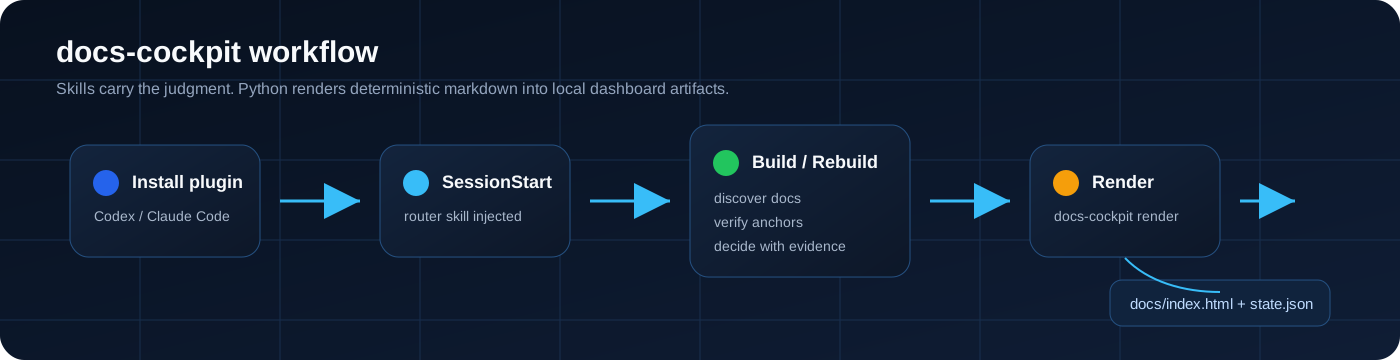
The core rule is simple: cognition lives in skills, Python only renders. Your agent reasons about associations and anchors; the CLI deterministically renders markdown into docs/index.html and docs/state.json.
Quickstart
Install the plugin for your agent, open a repository, and ask it to set up docs-cockpit. In any project with docs-cockpit.yaml, the SessionStart hook injects the router skill automatically.
Codex
codex plugin marketplace add Guohao1020/docs-cockpit
codex plugin add docs-cockpit@docs-cockpit
Claude Code
/plugin marketplace add Guohao1020/docs-cockpit
/plugin install docs-cockpit@docs-cockpit
CLI fallback
If you only want the renderer and validator:
pip install docs-cockpit
docs-cockpit init
docs-cockpit render -c docs-cockpit.yaml
Open docs/index.html with file://. Run docs-cockpit lint before committing frontmatter changes.
See It
How It Works
docs-cockpit has three layers:
- Markdown files with YAML frontmatter describe modules, concepts, plans, RFCs, and linked docs.
- Skills guide the agent through setup, association, drift diagnosis, and status reading.
- The Python CLI validates the schema and renders static artifacts.
docs-cockpit render writes:
docs/index.html- the self-contained dashboard.docs/state.json- machine-readable payload plus validation issues.docs/prompts.js- prompt snippets used by dashboard copy actions.
No server is required at runtime.
Product Tour
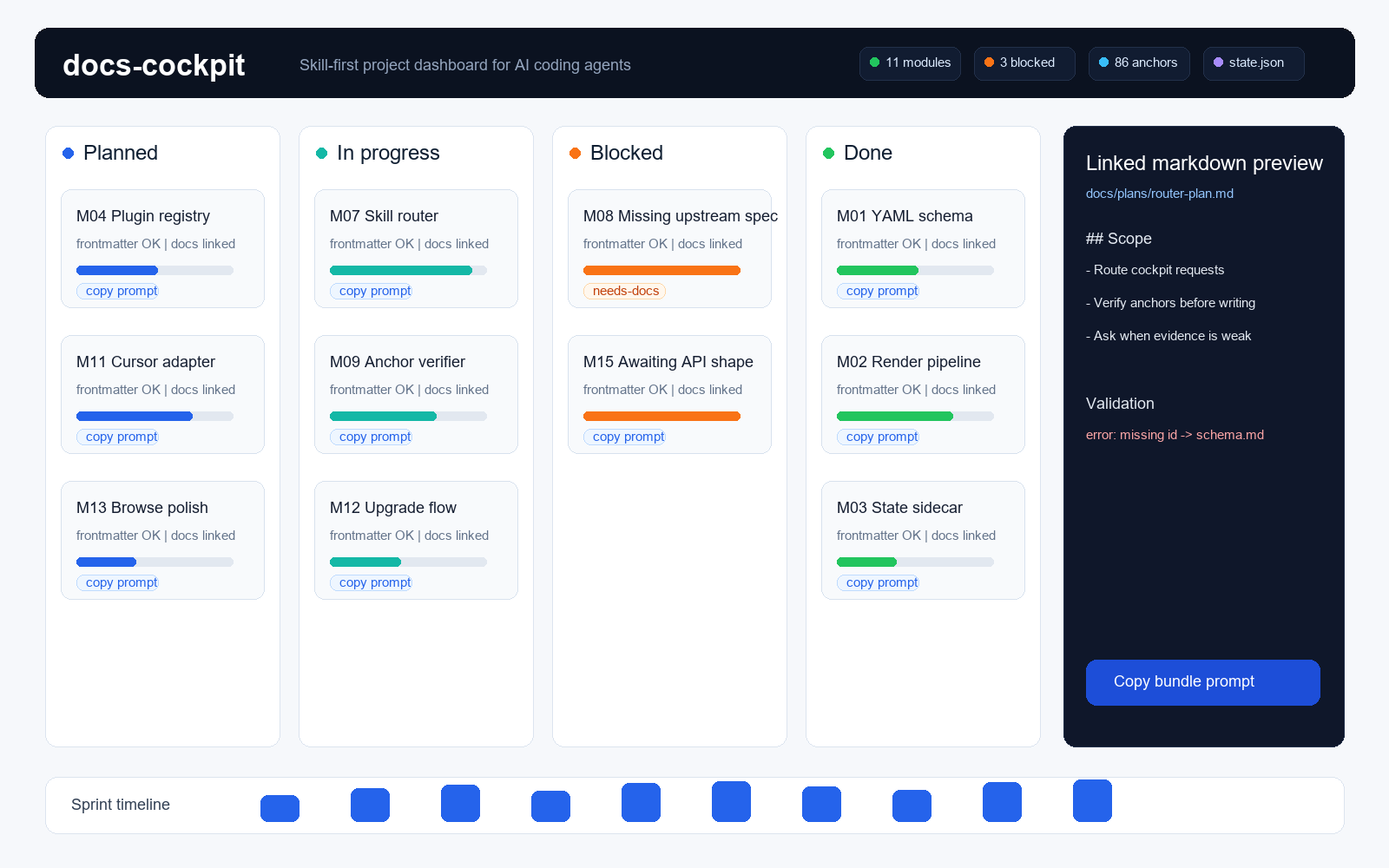
- Module Kanban with status columns, KPI strip, progress, owners, dependencies, and sprint grouping.
- Split-view drawer with description, status controls, subtasks, linked docs, and inline markdown preview.
- Backlog view for cross-module subtasks with filters for sprint, status, time, and search.
- Concept grid and system docs drawer for PRD, architecture notes, memory files, and RFCs.
- Copy-prompt actions for individual subtasks, selected bundles, and missing-doc scaffolds.
- Tree-sidebar markdown reader via
docs-cockpit browse. - Frontmatter lint output with severity, suggested fix, and reference back to
references/schema.md.
Skill Layer
The plugin ships three skills:
| Skill | Role |
|---|---|
use-docs-cockpit |
Entry router injected by SessionStart in projects with docs-cockpit.yaml. |
docs-cockpit-build |
First-build workflow: ensure config, discover docs, infer associations, verify anchors, ask before uncertain writes, draft missing docs, render. |
docs-cockpit-rebuild |
Refresh workflow: read current state, diagnose drift, re-infer broken links, apply minimal diffs, render and verify. Also answers pure status questions from state.json. |
The knowledge layer lives in references/: schema, association method, operations, config reference, design tokens, and frontmatter conventions.
State Sidecar
Every render writes docs/state.json next to the dashboard. It contains the same payload the UI uses plus structured issues[] from validation. Agents use it for status narratives. CI can use it with strict validation. External tooling can consume it without parsing HTML.
The sidecar schema is additive-only: new fields can appear, but existing fields are not removed casually.
Philosophy
- Skill-first: agent judgment belongs in readable skills, not opaque CLI heuristics.
- A wrong anchor is worse than a missing anchor: the build workflow verifies evidence and asks instead of guessing.
- Single-file dashboard: open with
file://, commit it, or share it without hosting. - Frontmatter as the database: human-readable markdown remains the source of truth.
- One schema source:
references/schema.mdis the spec the validator cites. - Deterministic rendering: Python loads config, validates metadata, embeds linked docs, and writes artifacts.
Project Anatomy
your-project/
├─ docs-cockpit.yaml
├─ docs/
│  ├─ index.html
│  ├─ state.json
│  ├─ browse.html
│  ├─ spec/
│  │  ├─ module/M01-*.md
│  │  └─ concept/C01-*.md
│  ├─ plans/YYYY-MM-DD-<id>-plan.md
│  ├─ RFC/001-*.md
│  └─ PRD.md
├─ CLAUDE.md
└─ .git/
Frontmatter Example
---
id: M07
type: module
title: "Job / Task FSM"
status: in-progress
sprint: M1.2
progress: 60
desc: "Job lifecycle state machine that drives worker scheduling."
owner: harvey
docs:
  - title: "Execution plan"
    path: "docs/plans/2026-05-03-m07-fsm-plan.md"
depends_on: [M06]
blocks: [M08, M09]
subtasks:
  - title: "Wire FSM enum to Pydantic"
    done: true
  - title: "Worker pulls next state from queue"
    done: false
---

# Module notes
Checklist items in the body can also carry anchors:
- [ ] Implement retry transition @code:src/worker/fsm.py:42-89 @docs:docs/RFC/004.md#section-2
See references/schema.md for the full frontmatter and anchor spec.
Updating
Ask your agent to update docs-cockpit, or run:
docs-cockpit upgrade
The upgrade flow checks the CLI and plugin layers, shows relevant release notes, clears the plugin cache when skills changed, and prompts for the required Codex restart.
Contributing
git clone https://github.com/Guohao1020/docs-cockpit
cd docs-cockpit
pip install -e .
py -3.13 -m pytest tests/ -q
docs-cockpit render -c docs_cockpit/examples/minimal.yaml --debug
Read CLAUDE.md before changing architecture, skills, schema, hooks, or templates. Skill changes are release events because cached plugin descriptions affect routing.
Bug fixes and documentation improvements are welcome as PRs. Open an issue first for schema changes, new commands, workflow changes, or breaking behavior.
Community
- Landing page: https://guohao1020.github.io/docs-cockpit/
- Issues: https://github.com/Guohao1020/docs-cockpit/issues
- Release notes: CHANGELOG.md
- Schema:
references/schema.md - Skill-first pivot:
docs/plans/P-skill-first-pivot.md
License
MIT. See LICENSE.
No comments yet
Be the first to share your take.