
demo-studio
Polished product demos — recorded by your AI agent.
Tag a skill in Cursor or Claude Code, describe what to show, and get back a zoom-composited .mp4 with optional voiceover and burned-in captions.
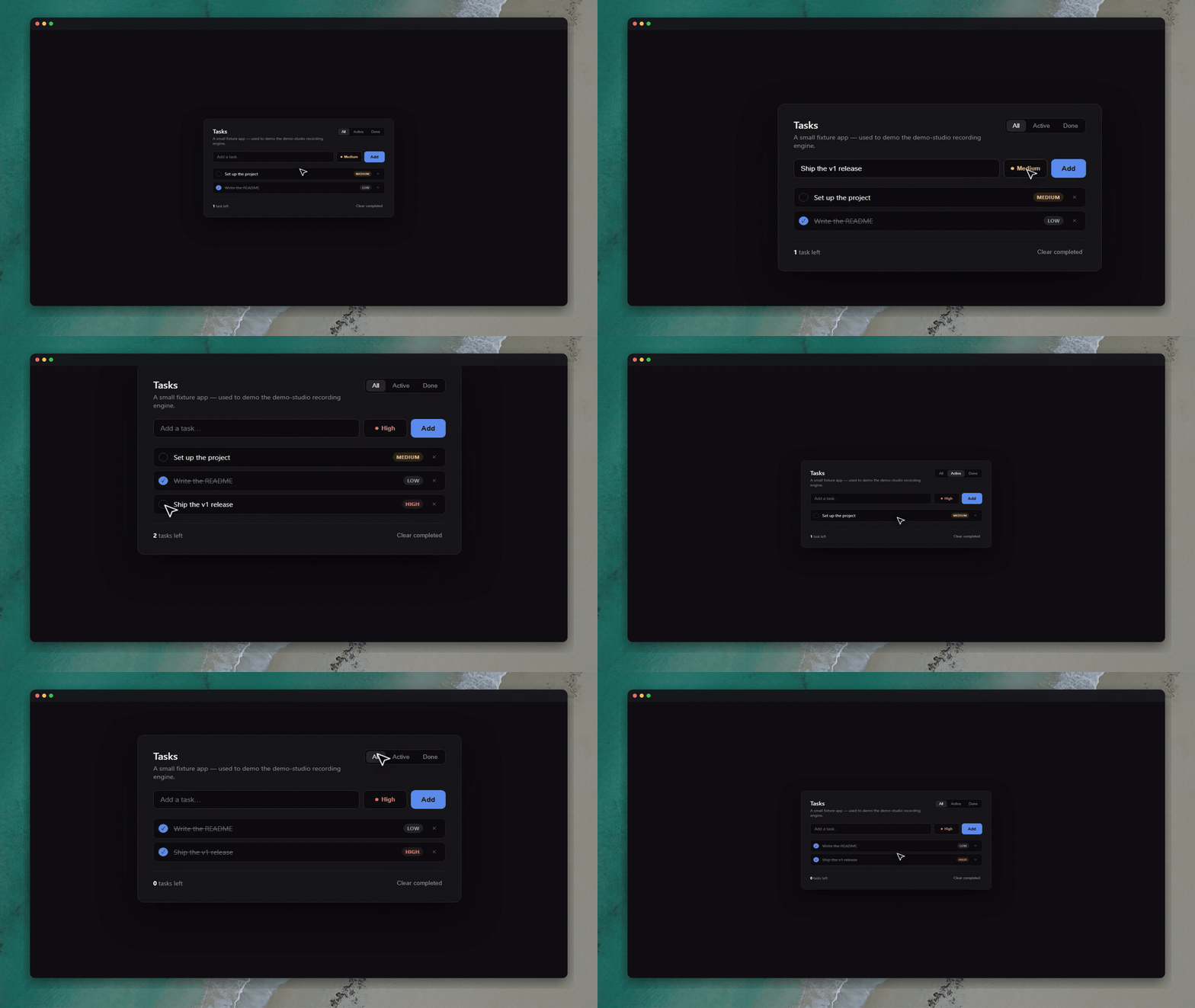
Launch demo (~60s, narrated + captioned) — recorded end-to-end with produce-video. The in-session app preview uses film-demo:
Why not just screen-record?
| Manual recording | demo-studio |
|---|---|
| You drive every click | Agent drives Playwright from a script |
| Zooms added in post | Smart focus/wide camera baked in |
| Voice + sync in a DAW | ElevenLabs + Whisper alignment automated |
| Every take is different | Guardrails + verify loop before delivery |
Works on any web app — Vite, Next.js, your own stack. One install, five skills.
Requirements
npx skills add only copies the skill files — it does not install ffmpeg,
Playwright, Python packages, or browser binaries. @demo-setup writes
demo.config.json, vendors the recording engine, and runs sanity checks — it
does not install system tools for you. Install the rows below once per
machine (or per project for Playwright / npm deps).
Every demo (silent or narrated)
| Tool | How to install | Used for |
|---|---|---|
| Node.js 18+ | nodejs.org | Recording scripts |
ffmpeg + ffprobe on PATH |
ffmpeg.org/download — on macOS: brew install ffmpeg; on Windows: gyan.dev builds and add bin to PATH |
Compose, speed-ups, sync, captions |
| Playwright + Chromium | In your project root: npm i playwright then npx playwright install chromium |
Browser capture (film-demo) |
Cloning this repo for the hello fixture: npm install (Playwright is already in package.json), then npx playwright install chromium.
Narrated demos only (narrate / sync-narration / produce-video)
| Tool | How to install | Used for |
|---|---|---|
Python 3.9+ on PATH |
python.org | Whisper alignment, ElevenLabs script |
| elevenlabs (Python) | pip install -r skills/narrate/scripts/requirements.txt |
Text → narration.mp3 |
| faster-whisper (Python) | pip install -r skills/sync-narration/scripts/requirements.txt |
Sentence timing (local, no API key) |
ELEVENLABS_API_KEY |
Copy .env.example → .env |
ElevenLabs TTS only |
Silent mode (narration.provider: "none") needs no Python packages and no API key.
Recording your own app (not the hello fixture)
Your dev server must be reachable at demo.config.json → app.baseUrl (e.g. npm run dev on port 5173). @demo-setup infers the command but does not start the server for you.
Verify before the first recording
After @demo-setup (or once demo.config.json exists):
node skills/demo-setup/scripts/check-setup.mjs    # node, ffmpeg, ffprobe, python, config
node skills/film-demo/scripts/test-engine.mjs     # full capture → compose smoke test (no app)
Both must exit 0. If ffmpeg or ffprobe is missing, nothing downstream works.
Quick start
1. Install skills (in your project, or clone this repo to try the hello fixture):
npx skills add AlexAnsart/demo-studio --all --agent cursor --copy -y
Install the requirements above if you have not already (ffmpeg, Playwright, and Python deps for narrated runs).
2. Set up once — in Cursor chat:
@demo-setup Set up demo-studio for this project.
This creates demo.config.json at your project root (from demo.config.example.json).
3. Record — silent demo:
@film-demo Record a silent demo of the signup flow. Save to
demos/signup/demo.mp4.
Or full narrated pipeline (needs ELEVENLABS_API_KEY in .env):
@produce-video Produce a narrated demo of creating a task — voiceover and captions — save to
demos/create-task/demo.mp4.
The agent writes the beat script, records the browser, composes zooms, runs quality checks, and delivers the file. You don't run ffmpeg or Playwright commands yourself.
Skills
| Skill | Role |
|---|---|
| demo-setup | One-time project config — dev server, auth, narration, scaffolds your first demo |
| film-demo | Silent capture — Playwright, cursor, zone zooms, speed-ups, styled frame |
| narrate | ElevenLabs voiceover from your script |
| sync-narration | Whisper alignment, pause insertion, caption burn-in |
| produce-video | End-to-end orchestrator — all of the above in one run |
How it works
Your prompt  →  script.md (Say + Show beats)
                    ↓
              narrate (optional)  →  narration.mp3
                    ↓
              film-demo           →  silent .mp4 (smart zooms, guardrails)
                    ↓
              sync-narration      →  final .mp4 + captions
Voice comes first when narrated: the video adapts to the voice, not the other way around.
Try the hello fixture
No dev server required — clone or open this repo, then install deps once:
npm install
npx playwright install chromium
Or install skills into another project:
npx skills add AlexAnsart/demo-studio --all --agent cursor --copy -y
Then in Cursor:
@demo-setup Set up demo-studio. Use the hello fixture in
examples/hello-demo/app.@film-demo Record a silent demo: type "Ship the v1 release", click Add, show the new task. Save to
examples/hello-demo/output/demo.mp4.
Configuration
All tunables live in demo.config.json at your project root. The demo-setup skill generates it; you can also copy demo.config.example.json and edit by hand.
Field-by-field reference: docs/CONFIG.md
Every field has a safe default in skills/film-demo/scripts/config.mjs — a partial or empty file still works.
Where settings apply
| Layer | What you set | When to use |
|---|---|---|
demo.config.json |
Project-wide defaults (cursor, camera, frame preset, voice, …) | Once per repo — the agent reads this on every run |
| Agent prompt | One-off instructions (“use macos-dark”, “save to …”) | Per demo |
compose.mjs CLI flags |
Frame overrides for a single render dir | Manual re-compose or debugging |
presets.mjs |
New named looks (copy an existing preset entry) | When you want a reusable custom style |
Config sections at a glance
| Section | Controls |
|---|---|
app |
Base URL, dev command (doc only), recording viewport (1920×1080 default) |
auth |
Optional off-camera login — selectors + env var names for credentials |
cursor |
Pointer size (scale) and color |
camera |
Zone padding, max zoom, default pan/zoom duration |
speedup |
How long waits/spinners/idle gaps are compressed (set idleGapMin very high for narrated demos) |
frame |
Output size, preset, wallpaper, corner radius, title bar |
narration |
none or elevenlabs — voice, model, API key env var name |
captions |
Burn-in on/off, line length |
output |
Default folder for scaffolded demos (demos/) |
Minimal config example
{
  "app": { "baseUrl": "http://localhost:5173", "devCommand": "npm run dev" },
  "frame": { "preset": "macos-dark", "wallpaper": "photo-beach-tropical" },
  "narration": { "provider": "elevenlabs" }
}
Only the fields you set override defaults; everything else falls back to config.mjs.
Window design (styled frame)
The styled frame is the border around your recording: background (solid color or wallpaper), optional rounded corners, drop shadow, and an optional macOS-style title bar with red / amber / green traffic-light dots.
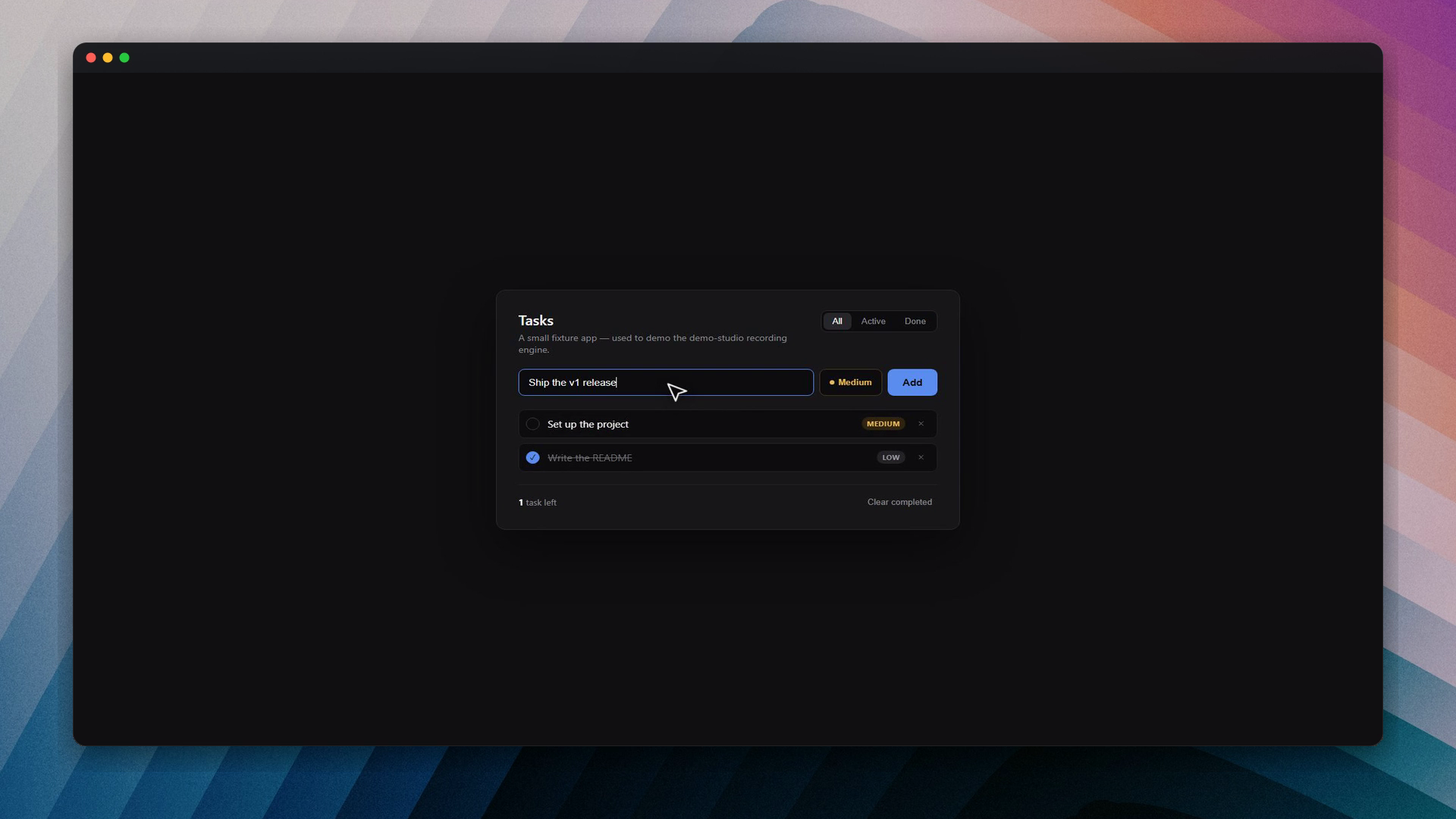
Light variant: docs/assets/window-chrome-macos-light.png

Frame presets
Set frame.preset in demo.config.json, or pass --preset to compose.mjs.
| Preset | Look |
|---|---|
studio-dark (default) |
Near-black padding, subtle shadow, square corners, no wallpaper |
clean-light |
Off-white padding, faint shadow, square corners |
none |
No background/shadow — border only |
rounded-dark |
Like studio-dark but rounded corners (18px), no wallpaper/title bar |
macos-dark |
Wallpaper + rounded corners + dark title bar + traffic-light dots |
macos-light |
Wallpaper + rounded corners + light title bar + traffic-light dots |
Built-in macOS presets ship with these defaults (skills/film-demo/scripts/presets.mjs):
| Preset | Default wallpaper | Dim overlay |
|---|---|---|
macos-dark |
photo-coast-aerial (aerial beach) |
0.25 |
macos-light |
wave-blue-minimal (soft blue) |
0.08 |
Swap the wallpaper to any bundled name or your own image — the preset only sets the starting point.
Frame fields in demo.config.json
| Field | Default | Effect |
|---|---|---|
frame.preset |
studio-dark |
One of the presets above |
frame.canvasWidth / canvasHeight |
1920 / 1080 |
Final export resolution — keep in sync with app.viewport |
frame.wallpaper |
null |
Bundled name (no extension) or path to your own image |
frame.radius |
0 |
Window corner radius in px — overrides the preset when set |
frame.titlebarHeight |
0 |
Title bar height in px — 0 = none; overrides preset when set |
frame.trafficLights |
true |
Show/hide the three dots when a title bar is present |
Example — aerial beach behind a dark macOS window:
"frame": {
  "preset": "macos-dark",
  "wallpaper": "photo-beach-tropical"
}
Example — rounded corners only, no wallpaper:
"frame": {
  "preset": "rounded-dark"
}
Compose CLI (per-render overrides)
After recording, film-demo runs compose.mjs on the render folder (raw.mp4, camera plan, etc.). You can re-run compose manually with extra flags:
node skills/film-demo/scripts/compose.mjs <renderDir> --preset macos-dark

# Swap wallpaper
node skills/film-demo/scripts/compose.mjs <renderDir> \
  --preset macos-dark --wallpaper photo-beach-tropical

# Build chrome piecemeal from a plain preset
node skills/film-demo/scripts/compose.mjs <renderDir> \
  --preset studio-dark \
  --wallpaper ribbon-indigo --wallpaper-dim 0.5 --radius 28

# Title bar + custom dot colors, no wallpaper
node skills/film-demo/scripts/compose.mjs <renderDir> \
  --preset studio-dark \
  --radius 18 --titlebar \
  --titlebar-color "rgba(30,30,36,0.95)" \
  --traffic-light-colors "#ff5f57,#febc2e,#28c840"
| Flag | Default | Notes |
|---|---|---|
--preset <name> |
studio-dark |
Base look from presets.mjs |
--wallpaper <name|path> |
preset's | Bundled name (e.g. photo-beach-drone) or file path |
--wallpaper-dim <0–1> |
preset's (0.35 if unset) |
Dark overlay on the wallpaper |
--wallpaper-blur <px> |
0 |
Extra blur on the wallpaper |
--radius <px> |
preset's | Corner radius (0 = square) |
--titlebar / --no-titlebar |
preset's | Toggle 40px title bar |
--titlebar-height <px> |
preset's | Exact title bar height |
--titlebar-color <css> |
preset's | e.g. "rgba(22,22,27,0.94)" |
--traffic-lights / --no-traffic-lights |
preset's | Show/hide dots |
--traffic-light-colors <hex,hex,hex> |
#ff5f57,#febc2e,#28c840 |
Close / minimize / maximize dots, left to right |
Finer options (dim, blur, title bar color) are not in demo.config.json yet — use CLI flags or edit presets.mjs. See docs/CONFIG.md § Window chrome.
Title bar note: the bar sits inside the top padding — it does not shrink your recorded content. If titlebarHeight exceeds internal padding, it is clamped with a console warning.
Wallpapers
47 bundled PNGs in skills/film-demo/assets/wallpapers/. Use any name with frame.wallpaper or --wallpaper (no .png extension). Pass a file path to use your own image.
| Category | Prefix / names | Count |
|---|---|---|
| Real photos (Unsplash) | photo-* — beaches, cities, forests, deserts, aurora, … |
28 |
| Abstract gradients | wave-* — fluid / Recordly-style waves |
5 |
| Synthetic (MIT) | ribbon-* + legacy mesh (midnight-violet, aurora-teal, …) |
14 |
Full gallery + licenses: skills/film-demo/assets/wallpapers/ATTRIBUTION.md
Machine-readable list: skills/film-demo/assets/wallpapers/manifest.json
Picking a wallpaper
| Use case | Suggested names |
|---|---|
| Default (compose) | photo-coast-aerial |
| Tropical beach, aerial | photo-beach-tropical, photo-beach-drone, photo-island-turquoise |
| Clean abstract (dark UI) | wave-purple-pink, ribbon-indigo, ribbon-violet |
| Clean abstract (light UI) | wave-blue-minimal, ribbon-ocean |
| City / night | photo-city-neon, photo-city-night-bergen |
| Nature / dramatic | photo-aurora, photo-forest-canopy, photo-desert-milkyway |
| Minimal texture | photo-texture-concrete, photo-architecture-white |
List every bundled name:
ls skills/film-demo/assets/wallpapers/*.png
Preview wallpapers before committing
Renders a 10-second macos-dark sample for each wallpaper (requires an existing render dir with raw.mp4 or preview-zoomed.mp4, e.g. from hello-demo):
# All wallpapers
node skills/film-demo/scripts/render-wallpaper-samples.mjs examples/hello-demo/renders/006 --sec 10

# Subset only
node skills/film-demo/scripts/render-wallpaper-samples.mjs examples/hello-demo/renders/006 \
  --sec 10 --only photo-beach-tropical,photo-aurora,photo-city-neon
Output: examples/hello-demo/wallpaper-samples/<name>.mp4 — open a few, pick a name, set it in config.
Download / refresh Unsplash photos
Bundled photos are already in the repo. To re-fetch or add subsets:
node skills/film-demo/scripts/download-wallpapers.mjs
node skills/film-demo/scripts/download-wallpapers.mjs --only photo-beach-tropical,photo-beach-aerial
Unsplash License — free commercial use. Synthetic wallpapers need no attribution.
Regenerate procedural ribbons/mesh: node skills/film-demo/scripts/generate-wallpaper.mjs
Environment variables
| Variable | Required | Purpose |
|---|---|---|
ELEVENLABS_API_KEY |
Narrated demos only | ElevenLabs TTS |
DEMO_USER_EMAIL / DEMO_USER_PASSWORD |
If auth.loginRequired |
Off-camera login (names configurable via auth.credentialsEnv) |
Never commit .env. See .env.example.
Project layout (after setup)
your-project/
├── demo.config.json          ← all defaults (frame, camera, voice, …)
├── .env                      ← API keys (gitignored)
├── demos/                    ← output dir (configurable)
│   └── my-feature/
│       ├── script.md         ← Say + Show beats
│       ├── run.mjs           ← Playwright recording script
│       └── demo.mp4          ← final deliverable
└── skills/                   ← copied by npx skills add
    └── film-demo/
        └── assets/wallpapers/  ← bundled PNGs
Further reading
| Doc | Contents |
|---|---|
| docs/CONFIG.md | Every demo.config.json field |
| skills/film-demo/SKILL.md | Recording workflow for agents |
| skills/film-demo/reference.md | Camera plan, compose pipeline, ffmpeg details |
| skills/film-demo/assets/wallpapers/ATTRIBUTION.md | Wallpaper catalog + licenses |
License
MIT · AlexAnsart/demo-studio
No comments yet
Be the first to share your take.