
D365 F&O MCP Server
23 AI tools that know every X++ class, table, form, and EDT in your D365FO codebase







Grounded AI development for Dynamics 365 Finance & Operations — works with GitHub Copilot and Claude Code



These connect an editor to a server that is already deployed — see Quick Start if you still need to set one up.
Why
AI assistants excel at C#, Python, and JavaScript. X++ is different: your D365FO codebase is private, deeply customized, and invisible to every model — so AI confidently generates code that doesn't compile.
This server pre-indexes your entire D365FO installation (580 000+ symbols across standard, ISV, and custom models) and exposes it as 23 specialized MCP tools. Every signature, every CoC wrapper, every label, every form pattern — verified against your real metadata before the AI writes a single line.
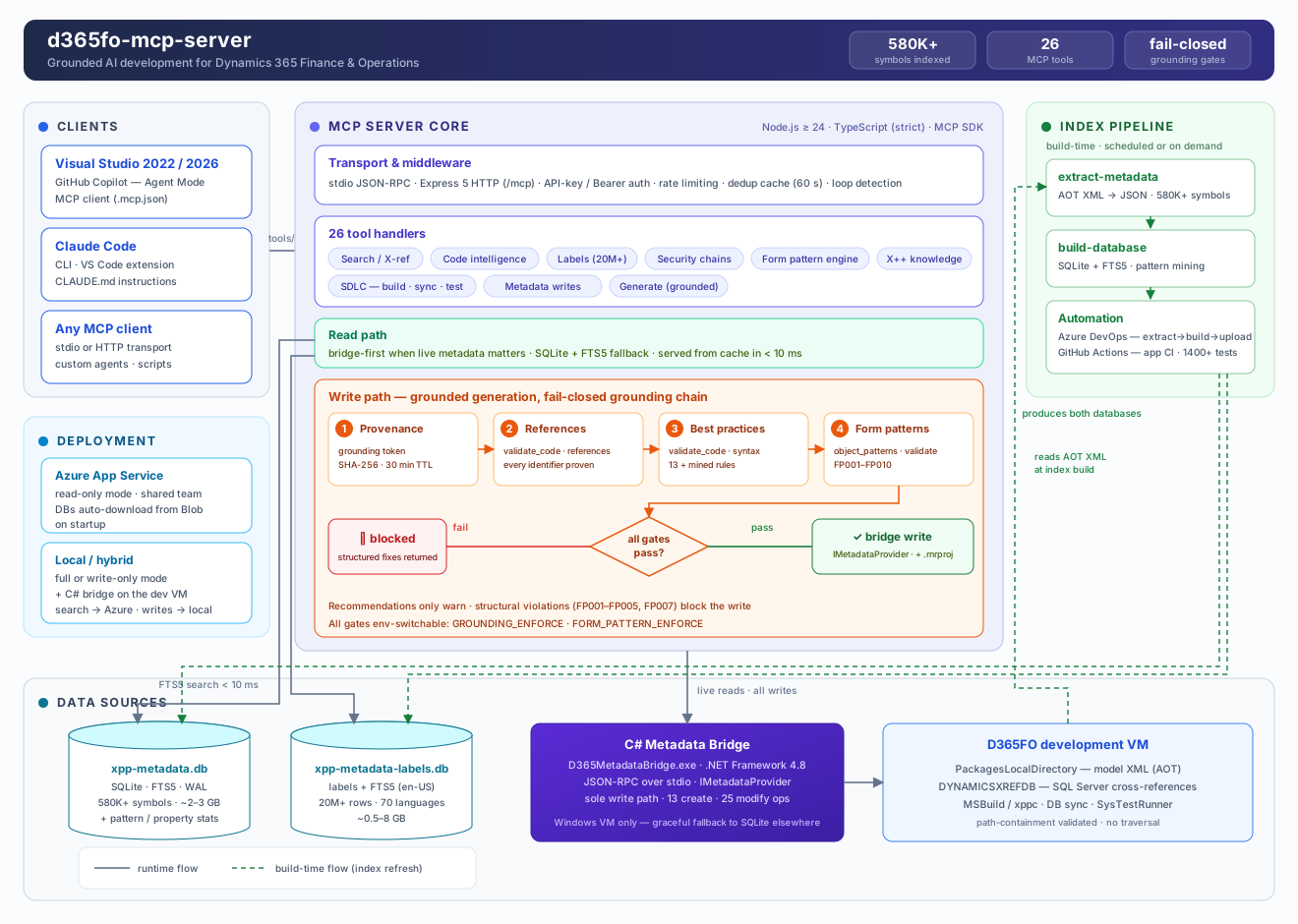
| Task | Without this server | With this server |
|---|---|---|
| Method signatures | Guessed → compile errors | Exact, from your codebase |
| Existing CoC wrappers | Manual AOT search | extension_info(mode="coc") in < 50 ms |
| New forms | Hand-written XML, broken patterns | Cloned from reference forms, validated against the pattern catalog |
| Labels | Hardcoded strings | Right @SYS/@MODULE key found instantly |
| Security chains | Hours of manual tracing | Role → Duty → Privilege → Entry Point in one call |
| Generated code | Hallucinated fields and types | Every reference proven against the index, gated before write |
Capabilities
| Feature | Description |
|---|---|
| 🔍 Full-codebase intelligence | 580K+ symbols indexed: classes, tables, forms, EDTs, enums, labels (20M+ rows), security artifacts — FTS5 search in < 10 ms |
| 🛡️ Grounded generation | Fail-closed gates: prepare issues grounding tokens, validate_code(mode="references") proves every identifier, validate_code(mode="syntax") enforces best practices — hallucinated code never reaches disk |
| 🧩 Form pattern engine | Complete catalog of Microsoft form patterns and sub-patterns: recommends the right pattern, clones reference forms with datasource re-binding, deterministically expands patterns that have no reference form, auto-repairs a form's missing required controls, validates structure and blocks invalid writes |
| ✍️ Safe metadata writes | C# bridge uses Microsoft's own IMetadataProvider wherever it can express the object; the few types and ops it cannot go through structured XML writers with ambiguity guards — never blind string replacement. Automatic .rnrproj registration, one-call undo |
| 🏗️ SDLC integration | MSBuild compilation with structured diagnostics, DB sync, xppbp best practices, SysTestRunner — all from chat |
| 📐 X++ knowledge base | Queryable rules: select grammar, CoC authoring, financial dimensions, the posting engine (LedgerVoucher), number sequences, SysExtension, Electronic Reporting, AX2012→D365FO migration — prevents deprecated APIs |
Pattern-grounded form development
Forms are the hardest artifact to generate correctly — each pattern dictates required containers, ordering, and allowed sub-patterns. The form pattern engine makes it a guided pipeline:
flowchart LR
    A["object_patterns<br/>(domain=form, action=analyze)"] --> B["object_patterns<br/>(domain=form, action=spec)"]
    B --> C["generate_object<br/>objectType=form, cloneFrom"]
    C --> D["object_patterns<br/>(domain=form, action=validate) FP001–FP010"]
    D -->|clean| E["d365fo_file<br/>(action=create) write + project"]
    D -->|errors| C
Structural violations (wrong order, missing container, disallowed control) block the write — recommendations only warn. Mined pattern statistics from your own environment ground every suggestion in reality.
Quick Start
From D365FO platform update 10.0.49 (PU74), Visual Studio 2026 is the supported IDE for X++ development — Microsoft no longer supports VS 2022. Earlier platform versions still use VS 2022 ≥ 17.14. Details
Installing on your own D365FO VM — the usual case. One line in PowerShell installs Node.js if it is missing, installs the server from npm, and runs the setup wizard, which asks where the index should live and builds the C# bridge for you:
irm https://raw.githubusercontent.com/dynamics365ninja/d365fo-mcp-server/main/install.ps1 | iex
Already have Node.js 24+? Then the one-liner has nothing to bootstrap and you can skip it:
npm install -g d365fo-mcp
d365fo-mcp setup
Re-running either is safe. An installation made before the npm package existed is a git checkout, and both are left exactly where they are and updated in place.
Your team already runs a shared server? Then you install nothing — point your editor at it:
npx d365fo-mcp connect https://your-server.azurewebsites.net
Both paths in full — prerequisites, editor configuration for every scenario, the required instruction file, and how to verify grounding actually works: docs/QUICK_START.md
Azure Deployment
One shared instance for the whole team — the metadata index lives in Blob Storage and downloads automatically on startup.
Deployment guide: docs/SETUP_AZURE.md — includes CI/CD pipeline automation
Documentation
| Getting started | Reference | Operations |
|---|---|---|
| Quick Start — connect or install | All 23 tools | Azure deployment |
| Setup scenarios A–F | .mcp.json reference |
DevOps pipelines |
| Claude Code setup | Configuration | Testing |
| Usage examples — real tool chains | Architecture | Custom / ISV models |
| Changelog | Knowledge authoring | Coverage — what the badge counts |
| Backlog — deferred work | New tool checklist | Eval loop — the self-improvement harness |
License
MIT
No comments yet
Be the first to share your take.