




    /\   /\        ______      __              _____
   (o ) ( o)      / ____/_  __/ /_  ___  _____/ ___/___  _____
    \ \_/ /      / /   / / / / __ \/ _ \/ ___/\__ \/ _ \/ ___/
  <==\   /==>   / /___/ /_/ / /_/ /  __/ /   ___/ /  __/ /__
     \ V /      \____/\__, /_.___/\___/_/   /____/\___/\___/
     /_ _\           /____/                          by 26zl
      |_|                     Toolkit
Cybersecurity toolkit with built-in AI integration. An embedded MCP (Model Context Protocol) server lets MCP-capable clients query the tool registry, check install status, recommend tools for a CTF category or bug-bounty target, and run installed tools through a governed execution path. Jump to MCP Server (AI Integration).
Bundled with a modular installer for Linux and Termux (Android) covering 670+ tools, 18 modules, 14 profiles, and 12 install methods.
What makes it different: most toolkits stop at installing tools. Here an AI can also drive them — infer the problem type, pick the right tools from all modules/profiles, and work with you as an interactive companion. When you explicitly authorize it, the same MCP toolchain can enter an autonomous solver loop. Companion by default; autonomous only when you ask.
Works with
| Client | Integration | Label |
|---|---|---|
| Claude Code | .mcp.json (tracked) + .claude/skills/ |
Native configuration included |
| Claude Desktop | claude_desktop_config.json |
Configuration example documented |
| OpenCode | opencode.jsonc (tracked) + .agents/skills/ |
Live tested |
| Codex | .codex/config.toml (tracked) |
Native configuration included |
| Gemini CLI | GEMINI.md + .gemini/settings.json (tracked) |
Native configuration included |
| GitHub Copilot | .mcp.json (CLI) + .github/copilot-instructions.md |
CLI live tested; VS Code documented |
| Hermes Agent | User ~/.hermes/config.yaml |
Live tested |
| OpenClaw | User ~/.openclaw/openclaw.json + .agents/skills/ |
Live tested |
| Cursor / Cline / Goose | Client MCP settings + Agent Skills | Compatible through MCP; skills supported |
| Continue | Client MCP settings; rules/prompts for context | Compatible through MCP |
| LM Studio (>=0.3.17) | mcp.json; manual or MCP-provided context |
Compatible through MCP |
| Ollama | MCP host in front of it | Compatible through an MCP host |
| Aider | — | Not applicable |
| Open WebUI | MCP-to-OpenAPI bridge | Compatible through MCP host or bridge |
See docs/AI_CLIENTS.md for detailed configuration per client, and docs/ORCHESTRATION.md for coordinating multiple agents across any MCP client.
How it works
Two entry points share one tool registry. An operator runs the bash installer to put tools on disk; an AI agent talks to the MCP server to discover, recommend, and execute those same tools through its governed tool path. tools_config.json is the single source of truth the modules define and the MCP advisors read, and CI validators keep the Python and bash sides in sync.
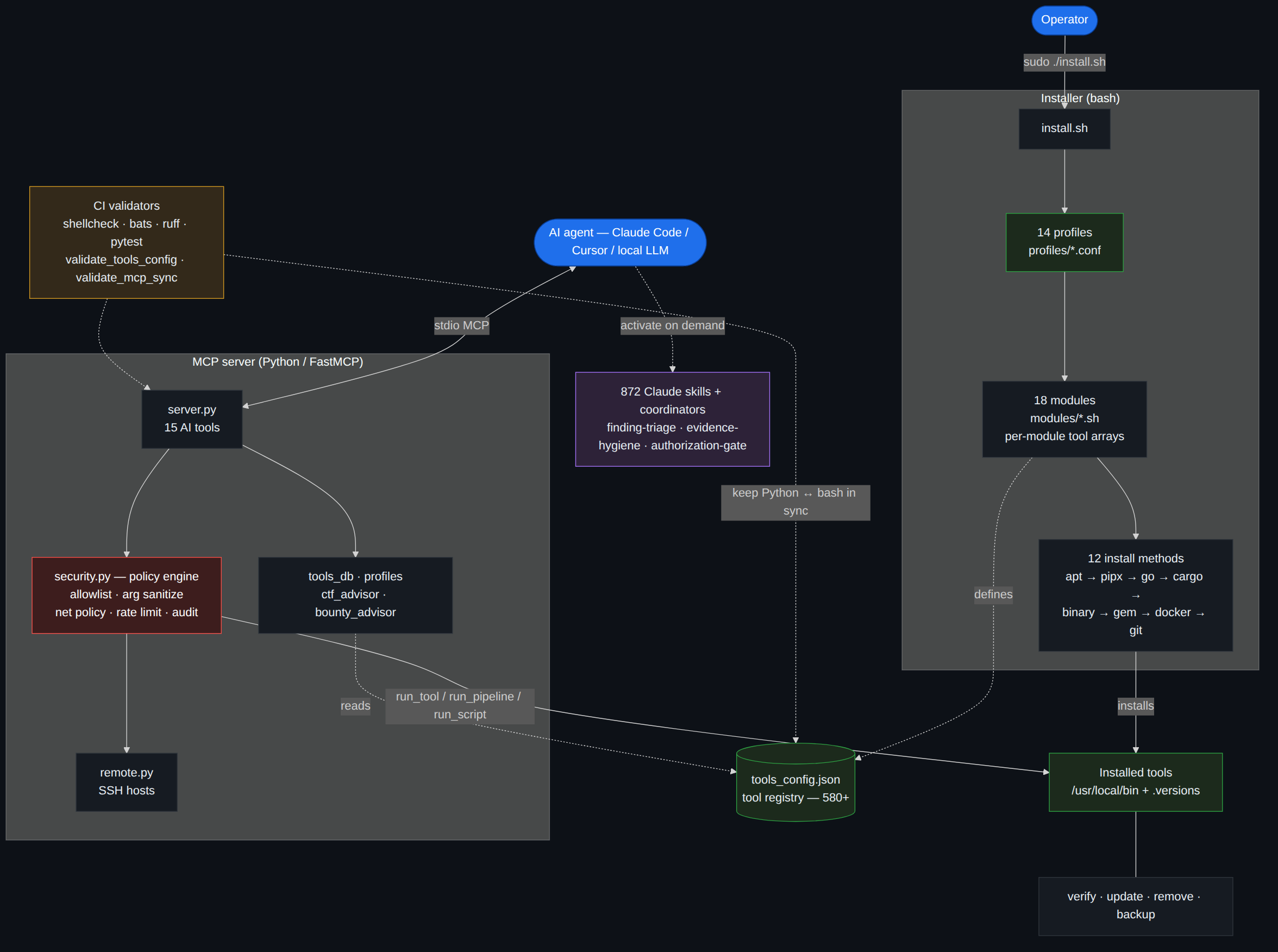
Mermaid source: assets/how-it-works.mmd.
Reading the diagram: solid arrows are runtime or installation actions; dashed arrows are validation and context relationships. Client configurations enter through the root-aware launcher before reaching FastMCP. security.py governs run_tool and run_pipeline through the allowlist, argument checks, and network policy without invoking a shell. run_script remains a separate, disabled-by-default full-code-execution capability. Agent Skills stay outside the execution path: .claude/skills/ is canonical and scripts/sync-skills.sh produces .agents/skills/ for clients that use the portable mirror.
Why not just Kali (or another installer)?
Kali/Parrot/BlackArch ship the tools; this is complementary, not a replacement. It runs on the box you already have (incl. Termux) and adds an AI control plane that can discover, recommend, chain, and execute installed tools through one governed interface. Want all the tools? A distro is fine. Want an MCP client that can select and run them under explicit policy? That's the gap.
Trust & safety
Security users should be paranoid — here's exactly what runs and what's gated:
- Default-safe MCP. Out of the box
CYBERSEC_MCP_ALLOW_EXTERNAL=0rejects network targets that do not resolve to private/loopback ranges, andCYBERSEC_MCP_ALLOW_SCRIPTS=0disablesrun_script. You opt into external scopes / scripting explicitly. - Governed tool execution passes one gate (
mcp_server/security.py): registry allowlist, no shell (create_subprocess_exec, nevershell=True), argument sanitization, a per-tool blocked-flag denylist (e.g.sqlmap --os-shell,nmap -iL, file-list/target-injection flags), target/network policy, rate limiting, output caps, and timeouts. - The execution policy is not an OS sandbox. Allowed tools run with the MCP process user's permissions, and some security tools can launch child processes or load plugins. Disabling
run_scriptonly disables that endpoint; run the MCP server as a least-privileged user or inside an isolation boundary appropriate for untrusted targets. - Tool-aware policy is not solver hardcoding. The solver chooses tools from the registry/advisors; the policy layer only understands enough CLI grammar to tell a real target from a header, wordlist, output path, config file, or target-list flag. That keeps normal commands usable without letting file-list/config flags bypass scope checks.
- Audit trail, not leaks. Actions are logged as JSON to an owner-only (
0600) rotating log under the user's state directory (~/.local/state/cybersec-tools-mcp/audit.logby default). Script bodies are never persisted — only an irreversible SHA256 + length is logged for correlation — and credential-shaped strings are redacted from tool arguments. - Least privilege in the installer. It runs as root but drops to the invoking user (
$SUDO_USER) for cloned-repo builds andpip/cargo/geminstalls; binary releases are SHA256-verified when checksums are published. - Dual-use tooling is gated. C2 and phishing frameworks (Sliver, Caldera, gophish, evilginx, …) are off by default and install only with
--include-c2(theredteam/fullprofiles); the MCP layer reflects this and never auto-runs them. - Authorized use only. See
SECURITY.md, the Supply Chain Model, and the Disclaimer.
Install
All required runtimes (Python, Go, Ruby, Java, Rust, Node.js), dev libraries, pipx, and build tools are installed automatically. The only prerequisite is a supported Linux distro. Windows and macOS are not supported (use WSL or Docker).
Docker is the one exception — install it manually if you want C2 frameworks, MobSF, BeEF, BloodHound, TheHive, or Cortex (
--enable-docker). See Docker install docs. GitHub authentication is recommended. The installer downloads ~30 binary releases and makes ~30+ API calls to GitHub. Without auth, you're limited to 60 requests/hour and some downloads may fail. With auth, the limit is 5,000/hour. The easiest way:# Install gh CLI and log in (one-time) — the installer auto-detects it sudo apt install gh && gh auth loginAlternatively, export a personal access token (no scopes needed):
export GITHUB_TOKEN=ghp_xxxxxxxxxxxxxxxxxxxx
From the latest release (pinned and stable — recommended):
# Newest tag is on the Releases page: https://github.com/26zl/cybersec-toolkit/releases
git clone --depth 1 --branch v1.1.0 https://github.com/26zl/cybersec-toolkit.git && cd cybersec-toolkit && sudo ./install.sh
From main (newest tools, fixes, and changes; may include unreleased work):
git clone https://github.com/26zl/cybersec-toolkit.git && cd cybersec-toolkit && sudo ./install.sh
That installs the standard tools from all 18 modules. C2/phishing tools and Docker images
remain opt-in; use --profile full --enable-docker when you explicitly want the complete
registry supported by the current platform. To install a subset:
sudo ./install.sh --profile ctf                      # CTF tools only
sudo ./install.sh --profile redteam --enable-docker   # Red team + Docker C2
sudo ./install.sh --module web --module recon          # Specific modules
sudo ./install.sh --tool sqlmap --tool nmap            # Individual tools
sudo ./install.sh --dry-run --profile ctf              # Preview without installing
Not sure the machine is ready? Run a read-only preflight first — it needs no root and installs nothing:
./install.sh --doctor # Distro, prerequisites, MCP server, tool registry
Try in Docker
Pull the prebuilt image (no local build):
docker run --rm ghcr.io/26zl/cybersec-toolkit --profile ctf
Or build it yourself:
docker build -t cybersec-toolkit .
docker run --rm cybersec-toolkit --profile ctf
Podman works as a drop-in replacement — swap
dockerforpodman(oralias docker=podman); rootless builds and runs are supported. For the Compose example below, usepodman compose(needs a compose provider installed).
Or use the bundled Compose file (builds and runs the installer service):
docker compose run --rm installer --profile ctf
The image grants the
toolkituser passwordless sudo so the installer can manage system packages. Treat code inside the container as root-capable; the image is not a security sandbox, especially whenrun_scriptis enabled or sensitive host paths are mounted.
macOS (Apple Silicon): Add --platform linux/amd64 to both commands to run via x86 emulation:
docker build --platform linux/amd64 -t cybersec-toolkit .
docker run --rm --platform linux/amd64 cybersec-toolkit --profile ctf
Termux (Android):
pkg install git
git clone https://github.com/26zl/cybersec-toolkit.git
cd cybersec-toolkit
./install.sh --profile lightweight
sudo ./install.sh --help                # Full help
sudo ./install.sh --list-profiles       # Show profiles
sudo ./install.sh --list-modules        # Show modules
sudo ./install.sh --skip-heavy          # Skip large/slow packages
sudo ./install.sh --skip-pipx           # Skip all pipx (Python) installs
sudo ./install.sh --skip-go             # Skip all Go tool installs
sudo ./install.sh --skip-cargo          # Skip all Cargo (Rust) installs
sudo ./install.sh --skip-gems           # Skip all Ruby gem installs
sudo ./install.sh --skip-git            # Skip all git clone installs
sudo ./install.sh --skip-binary         # Skip all binary release downloads
sudo ./install.sh --skip-source         # Skip build-from-source, snap, npm, and curl-pipe installs
sudo ./install.sh --fast                # Skip checksum verification (see Security note below)
sudo ./install.sh --require-checksums   # Fail if binary release has no checksum file
sudo ./install.sh --production          # Strict checksum preset for release downloads
sudo ./install.sh --upgrade-system      # Upgrade system packages before installing
sudo ./install.sh --list-sessions       # List install sessions and exit
sudo ./install.sh --rollback <id|last>  # Rollback tools installed in a session
sudo ./install.sh --version             # Show installer version and exit
sudo ./install.sh --enable-docker       # Pull Docker images
sudo ./install.sh --include-c2          # Include C2 frameworks (needs --enable-docker)
sudo ./install.sh -j 8                  # 8 parallel install jobs (default: 4)
sudo ./install.sh -v                    # Verbose / debug output
--tool installs only the specified tool without running the full dependency setup.
Dry-run time estimates count install entries across methods, so the estimate can be higher than the de-duplicated 670+ tool registry.
The installer orchestrates 670+ tools across 12 different install methods. The time is spent on I/O-bound operations that no scripting language can speed up:
| What takes time | Why |
|---|---|
| System packages (apt/dnf) | Downloading and unpacking the .deb/.rpm packages and resolving dependencies |
| Go tools | Downloading modules and compiling each binary |
| pipx (Python) | Creating one isolated venv per tool and downloading wheels |
| Cargo (Rust) crates | Compiling from source — Rust has no pre-built registry binaries |
| Git clones | Cloning each repository |
| Binary releases | Downloading pre-built binaries from GitHub |
| Bash overhead | Array iteration, logging, progress bars (negligible) |
For the current per-method tool counts, run ./install.sh --dry-run — it prints the live breakdown so the numbers can't go stale here. The slowest stages are the ones that compile or unpack the most (apt/dnf and Go), not raw tool count: Cargo compiles from source but only covers a handful of tools.
The installer already parallelizes where possible (-j 4 by default). Methods with shared locks (apt, pipx, cargo) must run sequentially. To reduce install time:
- Use
--profile lightweightor--module <name>to install only what you need - Use
--skip-cargoto skip Rust compilation (the slowest per-tool method) - Increase parallelism with
-j 8for faster Go/git/binary downloads - Set up an apt-cacher-ng proxy for repeated installs
Profiles
| Profile | Modules | Description |
|---|---|---|
full |
All 18 | Complete security toolkit |
ctf |
misc, crypto, pwn, reversing, stego, forensics, cracking, web, mobile, blockchain | CTF competitions |
redteam |
misc, networking, recon, web, enterprise, pwn, mobile, cracking, cloud, wireless, reversing, crypto | Offensive security |
web |
misc, networking, recon, web, llm | Web application testing |
osint |
misc, recon | OSINT gathering |
forensics |
misc, forensics, blueteam, reversing, stego, cracking | Digital forensics and incident response |
pwn |
misc, pwn, reversing, crypto | Binary exploitation and reverse engineering |
mobile |
misc, mobile, web, reversing | Mobile application security testing |
cloud |
misc, cloud, containers, networking, recon | Cloud and container security auditing |
blockchain |
misc, blockchain, web, crypto | Smart contract auditing and blockchain security |
wireless |
misc, wireless, networking | WiFi, Bluetooth, and SDR security |
lightweight |
misc, networking, recon, web, cracking | Hobby ethical hacking essentials (HTB, THM, bug bounty) |
crackstation |
misc, cracking, crypto | Hash cracking |
blueteam |
misc, blueteam, forensics, reversing, mobile, containers, networking, cloud, recon | Defensive security, IR, malware analysis |
Modules
| Module | Tools | Description |
|---|---|---|
misc |
41 | Post-exploitation, social engineering, wordlists, resources, C2 (Docker + Loki) |
networking |
57 | Port scanning, packet capture, tunneling, MITM, protocol tools |
recon |
84 | Subdomain enumeration, OSINT, DNS, automated recon frameworks |
web |
60 | Vulnerability scanning, fuzzing, SQLi, XSS, CMS scanners, API testing |
crypto |
14 | RSA attacks, cipher analysis, hash attacks, constraint solving |
pwn |
36 | Exploit frameworks, binary exploitation, fuzzing, payload generation |
reversing |
33 | Disassemblers, debuggers, emulation, Java/Python reversing |
forensics |
57 | Disk/memory forensics, file carving, timeline analysis, log analysis, hardware/serial |
enterprise |
80 | Active Directory, Kerberos, Azure AD, credential harvesting, lateral movement |
wireless |
41 | WiFi cracking, Bluetooth, SDR, rogue AP |
cracking |
34 | Hash cracking (john, hashcat), brute force, wordlist generation |
stego |
15 | Image/audio steganography, detection, StegCracker |
cloud |
22 | AWS/Azure/GCP security auditing, Checkov |
containers |
15 | Docker/Kubernetes security (Grype, Syft, Kubescape, kubeaudit) |
blueteam |
36 | IDS/IPS, SIEM, incident response, threat intelligence, hardening, malware analysis (YARA, ClamAV, FLOSS, Capa, Loki) |
mobile |
18 | Android/iOS app testing, APK analysis, MobSF (Docker) |
blockchain |
15 | Smart contract auditing (Slither, Mythril, Foundry, Aderyn), blockchain forensics, Echidna (Docker) |
llm |
14 | LLM red teaming, prompt injection, jailbreak testing, AI vulnerability scanning |
Install Methods
| Method | Count | Examples |
|---|---|---|
| Git clone | ~197 | GitHub repos with auto-setup, resources, wordlists |
| System packages (apt/dnf/pacman/zypper) | ~166 | nmap, wireshark, john, hashcat |
| pipx | ~137 | sqlmap, impacket, bloodhound, volatility3 |
| Go install | ~62 | nuclei, subfinder, ffuf, httpx |
| Binary release | ~51 | gitleaks, chainsaw, findomain, FLOSS, Capa, Loki, Syft, Kubescape |
| Build from source | ~23 | massdns, duplicut, AFLplusplus, honggfuzz |
| Docker | ~12 | Empire, MobSF, BeEF, BloodHound, TheHive, Cortex, PentAGI |
| Ruby gem | 6 | wpscan, evil-winrm, brakeman |
| Cargo (Rust) | 8 | feroxbuster, RustScan, pwninit, yara-x-cli |
| Special (curl-pipe) | 4 | Metasploit, Foundry, Steampipe, patator |
| Snap | 1 | zaproxy |
| npm | 5 | promptfoo, apk-mitm, surya, solgraph |
Post-Install Scripts
All scripts require root on Linux (sudo) and support --help. On Termux, no root is needed.
| Script | Purpose | Example |
|---|---|---|
scripts/verify.sh |
Check which tools are installed | sudo ./scripts/verify.sh --module web --skip-heavy |
scripts/update.sh |
Update all installed tools | sudo ./scripts/update.sh --skip-system |
scripts/remove.sh |
Remove tools by module | sudo ./scripts/remove.sh --module enterprise --yes |
scripts/remove.sh --deep-clean |
Purge all caches and build artifacts | sudo ./scripts/remove.sh --deep-clean --yes |
scripts/backup.sh |
Backup/restore tool configs | sudo ./scripts/backup.sh backup |
--deep-clean removes Go module/build cache, Cargo registry, pip/pipx/npm/gem caches, orphaned pipx venvs, stale symlinks, and log files. Add --remove-deps to also purge Rustup toolchains.
MCP Server (AI Integration)
MCP (Model Context Protocol) is an open standard that lets AI assistants use external tools. This project includes an MCP server that gives any MCP-capable AI (Claude Code, Claude Desktop, Cursor, etc.) full read access to the 670+ tool registry — plus the ability to check installs, recommend profiles, and execute tools. The AI becomes an interactive partner for ethical hacking: it knows every tool, which ones you have installed, and can run them for you.
What the AI can do
| Tool | What it does |
|---|---|
list_tools |
List/filter all 670+ tools by module, method, or install status (includes URLs) |
check_installed |
Check if a tool is installed (5 detection strategies) |
get_tool_info |
Full details: method, module, URL, install/update/remove commands |
get_module_info |
Deep-dive a module: all tools, install status, which profiles use it |
get_profile_tools |
See every tool a profile installs, grouped by module |
suggest_for_ctf |
Curated tool recommendations for 14 CTF challenge categories |
suggest_for_bounty |
Bug bounty tool recommendations for 7 target types with methodology and common vulns |
guided_assessment |
Companion-first solve assistant for an authorized target — classifies the target/finding, returns triage gates, recommends skills, picks tools from all modules/profiles, and guides step-by-step; opt-in autonomous starts an auto-solver loop over run_tool, run_pipeline, and the separately gated run_script capability |
get_cve_info |
Map a CVE id or nickname (e.g. log4shell) to curated skills, registry tools, modules, and live NVD/KEV/EPSS lookup commands |
recommend_install |
Natural-language → profile/module/tool recommendation |
list_profiles |
All 14 profiles with tool counts and install commands |
run_tool |
Execute installed tools safely (sanitized args, network policy, rate limiting, audit logging). Supports remote execution via SSH |
run_pipeline |
Pipe tools together safely without shell (strings binary | grep flag) |
run_script |
Explicit, unsandboxed Python/Bash execution opt-in. Supports per-script venv selection |
manage_remote_hosts |
Add, remove, list, and test SSH remote hosts for remote tool execution |
The MCP client can query every tool and its install state, chain governed tool calls, parse the output, and pivot on what it finds. Script execution requires a separate opt-in.
External recon → attack surface (needs CYBERSEC_MCP_ALLOW_EXTERNAL=1, authorized scope only)
- "Enumerate the attack surface for target.com and flag anything exploitable" — fans out
amass/subfinder→ resolves and probes withhttpx→ fingerprints withwhatweb→ runsnucleitemplates → content-discovery withffuf, then ranks hosts by exposure and proposes next steps - "Found an open redirect on
/go?url=— weaponize it" — verifies withcurl, then builds an SSRF / OAuth-token-theft PoC and probes for an exploitable callback
Web exploitation
- "Confirm and exploit the SQLi on the login endpoint" —
sqlmapto confirm and dump (destructive--os-shell/--os-cmdare policy-blocked), thenrun_scriptto automate the auth bypass and pull just enough for a PoC - "GraphQL introspection is on — map it and hunt IDOR" — pulls the schema, generates queries, fuzzes object IDs, and diffs authenticated vs unauthenticated responses
Active Directory / internal
- "Low-priv creds on 10.10.0.0/24 — find a path to Domain Admin" — collects with
bloodhound, kerberoasts withimpacket(GetUserSPNs.py), cracks the TGS inhashcat, then validates lateral movement withnetexec— all over the Kali VM via SSH - "Check for DCSync rights and dump if the path exists" — enumerates replication ACLs, then runs
secretsdump.pyagainst the DC
Binary exploitation & reversing
- "Build a ret2libc exploit for this 64-bit binary" — triages with
checksec/readelf, finds gadgets withROPgadget, leaks libc via aputs@pltcall, then writes the fullpwntoolschain invenv="pwntools"and pops a shell locally - "Recover the algorithm from this stripped binary" —
objdump/radare2disassembly piped into targeted analysis, then arun_scriptreimplementation to verify behavior
Crypto
- "Break this RSA — small
e, several ciphertexts" — detects the attack (Håstad / common-modulus / Wiener) and solves it withpycryptodome+sympyin a venv, returning plaintext - "This JWT is HS256 with a weak key" — cracks the signing secret and forges an admin token
Blue team · detection engineering
- "Write a Sigma rule for this technique and convert it to my SIEM" — authors the rule and renders it for the target backend (Splunk / Elastic) via
sigma-cli - "Hunt these Windows event logs for lateral movement" — runs
chainsawover the EVTX with Sigma rules, then summarizes hits by host and timeline - "Build YARA rules from these samples and scan the tree" — generates
yarasignatures and runs them recursively
DFIR · malware triage
- "Timeline this memory dump" — sweeps
volatility3plugins (pslist,netscan,malfind) and chains them into one narrative - "Hunt for C2 beaconing in this pcap" —
tshark/tcpdumpextraction →suricatarules → flags periodic callbacks - "Statically triage this suspicious file" —
file→strings→capa/yara, then extracts IOCs for enrichment
Cloud · containers · ops
- "Audit this AWS account for public S3 and risky IAM" — runs
prowler/scoutsuiteand surfaces only the high-severity findings - "Scan this image and k8s manifests before deploy" —
grypeimage scan pluskubescapeconfig checks - "What's my redteam coverage — and fix the gaps" — diffs
get_profile_tools("redteam")against install status and emits the exact install commands
Mobile · wireless · blockchain
- "Static-analyze this APK for secrets and insecure storage" —
apktool/jadxdecompile → MobSF-style checks, then greps for keys and endpoints - "Audit this Wi-Fi capture" — parses the handshake and runs
aircrack-ng/hashcatagainst it - "Review this Solidity contract for reentrancy" — runs
slither/mythriland explains the findings
run_tool and run_pipeline are argument-sanitized, network-policed, rate-limited, and
audit-logged. run_script is off by default because enabling it is a full-code-execution
opt-in with the MCP server user's filesystem and network permissions; the external-target
policy does not sandbox scripts. Destructive flags (--os-shell, -rf, --exploit, …)
are blocked in the governed tool path. Use only against systems you are authorized to test.
Quick Start
Requires uv. Claude Code can use the tracked project .mcp.json directly. It runs the MCP server over stdio with scripts and external network targets disabled by default:
{
  "mcpServers": {
    "cybersec-tools": {
      "command": "uv",
      "args": ["run", "--directory", "mcp_server", "fastmcp", "run", "server.py", "--transport", "stdio", "--no-banner"],
      "env": {
        "CYBERSEC_MCP_ALLOW_EXTERNAL": "0",
        "CYBERSEC_MCP_ALLOW_SCRIPTS": "0"
      }
    }
  }
}
Restart Claude Code. The 15 tools appear in /mcp.
Other MCP clients (Codex, Cursor, local LLMs)
MCP is an open standard, so the same stdio server works with any MCP-capable client. From the repo root the launch command is:
uv run --directory mcp_server fastmcp run server.py --transport stdio --no-banner
--directory mcp_server is relative to the working directory. If a client may start
the server from a subdirectory, use the root-aware launcher from the repo root:
bash scripts/mcp-launch.sh
From outside the repository, use the launcher's absolute path:
bash /path/to/cybersec-toolkit/scripts/mcp-launch.sh
- Codex — a project
.codex/config.tomlis included (resolves the Git root first so it works from any subdirectory). Codex's primary config is~/.codex/config.toml; if the project file isn't picked up, copy the[mcp_servers.cybersec-tools]block into your home config. - Cursor / Continue / Cline / Goose — add the same launch command in the client's MCP settings UI or config file (use an absolute path if the client's working directory isn't the repo root).
- LM Studio (≥0.3.17) — LM Studio is itself an MCP host, no bridge needed. Add the
server to its
mcp.json(Cursor notation, samemcpServersshape as.mcp.json) using an absolute path or the git-root wrapper, since LM Studio's working directory isn't the repo root. Using MCP via LM Studio's API requires ≥0.4.0 and an MCP-capable endpoint such as/api/v1/chator/v1/responses. - Ollama — Ollama is a model runtime, not an MCP host. Put an MCP-capable agent in front of it (e.g. Kit) and point it at the launch command above.
- Other local LLMs — a bare model does not speak MCP on its own. Run it behind any
MCP-capable host (LM Studio, Cline, Continue, Goose, Kit, or Open WebUI via an
MCP→OpenAPI bridge like
mcpo) and point that host at the launch command above.
Security note: start with just this one server. It already enforces argument sanitization, network allowlists, rate limiting, and audit logging, and ships with script execution and external targets disabled by default — keep those off unless you have an authorized scope, and prefer hosts that support human-in-the-loop tool approval.
Vendor-neutral repo instructions live in AGENTS.md (read natively by Codex
and many agentic tools); Claude Code reads CLAUDE.md.
Connect from WSL (e.g. Kali Linux)
The MCP server runs over stdio, so it works from any environment that Claude Code can spawn. To use tools installed inside WSL:
{
  "mcpServers": {
    "cybersec-tools": {
      "command": "wsl",
      "args": [
        "-d", "kali-linux",
        "bash", "-lc",
        "cd /path/to/cybersec-toolkit/mcp_server && uv run fastmcp run server.py --transport stdio --no-banner"
      ]
    }
  }
}
Connect from Docker
{
  "mcpServers": {
    "cybersec-tools": {
      "command": "docker",
      "args": [
        "run", "-i", "--rm",
        "-e", "CYBERSEC_MCP_ALLOW_EXTERNAL=0", "-e", "CYBERSEC_MCP_ALLOW_SCRIPTS=0",
        "--entrypoint", "bash", "cybersec-toolkit",
        "-c",
        "cd /opt/cybersec-toolkit/mcp_server && uv run fastmcp run server.py --transport stdio --no-banner"
      ]
    }
  }
}
Script Execution
run_script lets the AI write and execute Python or Bash scripts. It requires
CYBERSEC_MCP_ALLOW_SCRIPTS=1, is not OS-sandboxed, and is not constrained by
CYBERSEC_MCP_ALLOW_EXTERNAL. Enabling it grants scripts the same filesystem and network
permissions as the MCP server process. Review generated code and scope before opting in:
{
  "mcpServers": {
    "cybersec-tools": {
      "command": "uv",
      "args": ["run", "--directory", "mcp_server", "fastmcp", "run", "server.py", "--transport", "stdio", "--no-banner"],
      "env": {
        "CYBERSEC_MCP_ALLOW_SCRIPTS": "1",
        "CYBERSEC_MCP_ALLOW_EXTERNAL": "0"
      }
    }
  }
}
Venv Support
Some packages (e.g. pwntools) require an older Python. The venv parameter lets the AI choose the right interpreter per script:
# One-time setup: create a venv with pwntools
python3.12 -m venv ~/.ctf-venvs/pwntools
~/.ctf-venvs/pwntools/bin/pip install pwntools z3-solver
The AI then uses run_script("from pwn import *; ...", venv="pwntools") automatically.
The default MCP environment contains FastMCP and the Python standard library. Install the
optional helper set with cd mcp_server && uv sync --extra ctf-core before using
requests, pycryptodome, beautifulsoup4, Pillow, or NumPy without a named venv.
Set CYBERSEC_MCP_VENVS_DIR to override the default ~/.ctf-venvs/ location.
Manual Scripts
The manual_scripts/ directory stores persistent scripts that the AI creates for the user — complex exploits, multi-step solvers, parsers, protocol helpers, and reusable tools that should not disappear after one execution. In companion mode the AI proposes the script, then writes and runs it only after approval or a clear "continue". In opt-in autonomous mode, if normal tools and pipelines stop making progress and programming logic is the smallest reliable path, the AI can write, save, and run scoped helpers via run_script. Simple recon/HTTP commands such as curl stay as run_tool calls; scripts are for logic that tools cannot express cleanly.
Test the Server
cd mcp_server && uv run fastmcp dev server.py
This opens a web-based MCP Inspector for interactively testing each tool.
See mcp_server/README.md for Claude Desktop setup and full documentation.
Help wanted
This project is large by design, and community help is very welcome.
Useful contributions include testing installs on different distros, adding missing tools, fixing package mappings, improving MCP workflows, writing example use cases, tightening documentation, and reporting rough edges from real CTF, lab, bug bounty, pentest, DFIR, or defensive workflows.
Open an issue for bigger changes, or send a focused PR for small fixes. See
CONTRIBUTING.md for the validation checklist.
Development
Public contributor docs live in CONTRIBUTING.md. The quick-start is:
git clone https://github.com/26zl/cybersec-toolkit.git && cd cybersec-toolkit
make setup    # submodules + MCP deps + skill mirror (Codex-ready)
make check    # core local checks — shellcheck, validators, bats, ruff, pytest
make help lists every shortcut (lint, test, validate, curate, sync-skills,
check-skills, mcp, docker, …); the raw command each target runs is in
CLAUDE.md / AGENTS.md.
The MCP Python project uses uv with [tool.uv] exclude-newer = "3 days".
New dependency resolutions intentionally ignore packages uploaded in the last
72 hours to reduce dependency-confusion and compromised-release blast radius.
Dependabot uses the matching 3-day cooldown, and the weekly uv update workflow
inherits the same policy.
This release-age policy is scoped to project bootstrap/runtime dependencies only: MCP Python packages, CI actions, and the Docker build inputs needed to get the project running. It does not delay or pin the cybersecurity tools installed from the registry; those tools intentionally follow their module installer and update flow so operators can get current scanners, exploits, signatures, and research utilities.
Run shell tests on Linux or WSL. Native Windows checkouts can rewrite the vendored Bats submodules with CRLF and cause $'\r' failures.
Agent Skills
This repo ships 872 Agent Skills under the canonical .claude/skills/ source tree. Claude Code discovers that tree directly; scripts/sync-skills.sh generates the portable .agents/skills/ mirror for compatible clients. Skills activate on demand based on the task — they don't permanently consume context. Of these, 31 are project-authored and 841 are curated from open-source projects — each attributed below and in THIRD_PARTY_NOTICES.md.
- 10 project-specific developer skills (
add-tool,validate-all,module-scaffold,writeup-template,mcp-sync-check,security-wordlists,security-payloads,guided-assessment,skill-dependency-audit,skill-curation-router) - 4 cross-skill coordinators (
finding-triage,security-comms,authorization-gate,evidence-hygiene) that other skills route findings, communication, authorization checks, and evidence sanitization through - 7 coverage gap anchor skills (GRC/privacy, AI/LLM security, IoT/embedded/hardware, mainframe, telecom/5G, SAP/ERP, supply-chain/product security)
- 1 coding-agent workflow skill from multica-ai/andrej-karpathy-skills (MIT)
- 6 CTF methodology skills (
ctf-crypto,ctf-pwn,ctf-web,ctf-rev,ctf-forensics,ctf-stego) - 4 bug bounty methodology skills (
bounty-recon,bounty-web,bounty-api,bounty-mobile) - 10 bug bounty workflow skills from BugHunter (claude-bug-bounty) (MIT)
- 58 offensive methodology skills from SnailSploit Claude-Red (MIT)
- 14 code audit skills from Trail of Bits (CC-BY-SA 4.0)
- 754 operational how-tos from the community project mukul975/Anthropic-Cybersecurity-Skills (Apache 2.0)
- 4 high-level workflows from Transilience (MIT)
Source and category index in .claude/skills/SKILLS.md.
Install as a Claude Code plugin
The repo doubles as a plugin marketplace (.claude-plugin/), so you can pull the whole skill library into any project without cloning manually:
/plugin marketplace add 26zl/cybersec-toolkit
/plugin install cybersec-toolkit@cybersec-toolkit
The plugin exposes the skills under .claude/skills/ (declared via the skills field in .claude-plugin/plugin.json). The MCP server is configured separately via .mcp.json — see MCP Server.
Use these skills across supported clients
Agent Skills are Markdown plus optional helper files, but discovery and activation are
client features rather than MCP features. Claude Code, OpenCode, Codex, Gemini CLI,
GitHub Copilot, Cursor, Cline, Goose, Hermes, and OpenClaw support Agent Skills through
different paths or settings. scripts/sync-skills.sh mirrors the repository's
.claude/skills/ source into .agents/skills/ for clients that use that location:
scripts/sync-skills.sh            # mirror .claude/skills/ -> .agents/skills/
scripts/sync-skills.sh --check    # report drift without writing (exit 1 if out of date)
make setup (see Development) runs this mirror step for you.
.claude/skills/
No comments yet
Be the first to share your take.