
                                   ·              *
                                 ▄▄▄▄▄▄▄▄▄▄▄▄▄▄▄▄▄▄▄▄▄
                                ▐░░░▒▒▒▒▓▓▓█▓▓▓▒▒▒▒░░░▌
                                 ▀█░░░▒▒▒▓▓█▓▓▒▒▒░░░█▀   ·
                                   ▀█░░▒▒▒▓█▓▒▒▒░░█▀
                            *        ▀█░▒▒▓█▓▒▒░█▀
                                       ▀█▒▒█▒▒█▀
                                         ▀███▀     ·
                                           ▀

 ██████╗██████╗ ██╗   ██╗███████╗████████╗ █████╗ ██╗     ██╗     ██╗███╗   ██╗███████╗
██╔════╝██╔══██╗╚██╗ ██╔╝██╔════╝╚══██╔══╝██╔══██╗██║     ██║     ██║████╗  ██║██╔════╝
██║     ██████╔╝ ╚████╔╝ ███████╗   ██║   ███████║██║     ██║     ██║██╔██╗ ██║█████╗
██║     ██╔══██╗  ╚██╔╝  ╚════██║   ██║   ██╔══██║██║     ██║     ██║██║╚██╗██║██╔══╝
╚██████╗██║  ██║   ██║   ███████║   ██║   ██║  ██║███████╗███████╗██║██║ ╚████║███████╗
 ╚═════╝╚═╝  ╚═╝   ╚═╝   ╚══════╝   ╚═╝   ╚═╝  ╚═╝╚══════╝╚══════╝╚═╝╚═╝  ╚═══╝╚══════╝




Crystalline intelligence for AI agents. Plain markdown underneath.
Psychology splits intelligence in two. Fluid intelligence reasons about novel problems in the moment; crystallized intelligence is everything learning has deposited - the vocabulary, the judgment, the lessons experience already paid for. A large language model is fluid intelligence in its purest form: brilliant in the moment, and the moment is all it has. Every session it starts as a stranger - yesterday's decisions forgotten, the team's conventions unknown, everything re-derived or re-explained.
Crystalline is the other half: the crystalline intelligence an agent accumulates and keeps. Onboarded at session start, taught curated knowledge organized into domains, capturing what it learns as engrams while it works - session by session it stops being a stranger and becomes a peer.
The difference it makes, in one exchange:
Yesterday
  You:    The retry queue silently drops jobs older than 24h. That cost us an hour.
  Agent:  Worth keeping. Captured "Retry queue gotcha" into engineering (#payments #gotcha).

Today, a fresh session
  You:    Why is the payments queue losing jobs again?
  Agent:  Recalled from engineering: the retry queue drops jobs older than 24h,
          captured yesterday. Check the stuck jobs' age before anything else.
Crystalline is a single Rust binary: a CLI for people, an MCP server for agents and a local search index on top of plain markdown files.
The name is borrowed from psychology: crystallized intelligence is the knowledge a mind accumulates through experience, the counterpart of fluid, in-the-moment reasoning. Models have the fluid kind in abundance; Crystalline gives them the other half.
Why Crystalline · How it works · Get started · Session onboarding · The learning loop · Teach and learn · Skills · Share with a team · Deployment · FAQ
Why Crystalline
Crystalline is the evolution of approaches that many teams have walked through in the same order. Giving an agent a single markdown file of instructions works, until it grows past what fits in context. Splitting it into a folder of markdown files works, until nobody can tell which file to read for a given task. Adding index files that point at folders and other files works, until maintaining the pointers becomes its own job and every lookup still means walking a tree by hand. Each step scales further than the last, and each one quietly breaks somewhere in the hundreds of files.
Once knowledge grows into the thousands or tens of thousands of units, reading and pointer-walking stop being viable at all. What is needed at that scale is what any large knowledge system needs: real indexes. Crystalline keeps the plain markdown files - they remain the source of truth, readable and diffable - and adds domain routing, full-text and semantic search, a knowledge graph and temporal filtering on top, so the ten-thousandth engram is exactly as findable as the tenth.
How it works
- Domains are folders of knowledge. Each one carries a
MANIFEST.mddescribing its scope and when an agent should route a task there. - Engrams are the unit of knowledge: one markdown file with YAML frontmatter, holding prose, observations (
- [category] a captured fact or lesson) and relations (- rel_type [[Other Engram]]) to other engrams. - Built on an open format. The engram format extends Google's Open Knowledge Format (OKF) v0.2: plain markdown with YAML frontmatter, readable by any OKF tooling, with no lock-in. Unknown keys are always preserved, every engram records who wrote it and when and Crystalline layers its routing, temporal and knowledge-graph conventions on top - so OKF documents drop straight into a domain and your knowledge stays portable, diffable files whatever tools come next.
- Knowledge retires, it does not disappear. When a fact stops holding, the old engram is superseded rather than overwritten: its
statusmarks it as no longer current,valid_from/valid_tokeep the past addressable by date ("what applied last June") and the lessons it taught carry forward as unbounded knowledge - the way a person still draws on a past job without mistaking it for the present. A retired engram stays in every search; it is only softly faded in ranking, so current knowledge surfaces first without the past ever going missing. - MANIFEST routing lets an agent (or a person) figure out which domain owns a task without reading every file:
crystalline prompt systemturns each domain's## When to Usebullets into a compact session-start briefing. - Fluid is the browser UI for an instance, and it is the half of this that is for people: Crystalline stores what was learned, Fluid is where you read, edit and think with it.
Fluid, the web UI
The primary author in Crystalline is the agent: it captures and refines engrams as it works. Fluid is how you take part directly - read what was learned, correct a fact, add knowledge of your own - in the browser, without going through the LLM or spending a token on it. Fluid is built into the binary and on by default at http://localhost:7411, so the daemon your agents already talk to serves people and agents on one port: nothing to deploy, and the first visit creates your admin account right in the browser.
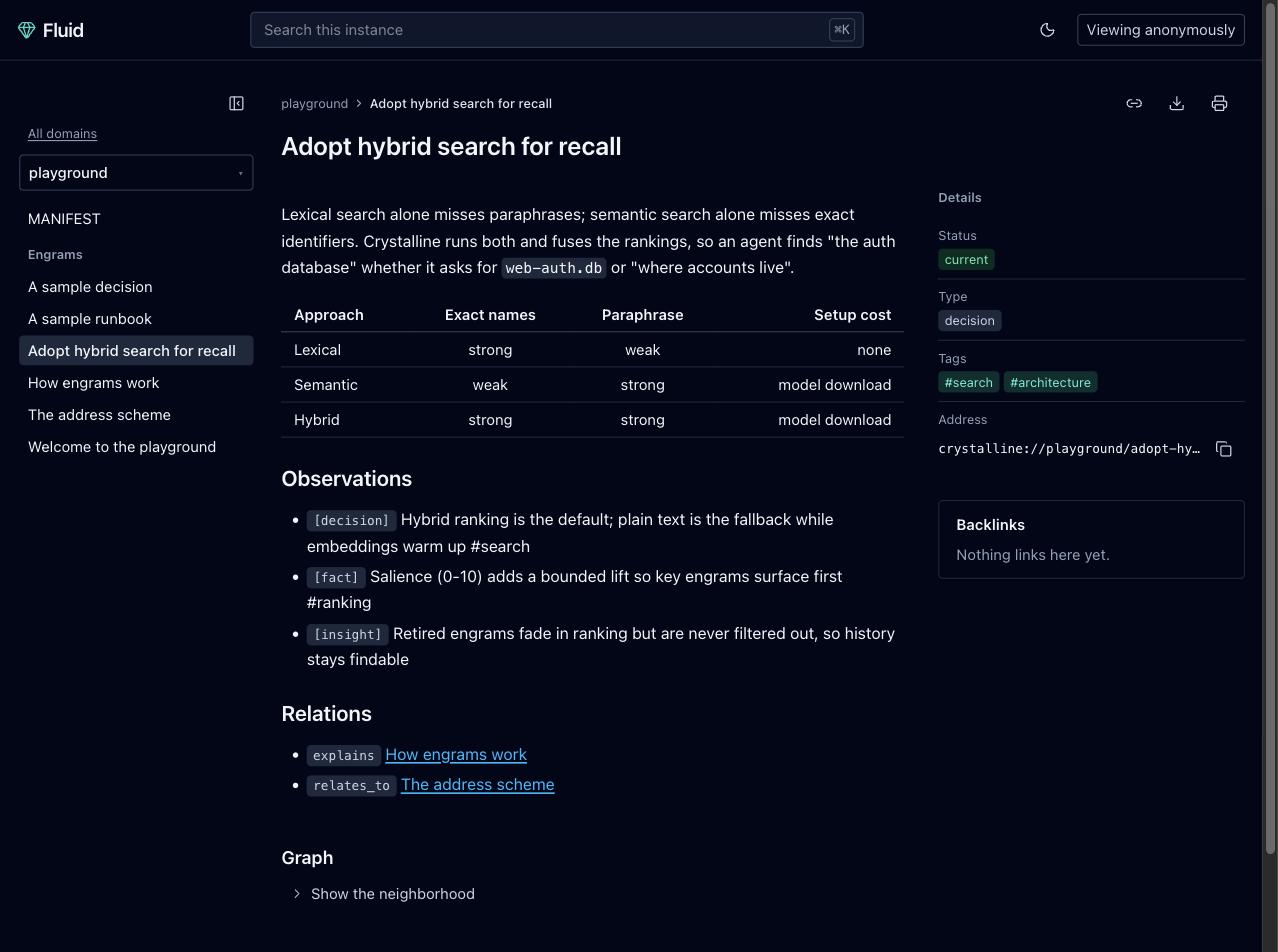
- Read what was learned. An engram is a page: frontmatter as a details rail, observations and relations as labelled chips, backlinks, and the
crystalline://address one click from the clipboard. Domains down the side, Cmd+K to jump anywhere by name. - Edit in place. A live-preview markdown editor with table editing, a frontmatter form, mermaid previews and wikilink completion across every domain. The file on disk stays the source of truth.
- Collaborate in real time. Everyone in the same engram sees everyone else's cursors and edits live; changes merge conflict-free and land as one save.
- Search it all. Faceted search across the whole instance, backed by the same hybrid text-plus-semantic ranking the agents use.
- See the shape of it. An interactive graph of any engram's neighborhood, and an agent's-eye view showing exactly what the tools serve an agent for that page.
- Accounts when you need them, none when you don't. Admin, editor and viewer roles managed in the UI or with
crystalline users; an anonymous read-only mode for a published archive; a trusted-header mode behind an SSO proxy. See deployment for the container and team-server variants.
Get started
Sixty seconds on a Mac with Homebrew and Claude Code:
brew install jordiboehme/tap/crystalline
crystalline install claude-code
mkdir -p ~/knowledge/engineering
crystalline domain init ~/knowledge/engineering --name engineering
crystalline domain add engineering ~/knowledge/engineering
Start a session - the agent onboards itself and starts remembering. Then open http://localhost:7411: the daemon that session started serves the web UI there by default, and the first visit creates your admin account in the browser, so there is nothing to deploy and nothing to configure to read what your agent is learning. Everything below is the same three steps on other platforms and harnesses: install the binary, wire the harness, give the agent a domain. Claude Desktop skips the binary entirely - jump straight to its subsection. Semantic search wants the local embedding model fetched once with crystalline model download; plain text search works before that.
Install the binary
macOS, via Homebrew:
brew install jordiboehme/tap/crystalline
Linux, via .deb package (Debian, Ubuntu and derivatives, amd64 or arm64):
version=$(curl -fsSL https://api.github.com/repos/jordiboehme/crystalline/releases/latest | grep -m1 '"tag_name"' | cut -d '"' -f4)
arch=amd64   # or arm64
curl -fsSLO "https://github.com/jordiboehme/crystalline/releases/download/${version}/crystalline_${version#v}_${arch}.deb"
sudo dpkg -i "crystalline_${version#v}_${arch}.deb"
crystalline --version
The package also ships a systemd unit, installed disabled - see Linux server with systemd to run the daemon as a managed service.
Windows, via MSI: download crystalline-<version>-windows-amd64.msi (or crystalline-<version>-windows-arm64.msi for Arm devices) from the latest release and double-click it, or install silently with msiexec /i <file> /qn. The installer adds Crystalline to the system PATH and upgrades in place. Windows releases are not code signed yet, so verify against SHA256SUMS and confirm any SmartScreen prompt (More info > Run anyway).
Every release also ships the standalone crystalline binary for macOS (Apple Silicon and Intel), Linux (x86_64 and arm64, statically linked) and Windows (x64 and Arm64), with a SHA256SUMS file for verification - or build from a clone with cargo build --release. The macOS binaries are code signed and notarized with an Apple Developer ID, so Gatekeeper runs them without a prompt.
Claude Code
crystalline install claude-code
One command wires the whole integration: MCP registration, the SessionStart onboarding hook, the Stop capture nudge (see The learning loop) and the four topical skills. It is idempotent - rerun it any time and whatever is already correct is left untouched - and each part is skippable with --skip-mcp, --skip-hooks or --skip-skills; --project writes into the current repository's config instead of your global one, and crystalline uninstall claude-code reverses everything install did, leaving any hook, key or locally edited skill that is not Crystalline's own in place.
The quick start above is exactly this path end to end; give the agent its first domain the same way and start a session.
Claude Desktop
No terminal needed:
- Download
crystalline-v<version>.mcpbfrom the latest release - one universal bundle covering Apple Silicon Macs and Windows (per-arch bundles remain for Intel Macs and native windows-arm64). - In Claude Desktop, open Settings > Extensions > Advanced settings > Install Extension... and pick the file.
It starts with no domains: the agent creates one with the add_domain tool whenever it needs somewhere to capture knowledge - a folder of markdown files under your Documents/Crystalline folder, a database-backed domain or a GitHub team domain. Onboarding is automatic on every connection (see Session onboarding). The extension gets you the browser half too: the daemon it spawns serves the web UI at http://localhost:7411 by default, where the first visit creates your admin account. The optional companion skill adds capture and collaboration best practices (see Skills); the Claude Desktop extension scenario shows how it works underneath.
Codex CLI
The same integration, one command (Codex keeps MCP registration user-level even with --project; the installer says so when it applies):
crystalline install codex
Then give the agent its first domain as in the quick start.
GitHub Copilot CLI
The same integration for the agentic Copilot CLI, one command (Copilot too keeps MCP registration user-level even with --project). The installer drives the copilot binary and falls back to gh copilot when only the GitHub CLI form is installed:
crystalline install copilot
Hooks land in a dedicated ~/.copilot/hooks/crystalline.json and skills in ~/.copilot/skills (both honor COPILOT_HOME); with --project they go to .github/hooks and .github/skills instead, which Copilot loads once you trust the folder. Then give the agent its first domain as in the quick start.
Any MCP harness
Crystalline runs as an MCP server over stdio; the server command is always crystalline mcp. Everything the installer does can also be done by hand:
claude mcp add crystalline --scope user -- crystalline mcp --harness claude-code
codex mcp add crystalline -- crystalline mcp --harness codex
copilot mcp add crystalline -- crystalline mcp --harness copilot
--harness is optional and tells the server which harness spawned it, so a harness that already has the skills installed as files is not served them a second time over MCP (see Skills over MCP). Leave it out and the full surface is served. The -- matters on the Claude Code line: without it, claude mcp add reads the server's own flags as its options.
The first agent to connect starts a background daemon that loads the embedding model once and watches every registered domain; every later connection - other agents, other terminals, other harnesses - attaches to that same daemon, so there is always one shared instance and one consistent view of the index. A daemon running in a container is reached over HTTP instead of stdio - see Run in a container.
From the terminal
The CLI mirrors everything an agent can do. This runs verbatim, start to finish, on a clean machine:
# 1. Create a domain: a folder of knowledge with a MANIFEST.md at its root.
#    domain add indexes whatever is already there (the manifest, for now)
#    right away, no separate sync step needed.
mkdir -p ~/knowledge/engineering
crystalline domain init ~/knowledge/engineering --name engineering
crystalline domain add engineering ~/knowledge/engineering

# 2. Capture an engram: a unit of knowledge, with an observation bullet.
crystalline write engineering "Retry queue gotcha" \
  --content "- [gotcha] The retry queue drops jobs older than 24h #payments" \
  --tags gotcha,payments

# 3. Search it back (plain text, since no embeddings exist yet).
crystalline search "retry queue"

# 4. Fetch the local embedding model once, then re-sync with embeddings.
crystalline model download
crystalline sync --embed

# 5. Search again: hybrid text-plus-semantic ranking now finds the engram
#    from a differently worded description of the same problem.
crystalline search "why does the payments queue lose jobs"

# 6. See what got indexed.
crystalline status
Engrams written through Crystalline are indexed immediately; crystalline sync only picks up files created outside it (an editor, a git pull) when no daemon is watching them. Edit the domain's MANIFEST.md ## Scope and ## When to Use sections so routing describes it accurately - that file is what the session prompt and an agent's routing decisions read (see Session onboarding).
The Crystalline Playbook teaches the whole workflow by example, a use-case course over one running dataset through recording, querying, ingesting, reconciling, retiring and sharing knowledge.
Session onboarding
Every MCP client is onboarded automatically: the crystalline server's instructions, returned when a client connects, carry a live routing block - one line per registered domain summarizing when to use it, plus the behavior rules (narrow question -> search that domain; broad question -> sweep all of them; writes always name a domain explicitly). The block names the exact crystalline tools each rule refers to (search_engrams, write_engram and the rest), so an agent with several MCP servers connected knows which tool on which server to call.
Domain lists and file-domain MANIFESTs are read fresh for every new connection; virtual-domain routing lines follow the daemon's latest snapshot, refreshed on every stdio connection and on every local virtual write. Claude Desktop and any harness that shows the model its MCP server instructions need no further setup. A harness installed on this machine with crystalline install is the one exception, and it needs no setup either: its own session hook delivers the block, so the server recognizes it at connect time and hands it a one-line pointer instead of a second copy (see Skills over MCP).
The block is sized for clients that truncate server instructions: the intro and the behavior rules come first and always fit, and the domain lines that follow shrink to one bullet each, then to a single count line, rather than pushing the rules out of view. Nothing is lost either way, since list_domains with include_routing=true returns the whole index on demand.
The same routing block is available outside MCP: crystalline prompt system renders it to stdout from every registered domain's MANIFEST.md, to feed to an agent as session context. Over MCP there is no workspace, so prompt.rules filters and repo-local preferred_domains apply only on this path - crystalline prompt system --workspace . scopes it to the current repository. prompt takes a subcommand naming the kind of prompt to generate: system for hook-driven harnesses, connector for the snippet below.
The generic harness recipe: run crystalline prompt system at session start and inject its stdout as context before the agent does anything else. In Claude Code that is a SessionStart hook in settings.json, matched on startup|clear|compact so the routing block is re-injected after /clear and after a compaction as well as on a fresh start (a resumed session is deliberately excluded, since its transcript already carries the earlier routing block). Get started covers crystalline install, which writes this hook for you; by hand it is:
{
  "hooks": {
    "SessionStart": [
      {
        "matcher": "startup|clear|compact",
        "hooks": [
          { "type": "command", "command": "crystalline prompt system" }
        ]
      }
    ]
  }
}
Any harness with an equivalent session-start hook can run the same command the same way.
Remote clients
A remote service or a chat harness runs no session hooks, and most of them never show the model an MCP server's instructions, so neither onboarding path above reaches the agent. Give it a standing instruction instead: paste this into the client's custom instructions and the agent onboards itself with one tool call at the start of every session.
This environment includes Crystalline, your crystallized intelligence across sessions, over MCP. At the start of every session call its list_domains tool with include_routing set to true; the result is your onboarding: one routing line per domain plus the behavior rules for this server's tools. Follow it, search those domains before answering from memory and re-fetch it mid-session with the same call whenever you need it again.
crystalline prompt connector prints the same snippet, ready to copy. The same text is also available in-client, with no copy-paste, as the connector MCP prompt; a harness that shows the model MCP prompts can insert the onboarding prompt directly instead, which carries the live routing block itself rather than the instruction to fetch it (see Skills over MCP).
An agent built on the Messages API MCP connector can keep its context lean by deferring most of the tool surface: with defer_loading on, a tool is declared but its description and schema load only when the model searches for it. Defer everything by default and pin the three tools an agent needs before it can search for anything - search_engrams, read_engram and list_domains, the trio that carries session onboarding and recall:
{
  "mcp_toolset": {
    "type": "mcp_toolset",
    "mcp_server_name": "crystalline",
    "default_config": { "defer_loading": true },
    "configs": {
      "search_engrams": { "defer_loading": false },
      "read_engram": { "defer_loading": false },
      "list_domains": { "defer_loading": false }
    }
  }
}
Claude Code does this for you: it turns tool search on automatically once a session's MCP tool descriptions grow large, loading tool names plus each server's instructions up front and the rest on demand. The routing block is sized to survive that mode intact (see Session onboarding).
The learning loop
Experience only compounds when capture actually happens. The loop has three beats: the agent recalls what is known at session start, works with it and captures what it learned before the session ends. The last beat is the one agents skip when nothing reminds them - so crystalline install wires the reminder.
It is a Stop hook running crystalline hook stop: a once-per-session, late nudge that fires on the first stop after a session gains real substance and stays silent otherwise - below the substance threshold, once it has already fired, in read-only mode or with no domain registered. When it fires, it asks the agent to review the conversation for durable learnings, propose capturing each one into the fitting domain (the same propose-first, wait-for-a-yes shape the capture skill follows) and raise the salience of any recalled engram that proved key to the task.
The reminder costs about 120 tokens, at most once per session. Remove it with crystalline uninstall <harness>, or leave it out from the start with --skip-hooks.
Teach and learn
The MCP server exposes 17 tools, 21 once team domains are turned on (see Share knowledge with a team); capturing knowledge as a byproduct of work is the core loop:
write_engram- capture a new engram.domainis always required (there is no default domain for writes, so an agent never writes into the wrong place).permalink,statusandrecorded_atare filled in for you.search_engrams- search before writing, and search to recall what is already known. Defaults to hybrid text-plus-semantic ranking across every domain; passdomainsto narrow it, or filter bytype,tags,statusor arbitrarymetadata_filterswith no query text at all.edit_engram- refine an engram in place (append,prepend,find_replace,replace_section,insert_before_section,insert_after_section,set_frontmatter) instead of creating a duplicate for the same topic.set_frontmatterassigns one lifecycle field by name -status,valid_from,valid_to,stale_after,source_date,salienceorverified- so retiring an engram or recording a re-check is a field assignment rather than a text substitution.build_context- given acrystalline://domain/permalinkanchor, follow its relations and links (across domains too) to assemble the neighbourhood around a task before diving in - the neighbourhood comes back ranked by how strongly each engram connects to the anchor, salience-aware, somax_relatedkeeps the most relevant.vocabulary- list the tags, observation categories and relation types already in use, with counts, and reuse an existing term before coining a near-duplicate.evolve_engrams- ask what the archive needs instead of waiting to trip over it: a read-only sweep of one domain or all of them that returns a ranked maintenance queue, every finding carrying the evidence it fired on and the exact next action. It sees temporal and lifecycle debt (avalid_tothat elapsed while the status still reads current, astale_afterpast due, a replacement that landed while the retirement was never finished), structural gaps (unresolved[[links]], one-sided relation pairs, orphans, oversized engrams and stubs) and redundancy (near-duplicate clusters, drifted tags). A finding markedmechanicalcompletes intent the archive already records; one markedjudgmentchanges what the archive claims and wants a yes first. It is the tool behindcrystalline evolvebelow.
Observations are the atomic unit of an engram's body: top-level bullets like - [decision] we chose Postgres for the write path #database. Categories are free text; useful ones include decision, fact, pattern, gotcha, convention, lesson, risk and idea. Relations connect engrams: - depends_on [[Other Engram]], or - "relates to" [[Other Engram]] for a multi-word relation type.
Temporal fields are plain and easy to get wrong by overthinking them: an absent valid_from means the engram has always been valid, an absent valid_to means it is valid forever. When set, the fields are plain ISO dates (YYYY-MM-DD) at day granularity, and the write drops a sentinel far-future value outright, since absence already means forever. Set them only when a fact is genuinely time-bounded (a policy that changes on a known date, a temporary workaround). status and type have recommended value sets stated in the tool descriptions themselves (status: stable, draft, idea, deprecated, superseded, and so on; type: engram, guide, decision, architecture, runbook, reference) - they exist so an agent can tell an idea apart from current fact, and they are guidance, never a global enum a write is rejected for.
Exceptionally valuable knowledge can carry a numeric salience key (0 to 10) in metadata, the way a memory formed during an exceptional event encodes more strongly: hybrid search adds a small bounded lift for it, so a salient engram ranks above equally relevant unmarked ones while relevance keeps the upper hand and nothing is ever filtered out by it. An agent raises it later on an engram that proved to be the key to a task; the lift's strength is the search.salience_weight setting (0.0 to 1.0, default 0.15, 0 disables it). The counterpart on the way out is search.retired_weight (0.0 to 1.0, default 0.6, 1.0 disables it): an engram whose status is deprecated, superseded, archived or legacy is softly faded by it in ranking, never filtered out.
The CLI mirrors the mutating and read tools directly for scripting and quick edits outside an agent session: crystalline write, read, edit, move, delete, search, context, recent and vocabulary take the same parameters as their MCP counterparts.
Tag identity is case-folded, so Foo and foo are the same tag; the files keep whatever case you wrote. For the rest of tag drift - a separator swap or a plural - crystalline vocabulary and crystalline doctor surface near-duplicate clusters, and two CLI-only commands consolidate them: crystalline tags rename <old> <new> and crystalline tags merge <old> <into>. Both rewrite only the tag tokens, preview before writing and take --dry-run, --yes and --domain; a merge also records the fold in the MANIFEST's ## Tag Aliases section, so a search for the old name keeps resolving forever. Bulk rewrites are deliberate maintenance, which is why these live on the CLI rather than as MCP tools.
Skills
The skills/ folder ships four harness-agnostic agent skills plus one consolidated skill, teaching an agent how to use Crystalline well:
crystalline-routing- which domain(s) to search for a task, when to sweep every domain instead, temporal filtering for "what is true now", and when to fall back to reading a MANIFEST directly.crystalline-capture- when captured knowledge is worth writing down, searching before writing to avoid duplicates, editing an existing engram instead of forking the topic, and the observation-category and temporal-field conventions that keep engrams useful later.crystalline-schema- authoring a Picoschema schema engram for a domain that wants structure, inferring one from what is already captured, and validating conformance.crystalline-collaboration- working in a domain that has a team origin: checking status at session start, updating before deep work, sharing a coherent unit of knowledge as a proposal and relaying its review URL, conflict etiquette and connecting a new teammate end to end.crystalline-intelligence- a single consolidated skill for Claude Desktop and other harnesses that install one skill at a time: recall, capture, read-only stand-down and team sharing essentials in one file.
crystalline install claude-code (or codex or copilot) copies these same four skills into place automatically - ~/.claude/skills for Claude Code, ~/.agents/skills for Codex, ~/.copilot/skills for the Copilot CLI - and leaves crystalline-intelligence alone, since it is Claude Desktop's own consolidated skill. Each is a plain folder with a SKILL.md; to do it by hand instead, copy the folder into wherever your harness looks for skills. For Claude Code, that is .claude/skills/ in a project or ~/.claude/skills/ globally:
cp -r skills/crystalline-routing skills/crystalline-capture skills/crystalline-schema skills/crystalline-collaboration ~/.claude/skills/
Installed skills stay current on their own: each install is recorded in a local receipt and when a new crystalline version first runs it refreshes the installed skills at session start - updating changed ones (an edited copy is kept beside the new one as SKILL.md.bak) and removing ones the new version no longer ships.
Installing from a release instead of a clone: download crystalline-agent-skills-v<version>.zip from the latest release and unpack it into ~/.claude/skills/. Zip installs are not tracked by the receipt, so re-unpack the zip after upgrading crystalline (or run crystalline install once to switch to managed skills).
Claude Desktop: download crystalline-claude-desktop-skill-v<version>.zip from the latest release, then open Settings > Capabilities > Skills (enable the Skills capability there if it is off) and upload the zip as-is (it contains the crystalline-intelligence folder; do not unpack it). If you uploaded an earlier release's skill, delete the old crystalline-memory entry there once the new one is up - Desktop keeps uploaded skills side by side, and the two teach the same lessons twice. Routing itself needs no skill - the server's instructions deliver it automatically; the skill adds capture and collaboration best practices.
Other harnesses that support a similar skill or instruction-file convention can point at the same folders directly; the content only assumes the MCP tools documented in Teach and learn, never a specific harness.
Skills over MCP
Installing the folders is not the only way in: every server also serves the same five skills to remote clients that never run the CLI at all. A chat surface calls the skills tool - with no arguments it lists all five, by name it returns one skill's full SKILL.md. A harness whose agents read MCP resources instead reaches the same content at skill://<name>/SKILL.md. And a harness that shows the model MCP prompts can insert the onboarding or connector prompt directly, the same text described in Remote clients below. All three are governed by the one skills.serve setting. Its default, auto, serves them to every client except a session spawned by a harness this machine has already onboarded: crystalline install registers the MCP server as crystalline mcp --harness <name>, and a session started that way asks the local install receipt whether that harness has its session hooks wired. If it has, it already carries the five skills as files and gets its routing block from its own hook, so it is served neither the skill surface nor a second copy of the onboarding block. Everything else is served in full, including a registration made before that flag existed, a harness the receipt does not know and every HTTP client - a remote client never ran the CLI here, so nothing on this machine says what it has.
claude mcp get crystalline (and the Codex and Copilot equivalents) shows whether a registration carries the flag, which is how to tell which answer a stdio session will get. Set skills.serve to true to serve everything to everyone regardless, or to false to serve the skills to nobody, for an operator who would rather ship them only as zips; either explicit value overrides the resolved answer and makes every client identical, on both transports. The value is read once when the daemon starts, so changing it with configure applies from the next start.
After upgrading from a version before this flag existed, an existing registration still reads plain crystalline mcp and the skill surface simply stays on, exactly as it was. To pick the flag up:
- Claude Code: rerun
crystalline install claude-code. It reads the existing entry back and re-registers it in place. It only does that for an entry it recognizes as its own, in the scope it would write, carrying no environment block of yours; anything else it leaves untouched and prints the command you can run yourself. - Codex and Copilot: rerun
crystalline installdoes not repair those, because theirmcp getoutput format has not been verified and an install that cannot read what it is repairing must not touch it. Replace the entry yourself:codex mcp remove crystalline && codex mcp add crystalline -- crystalline mcp --harness codex, and the same shape forcopilot.
Either way this is an optimisation, not a fix: leaving it alone costs a duplicated routing block and six listed entries, nothing more. Setting skills.serve explicitly to true or false sidesteps it entirely.
Ship tools with a domain
Teaching an agent what a domain knows is half the story - the other half is the working tools that knowledge depends on to act on it: skills, slash commands, subagent definitions and MCP server configs. A domain's MANIFEST.md can declare a ## Provisioning section naming the folders it ships, one bullet per kind:
## Provisioning

- skills: skills
- commands: commands
- agents: agents
- mcps: mcps
Each bullet is type: path, one of skills, commands, agents or mcps (a folder of JSON configs for mcps); path is relative to the MANIFEST itself and may climb out of the domain root with ../ to point at a folder that lives beside it. The starter MANIFEST crystalline domain init scaffolds does not include this section - add it by hand once a domain actually ships something. Every artifact is authored once and translated into whichever harnesses' formats allow it, a markdown agent becoming Codex's TOML dialect and back again.
Nothing ships until a person decides to: an undecided domain surfaces at session start so the agent can raise it with the person at the keyboard, then applies the answer with the provision MCP tool or from the terminal:
crystalline provision allow engineering   # opt in, then reconcile
crystalline provision deny engineering    # opt out, removing anything already shipped
crystalline provision status              # every domain's decision, every harness's installed state
Bare crystalline provision reconciles every opted-in domain into every harness this machine has onboarded. It is idempotent and safe to rerun - installing what is missing, updating what changed and retiring what a domain no longer ships. A provisioned file you edited by hand is still brought current on the next reconcile, with your edited version kept beside it as a .bak copy rather than lost; a foreign file Crystalline never wrote is adopted when it already matches byte for byte and otherwise left untouched, never overwritten.
Share knowledge with a team
A team domain is an ordinary domain whose files also live in a GitHub repository: local markdown stays the source of truth on this machine, and an origin records which repository, subfolder and branch it tracks.
Connect this machine to GitHub once:
crystalline config set github.enabled true
crystalline connect github
connect github opens a short code to confirm at github.com/login/device, or takes a personal access token via --token for someone who would rather skip the browser; either way there is no git and no SSH key involved, since connecting only establishes this machine's GitHub identity. An agent does the same through the configure MCP tool, passing connect: "github" and relaying the code to the person at the keyboard.
Bring a team repository in as a domain:
crystalline domain add design --origin acme/design-knowledge --branch main
--origin takes owner/repo or owner/repo/subpath when the domain is a subfolder of a bigger repository; the local folder defaults to <domains_root>/<name> (the domains root is ~/Documents/Crystalline unless you set domains_root or CRYSTALLINE_DOMAINS_ROOT) and the domain is downloaded and indexed immediately. An agent does the same with the add_domain MCP tool.
From there, crystalline origin covers the team domain lifecycle:
origin status [--domain <name>]- where a team domain stands: ahead, behind, open and declined proposals, unresolved conflicts.origin update [--domain <name>]- bring a team domain (or every one) up to date with what the team has merged.origin share <name> [--title <t>] [--message <m>]- share local changes as a proposal the team reviews on GitHub; refuses while a conflict is unresolved so the team always reviews a clean proposal.origin resolve <name> <path> --keep mine|theirs(or--content-file <f>for a hand-merged result) - settle a flagged conflict.origin discard <name> --proposal <n>- abandon a declined or no-longer-wanted proposal, restoring local files that were not touched since sharing them.
The same actions are MCP tools an agent calls directly: update_domain, origin_status, share_changes and resolve_conflict, plus `configur
No comments yet
Be the first to share your take.