
context-harness
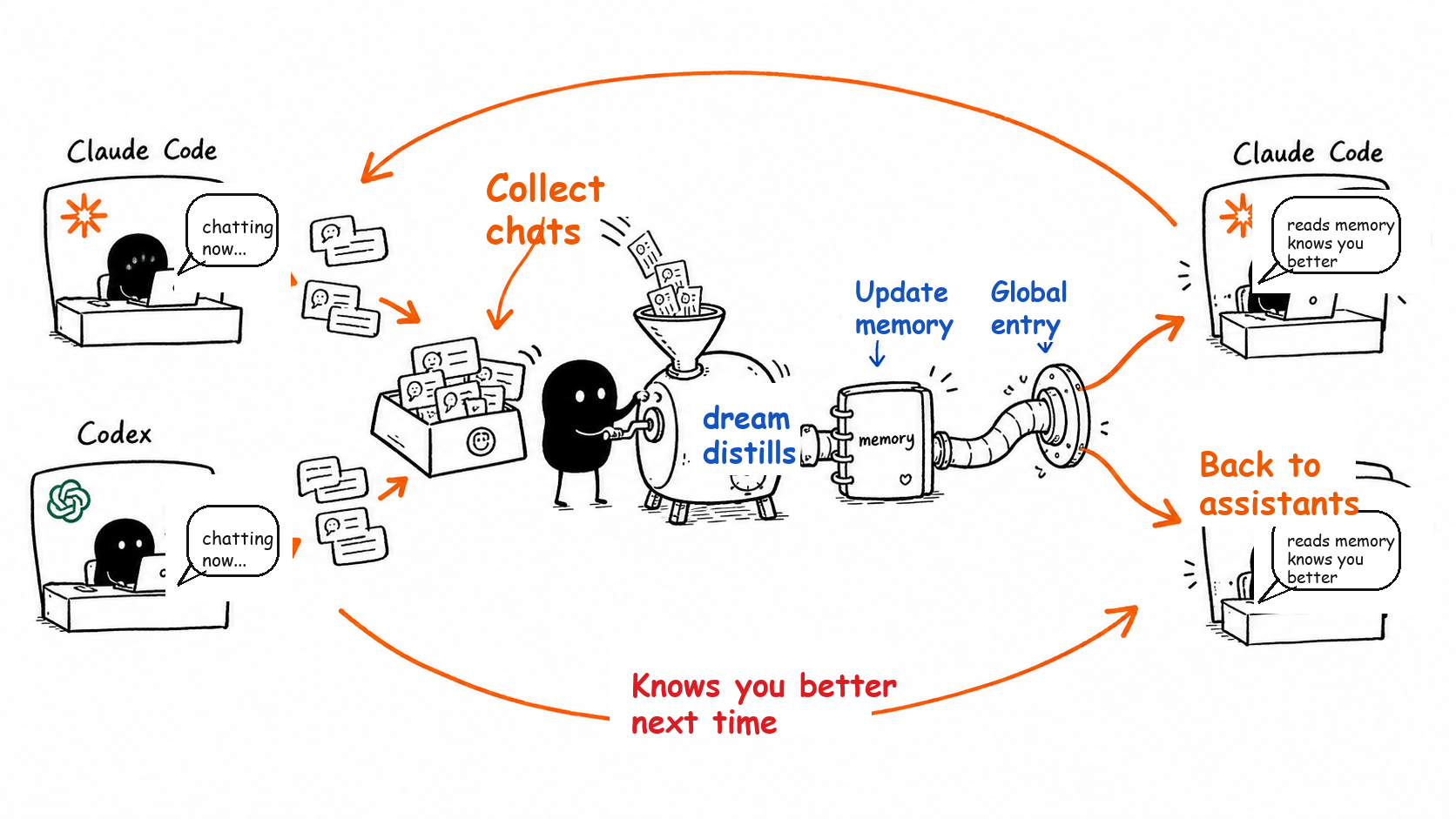
context-harness is a local-first personal AI context tool. It archives conversations from your local AI coding assistants so they can be synced, searched, and turned into useful memory later.
Supported local AI coding assistants:
The project keeps the tool itself separate from your personal data. This repository contains the program; your conversations, memory, logs, and sync state live in a configurable data directory such as ~/.context-harness.
What's new — native Open Knowledge Format (OKF) support. Your data home is now a portable OKF knowledge base, not just a folder of notes:
- Every conversation, memory file, profile, and index carries machine-readable YAML frontmatter whose only mandatory field is
type— so an AI agent can filter, sort, and aggregate bytype/tags/source/ time instead of parsing prose.- Auto-generated
index.md/log.md(per source, plus aconversations/index and a data-home root index) give progressive disclosure and a change timeline, cross-linked with ordinary relative markdown links.- New archives are OKF by default; an existing data home is brought up to date with the idempotent
context-harness migrate-okf [--dry-run]. Bodies are never touched and unknown producer fields are preserved.See Open Knowledge Format (OKF) for details.
Simple Install
If you just want to get it working, you do not need to understand plugins, skills, or command-line internals first. Start with one of these two paths. After installation, you will have:
- Personal data folder:
~/.context-harness - Program runtime folder:
~/.local/share/context-harness - Automatic sync settings for Codex / Claude Code when the installer detects them, or when you explicitly request them
- Global
profile-dreamerskill registration for detected Codex / Claude Code installs
Option A: Copy One Command
On macOS / Linux, paste this into Terminal:
curl -fsSL https://raw.githubusercontent.com/yinjialu/context-harness/main/scripts/install.sh | bash
If you only want to turn on automatic sync for one AI coding assistant, use:
curl -fsSL https://raw.githubusercontent.com/yinjialu/context-harness/main/scripts/install.sh | env CONTEXT_HARNESS_AGENTS=codex bash
curl -fsSL https://raw.githubusercontent.com/yinjialu/context-harness/main/scripts/install.sh | env CONTEXT_HARNESS_AGENTS=claude-code bash
The installer prepares uv, downloads or updates context-harness, initializes the data folder, turns on the selected sync settings, and registers profile-dreamer globally. In an interactive terminal it also asks whether to register all bundled skills; set CONTEXT_HARNESS_SKILLS=all or CONTEXT_HARNESS_SKILLS=none to choose non-interactively. If Codex asks you to approve the sync hook after installation, run /hooks in Codex and approve context-harness.
Option B: Ask Your Local AI Coding Assistant
If you do not want to manage the terminal steps yourself, copy this prompt into your local Codex, Claude Code, or another AI coding assistant:
Please install context-harness on this machine so it can sync and archive my local AI coding assistant conversations.

Please run this one-line installer first:
curl -fsSL https://raw.githubusercontent.com/yinjialu/context-harness/main/scripts/install.sh | bash

After installation, tell me:
1. Whether the personal data folder was created at ~/.context-harness
2. Whether the program runtime folder is ready at ~/.local/share/context-harness
3. Which automatic sync settings were turned on for Codex / Claude Code
4. If Codex needs hook trust approval, remind me to run /hooks and approve context-harness

Do not store my conversations, memory, or sync state inside the context-harness source repository.
If you already know that you only use Codex or only use Claude Code, change the installer command to:
curl -fsSL https://raw.githubusercontent.com/yinjialu/context-harness/main/scripts/install.sh | env CONTEXT_HARNESS_AGENTS=codex bash
curl -fsSL https://raw.githubusercontent.com/yinjialu/context-harness/main/scripts/install.sh | env CONTEXT_HARNESS_AGENTS=claude-code bash
Quick Start
Run the following commands from the context-harness repository root.
Clone the repository:
git clone https://github.com/yinjialu/context-harness.git
cd context-harness
Install dependencies:
uv sync
Initialize the data home:
uv run context-harness --context-home ~/.context-harness init
init also binds the data home's global-claude.md into agent-level context:
- Claude Code: adds an
@importline to~/.claude/CLAUDE.md(created if absent). - Codex: adds a managed Context Harness block to
~/.codex/AGENTS.md(created if absent) that tells Codex to read the same global context file at the start of new sessions.
The step is idempotent and non-destructive — existing CLAUDE.md and AGENTS.md content is preserved. Restart Claude Code or start a new Codex session after a fresh link so the imported context loads.
Sync the latest Codex conversation:
uv run context-harness --context-home ~/.context-harness sync codex --latest 1
Sync the latest Claude Code conversation:
uv run context-harness --context-home ~/.context-harness sync claude-code --latest 1
Export the latest raw transcript as local agent trajectory JSONL:
uv run context-harness --context-home ~/.context-harness export-trajectories codex --latest 1
uv run context-harness --context-home ~/.context-harness export-trajectories claude-code --latest 1
Trajectory exports are written under exports/trajectories/<source>/ and preserve structured system / user / assistant / tool messages, tool calls, tool results, provenance, and audit metadata. They are local review artifacts only; context-harness does not upload them.
Install automatic sync hooks:
uv run context-harness --context-home ~/.context-harness hooks install codex
uv run context-harness --context-home ~/.context-harness hooks install claude-code
Custom Data Home
context-harness supports two ways to set the data home:
CONTEXT_HARNESS_HOME=~/Documents/my-context uv run context-harness init
uv run context-harness --context-home ~/Documents/my-context init
--context-home takes precedence over CONTEXT_HARNESS_HOME. After initialization, edit config.toml in the data home to customize Codex / Claude Code source paths and archive output paths.
Example:
[sources.codex]
enabled = true
sessions_dir = "~/Library/Application Support/Codex/sessions"
output_dir = "conversations/codex"

[sources.claude-code]
enabled = true
projects_dir = "~/Documents/claude-code-projects"
output_dir = "conversations/claude-code"

[memory]
profile_file = "memory/user_profile.md"
global_context_file = "global-claude.md"
Relative paths are resolved against context_home. Absolute paths and ~ keep their normal meaning.
Data Directory Layout
After initialization, the data home looks roughly like this:
~/.context-harness/
  config.toml
  index.md                 # OKF root index
  global-claude.md         # OKF type: Personal Context
  conversations/
    index.md               # OKF index of sources
    codex/
      index.md             # OKF index (progressive disclosure)
      log.md               # OKF log (reverse-chronological)
      20260616_019ed088.md # OKF type: Conversation
    claude-code/
  memory/
    MEMORY.md              # OKF type: Index
    user_profile.md        # OKF type: user
  exports/
    trajectories/
      codex/
        20260616_019ed088.jsonl
  state/
    codex-sync-state.json
    claude-code-sync-state.json
conversations/stores Markdown archives rendered from Code Agent transcripts.exports/trajectories/stores optional JSONL agent trajectory exports for local training-data review.memory/stores files maintained by workflows such asprofile-dreamer.state/stores incremental sync state to avoid reprocessing unchanged sessions.config.tomldescribes local machine paths and switches. It should not be committed to this mechanism repository.
Open Knowledge Format (OKF)
The data home is a native Open Knowledge Format knowledge base: a directory of markdown files, each carrying a YAML frontmatter block whose only mandatory field is type. Conversations (type: Conversation), memory (type: user|project|feedback|reference|insight), the global profile (type: Personal Context) and the indexes (type: Index/Log) are all OKF-compliant, and concepts are linked with ordinary relative markdown links.
- New archives are written with OKF frontmatter automatically by the sync hook — no extra step.
index.md/log.mdfiles are rebuilt after every sync for progressive disclosure and change history.- To bring an existing data home up to OKF, run the idempotent migration:
context-harness migrate-okf --dry-run   # list files that would change
context-harness migrate-okf             # apply in place
The migration only adds or repairs missing standard frontmatter fields; unknown producer fields and human-authored bodies are preserved, so it is safe to re-run.
Skills
This repository includes four Agent-facing skills:
skills/init-context: initialize the data home and optionally install Codex / Claude Code hooks.skills/sync-conversations: manually run full or incremental conversation sync.skills/profile-dreamer: extract profile and memory update proposals from archived conversations.skills/adapt-agent-backup: guide another Agent through adding a new local Code Agent backup adapter.
The skills describe Agent workflows. The CLI owns the actual behavior, so business logic stays in one place.
Copy-Ready Prompt: Add Agent Backup Support
Copy this into the coding Agent you want context-harness to support:
Please clone and inspect https://github.com/yinjialu/context-harness.

Use the repository's `adapt-agent-backup` skill to add local conversation backup support for the coding Agent you are currently running in, then submit a PR.
Adapter PRs get a lightweight GitHub bot checklist when they touch collector-style files or use the agent-backup-adapter label. For optional AI review, comment @codex review or @claude review this adapter PR against the adapt-agent-backup checklist when that integration is enabled.
Codex Plugin
This repository is also a Codex plugin. Its plugin manifest lives at .codex-plugin/plugin.json and exposes the repository's skills/ directory.
Public community install
Codex does not currently support self-serve publishing into the official public Plugin Directory. For community distribution, publish the Git marketplace and ask users to add it once:
codex plugin marketplace add yinjialu/context-harness --ref codex-plugin
After adding the marketplace, users can open the Codex Plugins page, switch to the Context Harness marketplace source, search for context-harness, and install it there. They can also install it from the CLI:
codex plugin add context-harness@context-harness
Update an existing installation:
codex plugin marketplace upgrade context-harness
codex plugin add context-harness@context-harness
Workspace sharing
To make the plugin installable directly from the Codex app for teammates in the same ChatGPT workspace:
- Install the plugin locally.
- Open the Codex Plugins page.
- Go to
Created by youand openContext Harness. - Select
Share. - Add workspace members or groups, or copy a share link.
People you share with can find the plugin under Shared with you in the Codex plugin directory. Workspace sharing does not publish the plugin to the public Plugin Directory.
Publishing the marketplace branch
The codex-plugin branch is generated from this repository by scripts/build_codex_plugin_marketplace.py. Maintainers can publish it manually:
python3 scripts/build_codex_plugin_marketplace.py
cd dist/codex-plugin-marketplace
git init
git add .
git commit -m "Publish Codex plugin marketplace"
git branch -M codex-plugin
git remote add origin [email protected]:yinjialu/context-harness.git
git push --force origin codex-plugin
The GitHub Actions workflow also publishes that branch when a v* tag is pushed, or when the workflow is run manually.
For local development, register the current checkout through the personal Codex marketplace:
mkdir -p ~/plugins
ln -sfn /path/to/context-harness ~/plugins/context-harness
codex plugin add context-harness@personal
The symlink keeps the current repository as the single source of truth while matching Codex's standard personal marketplace path layout.
For repo-local discovery, the repository also provides relative symlinks:
.agents/skills/      # Codex repo-local skills
.claude/skills/      # Claude Code repo-local skills
To install the skills globally, run:
mkdir -p ~/.codex/skills ~/.agents/skills ~/.claude/skills
ln -sfn /path/to/context-harness/skills/profile-dreamer ~/.codex/skills/profile-dreamer
ln -sfn /path/to/context-harness/skills/init-context ~/.agents/skills/init-context
ln -sfn /path/to/context-harness/skills/sync-conversations ~/.agents/skills/sync-conversations
ln -sfn /path/to/context-harness/skills/profile-dreamer ~/.agents/skills/profile-dreamer
ln -sfn /path/to/context-harness/skills/init-context ~/.claude/skills/init-context
ln -sfn /path/to/context-harness/skills/sync-conversations ~/.claude/skills/sync-conversations
ln -sfn /path/to/context-harness/skills/profile-dreamer ~/.claude/skills/profile-dreamer
Claude Code Plugin
This repository is also a Claude Code plugin. Its plugin manifest lives at .claude-plugin/plugin.json, and Claude Code auto-discovers the repository's skills/ directory.
Community install
Publish the Git marketplace and ask users to add it once:
/plugin marketplace add yinjialu/context-harness#claude-plugin
Then install the plugin from the marketplace:
/plugin install context-harness@context-harness
You can also drive the same flow from the CLI:
claude plugin marketplace add yinjialu/context-harness#claude-plugin
claude plugin install context-harness@context-harness
Update an existing installation:
claude plugin marketplace update context-harness
claude plugin update context-harness@context-harness
Publishing the marketplace branch
The claude-plugin branch is generated from this repository by scripts/build_claude_plugin_marketplace.py. Maintainers can publish it manually:
python3 scripts/build_claude_plugin_marketplace.py
cd dist/claude-plugin-marketplace
git init
git add .
git commit -m "Publish Claude Code plugin marketplace"
git branch -M claude-plugin
git remote add origin [email protected]:yinjialu/context-harness.git
git push --force origin claude-plugin
The Publish Claude Code Plugin Marketplace GitHub Actions workflow also publishes that branch when a v* tag is pushed, or when the workflow is run manually.
For local development, add the current checkout as a local marketplace:
/plugin marketplace add /path/to/context-harness
/plugin install context-harness@context-harness
Claude Code reads .claude-plugin/plugin.json directly from the checkout, so the repository stays the single source of truth.
Install With skills.sh / gh skill
The repository follows the standard skills/*/SKILL.md layout, so skill tooling can install it directly from GitHub.
Install all skills for Codex and Claude Code with npx skills:
npx skills add yinjialu/context-harness --skill '*' -a codex -a claude-code -g -y
Install with GitHub CLI gh skill:
for skill in init-context sync-conversations profile-dreamer; do
  gh skill install yinjialu/context-harness "$skill" --agent codex --scope user
  gh skill install yinjialu/context-harness "$skill" --agent claude-code --scope user
done
Validate the publishable skill package:
gh skill publish skills --dry-run
Publish a tagged release (use the release tag you are publishing, e.g. vX.Y.Z):
gh skill publish skills --tag "vX.Y.Z"
skills/ is the canonical publish target. Running gh skill publish from the repository root may warn about .agents/skills and .claude/skills; those directories are intentionally kept as repo-local discovery symlinks for Codex and Claude Code.
Skill-Only Bootstrap
Installing the skills does not copy the whole CLI repository into the agent's skill directory. To close that gap, each skill includes scripts/bootstrap.sh.
When an Agent runs a context-harness skill, it should first run:
runtime_dir="$(bash scripts/bootstrap.sh)"
cd "$runtime_dir"
The bootstrap script:
- clones or updates the runtime repository at
~/.local/share/context-harness - checks out the latest released tag by default (override with
CONTEXT_HARNESS_REF) - runs
uv sync - prints the runtime repository path on stdout
After that, the Agent can run normal CLI commands:
uv run context-harness --context-home ~/.context-harness init
uv run context-harness --context-home ~/.context-harness sync codex --latest 1
Forks can override the runtime source:
CONTEXT_HARNESS_REPO_URL=https://github.com/<owner>/<repo>.git \
CONTEXT_HARNESS_REF=main \
bash scripts/bootstrap.sh
You can also set CONTEXT_HARNESS_RUNTIME_DIR to choose a custom runtime checkout path.
Audit Local Version
Use these read-only checks before and after upgrading a machine:
context-harness --version
readlink ~/.context-harness
git -C ~/.local/share/context-harness describe --tags --always --dirty
git -C ~/.local/share/context-harness status --short
rg "context-harness" ~/.codex/hooks.json ~/.claude/settings.json
For a smooth upgrade, publish a tagged release first, then rerun the skill bootstrap once. The bootstrap updates ~/.local/share/context-harness to the default tag baked into the installed skill unless CONTEXT_HARNESS_REF overrides it:
bash ~/.agents/skills/sync-conversations/scripts/bootstrap.sh
context-harness --version
Hooks
Hooks automatically call the sync command at the right point in each supported Code Agent lifecycle, then archive the new conversation into context_home.
Hook installers use the same scope model for supported Code Agents: user-level by default, project-local when --scope project is passed. --project-root targets a different project; otherwise project-local install uses the current directory.
Codex hooks are written to ~/.codex/config.toml and ~/.codex/hooks.json by default:
uv run context-harness --context-home ~/.context-harness hooks install codex
To install a project-local Codex hook instead, pass --scope project. From the target project root:
uv run context-harness --context-home ~/.context-harness hooks install codex --scope project
If you run the command from the context-harness repository root for another project, pass the target project explicitly:
uv run context-harness --context-home ~/.context-harness hooks install codex --scope project --project-root /path/to/your-codex-project
Claude Code hooks are written to ~/.claude/settings.json by default:
uv run context-harness --context-home ~/.context-harness hooks install claude-code
To install a project-local Claude Code hook:
uv run context-harness --context-home ~/.context-harness hooks install claude-code --scope project
Hook installers are idempotent. Re-running them updates the existing context-harness sync hook without deleting unrelated hook configuration.
The generated hook command reads transcript_path from hook stdin and syncs the transcript that just ended, instead of guessing the latest conversation by global mtime. The command stores the absolute path to this context-harness checkout; reinstall hooks after moving or deleting the repository.
Codex command hooks may require an additional trust review. If Codex reports that the hook is untrusted, run /hooks in Codex and approve the context-harness hook.
Using With Codex
Codex discovers skills from repo-local .agents/skills/ and user-level $HOME/.agents/skills. When you open the context-harness repository, the built-in skills are exposed through .agents/skills. To use them from any project, install them globally into ~/.agents/skills.
Typical invocations:
$init-context initialize context-harness and optionally install hooks
$sync-conversations sync Codex / Claude Code conversation records
$profile-dreamer propose memory / profile updates from archived conversations
Natural language works too:
Use sync-conversations to sync recent Codex and Claude Code conversations
Use profile-dreamer to extract changes in my personal profile from recent archives
Recommended setup:
uv run context-harness --context-home ~/.context-harness init
uv run context-harness --context-home ~/.context-harness hooks install codex
Then run /hooks in Codex and trust the context-harness command hook. After that, the Codex Stop hook passes transcript_path to context-harness, and the current transcript is archived first.
Using With Claude Code
Claude Code discovers project skills from .claude/skills/ and user skills from ~/.claude/skills. When you open the context-harness repository, the built-in skills are exposed through .claude/skills. To use them from any project, install them globally into ~/.claude/skills.
Typical invocations:
/init-context
/sync-conversations
/profile-dreamer
Recommended setup:
uv run context-harness --context-home ~/.context-harness init
uv run context-harness --context-home ~/.context-harness hooks install claude-code
The Claude Code hook is written to ~/.claude/settings.json by default. The Stop hook reads transcript information from hook stdin and archives the current session into ~/.context-harness/conversations/claude-code/.
Design Docs
- docs/superpowers/specs/2026-06-16-context-harness-design.md
- docs/superpowers/plans/2026-06-16-context-harness-v1-core.md
License
MIT
No comments yet
Be the first to share your take.