
Codex Visual Asset Skills
中文
这个仓库只保留两类视觉素材 skill:
transparent-visual-assets:用 Codex 生图生成纯色背景素材,再清理成透明 PNG。sprite-animation-assets:规划连续帧,把透明帧组合成 GIF 预览和 spritesheet/atlas。
PPT 已拆成独立仓库,不再放在这里:
一句话:做透明素材和动画素材,用这个仓库;做可编辑视觉 PPTX,用 PPT 仓库。
安装
安装全部素材 skill 到 Codex 全局目录:
npx skills add DwDestiny/codex-visual-asset-skills --skill '*' -g -a codex -y
只安装其中一个:
npx skills add DwDestiny/codex-visual-asset-skills --skill transparent-visual-assets -g -a codex -y
npx skills add DwDestiny/codex-visual-asset-skills --skill sprite-animation-assets -g -a codex -y
先查看仓库里有哪些 skill:
npx skills add DwDestiny/codex-visual-asset-skills --list
快速使用
Use $transparent-visual-assets to create a transparent PNG cartoon character asset for my website.
Use $sprite-animation-assets to turn this character into a waving GIF and transparent spritesheet.
使用场景
只要素材需要叠到网页、PPT、App、海报、视频或游戏界面上,透明背景就很有用。下面这些案例都来自同一套流程:先用 Codex 生图生成纯色底源图,再清成透明 PNG。
| 场景 | 适合做什么 | 示例 |
|---|---|---|
| 网站设计素材 | Landing page、产品官网、博客插画、功能区装饰、空状态插画 |  |
| PPT / 汇报图表 | 路演页、数据页、业务复盘、图表旁的视觉解释元素 |  |
| App / 产品引导 | Onboarding、权限说明、功能引导、发布说明里的产品插画 |  |
| 电商 / 社媒贴纸 | 商品页角标、促销贴纸、社媒封面、小红书/公众号配图元素 |  |
| 游戏 / 互动 UI | 小角色、道具、背包图标、按钮素材、轻动画帧素材 |  |
Demo 效果
透明素材处理:这几张不是脚本画的占位图,而是先用 Codex 生图模型生成纯色背景源图,再清成透明 PNG。
| Polished Anime | Watercolor | Cyberpunk |
|---|---|---|
 |
 |
 |
连续动画素材:先用 Codex 生图模型生成同一角色的动作条,再拆帧、去背景、剔除破坏尾段连续性的源帧,检查同一只手的动作连续性,最后组合成 GIF 和 atlas。
| GIF Preview | Transparent Atlas |
|---|---|
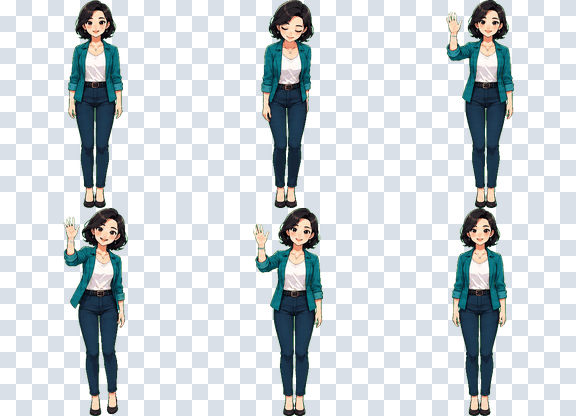 |
 |
逐帧 QA:

两个 skill 分别解决什么
transparent-visual-assets 会指导 Codex:
- 先生成可抠背景的纯色底素材。
- 避免棋盘格、阴影、地面、文字、光晕和漂浮杂点。
- 调用脚本移除纯色背景,输出透明 PNG 和报告。
核心脚本:
python ~/.codex/skills/transparent-visual-assets/scripts/prepare_transparent_asset.py --help
sprite-animation-assets 会指导 Codex:
- 先定义状态、帧数、cell 尺寸和循环节奏。
- 保持同一个角色或物体在每一帧里的身份一致。
- 调用脚本组合 spritesheet/atlas,并导出 GIF 预览。
核心脚本:
python ~/.codex/skills/sprite-animation-assets/scripts/compose_sprite_set.py --help
仓库结构
skills/
  transparent-visual-assets/
    SKILL.md
    scripts/prepare_transparent_asset.py
    references/prompt-and-cleanup.md
  sprite-animation-assets/
    SKILL.md
    scripts/compose_sprite_set.py
    references/sprite-atlas-layouts.md
demos/
  source-model/
  transparent-assets/
  use-cases/
  sprite-animation-assets/
  preview/
  process_model_demo_assets.py
tests/
  test_asset_scripts.py
  test_effect_artifacts.py
边界
这个仓库不替代官方 hatch-pet。如果你要的是完整 Codex 自定义宠物包,包括 pet.json、完整 8x9 atlas、QA contact sheet、预览视频和 app-ready packaging,继续用 hatch-pet。
如果你只需要可复用素材:
- 单张透明 PNG:用
transparent-visual-assets - 连续帧 / GIF / spritesheet:用
sprite-animation-assets - 可编辑视觉 PPTX:用 codex-visual-ppt-deck-builder
English
This repository now contains two focused visual asset skills for Codex:
transparent-visual-assets— generate a flat-background image with Codex, then clean it into a transparent PNG.sprite-animation-assets— plan continuous frames and package transparent frames into GIF previews and spritesheet atlases.
The PPT skill has moved to its own repository:
In short: use this repository for transparent assets and animation assets; use the PPT repository for editable visual PPTX decks.
Install
Install both asset skills globally for Codex:
npx skills add DwDestiny/codex-visual-asset-skills --skill '*' -g -a codex -y
Install only one:
npx skills add DwDestiny/codex-visual-asset-skills --skill transparent-visual-assets -g -a codex -y
npx skills add DwDestiny/codex-visual-asset-skills --skill sprite-animation-assets -g -a codex -y
List available skills before installing:
npx skills add DwDestiny/codex-visual-asset-skills --list
Quick Start
Use $transparent-visual-assets to create a transparent PNG cartoon character asset for my website.
Use $sprite-animation-assets to turn this character into a waving GIF and transparent spritesheet.
Use Cases
Transparent assets are useful anywhere a visual needs to be layered over a website, slide deck, app screen, poster, video, or game UI. The examples below use the same workflow: generate a flat-background source image with Codex, then clean it into a transparent PNG.
| Use case | What it is good for | Example |
|---|---|---|
| Website design assets | Landing pages, product sites, blog illustrations, empty states | |
| Slides and report charts | Pitch decks, analytics pages, business reviews, visual chart explainers | |
| App onboarding | Onboarding, permission prompts, feature walkthroughs, release notes | |
| Ecommerce and social stickers | Product badges, campaign stickers, covers, post decorations | |
| Game and interactive UI | Characters, items, inventory icons, buttons, lightweight animation frames | |
Demo
Transparent asset cleanup: these are not SVG placeholders. They start as Codex-generated flat-background raster images and are cleaned into transparent PNGs.
| Polished Anime | Watercolor | Cyberpunk |
|---|---|---|
|
|
|
Sprite animation assets: generate a consistent character action strip, remove backgrounds, reject frames that break continuity, then package the result into a GIF preview and atlas.
| GIF Preview | Transparent Atlas |
|---|---|
|
|
Frame QA:
What Each Skill Does
transparent-visual-assets helps Codex:
- Generate an image against a removable flat-color background.
- Avoid checkerboards, shadows, floors, text, glow, and floating artifacts.
- Run a cleanup script that outputs a transparent PNG and report.
Core script:
python ~/.codex/skills/transparent-visual-assets/scripts/prepare_transparent_asset.py --help
sprite-animation-assets helps Codex:
- Define states, frame count, cell size, and loop timing.
- Keep the same character or object identity across every frame.
- Package frames into a spritesheet/atlas and GIF preview.
Core script:
python ~/.codex/skills/sprite-animation-assets/scripts/compose_sprite_set.py --help
Repository Layout
skills/
  transparent-visual-assets/
    SKILL.md
    scripts/prepare_transparent_asset.py
    references/prompt-and-cleanup.md
  sprite-animation-assets/
    SKILL.md
    scripts/compose_sprite_set.py
    references/sprite-atlas-layouts.md
demos/
  source-model/
  transparent-assets/
  use-cases/
  sprite-animation-assets/
  preview/
  process_model_demo_assets.py
tests/
  test_asset_scripts.py
  test_effect_artifacts.py
Scope
This repository does not replace OpenAI's official hatch-pet skill. If you need a complete Codex custom pet package, keep using hatch-pet.
For focused reusable outputs:
- Single transparent PNG: use
transparent-visual-assets - Animation frames / GIF / spritesheet: use
sprite-animation-assets - Editable visual PPTX decks: use codex-visual-ppt-deck-builder
License
MIT
No comments yet
Be the first to share your take.