
What is Codewalk?
Codewalk analyzes any codebase and gives you:
- Module detection — groups files into logical modules automatically
- Dependency graph — extracts every import/require → builds the full dependency map
- Blast radius — "if I change this file, what breaks?"
- Reading order — optimal file reading sequence (dependencies first)
- Execution flow — entry points, module-to-module and file-to-file dependency flow
- AI chat — ask anything about the code, powered by RAG + tool-calling agent
- Code review — review git diffs for bugs, security issues, and style (context-enriched, OWASP-focused)
- Incremental reindex — re-embed only changed files using content hash comparison
- Graph intelligence — DuckDB + igraph: symbol-level call graph, cycle detection, centrality analysis, import chain tracing
- Corrective RAG — distance-based chunk filtering + LLM answer grading + query rewriting for higher quality answers
- Voice interface — talk to your codebase hands-free: mic → transcribe → Copilot routes → speak answer
Three ways to use it locally, plus optional cloud indexing:
| Interface | Best for |
|---|---|
| Web UI (Next.js) | Visual exploration — Knowledge Graph UI, diagrams, module browser, blast radius viewer |
| MCP Server | VS Code Copilot, Claude Code, Cursor — AI agents use tools directly |
| REST API | Scripts, CI/CD, custom integrations |
Cloud (optional): Push to GitHub → Codewalk Cloud indexes on the server → MCP downloads the index and queries locally. See Cloud Deployment.
🎙️ Voice is available via both MCP (
codewalk_voice_ask+codewalk_speak) and REST API (POST /voice/ask) — ask questions by speaking, hear answers read aloud.
Why Codewalk?
| Scenario | How Codewalk helps |
|---|---|
| New dev joins the team | Point Codewalk at the repo → get an overview, module map, and reading order. Self-onboard in hours instead of weeks of "hey, can you explain this?" |
| LLM token costs are high | Without RAG, the LLM needs your entire codebase in context — slow and expensive. Codewalk embeds code into a vector DB and retrieves only the relevant chunks per query. Faster answers, fraction of the tokens. |
| Senior dev switches modules | You know the auth module but now need to work on payments. Get module info, blast radius, and execution flow without bugging the payments team. |
| Before a refactor | Check blast radius before touching shared code. "If I change base_model.py, what breaks?" — get the answer before you break prod. |
| PR reviews | Run codewalk_run_review (MCP) or POST /review (API) — automated review with OWASP security checks, blast radius warnings, and team guidelines matching. MCP mode returns enriched context so the calling model (Claude/GPT) performs the review directly — no separate LLM needed. |
| Documentation is outdated | Codewalk analyzes the actual code, not stale wiki pages. Always up to date. |
🔬 Code Review — Powered by the Intelligence Layer
Codewalk's review engine is built on top of the codebase intelligence layer. It doesn't just lint — it understands your architecture, knows what files are risky, and reviews with full context.
How it works
git diff → Static Analysis (graph risk, PageRank, cycles, blast radius)
         → Batch files (3-5 per batch, grouped by feature)
         → Host LLM reviews each batch with full context
         → Submit findings to disk per batch (JSON + Markdown, context stays clean)
         → Final summary: raw findings grouped by severity
What makes it different
| Capability | CodeRabbit / GitHub Copilot Review | Codewalk Review |
|---|---|---|
| Architecture awareness | ❌ No dependency graph | ✅ DuckDB + igraph: PageRank, fan-in, cycles, bottlenecks |
| Blast radius | ❌ | ✅ "This file has 23 callers — review with extra care" |
| Works without indexing | — | ✅ Just needs a git repo (graph enhances but isn't required) |
| Batched for large PRs | Dumps everything at once | ✅ 3-5 files per batch, sorted by risk, host LLM stays focused |
| Custom rubrics | Limited | ✅ Per-language + per-framework + team guidelines |
| Fix application | Suggests only | ✅ Accept/reject → apply atomically → verify with tests |
| Severity levels | varies | blocker · error · suggestion |
Zero-setup review
Review runs on any git repo — no codewalk_analyze_codebase needed. The dependency graph is built automatically on first review (~5s) and cached:
| Component | Auto (graph-only) | Full index (after analyze) |
|---|---|---|
| Git diff + file content | ✅ | ✅ |
| Rubrics + team guidelines | ✅ | ✅ |
| Stack detection | ✅ (from file extensions) | ✅ (cached) |
| Blast radius, PageRank, cycles | ✅ Built on-the-fly (~5s) | ✅ From cached DuckDB |
| Neighborhood (callers, tests) | ⚠️ Tests + interfaces only | ✅ Full (from ChromaDB) |
| Blast radius warnings | ⚠️ Not available | ✅ Transitive impact |
Severity levels
| Level | Value | Meaning |
|---|---|---|
| Blocker | "blocker" |
Must fix before merge — blocks the PR |
| Error | "error" |
Should fix — real bugs, logic errors, security risks |
| Suggestion | "suggestion" |
Nice to have — style, naming, minor improvements |
MCP review flow
codewalk_run_review()→ session + first batch (reviews ALL changes by default: staged + unstaged + untracked; passtarget_branch='...'to diff against a branch)- Host reviews batch →
codewalk_submit_batch_findings(session_id, [...])→ saved to disk as JSON; a hard-wrapped Markdown companion is also written for easy reading codewalk_review_next_batch(session_id)→ next batch (context window is clean)- Repeat until all batches done
codewalk_get_review_summary(session_id)→ structured summary of raw findings- User edits
llm_findings.json→ setsuser_verdicttoaccepted/rejected→codewalk_accept_and_verify_fixreturns the accepted findings → the host applies them and verifies withcodewalk_run_static_analysis+codewalk_run_tests - (Optional)
codewalk_re_review()→ fresh review that hides rejected findings
API review flow
curl -X POST http://localhost:8000/review \
  -H "Content-Type: application/json" \
  -d '{}'
Runs: static analysis → batch review (parallel LLM) → raw findings JSON (issues + static_issues + session_id).
Fix flow (Copilot-style diff review):
- Accept/reject findings in the UI
POST /review/preview-edits— generates the proposed diff per accepted finding (dry run, no writes)- Review the diffs, approve selected edits
POST /review/apply-edits— writes approved diffs, verifies with static analysis + tests, rolls back failures (a write is refused if the file changed since the preview)
✨ Features
| Feature | Description |
|---|---|
| 🔍 Module Detection | Auto-groups files into packages/modules by directory structure |
| 🕸️ Dependency Graph | Parses imports across 15+ languages via tree-sitter |
| 💥 Blast Radius | BFS on reversed dependency graph → shows transitive impact of any change |
| 📖 Reading Order | Topological sort → "read config.py before embedder.py because embedder imports config" |
| 🔄 Execution Flow | Entry points, module/file dependency chains, D3/ELK diagrams |
| 🤖 AI Chat | LangGraph agent with 7 tools, multi-turn conversation with memory |
| 🔎 Semantic Search | ChromaDB vector search on embedded code chunks (RAG) |
| 🔬 Code Review | Context-enriched review pipeline: test coverage, blast radius, guidelines RAG, deep analysis |
| 🔄 Incremental Reindex | Content hash comparison — only re-embeds changed files, skips unchanged |
| 🧩 MCP Server | 43 MCP tools for VS Code Copilot / Claude Code / Cursor / Codex |
| 🎙️ Voice Interface | Talk to your codebase — mic recording, local STT (faster-whisper), agent-driven routing (MCP + API), TTS response |
| 🔬 Graph Intelligence | DuckDB persistent graph + igraph C-speed traversal: cycle detection, centrality, import chain tracing |
| 🧬 Corrective RAG | Distance-based chunk filtering (free) + LLM answer grading + query rewriting for reliable answers |
| 📦 Parent-Child Chunking | Full functions stored as parents, sub-chunks searched — retrieve complete context on match |
| ⚡ Parallel Embedding | Producer-consumer pipeline — CPU chunking overlaps with GPU embedding |
| 🏗️ Multi-Provider LLM | Ollama (local), OpenAI, Anthropic, Groq, Gemini, OpenRouter, DeepSeek |
| 📚 Doc Indexing | Index team docs (.md, .pdf, .txt) — search and ask questions with source citations |
| 🔄 Reflection | Actor→Critic→Improve loop used by deep research to refine cross-cutting reports |
| 🧑💻 Human-in-the-Loop | Approval gate before any code/file modification — LangGraph checkpoint + interrupt |
| 🔬 Deep Research | Fan-out parallel search → merge → synthesize → reflect for complex cross-cutting questions |
| 🏗️ Architecture Health | Graph stats, bottleneck files (betweenness centrality), PageRank, cycle detection with fix suggestions |
| 🌐 15+ Languages | Python, JS, TS, Java, Go, Rust, Ruby, PHP, C#, C++, C, Dart, Kotlin, Swift, YAML |
Supported Languages
| Language | Extensions | Tree-sitter Parsing | Import Extraction |
|---|---|---|---|
| Python | .py |
✅ | ✅ |
| JavaScript | .js, .jsx |
✅ | ✅ |
| TypeScript | .ts, .tsx |
✅ | ✅ |
| Java | .java |
✅ | ✅ |
| Go | .go |
✅ | ✅ |
| Rust | .rs |
✅ | ✅ |
| Ruby | .rb |
✅ | ✅ |
| PHP | .php |
✅ | ✅ |
| C# | .cs |
✅ | ✅ |
| C++ | .cpp |
✅ | ✅ |
| C | .c |
✅ | ✅ |
| Kotlin | .kt |
✅ | ✅ |
| Swift | .swift |
✅ | ✅ |
| Dart | .dart |
✅ (optional install) | ✅ |
| YAML | .yaml, .yml |
— | — |
| JSON | .json |
— | — |
| TOML | .toml |
— | — |
| Markdown | .md |
— | — |
Tree-sitter parsing = extracts functions, classes, and methods for accurate chunking and function explanations.
Import extraction = builds the dependency graph, blast radius, and reading order.
Languages without tree-sitter support still get indexed via text splitting — they work with semantic search and AI chat, just without function-level granularity.
🆚 Codewalk vs. alternatives
Codewalk is not another AI autocomplete. It is a codebase intelligence layer: it builds a persistent dependency graph, embeds your code, indexes your docs, and exposes that intelligence through a UI, an MCP server, and an API.
If you need deep cross-file reasoning, blast-radius analysis, or AI review inside your existing IDE agent, Codewalk fits where general-purpose assistants stop.
| Use case | Typical approach | What Codewalk does differently |
|---|---|---|
| Explain this codebase | Ask a generic chat model and paste files | Builds a live graph + RAG so answers are grounded and cite real files |
| PR review | Lint + human review | LLM review with blast-radius, architecture, and custom guidelines |
| Refactor shared code | Grep for imports | Dependency graph + blast radius showing transitive impact |
| Onboard a new developer | Read wiki pages | Reading order + module map generated from actual code |
| Team knowledge | Search Confluence/Notion | Index docs alongside code and ask with citations |
| AI agent tooling | Write custom scripts or prompts | 43 MCP tools the agent can call directly |
🎬 Demo
Knowledge Graph UI
https://github.com/user-attachments/assets/48d30d70-2f4b-46e9-b4ca-0feb1341e503
Run Frontend from Any Repo
https://github.com/user-attachments/assets/ab140781-0e2f-432e-bc14-939eb82112d3
MCP — Analyze Codebase
https://github.com/user-attachments/assets/a85ec23b-eba6-4ff2-9c49-553fda4ab8bc
MCP — Overview
https://github.com/user-attachments/assets/d65d23c6-38bc-4610-b5d0-62669d85e5fd
MCP — Search Codebase
https://github.com/user-attachments/assets/23244594-42b5-4a39-9f30-d2e2ff10454f
MCP — Explain Function
https://github.com/user-attachments/assets/252a4738-3a22-4759-94f3-0ac41f7f0c09
MCP — Blast Radius
https://github.com/user-attachments/assets/052fa64b-e421-48ed-b65c-29609e0caf32
MCP — Run Review
https://github.com/user-attachments/assets/de36cdff-610b-4f4b-a422-7cff737fef2f
MCP — Ask Docs
https://github.com/user-attachments/assets/2b143e1c-f485-43b0-a750-aec0da627ea1
API — Overview
https://github.com/user-attachments/assets/f3ecaf4f-b0f0-4840-922e-806e840e3daf
API — Modules & Module Details
https://github.com/user-attachments/assets/b145f967-137b-43fc-873a-565c600dbb6b
API — Reading Order
https://github.com/user-attachments/assets/31f36fe9-67ea-46bc-a2b8-e64b982145d5
API — Code Review
https://github.com/user-attachments/assets/321870f0-2a12-4b48-8ed2-f5956ee3ad2e
API — Architecture
https://github.com/user-attachments/assets/1246efec-c52c-4b7d-bb63-c5eb72607fd2
API — Blast Radius
https://github.com/user-attachments/assets/e7aba067-e497-4a00-83a1-6d53f473d555
API — Team Docs Ask
https://github.com/user-attachments/assets/1b2c88cb-5eab-4b7c-8487-42ae737ad90e
🖥️ Frontend — Knowledge Graph UI
Codewalk ships with a Next.js frontend for visual codebase exploration.
What you can do
- Structural view — explore the repo as a layered dependency graph: modules, files, classes, and functions laid out as an interactive path flow.
- Knowledge view — semantic graph of entities and relationships surfaced by the AI analysis.
- Path Finder — pick a source and target node and discover import/dependency paths between them.
- Search — fuzzy + semantic search across files, symbols, and concepts.
- Blast Radius / Diff mode — visually highlight changed and affected nodes.
- Themes — switch between presets (Dark Gold, Dark Ocean, Dark Forest, Dark Rose, Light Minimal), accent colors, and heading fonts; your choice is saved locally.
- Info Panel — unified node details, metrics, source preview, and project overview.
- KineticShell navigation — index-dependent tabs stay locked until
GET /index-statusreportsindexed: true. - Cloud Admin — visit
/adminto register repos, list repos, trigger indexing, copy tokens, and check server health/version.
Run it
Quick start from a target repo
If you already have the Codewalk repo cloned elsewhere, run the combined launcher from the repo you want to explore:
/path/to/codewalk/scripts/run-ui-for-repo.sh
This starts the API from your current directory (discovering codewalk.yaml) and the frontend from the Codewalk checkout, automatically setting CODEWALK_REPO_PATH so the UI reads .codewalk/ from your repo.
Frontend-only development
cd frontend
npm install
npm run dev
If you change frontend code and see stale chunk 404s or client-side exceptions, restart with a clean build cache:
npm run dev:clean      # clears .next and starts fresh
npm run restart        # kills port 3000 and restarts dev
# or
./scripts/restart-frontend.sh
Set NEXT_PUBLIC_API_URL to point at the backend (e.g. http://localhost:8000 or https://api.codewalk.xyz).
Then open http://localhost:3000, analyze a repo, and click Knowledge Graph.
Demo
🎥 [Video coming soon — add frontend walkthrough here]
⚙️ Setup (local)
Production cloud server? See FULL_SETUP_GUIDE.md — step-by-step: Hetzner,
api.codewalk.xyz, GitHub App, webhooks, MCP download.
Prerequisites
| Tool | Version | Check |
|---|---|---|
| Python | 3.10+ | python3 --version |
| Node.js | 18+ | node --version |
| Git | Any | git --version |
| Ollama (optional) | Latest | ollama --version |
1. Clone the codewalk repo
git clone https://github.com/gupta29470/codewalk.git
cd codewalk
2. Backend setup in codewalk
# Create virtual environment
python3 -m venv .codewalk-env
source .codewalk-env/bin/activate    # macOS / Linux
# .codewalk-env\Scripts\activate     # Windows

# Install Python dependencies
pip install -r requirements.txt
If you're behind a VPN, corporate proxy, or private network, package installations and model downloads may fail due to blocked connections or SSL certificate errors.
Recommended: Use a normal (non-VPN) network for first-time setup.
Codewalk's setup downloads packages from PyPI, npm, and HuggingFace. These are one-time downloads — once installed, everything runs locally. If possible:
- Disconnect from VPN temporarily
- Run the setup steps (
pip install,npm install, start the backend once to download the embedding model) - Reconnect to VPN — everything is cached locally, no more downloads needed
After the first run, Codewalk works fully offline (with Ollama). The VPN/corporate network won't cause any issues.
# If you get an SSH error, run this first:
git config --global url."https://github.com/".insteadOf "[email protected]:"

# Then install:
pip install "tree-sitter-dart @ git+https://github.com/UserNobody14/tree-sitter-dart.git"
Without this, Codewalk still works — Dart files just won't get tree-sitter parsing (falls back to text splitting).
3. Frontend setup in codewalk
cd frontend
npm install
cd ..
4. Configure environment in codewalk
Copy the template: cp env.local.example.txt .env then edit:
# ─── LLM Configuration ──────────────────────────────────────
# Provider: ollama | openai | anthropic | gemini | groq | openrouter
LLM_PROVIDER=ollama
LLM_MODEL=qwen2.5-coder:7b

# ─── Embeddings ──────────────────────────────────────────────
EMBEDDING_MODEL=jinaai/jina-code-embeddings-1.5b

# ─── API Keys (only fill the one you're using) ──────────────
# GROQ_API_KEY=gsk_...
# OPENAI_API_KEY=sk-...
# ANTHROPIC_API_KEY=sk-ant-...
# GOOGLE_API_KEY=AI...
# OPENROUTER_API_KEY=sk-or-...
5. Pull an Ollama model (if using local LLM)
ollama pull qwen2.5-coder:7b
| Model | Size | Tool Calling | Best For |
|---|---|---|---|
qwen2.5-coder:7b |
4.7 GB | ✅ | Code-focused, fast |
qwen3.5:latest (8B) |
6.6 GB | ✅ | General + code |
qwen3.5:27b |
17 GB | ✅ | Best accuracy |
🚀 Usage
Option 1: Web UI
Quick launch from a target repo (recommended for exploration):
From the repo you want to explore, run the combined launcher in the Codewalk checkout:
/path/to/codewalk/scripts/run-ui-for-repo.sh
It kills any process on ports 8000/3000, starts the API from the target repo, starts the frontend from the Codewalk checkout, and sets CODEWALK_REPO_PATH automatically. Then open http://localhost:3000.
Manual two-terminal setup (for frontend/backend development):
Open two terminals in codewalk:
Terminal 1 — Backend API
source .codewalk-env/bin/activate
uvicorn src.codewalk.api.main:app --reload --port 8000
Terminal 2 — Frontend
cd frontend
npm run dev
If the frontend throws stale chunk 404s after pulling or editing code, restart it cleanly:
npm run dev:clean
# or from the project root
./scripts/restart-frontend.sh
Open http://localhost:3000 → click Analyze Codebase (the repo is discovered from the working directory via codewalk.yaml).
Then explore:
- Knowledge Graph — interactive structural + knowledge graph, layer/module legend, node-category filters, detail-level toggle, persona selector, Path Finder, export menu, code viewer, file explorer, tour/onboarding, mobile layout, edge styling, and diff overlay
- Overview — tech stack, modules, dependency diagram, riskiest files
- Modules — browse all modules, click one for file list + dependencies
- Blast Radius — which files break if you change each file
- Reading Order — optimal file reading sequence with risk levels
- Execution Flow — D3/ELK diagram of module/file dependencies
- Chat — ask any question ("explain the authentication flow", "what does scanner.py do?")
- Code Review — review git diffs, review single files, load team guidelines
- Voice — click the mic, ask a question by speaking, hear the answer read aloud
- Smart Reindex — incremental re-embed with stats (skipped, changed, deleted)
- Research — deep cross-cutting reports with a structured architecture diagram card
- Cloud Admin —
/adminpage for repo registration, token management, and server health
Option 2: MCP Server (VS Code Copilot / Claude Code / Cursor)
See MCP Integration below.
Option 3: REST API
# Start the backend
source .codewalk-env/bin/activate
uvicorn src.codewalk.api.main:app --reload --port 8000
Step 1 — Analyze a codebase:
# Run from inside the repo you want to analyze (repo is discovered from cwd via codewalk.yaml)
curl -X POST http://localhost:8000/analyze \
  -H "Content-Type: application/json" \
  -d '{"index_mode": "auto"}'
Step 2 — Check index status and explore the results:
# Check whether the current workspace is indexed
# Optional: ?repo_path=/path/to/repo (defaults to cwd discovery)
curl "http://localhost:8000/index-status" | python3 -m json.tool

# Project overview (tech stack, modules, riskiest files)
curl http://localhost:8000/overview | python3 -m json.tool

# List all modules
curl http://localhost:8000/modules | python3 -m json.tool

# Dive into a specific module
curl http://localhost:8000/modules/auth | python3 -m json.tool

# What breaks if I change files in the auth module?
curl http://localhost:8000/blast-radius/auth | python3 -m json.tool

# Optimal reading order
curl http://localhost:8000/reading-order | python3 -m json.tool

# Execution flow (entry points, dependency chains)
curl http://localhost:8000/execution-flow | python3 -m json.tool
Step 3 — Chat with the agent:
# Ask a question
curl -X POST http://localhost:8000/chat \
  -H "Content-Type: application/json" \
  -d '{"message": "Explain this project", "thread_id": "thread-1"}'

# Follow-up (same thread_id = conversation memory)
curl -X POST http://localhost:8000/chat \
  -H "Content-Type: application/json" \
  -d '{"message": "What does the auth module do?", "thread_id": "thread-1"}'

# After code changes — refresh analysis without re-embedding
curl -X POST http://localhost:8000/refresh

# Incremental reindex — only re-embed changed files
curl -X POST http://localhost:8000/incremental-reindex

# Review current git diff for bugs, security, style
curl -X POST http://localhost:8000/review \
  -H "Content-Type: application/json" \
  -d '{"staged": false, "target_branch": "master"}'
See API Reference for full request/response details on every endpoint.
🔌 MCP Integration
Codewalk runs as an MCP (Model Context Protocol) server, so any AI agent that speaks MCP can use it.
Cloud MCP (index on server, query locally)
- Cloud server indexes your repo on
git push(GitHub App webhook) - Clone codewalk locally (MCP server code)
- Open target repo in Cursor/VS Code (
${workspaceFolder}) - Configure MCP with cloud URL + repo token:
{
  "servers": {
    "codewalk": {
      "command": "/path/to/codewalk/.codewalk-env/bin/python",
      "args": [
        "-c",
        "import os, sys; sys.path.insert(0, os.environ['CODEWALK_PATH']); from src.codewalk.mcp.server import mcp; mcp.run(transport='stdio')"
      ],
      "cwd": "${workspaceFolder}",
      "env": {
        "CODEWALK_PATH": "/path/to/codewalk",
        "CODEWALK_SERVER_URL": "https://api.codewalk.xyz",
        "CODEWALK_REPO_NAME": "owner/repo",
        "CODEWALK_REPO_TOKEN": "cw_repo_xxxxxxxx"
      }
    }
  }
}
cwdshould be the target repo (wherecodewalk.yamllives).CODEWALK_PATHtells Python where to find the Codewalk source package. Open the target repo in your editor so the server starts from that workspace.
Get repo_token after first index (on server):
docker compose exec postgres psql -U codewalk -d codewalk -c \
  "SELECT repo_token FROM repos WHERE full_name='owner/repo';"
Run codewalk_connect_repo in Cursor or let analyze auto-download the index. Cloud sync tools include codewalk_pull_index, codewalk_connect_repo, codewalk_index_status, codewalk_check_version, and codewalk_show_knowledge_graph.
Every MCP tool is wrapped with a workspace-change guard (
_refresh_state_if_moved) that re-discovers the current working directory and resets state if the workspace changes.
⚠️ One repo per MCP server process. Codewalk keeps runtime state (vector store, graph, repo path) in memory. Pointing the same running MCP server at multiple repos — or rapidly switching workspaces in the same process — can overwrite or corrupt that state. Use one editor window / one MCP connection per repo. The stdio transport is safe because each connection spawns a separate process, but do not route commands for different repos into the same server instance.
Local-only MCP (index on your machine)
No cloud — index runs locally via codewalk_analyze_codebase. After rebuild_analysis_cache, MCP embeds with index_from_paths_parallel (same pipeline helpers as the API, but MCP scans via scan_repo_files + codewalk.yaml excludes rather than calling full_index_parallel directly).
| Surface | Local embed entrypoint | Notes |
|---|---|---|
MCP codewalk_analyze_codebase |
index_from_paths_parallel |
rebuild_analysis_cache → parallel chunk/embed → write_manifest |
API POST /analyze (+ /analyze/stream) |
full_index_parallel |
Same Chroma output under {repo}/.codewalk/ |
Review & approve fixes (agent + MCP)
You talk to your IDE agent; the agent calls Codewalk MCP tools. Codewalk does not render UI — each host has its own approve/reject experience (Cursor approval cards, Copilot chat, Claude Code prompts, etc.). The agent must present each fix and wait for your approval through that host UI (or yes/no in chat).
- Agent runs
codewalk_run_review(returns enriched context for the host LLM to review) orcodewalk_review_file(runs the full pipeline on one file) - User edits
llm_findings.json: setuser_verdicttoacceptedorrejectedfor each finding - Apply + verify accepted fixes:
codewalk_accept_and_verify_fix(session_id)returns every accepted finding with instructions — the host LLM applies them with its own editing tools, then verifies withcodewalk_run_static_analysis+codewalk_run_tests. Codewalk never edits files over MCP. - After edits:
codewalk_incremental_reindex
Full agent rules: src/codewalk/mcp/server.py FastMCP instructions (sent on MCP connect).
Example: @codewalk review my changes, then fix each issue only after I approve
Cloud re-download: codewalk_pull_index / codewalk_connect_repo / auto-download on analyze all replace local .codewalk/ (delete then extract). Force refresh: rm -rf .codewalk then pull.
MCP tools — index requirements
| Tool | Index required? | Notes |
|---|---|---|
codewalk_analyze_codebase |
Builds/loads | Cloud download or local embed |
codewalk_generate_config |
No | Creates starter codewalk.yaml |
| Query tools (search, overview, modules, symbols, …) | Yes | _require_index() auto-loads disk |
codewalk_find_circular_dependencies |
Yes | Uses graph data |
codewalk_get_architecture_health |
Yes | Graph stats + cycles |
codewalk_incremental_reindex, codewalk_refresh_analysis |
Yes | |
codewalk_run_review, codewalk_review_file, codewalk_get_stack_info |
Soft / Yes | Better with index; run_review returns context for the host LLM |
codewalk_get_review_details |
Yes | Reads persisted session |
codewalk_accept_and_verify_fix |
Yes | Returns accepted findings; host applies them itself, then verifies with run_static_analysis/run_tests |
codewalk_run_static_analysis |
No | ruff/mypy/eslint/etc. |
codewalk_run_tests |
No | pytest/npm test/etc. |
codewalk_pull_index, codewalk_connect_repo, codewalk_index_status |
Cloud config | Replace .codewalk/ on download |
Docs / guidelines / voice / check_version / show_knowledge_graph |
Varies | See MCP server instructions |
Starting the MCP Server in VS Code
-
Open VS Code in the codewalk project
-
Press
Cmd+Shift+P(macOS) orCtrl+Shift+P(Windows/Linux) -
Type
MCP: List Serversand select it
-
You'll see
codewalkin the list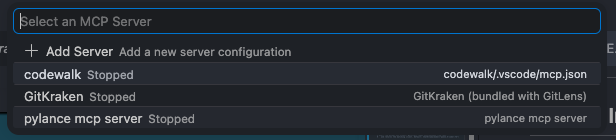
-
Click Start Server next to codewalk
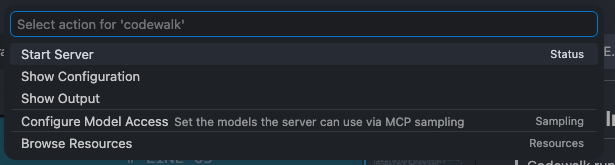
-
The server starts in the background (stdio transport)
-
Open Copilot Chat → type
@codewalk→ all Codewalk MCP tools are available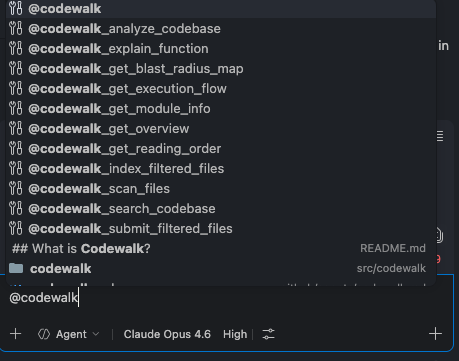
VS Code Copilot
Add to .vscode/mcp.json in your desired project:
⚠️ Replace
/path/to/codewalkwith the actual absolute path where you cloned codewalk.cwd(${workspaceFolder}) should be the target repo so the server discoverscodewalk.yaml.CODEWALK_PATHmust point at the cloned Codewalk repo sosrc.codewalk.mcp.serverresolves.
{
  "servers": {
    "codewalk": {
      "command": "/path/to/codewalk/.codewalk-env/bin/python",
      "args": [
        "-c",
        "import os, sys; sys.path.insert(0, os.environ['CODEWALK_PATH']); from src.codewalk.mcp.server import mcp; mcp.run(transport='stdio')"
      ],
      "cwd": "${workspaceFolder}",
      "env": {
        "CODEWALK_PATH": "/path/to/codewalk"
      }
    }
  }
}
Codewalk config (
codewalk.yaml): Put repo-specific settings in the repo root:docs_path: team-docs code_guidelines: team-docs/code_guidelines.md indexing: exclude: - tests/** - docs/** - scripts/legacy/** - "*.generated.*" include: - docs/architecture/**
indexing.excludeis a list of paths/patterns skipped during scanning.indexing.includeoverrides exclusions (and the core safety net) for specific paths. These are checked at scan time. Generate a starter config with stack-specific excludes viapython -m src.codewalk.cli generate-configor@codewalk Run codewalk_generate_config.
Docs & guidelines:
docs_pathindexes.md,.txt, and.rstfiles for semantic search via/docs/searchorcodewalk_search_docs.code_guidelinesis an optional explicit path to the review-guidelines file. Codewalk loads guidelines in this priority order:
- Explicit file — if
code_guidelines: path/to/file.mdis set incodewalk.yaml, read that file directly.- ChromaDB doc collection — search the indexed docs for a
code_guidelinesdocument (skipped in MCP review path to avoid cold-start latency).- Disk scan — scan
docs_pathfor any file namedcode_guidelines.md/.txt/.rst.- None — no guidelines found; review proceeds without them.
- For language/framework-specific review rubrics, place
.mdfiles in.codewalk/rubrics/(e.g..codewalk/rubrics/python.md,.codewalk/rubrics/python_fastapi.md,.codewalk/rubrics/core.md). These override built-in rubrics.
Customizing file filters: Codewalk uses a deterministic core safety net (
src/codewalk/ingestion/file_filter.py) — no LLM involved. It always skips universally bad content (.git,node_modules, dependency/build/cache dirs, binaries, media, secrets, lock files, generated suffixes). Repo- or framework-specific exclusions (e.g.,tools/,scripts/,cdk/,migrations/, story files) belong incodewalk.yaml(often generated bygenerate-config). If a folder or file is not being indexed that you need, you have three options:
codewalk.yamlindexing.include— override exclusions for specific paths. Example:["docs/architecture/**", "src/migrations/schema.py"].codewalk.yamlindexing.exclude— repo-specific dirs/patterns. Example:["tests/**", "docs/**", "*.generated.*"]..codewalkignorefile — gitignore-style patterns in the repo root (see below).You generally do not need to duplicate
node_modules,.git, build dirs, etc. incodewalk.yaml; those are handled by the core safety net.
.codewalkignore— Create a.codewalkignorefile in the root of the repo you're analyzing to skip specific files/directories:# Skip test files tests/ *_test.py # Skip specific directories data/ wiki/ blogs/ # Skip specific file patterns *.config.js setup.pySyntax (gitignore-like):
folder/— skip any path containing this directory*.pattern— glob match against full path or filenamefilename— matches exact filename or path segment# comment— ignored- blank lines — ignored
Patterns are cached in
_codewalkignore_patterns(loaded once per session). If you change the repo being analyzed,reset_codewalkignore()clears the cache so the next repo's.codewalkignoregets loaded.
Then in Copilot Chat: @codewalk → it will call codewalk_analyze_codebase automatically.
Note: After adding or modifying
.vscode/mcp.json, reload the VS Code window:Cmd+Shift+P→Developer: Reload Window.
Claude Code
Add to ~/.claude/mcp.json:
{
  "mcpServers": {
    "codewalk": {
      "command": "/path/to/codewalk/.codewalk-env/bin/python",
      "args": [
        "-c",
        "import os, sys; sys.path.insert(0, os.environ['CODEWALK_PATH']); from src.codewalk.mcp.server import mcp; mcp.run(transport='stdio')"
      ],
      "cwd": "${workspaceFolder}",
      "env": {
        "CODEWALK_PATH": "/path/to/codewalk"
      }
    }
  }
}
Cursor
Settings → MCP Servers → Add:
{
  "codewalk": {
    "command": "/path/to/codewalk/.codewalk-env/bin/python",
    "args": ["-m", "src.codewalk.mcp.server"],
    "cwd": "${workspaceFolder}",
    "env": {
      "CODEWALK_PATH": "/path/to/codewalk"
    }
  }
}
Exclusions now live in
codewalk.yaml(indexing.exclude) or.codewalkignore, not in theEXCLUDE_PATHSenv var.
OpenAI Codex CLI
Add to ~/.codex/mcp.json:
{
  "mcpServers": {
    "codewalk": {
      "command": "/path/to/codewalk/.codewalk-env/bin/python",
      "args": [
        "-c",
        "import os, sys; sys.path.insert(0, os.environ['CODEWALK_PATH']); from src.codewalk.mcp.server import mcp; mcp.run(transport='stdio')"
      ],
      "cwd": "${workspaceFolder}",
      "env": {
        "CODEWALK_PATH": "/path/to/codewalk"
      }
    }
  }
}
How It Works (First-Time Setup)
The first time you use Codewalk on a new codebase, it needs to index the files.
You just tell the AI to analyze — the AI handles the rest automatically.
Tool Calling Sequence
┌─────────────────────────────────────────────────────────────────────┐
│                    SETUP WORKFLOW (run once)                        │
│                                                                     │
│  Step 1 (only step)                                                 │
│  codewalk_analyze_codebase                                          │
│       │  scans files, builds dependency graph, detects modules,     │
│       │  filters with file_filter.py, chunks, embeds — all in one   │
│       ▼                                                             │
│  ✅ READY — all query tools unlocked                                │
└─────────────────────────────────────────────────────────────────────┘

┌─────────────────────────────────────────────────────────────────────┐
│                   QUERY TOOLS (use after setup)                     │
│                                                                     │
│  codewalk_get_overview          → project summary + dependency flow │
│  codewalk_search_codebase       → semantic code search              │
│  codewalk_lookup_symbol         → find symbols by name across repo  │
│  codewalk_get_module_info       → inspect a specific module         │
│  codewalk_explain_function      → AI-powered function explanation   │
│  codewalk_explain_class         → AI-powered class explanation      │
│  codewalk_get_blast_radius_map  → change risk analysis              │
│  codewalk_find_circular_dependencies → detect import cycles         │
│  codewalk_get_reading_order     → optimal file reading sequence     │
│  codewalk_get_execution_flow    → module/file dependency flow       │
│  codewalk_get_architecture_health → bottlenecks, cycles, key files  │
│  codewalk_call_chain(source, target) → trace import path between    │
│  codewalk_show_knowledge_graph  → export graph for visualization    │
│  codewalk_index_docs(docs_path) → index .md/.pdf/.txt docs          │
│  codewalk_search_docs(query)    → search indexed documents           │
│  codewalk_ask_docs(question)    → RAG answer grounded in docs        │
└─────────────────────────────────────────────────────────────────────┘

┌─────────────────────────────────────────────────────────────────────┐
│                   REVIEW & HITL TOOLS                               │
│                                                                     │
│  codewalk_run_review            → gather review context for host LLM│
│  codewalk_review_file           → full pipeline review of one file  │
│  codewalk_get_stack_info        → deterministic stack signals       │
│  codewalk_get_review_details    → retrieve a persisted review       │
│  codewalk_load_guidelines       → load team coding standards        │
│  codewalk_accept_and_verify_fix → return accepted fixes to apply    │
└─────────────────────────────────────────────────────────────────────┘

┌─────────────────────────────────────────────────────────────────────┐
│                 MAINTENANCE (after code changes)                    │
│                                                                     │
│  codewalk_generate_config       → starter codewa
No comments yet
Be the first to share your take.