
codegraph
Give your coding agent a map of the repository, not a pile of search results.
codegraph is a local CLI and TypeScript library that turns a source tree into a resolved map of files, symbols, references, and dependencies. Ask where an implementation lives, how components connect, what a change can break, or which tests are relevant, then get bounded source evidence and copyable next steps.
Without structural context, an agent burns early turns listing directories, guessing search terms, opening candidate files, and reconstructing relationships. codegraph does that discovery once so the context window can stay focused on the problem.
Warm-cache timings for codegraph orient --root . --budget small --json on this repository have ranged from about 0.6s (Windows 11, Node 24) to about 2.5s (a 4-core Linux container, Node 22), so treat them as machine-dependent rather than a headline figure; the matching MCP orient call returned in about 100ms on the faster of the two. The performance program index records the current measurements and the conditions behind them.
With Node.js 22.16 or newer, install from npm:
npm install -g @lzehrung/codegraph
codegraph doctor
codegraph install
codegraph explore "how does auth reach the database?" --root .
No Node.js or npm? The standalone installers download a self-contained bundle with Node.js, the CLI, and the matching native runtime:
irm https://github.com/lzehrung/codegraph/releases/latest/download/install.ps1 | iex
curl -fsSL https://github.com/lzehrung/codegraph/releases/latest/download/install.sh | sh
Use codegraph alongside text search and compilers: text search finds exact strings, compilers prove language behavior, and codegraph fills in the cross-file repository map between them. See Installation for npm, standalone, and source-checkout paths.
Table of contents
- Changelog
- What you can do
- Try it
- A useful first five minutes
- Visualize a graph
- What the output looks like
- Why codegraph
- Why not just grep or an LSP?
- Agent setup
- Language support
- Using as a library
- How it works
- Limits and tradeoffs
- Documentation
- Development
What you can do
| Question | Start here | What comes back |
|---|---|---|
| "Where should I start in this repo?" | codegraph orient --root . --budget small |
Central modules, a bounded tree, and copyable follow-ups |
| "How does this feature work?" | codegraph explore "<question>" --root . |
Ranked anchors, source packets, dependency paths, blast radius, and likely tests |
| "What could this change break?" | codegraph review |
Changed symbols, Markdown link findings, risk signals, candidate tests, duplicate leads, and review tasks |
| "Which tests should I run?" | codegraph affected --base HEAD --head WORKTREE --quiet |
Deterministic affected test paths from changed files and reverse dependencies |
| "What depends on this file?" | codegraph rdeps src/file.ts --json |
Reverse dependencies from the resolved project graph |
| "Where is this symbol defined or used?" | codegraph goto <file> <line> <column> and codegraph refs ... |
Semantic definitions and references across supported languages |
| "Which declaration matches this name?" | codegraph symbols "CodeReviewSession" --root . |
Ranked symbols with portable handles, exact ranges, provenance, and omissions |
| "What evidence do I need before a refactor?" | codegraph refactor-plan <symbol-target> |
References, call and type relationships, candidate tests, omissions, and copyable follow-ups |
| "Is the architecture drifting?" | codegraph drift ./src --base origin/main --head HEAD |
New cycles, hotspot changes, unresolved imports, API changes, and graph deltas |
| "Where is code duplicated?" | codegraph duplicates ./src --min-confidence medium |
Ranked exact and near-duplicate groups with locations and confidence |
| "Are the Markdown links broken?" | node ./dist/cli.js links --root . |
Local Markdown link failures with exact ranges, external URLs skipped, JSON for CI |
| "Can another tool consume the graph?" | codegraph graph --root . ./src --json --output codegraph.json |
JSON, Mermaid, DOT, or SQLite output |
Human-readable output is the CLI default, including the compact review report; --pretty remains an explicit equivalent. Use --json for stable fields, ranges, handles, reasons, confidence, and omission counts in automation.
Try it
Recommended: Install from npm when Node.js 22.16 or newer is available. The standalone archive bundles Node.js.
From npm (recommended)
npm install -g @lzehrung/codegraph
codegraph doctor
codegraph install --all --dry-run
codegraph install --all --yes
Published package installs resolve the optional native runtime automatically when a compatible artifact exists. See Installation for alternatives and update instructions.
Standalone archive (no Node.js or npm)
The standalone archive bundles Node.js, the CLI, the matching native runtime, and the codegraph skill.
irm https://github.com/lzehrung/codegraph/releases/latest/download/install.ps1 | iex
curl -fsSL https://github.com/lzehrung/codegraph/releases/latest/download/install.sh | sh
Both commands preview the target and install path before writing. See Installation for requirements and unattended installs.
From a source checkout (development)
Use this path to evaluate the current repository or contribute changes:
git clone https://github.com/lzehrung/codegraph.git
cd codegraph
npm install
npm run build

node ./dist/cli.js doctor
node ./dist/cli.js orient --root . --budget small
Continue with node ./dist/cli.js <command> from the checkout. To use the bare codegraph examples below unchanged, run npm install -g . after the build, then codegraph doctor and codegraph install --all --dry-run.
A useful first five minutes
Do not begin by generating every possible report. Start with the question you actually have.
Understand an unfamiliar repo
# Ask one concrete architecture question
codegraph explore "how does the CLI reach review analysis?" --root .

# If you do not know the question yet, get a bounded map
codegraph orient --root . --budget small

# Follow an anchor returned by either command
codegraph explain src/review.ts
codegraph deps src/review.ts --json
codegraph refs src/review.ts:215:23
Review local changes
# Compact reviewer handoff for staged and unstaged tracked changes
codegraph review

# Broader blast-radius map when the summary needs expansion
codegraph impact --base HEAD --head WORKTREE

# Deterministic affected-test paths for focused validation
codegraph affected --base HEAD --head WORKTREE --quiet
Use --head STAGED to compare HEAD with the index, or use refs such as --base origin/main --head HEAD for a branch review.
Inspect repository health
codegraph inspect ./src --limit 20
codegraph cycles --sort priority
codegraph unresolved
codegraph apisurface
codegraph duplicates ./src --min-confidence medium --limit 20
codegraph drift ./src --base origin/main --head HEAD --graph-edges summary --public-api removals

# Validate local Markdown links offline (exit 1 on broken links)
node ./dist/cli.js links --root .
Export the model
codegraph graph --root . ./src --json --output codegraph.json
codegraph graph --root . ./src --mermaid --output graph.mmd
codegraph graph --root . ./src --dot --output graph.dot
codegraph graph --root . ./src --sqlite codegraph.sqlite
Visualize a graph
The packaged viewer is a human-facing graph UI; agents should use graph JSON, SQLite, MCP, or --json instead. Its command is codegraph viewer [--root <root>] [--graph <root-confined-json>] [--host <host>] [--port <0-65535>] [--open] [--print-url]; the root defaults to the current directory.
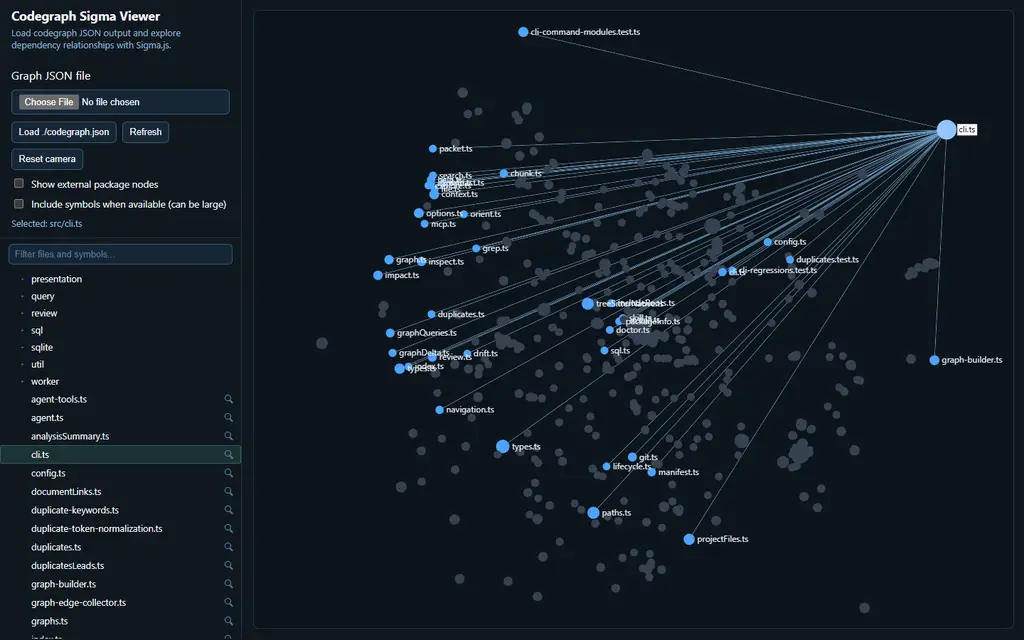
codegraph viewer --root . --open
codegraph viewer --root . --graph codegraph-out/graph.json --open
codegraph viewer --root . --port 4173 --print-url
The default host is 127.0.0.1 and the default port is 4173. Without --graph, each UI load or reload builds a current graph projection through the automatically validated .codegraph/cache/index-v1 index; init, index, and an exported JSON file are not prerequisites. An explicit --graph serves that root-confined snapshot through the same /graph.json route, while --print-url only prints the deterministic URL and exits.
The UI loads Sigma, Graphology, and ForceAtlas2 from bundled docs/graph-visualization/vendor/ assets, so the viewer stays offline and self-contained once codegraph is installed.
What the output looks like
Because ranking and counts change with the working tree, this abbreviated explore excerpt shows the stable response structure rather than snapshot-specific totals:
Anchors
- buildReviewReport [symbol] src/review.ts
- src/cli/help.ts:1 [chunk] src/cli/help.ts
- ReviewPreset [symbol] src/review.ts

Relevant source
- buildReviewReport is defined in src/review.ts.
- References, dependencies, and dependents are summarized here.

Blast radius
- src/review.ts: src/index.ts, src/cli/review.ts, src/mcp/server.ts, ...

Candidate tests
- tests/agent-explain.test.ts
- tests/agent-explore.test.ts
- tests/agent-packet.test.ts

Follow-ups
- codegraph file src/review.ts
- codegraph refs src/review.ts:215:23

Limits
- anchors, packets, paths, blast radius, reverse dependencies, and candidate tests

Recommended next: codegraph file src/review.ts
Real output includes counts, copyable follow-ups, explicit limits, and omission counts.
A worktree review is optimized for a different job:
Review Summary
==============
Status: ok
Files changed: 5
Symbols changed: 22
Candidate tests: 1 (high: 1, medium: 0, low: 0)
Risk: high (80)
Signals: exported-symbols-changed, many-symbols-changed
Structured output carries the underlying changed files, symbols, graph edges, reasons, diagnostics, snippets, and candidate-test confidence.
Why codegraph
Spend context on the problem, not repository discovery
One bounded CLI explore response can combine ranked anchors, relevant source, dependency paths, blast radius, candidate tests, and next commands. CLI explore includes source by default for a human reader, while MCP explore defaults includeSource to false so source-bearing packets do not dominate agent responses; its anchors and follow-ups identify the focused source request to make next. The agent gets an evidence-backed starting point without first dumping the tree or repeatedly guessing which files to open.
Ground the next action
Results include source paths, symbol ranges, stable handles, rank reasons, graph relationships, confidence, and omission counts. An agent can inspect why something ranked, jump to the definition or references, and continue from an exact target instead of treating a fuzzy match as an answer.
Reuse one map from discovery through review
Search, navigation, dependency analysis, impact, and review reuse the same graph and semantic index. A target found during discovery can flow directly into explain, refs, deps, impact analysis, and candidate-test selection.
Work across the repository an agent actually has
One repository model can include source code, SQL, workspace packages, documentation links, stylesheets, templates, and single-file components. Capability claims stay language-specific, so graph support is not presented as full compiler or language-server parity.
Keep the evidence local and reusable
codegraph runs locally as a CLI, library, or MCP server. Humans get readable output; agents and programs can keep structured JSON, stable handles, warm sessions, SQLite data, or graph exports without parsing display text.
Why not just grep or an LSP?
codegraph complements both.
- Use text search for exact strings, logs, config keys, and prose.
- Use a compiler or language server when you need compiler-grade type analysis, overload resolution, dynamic dispatch, or editor refactors.
- Use codegraph when the question crosses files, languages, dependency edges, a git diff, or an agent context boundary.
The distinction is evidence shape, not a claim that one tool replaces the others.
Agent setup
Run codegraph install on an interactive terminal to detect supported clients, preview the changes, and confirm once. Use --all when you want the full current catalog without detection:
codegraph install
codegraph install --target codex,claude --dry-run
codegraph install --target codex,claude --yes
codegraph install --all --dry-run
codegraph install --all --yes
codegraph install --print-config codex
Supported target ids are codex, claude, cursor, gemini, opencode, omp, kilo, and agents. Interactive writes default to no; noninteractive writes require --yes.
For a skill without MCP configuration:
codegraph skill install --agent codex
codegraph skill install --agent claude
codegraph skill install --agent cursor
See Agent workflows for exploration strategy, warm sessions, streaming, review loops, and tool wrappers. Use codegraph server start --root . --warmup to share one local MCP HTTP server, then inspect or stop it with codegraph server status --root . --json and codegraph server stop --root .; lifecycle verification keeps its secret outside the project. See MCP for server and client configuration.
Language support
Shared source-language indexing and navigation: JavaScript, TypeScript, Python, PHP, Go, Java, C#, Ruby, Rust, Kotlin, Swift, Zig, C, and C++.
SQL: statement chunking, object symbols, common DDL/DML and CTE facts, SQL-to-SQL edges, and object-level navigation. codegraph does not claim column-definition resolution.
Graph-first formats: HTML, Astro, Handlebars, Markdown, MDX, reStructuredText, AsciiDoc, CSS, SCSS, and Less have narrower graph or chunking support.
Single-file components: Vue and Svelte script blocks participate in dependency graphs and chunking; semantic navigation is narrower.
See Language parity for the capability matrix and Scenario catalog for the fixtures behind those claims.
Using as a library
Install the slim library package when you do not need the CLI, MCP server, installer, or viewer:
npm install @lzehrung/codegraph-core
It exposes the same core, graph, impact, and agent entrypoints as the product package. Use it when your application needs structured evidence instead of CLI text.
Review a diff
import { analyzeImpactFromDiff, buildProjectIndex } from "@lzehrung/codegraph-core";

const root = process.cwd();
const index = await buildProjectIndex(root, { native: "auto" });
const impact = await analyzeImpactFromDiff(root, index, {
  provider: "git",
  base: "HEAD",
  head: "WORKTREE",
  detectBreakingChanges: true,
});

console.log(impact.changedSymbols, impact.impacted);
For review-oriented batch data, use buildReviewReport() or analyzeImpactFromDiff(). For progressive analysis, analyzeImpactStreaming() emits structured fields and a final summary with ranked top impacts; agent-shaped integrations can use tool_impactJSON().
Trace dependencies, consumers, and a symbol's references
One index supports file traversal and semantic navigation. File identities in graph results use normalized / separators.
import path from "node:path";
import {
  buildProjectIndex,
  findReferences,
  getDependencies,
  getReverseDependencies,
  goToDefinition,
} from "@lzehrung/codegraph-core";

const root = process.cwd();
const file = path.join(root, "src", "auth.ts").replaceAll(path.sep, "/");
const index = await buildProjectIndex(root);

const dependencies = getDependencies(index.graph, file, { depth: 2, limit: 20 });
const consumers = getReverseDependencies(index.graph, file, { depth: 2, limit: 20 });

const definition = await goToDefinition(index, { file, line: 42, column: 13 });
if (definition.status === "ok") {
  const references = await findReferences(index, {
    file: definition.definition.file,
    line: definition.definition.range.start.line,
    column: definition.definition.range.start.column,
  });
  console.log({ dependencies, consumers, references });
}
Build a warm in-process explorer
Use the agent subpath for bounded, agent-ready answers. The session reuses a snapshot and refreshes bounded edits automatically.
import { createAgentSession, exploreCodegraphWithSession } from "@lzehrung/codegraph-core/agent";

const root = process.cwd();
const session = createAgentSession({ root, freshness: { policy: "auto" } });
const answer = await exploreCodegraphWithSession(session, {
  root,
  query: "how does auth reach the database?",
  limit: 5,
  maxPackets: 3,
  maxPaths: 3,
});

console.log(answer.summary, answer.anchors, answer.followUps);
For offline navigation, buildCodegraphArtifact() writes graph JSON, SQLite, questions, and a manifest from the same analysis model. See the Library API reference for sessions, streaming impact, artifacts, graph APIs, and review reports.
The product package @lzehrung/codegraph keeps the CLI/MCP/viewer surface and re-exports core APIs. Agent helpers live under /agent; MCP handlers and the server live under /mcp. See the public API boundary before choosing an import path.
How it works
codegraph follows a single analysis pipeline:
- Discover supported files under the selected project and include roots.
- Parse source languages with Tree-sitter and extract imports, exports, definitions, bindings, and scopes.
- Resolve module specifiers to project files or explicit external nodes.
- Build forward and reverse dependency indexes plus a semantic symbol index.
- Reuse those indexes for navigation, exploration, impact, review, and exports.
Disk caching avoids repository-wide source reads on exact warm text-search hits. How it works covers caching, recovery, and performance choices.
Limits and tradeoffs
The honest boundaries matter:
- codegraph is not a compiler or type checker. Reflection, generated code, macros, overload behavior, and dynamic dispatch can be missed.
- Precise navigation depends on successful parsing and language queries. Without a compatible native runtime, codegraph falls back to reduced graph-only and regex recovery rather than claiming equivalent semantics.
- Call-compatibility findings are conservative review leads, not compiler diagnostics.
- Duplicate matches and candidate tests are ranked leads that still require human or agent judgment.
--fast-graphis an explicit speed/accuracy tradeoff for plain JavaScript and TypeScript import extraction.- The checked
explorebenchmark is a bounded evidence-retrieval benchmark, not a universal performance claim. - The fixture test matrix and language parity docs show what codegraph has actually been tested against by language and operation; absence there means untested, not guaranteed.
Mitigations are explicit too:
- The repository keeps real-language fixtures and parity suites for definitions, references, dependencies, chunking, MCP, and native-vs-reduced behavior.
- A generated fixture test matrix shows real
tests/languages/*.test.tsstatus and test counts per language, with no hand-authored goldens involved. - Structured output keeps freshness, confidence, and omission counts visible instead of pretending unsupported cases were resolved.
Run codegraph doctor to confirm the active runtime. Use --report on graph, index, search, inspect, or review commands when backend and cache behavior need to be auditable.
Development
npm install
npm run build
npm run check
Use the narrowest relevant test while iterating. npm run check is the pre-commit baseline for formatting, lint, build, and tests; native workspace changes also require npm run build:native and npm run test:native.
codegraph is MIT licensed.
No comments yet
Be the first to share your take.