
Clutch
Local AI multi-agent orchestration & supervision — on your desktop.
English · 简体中文 · Website · Getting Started · Releases
[!TIP] New here? Read the Getting Started Guide — install, first-launch wizard, and your first chat in ~5 minutes. No dev setup required.
Clutch is a desktop app (Tauri + React) for developers and technical operators who want visible, editable, multi-agent workflows on top of tools you already use — Claude Code, Codex, Ollama, MCP, and cloud LLMs. Drag a SOP on a canvas; LangGraph runs it locally; you supervise chat, terminal, diffs, and approvals in one place.
Not a replacement for Claude Code or Cursor — a control layer for long sessions and multi-agent pipelines.
| Stack | Tauri 2 · React 19 · FastAPI + LangGraph · local-first (localhost:8123) |
| License | See LICENSE |
| Latest release | v1.3.0 · Changelog |
| Contributors | Thanks to @MyloveAless for the multi-agent image generation workflow design & end-to-end validation. |
What's new in v1.3.0
- Tool trail detail (D46): Cursor/Grok-aligned tool steps — verb-group headers (
Fetched N pages,Searched N queries), per-step target/preview, View in Terminal for any tool step. - Permission modes (D27 / D54): Composer pill is Agent / Plan / Full / Ask (Cursor-style order & labels); default Agent; first-run onboarding matches.
- Deliverable intent (D54): Chat infers the deliverable kind (page / image / video / code / answer) from your ask — real
generate_image/generate_video, auto-open rendered.htmlin the system browser, stray artifacts relocated to.clutch/artifacts/. - Tool-skip harness (D44): Live-fact turns answered in prose with zero
tool_callsget a reminder +tool_choice=requiredretry so advertised tools are actually used. - Plan approve → execute: After you confirm a plan, Chat injects an execute nudge so the model must
todo_writethen edit files — no more re-asking or claiming done in prose. - Sidebar recent-first: Projects and sessions sort by last chat activity; reopening an old chat floats it to the top.
v1.3.0 ships macOS + Windows. macOS: Apple Silicon DMG + in-app updater. Windows: MSI/NSIS. Sidecar hotpatch assets published separately.
Older releases (v1.2.9 coding image paste, v1.2.8 workflow hardening, …): CHANGELOG.md · docs/releases/.
Quick start (end users)
Option A — Terminal install (recommended)
macOS (Apple Silicon) — pick one:
# One-liner (no Homebrew required)
curl -fsSL https://raw.githubusercontent.com/fancy1108/Clutch/main/scripts/install.sh | bash
# If you already use Homebrew
brew tap fancy1108/clutch
brew install --cask clutch
Windows (x64 · not yet verified on hardware):
irm https://raw.githubusercontent.com/fancy1108/Clutch/main/scripts/install.ps1 | iex
Pin a version: CLUTCH_VERSION=v1.3.0 before running either script (or v1.2.9 / v1.2.8 / v1.2.7 /
Install channels (maintainers): docs/RELEASE_MAINTAINER.md
Option B — Manual download
1. Download — GitHub Releases
| Platform | File | Status |
|---|---|---|
| macOS (Apple Silicon) | Clutch_*_aarch64.dmg |
✅ Verified |
| Windows 10/11 x64 | Clutch_*_x64-setup.exe or .msi |
⚠️ Not yet verified on physical hardware |
[!WARNING] Windows: Installers are built in CI and attached to Releases, but maintainers have not completed full smoke testing on real Windows 10/11 machines yet. Expect rough edges; please open an Issue with your OS version and installer filename if something breaks. Tracking: #23.
2. First open (macOS unsigned build) — Gatekeeper may block the app. This is normal for unsigned OSS desktop apps:
xattr -cr /Applications/Clutch.app && open -a Clutch
Or: Applications → right-click Clutch → Open → confirm.
3. Follow the setup wizard — workspace → model or CLI → tools → done.
4. New Chat — pick an agent, send a message.
→ Full walkthrough: docs/GETTING_STARTED.md · Install details: docs/INSTALL.md
What you can do
| Capability | In plain terms |
|---|---|
| Visual workflows | Drag agents on a canvas; Clutch compiles to LangGraph and runs the SOP |
| Local CLI bridge | Connect Claude Code, CodeBuddy, MiMo Code, ZCode, Codex, Ollama, Aider, Rivet, Grok (grok-cli), … from Settings → Tools |
| One supervision desk | Chat, terminal, file tree, diffs, and flow progress in one window |
| Human-in-the-loop | Pause on risky steps; approve, reject, or retry with instructions |
| Agents & models | Custom agents, API keys, Skills registry, MCP servers |
| Hybrid sessions | Multiple sessions, workflow refine, state across restarts |
Deep dive: docs/PRODUCT_INTRO.md · Architecture: docs/ARCHITECTURE.md
Screenshots
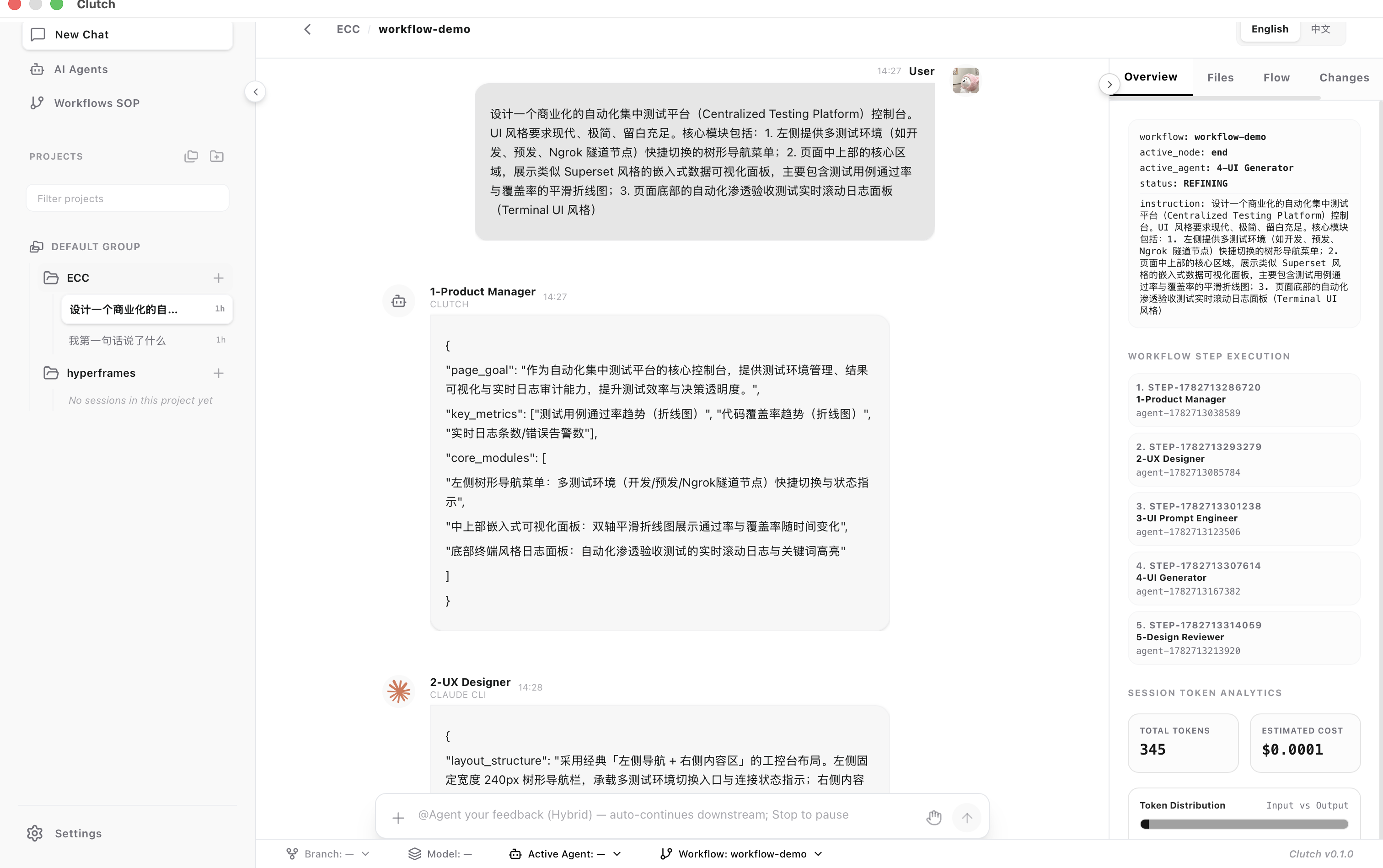
Hybrid workflow console — multi-agent run, progress, and token stats:
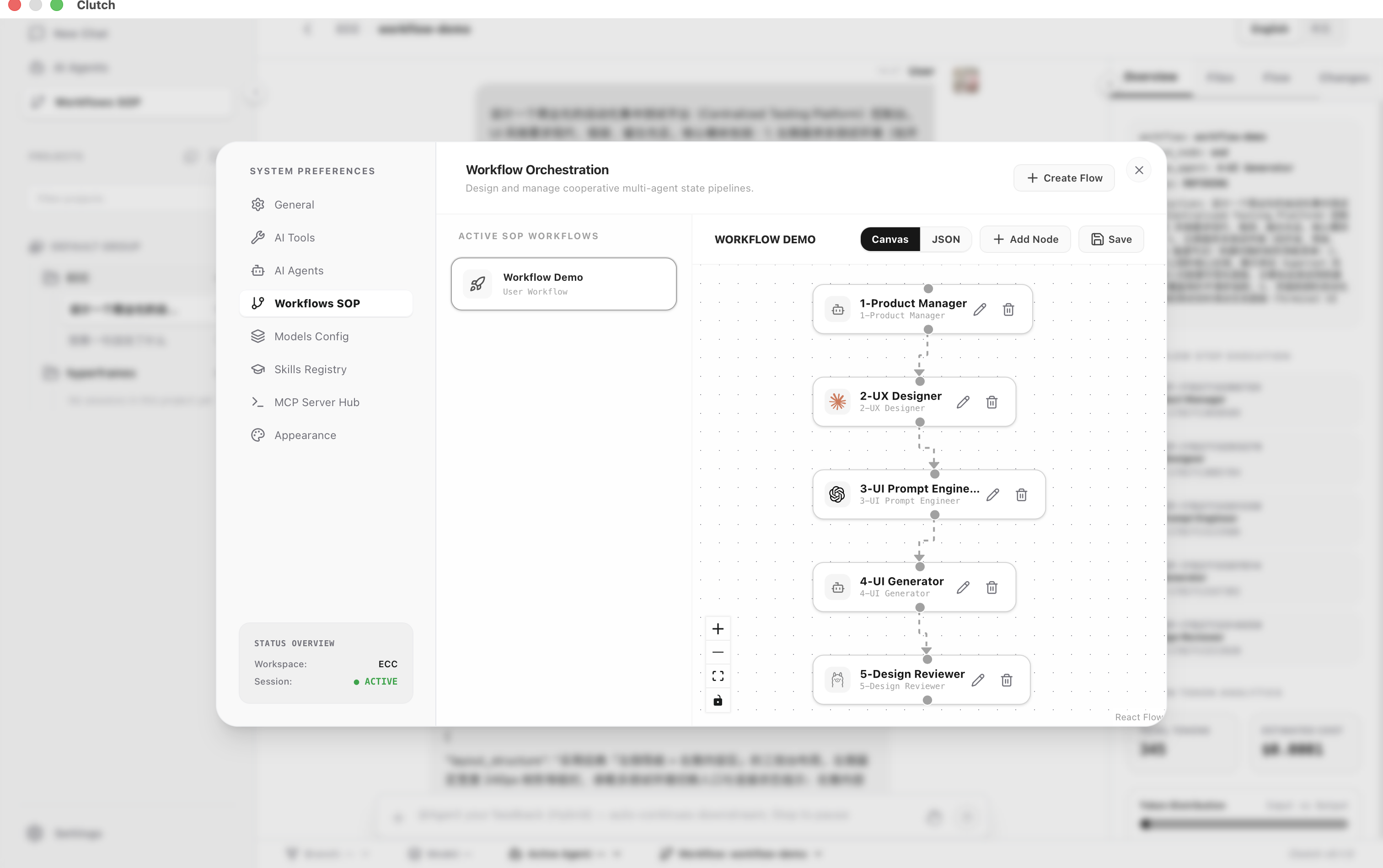
Visual SOP editor — zero-code multi-agent pipeline on a canvas:
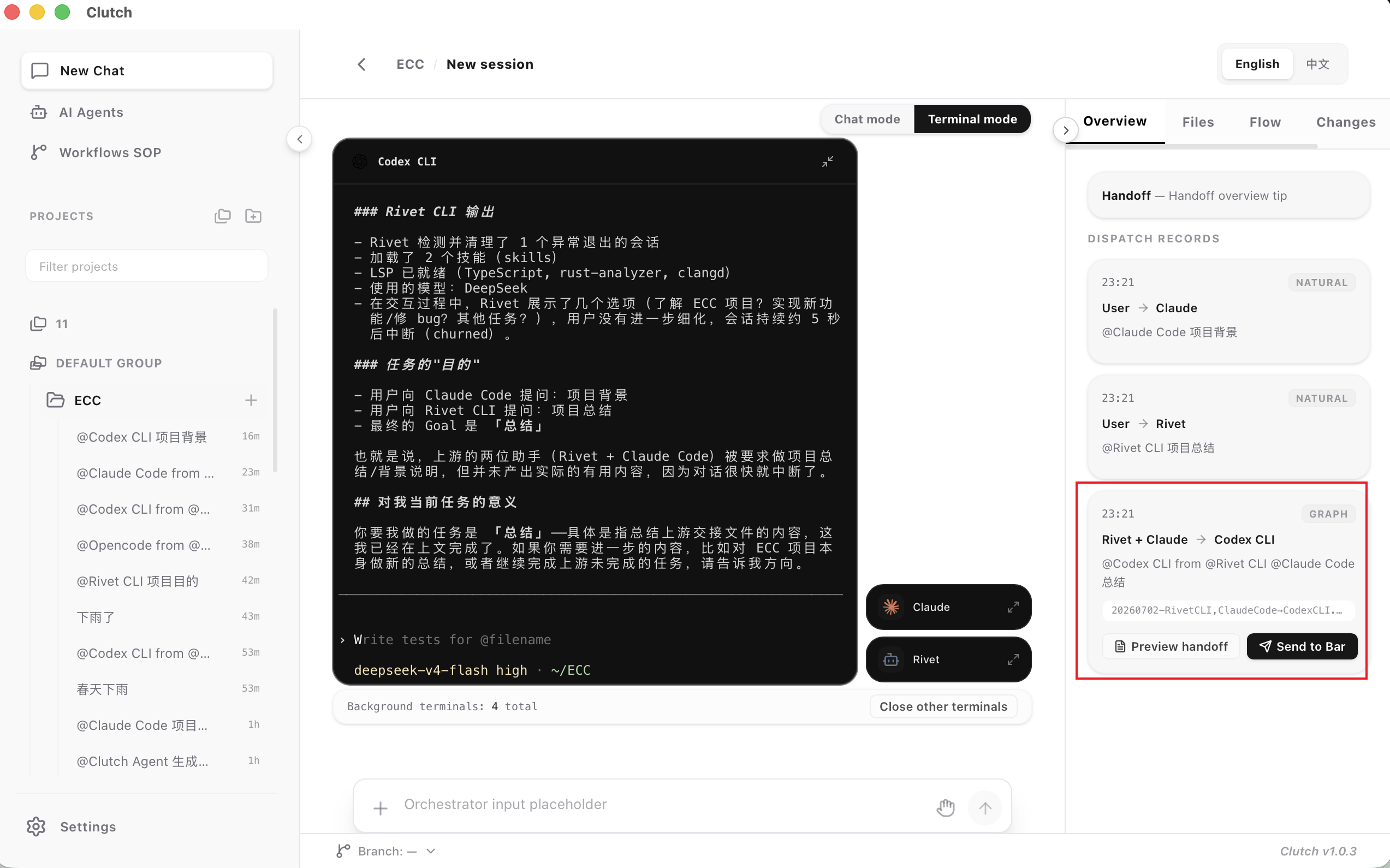
Terminal Orchestra — interactive CLI lanes, dispatch, and session resume in Terminal mode:
Documentation
| I want to… | Read |
|---|---|
| Get started (recommended) | docs/GETTING_STARTED.md |
| Install DMG / Windows | docs/INSTALL.md |
| Understand all features | docs/PRODUCT_INTRO.md |
| macOS in-app updates | docs/UPDATES.md |
| Build from source | docs/BUILD_FROM_SOURCE.md |
| Third-party MCP guides | docs/mcp-servers/ (community/vendor integrations) |
| Contribute | CONTRIBUTING.md (PRs to dev) |
| macOS / Windows UI boundaries | docs/PLATFORM_MAINTENANCE.md |
| Report a security issue | SECURITY.md |
Full index: docs/README.md · Maintainers: docs/RELEASE_MAINTAINER.md
Compatibility
Details: docs/STABILITY.md
| Platform | Support |
|---|---|
| macOS 14+ (Apple Silicon) | ✅ Primary target · in-app updates v1.0.2+ |
| macOS 14+ (Intel) | ❌ Not supported — Apple Silicon DMG only; source build at your own risk |
| Windows 10/11 x64 | ⚠️ MSI/NSIS from v1.0.2 · CI built · not yet verified on physical Windows hardware (#23) |
| Linux | 🚧 No official installer |
Dev toolchain (source only): Node ≥ 20, pnpm ≥ 9, Python ≥ 3.11, uv, Rust (for tauri build). Run ./scripts/doctor.sh to check.
For developers
Windows source builds: use Windows 10/11 x64 with Node >= 20, pnpm >= 9,
Python >= 3.11, uv, Rust stable x86_64-pc-windows-msvc, Visual Studio 2022
Build Tools with MSVC v143, a Windows 10/11 SDK, and Git for Windows. The
Windows app is still Tauri-based: React/Vite frontend, Rust desktop shell,
PyInstaller Python sidecar, then MSI/NSIS bundles. More detail:
docs/BUILD_FROM_SOURCE.md.
git clone https://github.com/fancy1108/Clutch.git
cd Clutch
./scripts/doctor.sh
pnpm install
cd services/orchestrator && uv sync --extra dev && cd ../..
export CLUTCH_RUNTIME_MODE=hybrid   # optional
pnpm tauri:dev
Commands & discipline: CLAUDE.md · Before PR: ./scripts/verify.sh
Security & CLI permissions
Clutch talks to local AI CLIs through a loopback Sidecar (127.0.0.1:8123).
[!IMPORTANT] For Claude Code, CodeBuddy, MiMo Code, ZCode, and Antigravity (agy) CLIs, Clutch defaults to permission-bypass flags (
--dangerously-skip-permissionsor ZCode--mode yolo) so workflows can run without per-tool CLI prompts. Only use on workspaces you trust. The in-chat Permission menu controls MCP gating for built-in agents, not this CLI default.
Report vulnerabilities: SECURITY.md
Repository layout
clutch/
├── apps/desktop/           # Tauri + React UI
├── services/orchestrator/  # Python Sidecar (LangGraph)
├── docs/                   # Product & install docs
├── workflows/              # Workflow schemas & templates
└── scripts/                # verify · doctor · release
Frontend and Sidecar communicate only over loopback HTTP/WebSocket (dev 8124, packaged 8123).
Community
- Questions / bugs: GitHub Issues
- Contributing:
CONTRIBUTING.md·CODE_OF_CONDUCT.md - Changelog:
CHANGELOG.md
No comments yet
Be the first to share your take.