
claude-video-parser
Hand Claude Code a screen recording of a broken UI flow. Get back an evidence-bounded bug report — which frame shows the failure, where the user clicked, what the error text says, and an honest list of what the video cannot prove.
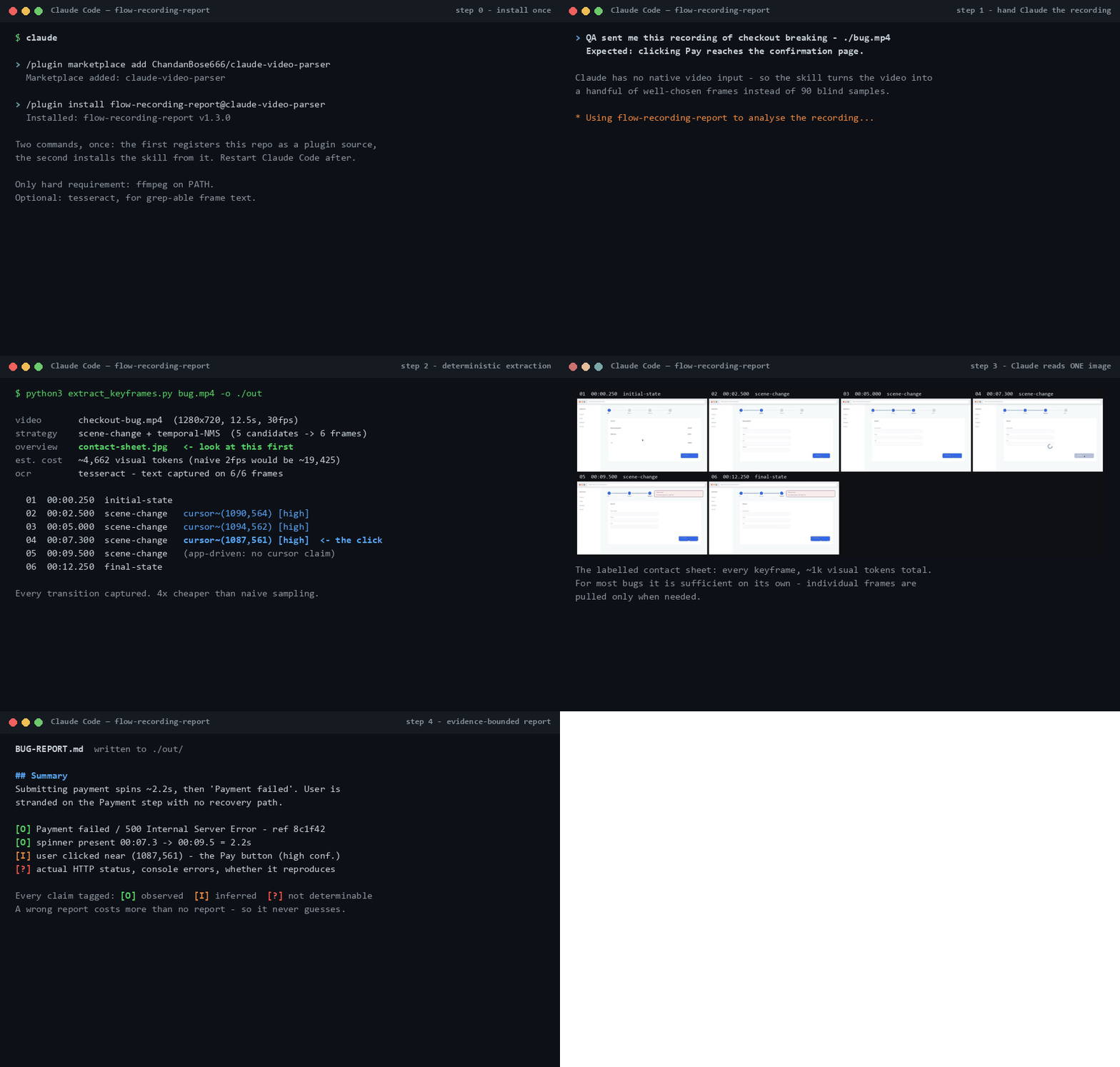
Claude has no native video input — so this skill turns the recording into a handful of well-chosen keyframes (not 90 blind samples), reads one labelled contact sheet, and writes a report where every claim is tagged observed / inferred / not-determinable.
Quickstart
1. Install the plugin — inside Claude Code (CLI or IDE extension), run these two commands once. The first registers this repo as a plugin source, the second installs the skill from it:
/plugin marketplace add ChandanBose666/claude-video-parser
/plugin install claude-video-parser@claude-video-parser
Restart Claude Code. (Prefer a plain copy? ./scripts/install.sh or
.\scripts\install.ps1 puts the skill into ~/.claude/skills/ instead; --project /
-Project scopes it to the current repo.)
2. Make sure ffmpeg is on PATH — the only hard requirement:
| macOS | brew install ffmpeg |
| Debian/Ubuntu | sudo apt install ffmpeg |
| Windows | winget install Gyan.FFmpeg |
Optional but worth it: tesseract (brew install tesseract / sudo apt install tesseract-ocr / winget install UB-Mannheim.TesseractOCR) — adds grep-able OCR text for
every extracted frame, so error strings are found before spending any visual tokens.
3. Use it — drag the video into the prompt (or type its path, or paste a direct video URL) and say what you expected:
QA sent me this recording of checkout breaking —
./bug.mp4. Expected: clicking Pay reaches the confirmation page.
Claude extracts keyframes, reads the contact sheet, and writes BUG-REPORT.md. That's the
whole workflow. You can also run the extractor directly:
python3 skills/claude-video-parser/scripts/extract_keyframes.py bug.mp4 -o ./out
python3 skills/claude-video-parser/scripts/extract_keyframes.py bug.mp4 --json   # machine-readable
What you get
One contact sheet like this (every keyframe, labelled, ~1k visual tokens total — for most bugs it is sufficient on its own):
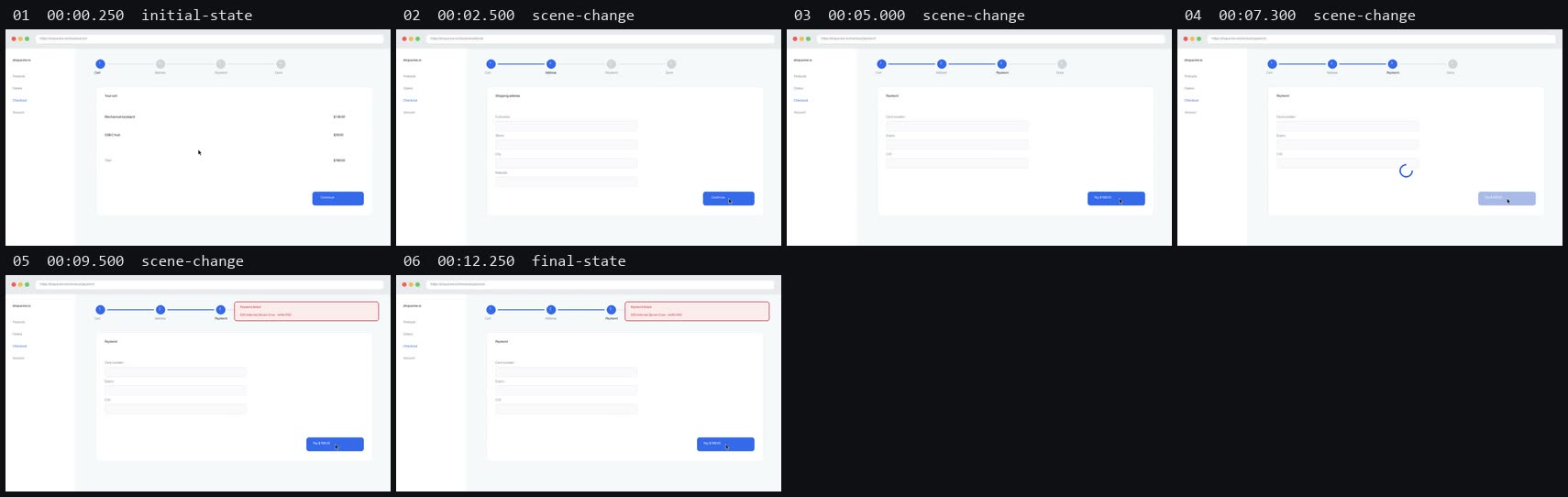
...and a report (full worked example) whose claims look like this:
[O] Payment failed / 500 Internal Server Error - ref 8c1f42     (frames 05-06)
[O] spinner present 00:07.3 -> 00:09.5 = 2.2s
[I] user clicked near (1087, 561) - the Pay button region (high confidence)
[?] actual HTTP status, console errors, whether it reproduces
[O] observed in a cited frame · [I] inferred · [?] not determinable from video. The
[?] section is deliberate: it tells the developer what to go collect, and it stops the
report being trusted further than pixels can support. A confident wrong bug report costs
more time than no report.
When NOT to use it
The skill declines, on purpose, when a better artifact exists:
- You can reproduce the bug locally → drive the browser with Playwright MCP or Chrome DevTools MCP instead. The DOM, console, and network beat pixels on every axis.
- A Playwright trace or HAR sits next to the video → the extractor detects
trace.zip/*.har/ Cypressscreenshots/siblings automatically and tells you to read those first. The video is the fallback, not the primary.
Architecture
  video path ─ or ─ direct http(s) URL (downloaded first; player pages
      │              like YouTube are rejected with a hint)
      ▼
┌─────────────────────── extract_keyframes.py ───────────────────────┐
│                                                                    │
│  probe metadata ──► richer-artifact check                          │
│                     trace.zip / *.har / Cypress screenshots next   │
│                     to the video? → "read that first" warning      │
│      │                                                             │
│      ▼                                                             │
│  scene candidates (seed threshold 0.0015, optional --roi)          │
│      │  └─ candidate flood? locate the hot region, suggest --roi   │
│      ▼                                                             │
│  temporal NMS (--min-gap) ─ near-static video? → uniform fallback  │
│      ▼                                                             │
│  pin initial + final state, extract frames (ffmpeg, downscaled)    │
│      ├──► cursor/click inference (pre-transition motion scan)      │
│      ├──► OCR pass (optional, tesseract, frames upscaled 2×)       │
│      ▼                                                             │
│  contact-sheet.jpg + frame-NN.jpg + manifest.json                  │
└────────────────────────────────────────────────────────────────────┘
      │
      ▼
  Claude reads the labelled contact sheet (~1k visual tokens)
      │
      ▼
  BUG-REPORT.md — every claim tagged [O] / [I] / [?]
The extractor is a single stdlib-Python script shelling out to ffmpeg — no server, no
background process, no state between runs. Everything it learned about the video lands in
manifest.json, so the reasoning step is fully auditable.
How it works, and why it's cheap
Scene thresholds calibrated for UI, not film. ffmpeg's conventional scene threshold
(0.3) is tuned for hard cuts; measured UI transitions in real screen recordings score
0.002–0.05 — a toast changes 4% of the frame. This extractor seeds at 0.0015, then
applies temporal non-maximum suppression so a 400ms animation contributes one frame, not
twelve. On the bundled fixture: 6 frames, every transition captured, ~4,662 visual tokens
where naive 2fps sampling would burn ~19,425.
Cursor/click inference. For each transition, the seconds before it are scanned at low resolution for a small travelling blob — a pointer — and the report can say "the user clicked here". Validated against ground-truth clicks on real recordings: located clicks land 1–49px off, with zero wrong claims — spinners, blinking carets, and typing are recognised and never reported as a pointer. When evidence is weak it abstains rather than guesses.
Optional OCR. With tesseract installed, every frame's text lands in the manifest (frames are upscaled 2× first — the difference between missing and reading a 14px error banner). Error strings become grep-able before any frame is viewed.
Region-of-interest scoring. A video player or animated canvas in the recording floods
scene detection. The extractor notices, locates the continuously-changing region, and
prints the exact --roi to retry with — measured on a real recording, that took 76
candidates down to 2 and still caught the bug at its exact timestamp.
What it deliberately does not do: audio, transcription, YouTube, MCP servers, API
keys, model downloads. Stdlib Python + ffmpeg. For per-segment variable-fps extraction or
audio, compose with claude-video-vision —
that's a perception layer, this is a reporting contract, and they stack.
Configuration
There is no config file, no environment variables, and no setup wizard — deliberately. When the skill runs inside Claude Code, Claude picks the flags. You only touch them when running the extractor directly:
| Flag | Default | What it does |
|---|---|---|
-o, --out |
./<videoname>-keyframes |
Output directory |
--max-frames |
14 |
Hard cap on extracted frames |
--min-gap |
0.5 |
Seconds of temporal suppression around each kept frame |
--threshold |
0.0015 |
Seed scene threshold — measured UI transitions score 0.002–0.05 |
--min-score |
0.0 |
Drop candidates below this; raise to ~0.005 if a noisy recording yields junk frames |
--roi X,Y,W,H |
off | Score scene changes on this region only (frames still extracted full-size) |
--long-edge |
1024 |
Downscale long edge in px (≈800 visual tokens per frame) |
--quality |
4 |
JPEG quality, ffmpeg -q:v (2 = best, 31 = worst) |
--cursor-window |
1.5 |
Seconds of pre-transition motion inspected for the pointer |
--ocr-lang |
eng |
Tesseract language(s), e.g. eng+deu |
--sheet-cols, --sheet-tile |
4, 420 |
Contact-sheet grid columns and tile width (px) |
--no-cursor, --no-ocr, --no-contact-sheet |
— | Skip that stage |
--json |
— | Print manifest JSON to stdout instead of the human summary |
Repo layout
| Path | What |
|---|---|
skills/claude-video-parser/ |
The skill: SKILL.md, extractor script, evidence rules, report template |
examples/ |
Worked example: demo GIF, contact sheet, full bug report |
tests/ |
79 checks across four suites + a real-recording validation harness (tests/realworld/) |
Test
python3 -m pip install pillow
python3 tests/test_extract.py        # 34 end-to-end checks on a synthetic fixture
python3 tests/test_cursor_units.py   # 21 unit checks: cursor detection primitives
python3 tests/test_ocr_units.py      #  8 unit checks: OCR TSV parsing
python3 tests/test_misc_units.py     # 16 unit checks: ROI + artifact detection
CI runs all four on Ubuntu, macOS, and Windows (Python 3.10 and 3.12). The real-recording
harness (tests/realworld/, needs Playwright + network) records genuine browser flows
with ground-truth events and click coordinates, and scores the extractor against them.
Licence
MIT
No comments yet
Be the first to share your take.