
A Claude Code statusline plugin that displays real-time API quota usage, context window consumption, token counts, and reset countdowns. It integrates directly into Claude Code's terminal UI to help developers track resource consumption across 5-hour and 7-day billing cycles.
Claude Code statusline plugin for 5-hour/7-day quota, context usage, tokens, and reset countdowns in your terminal.
45Stars
9Forks
0Open issues
Python MIT v0.1.6 Updated 1 month ago
At a glance
Python Actively maintained Commercial OK
README
Quickstart
Windows PowerShell
irm https://raw.githubusercontent.com/aiedwardyi/claude-usage-monitor/v0.2.0/install.ps1 | iex
macOS / Linux
curl -fsSL https://raw.githubusercontent.com/aiedwardyi/claude-usage-monitor/v0.2.0/install.sh | bash
What you get
After install, restart Claude Code. Your statusline now shows:
◆ Opus │ my-project/main
▰▰▰▰▱ 75% │ ↑50k ↓12k │ 5h: ▰▰▰▰▱ 80% (1h) │ 7d: ▰▰▱▱▱ 34% │ 2m0s
- 5h / 7d quota - see how much is left before you hit limits
- Context % - see when you're running low before Claude tells you
- Token counts - input and output for the current session
- Reset countdown - know when your quota replenishes
Uses your existing Claude Code OAuth session. No extra API key or Python packages needed. Windows launches Python directly - no Git Bash requirement.
Prefer to audit first
git clone https://github.com/aiedwardyi/claude-usage-monitor.git
cd claude-usage-monitor
git switch --detach v0.2.0
python install.py
On Windows, py -3 install.py works too.
The installer:
- copies launcher files into
~/.claude/plugins/claude-usage-monitor - updates
~/.claude/settings.json(backs up tosettings.json.bakfirst) - runs a launcher smoke check and prints the verify command
Verify manually
If you want to verify the launcher yourself before restarting Claude Code:
- Windows:
type nul | "C:\Users\you\.claude\plugins\claude-usage-monitor\statusline.cmd" - macOS / Linux:
printf '' | bash ~/.claude/plugins/claude-usage-monitor/statusline.sh
What it shows
| Segment | Description |
|---|---|
◆ Opus |
Active model |
my-project/main |
Project name and git branch |
▰▰▰▰▱ 75% |
Context window remaining |
↑50k ↓12k |
Input and output tokens |
5h: ▰▰▰▰▱ 80% (1h) |
5-hour quota remaining with bar and reset countdown |
7d: ▰▰▱▱▱ 34% (2d) |
7-day quota remaining with bar and reset countdown |
2m0s |
Session duration |
All three bars show remaining % by default - they start full (green) and drain toward empty (red) as you use quota, like a fuel gauge. Prefer the fill-up style Claude Code uses? Set CQB_REMAINING=0.
Color coding
| Color | Meaning |
|---|---|
| Green | Under 70% used |
| Yellow | 70-90% used |
| Red | Over 90% used |
Trust and security
At runtime, the tool:
- reads Claude Code session JSON from
stdin - reads
~/.claude/.credentials.jsonforclaudeAiOauth.accessToken(unlessCLAUDE_CODE_OAUTH_TOKENis set) - runs
git rev-parse --abbrev-ref HEADfor the branch name - writes a per-login
claude-sl-usage-<hash>.jsoncache and matching.lockin your system temp directory - makes one HTTPS request to
https://api.anthropic.com/api/oauth/usage
It does not install dependencies, collect telemetry, or send any local data besides the usage API call.
The installer writes only to:
~/.claude/plugins/claude-usage-monitor/~/.claude/settings.json(with.bakbackup)
More detail in SECURITY.md.
Requirements
- Claude Code CLI with an active subscription
- Python 3.10+ (
python3,python, orpy -3) - macOS / Linux:
bash - Windows: no Git Bash requirement
How it works
- Claude Code pipes session JSON into the launcher on every refresh.
statusline.pyparses the payload and reads your Claude Code OAuth token.- It calls Anthropic's usage endpoint to fetch 5-hour and 7-day utilization.
- Results are cached in your system temp directory for 5 minutes.
- The script prints a two-line ANSI statusline.
The first render may show 5h: -- and 7d: -- until the background fetch completes.
Compatibility
| Platform | Launcher | Status |
|---|---|---|
| Windows 10 / 11 | statusline.py |
Tested |
| macOS | statusline.sh |
Tested in CI |
| Linux | statusline.sh |
Tested in CI |
Customization
Every segment is toggleable via environment variables. Set them in your shell profile or in ~/.claude/settings.json:
{
  "env": {
    "CQB_PACE": "1",
    "CQB_CONTEXT_SIZE": "1",
    "CQB_COST": "1"
  }
}
| Variable | Default | Description |
|---|---|---|
CQB_TOKENS |
1 |
Show token counts |
CQB_RESET |
1 |
Show reset countdowns |
CQB_DURATION |
1 |
Show session duration |
CQB_BRANCH |
1 |
Show git branch |
CQB_CONTEXT_SIZE |
0 |
Show context size label such as of 1M |
CQB_PACE |
0 |
Show pacing indicator |
CQB_COST |
0 |
Show session cost |
CQB_REMAINING |
1 |
Show remaining % (fuel gauge) for all gauges; set 0 for used % |
CQB_BAR |
1 |
Show visual progress bar next to 5h/7d quotas |
CQB_EMAIL |
0 |
Show the logged-in account email (Anthropic OAuth logins only; blank for API-key logins) |
CQB_MAX_WIDTH |
80 |
Max status line width; low-priority segments (tokens, duration) drop when line overflows |
Credentials, account email, and the usage cache all follow CLAUDE_CONFIG_DIR when set (as used by account-swap tools), falling back to ~/.claude.
Presets
Maximal

{ "env": { "CQB_PACE": "1", "CQB_CONTEXT_SIZE": "1", "CQB_COST": "1" } }
Minimal
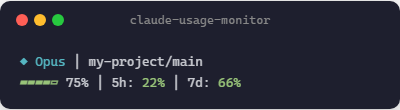
{ "env": { "CQB_TOKENS": "0", "CQB_RESET": "0", "CQB_DURATION": "0" } }
Heavy context
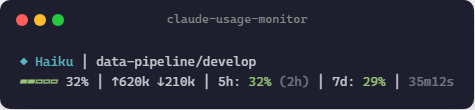
Critical usage
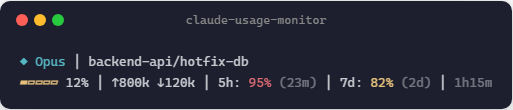
Manual install
git clone https://github.com/aiedwardyi/claude-usage-monitor.git
cd claude-usage-monitor
git switch --detach v0.2.0
python install.py
On Windows, py -3 install.py works too.
Or update ~/.claude/settings.json yourself:
{
  "statusLine": {
    "type": "command",
    "command": "bash /path/to/statusline.sh",
    "padding": 0
  }
}
On Windows, prefer bash with forward-slash paths when Git Bash is on PATH. When it isn't, point directly at python.exe and statusline.py. Claude Code on Windows parses this field bash-style, so backslashes are eaten, .cmd files don't spawn, and unquoted paths split on the first space. Both python.exe and the install directory must therefore be space-free (%LOCALAPPDATA%\Programs\Python\Python313, not the all-users C:\Program Files\Python313). The -X utf8 flag keeps Python decoding the input as UTF-8 so non-ASCII workspace paths render correctly:
{
  "statusLine": {
    "type": "command",
    "command": "C:/Users/you/AppData/Local/Programs/Python/Python313/python.exe -X utf8 C:/Users/you/.claude/plugins/claude-usage-monitor/statusline.py",
    "padding": 0
  }
}
Uninstall
- Remove
~/.claude/plugins/claude-usage-monitor/ - Edit
~/.claude/settings.jsonand remove thestatusLineentry (restore.bakif needed) - Restart Claude Code
Troubleshooting
The launcher check fails
Make sure python3, python, or py -3 works from your shell.
The statusline shows 5h: -- | 7d: --
The first API call runs in the background. Wait a few seconds and let Claude Code refresh.
The statusline shows 5h: no token | 7d: no token
The usage API requires an OAuth login. If you logged in with an API key, run claude login to authenticate via browser instead. The OAuth token is stored in ~/.claude/.credentials.json.
Unicode characters look wrong
Use a UTF-8 terminal font. On older Windows terminals, run chcp 65001.
I want to inspect the network behavior
Read statusline.py and SECURITY.md. The only network call is to https://api.anthropic.com/api/oauth/usage.
Contributing
Issues and pull requests are welcome. Start with CONTRIBUTING.md.
If this is useful to you, a star helps others find it.
License
MIT
Comments (0)
Sign in to join the discussion.
No comments yet
Be the first to share your take.