
A browser extension that displays real-time token counts, cache timers, and usage progress bars while using Claude.ai. It intercepts API responses to show accurate session and weekly usage statistics without sending data to external servers.
A minimal browser extension that shows token count, cache timer, and usage bars on claude.ai.
2,124Stars
244Forks
25Open issues
9Watching
JavaScript MIT v0.4.2 Updated 5 months ago
At a glance
Node.js Actively maintained Commercial OK
README
Claude Counter
A minimal browser extension that shows token count, cache timer, and usage bars on claude.ai.
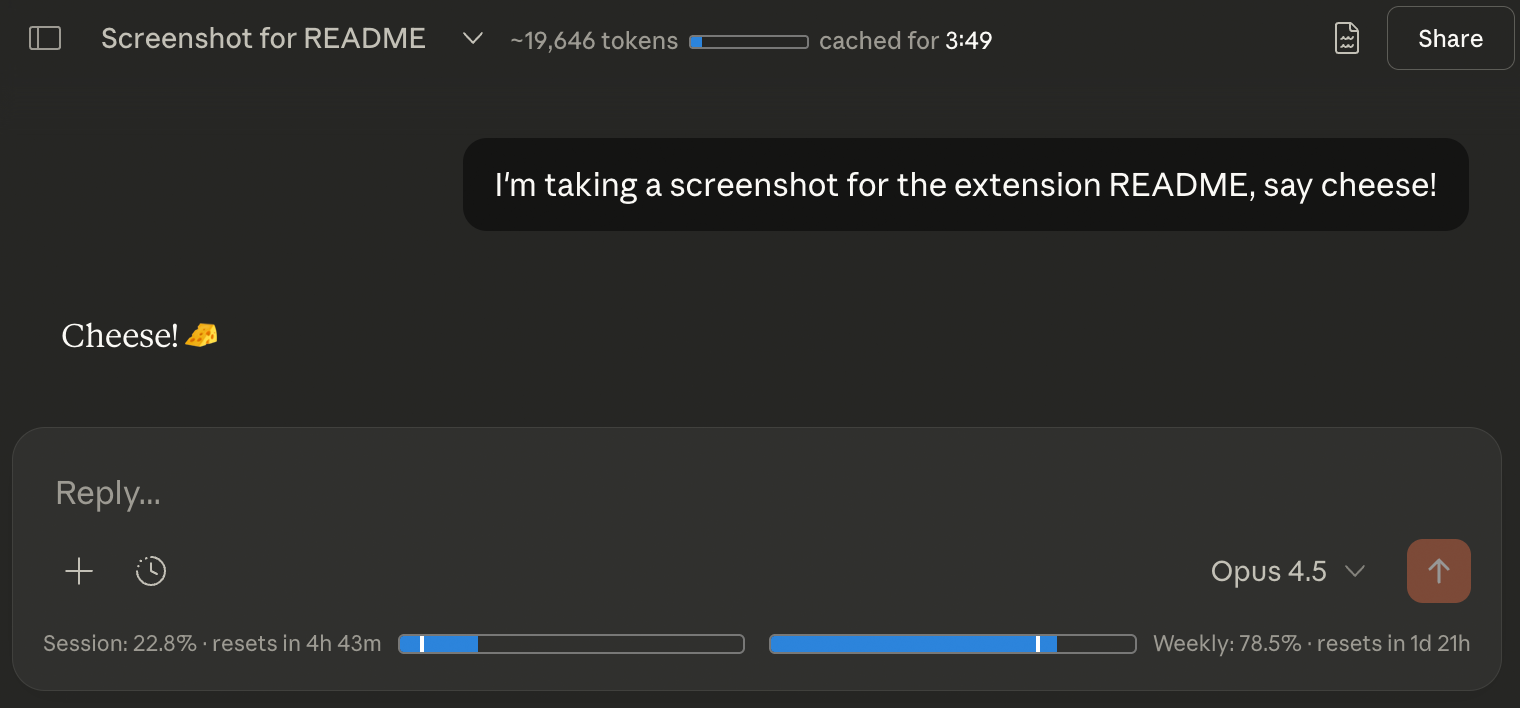
Features
- Token count — Approximate token count for the current conversation, with a mini progress bar against the 200k context limit
- Cache timer — Countdown showing how long the conversation remains cached (cheaper to continue)
- Usage bars — Session (5-hour) and weekly (7-day) usage from Claude's native API, with progress bars and reset countdowns (more accurate than the rounded /usage page)
Installation
Chrome / Edge / Chromium
- Download
claude-counter-0.4.2.zip - Go to
chrome://extensionsand enable Developer mode - Drag and drop the zip onto the page
Firefox
- Download
claude-counter-0.4.2.xpi - Drag it into any Firefox window and click Add
Userscript
- Install the userscript from
claude-counter.user.js
How it works
- Intercepts Claude's API responses to read conversation data and usage info
- Uses a vendored tokenizer (
o200k_base) for approximate token counting - Uses Claude’s
/usageplus live SSEmessage_limitdata; the SSE provides exact, unrounded utilization fractions, so the progress bars are more accurate than the rounded percentages shown on Claude’s native /usage page - Watches for DOM changes to inject UI elements as you navigate
Privacy
- All data stays local — no external servers, no tracking
- Reads your
lastActiveOrgcookie to query Claude's/usageendpoint - Makes requests only to
claude.ai
Credits
- Token counting via gpt-tokenizer (MIT)
- Inspired by Claude Usage Tracker by lugia19
License
MIT
Comments (0)
Sign in to join the discussion.
No comments yet
Be the first to share your take.