
ChatGPT Sidebar



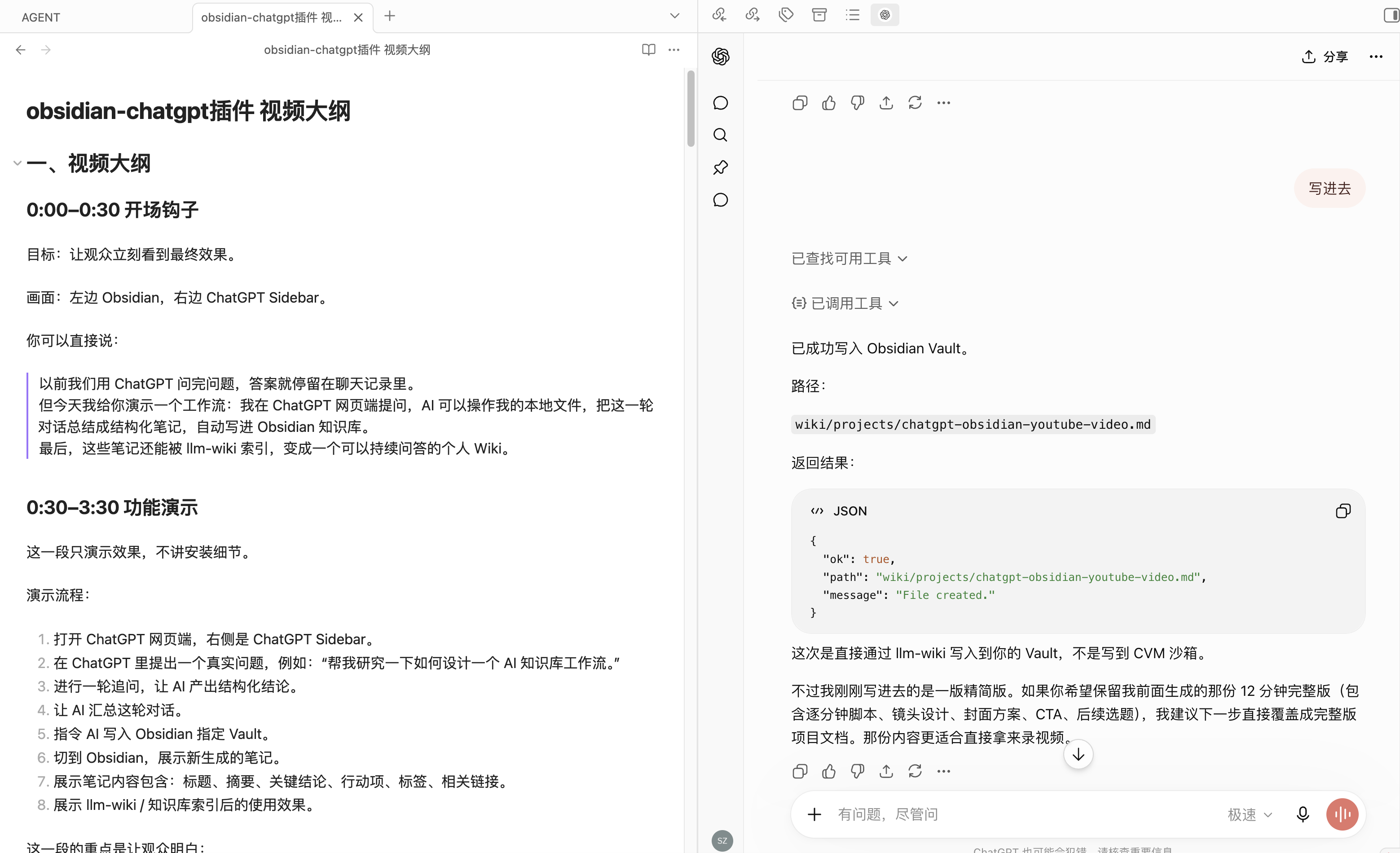
把 Obsidian vault 变成 ChatGPT 可直接使用的本地知识工作台:桌面端 ChatGPT 侧边栏、vault 级 MCP server、ngrok 远程访问、安全的文件读写工具,以及可选的 Agent Reach-backed 外部资料发现与读取工具。
ChatGPT Sidebar is a Codex skill package for setting up an Obsidian + ChatGPT workflow end to end. It is not a vault backup, not an Obsidian marketplace plugin package, and not a ChatGPT automation scraper.
Workspace Preview
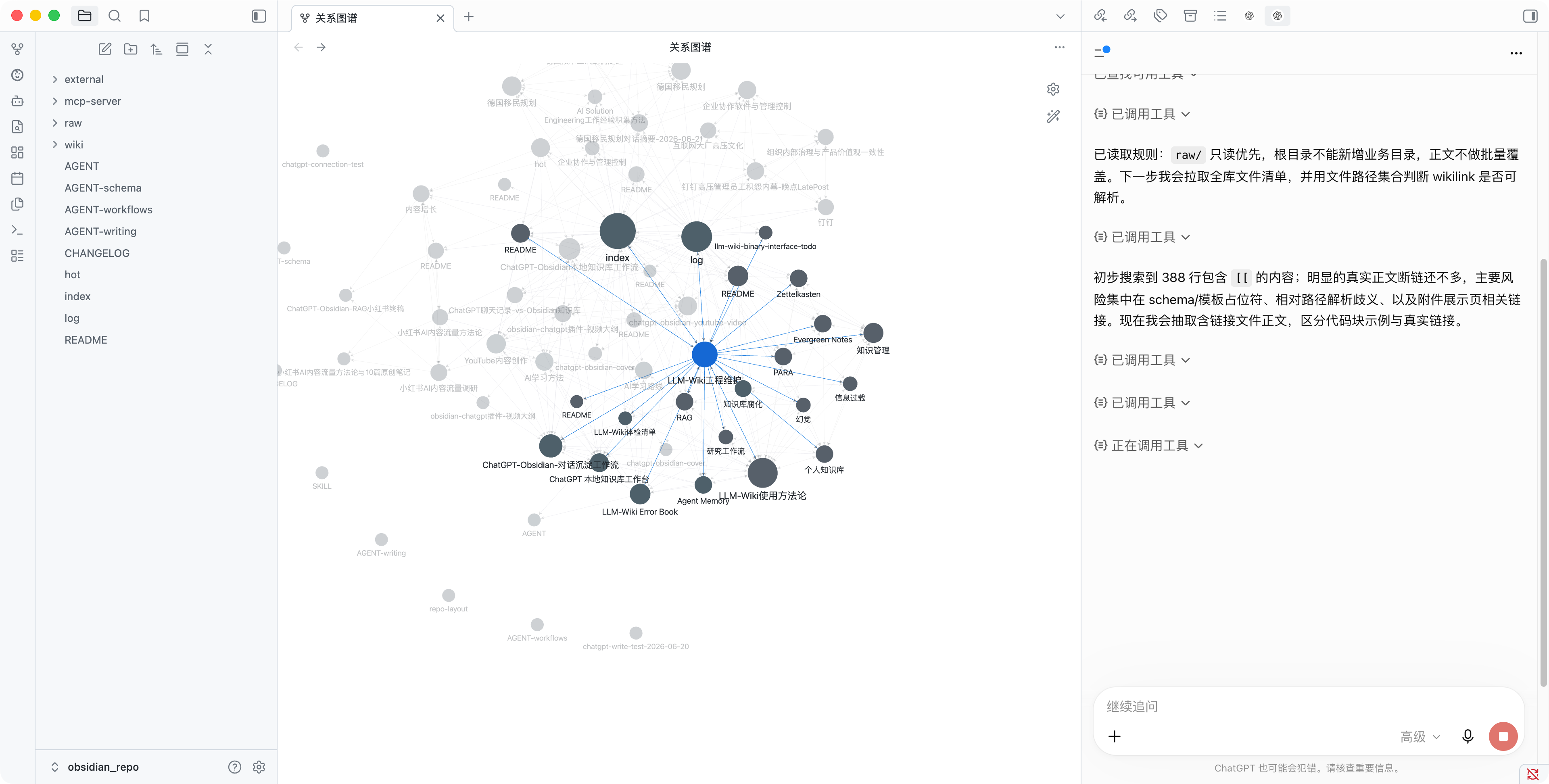
The intended workflow is visible in one screen: Obsidian keeps the graph, files, and long-term notes on the left, while ChatGPT uses MCP tools on the right to inspect and organize the vault.
中文导读
chatgpt-sidebar 面向想把 ChatGPT 和 Obsidian 长期知识库连起来的人。它提供一套可复用的安装和维护流程,让 Codex 能在目标 vault 中搭好:
- Obsidian 桌面端 ChatGPT 网页侧边栏。
- 清晰的
raw/、wiki/、mcp-server/知识库结构。 - 让 ChatGPT 读取、搜索和整理 vault 文件的 MCP server。
- 可选的外部学习工具:网页搜索、GitHub 搜索、YouTube 搜索/字幕、RSS 阅读、网页正文读取。
- 通过 ngrok 暴露给 ChatGPT 远程 MCP 的连接方式。
- 默认保护
.git、.obsidian、.env、插件缓存、cookies 和 token 的安全边界。
这个 README 借鉴了热门 Obsidian 项目的常见写法:先说明项目价值,再给出安装、触发方式、功能边界、仓库结构、验证命令和安全模型。
Why It Matters
Obsidian is great for long-lived knowledge. ChatGPT is great for reasoning and synthesis. The awkward part is the bridge between them: browser tabs, manual copying, random scripts, ngrok URLs, MCP auth, and a lot of small things that are easy to forget.
This skill turns that bridge into a repeatable setup:
| Need | What this skill sets up |
|---|---|
| Use ChatGPT while writing in Obsidian | Desktop ChatGPT web sidebar |
| Let ChatGPT inspect a vault | Vault-scoped MCP read tools |
| Let ChatGPT organize notes | Explicit write, append, move, delete tools |
| Let ChatGPT discover new knowledge | Web, GitHub, YouTube, RSS discovery tools |
| Let clients validate tool outputs | MCP outputSchema + structuredContent |
| Connect ChatGPT to local files | ngrok + token-protected SSE endpoint |
| Avoid leaking local state | Git ignores, path guards, secret boundaries |
What Codex Can Build
ChatGPT Web Sidebar
An Obsidian community plugin that opens https://chatgpt.com in a desktop sidebar.
It deliberately does not:
- call the OpenAI API
- scrape ChatGPT responses
- inject scripts into ChatGPT
- automate login, CAPTCHA, clicks, or sending
- sync ChatGPT history
Vault MCP Server
A local MCP server based on Faust-Donf/chatgpt-mcp-server-template, using Express, the official MCP SDK, SSE transport, and ChatGPT-compatible OAuth/DCR shims.
The server can expose controlled vault tools:
| Tool | Purpose |
|---|---|
get_vault_structure |
Inspect vault layout |
list_vault_files |
List exposed files with pagination |
read_vault_file |
Read a text-like file |
search_vault |
Search notes with line previews |
write_vault_file |
Create or overwrite a file with explicit overwrite=true |
append_vault_file |
Append content to a file |
delete_vault_file |
Delete one file with explicit confirm=true |
move_vault_path |
Move or rename files/directories |
create_vault_directory |
Create folders for organization |
runtime_context |
Return MCP server date, time, timezone, and runtime user |
Modern MCP clients can consume these tools as structured outputs. The recommended server implementation declares outputSchema in tools/list and returns matching structuredContent from tools/call, while preserving readable text output for older clients.
The server can also expose optional Agent Reach-backed discovery tools:
| Tool | Purpose |
|---|---|
agent_reach_status |
Diagnose Agent Reach and upstream CLI availability |
web_search |
Search web sources, with optional hostname restriction |
github_search |
Search GitHub repositories through gh |
youtube_search |
Search YouTube videos through yt-dlp |
rss_read |
Read RSS or Atom feeds |
read_url |
Read one HTTP(S) page through Jina Reader or direct fallback |
youtube_transcript |
Extract YouTube subtitles or auto-subtitles |
Discovery tools should expose structured success and failure shapes, including ok, result arrays or content fields, and machine-readable error, message, and details fields when an upstream CLI or reader is unavailable.
This is intentionally not arbitrary shell access. ChatGPT Web calls narrow MCP tools; those tools run in the MCP server runtime and call Agent Reach or upstream CLIs only through fixed handlers.
Learning Workflow
With the optional discovery tools enabled, ChatGPT can follow this loop:
discover: web_search / github_search / youtube_search / rss_read
read:     read_url / youtube_transcript
write:    write_vault_file / append_vault_file
For time-sensitive prompts such as "latest", "recent", "today", or "this year", ChatGPT should first call runtime_context() to get the MCP server's current date, year, and timezone. This avoids relying on stale model memory.
ngrok Remote Access
The skill includes the runbook for exposing the local MCP server through ngrok and connecting ChatGPT to:
https://<ngrok-host>/sse?token=<MCP_ACCESS_TOKEN>
Who This Is For
Use this if you want:
- a personal Obsidian knowledge base that ChatGPT can search and update
- a way for ChatGPT to discover high-quality external sources and save distilled notes
- a reproducible setup instead of scattered one-off scripts
- a local-first workflow where vault files stay on your machine
- explicit read/write tools instead of broad filesystem access
- a documented restart path for MCP and ngrok
This is not for:
- syncing ChatGPT conversation history automatically
- bypassing ChatGPT login, rate limits, CAPTCHA, or browser checks
- publishing a full Obsidian vault backup
- scraping ChatGPT web content
- replacing the official Obsidian plugin publishing flow
Install The Skill
Clone this repository into your Codex skills directory:
mkdir -p ~/.codex/skills
git clone https://github.com/Faust-Donf/chatgpt-sidebar.git ~/.codex/skills/obsidian-web-mcp
Start a new Codex session so the skill is discovered.
Trigger It
Use a prompt like:
Use obsidian-web-mcp to set up this Obsidian vault with a ChatGPT web sidebar and an ngrok-exposed MCP server.
Other useful prompts:
Use obsidian-web-mcp to add write/delete/move MCP tools to this vault safely.
Use obsidian-web-mcp to add Agent Reach-backed web_search, youtube_search, rss_read, read_url, and youtube_transcript tools to this vault MCP server.
Use obsidian-web-mcp to document how to restart the Obsidian MCP server after shutdown.
Use obsidian-web-mcp to prepare this Obsidian MCP setup for GitHub without committing secrets.
Typical Output
After Codex uses this skill on a vault, the target project usually has:
.obsidian/plugins/chatgpt-web-sidebar/
mcp-server/
raw/
wiki/
AGENT.md
README.md
The MCP server has its own:
mcp-server/.env.example
mcp-server/package.json
mcp-server/src/
mcp-server/README.md
The real .env stays local and ignored by Git.
Repository Contents
chatgpt-sidebar/
├── SKILL.md                 # Main workflow used by Codex
├── README.md                # Human-facing project page
├── LICENSE
├── CONTRIBUTING.md
├── agents/
│   └── openai.yaml          # UI metadata
├── references/
│   └── repo-layout.md       # Recommended vault/repo layout
└── assets/
    └── cover.png            # README cover image
Safety Model
The skill tells Codex to keep these boundaries:
- never commit
.env, ngrok tokens, MCP tokens, cookies, or plugin session state - keep MCP file access inside the target vault
- exclude
.git,.obsidian,mcp-server,node_modules,.env, and cache files from MCP exposure - require explicit flags for destructive operations
- expose external discovery through narrow read-only MCP tools, not arbitrary shell
- install Agent Reach only in the same user/container/machine runtime as the MCP server
- use
runtime_contextbefore interpreting "latest" or "recent" - keep ChatGPT tool execution set to ask before running
- avoid ChatGPT DOM scraping and automation
This matters because a remote MCP tunnel can expose local files if it is built casually. The skill biases toward explicit tools, path guards, token auth, and restart documentation.
Validate
Run the local skill validator:
python3 ~/.codex/skills/.system/skill-creator/scripts/quick_validate.py ~/.codex/skills/obsidian-web-mcp
This repository also runs a lightweight GitHub Actions workflow on every push to verify the skill package shape.
When validating a generated MCP server, also check that:
client.listTools()showsoutputSchemafor every public tool.- representative calls such as
agent_reach_status,runtime_context, andlist_vault_filesreturnstructuredContent. - legacy text
contentremains present for clients that do not yet consume structured output.
Star History
Status
This skill is opinionated and practical. It is designed for personal/local Obsidian workflows where you understand the risk of exposing a local MCP server through a public tunnel.
Use private repositories and rotate tokens if you share URLs or screenshots.
No comments yet
Be the first to share your take.