
An intelligent API gateway that unifies access to Claude, Codex, Gemini, and OpenAI APIs through a single stable endpoint. It provides automatic failover, exponential backoff, load balancing across multiple channels and URLs, soft-error detection, live request monitoring, and cost control to eliminate manual channel switching and operational complexity.
AI API gateway that ends manual channel switching with smart routing, auto failover, exponential cooldown, multi-URL scheduling, live request monitoring and soft-error detection.
398Stars
68Forks
1Open issues
4Watching
Go MIT v4.9.0 Updated 1 week ago
At a glance
Go Actively maintained Commercial OK
README
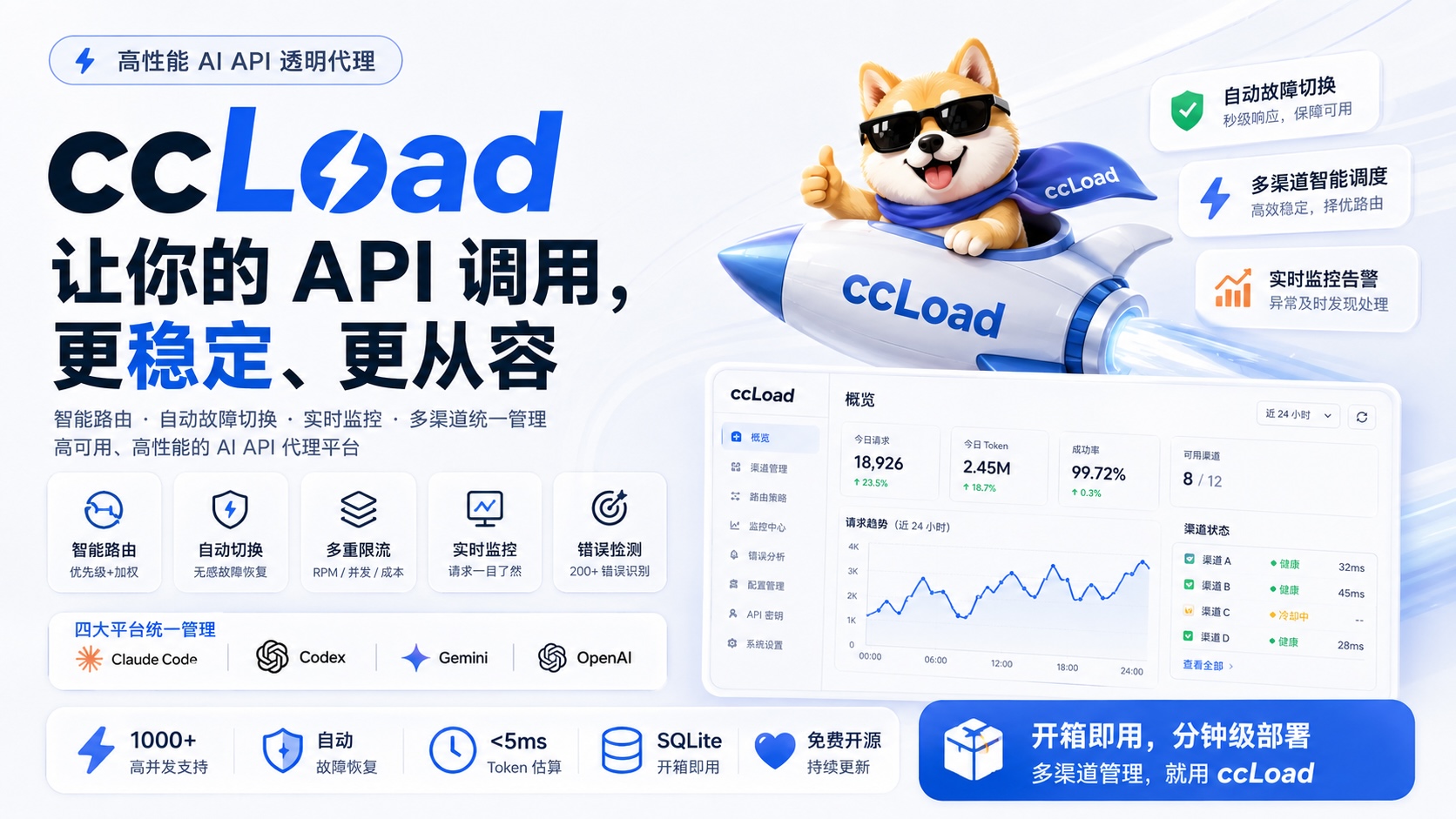
ccLoad
AI API gateway for Claude Code, Codex, Gemini, and OpenAI.
English | 简体中文






Smart routing | Automatic failover | Model-aware cooldown | Multi-URL scheduling | Protocol transforms | Live monitoring | Cost control
ccLoad removes the operational mess of running multiple AI API upstreams. It keeps Claude Code, Codex, Gemini, and OpenAI-compatible clients on one stable gateway, then handles upstream selection, failover, cooldown, protocol conversion, request visibility, and cost limits in the service instead of in every client script.
🤖 Built with Codex and GPT-5.6
During OpenAI Build Week, Codex powered by GPT-5.6 was the primary engineering agent used to:
- Trace request routing, failover, cooldown, protocol conversion, and dashboard flows across the Go backend and embedded web UI.
- Implement and review model-scoped cooldown handling for upstream
5xx, key-level429, model-unavailable404, and explicit model-retirement410failures without unnecessarily cooling an entire channel. - Refine the model-status and call-statistics UI, update the English and Chinese documentation, and verify the result with focused Go tests, builds, and browser walkthroughs.
- Prepare the reproducible demo and Devpost submission while keeping architecture, security, and final-review decisions under human control.
GPT-5.6 is also integrated into the product itself: ccLoad exposes GPT-5.6 through OpenAI-compatible and Codex Responses endpoints, includes Sol, Terra, and Luna model presets, calculates their standard, priority, flex, cached-token, and long-context costs, and applies routing and model-scoped cooldown decisions to them like any other configured upstream model.
The repository's AGENTS.md and CLAUDE.md provide persistent engineering constraints so Codex works against the same KISS-first review and testing rules in every session.
🎯 What ccLoad Solves
Common failure modes when you run several AI API channels:
- Manual channel switching: Different keys, validity windows, quotas, and upstream URLs quickly become hard to manage.
- Rate limits and upstream failures:
429,502,504, expired keys, and overloaded providers should not stop the client workflow. - Opaque request status: Without live request visibility, long streaming requests become guesswork.
- HTTP 200 with error content: Some upstreams return a successful HTTP status while the response body is an actual error.
- Cost drift: Shared gateways need per-channel and per-token limits, not spreadsheet accounting after the bill arrives.
ccLoad handles those cases with:
- Smart routing: High-priority channels are selected first; channels at the same priority use smooth weighted round-robin.
- Automatic failover: Failed keys, models, channels, and URLs are skipped according to the classified error scope.
- Model-aware cooldown: Structured
model_cooldownresponses, upstream HTTP 5xx failures, key-level 429 rate limits, model-unavailable 404 errors, and explicit model-retirement 410 errors all cool only the actual upstream model first; other models on the same channel remain available. The channel is promoted to cooldown only after every configured model or every enabled key is cooling. - Multi-URL scheduling: A single channel can use multiple upstream URLs, weighted by observed latency and health.
- Per-URL protocol routing: Each URL can declare the upstream wire protocols it accepts. Explicit declarations route directly; an empty declaration tries the client protocol first and caches the working fallback.
- Responses WebSocket bridging: Authenticated Codex clients can keep a downstream WebSocket while each candidate uses native Codex WebSocket or the existing HTTP/SSE transport.
- Live monitoring: Active requests, logs, token usage, TTFB, cost, and upstream details are visible in the web dashboard.
- Soft-error detection: HTTP 200 responses that are actually errors trigger the same failover path as regular upstream failures. Common cases include:
- JSON responses containing
{"error": {...}}structure - Responses with
typefield set to"error" - Explicit rate limits in SSE
errorevents (rate_limit_exceeded/too_many_requests) are handled as429 - Plain text messages like
"当前模型负载过高"/"Current model load too high"(load warnings)
- JSON responses containing
✨ Key Features
- 🚀 High-Performance Architecture - Gin framework, 1000+ concurrent connections, high-performance caching
- 🧮 Local Token Counting - API-compliant local token estimation, <5ms response, 93%+ accuracy, supports large-scale tool scenarios
- 🎯 Smart Error Classification - Distinguishes Key/Model/Channel/Client errors, soft error detection (200 masquerading as error), SSE rate-limit errors as 429, 1308 quota handling
- 🔀 Smart Routing - Priority + smooth weighted round-robin channel selection, pre-filters cooled channels, multi-key load balancing, health-based dynamic sorting (confidence factor prevents small sample over-penalization)
- 🛡️ Failover - Key, model, and channel failures share one exponential-backoff policy; explicit upstream reset deadlines take priority, and model-scoped failures switch channels without cooling the whole channel
- 🔒 Race-Safe - Key selector race condition protection, startup config validation, automatic resource cleanup
- 📊 Real-time Monitoring - Built-in trend analysis, logging, and stats dashboard, Token usage stats with time range selection and per-token classification, runtime status panel with process metrics (CPU, RSS, GC)
- 🎯 Transparent Proxy - Supports Claude Code, Codex, Gemini, and OpenAI compatible APIs with smart auth detection
- 🔑 OAuth Channels - Codex (ChatGPT), Anthropic (Claude), Antigravity, and xAI OAuth credentials with automatic refresh where supported; Codex personal access token (PAT) authorization; Z.ai Coding Plan (ZCode) browser authorization or API-key import; Cursor user API-key import; and Zed native sign-in (trial bound to a real Zed installation's
system_id), with batch quota refresh, invalid-credential cleanup, and auto-disable for permanently rejected credentials - 📅 OAuth Quota Cost Tracking - Per-credential weekly/monthly standard-cost accumulation aligned to upstream quota windows, plus manual Codex quota reset when a reset credit is available
- 🔌 Responses WebSocket - Downstream Codex WebSocket sessions bridge to native Codex WebSocket or HTTP/SSE candidates with transcript-aware failover
- 📦 Simple Deployment - Embedded SQLite; the Cursor SDK Bridge is managed automatically when needed
- 🔒 Secure Authentication - Token-based admin interface and API access control
- 🏷️ Build Tags - GOTAGS support, high-performance JSON library enabled by default
- 🐳 Docker Support - Multi-arch images (amd64/arm64), automated CI/CD
- ☁️ Cloud Native - Container deployment support, GitHub Actions auto-build
- 🤗 Hugging Face - One-click deployment to Hugging Face Spaces, free hosting
- 💰 Cost Limits - Per-channel daily cost limits, per-token cost limits
- 🚦 Channel RPM Limits - Per-channel rolling 60-second request caps, 0=unlimited
- 🚧 Channel Concurrency Limits - Per-channel in-flight request caps, 0=unlimited
- 🗝️ Per-Key Model Allowlists - Restrict which channel models each Key serves; empty means unrestricted, and channels whose Keys all decline the model are skipped
- 🧠 Model Thinking Suffix - Append
(minimal/low/medium/high/xhigh/max),(none),(auto), or a numeric budget to any model name; ccLoad maps it to the upstream protocol's thinking parameters while routing on the base name - 🖼️ Multimodal Fallback - Route requests containing images/files from non-vision models to configured fallback models (
model_multimodal_fallback), applied before thinking-suffix handling and channel/Key selection - 🕒 Channel Time Windows - Optional HH:MM availability window per channel (server local time, cross-midnight supported); channels outside their window are fully excluded from routing
- 🔐 Token Restrictions - Per-token cost limits, model restrictions, channel allowlist/denylist, and concurrency caps for fine-grained access control
- ⏱️ TTFB Monitoring - Streaming request first byte time tracking for upstream latency diagnosis
- 🌐 Multi-URL Load Balancing - Multiple URLs per channel with latency-weighted random selection
- 🧭 Per-Channel Proxy - Route a channel's upstream traffic through an http/https/socks5/socks5h proxy with isolated connection pools
- 💵 service_tier Pricing - OpenAI priority/flex/default tier multipliers for accurate cost accounting
- 🖼️ Image Tool Billing - Responses image_generation/gpt-image-2 cost accounting
- 📉 Tiered Pricing - GPT-5.4/Qwen-Plus/Gemini long-context step pricing, auto-applies lower rate at token thresholds
- 🔄 Per-URL Protocol Routing - Explicit Anthropic/OpenAI/Codex/Gemini capability per URL, with native-first automatic detection when left empty
- 💬 Conversational Model Testing - Channel/model/chat testing modes with image upload, reasoning level, built-in search, and chat export
- 🎨 Image Generation Testing - Dedicated tab that renders generated images through either the Images API or Chat Completions, with size/quality/background/output-format controls
- 🔍 Debug Logs - Upstream request/response raw data capture with sensitive header masking, essential for troubleshooting
- 🕐 Scheduled Checks - Background periodic channel availability probing, auto-detect failed channels
- 🔄 Release Channels - Stable updates by default, with an opt-in preview channel; check interval is configurable from the admin settings page, plus a manual check button for on-demand checks
- 🧩 Custom Request Rules - Per-channel HTTP header & JSON body rewriting (remove/override/append), with auth header protection, CRLF guard, and capacity caps
- 🎛️ Log Column Customization - Show/hide table columns per preference, settings persist in browser localStorage
🏗️ Architecture Overview
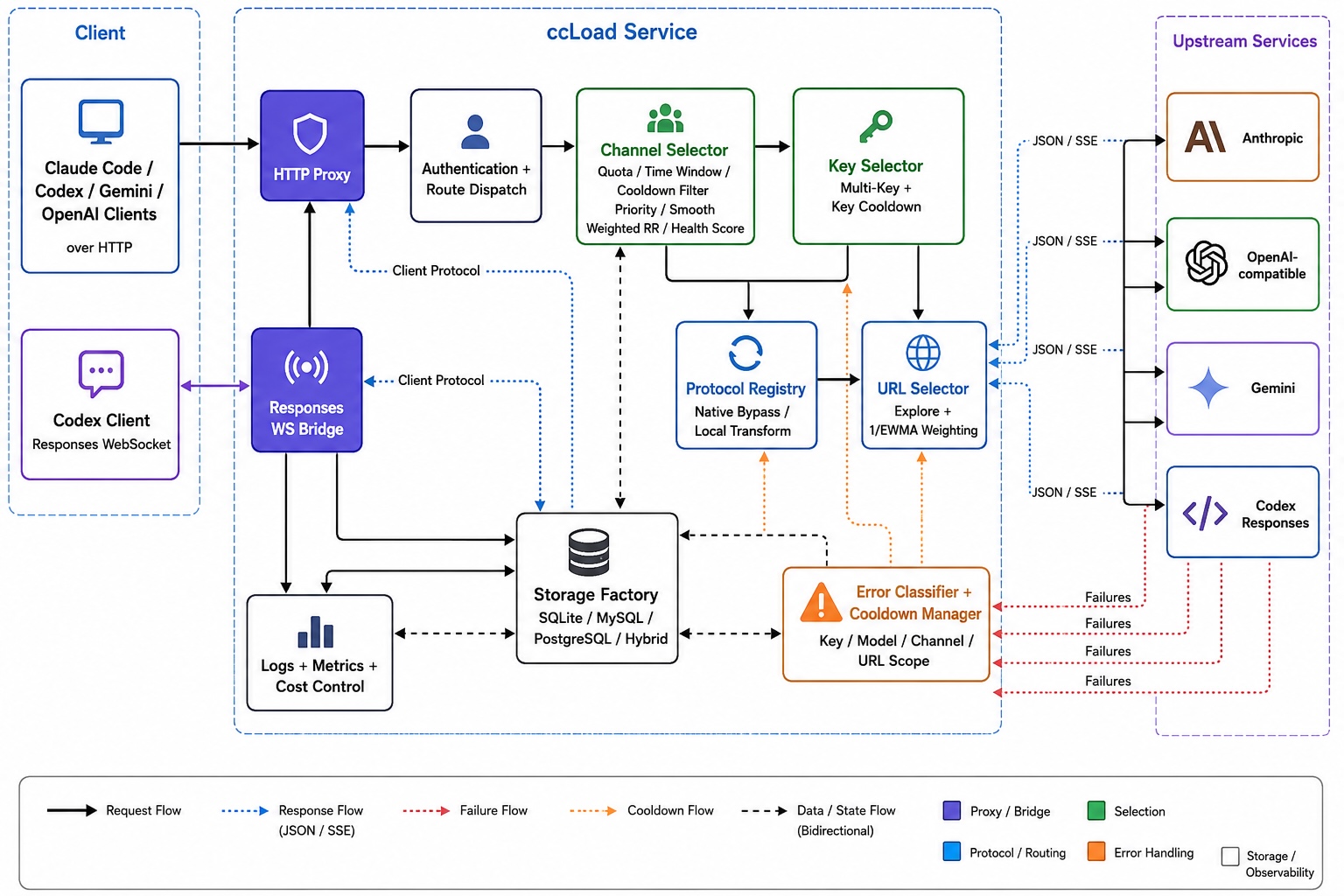
Every channel accepts all four client protocols. Upstream protocol selection is controlled by protocol_transform_mode and each structured URL's protocols declaration. upstream is strict client-protocol passthrough. auto tries the client protocol first, then probes OpenAI → Anthropic → Codex → Gemini while skipping the protocol already attempted, and advances only after an uncommitted capability error. local prioritizes URLs with explicit declarations and follows each URL's declared order; only when every URL is undeclared does it try Anthropic → Codex → OpenAI → Gemini. Incompatible URLs are skipped without a request or cooldown. Successful automatic detection is cached per URL and request family until restart or channel configuration changes. Only stable endpoint-level non-model 404/405 responses cache an all-protocols-unsupported result for that URL and request family; it is probed again after 10 minutes. Request-dependent 400/403/500 responses and local transform failures are retried on the next request.
🚀 Quick Start
Choose the deployment method that suits you best:
| Method | Difficulty | Cost | Use Case | HTTPS | Persistence |
|---|---|---|---|---|---|
| 🐳 Docker | ⭐⭐ | VPS required | Production, high performance | Config required | ✅ |
| 🤗 Hugging Face | ⭐ | Free | Personal use, quick trial | ✅ Auto | ✅ |
| 🔧 Source Build | ⭐⭐⭐ | Server required | Development, customization | Config required | ✅ |
| 📦 Binary | ⭐⭐ | Server required | Lightweight, simple setup | Config required | ✅ |
Method 1: Docker Deployment (Recommended)
Using pre-built images (Recommended):
# Option 1: Using docker-compose (Simplest)
curl -o docker-compose.yml https://raw.githubusercontent.com/caidaoli/ccLoad/master/docker-compose.yml
curl -o .env https://raw.githubusercontent.com/caidaoli/ccLoad/master/.env.docker.example
# Edit .env file to set CCLOAD_PASS (required, service exits without it)
docker-compose up -d

# Option 2: Run image directly
docker pull ghcr.io/caidaoli/ccload:latest
docker run -d --name ccload \
  -p 8080:8080 \
  -e CCLOAD_PASS=your_secure_password \
  -v ccload_data:/app/data \
  ghcr.io/caidaoli/ccload:latest
Building from source:
# Clone project
git clone https://github.com/caidaoli/ccLoad.git
cd ccLoad

# Build and run with docker-compose
cp .env.docker.example .env  # edit .env to set CCLOAD_PASS
docker-compose -f docker-compose.build.yml up -d

# Or build manually
docker build -t ccload:local .
docker run -d --name ccload \
  -p 8080:8080 \
  -e CCLOAD_PASS=your_secure_password \
  -v ccload_data:/app/data \
  ccload:local
Method 2: Source Build
# Clone project
git clone https://github.com/caidaoli/ccLoad.git
cd ccLoad

# Build project (uses high-performance JSON library by default)
go build -tags sonic -o ccload .

# Or use Makefile
make build

# Run in development mode
go run -tags sonic .
# Or
make dev
Method 3: Binary Download
# Download binary for your platform from GitHub Releases
wget https://github.com/caidaoli/ccLoad/releases/latest/download/ccload-linux-amd64
chmod +x ccload-linux-amd64
./ccload-linux-amd64
When a Cursor channel exists, ccLoad automatically downloads its pinned SDK Bridge, verifies the embedded SHA-256, and installs it atomically under its managed state directory. For offline installations, download the matching archive from the official Cursor SDK Bridge releases, place its cursor-sdk-bridge executable beside ccLoad, or set CURSOR_SDK_BRIDGE_BIN.
Method 4: Hugging Face Spaces Deployment
Hugging Face Spaces provides free container hosting with Docker support, ideal for personal and small team use.
Deployment Steps
-
Login to Hugging Face
Visit huggingface.co and log into your account
-
Create New Space
- Click "New" → "Space" in the top right
- Space name:
ccload(or custom name) - License:
MIT - Select the SDK:
Docker - Visibility:
PublicorPrivate(private requires paid subscription) - Click "Create Space"
-
Create Dockerfile
Create a
Dockerfilein the Space repository:FROM ghcr.io/caidaoli/ccload:latest ENV TZ=Asia/Shanghai ENV PORT=7860 ENV SQLITE_PATH=/tmp/ccload.db EXPOSE 7860Create via:
Method A - Web Interface (Recommended):
- Click "Files" tab on Space page
- Click "Add file" → "Create a new file"
- Enter
Dockerfileas filename - Paste the content above
- Click "Commit new file to main"
Method B - Git Command Line:
# Clone your Space repository git clone https://huggingface.co/spaces/YOUR_USERNAME/ccload cd ccload # Create Dockerfile cat > Dockerfile << 'EOF' FROM ghcr.io/caidaoli/ccload:latest ENV TZ=Asia/Shanghai ENV PORT=7860 ENV SQLITE_PATH=/tmp/ccload.db EXPOSE 7860 EOF # Commit and push git add Dockerfile git commit -m "Add Dockerfile for ccLoad deployment" git push -
Configure Environment Variables (Secrets)
In Space settings (Settings → Variables and secrets → New secret):
Variable Value Required Description CCLOAD_PASSNone ✅ Required Admin interface password CCLOAD_API_TOKENStoken1|production,token2|developmentOptional Pre-seed API access tokens on startup Note: API access tokens can be pre-seeded with
CCLOAD_API_TOKENSor managed in the Web admin interface/web/tokens.html. -
Wait for Build and Startup
After pushing Dockerfile, Hugging Face will automatically:
- Pull pre-built image (~30 seconds)
- Start application container (~10 seconds)
- Total time ~1-2 minutes (3-5x faster than source build)
-
Access Application
After build completes, access via:
- App URL:
https://YOUR_USERNAME-ccload.hf.space - Admin Interface:
https://YOUR_USERNAME-ccload.hf.space/web/ - API Endpoint:
https://YOUR_USERNAME-ccload.hf.space/v1/messages
First Access Note:
- If Space is sleeping, first access takes 20-30 seconds to wake
- Subsequent accesses respond immediately
- App URL:
Hugging Face Deployment Characteristics
Advantages:
- ✅ Completely Free: Public Spaces are permanently free with CPU and storage
- ✅ Fast Deployment: Pre-built image, 1-2 minutes (3-5x faster than source build)
- ✅ Auto HTTPS: No SSL certificate configuration needed
- ✅ Auto Restart: Automatic restart after crashes
- ✅ Version Control: Git-based, easy rollback and collaboration
- ✅ Simple Maintenance: Only 5-line Dockerfile, no source code management
Limitations:
- ⚠️ Resource Limits: Free tier provides 2 CPU + 16GB RAM
- ⚠️ Sleep Policy: 48 hours without access triggers sleep, first access takes ~20-30s to wake
- ⚠️ Fixed Port: Must use port 7860
- ⚠️ Public Access: Spaces are public by default, must configure API tokens via Web admin to access /v1/* APIs (otherwise 401)
Data Persistence
Important: Hugging Face Spaces Storage Policy
Due to Hugging Face Spaces limitations (/tmp directory clears on restart), we strongly recommend using an external MySQL or PostgreSQL database for complete data persistence:
Option 1: Hybrid Storage Mode (Recommended, Best Performance)
- ✅ Local authoritative I/O: Config, credentials, keys, cooldowns, and logs commit to SQLite first, keeping remote latency off the scheduling path
- ✅ Eventually consistent primary: Writes are coalesced by entity and retried every 10 seconds after failure
- ⚠️ Single-instance semantics: Multiple hybrid writers and external primary writes are unsupported; process exit may lose in-memory pending syncs
- ✅ Stats caching: Smart TTL cache reduces repetitive aggregate queries
- Configuration: Add one primary DSN (
CCLOAD_MYSQLorCCLOAD_POSTGRES) plusCCLOAD_ENABLE_SQLITE_REPLICA=1in Secrets
Dockerfile Example (Hybrid Mode):
FROM ghcr.io/caidaoli/ccload:latest
ENV TZ=Asia/Shanghai
ENV PORT=7860
# Configure in Secrets: CCLOAD_MYSQL or CCLOAD_POSTGRES, plus CCLOAD_ENABLE_SQLITE_REPLICA=1
EXPOSE 7860
Option 2: Pure External Database Mode
- ✅ Complete Persistence: Channel configs, logs, and stats all preserved
- ✅ Restart-Safe: Data stored externally, unaffected by Space restarts
- ⚠️ Database Latency: Stats page latency depends on the remote database and region
- Configuration: Add exactly one of
CCLOAD_MYSQLorCCLOAD_POSTGRESin Secrets
Recommended Free MySQL Services:
- TiDB Cloud Serverless - Free 5GB storage, MySQL compatible, no connection limits, recommended first choice
- Aiven for MySQL - Free 1GB storage, multi-region support
MySQL Configuration Example (TiDB Cloud):
- Register for TiDB Cloud account
- Create Serverless Cluster (free)
- Get connection info, format:
user:password@tcp(host:4000)/database?tls=true - Add
CCLOAD_MYSQLvariable in Hugging Face Space Secrets - (Optional) Enable Hybrid Mode: Add
CCLOAD_ENABLE_SQLITE_REPLICA=1for best performance - Restart Space, all data will auto-persist to MySQL
PostgreSQL Configuration Example:
CCLOAD_POSTGRES=postgres://user:password@host:5432/ccload?sslmode=require
URL and libpq keyword DSNs are supported. Do not set CCLOAD_MYSQL and CCLOAD_POSTGRES at the same time.
Dockerfile Example (Pure External Database):
FROM ghcr.io/caidaoli/ccload:latest
ENV TZ=Asia/Shanghai
ENV PORT=7860
# Configure CCLOAD_MYSQL or CCLOAD_POSTGRES in Secrets; SQLITE_PATH is not required
EXPOSE 7860
Option 3: Local Storage Only (Not Recommended)
- ⚠️ Data Loss:
/tmpclears on Space restart, channel config lost - ⚠️ Manual Recovery: Must re-import via Web interface or CSV
- Use case: Temporary testing only
Update Deployment
With pre-built images, updates are simple:
Image Refresh:
- When new version image (
ghcr.io/caidaoli/ccload:latest) is released - Click "Factory rebuild" in Space settings to pull latest image
- Or wait for Hugging Face auto-restart (typically after 48 hours)
Manual Trigger Update:
# Add empty commit to trigger rebuild
git commit --allow-empty -m "Trigger rebuild to pull latest image"
git push
Version Pinning (Optional): To lock specific version, modify Dockerfile:
FROM ghcr.io/caidaoli/ccload:v4.7.0  # Specify version
ENV TZ=Asia/Shanghai
ENV PORT=7860
ENV SQLITE_PATH=/tmp/ccload.db
EXPOSE 7860
Basic Configuration
Choose SQLite, MySQL, or PostgreSQL based on the deployment shape. MySQL and PostgreSQL are mutually exclusive.
SQLite Mode (Default):
# Set environment variables
export CCLOAD_PASS=your_admin_password
export PORT=8080
export SQLITE_PATH=./data/ccload.db

# Or use .env file
echo "CCLOAD_PASS=your_admin_password" > .env
echo "PORT=8080" >> .env
echo "SQLITE_PATH=./data/ccload.db" >> .env

# Start service
./ccload
MySQL Mode:
# 1. Create MySQL database
mysql -u root -p -e "CREATE DATABASE ccload CHARACTER SET utf8mb4 COLLATE utf8mb4_unicode_ci;"

# 2. Set environment variables
export CCLOAD_PASS=your_admin_password
export CCLOAD_MYSQL="user:password@tcp(localhost:3306)/ccload?charset=utf8mb4"
export PORT=8080

# Or use .env file
echo "CCLOAD_PASS=your_admin_password" > .env
echo "CCLOAD_MYSQL=user:password@tcp(localhost:3306)/ccload?charset=utf8mb4" >> .env
echo "PORT=8080" >> .env

# 3. Start service (auto-creates tables)
./ccload
PostgreSQL Mode:
# 1. Create the database and user in PostgreSQL

# 2. Set environment variables
export CCLOAD_PASS=your_admin_password
export CCLOAD_POSTGRES="postgres://user:password@localhost:5432/ccload?sslmode=disable"
export PORT=8080

# 3. Start service (auto-creates and migrates tables)
./ccload
Docker + MySQL:
# Option 1: docker-compose (Recommended)
cat > docker-compose.mysql.yml << 'EOF'
version: '3.8'
services:
  mysql:
    image: mysql:8.0
    environment:
      MYSQL_ROOT_PASSWORD: rootpass
      MYSQL_DATABASE: ccload
      MYSQL_USER: ccload
      MYSQL_PASSWORD: ccloadpass
    volumes:
      - mysql_data:/var/lib/mysql
    ports:
      - "3306:3306"
    healthcheck:
      test: ["CMD", "mysqladmin", "ping", "-h", "localhost"]
      interval: 10s
      timeout: 5s
      retries: 5

  ccload:
    image: ghcr.io/caidaoli/ccload:latest
    environment:
      CCLOAD_PASS: your_admin_password
      CCLOAD_MYSQL: "ccload:ccloadpass@tcp(mysql:3306)/ccload?charset=utf8mb4"
      PORT: 8080
    ports:
      - "8080:8080"
    depends_on:
      mysql:
        condition: service_healthy

volumes:
  mysql_data:
EOF

docker-compose -f docker-compose.mysql.yml up -d

# Option 2: Direct run (requires existing MySQL service)
docker run -d --name ccload \
  -p 8080:8080 \
  -e CCLOAD_PASS=your_admin_password \
  -e CCLOAD_MYSQL="user:pass@tcp(mysql_host:3306)/ccload?charset=utf8mb4" \
  ghcr.io/caidaoli/ccload:latest
Docker + PostgreSQL (requires an existing PostgreSQL service):
docker run -d --name ccload \
  -p 8080:8080 \
  -e CCLOAD_PASS=your_admin_password \
  -e CCLOAD_POSTGRES="postgres://user:pass@postgres_host:5432/ccload?sslmode=require" \
  ghcr.io/caidaoli/ccload:latest
After service starts, access:
- Admin Interface:
http://localhost:8080/web/ - API Proxy:
POST http://localhost:8080/v1/messages - API Token Management:
http://localhost:8080/web/tokens.html- Configure API access tokens via Web interface
📖 Usage Guide
API Proxy
Claude API Proxy (Requires Auth):
First, configure API access token in Web admin interface http://localhost:8080/web/tokens.html, then use that token to access API:
curl -X POST http://localhost:8080/v1/messages \
  -H "Content-Type: application/json" \
  -H "Authorization: Bearer your-api-token" \
  -H "x-api-key: your-claude-api-key" \
  -H "anthropic-version: 2023-06-01" \
  -d '{
    "model": "claude-sonnet-4-6",
    "max_tokens": 1024,
    "messages": [
      {
        "role": "user",
        "content": "Hello, Claude!"
      }
    ]
  }'
OpenAI Compatible API Proxy (Chat Completions):
curl -X POST http://localhost:8080/v1/chat/completions \
  -H "Content-Type: application/json" \
  -H "Authorization: Bearer your-api-token" \
  -d '{
    "model": "gpt-4o",
    "messages": [
      {
        "role": "user",
        "content": "Hello!"
      }
    ]
  }'
Image Generation (Images API):
POST /v1/images/generations is OpenAI Images-compatible, with its own body-size limit controlled by max_image_body_bytes. When the channel model is an xAI conversational model at grok-4.6 or later, ccLoad bridges the request into an xAI Responses image_generation tool call: non-streaming requests aggregate into standard Images JSON, and streaming requests emit partial_image / completed SSE events.
Codex Responses WebSocket:
The downstream and upstream WebSockets are independent. Authenticated clients can always upgrade GET /v1/responses or the Codex direct-route aliases GET /v1/codex/responses and GET /backend-api/codex/responses; a channel's websockets field only controls whether ccLoad tries a native Codex upstream WebSocket. Channels without that field still participate through the HTTP/SSE bridge and remain eligible for failover.
In /web/channels.html, select a channel with a Codex-capable URL, enable Native WebSocket, and run Probe. For the Admin API, the relevant fields are shown below. Keep the URL as an http:// or https:// URL; ccLoad converts the scheme to ws:// or wss:// for native upstream WebSocket requests:
{
  "urls": [{"url": "https://upstream.example.com", "protocols": ["codex"]}],
  "websockets": true
}
For example, connect to the downstream endpoint with websocat:
websocat \
  -H='Authorization: Bearer your-api-token' \
  -H='Session-Id: stable-conversation-id' \
  ws://localhost:8080/v1/responses
Send text frames after connecting. The first turn must use response.create and include model; later turns may use response.append with the previous response's response.id:
{"type":"response.create","model":"your-model","input":[{"type":"message","role":"user","content":"Hello"}]}
{"type":"response.append","previous_response_id":"resp_xxx","input":[{"type":"message","role":"user","content":"Continue"}]}
Read Responses events until response.completed, response.done, response.incomplete, response.failed, or error. Only text frames are accepted; binary frames receive an unsupported_frame error.
Failover applies only to upstream errors classified as retryable key-, model-, or channel-level failures. Client input errors, unrepresentable protocol conversions, and oversized messages do not fail over. Switching across keys, URLs, channels, or transports occurs only before any visible non-heartbeat event has been committed downstream. One same-upstream native WebSocket reconnect uses the separate semantic boundary described below.
| Current upstream | Next action | ccLoad behavior | Client behavior |
|---|---|---|---|
| HTTP/SSE fails before a visible event is committed | Try another HTTP/SSE candidate | Switches internally and replays the complete transcript | None |
Native WS disconnect or previous_response_not_found before a semantic event |
Reconnect the same upstream | Reconnects once internally and replays the complete transcript | None |
| Native WS fails before a visible event is committed | Switch to HTTP/SSE or another native WS candidate | Switches internally and replays the complete transcript | None |
| Native WS handshake rejection or EOF | Fall back to HTTP/SSE on the same channel, key, and URL | Falls back internally and replays the complete transcript | None |
| HTTP/SSE | The next candidate is native WS | Sends 502/server_error/upstream_unavailable, then closes downstream with code 1011 |
Reconnect with the same session hint and send the complete conversation input without previous_response_id |
For the same-upstream native WebSocket reconnect, response.created, response.queued, and response.in_progress are non-semantic, so ccLoad may still reconnect once after those events; every other event crosses that reconnect boundary. Those three lifecycle events are still visible events committed downstream, so they do not imply that cross-candidate failover remains available. Once text, reasoning, a tool call, or another actual output has been forwarded, ccLoad does not switch or replay, avoiding duplicate output, tool calls, and charges. Oversized messages close with code 1009 and do not fail over.
upstream_connection_reuse_limit_seconds limits how long upstream HTTP/1.1, HTTP/2, and WebSocket connections remain reusable, including connections in channel proxy pools. The default 0 leaves reuse unlimited. When a connection reaches a positive limit, it stops accepting new requests; an idle connection closes immediately, while an active request or turn finishes before closure. The next request opens a new physical connection. A native WebSocket reconnect replays the complete session transcript because an upstream Response ID is scoped to the physical WebSocket connection; this planned rotation is not reported as a request failure and does not cool down the channel.
Reconnects must use the same API token and stable execution headers. Session-Id identifies the top-level Codex session; when Thread-Id is present, ccLoad combines both headers so the parent and every subagent thread own independent transcripts, Response IDs, and turn locks. Clients without Thread-Id retain the Session-Id-only contract. prompt_cache_key, body session_id, and other cache-routing hints do not identify an execution session and never serialize or share local conversation state. An execution session is in-memory and process-local: new installations retain at most 256 sessions with a process-wide transcript payload budget of 256 MiB. Existing database records are not migrated. The idle TTL remains 15 minutes by default (10 minutes is suitable for small-memory hosts). After all downstream attachments have been gone for five minutes, the one-minute cleanup loop closes the physical upstream connection, so actual reclamation takes about 5–6 minutes while the transcript remains until the session TTL. A stable session and its committed transcript are never evicted by session-capacity or memory-budget pressure before that TTL expires. When the session ceiling is full, only a new session identity is rejected; an existing stable session may continue. Once the committed payload is over budget, every new turn, including turns on existing sessions, is rejected before upstream work starts. Both limits use a WebSocket 429/rate_limit_error/rate_limit event; retry after TTL reclamation, or change the setting and restart. A restart loses in-memory sessions, so the client must then resend the complete conversation input without previous_response_id.
The transcript budget is an admission threshold, not a strict allocation cap: turns already admitted are allowed to complete and commit. The finite worst-case overshoot is responses_ws_max_sessions × max_body_bytes in addition to the configured budget. Process restarts do not restore sessions or cumulative session metrics. Multi-instance deployments need sticky routing so reconnects reach the same instance. Otherwise, the client must send the complete conversation input without previous_response_id. Adjust session count, TTL, and transcript budget with responses_ws_max_sessions, responses_ws_session_ttl_minutes, and responses_ws_max_transcript_bytes in system settings. GET /admin/runtime-metrics reports the current effective payload as transcript_bytes; it excludes the Go runtime, WebSocket buffers, and temporary request-processing objects. The same response exposes WebSocket rejection counters, log queue/drop/persistence-failure counters, and—when hybrid storage is enabled—primary-sync backlog, failures, dropped tasks, and the last successful sync time.
Codex Alpha Search (Native Passthrough Only):
POST /v1/alpha/search accepts the native Codex search payload. The model field is optional. This request family has no local conversion path: ccLoad tries the native endpoint, caches endpoint-missing responses per URL, and moves to the next URL or channel.
curl -X POST http://localhost:8080/v1/alpha/search \
  -H "Content-Type: application/json" \
  -H "Authorization: Bearer your-api-token" \
  -d '{
    "query": "golang channels"
  }'
For a regular channel base URL, ccLoad appends /v1/alpha/search. For an exact URL, set exact: true and make url point to the complete endpoint, for example {"url":"https://upstream.example.com/v1/alpha/search","exact":true,"protocols":["codex"]}. Responses-only fields prompt_cache_key and prompt_cache_retention are removed before forwarding.
Model Thinking Suffix
Every protocol entry point accepts a thinking suffix appended to the model name, such as claude-sonnet-4-6(high), gpt-5.2(xhigh), or gemini-3.1-pro(8192). ccLoad strips the suffix for routing, then writes the level into the request body's thinking parameters for the protocol actually forwarded upstream (Anthropic thinking, OpenAI/Codex reasoning.effort, Gemini thinkingBudget):
- Levels:
minimal/low/medium/high/xhigh/max; a level beyond the upstream model's capability clamps to the nearest supported tier - Disable:
(none)or(0)turns thinking off - Auto:
(auto)defers to the upstream default thinking behavior - Numeric budget: a non-negative integer such as
(16384)is forwarded as a token budget (Anthropicbudget_tokens, GeminithinkingBudget)
The suffix is not a model identity: routing, auth, cooldown, logging, and the upstream model name always use the base name, so channel model lists do not need suffixed entries. The HTTP proxy, Responses WebSocket, and admin channel testing all honor the suffix; channel custom request rules run later and can override the fields it writes. A parenthesized model name whose suffix is not a known level or non-negative integer (an upstream really named foo(bar)) passes through unchanged.
Multimodal Fallback
System setting model_multimodal_fallback maps non-vision models to fallback models as a JSON object {"text-model":"fallback-model"} (max 64 mappings / 8 KB; keys are normalized to the lower-cased base name, values may carry a thinking suffix). When a request contains non-text content — images, files — ccLoad rewrites the incoming model to the fallback before thinking-suffix handling and token, channel, and Key filtering, so routing, cooldowns, and logs all follow the fallback model. HTTP entries inspect the client-protocol body; Responses WebSocket turns inspect the complete conversation transcript, so an image that entered the history keeps every later turn on the fallback deterministically. Open Multimodal Fallback Models on the settings page to edit the mapping. Unlike every other system setting, saving only this mapping takes effect immediately; a commit that touches any other setting still restarts the process about two seconds later.
Local Token Counting
Quickly estimate request token consumption (no upstream API call needed):
curl -X POST http://localhost:8080/v1/messages/count_tokens \
  -H "Content-Type: application/json" \
  -d '{
    "model": "claude-sonnet-4-6",
    "messages": [
      {"role": "user", "content": "Hello, how are you?"}
    ],
    "system": "You are a helpful assistant."
  }'

# Response example
# {
#   "input_tokens": 28
# }
Features:
- ✅ Compliant with Anthropic official API spec
- ✅ Local computation, <5ms response, no API quota consumption
- ✅ 93%+ accuracy (compared to official API)
- ✅ Supports system prompts, tool definitions, large-scale tool scenarios
- ✅ Requires auth token (configure at
/web/tokens.html)
Channel Management
Manage channels via Web interface /web/channels.html or API:
# Add a channel with per-URL protocol capabilities
curl -X POST http://localhost:8080/admin/channels \
  -H "Content-Type: application/json" \
  -d '{
    "name": "Claude-API",
    "api_key": "sk-ant-api03-xxx",
    "urls": [
      {"url": "https://api.anthropic.com", "protocols": ["anthropic"]},
      {"url": "https://api2.anthropic.com"}
    ],
    "protocol_transform_mode": "auto",
    "priority": 10,
    "rpm_limit": 0,
    "max_concurrency": 0,
    "models": [{"model": "claude-sonnet-4-6"}, {"model": "claude-opus-4-6"}],
    "enabled": true
  }'
OpenAI-compatible upstream example:
# Add a channel using the OpenAI wire protocol
curl -X POST http://localhost:8080/admin/channels \
  -H "Content-Type: application/json" \
  -d '{
    "name": "OpenAI-Compatible",
    "api_key": "sk-xxx",
    "urls": [
      {"url": "https://api.openai.com", "protocols": ["openai"]}
    ],
    "protocol_transform_mode": "auto",
    "priority": 10,
    "rpm_limit": 0,
    "max_concurrency": 0,
    "models": [{"model": "gpt-4o"}],
    "enabled": true
  }'
This works with any OpenAI-compatible provider by changing
urls[].urlto its API base URL. Omit/v1and endpoint paths because ccLoad appends them for the selected protocol. Theprotocols: ["openai"]declaration routes the channel as an OpenAI upstream.
Protocol behavior: Each
urlsentry may listprotocols(anthropic,codex,openai,gemini). A non-empty list is authoritative.upstreamonly passes through the client protocol;autostarts with the client protocol, then detects OpenAI → Anthropic → Codex → Gemini without retrying the client protocol;localprefers declared URLs and their configured protocol order. If every URL is undeclared inlocalmode, ccLoad tries Anthropic → Codex → OpenAI → Gemini.
Multi-URL Note:
urlsis an ordered array of{url, exact, protocols}objects.exact: truemeans the URL is already the complete upstream request URL. The system uses latency-weighted selection and independent URL cooldown; local mode first partitions explicitly declared URLs ahead of automatic ones while preserving order inside each group.
Model Entry Note: each
modelselement is{model, redirect_model, disabled}.redirect_modelrewrites the model name sent upstream while clients keep requesting the original name.disabled: trueremoves that model from the channel entirely — it stop
Comments (0)
Sign in to join the discussion.
No comments yet
Be the first to share your take.