
C4X - C4 Model Diagrams for VS Code






Fast, offline C4 architecture diagrams with a source-driven SVG preview and optional AI-powered generation via Google Gemini. Mermaid-inspired DSL, C4-compliant rendering, PNG export, and 1500+ cloud icons.
Trusted in production by thousands of developers — installs and downloads are tracked live via the badges above (VS Code Marketplace · Open VSX).
Watch
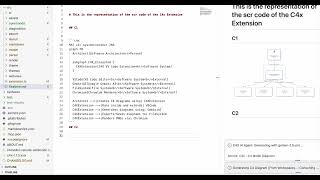
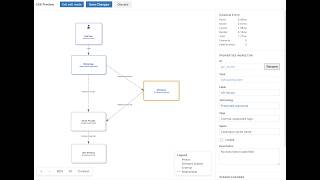
| 30s tour | Editing a diagram by dragging it |
|---|---|
 |
 |
How it works
- Generate. Point C4X at your project folder and Gemini reads the code and writes the C4 model as text. Optional, and off until you add a key.
- Fine-tune. A generated model is complete and valid, but it does not know your style. Drag elements, group them into boundaries and arrange the layout until the diagram tells the story you want it to tell.
- Keep it. The diagram is text in your repo, so it reviews in pull requests and renders the same for everyone on the team.
New in v1.6: the Visual C4 Editor
Step 2 is what v1.6 added. Diagrams stay text. You can now arrange them by dragging.
v1.6.2 highlights · Drag an element and it stays where you drop it · Diagrams open centred and ready to edit · Edit, Save and Discard sit together at the top left
- Lay a diagram out by hand: Drag elements until the picture reads the way you would draw it on a whiteboard, then save. Auto-layout gets you started; you decide where things go
- Edit an element without hunting through the source: Click it and change its name, technology, description, tags or icon in the inspector. Rename it and every relationship that mentions it is updated too
- Draw a relationship: Pick two elements and name the connection. Point an existing arrow somewhere else when the design moves on
- Group things that belong together: Move and resize a boundary and its contents travel with it
- See what you are about to change: Every edit is listed, reversible one by one, and shown as a diff against your source before you save. Nothing is written until you say so
- Keep the source trustworthy: A save that cannot be applied cleanly is rolled back rather than half-written, and you are warned if the file changed underneath you. Structurizr and PlantUML files are never rewritten; their layout is kept alongside them
- Edit the diagrams already in your docs: Open the editor straight from a
c4xblock in any Markdown file, so the architecture in your README stays as current as the code - Work without a mouse: Every gesture has a keyboard equivalent, announced for screen readers
The editor
| Select an element to edit its properties | Select a relationship to re-target or relabel it. Every change is staged before it is saved |
New in v1.4.0
- PNG export: Canvas-based at 1x/2x/4x resolution, no Chromium needed
- C4 Standard theme: Official filled-box convention as the new default
- Auto-layout: LR for small diagrams, TB for large
- 24 architecture pattern examples: CQRS, Saga, BFF, Hexagonal, IoT, CI/CD, Zero-Trust, and more
- All C4 view levels documented: C1 through C4 + Dynamic diagrams
Features
- Source-first Preview: Open or refresh a deterministic SVG view from the supported diagram source
- Visual editing: Drag elements, edit properties, draw relationships; every change written back to your source
- AI Generation (Gemini): Code-to-diagram, text-to-diagram, and visual PNG generation
- All C4 Levels: System Context, Container, Component, Deployment, and Dynamic views
- 6 Themes: C4 Standard (default), Classic, Modern, Muted, High Contrast, Auto
- Export: PNG (1x/2x/4x), SVG, Copy SVG with theme preservation
- 1500+ Icons: AWS, Azure, GCP with IntelliSense autocomplete (
$spritesyntax) - Markdown Integration: Render
c4xblocks directly in README and architecture docs - Auto-Layout: horizontal for small diagrams, vertical for large
- Self-Correcting AI: Parser-validated output with automatic retry and self-remediation
- MCP Server: Built-in validator for Claude, Cursor, and other AI assistants
Quick Start
Install
VS Code Marketplace (recommended): Search "C4X" in Extensions (Cmd+Shift+X) and install.
Command line: code --install-extension jpantsjoha.c4x
Create a Diagram
- Create a file
architecture.c4x - Write your diagram:
%%{ c4: system-context }%%
graph TB

Customer[Customer<br/>Person]
Banking[Banking System<br/>Software System]
Email[Email System<br/>Software System<br/>External]

Customer -->|Uses| Banking
Banking -->|Sends notifications| Email
- Open preview:
Cmd+K V(orCtrl+K V)
No Java, no servers, no configuration needed.
Embed in Markdown
```c4x
%%{ c4: system-context }%%
graph TB
    User[User<br/>Person]
    System[My System<br/>Software System]
    User -->|Uses| System
```
The extension renders c4x code blocks as visual diagrams in VS Code's Markdown Preview.
DSL Syntax
Elements
%% Bracket syntax
Admin[Administrator<br/>Person]
API[Payment API<br/>Software System<br/>External]

%% Function syntax (supports icons, technology, description)
Container(WebApp, "Web App", "React", $sprite="c4xicons.aws.elastic-beanstalk-application")
ContainerDb(DB, "Database", "PostgreSQL")
Person(User, "End User")
Types: Person, Software System, Container, ContainerDb, Component, ComponentDb, plus *_Ext variants for external elements.
Relationships
A -->|Label| B        %% Standard dependency
A ==>|Label| B        %% Synchronous / blocking
A -.->|Label| B       %% Asynchronous / event-driven
Boundaries
%%{ c4: container }%%
graph TB
    User[User<br/>Person]

    subgraph BankingSystem {
        WebApp[Web App<br/>Container]
        Database[DB<br/>Container]
    }

    User -->|Uses| WebApp
    WebApp ==>|Reads/Writes| Database
View Types
%%{ c4: system-context }%%      %% C1
%%{ c4: container }%%           %% C2
%%{ c4: component }%%           %% C3
%%{ c4: deployment }%%          %% C4
%%{ c4: dynamic }%%             %% Sequence/interaction
Full reference: Syntax Guide
AI Generation (Gemini)
C4X uses Google Gemini to generate diagrams from code, text, or selections.
Generated from a source folder, then arranged by hand. The diagram above is C4X's own src/ directory: Gemini read the code and wrote the component model, and the layout is the part a person decided.
Setup
- Get a free API key from Google AI Studio, or use a Google Cloud Vertex AI key for enterprise compliance.
- In VS Code, press
Cmd+Shift+P(Ctrl+Shift+Pon Windows and Linux) and runC4X: Set Gemini API Key. - Paste the key. It is stored in VS Code's encrypted SecretStorage, never in your settings file or your repository.
To replace an expired key, run the same command again. To remove it, run C4X: Clear Gemini API Key.
The key is not a setting. There is no box for it on the extension's settings page, by design: settings are stored in plain text and synced. If you are looking for
c4x.ai.apiKey, it is deprecated and any value left there is migrated to secure storage automatically.
Default model: gemini-3.6-flash, with automatic failover to gemini-3.1-pro-preview. Set any Gemini model id in c4x.ai.model; retired preview ids are redirected to their replacements rather than failing.
| Command | What it does |
|---|---|
C4X: Generate Diagram Here (Gemini) |
Read the surrounding folder and write a C4 model at the cursor |
C4X: Diagram from Selection (Alt+V) |
Generate a visual PNG from the highlighted text |
C4X: Set Gemini API Key |
Store or replace your API key in encrypted storage |
All AI-generated diagrams are parser-validated with up to 3 self-correction retries.
Full guide: Gemini AI Guide | Visual Diagram Guide
Icons
1500+ built-in cloud and technology icons with IntelliSense autocomplete.
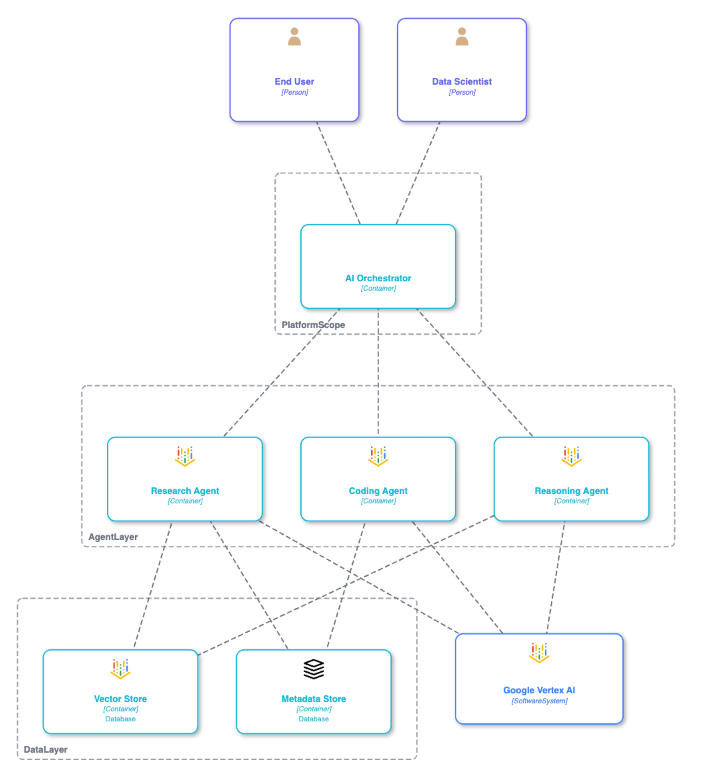
Container(S3, "Storage", "AWS S3", $sprite="c4xicons.aws.simple-storage-service-bucket")
ContainerDb(DB, "Database", "Cloud SQL", $sprite="c4xicons.gcp.cloudsql")
Full icon catalog: Icons & Examples
Export
| Command | Format | Notes |
|---|---|---|
C4X: Export Diagram as PNG |
PNG | 1x, 2x, or 4x resolution. Canvas-based, no Chromium. |
C4X: Export SVG |
SVG | Vector format for Figma, Sketch, Illustrator |
C4X: Copy SVG To Clipboard |
SVG | Quick paste into other apps |
Exported diagrams preserve your selected theme.
Themes
| Theme | Description |
|---|---|
| C4 Standard | Official filled-box convention (default) |
| Classic | White-fill with colored borders |
| Modern | Vibrant colors, rounded corners |
| Muted | Grayscale minimalist |
| High Contrast | WCAG AAA compliant |
| Auto | Adapts to VS Code light/dark |
Change via Command Palette (C4X: Change Theme) or settings ("c4x.theme": "modern").
Examples & Documentation
| Guide | Content |
|---|---|
| Example Gallery | Banking, Microservices, AI Agents |
| All C4 View Levels | C1-C4 + Dynamic, relationship types, database variants |
| Architecture Patterns | CQRS, Event Sourcing, Saga, BFF, Hexagonal, IoT, CI/CD, and more |
| Cloud Icons | AWS, Azure, GCP sprites with autocomplete |
| Layout Guide | Direction control, nested layouts, manual positioning |
| Ordering Guide | Controlling element placement |
| Visual Editing Status | Verified capability matrix, current how-to, and Known Limitations |
Visual C4 Editor Wiki (in-repo source: wiki/Visual-C4-Editor.md) |
v1.6 Visual C4 Editor overview — what ships today, what's planned, safety promises, try-it-locally steps |
| Visual Diagrams | AI-powered PNG generation |
| Syntax Reference | Complete DSL specification |
| Generation Guidelines | Advanced AI prompting |
MCP Server
A C4X source checkout includes a tracked, self-contained Model Context Protocol server for AI assistant integration. It starts without loading packages from node_modules, so it remains reliable in iCloud-backed workspaces and clean clones. The server is distributed with the source repository, not the Marketplace VSIX.
{
  "mcpServers": {
    "c4x-validator": {
      "command": "node",
      "args": ["/absolute/path/to/c4x-vscode-extension/mcp/c4x-mcp-server.bundle.cjs"]
    }
  }
}
For a trusted Codex project, use .codex/config.toml:
[mcp_servers.c4x-validator]
command = "node"
cwd = "/absolute/path/to/c4x-vscode-extension"
args = ["mcp/c4x-mcp-server.bundle.cjs"]
startup_timeout_sec = 10
tool_timeout_sec = 10
Restart the MCP client after changing its configuration. Maintainers can regenerate and verify the bundle and its THIRD_PARTY_NOTICES.txt file with pnpm run build:mcp and pnpm run verify:mcp.
Tool: validate_c4x validates syntax, returns line/column errors for auto-correction.
Resources: c4x://guidelines, c4x://syntax, c4x://examples/*
Works with Claude Desktop, Cursor, Windsurf, Cline, and any MCP-compatible client.
Performance
| Metric | Target | Achieved |
|---|---|---|
| Activation | < 200ms | 0.15ms |
| Bundle Size | < 1MB | 386KB |
| Parse | < 50ms | 10ms |
| Preview Render | < 250ms | 55ms |
These are historical v1.4 measurements from a 30-node fixture. Current development and release claims use the evidence gates recorded in STATUS.md and docs/ROADMAP.md.
Roadmap
Shipped
- v1.6.2 (August 2026): Visual C4 Editor on the Marketplace and Open VSX: drag-to-edit with guarded writeback, connect mode, boundary reposition/resize, staged changes with source diff
- v1.4.0 (May 2026): PNG export, auto-layout, C4-compliant renderer, model validation
Deferred beyond v1.6, and openly so: an element palette, and delete for elements and relationships. Both are authoring gestures whose writeback consequences deserve their own release rather than a corner of this one.
Known limitations are tracked in the Visual Editing Status matrix. Full roadmap: docs/ROADMAP.md
Contributing
Contributions welcome via GitHub Issues and pull requests. See CONTRIBUTING.md for guidelines.
More from the Author
Built by Jaroslav Pantsjoha.
- Pine Script (v5): Syntax highlighting, snippets, and linting for TradingView's Pine Script
License
MIT. See LICENSE.
Acknowledgments
- C4 Model by Simon Brown
- Mermaid.js: DSL syntax inspiration
- Dagre: Graph layout engine
Made with Gemini for architects who value simplicity | Jaroslav Pantsjoha | Report Issues | Star on GitHub
No comments yet
Be the first to share your take.