
🌐 Butler
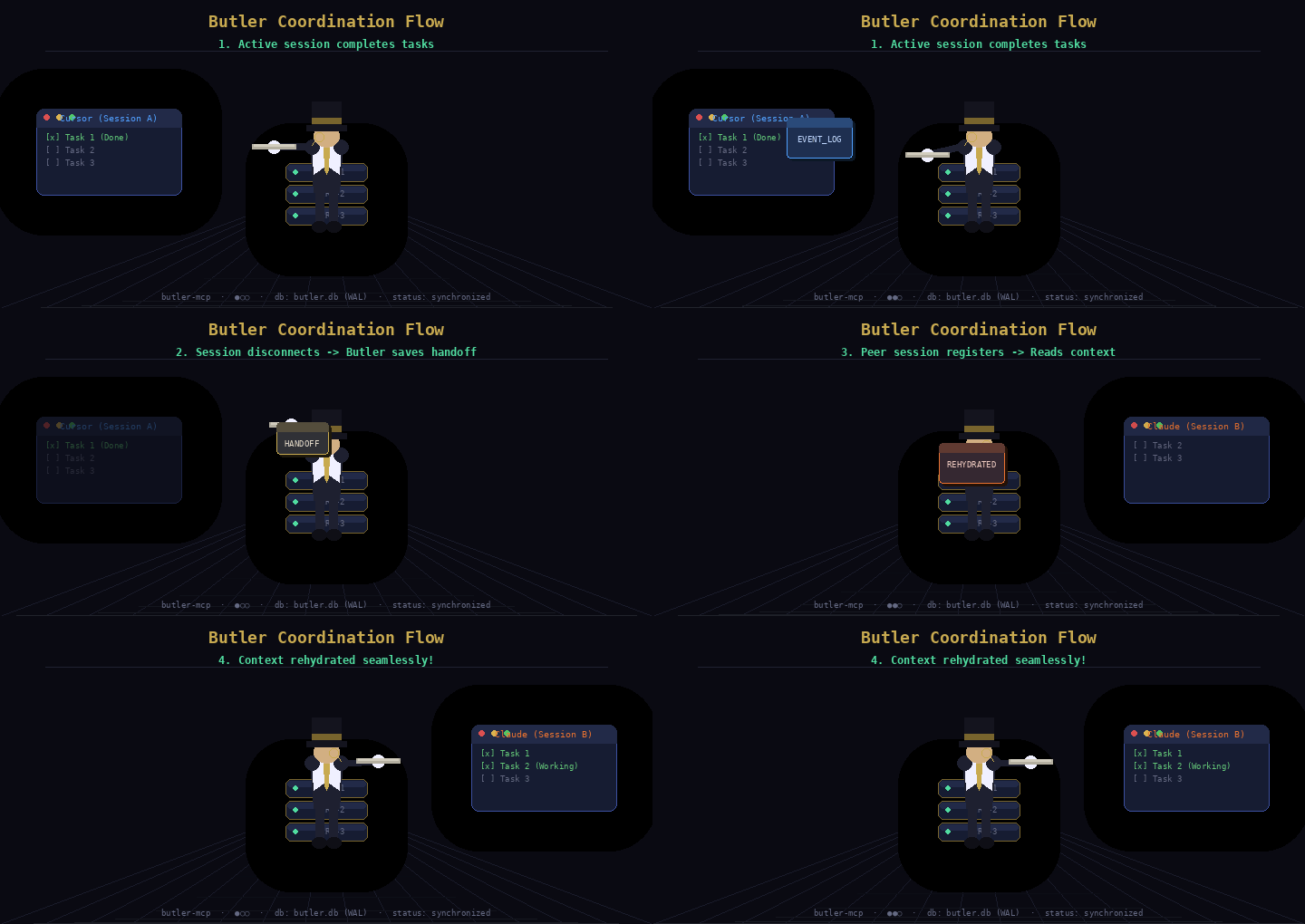
Persistent Coordination and Memory Layer for AI Coding Agents.
"Simple like Git. Persistent like Notion. AI-Native like Cursor."
Why not just a TODO.md? Text files have no locking, no claims, no session tracking — two agents editing one at the same time silently overwrite each other, and a crashed agent leaves a task looking claimed forever. Butler gives every write a version, every claim a lock, and every session a heartbeat. Full comparison ↓
name: io.github.Teycir/butler
package: butler-mcp (.mcpb via GitHub Releases, no npm)
transport: stdio (MCP JSON-RPC)
storage: local SQLite (.butler/butler.db) — no cloud, cross-tool by design
install: download .mcpb from https://github.com/Teycir/Butler/releases/latest
core_loop: projectlist -> sessionregister -> read butler://projects/{id}/context ->
  sessionheartbeat every 15s -> handoffcreate + sessiondisconnect on exit
tools:
  session: [sessionregister, sessionheartbeat, sessiondisconnect]
  tasks: [todoadd, todocomplete, todoupdate, tododelete, todolist]
  coordination: [todoclaim, todounclaim, messagesend, broadcast, synccontext]
  knowledge: [wikiupdate, ruleadd, ruleremove, decisionrecord, handoffcreate]
  memory: [memorystore, memorysearch, memorydelete, projectlist]
  observability: [eventsexport, butlerping]
resources:
  - butler://projects/{id}/context        # markdown packet: TODOs, rules, decisions, wiki, handoffs
  - butler://projects/{id}/todos          # JSON
  - butler://projects/{id}/wiki           # JSON
  - butler://projects/{id}/sessions       # JSON
  - butler://projects/{id}/memories       # JSON
  - butler://projects/{id}/diff?since={eventId}  # JSON changelog
  - butler://projects/{id}/orchestration  # LangGraph checkpoints, JSON
manifests:
  - server.json                          # Official MCP Registry manifest
  - .well-known/mcp/server-card.json     # SEP-1649 server card
  - .well-known/mcp.json                 # SEP-1960 discovery pointer
  - llms.txt                             # plain-text agent summary
Full schemas: src/mcp/tools/*.tools.ts, or query tools/list over MCP. See Discovery & Registries for where this server is indexed.






🎯 Use Cases
Butler's core value isn't just that an agent remembers — it's that the memory is portable across completely different AI tools, because it lives in a shared local SQLite file rather than inside any one vendor's session. That's what makes cross-tool continuity possible in the first place.
| Scenario | What happens without Butler | What Butler does |
|---|---|---|
| Claude Code runs out of credits mid-task | You switch to Kiro CLI (or Cursor, or anything else) and it starts from zero — no idea what Claude Code already did | Kiro CLI registers a session, reads butler://projects/{id}/context, and picks up exactly where Claude Code left off: the same TODOs, rules, decisions, and the handoffcreate summary Claude Code recorded before running out |
| Planning in one tool, implementing in another (e.g. plan in Claude Desktop, implement in Cursor) | The implementing tool starts cold — no idea what was decided or done | The new session reads /context and instantly gets the prior session's handoff summary, open TODOs, and rules — regardless of which vendor built either tool |
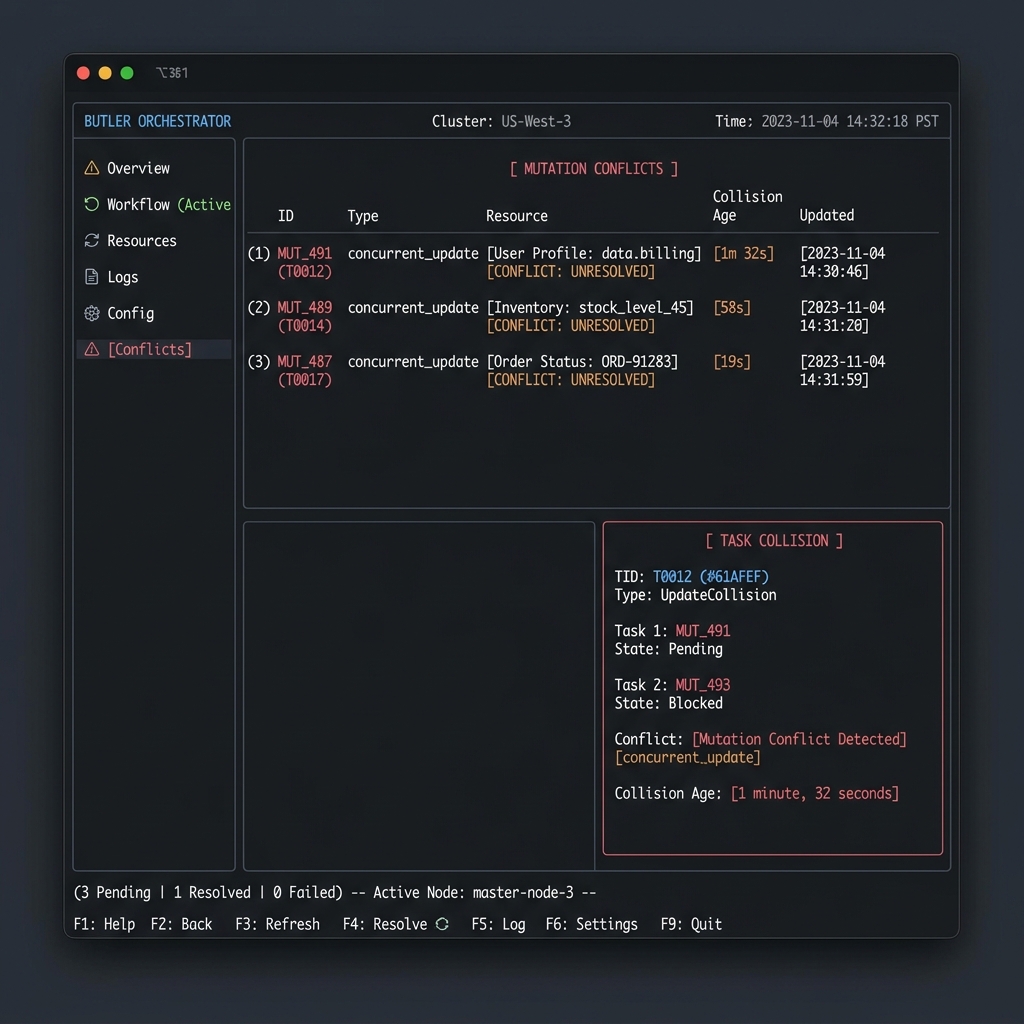
| Two agents (possibly different tools) editing the same repo concurrently | Silent overwrites or duplicated work on the same task | todoclaim/todounclaim mark tasks as in-progress across tools; todocomplete/todoupdate use optimistic version locks and emit a TODO_CONFLICT event if two sessions touch the same TODO within seconds |
| An agent crashes or the terminal is closed | Its in-progress claims stay locked forever; no record of what it was doing | The lifecycle monitor marks the session stale after 60s, dead after 5 minutes, auto-releases its claims, and synthesizes an ungraceful handoff for whichever tool picks it up next |
| Coordinating a large refactor across sessions/tools | Agents don't know what their peers (on other tools) are touching | messagesend for direct heads-up between two sessions, broadcast for announcements to everyone, both surfaced in the next /context read regardless of client |
| Recording why a design decision was made | Rationale lives only in one tool's chat history and gets lost when the window closes or credits run out | decisionrecord logs an ADR (context + outcome) directly into the durable, tool-agnostic event log and project wiki |
| Onboarding a new agent/session into an existing project | Re-explaining architecture, constraints, and conventions from scratch every time — and again for every different tool you try | ruleadd persists coding guidelines every session must follow, on every client; wikiupdate builds a shared reference doc; both are pulled into /context automatically |
| Finding relevant past context without re-reading everything | Manually grepping chat logs or the whole codebase — and chat logs from other tools aren't even accessible | memorysearch runs hybrid TF-IDF + recency ranking over stored summaries, decisions, rules, and wiki pages, shared by every connected tool |
| Auditing what happened in a project over time | No structured history, just scattered chat transcripts split across whichever tools were used | eventsexport dumps the full append-only event log as JSON/NDJSON, filterable by session, type, or time range — one log, all tools |
| Multi-step agent orchestration (e.g. Plan → Implement → Verify → Commit, each stage potentially a different tool) | Each phase runs in isolation with no shared checkpoint state | The built-in LangGraph checkpointer (getLangGraphCheckpointer()) persists thread state in the same SQLite DB, and buildOrchestratorGraph coordinates hand-offs between planning/implementing/verifying agents |
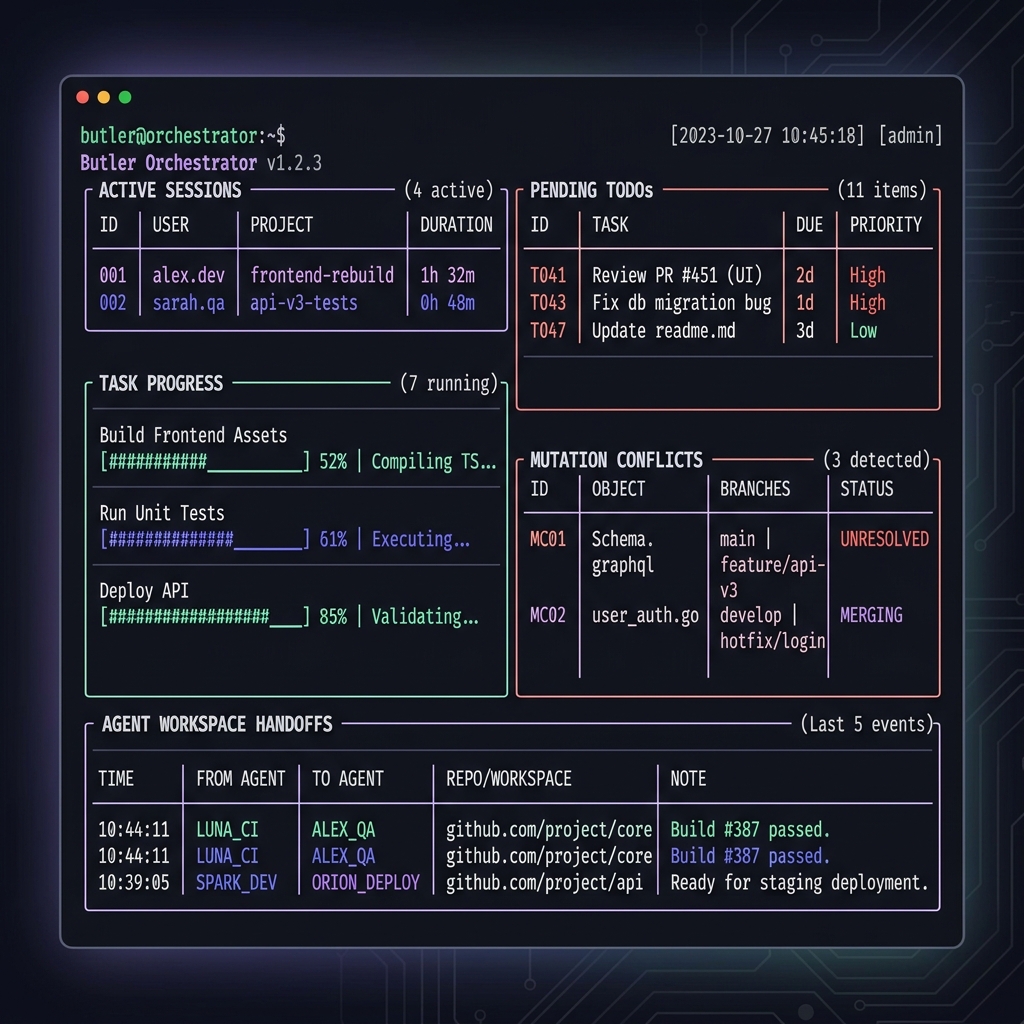
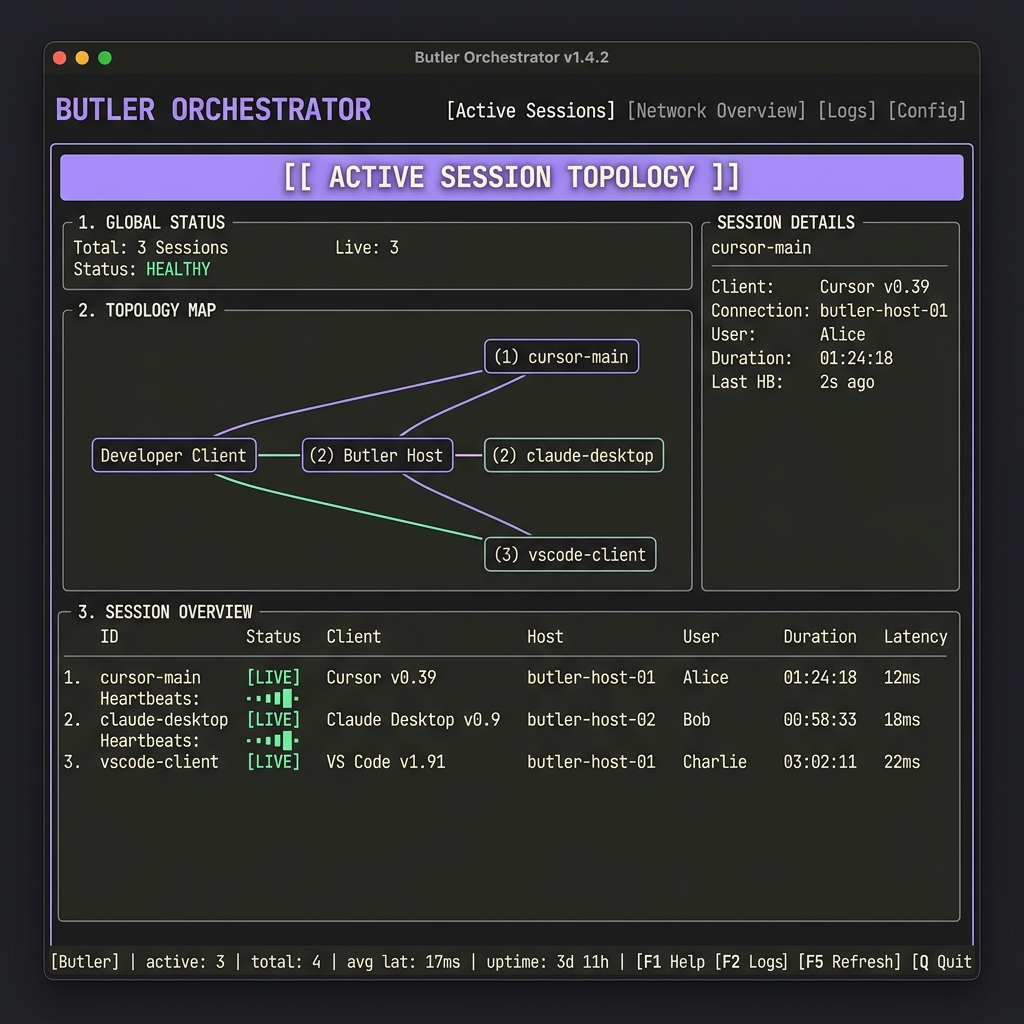
| Watching a live multi-agent, multi-tool workspace | No visibility into who's doing what right now, especially across different clients | butler tui / butler dashboard show live sessions from every connected tool, claims, conflicts, and handoff quality in real time |
🌟 Features Showcase
| 🖥️ Live Orchestration Dashboard | 👤 Active Session Topology & Status |
|---|---|
 |
 |
| ⚡ Concurrency Mutation Conflicts | 🤝 Handoff Quality Scorecard & Coaching |
 |
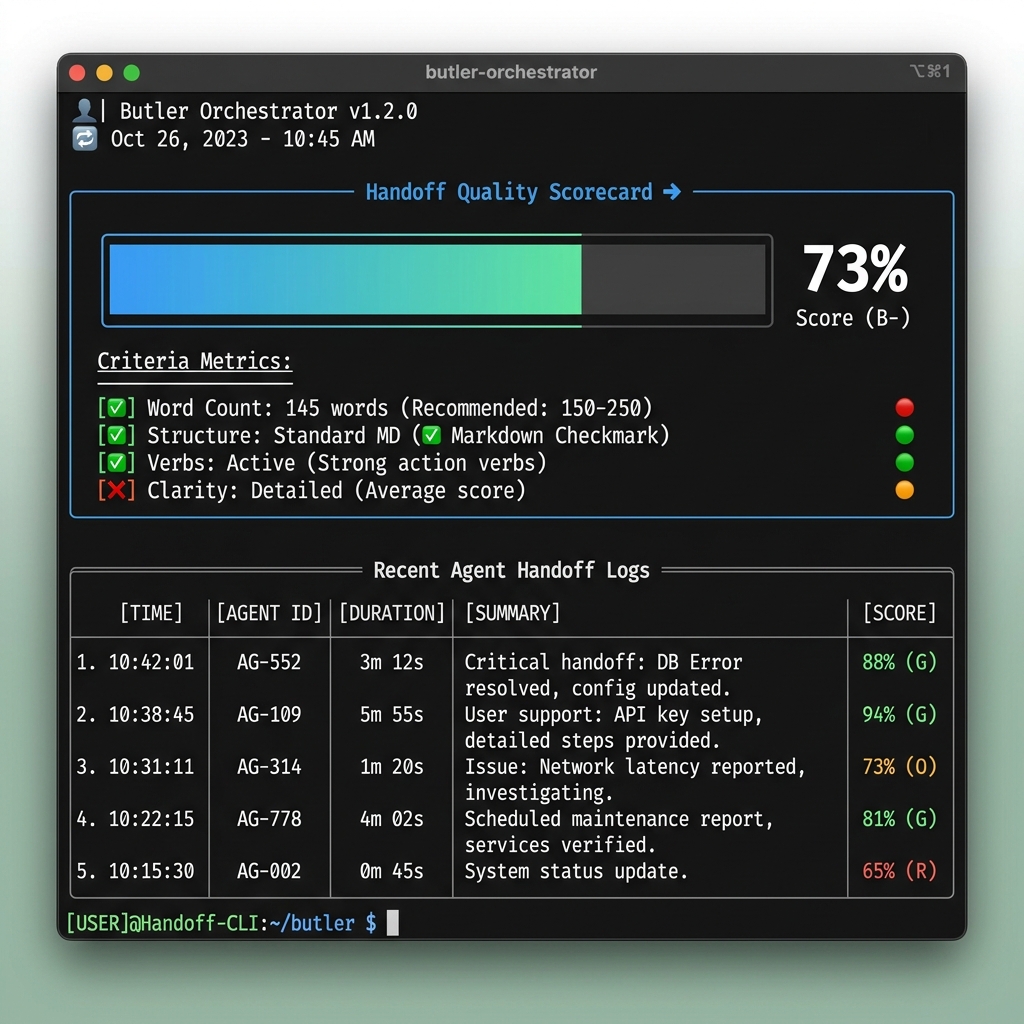 |
📑 Table of Contents
- 🌐 Butler
- 🎯 Use Cases
- 📑 Table of Contents
- ⚡ Butler in 3 Minutes
- ⏱️ Quickstart in 30 Seconds (via GitHub Release)
- ⏱️ Quickstart from Source
- 🌟 The Core Vision
- 🧠 Core Terminology
- 🏗️ System Architecture
- 🔄 Workflow Demo: cross-client session continuity
- ⚡ Quickstart
- 🔌 API & Tool Surface
- 🖥️ Developer CLI
- 🧩 Butler Workflow Skill
- 🤖 Zero-Intervention Automation
- 🔍 Context Freshness & Staleness
- 🤝 Multi-Agent Conflict Detection
- 🗄️ Schema Migration
- 🤖 Multi-Agent Orchestration & LangGraph Integration
- 📂 Repository Anatomy
- 📜 Principles
- 🔎 Discovery & Registries
- Support Development
- 🌐 Related Projects
- 💼 Services Offered
- 📄 License
- Author
⚡ Butler in 3 Minutes
What is Butler?
Butler is a lightweight, local-first background coordination engine that registers active AI agents (e.g. Claude Desktop, Cursor, custom IDE tools) and maintains a shared, event-sourced memory space directly inside your project repository.
Butler features native LangGraph integration, providing a built-in SQLite checkpointer to save/restore multi-agent conversation threads and coordinate workflow graphs directly in the project database.
Why does it exist?
Coding agents are fundamentally amnesiac. When Cursor reloads or a process exits, active context (TODOs, architectural constraints, session differences) is completely lost. When multiple agents run concurrently, they operate in silos, generating race conditions and divergent branches. Butler bridges this gap.
Who is it for?
- AI Pair Programmers: Developers working interchangeably across multiple LLM clients (e.g., planning in Claude, implementing in Cursor).
- Multi-Agent Workspaces: Teams running concurrent background AI workers on the same repository.
- Local-First Advocates: Engineers seeking zero network leakages and absolute privacy.
Why not alternatives?
Unlike general-purpose agent memory platforms (which require hosted cloud APIs, external vector databases, or wrapping your code in framework SDKs), Butler is a local-first developer utility. It integrates directly with your existing workspace as a standard Model Context Protocol (MCP) server. A single .mcpb install (or the bundled install.sh/install.ps1 script) auto-configures your entire IDE stack (Cursor, Claude Desktop, VS Code, Zed) to instantly share project-level context, prevent concurrent file-editing conflicts, and persist active tasks directly within your repo's local SQLite database—with zero network leakage, zero dependencies, and zero setup latency.
1. Butler vs. Dedicated Agent Memory Systems
| Dimension | Butler | Mem0 | Letta (MemGPT) | LangMem | Zep |
|---|---|---|---|---|---|
| Primary Use Case | AI coding client memory & repo state coordination | General-purpose personalization APIs | Long-running autonomous OS-like agents | LangGraph-native agent prompt refinement | Temporal context & enterprise data graphs |
| Local Footprint | 0-Click Local SQLite (stored inside the repository) | Hybrid Cloud API or self-hosted vector database | Local/Cloud server (requires separate Docker/process) | Cloud-first managed service by LangChain | Cloud-first or heavy Docker dependencies |
| MCP Native | Yes (integrated in Claude Desktop, Cursor, VS Code, Zed) | No | No (uses custom REST/Websocket API) | No | No |
| IDE/CLI Auto-Install | Yes (.mcpb one-click, or install.sh/install.ps1 auto-configures clients) |
No | No | No | No |
| LangGraph Support | Yes (Built-in SQLite checkpointer for LangGraph JS) | No | No | Yes (native SDK integration) | No |
| Concurrency Control | Yes (Optimistic locking for parallel agents editing code) | No | No | No | No |
| Amnesia Prevention | Yes (Maintains context state across IDE reloads/restarts) | No (Focuses on user memory, not project state) | Yes (for its own custom agents) | Yes (primarily via API state stores) | Yes (via temporal memory logs) |
2. Butler vs. Ad-hoc Storage & Databases
The obvious cheap alternative is a TODO.md or context.txt the agent reads and edits directly. It works, until more than one thing touches it:
- Concurrent writes silently clobber each other. If two agents (or two tabs of the same agent) both read the file, edit it, and write it back, the second write wins and the first agent's changes vanish — no error, no merge, just gone. Butler's SQLite event log gives every write a version number; a stale write is rejected instead of silently overwriting.
- A flat file has no session concept. There's no way to tell "who wrote this line and when," or to detect that the agent that claimed a task crashed 20 minutes ago and the task is actually free again. Butler tracks sessions with heartbeats, so dead agents don't hold a task forever.
- Context only grows. A markdown file accumulates every decision and TODO ever written, so agents either re-read a growing wall of text every turn (token cost climbs over the project's lifetime) or a human has to manually prune it. Butler materializes a current-state view from the event log — closed TODOs and superseded decisions drop out of what the agent reads, while the full history stays queryable if you ever need it.
- No structured handoff. Passing context from one tool to another means copy-pasting the relevant bit of the file into a prompt by hand. Butler's
handoffcreate/sessiondisconnectgives the next session a specific, structured summary to pick up from — not "here's the whole file, figure out where I left off." - Diffing a markdown file tells you what changed, not why or by whom. Butler's event log is append-only and attributes every change to a session, so
eventsexportgives you a real audit trail instead of a git diff on prose.
None of this means TODO.md is bad — for a single agent working alone, it's fine, and often simpler. Butler earns its keep specifically when more than one agent (or more than one tool) touches the same project.
"But what if every agent just re-reads TODO.md at the start of each session?" That genuinely solves amnesia for a single agent working sequentially — read the file, pick up where you left off, no dependency needed. It stops working the moment two agents can be active at overlapping times:
- Read-then-write races. Agent A reads
TODO.mdat t=0, starts a long task. Agent B reads the same file at t=1, also starts working, then finishes first and writes back its version — silently erasing whatever A was about to add. Re-reading at session start doesn't help if the write happens at session end; the race is on the write, not the read. - "Re-read at the start of each session" only works if sessions don't overlap. Two IDE windows open on the same repo right now, both mid-task, is the actual multi-agent case Butler targets — and no file-reread policy fixes a write collision between two sessions that are already both open.
- Nothing tells B that a TODO is claimed, only that it exists. A can mark a line "in progress," but there's no lock — B can start the same item five seconds later because the file doesn't enforce anything, it just describes. Butler's
todoclaimis an actual claim other agents are blocked from taking, not a note that can be ignored. - A crashed agent leaves a lie in the file. If A claims a TODO in the text and then dies, that TODO looks permanently claimed to every future reader — nothing expires it. Butler's session heartbeats detect the dead session and free the claim automatically.
So the re-read pattern is a real, valid simplification exactly when you can guarantee one agent at a time. Butler is for the case where you can't — or don't want to have to.
| Dimension | Butler | Plain Text Files (context.txt) |
Heavy DBs (Postgres/Redis) |
|---|---|---|---|
| Portability | 0-Click Local SQLite | Hard to version-control safely | Complex Docker setup |
| State Conflict | Optimistic Lock Versions | Prone to complete overrides | Manual locks required |
| Recovery | Ephemeral heartbeats & handoffs | None (static data) | Complex event logs |
| Context Size | Materialized incremental views | Massive raw token bloat | Ad-hoc query builds |
⏱️ Quickstart in 30 Seconds (via GitHub Release)
Butler is distributed as a single .mcpb bundle attached to each GitHub Release — no npm package, no registry account needed:
- Download
butler-mcp-linux-x64.mcpbfrom the latest release. - Double-click it (or drag into Claude Desktop's Settings → Extensions) to install with one click.
Currently Linux x64 only — see Discovery & Registries below for why, and for the source-build path on other platforms.
⏱️ Quickstart from Source
1. Clone:
git clone https://github.com/Teycir/Butler.git
cd Butler
2. Install — choose your method:
Option A: Automatic installer (recommended)
Linux / macOS:
bash install/install.sh
Windows (PowerShell):
.\install\install.ps1
The installer will:
- Build Butler from source.
- Deploy the production bundle to
~/Mcp/butler-mcp/. - Automatically scan the host machine for active coding clients.
- Inject the Butler MCP configuration into all detected clients (supporting Claude Desktop, Claude Code, Cursor, VS Code, Windsurf, Zed, Gemini CLI, Kiro CLI, and Kilo Code).
- JSONC / Comment Safe: Safely parses configurations with comments and trailing commas without overwriting custom settings.
Custom DB path: Pass
--db-pathto use a custom SQLite file location:bash install/install.sh --db-path /your/path/butler.dbOr on Windows:.\install\install.ps1 -DbPath "C:\your\path\butler.db"
Option B: Manual setup
npm install
npm run build
Then add Butler to your AI client's MCP config manually:
{
  "mcpServers": {
    "butler": {
      "command": "node",
      "args": ["/absolute/path/to/Butler/dist/index.js"],
      "env": {
        "BUTLER_DB_PATH": "/absolute/path/to/butler.db"
      }
    }
  }
}
Config file locations:
- Claude Desktop (Linux):
~/.config/Claude/claude_desktop_config.json - Claude Desktop (macOS):
~/Library/Application Support/Claude/claude_desktop_config.json - Claude Desktop (Windows):
%APPDATA%\Claude\claude_desktop_config.json - VS Code / Cursor:
mcp.jsonin your user settings directory - Kiro CLI:
~/.config/kiro-cli/mcp.json - Kilo Code:
~/.config/Antigravity/User/globalStorage/kilocode.kilo-code/settings/mcp_settings.json
Example: Kiro CLI configuration (~/.config/kiro-cli/mcp.json)
{
  "mcpServers": {
    "butler": {
      "command": "/home/user/.nvm/versions/node/v20.20.0/bin/node",
      "args": [
        "/home/user/Mcp/butler-mcp/dist/index.js"
      ],
      "env": {
        "BUTLER_DB_PATH": "/home/user/.butler/butler.db"
      }
    }
  }
}
Restart your AI clients and Butler is ready.
🌟 The Core Vision
Coding agents today are incredibly powerful but fundamentally amnesiac. When your Cursor window reloads or Claude Desktop restarts, your active context, developer constraints, completed tasks, and architectural decisions are erased.
Even worse, when multiple agents work on the same codebase simultaneously, they operate in completely disjoint silos, causing race conditions, diverging implementations, and broken handoffs.
Butler bridges this gap by acting as a local, background Durable Project Memory Log:
               🤖 Agent A (Claude)        🤖 Agent B (Cursor)
                       \                      /
                        \                    /
                 [ Model Context Protocol stdio transport ]
                                    ↓
                       ===========================
                       │         BUTLER          │
                       │  Durable Shared Memory  │
                       ===========================
                       /      │           │      \
                     /        │           │        \
                    ▼         ▼           ▼         ▼
                🎯 TODOs   📜 Rules   💡 Decisions  📚 Wiki
🧠 Core Terminology
To understand Butler in under two minutes, here are our core conceptual models:
- Project: The permanent codebase workspace. Lives forever, anchored by a local-first SQLite file (
.butler/butler.db). - Session: An ephemeral window of activity by a specific AI client (e.g.
cursor-1,claude-desktop-2). Sessions send periodic heartbeats to prove presence. - Event: An append-only, immutable transaction log entry representing a discrete state change (e.g.
TODO_CREATED,RULE_ADDED,WIKI_UPDATED). Events are the ground truth. - State: A materialized cache of the project's current status (active tasks, wiki pages, rules) constructed incrementally by playing events. State is the cache.
- Handoff: A structured, context-rich handoff payload generated when a session disconnects, capturing exact achievements and pending blockers.
- Memory: Highly searchable semantic guidelines, observations, and design logs indexed locally using light, zero-click Term Frequency-Inverse Document Frequency (TF-IDF) sparse relevance algorithms.
🏗️ System Architecture
Butler is designed to be operationally invisible and incredibly fast. It operates on an event-sourced, materialized-view model backed by SQLite in Write-Ahead Log (WAL) mode.
graph TD
    subgraph AI_Clients["AI Clients"]
        C1[🤖 Claude Desktop]
        C2[🤖 Cursor Editor]
        C3[🤖 Kiro / Kilo / VSCode]
    end

    subgraph Dev_Tools["Developer Tools (local, no MCP)"]
        CLI[🖥️ cli/status.ts · cli/tui.ts<br/>npm run status · npm run tui]
        DASH[📊 cli/dashboard.ts<br/>npm run dashboard → :7888 SSE]
    end

    subgraph MCP_Layer["Transport Layer"]
        MCP[🔌 mcp/server.ts<br/>MCP stdio · JSON-RPC]
    end

    subgraph Tools["mcp/tools/"]
        T_SES[session.tools.ts<br/>register · heartbeat · disconnect]
        T_TODO[todo.tools.ts<br/>add · complete · update · delete · list]
        T_KNOW[knowledge.tools.ts<br/>wiki · rule · decision · handoff]
        T_MEM[memory.tools.ts<br/>store · search · delete · projectlist]
        T_COORD[coordination.tools.ts<br/>claim · unclaim · message · broadcast · synccontext]
        T_OBS[observability.tools.ts<br/>eventsexport · butlerping]
    end

    subgraph Resources["mcp/resources.ts · mcp/resources/"]
        R_CTX[context · todos · wiki<br/>sessions · memories · diff · orchestration]
    end

    subgraph Coordinator["src/coordinator/"]
        LIFE[lifecycle.ts<br/>session CRUD · heartbeat monitor<br/>stale/dead detection · ensureSession]
        HAND[handoff.ts<br/>generateStructuredHandoff<br/>computeHandoffQualityScore]
        DIFF[diff.ts<br/>getProjectDiff<br/>getContextStaleness]
        SES[session.ts<br/>SessionRecord · low-level read helpers]
    end

    subgraph Events["src/events/"]
        STORE[store.ts<br/>appendEvent · getEvents<br/>createSnapshot · getLatestSnapshot]
        MAT[materializer.ts<br/>materializeProject · in-memory ProjectState cache]
        PROJ[projections.ts<br/>projectEvent · per-event state transitions]
        TYPES[types.ts<br/>EventRecord · event type definitions]
    end

    subgraph Vector["src/vector/"]
        VEC[index.ts<br/>Pure-JS TF-IDF<br/>addMemory · searchMemories · deleteMemory]
        SIM[similarity.ts<br/>cosine similarity · token scoring]
    end

    subgraph DB_Layer["src/db/"]
        SCHEMA[schema.ts<br/>INIT_SCHEMA_SQL<br/>VERSIONED_MIGRATIONS v1–v8]
        DATABASE[database.ts<br/>initDatabase · getDb · closeDatabase]
    end

    subgraph Storage["SQLite WAL  .butler/butler.db"]
        T1[(projects)]
        T2[(sessions)]
        T3[(events)]
        T4[(sequences)]
        T5[(snapshots)]
        T6[(memories)]
        T7[(butler_migrations)]
        T8[(checkpoints)]
        T9[(writes)]
    end

    C1 & C2 & C3 -->|JSON-RPC stdio| MCP
    MCP --> T_SES & T_TODO & T_KNOW & T_MEM & T_COORD & T_OBS
    MCP --> R_CTX
    T_SES & T_TODO & T_KNOW & T_MEM & T_COORD --> LIFE
    T_SES --> HAND
    T_KNOW --> HAND
    R_CTX --> MAT & LIFE & DIFF & VEC
    LIFE --> STORE & HAND & DIFF
    LIFE --> SES
    HAND --> SES
    STORE --> DATABASE
    MAT --> STORE & PROJ & TYPES
    PROJ --> TYPES
    VEC --> SIM
    VEC --> DATABASE
    DATABASE --> SCHEMA
    DATABASE --> T1 & T2 & T3 & T4 & T5 & T6 & T7 & T8 & T9
    CLI --> DATABASE
    DASH --> DATABASE
🔄 Workflow Demo: cross-client session continuity
Imagine this workflow:
- Start in Cursor: You ask Cursor to plan a database migration. Cursor registers a session, creates 3 TODOs, and records a design decision (
ADR-001). - Cursor Window Reloads / Crashes: The Cursor session terminates. Butler detects the disconnection, automatically materializes a structured handoff marker, and updates the event log.
- Resume in Claude Desktop: You open Claude Desktop. Claude registers its session.
- Instant Rehydration: Claude reads the
butler://projects/{id}/contextresource. It instantly receives:- The structured handoff summarizing Cursor's accomplishments.
- The exact pending TODO list.
- The active project rules and architectural constraints. Claude immediately resumes work with zero lost context.
⚡ Quickstart
1. Installation
git clone https://github.com/Teycir/Butler.git
cd Butler
Linux / macOS:
bash install/install.sh
Windows (PowerShell):
.\install\install.ps1
The installer builds Butler, deploys the release to ~/Mcp/butler-mcp/, and auto-configures detected clients (including Claude Desktop, Claude Code, Cursor, VS Code, Windsurf, Zed, Gemini CLI, Kiro CLI, and Kilo Code) safely. Restart your AI clients and Butler is ready.
Custom DB path: Pass
--db-pathto specify a custom database location:bash install/install.sh --db-path /your/path/butler.dbOr on Windows:.\install\install.ps1 -DbPath "C:\your\path\butler.db"
Verify Installation
Open your AI client (Claude Desktop, Cursor, etc.) and ask:
"Can you call the
butlerpingtool?"
Expected response:
{
  "status": "ok",
  "db_path": "/home/user/.butler/butler.db",
  "db_size_kb": 142,
  "schema_version": 8,
  "project_count": 3,
  "uptime_seconds": 3621
}
2. Zero-Config Project Default
Drop a .butler/project.json in your repo root to set a default project for all tool calls:
{ "project_id": "my-project" }
Butler walks up the directory tree to find this file automatically. Once set, every tool call in that workspace resolves project_id without you passing it explicitly.
3. Run the Verification Suite
npm test
🔌 API & Tool Surface
Resources
| URI | Description |
|---|---|
butler://projects/{id}/context |
Unified markdown context packet: TODOs, rules, decisions, wiki, sessions, handoffs, messages, broadcasts, and auto-surfaced relevant memories. Includes a 🟢/🔴 freshness badge and staleness metadata. |
butler://projects/{id}/todos |
Materialized active task list (JSON). |
butler://projects/{id}/wiki |
Shared wiki and reference documents (JSON). |
butler://projects/{id}/sessions |
Active and stale session registry (JSON). |
butler://projects/{id}/memories |
Complete project memory log (JSON). |
butler://projects/{id}/diff?since={eventId} |
Compact changelog of all state changes since a given event ID, grouped by type. |
butler://projects/{id}/orchestration |
LangGraph orchestration checkpoints and execution state stored for the project (JSON). |
Tools
Session Management
| Tool | Description |
|---|---|
sessionregister |
Bind an active client session. Idempotent — reconnecting agents reuse their session. |
sessionheartbeat |
Signal presence every 15 seconds to stay alive in shared context. |
sessiondisconnect |
Gracefully disconnect and broadcast a structured continuity handoff. |
Task Management
| Tool | Description |
|---|---|
todoadd |
Create a task with priority (low/medium/high) and optimistic version locking. |
todocomplete |
Mark a task done with conflict detection against concurrent mutations. |
todoupdate |
Update a TODO's title, priority, or status with version checking. |
tododelete |
Delete a TODO with optimistic version checking. |
todolist |
List all TODOs for a project (filterable by pending/completed/all). |
Multi-Agent Coordination
| Tool | Description |
|---|---|
todoclaim |
Claim a TODO as actively being worked. Other agents see it as 🔒 in-progress. Claims expire when the session goes stale. |
todounclaim |
Release a claim, making the TODO available again. |
messagesend |
Send a direct message to another active session (stored in event log; delivered on reconnect). |
broadcast |
Announce something to all active sessions — visible in every agent's next context read under 📢 Broadcasts. |
synccontext |
Force an immediate context sync across all peer sessions, surfacing the latest shared state without waiting for the next heartbeat cycle. |
Knowledge & Memory
| Tool | Description |
|---|---|
wikiupdate |
Create or update a wiki knowledge base page. |
ruleadd |
Add a persistent coding guideline all agents must follow. |
ruleremove |
Remove a persistent guideline by ID. |
decisionrecord |
Log an architectural decision record (ADR) with context and outcome. |
handoffcreate |
Explicitly broadcast a session handoff. Includes quality scoring (0–100%) with inline coaching feedback. |
memorystore |
Store a semantic project memory (type: summary, decision, rule, wiki). |
memorysearch |
Search project memory using hybrid TF-IDF keyword + recency ranking. |
memorydelete |
Delete a memory by ID to remove stale or incorrect information. |
projectlist |
List all projects in the Butler database. |
Observability
| Tool | Description |
|---|---|
eventsexport |
Export the raw event log as json (array) or ndjson (newline-delimited). Supports since, until, session_id, event_type, and limit filters. Default 500, max 5000 events. |
butlerping |
Lightweight health-check returning DB path, size, schema version, project count, and uptime. |
🖥️ Developer CLI
Butler ships with a local command line interface (CLI) to configure, manage, and monitor your multi-agent workspaces — no MCP server connection required to run diagnostics or status checks.
butler clients
Manages the opt-in registry of AI client config files Butler installs into (persisted to ~/.butler/clients.json).
$ butler clients list

📋 Known AI clients

  ✅  claude-desktop
           /home/user/.config/Claude/claude_desktop_config.json
     cursor
     vscode
     windsurf
     zed
     kiro-cli
     kilo-code
     ...

  1 client(s) registered. Run `butler install` to apply.
butler clients list— show all known client slugs plus which ones are currently registered.butler clients add <slug>— register a known slug (resolves its default path automatically), or pass--path /path/to/config.jsonto register a custom/unknown tool under that slug.butler clients remove <slug>— unregister a slug.
Note: once at least one client has been registered (manually or via auto-detect on the very first butler install run), butler install only injects into the registered set — it does not re-scan for newly installed IDEs on subsequent runs. Use butler clients add <slug> to pick up a new client later.
butler install
Deploys the Butler production bundle to ~/Mcp/butler-mcp and injects the Butler MCP server configuration into your registered AI client configuration files. If no clients are registered yet (i.e. this is the first run), it scans your system once to auto-detect and register active clients; on subsequent runs it only touches whatever is already registered in ~/.butler/clients.json (see butler clients above). It supports comments (JSONC) and trailing commas safely.
$ butler install
🔨 Building from source...
🚀 Syncing to /home/user/Mcp/butler-mcp...

🔧 Injecting Butler into registered AI clients...
  ✅ /home/user/.config/Claude/claude_desktop_config.json
  ✅ /home/user/.config/Cursor/User/mcp.json
  ✅ /home/user/.config/zed/settings.json
  ...

🎉 Done! Restart your AI clients to activate Butler.

──────────────────────────────────────────────────────────────────
📋  SYSTEM PROMPT SNIPPET — paste this into your AI client once:
──────────────────────────────────────────────────────────────────

On startup: call projectlist, then sessionregister (project_id from .butler/project.json or ask the user, session_id = "<client>-<4 random chars>", client_type = your tool name). Heartbeat every 15 seconds. Before exit: call handoffcreate with a summary of what you did, then sessiondisconnect.

🧪 Verifying setup...
Open any registered client and ask: 'Can you call the butlerping tool?'
Expected response: status: ok, schema_version: 8
butler init
Interactively initializes a new project configuration inside your local workspace. This creates .butler/project.json and adds it to your .gitignore so your agents can automatically identify the correct project database namespace.
$ butler init
🌐 Butler — Project Setup

? Project ID [default: my-project]: my-project
? Project name (optional): My Project Workspace
? Default client [default: Claude Desktop]: Claude Desktop

✅ Created .butler/project.json
✅ Added .butler/ to .gitignore
✅ Ready! Open your AI client and start coding.
butler status
Reads the global SQLite database (~/.butler/butler.db) directly and outputs a comprehensive diagnostic summary of the workspace's projects, sessions, active/completed tasks, and recent handoffs.
$ butler status
🤵  Butler Status   15/06/2026 20:08:12
    Database: /home/user/.butler/butler.db
    Projects: 4

╔═══════════════════════════════════╗
║  🌐 Butler — Butler               ║
║  🔴 INACTIVE  |  0 live sessions  ║
╚═══════════════════════════════════╝

SESSIONS
  No active sessions
  ⚫  1 dead session(s) hidden

TODOS (0 open, 0 completed)
  No open TODOs

🤝  RECENT HANDOFFS (last 3)
  [system]  claude-r4x  (127h ago)
          "Session claude-r4x lost connection (missed heartbeat). Auto-generated c…"
  [system]  claude-r4x  (127h ago)
          "Session claude-r4x lost connection (missed heartbeat). Auto-generated c…"

HANDOFF QUALITY SCORE  █████░░░░░  49% (last: claude-r4x)

Event log: 19 events | last: 127h ago
Snapshot:  no snapshot yet
Supports --project <id>, --db <path>, --json, and --help flags.
butler tui
Launches a live split-screen Terminal User Interface (TUI) that refreshes every 2 seconds, displaying real-time agent presence, broadcast events, active tasks, version conflicts, and handoff quality metrics.
┌──────────────────────────────────────────────────────────────────────────────────────────────────┐
│ 🤵 BUTLER ORCHESTRATOR │ Project: api-hunter                                     ● 20:13:57 │
│ DB: ~/.butler/butler.db (128 KB)                │ Schema: v8 │ Projects: 4 │ Status: 🟢 HEALTHY  │
├────────────────────────────────────────────────┬─────────────────────────────────────────────────┤
│ 👤 Topology Sessions (2)                       │ 🎯 Shared Task Space (3 open)                    │
│   ● cursor-main-1    cursor       12s ago      │   Progress: [██████░░░░░░░░░░] 37% (6/16 done)   │
│   ○ claude-desk-2    claude       45s ago      │   ■ HGH [#1] Implement JWT signat… │ 🔒 cursor-m… │
│                                                │   ■ MED [#2] Add OAuth tests       │ unclaimed    │
│ 📢 Broadcast Stream (2)                        │   ■ LOW [#3] Verify README typos   │ unclaimed    │
│   10s ago [cursor-m]: refactored auth.ts       │                                                  │
│   45s ago [claude-d]: pulling main branch      │ ⚡ Mutation Conflicts (1)                         │
│                                                │   ⚠️  Task #1 │ concurrent_update │ 8s ago    │
├──────────────────────────────────────────────────────────────────────────────────────────────────┤
│ 🤝 RECENT WORKSPACE HANDOFFS                                                                      │
│   [agent] cursor-main-1 (10m ago) - "Refactored JWT signature checking and fixed algorithm bypass."│
│   [system] claude-desk-2 (25m ago) - "Session claude-desk-2 disconnected gracefully."            │
│   Quality Rating: [███████████░░░░] 73% (latest: cursor-main-1) │ Words: 24 │ Struct: ✓ │ Verbs: ✓│
├───────────────────
No comments yet
Be the first to share your take.