
Burp Suite MCP Server -- 魔改增强版
<a id="中文"></a>
Burp Suite MCP Server -- 魔改增强版
给 Burp 装上一个真正能长期稳定工作的 MCP 服务。
如果你遇到过这些问题,这个版本就是为你准备的:
- AI 客户端隔几分钟就断开,反复重连
- Burp 历史记录一多就卡,甚至直接假死
- 大响应、大量历史、扫描结果根本不好查
- 官方版能跑 demo,但扛不住真实渗透测试场景
这个仓库是基于 PortSwigger 官方 mcp-server 的深度增强版,核心目标很直接:
- 先让它稳定可用
- 再让它适合真实工作流
- 最后把使用门槛降到足够低
先看怎么用
1. 构建
前提:
- Java 21+
- 本机可用
jar
git clone https://github.com/llc141525/burp-mcp-enhance.git
cd burp-mcp-enhance
./gradlew embedProxyJar
构建完成后,产物在:
build/libs/burp-mcp-all.jar
2. 加载到 Burp
- 打开 Burp Suite
- 进入
Extensions Add->Extension Type = Java- 选择
build/libs/burp-mcp-all.jar - 加载后,在 Burp 的 MCP 面板启用服务
3. 连接你的 AI 客户端
服务默认监听:
http://127.0.0.1:9876/mcp
推荐使用 Streamable HTTP:
{
	"mcpServers": {
		"burp": {
			"type": "http",
			"url": "http://127.0.0.1:9876/mcp"
		}
	}
}
适用于 Claude Desktop、Cursor 以及其他支持 Streamable HTTP 的 MCP 客户端。
4. 如果客户端只支持 stdio
这个项目内置 mcp-proxy-all.jar,可以桥接 stdio:
{
"mcpServers": {
"burp": {
"command": "java",
"args": [
"-jar",
"/path/to/mcp-proxy-all.jar",
"--sse-url",
"http://127.0.0.1:9876/sse"
]
}
}
}
也可以在 Burp UI 里直接点击“提取服务器代理 jar”或“安装到 Claude Desktop”。
为什么这个版本值得用
1. 不再依赖脆弱的 SSE 长连接
官方版主要依赖 SSE。问题是 SSE 本来就不适合高频、长时间、工具型请求响应场景,实际表现就是:
- 心跳超时
- 长调用阻塞
- 连接被打断
- AI 端频繁重连
这个版本把主通道换成了 Streamable HTTP(MCP 2025-03-26):
原版: SSE ----- 保活 ----- 保活 ----- 断开
本版: POST -> 结束 POST -> 结束 POST -> 结束
没有长连接,自然也就没有“用着用着掉线”这个老问题。
2. 查询不再实时打 Burp API,Burp 不再被拖死
官方版每次查询都直接调用 Burp API。真实使用里,只要代理历史一多:
- 查历史卡
- 查细节卡
- Burp UI 卡
- 严重点直接无响应
这个版本改成了 后台增量导出 + SQLite 本地缓存:
原版: AI 查询 -> Burp API(实时)-> Burp 卡死
本版: AI 查询 -> SQLite 缓存 -> 毫秒返回
^
后台导出器(增量同步)
^
Burp API
这样做的结果很直接:
- MCP 查询速度更稳定
- Burp 不会因为 AI 查询而持续卡顿
- 历史、扫描结果、详情查看都更适合长期会话
一眼看懂的核心能力
稳定性
- 默认推荐 Streamable HTTP,显著降低断连问题
- 保留 SSE 兼容模式,兼容旧客户端
- 支持重启服务,不需要反复重载扩展
性能
- Burp 数据后台增量同步到 SQLite
- HTTP 历史和扫描结果可分页读取
- 自动去重、自动裁剪、自动清理旧数据
更适合渗透测试工作流
- 支持按 ID 查看完整请求/响应详情
- 支持对比两条响应差异
diff_proxy_responses - 支持 GraphQL introspection / 类型查询 / schema 缓存
- 支持范围管理、站点地图、主动扫描
更适合 AI 使用
- 大响应支持异步任务和文件分块读取
get_burp_info可让 AI 先理解当前 Burp 能力- 自动审批目标支持统一管理
- 处理了常见的
20.0/20这类类型不匹配问题
项目展示
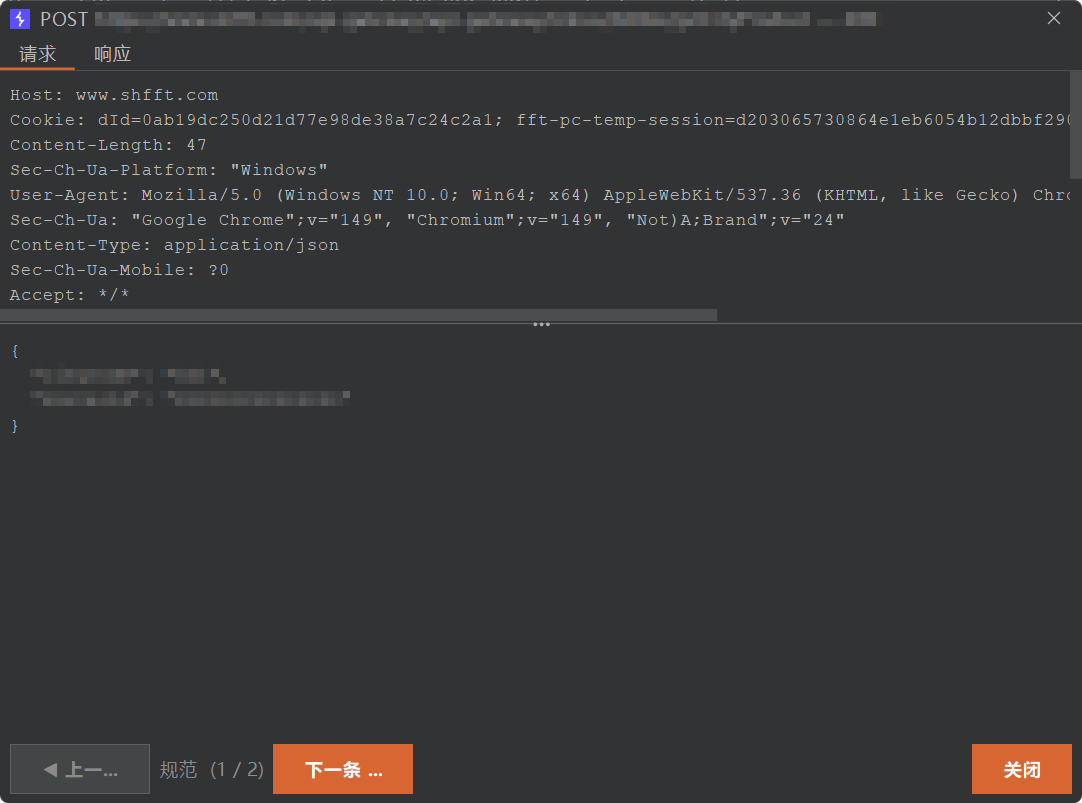
请求详情查看
可以直接在界面里查看单条请求的请求头、请求体和结构化内容。
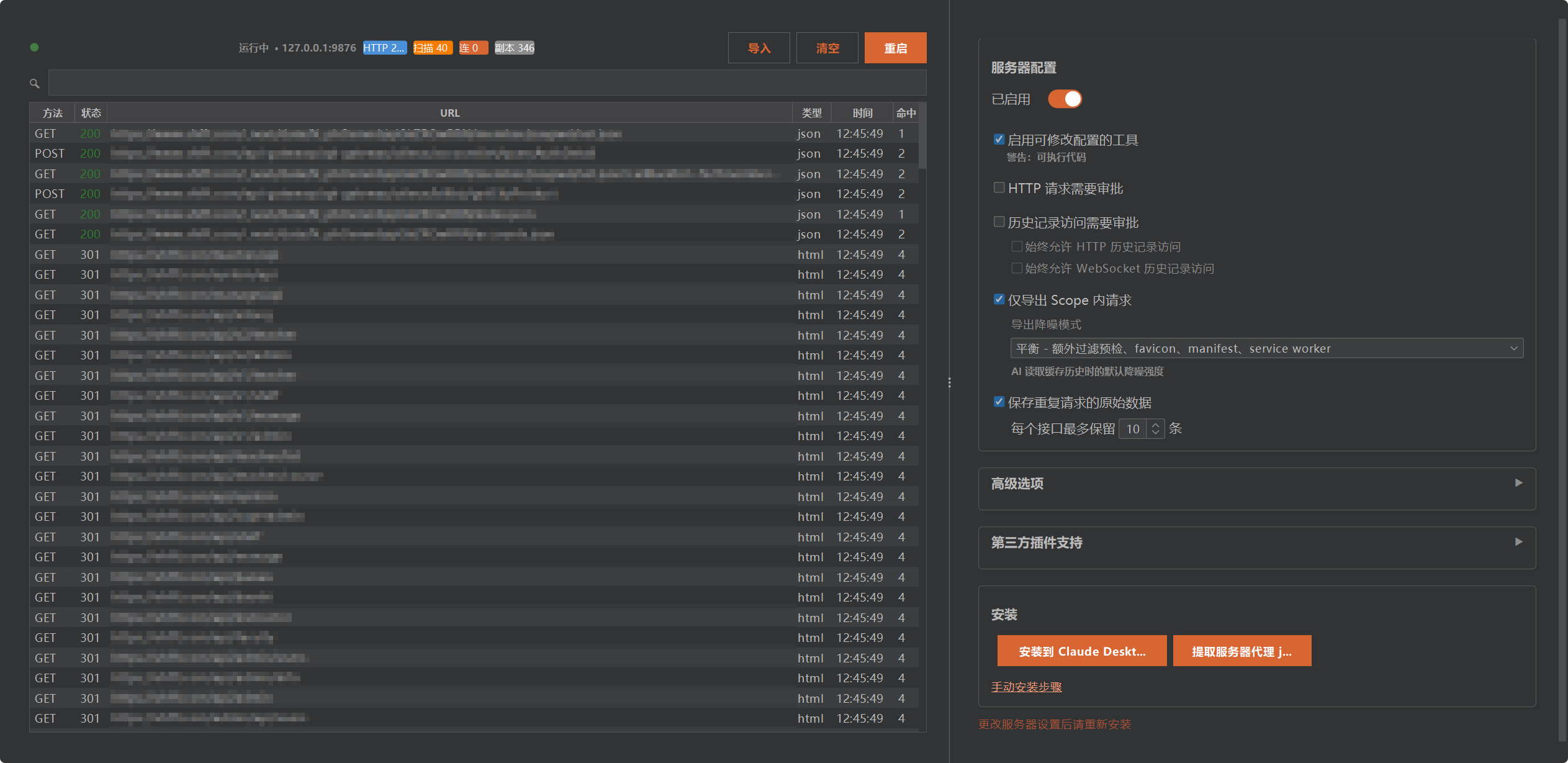
仪表板与服务配置
可以实时查看服务状态、缓存情况,并调整导出和审批行为。
常见使用场景
让 AI 查 Burp 历史
get_proxy_http_historyget_proxy_http_detailget_proxy_websocket_history
让 AI 做目标侦察
manage_scopeget_site_mapgraphql_introspectgraphql_list_typesgraphql_describe_type
让 AI 帮你分析请求差异
diff_proxy_responses
让 AI 发请求但不把 Burp 弄卡
send_http1_requestsend_http2_requestsubmit_taskget_task_result
MCP 工具重点速览
HTTP 与请求操作
send_http1_requestsend_http2_requestcreate_repeater_tabsend_to_intruder
代理历史与缓存
get_proxy_http_historyget_proxy_websocket_historylist_proxy_http_historyget_proxy_http_detailexporter_stats
范围、站点与扫描
manage_scopeget_site_mapstart_active_scan(Burp Pro)list_scanner_issuesget_scanner_issue_detail
GraphQL
graphql_introspectgraphql_list_typesgraphql_describe_typegraphql_query
差异分析
diff_proxy_responses
配置与辅助
manage_auto_approve_targetsset_task_execution_engine_stateset_proxy_intercept_stateclear_databaseget_burp_info
配置说明
| 选项 | 说明 | 默认值 |
|---|---|---|
| 服务器主机 | 监听地址 | 127.0.0.1 |
| 服务器端口 | 监听端口 | 9876 |
| 严格 localhost 模式 | WSL/远程环境需关闭 | 开启 |
| 启用保活心跳 | SSE 连接保活 | 开启 |
| 保活间隔 | 心跳间隔(秒) | 30s |
| 最大响应大小 | 单次响应上限(KB) | 100KB |
| HTTP 请求审批 | 发送 HTTP 前需确认 | 开启 |
| 历史记录访问审批 | 读取历史前需确认 | 开启 |
详细能力说明
SQLite 缓存层
- 代理 HTTP 历史和扫描问题自动缓存到本地 SQLite
- 支持分页查询、详情查看和按 ID 检索
- SHA-256 去重(
method + URL),5 分钟窗口合并 - 自动清理:10 万 HTTP 记录、1 万扫描问题
后台导出器
- 协程驱动后台轮询,默认每 5 秒同步一次
- 游标增量同步,只拉取新数据
- 支持仅导出 Scope 内请求
- 支持导出噪音过滤策略
异步任务系统
submit_task提交后台任务,立即返回 IDget_task_result轮询结果read_file/delete_file管理大响应文件- 适合大响应、长任务和低 token 压力场景
架构说明
+---------------------------------------------------+
| Burp Suite |
| +----------------------------------------------+ |
| | MCP Server Extension | |
| | +------------------+ +-------------------+ | |
| | | POST /mcp | | GET+POST /sse | | |
| | | (Streamable HTTP)| | (SSE 兼容模式) | | |
| | +------------------+ +-------------------+ | |
| | +-------------+ +-----------------------+ | |
| | | Exporter |->| SQLite Database | | |
| | | (后台同步) | | (本地缓存) | | |
| | +-------------+ +-----------------------+ | |
| +----------------------------------------------+ |
| ^ ^ |
| HTTP POST /mcp SSE GET /sse |
+----------+------------------+---------------------+
| |
+------+------+ +------+------+
| MCP Client | | MCP Client |
| (Claude等) | | (旧版/代理) |
+-------------+ +-------------+
构建命令
| 命令 | 说明 |
|---|---|
./gradlew embedProxyJar |
构建最终可分发 JAR(推荐) |
./gradlew test |
运行测试 |
./gradlew shadowJar |
仅构建主 JAR |
Burp Suite MCP Server -- Enhanced Edition
A Burp MCP server that is built for real workloads, not just demos.
This fork exists for one reason: the official server is hard to use in long-running, real penetration testing sessions.
Typical failure modes in the official build:
- AI clients disconnect repeatedly
- Burp slows down or freezes when history grows
- Large responses are painful to inspect
- Scanner results and cached data are not easy to work with
This fork fixes those issues at the architecture level.
Quick Start
Build
Requirements:
- Java 21+
jaravailable on your machine
git clone https://github.com/llc141525/burp-mcp-enhance.git
cd burp-mcp-enhance
./gradlew embedProxyJar
Artifact:
build/libs/burp-mcp-all.jar
Load Into Burp
- Open Burp Suite
- Go to
Extensions - Click
Add - Choose
Extension Type = Java - Select
build/libs/burp-mcp-all.jar - Enable the MCP server in Burp
Configure Your MCP Client
Recommended:
{
	"mcpServers": {
		"burp": {
			"type": "http",
			"url": "http://127.0.0.1:9876/mcp"
		}
	}
}
For stdio-only clients:
{
	"mcpServers": {
		"burp": {
			"command": "java",
			"args": [
				"-jar",
				"/path/to/mcp-proxy-all.jar",
				"--sse-url",
				"http://127.0.0.1:9876/sse"
			]
		}
	}
}
Why This Fork Matters
Streamable HTTP instead of fragile SSE-first behavior
The official server relies on SSE for a workload that behaves much more like request-response tooling than streaming UI updates. Under load, that tends to break.
This fork makes Streamable HTTP the primary path:
Official: SSE ----- keep alive ----- keep alive ----- drop
This fork: POST -> done  POST -> done  POST -> done
SQLite cache instead of live-querying Burp on every request
The official design asks Burp for data in real time on every query. That becomes painful once history grows.
This fork uses a background exporter plus SQLite cache:
Official: AI query -> Burp API (real-time) -> Burp freezes
This fork: AI query -> SQLite cache -> instant
                      ^
                 Background exporter
                      ^
                   Burp API
Key Capabilities
- Streamable HTTP MCP endpoint
- SSE compatibility mode
- SQLite-backed cached proxy/scanner history
- Background incremental exporter
- GraphQL introspection and schema caching
- Response diffing by history ID
- Scope management and site map queries
- Async task queue for large responses
- Chinese UI and built-in control dashboard
Screenshots
Request Detail Review
Inspect request headers and body content in a focused detail view.
Dashboard & Server Settings
Monitor server/cache state and adjust runtime behavior from the built-in dashboard.
Important Tools
HTTP
send_http1_requestsend_http2_requestcreate_repeater_tabsend_to_intruder
History & Cache
get_proxy_http_historyget_proxy_websocket_historylist_proxy_http_historyget_proxy_http_detailexporter_stats
Scope & Scanning
manage_scopeget_site_mapstart_active_scan
GraphQL
graphql_introspectgraphql_list_typesgraphql_describe_typegraphql_query
Analysis & Utilities
diff_proxy_responsesmanage_auto_approve_targetsget_burp_info
Build Commands
| Command | Description |
|---|---|
./gradlew embedProxyJar |
Build the distributable JAR |
./gradlew test |
Run tests |
./gradlew shadowJar |
Build the main JAR only |
No comments yet
Be the first to share your take.