
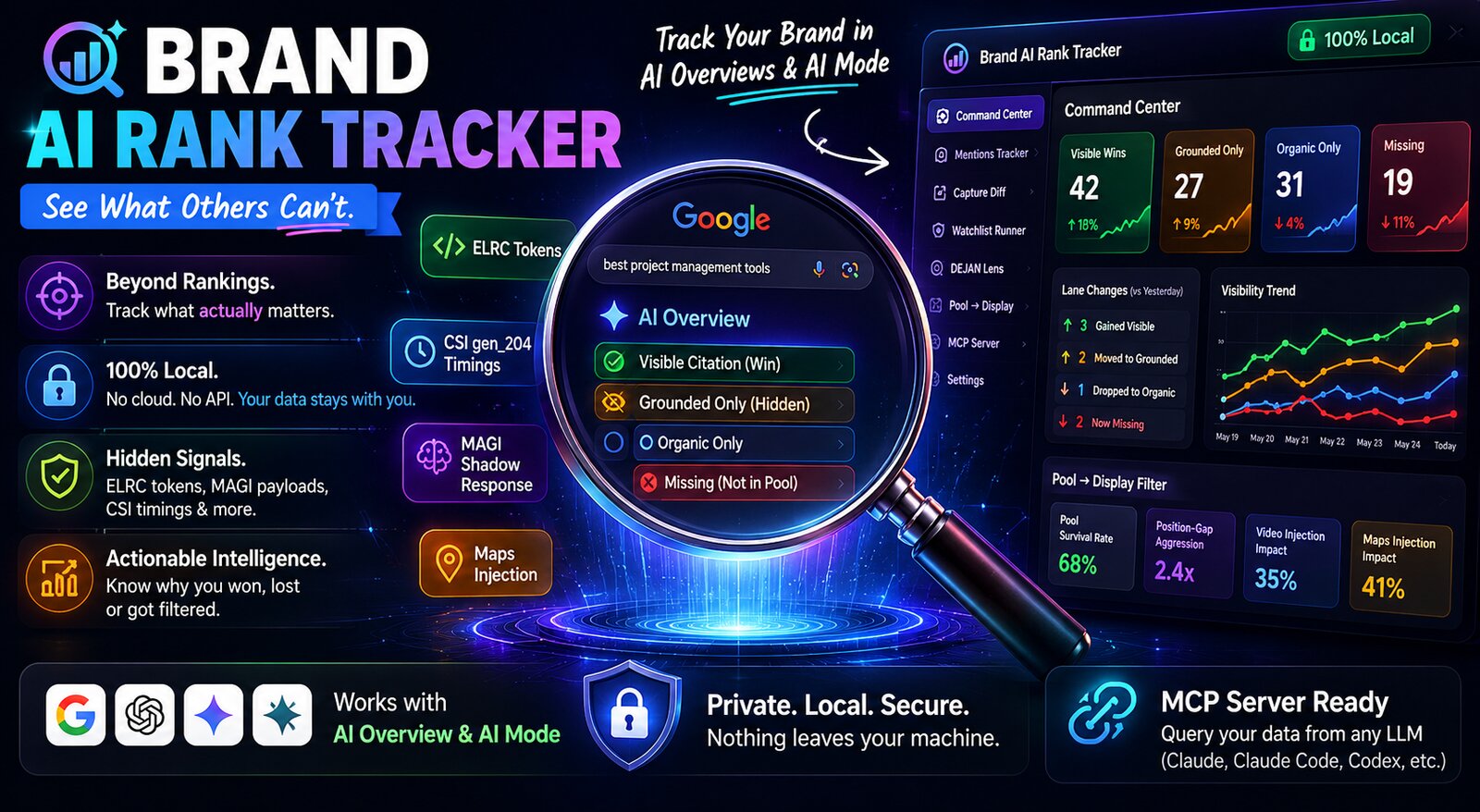
Brand AI Rank Tracker
The first open-source Chrome extension that tells you what Google's AI Overviews and AI Mode actually do with your brand — in real time, on your own browser, with your own data.





Reverse-engineering Google's AI black box, one capture at a time.
Why this exists
Every paid SEO tool (Semrush, Ahrefs, Sistrix, Similarweb) tells you your organic rank. None of them tell you the things that actually matter in 2026:
- Was your brand cited in the AI Overview?
- Was it grounded (used as a source) but hidden from view?
- Did you appear in the considered pool but get filtered out at display time?
- When you "lost visibility" — did Google drop you from the pool, or just from the panel?
- How fast does Google re-rank your sources between turn 1 and turn 2 of AI Mode?
Brand AI Rank Tracker answers all of these. It runs locally in your browser, captures every AIO + AIM response Google serves you, parses the hidden DOM signals (ELRC tokens, CSI timings, MAGI shadow responses, Maps injection), and builds you a private intelligence dashboard.
No cloud. No API key. No SaaS. No data leaves your machine.
Table of contents
- What it does
- Screenshots
- Install
- Quick start
- Feature deep-dive
- The "lane" model
- DEJAN Research Lens
- Response Forensics
- MCP bridge
- Privacy
- FAQ
- Roadmap
- License
What it does
Brand AI Rank Tracker watches every Google search you run and, when an AI Overview or AI Mode response appears, it captures the full structured payload:
| Surface | What it captures |
|---|---|
| AI Overview (AIO) | Citations, sidebar cards, inline links, grounding hosts, organic pool, MAGI payload, considered-but-not-shown sources, entities, products, places |
| AI Mode (AIM) | Same as AIO + fan-out queries, follow-ups, conversation chain, related queries, source carousel, knowledge graph |
| Hidden signals | ELRC tokens (10 types incl. data-sr-elrc for reranking), CSI gen_204 timings, Maps vertical injection, MAGI shadow responses |
| Outcome | Bucketed into one of four lanes: visible citation win / grounded only / organic only / missing |
Then it gives you:
- A popup with today's lane changes ("↑ 3 gained visible · ↓ 1 lost visible since yesterday")
- A Command Center dashboard with KPIs, mentions tracker, capture diff, and a watchlist runner
- A DEJAN Research Lens that compares published baselines against your own observed rank curve
- A Pool→Display filter card exposing domain survival rates, position-gap aggression, and video injection patterns
- MCP server so any LLM (Claude Code, Claude Desktop, Codex) can query your capture data directly
Screenshots
Drop your screenshots into
docs/screenshots/and they'll render here. Placeholder structure below — see docs/SCREENSHOT_GUIDE.md for the exact captures to grab.
| Popup — lane changes today | Command Center | Mentions Tracker with Lane Δ |
|---|---|---|
 |
 |
 |
| DEJAN Research Lens | Pool→Display Filter | Response Forensics |
|---|---|---|
 |
 |
 |
Install
1. Download
git clone https://github.com/vijaychauhanseo/brand-ai-rank-tracker.git
cd brand-ai-rank-tracker
Or download the latest release zip and unzip it.
2. Load into Chrome
- Open
chrome://extensions - Toggle Developer mode on (top right)
- Click Load unpacked
- Select the
brand-ai-rank-trackerfolder
The extension icon should appear in your toolbar. Pin it.
3. Configure your brand
Click the extension icon → Settings (gear). Set:
- Brand name — e.g.
Ahrefs - Primary domain — e.g.
ahrefs.com - Competitor domains — comma-separated list (e.g.
semrush.com, moz.com, similarweb.com)
That's it. Run a few Google searches with AI Overviews enabled, and your dashboard will start filling up.
Quick start
- Run a search. Open Google and search something your brand cares about — e.g.
best seo tools 2026orbacklink checker. If an AI Overview renders, the extension captures it silently. - Click the icon. You'll see today's lane changes and the latest capture.
- Click "View all". Opens the full Command Center dashboard.
- Set up a watchlist. In the dashboard → Brand Watchlist Runner, paste your tracked queries. The extension will run them on a schedule (daily/weekly) and log lane transitions.
Feature deep-dive
The "lane" model
Most SEO tools think binary: ranked or not ranked. AI search is four-dimensional. Every query/brand pair lands in exactly one lane:
| Lane | Meaning | What it tells you |
|---|---|---|
| 🟢 Visible citation win | Your brand appears as a clickable citation in the AIO/AIM panel | You won the panel. Click-eligible. |
| 🟡 Grounded only | Google used your page as a grounding source but didn't display it | You influenced the answer but lost the click |
| 🔵 Organic only | You rank in the 10 blue links but Google didn't consider you for AI | The AI passed you over |
| 🔴 Missing | Not in citations, not grounded, not in organic top 10 | True absence |
The popup banner aggregates today's transitions across all your tracked queries — "↑ 3 gained visible · ↓ 1 lost visible · 2 newly grounded · 4 other" — and lets you click through to the affected queries.
This is the foundation. Everything else builds on it.
DEJAN Research Lens
Inspired by Dan Petrovic's DEJAN.ai research on AI Overview source selection, but honest about which numbers are real vs published baselines.
- Real per-query data: organic rank, pool rank, shown rank, used-by-Google flag, selection rate
- Heuristic (clearly labelled): Keyword echo, Sentence echo, Self-ref flag (token-overlap, NOT Google attribution)
- Observed curve: when you have ≥5 captures at a given rank, the lens silently swaps DEJAN's published curve for your own observed curve with sample-size annotation
(n=47)
You can demo this live: "DEJAN published 28% shown at #1. My 1,132 captures show #1 shown at 34%, n=87." That's not theory — that's your data.
See docs/DEJAN_LENS.md for the full methodology.
Response Forensics
Per-capture intelligence pulled straight from the DOM that Google never meant you to read:
- ELRC tokens —
data-elrc,data-sr-elrc,data-rerank, etc. Surface session-level signals like reranking pass and SR reload between turns. - CSI timings — parses
/gen_204?rt=...beacons forsirt-aimc,sart-aimc,art,imn,irfi,irli. Real client-side render latency per response. - Maps injection — detects
/maps/vt?...categorical-search-results-injection, confirming geo-vertical insertion with KG entity attachment. - Shadow AIO — when MAGI payload is present but no AIO renders, surfaces as
aioStatus: magi_only. (Most tools throw this away. We count it.)
See docs/RESPONSE_FORENSICS.md.
Pool → Display filter intelligence
Three metrics no paid tool surfaces, inspired by the AIO/AIM research of Olivier de Segonzac:
- Domain survival leaderboard — per-domain pool→display rate. "Semrush: 87 pooled, 34 displayed, 39% survival."
- Position-gap aggression — average distance between consecutive displayed
positionvalues per capture. Higher = Gemini filtered out more candidates. - Video injection detection — flags YouTube/Vimeo cards displayed in citations without prior pool appearance. Confirms (or refutes) the "~95% video injection without pool entry" pattern against your data.
Capture diff
Pick any two captures of the same query (e.g. yesterday vs today, pre-update vs post-update) and see a structured diff:
- Lanes (yours and competitors)
- Citations added/removed
- Grounding sources changed
- Answer text token-diff
- Lane event annotations if a transition occurred between the two
Watchlist runner
Schedule queries to re-run automatically (daily / weekly / manual). Each run captures fresh, logs a lane_event_* record if anything changed, and bubbles changes up to the popup banner.
MCP bridge
The mcp_bridge.js script writes every capture to ~/.brand-ai/data.db via a native messaging host. A FastMCP server then exposes 5 tools to any MCP-aware client (Claude Code, Claude Desktop, Codex CLI):
list_projectsquery_rank_historyget_aio_citationsraw_sql(SELECT only)sync_status
This means you can ask Claude: "What's my 'backlink checker' rank history for the last 30 days, broken down by lane?" and it queries your local capture DB directly. No exports. No CSVs. No API.
Setup: see docs/MCP_SETUP.md.
Privacy
Everything stays on your machine.
- ✅ No external API calls
- ✅ No analytics, no telemetry, no phone-home
- ✅ All data in
chrome.storage.local+ optional local SQLite (~/.brand-ai/data.db) - ✅ Open source — read every line yourself
- ⚠️ Requires the
debuggerpermission to read CSI gen_204 beacons. You'll see Chrome's yellow "is debugging this browser" bar when active captures are running. That's expected — it's the price of seeing what Google sees.
Uninstall = chrome://extensions → Remove. Done. Nothing left behind except the optional ~/.brand-ai/ folder you can delete manually.
FAQ
Q: Does this work with Google AI Mode (the chat experience)? Yes. AIM captures include fan-out queries, follow-ups, conversation chain, related queries, and the source carousel. Same lane model.
Q: How is this different from Semrush AI Tracker / Ahrefs Brand Radar? Those tools poll a small set of queries from a cloud crawler. They miss session signals (reranking), can't see grounding, can't detect shadow MAGI responses, and can't run AI Mode. You're seeing the panel from your IP with your account state — closest possible to what Google serves your users.
Q: Won't this slow down my browsing?
No. Captures fire on document_end only for *.google.com and finish in <50ms. The expensive viewer dashboard is on-demand.
Q: Why the debugger permission?
To read /gen_204?rt=... beacons for CSI timing data. You can revoke it and most features still work — just no render-latency forensics.
Q: Can my team share captures? Not built-in — by design (privacy). Use the export buttons (JSON/CSV) and share files manually, or run the MCP server on a shared box.
Q: I see the brand mentioned in the AI Overview but the extension says "grounded only".
Lane detection uses citations / sidebar / inline links / external buttons vs your ownedDomains config. If your brand is referenced by name in the answer text but not linked, that's grounded only by design — the click goes elsewhere.
Roadmap
Open issues for any of these or send a PR:
- Acknowledge UI for lane events (dismiss / mute)
- Diff View integration showing lane events between two captures
- Google Search Console integration (OAuth + CSV import)
- Per-query click history join with GSC data
- Multi-brand mode (track several brands in one install)
- Bing / Perplexity / ChatGPT search capture parity
- Hosted "team dashboard" (opt-in, self-hosted)
Built by
Vijay Chauhan — SEO practitioner, AI search reverse-engineering nerd.
- Twitter / X: @vijaychauhanseo
- GitHub: @vijaychauhanseo
If this tool helped you, a ⭐ on the repo is the entire compensation plan.
License
MIT. Use it, fork it, ship a SaaS on top of it — just don't pretend you wrote it.
Built for SEOs who got tired of waiting for Ahrefs to ship an AIO feature.
No comments yet
Be the first to share your take.