
BetterPrompt
AI coding session analysis that runs entirely inside your AI coding tool. No API keys. No server. Just install the plugin and ask for your report.



How it works: BetterPrompt is a Claude Code plugin. It scans your local session logs, extracts metrics deterministically, then uses Claude (the model you're already paying for) to analyze your collaboration patterns across 5 domains: thinking quality, communication, learning behavior, context efficiency, and session outcomes. Results are assembled into a canonical local run and served as a standalone HTML report on localhost.
No separate server. No Gemini API key. No data leaves your machine.
Supported AI coding tools:
| Tool | Session Source | Format |
|---|---|---|
| Claude Code | ~/.claude/projects/ |
JSONL |
Screenshots
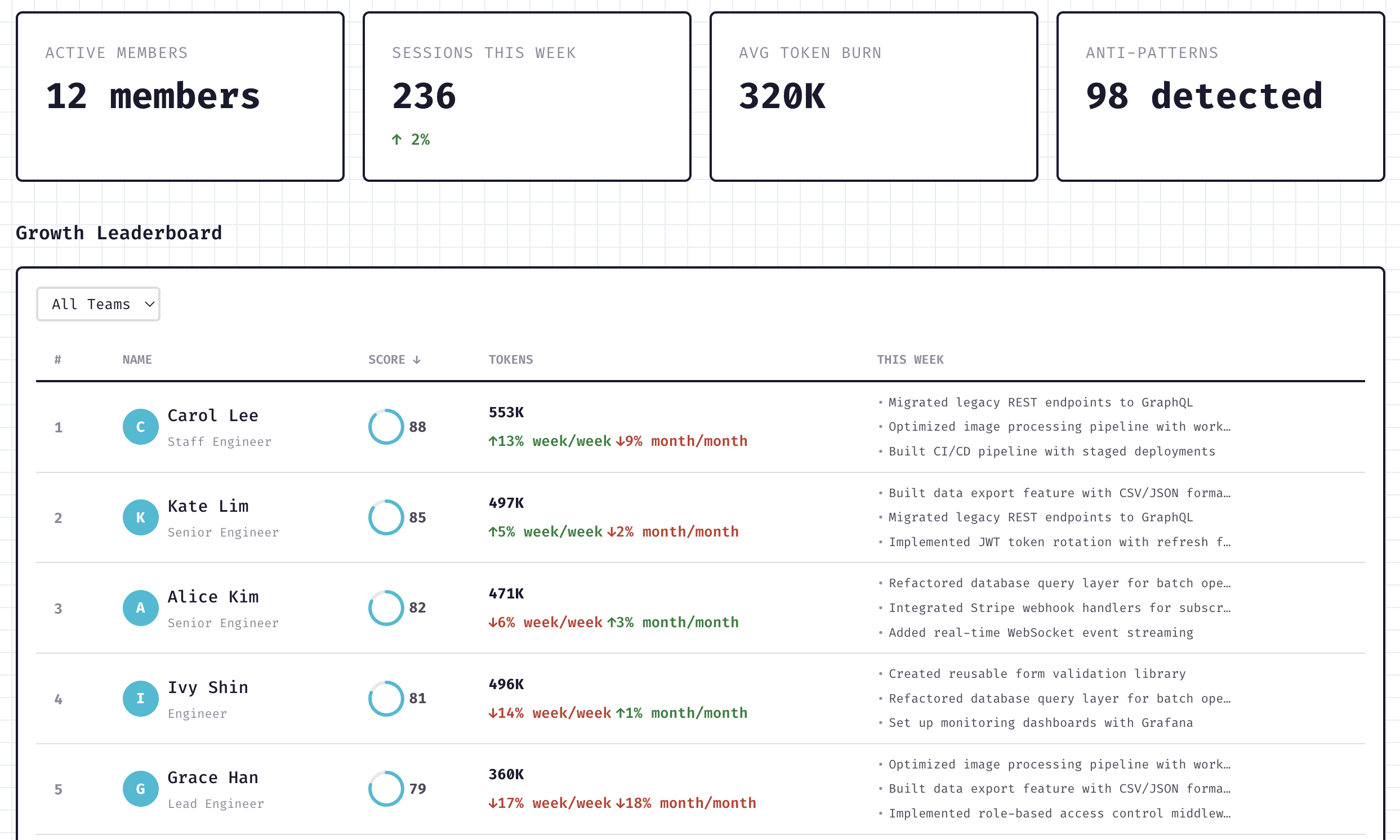
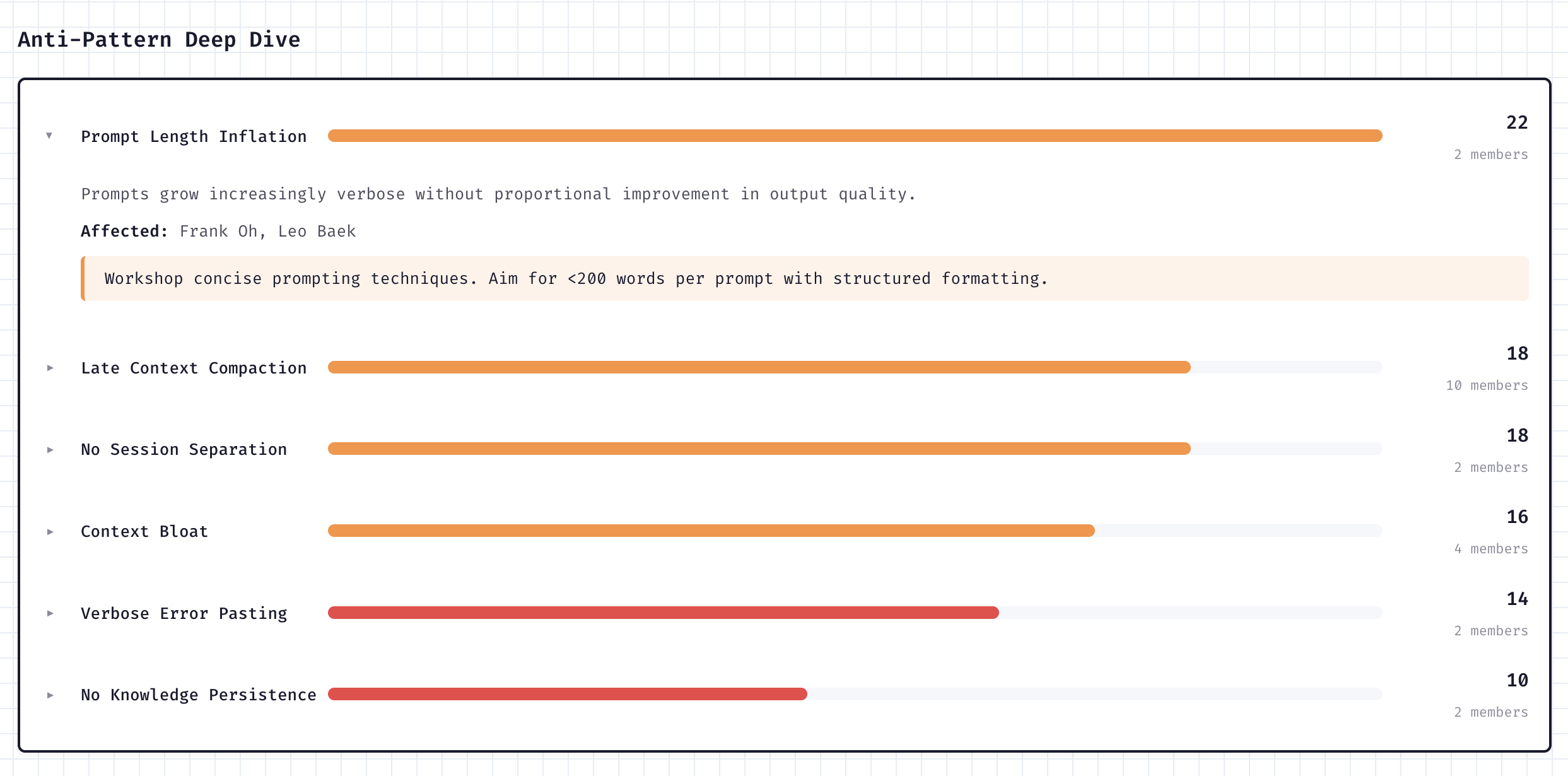
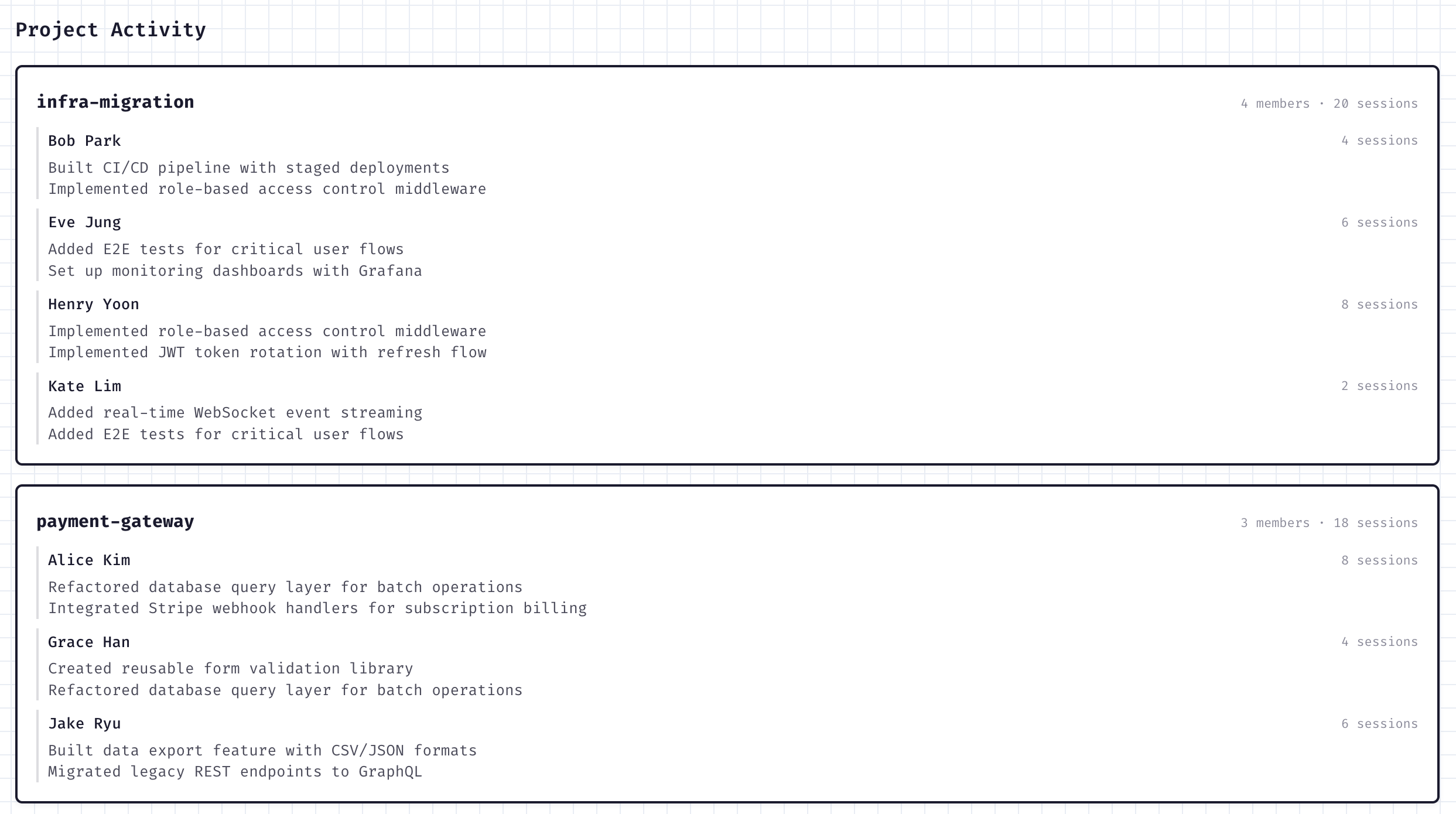
| Team Dashboard | Growth Areas | Project Breakdown |
|---|---|---|
 |
 |
 |
Quick Start (Plugin)
The recommended way to use BetterPrompt. Zero configuration required.
1. Install the plugin
In Claude Code:
/plugin marketplace add onlycastle/BetterPrompt
/plugin install betterprompt@betterprompt
That's it. The MCP server, analysis skills, and post-session hooks are registered automatically.
2. Reload plugins
After installing, reload plugins so Claude Code picks up the new MCP server and skills:
/reload-plugins
3. First-time setup
On your first Claude Code session after installation, the bp setup wizard runs automatically. It verifies your installation, optionally adds a command reference to your CLAUDE.md, and points you toward your first analysis. You can also invoke it manually anytime:
bp setup
4. Run your analysis
In any Claude Code session, run:
bp analyze
The plugin orchestrates the full pipeline -- scan sessions, extract data, analyze each domain, classify your type, and serve a report at http://localhost:3456.
If autoAnalyze is enabled, BetterPrompt can queue an analysis at session end and inject startup context in the next Claude Code session so the queued run resumes automatically.
Available Commands
| Command | Description |
|---|---|
bp analyze |
Run the full analysis pipeline: scan, extract, analyze 5 domains, classify type, generate report |
summarize sessions |
Generate a concise 1-line summary for each analyzed session |
summarize projects |
Generate project-level summaries from session data |
generate weekly insights |
Create a "This Week" narrative with stats and highlights |
classify type |
Classify your developer type into the 5x3 matrix with narrative |
translate report |
Translate report output for non-English sessions |
Troubleshooting
If the plugin isn't working, run the verification script:
bash scripts/verify-plugin.sh
This checks all 8 components (build artifacts, native dependencies, MCP config, plugin registration, server startup, session files) and reports what's broken with fix instructions.
Common issues:
| Problem | Fix |
|---|---|
better-sqlite3 won't compile |
Install build tools: xcode-select --install (macOS) or sudo apt install build-essential python3 (Linux) |
| MCP server not starting | Run /reload-plugins in Claude Code, or restart Claude Code |
| Rate limits during analysis | Reduce scope: select fewer projects in bp setup, or run analysis during off-peak hours |
Uninstalling
In Claude Code:
/plugin uninstall betterprompt@betterprompt
/plugin marketplace remove betterprompt
These commands deregister the MCP server, hooks, and skills. To also remove all local data, caches, and plugin registry entries:
# Analysis data, reports, databases, and logs
rm -rf ~/.betterprompt

# Plugin cache and marketplace directories
rm -rf ~/.claude/plugins/cache/betterprompt
rm -rf ~/.claude/plugins/marketplaces/betterprompt
If you want a fully clean slate (e.g., the plugin commands didn't fully clean up), also check these files and remove any betterprompt entries:
| File | What to remove |
|---|---|
~/.claude/settings.json |
enabledPlugins["betterprompt@betterprompt"] and plugins.betterprompt section |
~/.claude/plugins/installed_plugins.json |
betterprompt@betterprompt entry |
~/.claude/plugins/known_marketplaces.json |
betterprompt entry |
Project-level .claude/settings.local.json |
Any betterprompt entries |
Optional: Dashboard Server
If you want persistence, sharing, or enterprise dashboards, run the Next.js server alongside the plugin. Analysis itself still runs inside Claude Code; the server is for auth, storage, and dashboards.
git clone https://github.com/onlycastle/BetterPrompt.git
cd BetterPrompt
npm install
npm run dev
When you want a local plugin run stored on the server, use the plugin's sync_to_team MCP tool or POST /api/analysis/sync.
For a shared dashboard, set the plugin's serverUrl setting to your BetterPrompt server or pass serverUrl directly to sync_to_team.
Team Manager Guide
For engineering managers who want to track team-wide AI collaboration patterns. Requires the web server, but team members still run analysis through the Claude Code plugin.
1. Set up your organization
Start the server (npm run dev), then navigate to /dashboard/enterprise. First-time admin users are guided through a 3-step setup wizard:
- Create organization - set your org name (URL slug auto-generates)
- Create first team - name your team (optional, can skip)
- Share server URL - the wizard shows the dashboard URL for your team members
2. Invite team members
Go to /dashboard/enterprise/members and click Invite Member. Add members by email and assign a role:
| Role | Permissions |
|---|---|
owner |
Full access (org creator) |
admin |
Invite/edit/remove members, create/delete teams |
member |
View dashboards |
viewer |
Read-only access |
3. Team members run their analyses
Each team member needs:
- The BetterPrompt Claude Code plugin installed
- Your shared BetterPrompt server URL
After running a local analysis via the plugin, members use the plugin's serverUrl setting or pass serverUrl to sync_to_team to upload the canonical run to the shared dashboard.
4. Monitor your team
The enterprise dashboard at /dashboard/enterprise provides:
- Overview - active members, weekly sessions, token usage, anti-pattern counts
- Growth Leaderboard - members ranked by score improvement
- Team Detail (
/dashboard/enterprise/team/{teamId}) - radar charts, type distribution, skill gaps - Member Detail (
/dashboard/enterprise/members/{memberId}) - individual score history, anti-patterns, project activity - KPT Retrospective - aggregated Keep/Problem/Try patterns across the team
- Settings (
/dashboard/enterprise/settings) - org info and server URL
Plugin (packages/plugin)
Claude Code plugin with local-first analysis. Provides CLI commands for the full pipeline and analysis skills that guide Claude through each domain.
CLI Commands (packages/plugin/cli/commands/):
| Command | Description |
|---|---|
scan_sessions |
Discover and cache supported local session logs from Claude Code |
extract_data |
Run deterministic Phase 1 extraction (metrics, scores) |
save_domain_results |
Store domain analysis results (called by analysis skills) |
classify_developer_type |
Classify into the 5x3 type matrix |
generate_report |
Generate HTML report and serve on localhost |
sync_to_team |
Optional: sync results to a team server |
Analysis Skills (packages/plugin/skills/): Markdown files containing PTCF analysis frameworks. Claude reads these as instructions and calls save_domain_results with structured findings. Domains: thinking quality, communication patterns, learning behavior, context efficiency, session outcomes, plus a content writer for narrative synthesis.
cd packages/plugin
npm run build
Web Server (root)
Next.js app with the team dashboard UI, auth, persistence, and sync routes. Required only for team/enterprise features or the web-based dashboard.
npm run dev        # Dev server on port 3000
npm run build      # Production build
npm run typecheck  # Type-check without emitting
Testing
Tests use Vitest for unit/integration and Playwright for E2E.
npm test                # Unit tests
npm run test:watch      # Watch mode
npm run test:coverage   # Coverage report (threshold: 50%)
npm run test:integration # Full pipeline integration test
E2E tests (requires dev server or auto-starts one):
npx playwright test --config tests/e2e/playwright.config.ts
Test structure:
tests/
  unit/              # Models, parser, plugin parity, search agent, team/enterprise
  e2e/               # Playwright browser tests (report rendering, scroll nav)
  integration.test.ts # Full pipeline: session parsing -> multi-phase analysis
  fixtures/          # Real session logs and evaluation data
Project Structure
packages/
  plugin/                   Claude Code plugin (primary interface)
    mcp/                    MCP server + tool implementations
      tools/                Individual MCP tool modules
    skills/                 Analysis skill files (markdown)
    lib/
      core/                 Standalone extraction, scoring, type mapping
      report-template.ts    HTML report generator
      results-db.ts         Local SQLite storage
    hooks/                  Post-session analysis trigger
app/                        Next.js app router (team dashboard)
src/
  components/               React components
    dashboard/              Dashboard layout and navigation
    enterprise/             Team and org-level views
    landing/                Landing page sections
    personal/               Individual report tabs and insights
    report/                 Shared report UI
    ui/                     Reusable UI primitives
  lib/
    transformers/            Data transformation utilities
    domain/                 Domain models (config, knowledge, user, sharing)
    enterprise/             Team aggregation and enterprise features
    local/                  SQLite persistence (auth, reports, teams)
    models/                 Zod schemas and TypeScript types
    parser/                 JSONL session log parser
    search-agent/           Knowledge search and curation engine
  views/                    Page-level view components
tests/                      Unit, integration, and E2E test suites
docs/                       Architecture and deployment documentation
Documentation
- Architecture - system design and pipeline overview
- Plugin - plugin setup and MCP tools
- User Flows - employee and manager workflows
- Contributing
License
MIT - see LICENSE.
No comments yet
Be the first to share your take.