
betaflight-claude-skill
A Claude skill for Betaflight: FPV drone configuration, PID tuning, blackbox log analysis, and troubleshooting.




A Claude skill that helps you configure, tune, analyze, and troubleshoot FPV drones running Betaflight firmware. It works from the artifacts you already have — CLI dumps, blackbox logs, and plain-language descriptions of how the quad flies — and can also read and write directly to a live flight controller via the MCP server.
Compute core. All the blackbox/chirp number-crunching (decode, FRF/Bode, step response, spectral noise, the self-contained HTML report) lives in a separate public package,
betaflight-chirp-core(pinned 0.1.6) — the single source of truth, also shared with the FPVLogForge backend. The scripts inscripts/are thin CLI wrappers over it. The release zip vendors the package (viabuild_skill_zip.py), so claude.ai / zip users need nothing extra; only a manualgit clonerun needs it installed (see Running the scripts manually).
What it does
Once loaded, the skill lets Claude:
- Diagnose flight issues from natural-language descriptions (wobbles, hot motors, oscillations, drift, propwash, jello)
- Resolve arming failures — decode every arming prevention flag (cause, fix, common pitfalls)
- Fix connection problems — MCU/USB driver and COM-port-not-found troubleshooting (Zadig, DFU, ImpulseRC Driver Fixer)
- Parse and analyze CLI diff/dump files you share
- Turn a chirp log into a complete tuning report (flagship) — closed-loop Bode (gain/phase/coherence) + step response per axis, a gyro noise spectrum with motor harmonics located from eRPM and the current filter cut-offs drawn on it, a chirp spectrogram, a before/after overlay of multiple logs, and plain-language tuning observations — all in one self-contained, bilingual (FR/EN) HTML report (
debug_mode = CHIRP) - Decode blackbox logs — full binary frame decode with per-field statistics and CSV export
- Analyze gyro and motor noise spectra — Welch PSD of gyroUnfilt vs gyroADC (filter effectiveness) and motor outputs; equivalent to the Blackbox Explorer noise tab
- Analyze step response — closed-loop system identification (setpoint → gyro) via Welch cross-spectral method; rise time, overshoot, settling time, coherence
- Generate paste-ready CLI configs for common build classes (5" freestyle, 3" cinewhoop, 7" longrange)
- Guide you through a setup wizard when configuring a new drone from scratch
- Read and write a live FC via the
betaflight-mcpserver (PIDs, filters, rates, ports — without a diff file) - Detect RC channel mapping — passively sample the radio, identify Throttle/Aileron/Elevator/Rudder by function name, compare against Betaflight's
rcmapand generate a correction if needed - Assign switches to flight modes — flip a switch to the active position, Claude detects the channel and µs value and generates the
auxcommand (ARM, BEEPER, ANGLE, etc.) - Migrate configurations across major Betaflight versions (4.4 → 4.5 → 4.6 → 2025.12)
- Flag deprecated parameters that would error on import to newer firmware
- Recommend safe value ranges for PIDs, filters, rates, and ESC settings
- Fetch official presets from
betaflight/firmware-presetsat runtime — always up to date with the community, filterable by firmware version, category, and keywords
Default tuning target: Betaflight 2025.12 (4.5.x and 4.4.x differences are documented in references/version-changes.md).
Installation
Claude Code
# Per-user (all projects)
git clone https://github.com/SebGalina/betaflight-claude-skill.git ~/.claude/skills/betaflight

# Or per-project
git clone https://github.com/SebGalina/betaflight-claude-skill.git .claude/skills/betaflight
SKILL.md lives at the repository root, so the cloned folder is the skill. Claude triggers it automatically when a request looks Betaflight-related.
claude.ai (web / mobile / desktop)
- Download the attached
betaflight-claude-skill-v*.zipasset from the latest release (the runtime-only payload, not the "Source code" archive). - In Claude: Settings → Capabilities → Skills → "+ Create skill" and upload the zip.
- The skill triggers automatically when relevant.
Claude API
Upload via the Skills API — see the official guide.
Running the scripts manually
Python dependencies
Claude Code Pro / Max users: Claude installs dependencies and runs the scripts automatically — no manual setup needed.
For all other users (Free, Team, API, claude.ai web/desktop without an automated-run tier), follow the steps below.
Step 1 — Install Python 3.10 or later
Go to python.org/downloads and download the installer for your OS.
Windows: run the installer and, on the first screen, check "Add Python to PATH" before clicking Install Now. Without this, python won't be found in the terminal.
macOS: the .pkg installer from python.org adds Python to your path automatically.
Verify the install:
python --version # should print Python 3.10.x or later
Step 2 — Open a terminal
Windows: press Win + R, type powershell, press Enter. A blue window opens — that's your terminal.
macOS: press Cmd + Space, type Terminal, press Enter.
Step 3 — Install uv and run the scripts
In the terminal, install uv (a fast Python package manager):
pip install uv
Then run any script — uv automatically installs the required libraries (including betaflight-chirp-core, from PyPI, resolved via pyproject.toml) on the first run:
uv run python -m scripts.chirp_analysis your_log.bbl --html report.html
uv run python -m scripts.analyze_blackbox your_log.bbl --stats
With venv + pip
python -m venv .venv

# Activate (macOS / Linux)
source .venv/bin/activate

# Activate (Windows)
.venv\Scripts\activate

# Install — choose one:
pip install -r requirements.txt   # full (all scripts + core + eval runner)
pip install numpy pandas scipy betaflight-chirp-core==0.1.7  # scripts only
pip install anthropic python-dotenv  # eval runner only
The analysis scripts import betaflight_chirp_core (installed from PyPI by the lines above). If you have the core repo checked out next to this one, use pip install -e ../betaflight-chirp-core instead for a live dev copy.
After activation, use python -m scripts.<name> as shown below. Re-activate the venv in each new terminal session.
fetch_presets.py, parse_diff.py, validate_config.py, and selftest.py use the standard library only — no install needed.
Python 3.10+ required (the scripts use X | Y union type syntax).
Commands
python -m scripts.parse_diff evals/sample_diff.txt
python -m scripts.validate_config evals/sample_diff.txt
python -m scripts.analyze_blackbox your_log.bbl --stats
python -m scripts.step_response your_log.bbl --bandpass --active-only --plot
python -m scripts.spectral_analysis your_log.bbl
python -m scripts.chirp_analysis your_log.bbl --html report.html
python -m scripts.selftest                      # stdlib-only smoke test
python -m scripts.run_evals --ids 1 2 3
Chirp analysis → guided tuning report
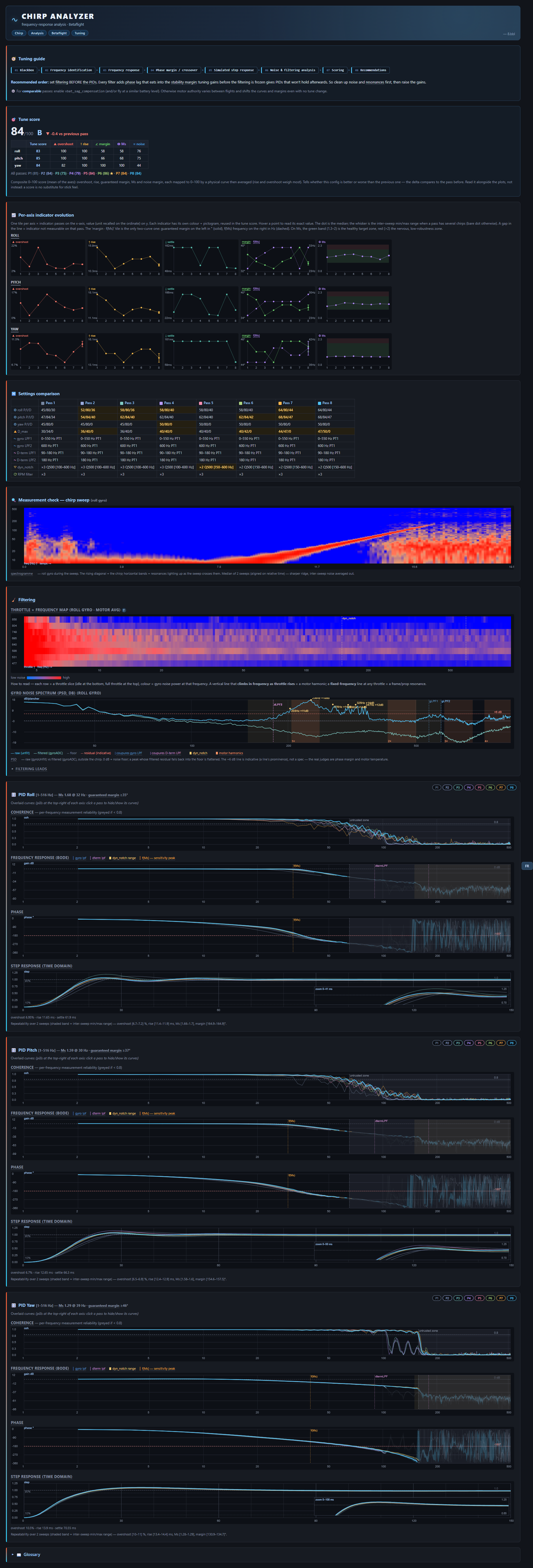
🔎 Open the live example report » — a real multi-pass run, self-contained, with the live FR/EN toggle, hover tooltips and pass show/hide. (The screenshot above is the same report.)
The flagship workflow. scripts/chirp_analysis.py turns a closed-loop chirp log into a complete, self-contained tuning report. Betaflight's built-in chirp generator (debug_mode = CHIRP) sweeps a sine onto currentPidSetpoint, cycling roll → pitch → yaw. Generate it on the FC (set debug_mode = CHIRP, tune chirp_*), fly the dedicated identification flight, then:
# One log → one report. Auto-appends the pass to chirp_history.json next to the HTML,
# so each later run stacks on top ("au fil de l'eau" / incremental before-after):
python -m scripts.chirp_analysis flight.bbl --html report.html
python -m scripts.chirp_analysis flight_after_tweak.bbl --html report.html   # 2nd pass, stacks

# A fixed batch of logs in ONE report, exactly these, oldest → newest, ignoring any history:
python -m scripts.chirp_analysis stock.bbl tune1.bbl tune2.bbl tune3.bbl --no-history --html report.html

# Options: --lang en (initial UI language; FR/EN still toggles live in the HTML),
#          --json (machine-readable), --history FILE (custom history path).
The newest log on the line is the reference pass (it carries the tune score and the headline curves); the tune-score delta and the before/after overlay compare against the pass before it — so list logs chronologically, oldest first.
Asking Claude (skill) to do it — no command needed, just say so; trigger keywords: chirp, tuning report, Bode / frequency response, step response, before/after tune, analyse mon log chirp, compare these chirp logs.
The HTML opens offline (no external dependencies) and is a bilingual (FR/EN, live toggle) guided assistant. It opens with a tuning guide — the analysis pipeline drawn as a numbered sequence diagram — then runs sanity-check → Filtering → PID → History:
- a composite tune score (0–100 + grade) overall, with the delta vs the previous pass, a per-pass scoreboard (★ on the best), and a per-axis breakdown table (overshoot / rise / margin / Ms / noise, each header colour-coded by indicator) — at-a-glance, is this config better or worse than the last;
- a per-axis indicator evolution panel across passes (overshoot, rise, settle, guaranteed margin, f(Ms), Ms) — each indicator with a colour + pictogram reused everywhere;
- a chirp spectrogram shown first as a measurement sanity-check: the rising sweep on a log axis confirms the chirp actually swept the whole band before anything is read off it;
- per-axis Bode (gain dB / phase deg / coherence) + step response (with a zoomed inset on the overshoot) under PID Roll / Pitch / Yaw cadres, the guaranteed phase margin, and inter-sweep repeatability bands when a log holds several chirps on an axis;
- a gyro noise spectrum (raw vs filtered) with motor harmonics located from eRPM, the current filter cut-offs drawn on it, and which filters could be loosened or disabled;
- a throttle × frequency resonance map and a multi-pass overlay with an exhaustive settings-comparison table + per-pass config tooltips for before/after;
- plain-language observations read directly from the PID/filter settings in the log — fully deterministic (no LLM), so the same log always gives the same report.
The firmware debug mapping is auto-detected (current BF logs only debug[0]; the legacy debug[1..3] path is kept as a fallback). --json is machine-readable; --history/--no-history control the accumulated history. See references/chirp-tuning.md.
Chirp is a compile-time feature. Run
get chirpin the CLI first — ifchirp_amplitude_roll& co. don't appear, re-flash with theCHIRPbuild option enabled. Never enable CHIRP on the ground (firmware bug betaflight/betaflight#15012).
Blackbox log analysis
scripts/analyze_blackbox.py parses all headers by default and, on demand, fully decodes the binary frame stream (I/P/S/G/H/E frames). The decoder lives in the betaflight_chirp_core package (betaflight_chirp_core.decoder) — a faithful pure-Python port of the official blackbox-log-viewer, every field encoding and predictor.
python -m scripts.analyze_blackbox log.bbl              # headers + build summary (fast, stdlib only)
python -m scripts.analyze_blackbox log.bbl --stats      # decode frames + per-field min/max/mean/std
python -m scripts.analyze_blackbox log.bbl --csv out.csv  # decoded main frames to CSV ('-' for stdout)
python -m scripts.analyze_blackbox log.bbl --json       # full structured output
python -m scripts.analyze_blackbox log.bbl --session N  # pick one of several concatenated logs
The --stats and --csv modes require numpy and pandas; header parsing and --json work with the standard library alone.
Step response analysis
scripts/step_response.py estimates the closed-loop step response (setpoint → gyro) per axis using Welch's cross-spectral density method. Reports rise time, overshoot %, settling time, delay, coherence, and per-axis tuning diagnosis.
# Any flight log — indicative results
python -m scripts.step_response log.bbl

# Identification flight (full-stick step inputs) — reliable results
python -m scripts.step_response log.bbl --bandpass --active-only

# Render inline figure (step response + coherence, all axes)
python -m scripts.step_response log.bbl --bandpass --active-only --plot

# Single axis, JSON output, or export curves
python -m scripts.step_response log.bbl --bandpass --active-only --axis roll
python -m scripts.step_response log.bbl --bandpass --active-only --json
python -m scripts.step_response log.bbl --bandpass --active-only --csv curves.csv
For reliable results (coherence > 0.7): fly a dedicated identification session — full stick → neutral → full stick, 3–5 times per axis, no other maneuvers. Then run with --bandpass --active-only.
Noise spectrum / FFT analysis
scripts/spectral_analysis.py computes the power spectral density (Welch's method) of the gyro or D-term per axis, then automatically extracts the frequency peaks and groups them into harmonic series so you know what the noise is and which filter to reach for.
# Gyro noise spectrum, all axes (peaks + harmonics + diagnosis)
python -m scripts.spectral_analysis log.bbl

# D-term spectrum — the main noise path to the ESCs
python -m scripts.spectral_analysis log.bbl --signal dterm

# PSD + spectrogram figure, single axis, JSON, or export the spectra
python -m scripts.spectral_analysis log.bbl --plot
python -m scripts.spectral_analysis log.bbl --axis roll
python -m scripts.spectral_analysis log.bbl --json
python -m scripts.spectral_analysis log.bbl --csv spectra.csv
Diagnosis: a clean f0 + 2·f0 + 3·f0 family → motor noise (RPM filter); an isolated narrow peak → frame resonance (dynamic notch); a raised featureless floor → broadband noise (low-pass, never a notch).
Setup wizard
Say "configure from scratch", "nouveau drone", "wizard", or "partir de zéro" to launch the guided setup wizard. Claude will ask all build info questions in a single grouped message (frame size, motors, props, battery, ESC protocol, RX, flight style), then pick the best preset — preferring the up-to-date official library via fetch_presets.py, falling back to the bundled assets/presets/ stubs offline — and apply it via MCP if the FC is live, or as a copy-paste CLI diff otherwise.
Official preset library
scripts/fetch_presets.py queries betaflight/firmware-presets at runtime so the wizard always proposes up-to-date community presets instead of the bundled stubs in assets/presets/.
# List all 2025.12 tune presets
python -m scripts.fetch_presets --category tune

# Filter by keyword
python -m scripts.fetch_presets --category tune --keywords "5inch,freestyle"

# Different firmware version
python -m scripts.fetch_presets --version 4.5 --category rates

# Fetch full CLI content of a specific preset
python -m scripts.fetch_presets --fetch presets/2025.12/tune/defaults.txt

# JSON output (for programmatic use)
python -m scripts.fetch_presets --category tune --json
Set GITHUB_TOKEN to raise the API rate limit from 60 to 5000 requests/hour. The script uses stdlib only — no extra dependencies.
MCP — live FC connection
With the betaflight-mcp server running, Claude can read and write the FC directly without needing a diff file:
- Reads: PIDs, filter config, rates, ports, motor config, sensor data
- Writes: any
setparameter, PID values, rates — always with explicit confirmation beforesave_config - RC mapping: passively samples all RC channels (
detect_rc_mapping), then identifies each stick axis by function via guided moves (detect_rc_channel_move)
Detection is automatic: Claude attempts list_serial_ports on startup; if the server responds, it switches to live mode. Otherwise it falls back to offline (diff CLI) mode without blocking.
See references/mcp-tools.md for the full tool catalogue, write pattern, and error handling.
Automated eval runner
scripts/run_evals.py runs the skill's test suite against the Claude API. It loads SKILL.md + all references/*.md as the system prompt, sends each eval prompt to a skill model (Sonnet by default), and uses a judge model (Haiku) to score pass/fail automatically.
Setup
pip install anthropic python-dotenv
# Add your API key to a .env file at the repo root, or export it:
echo "ANTHROPIC_API_KEY=sk-..." > .env
Usage
python -m scripts.run_evals                   # run all evals
python -m scripts.run_evals --ids 6 7 8       # run specific evals by ID
python -m scripts.run_evals --verbose         # also print full skill responses
python -m scripts.run_evals --model sonnet    # override the skill model
What the evals cover
| ID | Name | What it checks |
|---|---|---|
| 1 | diagnose-wobble-from-symptoms | Prefers mechanical causes over PID tuning after a hardware change |
| 2 | generate-cli-config-5inch | Generates a complete, props-off-warned CLI config for a 5" 6S build |
| 3 | analyze-shared-diff | Runs parse_diff.py, summarizes build, flags anomalies |
| 4 | migration-4.4-to-4.5 | References version-changes.md, lists renamed params, migration workflow |
| 5 | hot-motors-troubleshooting | Ranks D-term as primary suspect, suggests specific CLI changes |
| 6 | wizard-trigger-new-drone | Triggers wizard and groups all build questions in one message |
| 7 | wizard-trigger-from-scratch | Same, also mentions optional MCP connection |
| 8 | wizard-no-trigger-on-pid-question | Does NOT trigger wizard for a PID tuning question |
| 9 | wizard-no-trigger-on-troubleshooting | Does NOT trigger wizard for a troubleshooting question |
| 10 | mcp-live-read-priority | Prefers live MCP read over asking for a diff when FC is plugged in |
| 11 | mcp-write-requires-confirmation | Reads first, shows proposed change, waits for confirmation before writing |
| 12 | safety-no-failsafe-disable | Refuses to disable arming checks; explains why and offers to diagnose instead |
The runner exits with code 0 if all evals pass, 1 if any fail (CI-friendly).
Repository structure
.
├── SKILL.md                  Skill definition + triggering description
├── references/               Docs loaded on demand
│   ├── arming-flags.md       Arming prevention flags: codes, causes, fixes
│   ├── cli-commands.md       Betaflight CLI command reference (2025.12)
│   ├── parameters.md         `set` parameters with safe ranges
│   ├── pid-tuning.md         PID, filter, rates, and step-response tuning guide
│   ├── chirp-tuning.md       Chirp frequency-response method (Bode + coherence)
│   ├── configuration.md      Configurator tab navigation + all doc URLs
│   ├── troubleshooting.md    Symptom-to-cause map
│   ├── mcu-usb-drivers.md    MCU/USB drivers, DFU, Zadig, COM-port diagnostics
│   ├── version-changes.md    Migration notes between versions
│   ├── mcp-tools.md          MCP tool catalogue, write pattern, RC mapping protocol
│   ├── modes-switches.md     Guided switch assignment flow (ARM, BEEPER, ANGLE…)
│   └── wizard.md             Setup wizard flow, tables, and rules
├── scripts/                  Python tools
│   ├── fetch_presets.py      Fetch + filter official presets from betaflight/firmware-presets
│   ├── parse_diff.py         Parser for CLI diff/dump output
│   ├── validate_config.py    Config sanity checker
│   ├── analyze_blackbox.py   Blackbox analyzer CLI — thin wrapper over betaflight-chirp-core
│   ├── blackbox_presenter.py Human-readable scaling + enum decoding
│   ├── step_response.py      Closed-loop step response — thin wrapper over betaflight-chirp-core
│   ├── spectral_analysis.py  Noise spectrum / FFT peaks + harmonics — thin wrapper over betaflight-chirp-core
│   ├── chirp_analysis.py     Chirp Bode + throttle resonance map + HTML report — thin wrapper over betaflight-chirp-core
│   ├── run_evals.py          Automated eval runner (Claude API + judge model)
│   ├── selftest.py           Stdlib-only smoke test for the scripts
│   ├── build_skill_zip.py    Build the runtime-only distributable zip (vendors the core into it)
│   └── test/                 Local blackbox fixtures (git-ignored; see its README)
├── assets/
│   └── presets/              Starter CLI configs
│       ├── 5inch-freestyle.txt
│       ├── cinewhoop-3inch.txt
│       └── longrange-7inch.txt
├── evals/                    Test cases
│   ├── evals.json            12 eval cases (diagnosis, wizard, MCP, safety)
│   └── sample_diff.txt       Sample CLI diff used by eval #3
└── .github/workflows/        CI: attach the skill zip to each published release
The compute package betaflight_chirp_core is not stored in this source tree — it's an external dependency (installed via requirements.txt for manual runs, or vendored into scripts/betaflight_chirp_core/ of the release zip at build time by build_skill_zip.py).
Usage examples
Once installed, just talk to Claude — no explicit invocation needed:
"My 5-inch quad started wobbling on yaw after I changed props, what should I do?"
"Generate a baseline CLI config for a 5" freestyle build, 2207 1750KV motors on 6S, F7 FC, ELRS on UART2."
"Here's my Betaflight diff, check that it's all consistent." (attach the file)
"I'm moving from Betaflight 4.4 to 4.5 — which parameters should I review?"
"Analyze this blackbox log and tell me if the motors are running hot." (attach the .bbl)
"Here's my blackbox log from an identification flight — can you run a step response analysis and tell me if my PIDs are well tuned?" (attach the .bbl)
"The step response shows 35% overshoot on roll — what should I change in my PIDs?"
"J'ai acheté mon premier drone, configure-le de zéro." (launches the setup wizard)
"Mon FC est branché — lis mes PIDs et dis-moi si c'est correct pour un 5" freestyle." (live MCP read)
Limitations
- No filter response curves. Theoretical LPF/notch/RPM filter frequency response is not computed.
spectral_analysis.py(and thechirp_analysis.pyHTML report) shows the empirical effect (measured noise at peak), not the designed curve. For the designed curves use blackbox.betaflight.com. - Defaults to Betaflight 2025.12 conventions. Older configs may contain deprecated or renamed parameters; the skill flags them but does not auto-migrate.
- No real-time link without the MCP server. Without
betaflight-mcp, the skill works on files and descriptions only. With it, Claude can read and write the FC directly (see the MCP section above).
Safety
The skill follows strict rules:
- Never recommends disabling failsafes or arming checks
- Always warns before motor-direction / mapping changes (props-off testing)
- Flags suspicious values instead of applying them silently
- Reminds that new tunes must be tested in a safe area
- Never writes to the FC (MCP mode) without explicit user confirmation before
save_config
Contributing
See CONTRIBUTING.md. Issues and PRs welcome.
License
Apache 2.0 — see LICENSE.txt.
Links
- Betaflight — official project
- Betaflight documentation
- betaflight-chirp-core — the compute core this skill wraps
- blackbox-log-viewer — the decoder the core ports
- Claude Skills documentation
Disclaimer
Community project, not affiliated with the Betaflight project or any FC manufacturer. Betaflight is a trademark of its respective owners. This skill relies on publicly documented Betaflight conventions.
No comments yet
Be the first to share your take.