
BagIdea Office
A living, 2.5D Claude Office that runs as your desktop wallpaper — a team of AI agents with real presence that work, learn and grow alongside you. Every agent walks to its desk when real work starts, asks permission at the Security desk, holds meetings, learns new skills, and the lights follow your real local time.
🌐 Website · 🎤 Pitch deck · 📖 Docs






Install in one line — run the one-shot installer (Windows · macOS/Linux beta). Prefer npm? npx bagidea works too.
Not a dashboard. Not a chat window. A world that renders the true state of your Claude agents — Claude Code sessions, headless runs, custom scripts — as living pixel-art employees behind your desktop icons, and gives them a society. Build a big enough team and they grow their own AI social life: they chat, play, learn how to work together, and learn about you. Many of their meetings happen without you asking — small talk that can turn serious enough to start a project, complete with a written proposal they bring to you to approve or reject (with your reasons). They learn and grow from how you use them — many times their ideas feel like they really do have a soul.
Where it comes from: BagIdea Office takes inspiration from openclaw (the agent-office idea) and Hermes (agents that learn skills on their own) — folds in most of what those two do, then goes further: with your permission the agents actually create and finish real projects, and even propose and write their own plugins (you approve each one) that extend the office for real.
To run it you need Claude Code. For the full experience, add your Gemini + OpenAI API keys in settings — that unlocks agent voices, voice commands, realtime calls and image generation, and the office truly comes alive.
🌱 More than agents — a self-evolving, self-extending ecosystem
BagIdea Office began as a place to have AI agents as real coworkers. It has been growing into something wider: an ecosystem where agents learn, adapt, work together, and grow their own capabilities.
- 🤖 Multi-agent collaboration. One office holds many agents with different roles, skills, tools — and even different brains. They coordinate, hand work off, split into ghost clones for parallel work, hold meetings and report back. You don't have an AI; you have a team of AI that works together.
- 🧠 Knowledge that compounds. Agents accumulate knowledge from the work
itself — shared
OFFICE.mdnotes, per-agent memory written automatically after real work, workflows saved as reusable skills, and an archive any agent can search. One project creates knowledge the next project can use, so the office doesn't start from zero every time. - 🛠️ It extends itself. When an agent finds that the capabilities it has aren't enough for this job, it doesn't have to stop — it can propose a tool or a plugin, and (with your approval) that capability becomes a real part of the running office. In our own office the team built themselves a tool to talk to each other with, which also cleared up errors that kept recurring — and the Director now reports to the CEO from that plugin's data. Nobody specified it up front; the work asked for it. The idea shifts from AI that uses tools to AI that can propose new tools and capabilities for itself.
- 👑 You are still the CEO. Every widening passes a human gate: the Security Center, project-hook trust, and ✅/✕ on every proposal — with your reasons, which is also how the team learns what you want next time.
Goal → Think → Act → Learn → Extend → Collaborate → Repeat
We're not building one AI. We're building a place where AI can work, learn, build and grow together with you — and honestly, nobody knows yet what a system like this looks like after another year or two of growing. That's the most interesting part of building it.
→ Read the full story: A self-evolving, self-extending agentic AI ecosystem
🌐 Website: the landing page + browsable docs live in web/ (deployable to any static host).
📝 What changed: see the CHANGELOG.md for per-release notes.
🆕 Recently shipped
BagIdea Office is updated constantly — every office gets a 🔄 banner and one-click bagidea update. The latest:
- v0.9.50 — 🌱 not just agents, an ecosystem: the direction the office has actually grown in is now written down — a new guide, A self-evolving, self-extending agentic AI ecosystem, plus a matching section on the website and docs site in all 14 languages: multi-agent collaboration, knowledge that compounds across projects (shared notes, per-agent memory, workflows saved as skills, a searchable archive), self-extension — an agent that finds its capabilities aren't enough for the job can propose the tool or plugin that would be, and with your approval it becomes a real part of the running office — and the human gates that keep you the CEO. Also fixed: two install-page strings that were referenced but never existed (every language fell back to English), stale English install copy that still claimed the installer compiles Rust, a horizontal scroll on phones (and on the docs page), and a test that reported a failure it had invented. No change to how the office behaves.
- v0.9.49 — 🕘 a clock that agrees with your taskbar: the clock on the office roofline could sit minutes behind the real time. It ran off an accumulated frame-delta timer and only read the system clock once every 60 seconds — stale by up to a minute even when everything was healthy, and stale for as long as the renderer was starved when it wasn't (an occluded wallpaper, a machine coming back from sleep: the frame timer stops, the wall clock doesn't). It now samples the system time every second and repaints the instant the minute rolls over. Also fixed: the stray horizontal scrollbar under 📡 OFFICE FEED — the feed renders the same markdown the chat does but never inherited the chat's wrapping rules, so one long path inside a code block dragged the whole stream sideways.
- v0.9.48 — 🤖 the office stops waiting for you: ① AUTO (keep-going) mode — the team used to stop mid-job to ask your opinion and then sit there until you came back. With AUTO on, agents decide within their remit and open their own next turn until the work is genuinely finished; it still stops for a credential it can't get or an irreversible/outward action, and a block is pushed to your channels. Bounded to 8 self-driven rounds per job. Off by default: ⚙ → TOOLS → "🤖 Keep going (AUTO)" or
bagidea auto on. ② Scheduled jobs are real orders again — a standing order would fire, the Director would answer with a plan, and nothing was dispatched: the job runner was the one path that sent the prompt without the delegation protocol and read the reply without theDELEGATE:parser, so the lines that hand work to the team were printed as prose and thrown away. Fixed, and the same missing parser is fixed on the resume-after-limit path. ③ 🛡 Registering a folder no longer means "run whatever code it ships" (#39) — a project that carries its own.claudecommand hooks now raises a Security Center card listing the literal commands and parks the work until you answer; approval is bound to that exact setup, so editing the settings file or the script a hook calls asks again.bagidea trustanswers it from the terminal. Projects with no hooks of their own are unaffected. - v0.9.47 — ↻ model lists that stay current · a floor that doesn't stall: every provider's model list is now fetched from its own
/models(20 s after boot, every 12 h, and on demand via↻ Refresh model list) — including Claude, which had no live fetch at all, so a model released today is selectable today; no existing agent's brain is ever rewritten for you. Plus 🔓 auto-approve for tool permissions (opt-in), live rows for 👻 sub-agents and meetings, delegated work carrying an end-to-end mandate, a sustained 429 failing over like a 5xx with 3 job lanes so one agent's limit doesn't freeze the floor, and one XSS-safe markdown renderer everywhere. Fixes: the silent macOS installer death (bash 3.2sourcesemantics), the team wandering into the CEO's room, and a crash on worlds with no security light. - v0.9.46 — ⛶ Large window opens fullscreen and actually resizes: the large chat window now opens fullscreen (drag any edge down to shrink it — never below the normal size). Dragging used to do nothing because the webview covers the whole frameless window and hides the OS resize handles; large mode now has invisible drag strips on every edge and corner that trigger a real OS resize. The mini/restore button hides while large is open and returns when you leave it.
- v0.9.45 — the "runs anywhere, follows you anywhere" release: ① Zero-Anthropic-account fix — a user who never logged into Claude couldn't run any agent, even on GLM/DeepSeek/Qwen: the Claude Code CLI (our runtime for every brain) hangs on its interactive first-run wizard in headless spawns; the office now seeds the onboarding flag on boot, so third-party-only users just work — Claude login is optional. ② 📦 Move to a new machine —
bagidea exportpacks your whole office (agents · skills · memory · projects · plugins) into one file;bagidea importrestores it. ③ Gemini tool-use fix — the proxy now round-tripsthought_signature, so Gemini thinking models stop 400-ing on tools. ④ ⛶ Large window mode — big, resizable (never below normal size), great for reading long threads. ⑤ Two hide levels — hide everything, or hide just the chat + button while the wallpaper lives on. ⑥ Channels follow the work — delegation/report/pitch milestones push to Telegram & friends, and preview images upload as real Telegram photos. ⑦ 🌱 Eco mode —bagidea eco oncuts idle token burn without slowing your direct orders. Plus: the 3D-Editor-won't-open bug fixed (three real causes), Claude 5 family in the model picker, and 37 missing English UI strings seeded for fresh installs. - v0.9.44 — 📂 "open folder" opens the real folder again (Windows): the 📂 button under a media file in chat was opening Documents instead of where the file actually lives. It hit any path with a space in it — which is most real media (
uploads/, a Thai filename, anything ChatGPT generated), while space-free paths worked, so it hid in plain sight.explorer.exewants/select,"C:\dir\file.ext"with the switch bare and the path quoted; we were passing the switch and path as one token, so Node quoted the lot and Explorer never saw/selectat all. Verified end-to-end on paths with spaces, commas and Thai names. - v0.9.43 — 🛟 a fallback brain so agents survive a provider outage: when a teammate's model provider goes sustainedly overloaded (GLM/Z.AI's
529under load is the usual culprit), the office can now re-run that same task on a fallback brain you picked instead of letting it die on the retry loop. Turn it on once in Settings → CONNECT → 🛟 fallback brain (any connected provider, optional model) — it's off by default, so if you don't set one nothing changes. It's the careful version of the auto-failover reverted in v0.9.40: it only fires after the overload is sustained (not a one-off blip), only routes to a provider that's actually connected, never loops back onto the down brain, and leaves bad-auth (401/403) and rate-limit (429) handling exactly as it was. The failed-over task keeps its work and still reports back to whoever delegated it. - v0.9.42 — 📚 a full docs & website overhaul: every doc surface — README, the guide set, the website in all 14 languages, and the pitch deck — got an accuracy + coverage pass (provider count corrected to 19, the real 15 builtin skill packs, the File & Media Toolkit finally documented, the CLI reference completed), plus the website's version badge now self-updates from the repo and a macOS/Linux ready-flag fix (
OS.get_temp_dir()). - v0.9.41 — 🖼️ the wallpaper stops vanishing + agents schedule timed work for real: two long-standing annoyances, fixed. The wallpaper no longer disappears (Windows). It used to vanish "for no reason" and never come back until a restart — the #1 recurring complaint. Root cause, proven with a live parent-probe and a real Explorer restart: Windows destroys and recreates the hidden
WorkerWbehind your icons on ordinary events (changing/slideshow-rotating the wallpaper, a resolution/DPI/monitor change, an Explorer or DWM restart, lock screen / RDP, exiting a fullscreen game), taking our embedded world down with it and leaving Godot a windowless zombie. The shell now runs a world supervisor: lose the desktop parent → re-embed into a fresh WorkerW; window destroyed → relaunch and re-pin — automatically, within ~2 s, no restart. It gates on parent loss (never on visibility), so Win+D and display-sleep are untouched (the regression that reverted two earlier attempts can't recur). And agents now schedule "do it later" work through the office — and it actually runs. "In an hour", "tomorrow 9am", "every 30 minutes" used to quietly never happen (the scheduling skill taught the wrong request shape, so the daemon rejected it, and agents fell back to session-bound timers that die when the session closes). The skill now teaches the realPOST /jobsschema, ships in the builtin library for everyone, and every teammate carries it — so timed and recurring work is booked in the office's own scheduler and fires for real. Plus: the executive / CEO room is reserved for the CEO and the Director — no other teammate wanders in. - v0.9.40 — 🛠️ install anywhere + always-current model lists + media that renders: the one-shot installer now works on Windows boxes without winget (Git and Node download directly; the prebuilt shell needs no build at all) — and the docs make that installer the primary path, with
npx bagideajust an optional wrapper around it. The 🧠 brain picker's model lists are always current now — one backend catalog is the single source of truth plus a ↻ refresh button, so no more staleglm-4.6long afterglm-5.2shipped. Chat previews media at any absolute path, including paths with spaces (screenshots and Thai filenames render again). Plus hardened plugin loading (a JS-broken plugin is rejected up front instead of silently half-loading), an Ollama local-model guide, and a simpler brain-overload policy — a temporarily overloaded provider is retried hard rather than auto-switched to Claude. - v0.9.1–0.9.12 — 🐧 Linux (experimental) + a lot of polish: an experimental Linux build — one-line apt installer; on X11/Xorg it attaches as the live desktop wallpaper, on Wayland it falls back to a fullscreen window pinned below. Plus accurate per-model context windows (Claude / DeepSeek V4 / Gemini 2.5 / GPT‑4.1 = 1M) with the model picker pre-selecting each provider's newest model, a Kimi Code provider, work auto-resumes after a rate-limit or a restart, attached images readable by any model (vision OCR), gender-aware agent voices, a rock-solid plugin install / uninstall (confirm + live hub↔panel sync + overwrite-or-new on reinstall) with 📌 pin for favourites, and a voice hotkey that can't wedge. A fresh office now installs empty (add plugins from the Hub).
- v0.9.0 — 🧠 More brains + safer delegation + agent-built workflows: 18 model providers built in now — added Groq, Cerebras, xAI (Grok), Mistral, Together, Fireworks (via the proxy), local Ollama / LM Studio that need no API key, and Kimi (Moonshot) direct — and the pickers fetch each provider's live model list so new models always show. Plus an opt-in verification loop (a reviewer double-checks delegated work before it reaches you), approve/reject project proposals right in the chat or feed, agents that build workflows (and a 🪄 Draft with Director button), protected built-in skills with searchable Skill/Tool pickers, a redesigned neon chat-head, and a
bagidea brainsCLI. - v0.8.0 — 🧠 Swappable Brains (the big one): run each agent on its own model. Director on Claude (the thinker), builders on cheaper models → big cost savings with zero loss of Claude Code's tools/skills/sessions (Claude Code is still the engine — only the brain behind it swaps). Talk direct to Claude/GLM/DeepSeek/Qwen/MiniMax, or reach OpenAI/Gemini/OpenRouter/NVIDIA + your own custom providers through a built-in, zero-dependency proxy (no LiteLLM/Python). Plus auto-compact + auto-new-thread for every model (long chats never clog or freeze — see below), a 🧠 BRAINS monitor, a per-message model tag + context meter, per-provider cost in STATS, a typing indicator, and cancel-a-task mid-flight.
- v0.7.8–0.7.9 — 🔀 Workflow Builder grows up: an n8n-style graph canvas (zoom/pan, branch & merge), tabs, 7 read-only examples, and you can ▶️ Run a flow or 🧠 save it as a Skill. 🧰 Tools Hub — one-click MCP servers (Browser automation, Google, Postgres, Notion…) with a plain-language guide. New windows now follow your language, plugins open one way, the chat tucks aside for new windows, and a wallpaper-stability fix (no more vanishing on Win+D).
- v0.7.7 — first Workflow Builder, channels that mirror out + show “typing” + take slash commands, multi-monitor wallpaper + monitor picker. Fixes the wallpaper reports (#5/#6/#7).
- v0.7.5–0.7.6 — media shows inline in chat (images/video/audio, not file paths), manual atmosphere persists, a sponsor wall via GitHub Sponsors, smoother wallpaper (visible shadows, warmer noon).
- v0.7.0–0.7.4 — Hermes-style memory + native skills (far fewer tokens, same smarts), pop-out plugin windows, watch-agent-live, editable tasks, audio device settings.
- v0.6.x — first macOS build (beta), full 14-language UI, cost visibility, Right-Ctrl push-to-talk.
→ Full history in the CHANGELOG.
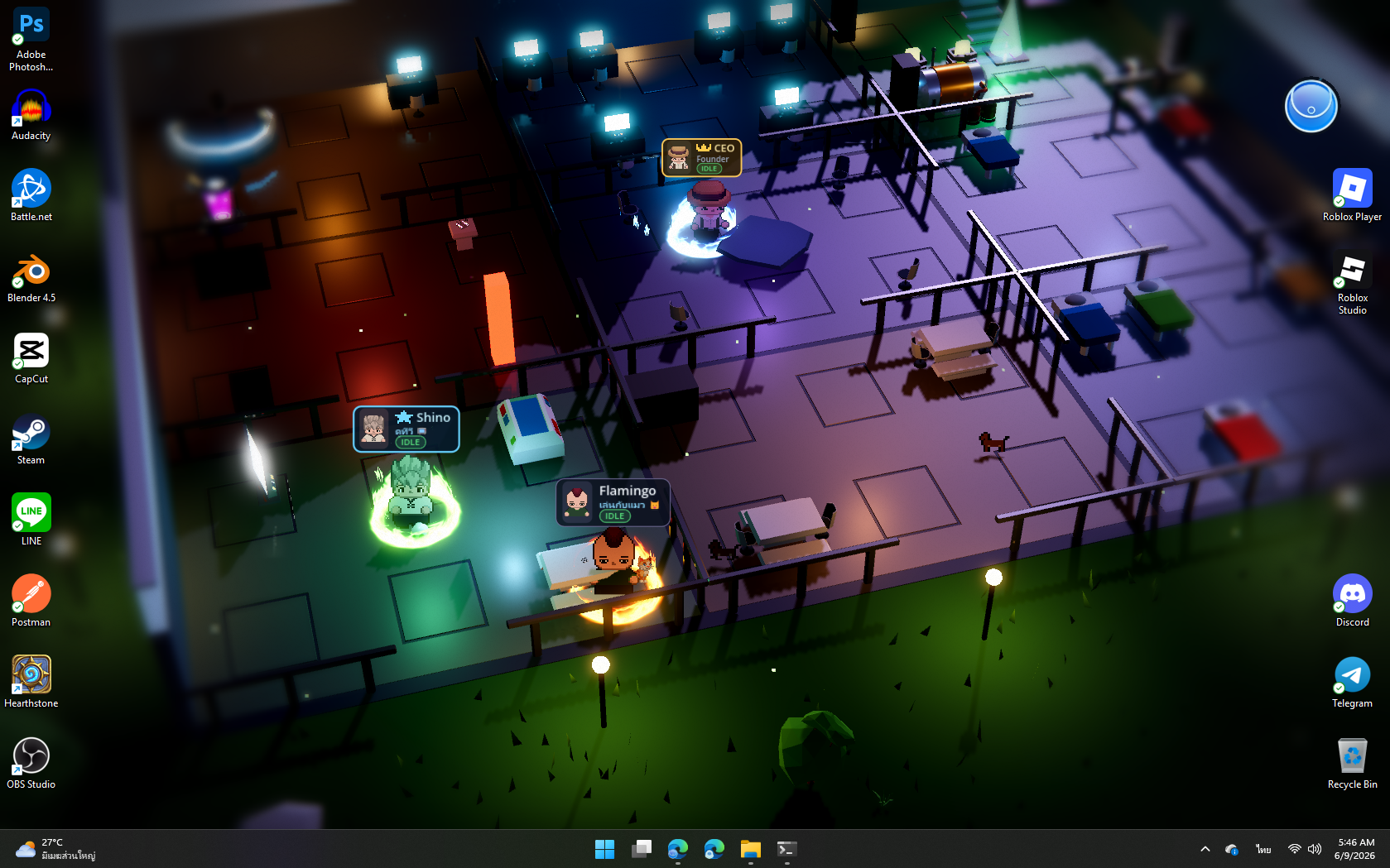
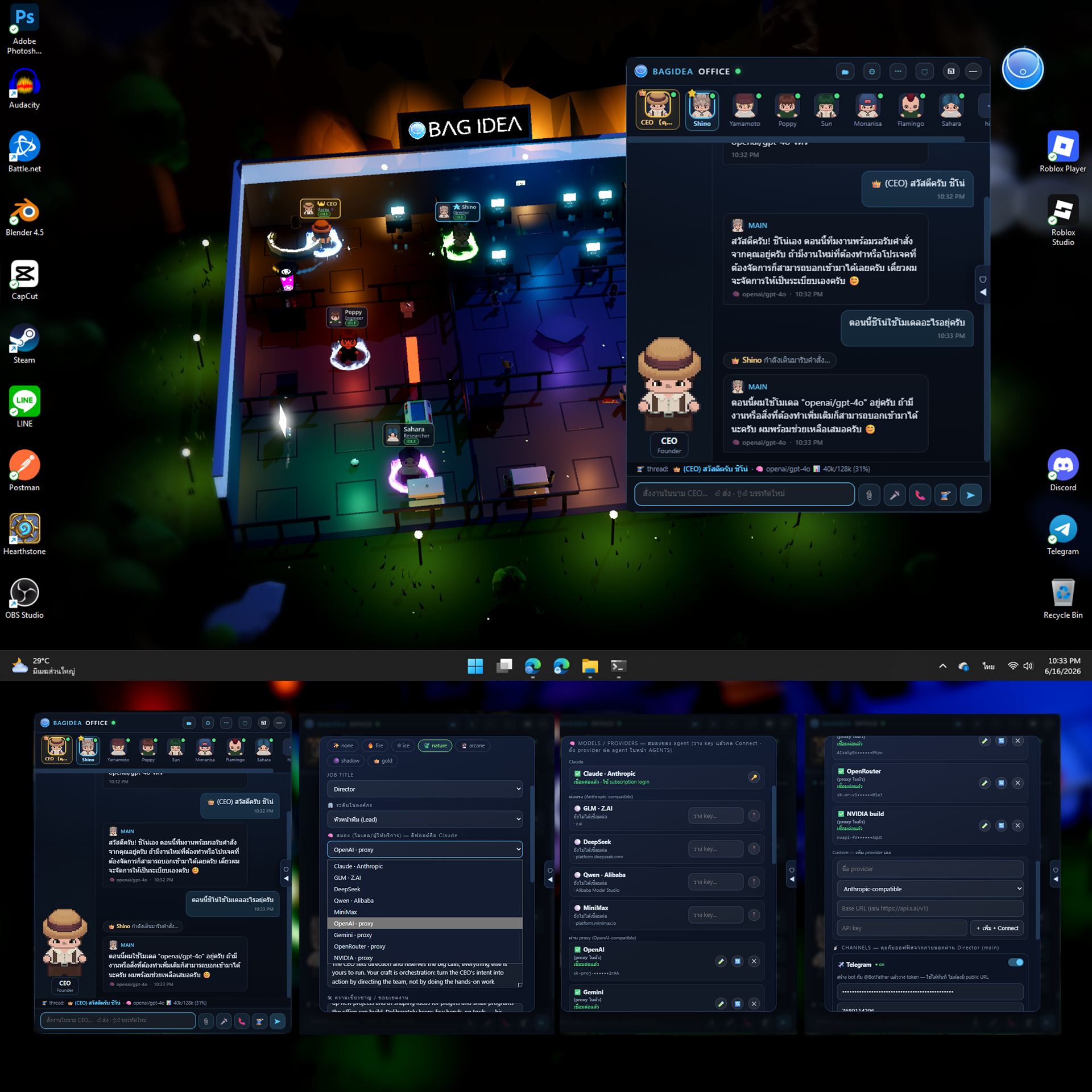
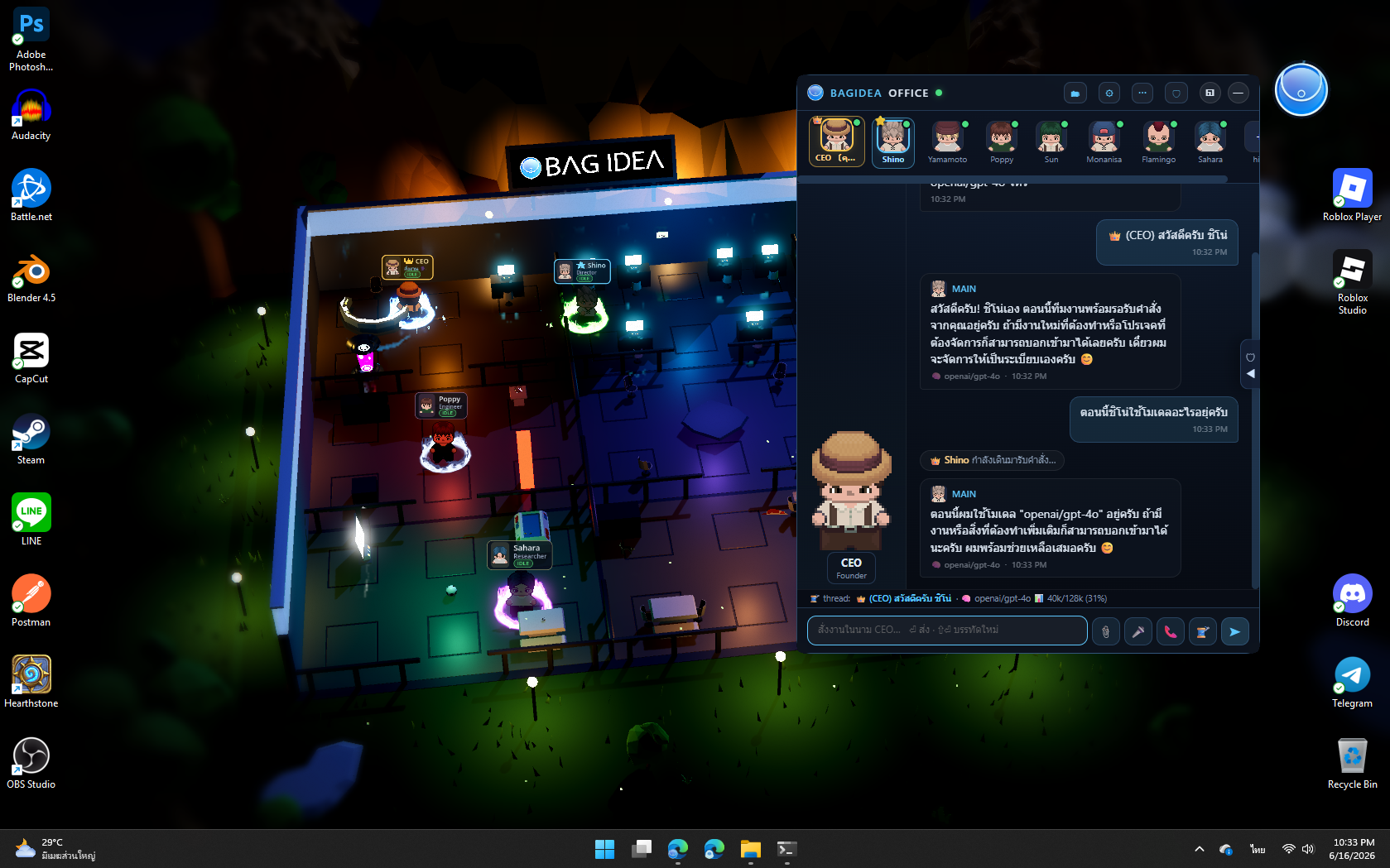
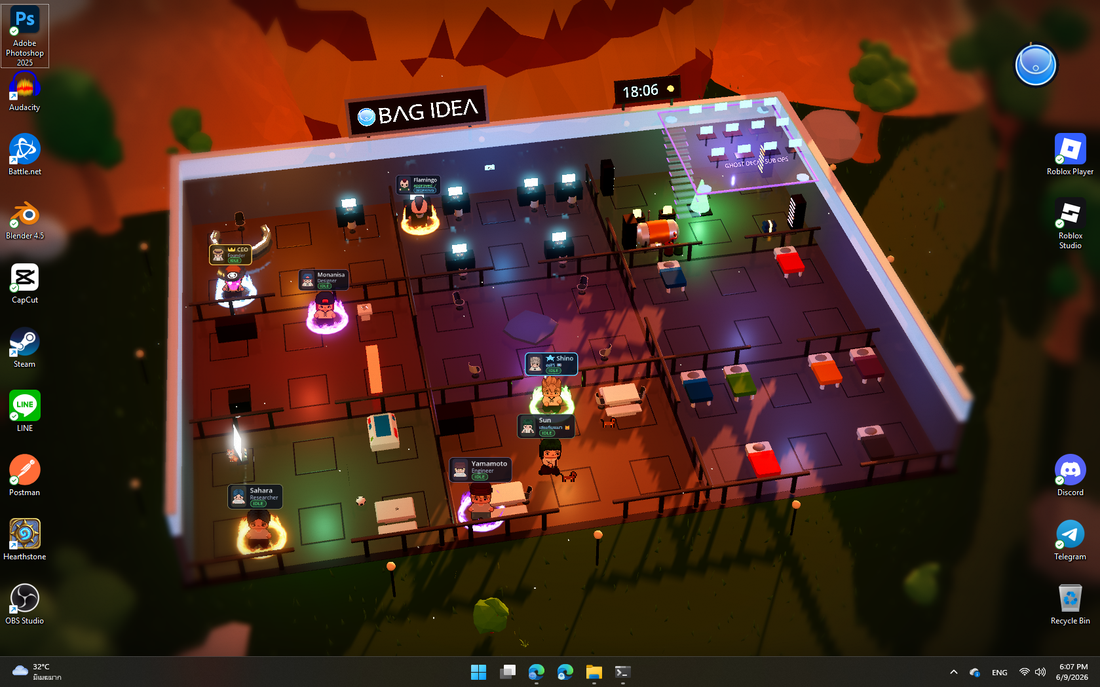 Captured live: the full office floor at golden hour — the CEO, the Director (Shino) and staff at their desks, the floating Ghost Deck (top-right), the server room glowing, the brand billboard and roofline clock, the office cat wandering. The day/night cycle follows your real local time.
It's a real wallpaper — running behind your desktop icons, with a live activity feed:
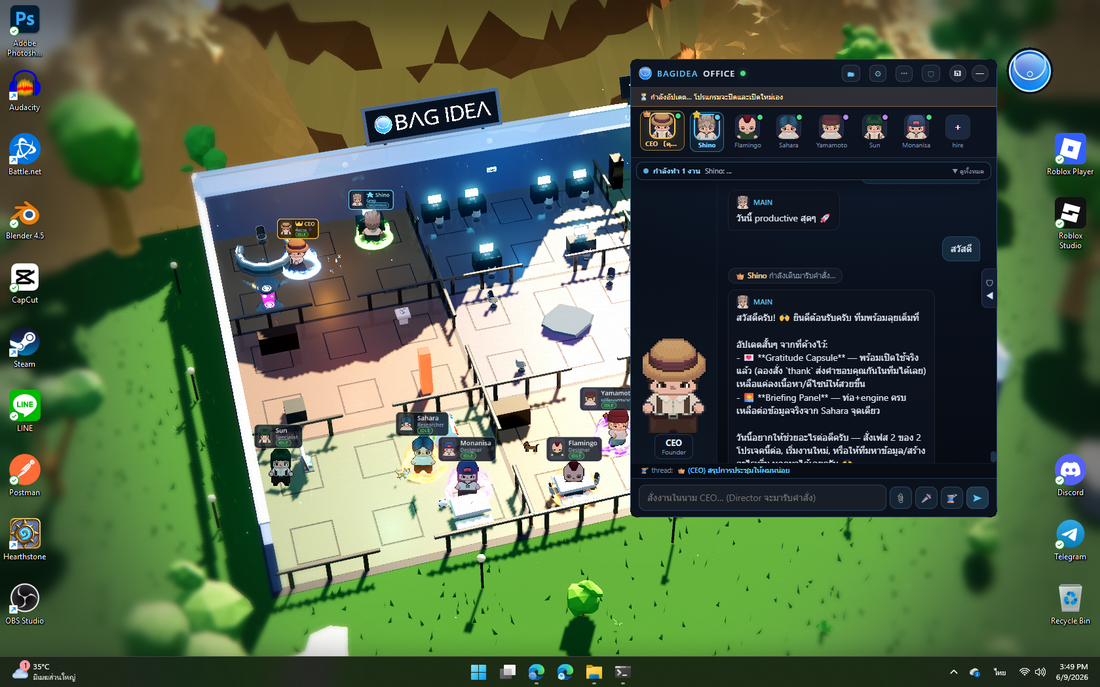
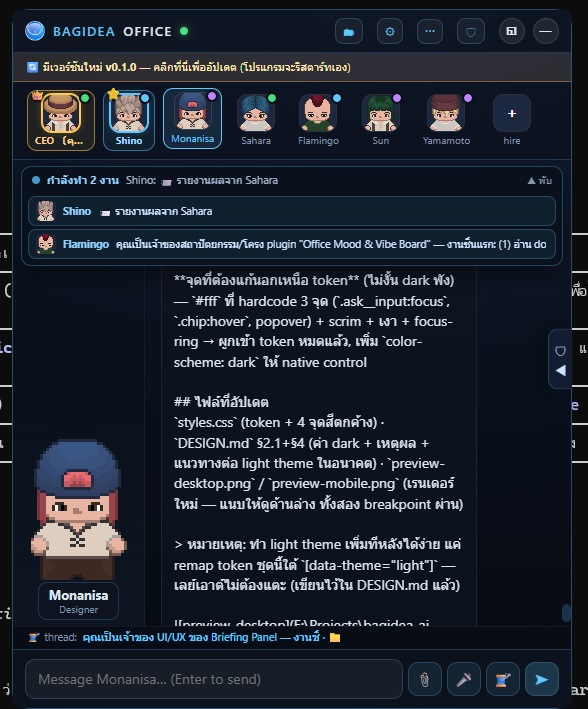
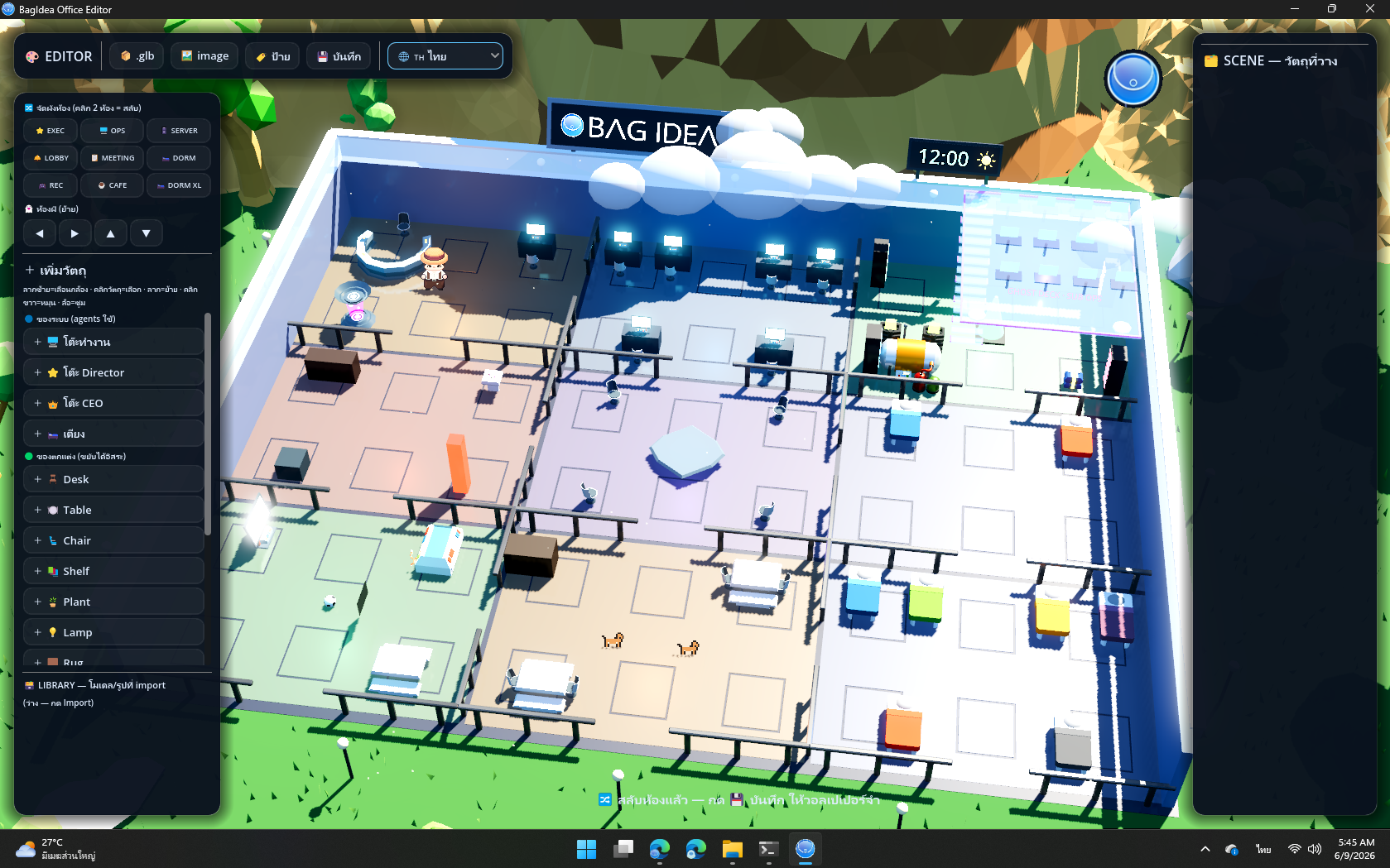
| 💬 Talk to the office (CEO seat) | 🎨 Rearrange it in the 3D Editor |
|---|---|
 |
 |
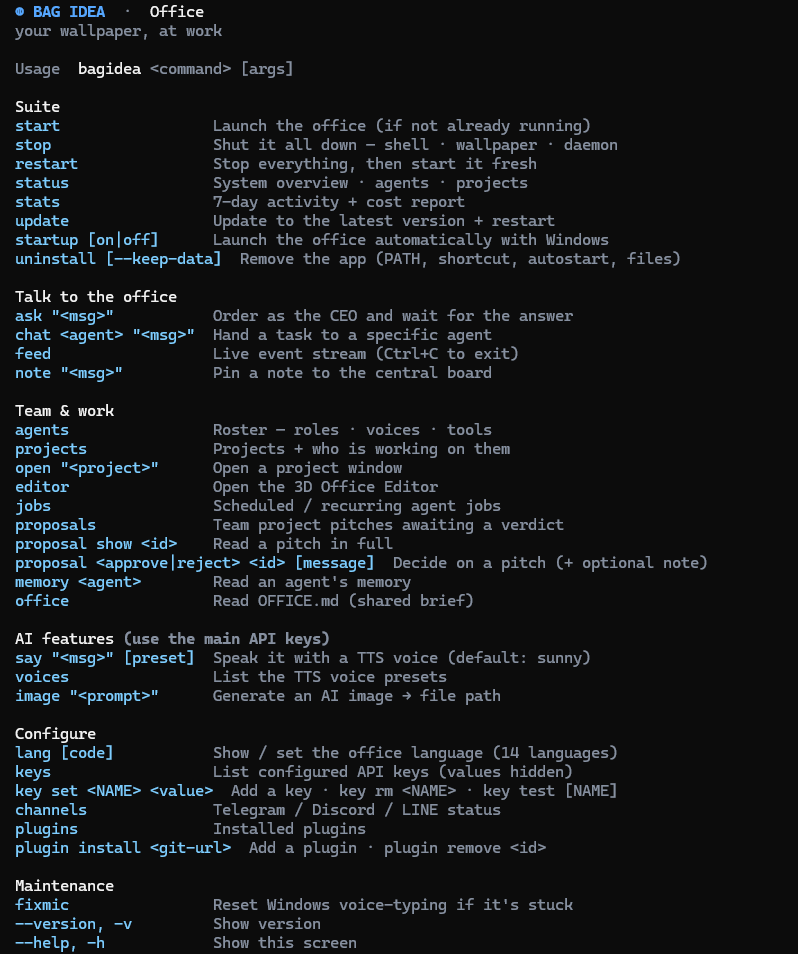
| 👥 The team mid-huddle, auras lit | ⌨️ The bagidea CLI |
 |
 |
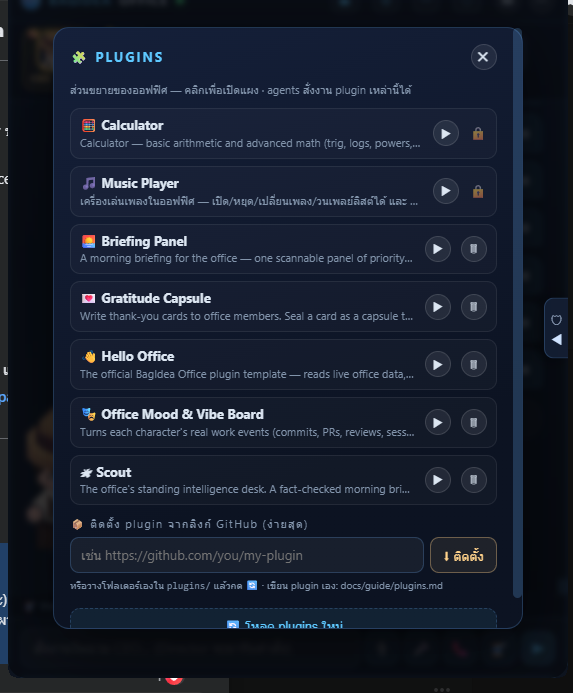
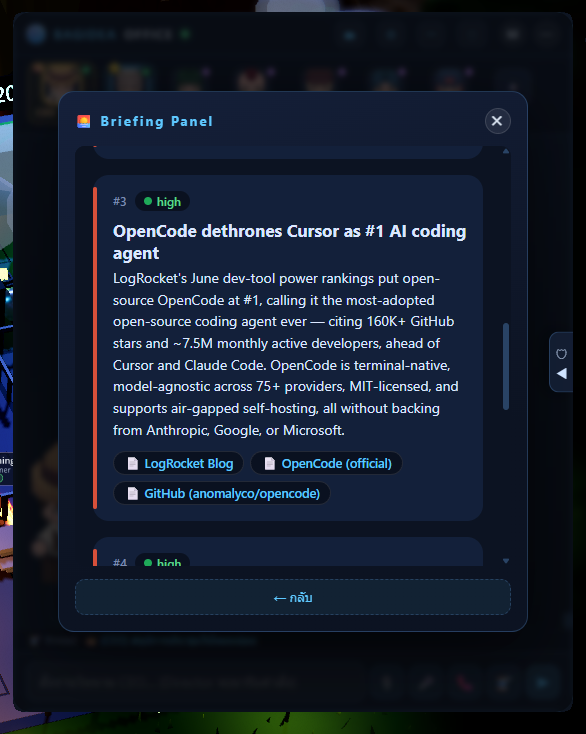
| 🔌 Plugins — agents build & run their own | 📰 A live briefing panel (a plugin in action) |
 |
 |
🧠 Swappable Brains — every agent, any model (new in v0.8.0)
Pick the model that powers each agent. Keep your Director on Claude for the hard calls, put the builders on cheaper models, and cut your bill — without losing a single Claude Code tool, skill or session. Claude Code stays the engine; only the brain behind it swaps, and it fails open to Claude, so nothing changes until you opt an agent in.
Two ways agents reach a model:
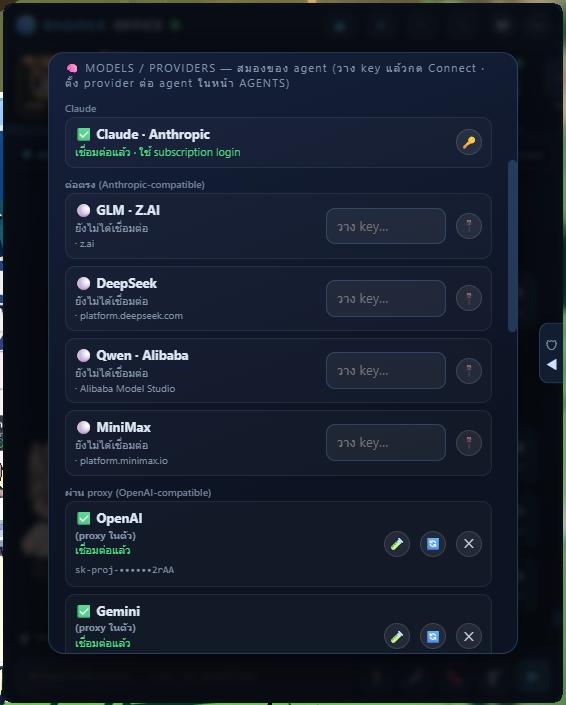
- 🟢 Direct (Anthropic-compatible) — Claude, GLM (Z.AI), DeepSeek, Qwen (Alibaba), MiniMax, Kimi (Moonshot), and Kimi Code (the kimi.com coding plan). The CLI talks straight to them; nothing in between.
- 🔵 Via the built-in proxy (OpenAI-compatible) — OpenAI, Gemini, OpenRouter, NVIDIA build, Groq, Cerebras, xAI (Grok), Mistral, Together AI, Fireworks, and your own custom providers. A zero-dependency proxy is baked into the daemon and translates Anthropic ↔ OpenAI on the fly — no LiteLLM, no Python (already have a LiteLLM gateway? point a custom provider at it).
- 💻 Local, no API key — Ollama and LM Studio: just run the server and Connect; the office routes to
localhost. Free, offline, private.
The model pickers fetch each provider's live model list when you connect (and when you open an agent's brain), so brand-new models show up without an app update.
| 🔌 Connect once in ⚙ CONNECT → 🧠 MODELS/PROVIDERS | ➕ Others + your own custom provider |
|---|---|
 |
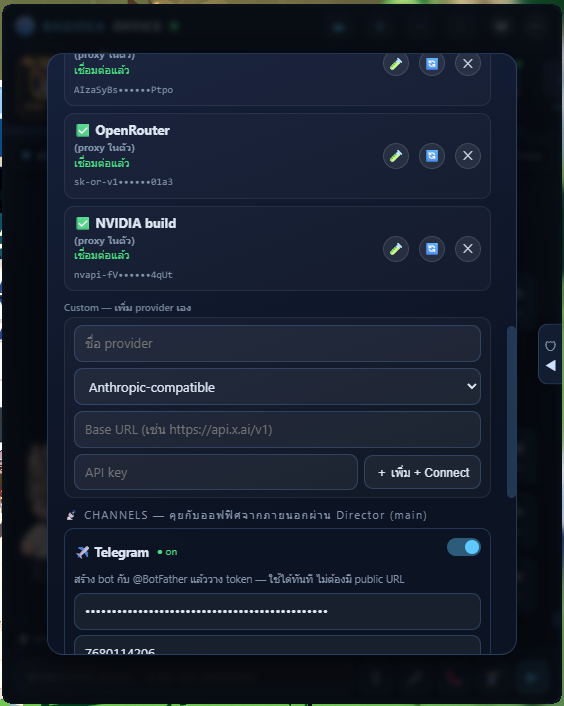 |
🆓 Try the free ones (mind the limits): NVIDIA build is free to test but rate-limited (~40 req/min) — heavy agent tasks hit 429 fast, so it's best for light/eval use. OpenRouter has free models (:free, vendor/model ids) but they're daily-capped and may queue; top up credit for serious work. Gemini has a generous free quota. (And OpenAI Tier 1's 30k tokens/min is small for heavy agent context — which is exactly why the next feature exists.)
♻️ Auto-Compact + Auto-New-Thread — for every model
Talk as long as you want. It never clogs, never freezes, never makes you start a new thread by hand.
Long conversations normally blow past a model's context window and break. Claude Code solves this for Claude only — BagIdea Office makes it work for every model, fully automatic and hands-free:
- 🧠 Proactive — before each turn the office measures the conversation against the model's context window. Getting full? It summarizes the thread with Claude → opens a fresh thread → keeps working, before it ever overflows.
- 🛟 Reactive — if a backend rejects a request (a rate or context limit you didn't see coming), the same recovery kicks in automatically.
- 🪄 Continuity preserved — the summary is written by Claude (big brain, huge context) and seeded into the new thread, so the agent still knows what you discussed. The UI even carries your view across to the new thread, so nothing ever looks stuck.
The result: even tiny / free-tier models run long sessions without you babysitting them.
📊 See everything
Every agent message is tagged with the model that produced it, the thread bar
shows a live context-usage meter (e.g. gpt-4o · 40k/128k), the 🧠 BRAINS
panel monitors every provider's connect status + each agent's usage, and STATS
breaks down estimated spend per provider.
✅ Status: working product — Windows 11 (stable) · macOS 13+ (beta) · Linux (experimental 🧪). The full pipeline works end-to-end: wallpaper → daemon → real Claude Code sessions working inside real project folders → spatialized approvals → agent management UI → Telegram / Discord / LINE / Slack / WhatsApp / Messenger channels → CLI → self-updater. All visuals and sounds ship in the repo (free / CC0 art — see Art assets), so a fresh install and
bagidea updatecarry the full look out of the box.
💛 Sponsors
BagIdea Office is built in the open and kept free to run. Sponsors make that possible — thank you 🙏
👑 Gold Partners
💛 Supporters
The block above auto-updates from GitHub Sponsors via
.github/workflows/sponsors.yml. Off-platform sponsors live inweb/sponsors.manual.json.
Tiers
| Tier | From | You get |
|---|---|---|
| 👑 Gold Partner | $3,000+/mo | Large logo on the website & in-app credits · top placement · roadmap input & early builds · shout-out in release notes |
| 🥈 Silver Partner | $300+/mo | Logo on the website · mention in release notes · early access to builds |
| 🥉 Bronze / Backer | $30+/mo | Logo or name on the supporters wall · a link to your site or socials · our heartfelt thanks |
| 💛 Supporter | any amount/mo | Your name on the supporters wall · a link to your site or socials |
Every sponsor — at any tier — gets a clickable link to their site or socials, and is shown on the website (sorted by contribution, amounts never displayed).
How sponsoring works
Sponsorship is a recurring monthly subscription handled entirely by GitHub Sponsors (think YouTube/Patreon membership) — secure payments, taxes and payouts are GitHub's job, not ours.
- Choose a tier & sponsor. Click 💖 Sponsor on GitHub (or use the button on the website), pick a monthly tier, and confirm. GitHub charges you each month until you cancel.
- Your logo & link come from your GitHub profile — automatically. Your avatar, display name, and link are pulled straight from your GitHub account; there is nothing to send us. To control the link, set the Website field in your GitHub profile (Settings → Public profile). Sponsoring as a GitHub Organization shows your company logo and site instead of a personal avatar.
- You appear within ~6 hours. As long as you choose “Make my sponsorship public” at checkout, an automated job (
.github/workflows/sponsors.yml) pulls the live sponsor list, maps each to a tier by amount, and updates both this README and the website supporters wall — sorted by tier, amounts never shown. Private sponsors are respected and simply not listed.
Everyone joins through GitHub Sponsors. The only exceptions are featured partners we add by hand (e.g. WARRIX, pinned first) in
web/sponsors.manual.json. Reuannamphung is shown there as a courtesy until they move to GitHub Sponsors. Maintainers: never hand-editweb/sponsors.json(it is generated) — editsponsors.manual.jsonfor off-platform sponsors only.
💖 Sponsor on GitHub → · or email us → to talk.
Table of Contents
- What it does
- Architecture
- Repository structure
- Requirements
- Installation
- Art assets
- Running the full stack
- Using it
- The
bagideaCLI - HTTP API
- Event protocol (OEP)
- Performance
- User guides
- Design documents
- Roadmap
What it does
🖥️ Live wallpaper world (Layer 1 — Godot 4)
- Renders behind your desktop icons (WorkerW technique, same as Wallpaper Engine) — and stays there: a world supervisor re-embeds (or relaunches and re-pins) the world within ~2 s whenever Windows tears the desktop
WorkerWdown (wallpaper change, resolution/monitor change, Explorer/DWM restart, lock/RDP, exiting a fullscreen game), so the wallpaper no longer "vanishes for no reason". It watches for parent loss, never visibility, so Win+D and display-sleep are left alone - HD-2D look: 3D office + billboarded pixel-art sprites lit by the scene, sky-driven image-based lighting, SSR-polished reflective floors, a cinematic tilt-shift focus pass (breathing vignette, edge desaturation, anamorphic bars), film grain, native-res MSAA
- A swappable 3×3 room grid (jigsaw): every room is an identical cell, so any room fits any slot — rearrange the whole floor from the Office Editor and the furniture, agent anchors and navigation all move with it. Rooms include Executive (CEO command console), Operations (6 desks, monitors facing their seats), Lobby, Cafeteria, Server, Meeting (seats face the table), Recreation, and two Dormitories (offline agents walk to a bunk and sleep). A wandering office cat 🐱 and a self-kicking football ⚽ follow the Recreation room, and a couple of dogs 🐕 hang out in the Cafeteria — when you swap those rooms, the pets follow
- A countryside around the office: 4,200 blades of wind-swaying grass, low-poly mountains and trees, drifting cartoon clouds (a near layer actually crosses the camera frame), bird flocks, daytime pollen motes and fireflies at night
- Ambient life & rare events: idle agents nap in a bunk or watch the rec-room TV, a football gets self-kicked around, birds wheel overhead — and once in a while a server-room incident 💥🔥 breaks out and the nearest agent rushes over to put it out (a rare comedic emergency, not a real failure)
- Agents walk between zones on an A* waypoint graph with 4-direction animated spritesheets; facing follows movement
- Real-time day/night cycle — sun, sky color, ambient and reflections follow your machine's clock (sunset ~17:00, night by 18:00); manual override from the overlay (🌗) for golden-hour screenshots
- A roofline digital clock with a phase icon (sun ☀ / low sun 🌇 / crescent moon 🌙) next to the brand billboard
- MMO-style nameplates on a crisp 2D HUD: portrait, name, role/status, live state pill (IDLE/WORKING/MEETING/BLOCKED/OFFLINE), distance-scaled — with rank dressing: the CEO's plate is gold with a pixel crown, the Director's is bright blue with a lead star
- Event FX: pixel-art flipbooks pop above characters — ✅ on task done, ❌ on failure, ❗ at Security, 👍/👎 on decisions, 🎵 when speaking, golden burst on a new skill, sci-fi warps on hire/fire
- Equippable auras: an elemental magic ring (fire/ice/nature/arcane/shadow/gold) under any character, picked in the agent editor — the CEO can wear one too
- The Ghost Deck: a floating glass platform (12 desks, movable from the Office Editor) reached by a glass staircase — when an agent splits into sub-agents, translucent ghost clones materialize, hurry up the stairs, work at a desk with live status plates, then glide home and dissolve back into their owner. Targets resolve to the deck's live position, so ghosts re-seat instantly even mid-task when you move the deck or swap rooms
- The idle Director makes rounds through the office instead of standing still; the CEO paces the executive floor (that's you)
- Mission Control board in-world: one card per running task, colored by state; lobby status totem shows daemon connectivity (truth, not decoration)
- Branded boot: a transparent floating logo splash + a pulsing circular logo card — never a black box
🧩 Extensibility & customization (2026-06)
- Plugins: a real extension host — a plugin folder adds UI panels, server routes, and commands agents can drive, with
ctxaccess to the office (registry, feed, broadcast,runClaude, private storage). Ships with the 🎵 Music Player built in (locked, pinned to the top of the list); the 🧮 Calculator and more are installable from the 🧩 Hub or any GitHub repo (bagidea plugin install <url>). Start from the official template (a Hello-World plugin + aCLAUDE.mdso an agent can build one), or read the worked examples — the calculator and music-player repos. Full spec: the guide - 🎨 Office Editor: rearrange the room grid (click two rooms to swap), place furniture / walls / decor on a top-down grid, and import your own models (.glb/.gltf/.fbx) and images — spawned on top of the world, atmosphere intact
- Agent skill library: every office ships with 15 builtin capability packs you can assign from the editor — deep-research, web-automation, office-control, office-ops, plugin-builder, code-review, doc-writer, debug-detective, data-wrangler, project-kickoff, diagram-maker, archive-search, build-workflow, file-media-toolkit, and schedule-via-office-job — plus Hermes-style auto-learned skills that grow at runtime. Four of them (file-media-toolkit, archive-search, doc-writer, schedule-via-office-job) are carried by every agent by default. Skills are delivered natively & on demand (Claude Code progressive disclosure) so a skill's instructions load only when it's actually relevant, never bloating every prompt
- 📄 File & Media Toolkit (built into every agent): the office can actually work with your files, not just talk about them. Any agent can read and convert PDFs, turn Excel / Word / PowerPoint into data or the other way around (via LibreOffice), author documents and slide decks (via
pandoc), transcribe a YouTube link or a local video (viayt-dlp+ffmpeg), edit and convert images (ImageMagick), and slice JSON (jq) — so "summarize this PDF", "make a deck from these notes", or "get me the transcript of that video" are one message, no setup. It degrades gracefully: whichever helper binaries are present are used, and the agent tells you if one is missing - 🌐 Multi-language UI — 14 languages: English default + ไทย/中文/Español/हिन्दी/العربية/Português/Русский/日本語/Deutsch/Français/한국어/Indonesia/Tiếng Việt. Now ships fully pre-translated — switching is instant and works even without a Gemini key; picker in settings (office-wide, per-machine default)
- 🌍 Official website in
web/— landing page + browsable docs, deployable to any static host
🎤 Voice, channels, memory & media (2026-06)
- Voice in / out: hold-to-record in the webview → OpenAI Whisper / Gemini transcription (no Windows dictation panel); Right Ctrl speaks a command straight to the CEO; agents can be given Gemini TTS voices — 16 presets split clearly ♀ / ♂ (8 each), each its own emotion/style, per-agent, gimmick
SPEAK:announcements; 📞 realtime voice chat (the main agent only) bridges your mic to Gemini Live in the main agent's assigned voice (or a sensible default), with the office's own knowledge in context - Channels: connect Telegram · Discord · LINE · Slack · WhatsApp · Messenger — messages enter the CEO flow, the Director answers back on the same channel
- Hermes-style memory (token-lean, relevance-retrieved): shared
workspace/OFFICE.md(owner) + per-agentworkspace/memory/<id>.md+ per-projectworkspace/projects/<id>/MEMORY.md, distilled automatically after real work. A pure on-device keyword index (BM25, zero deps, works in Thai too) injects only the memories relevant to the task at hand — not a blind dump — with full recall on demand viaGET /recall+ thearchive-searchskill - Main API keys + feature gates:
OPENAI_API_KEY/GEMINI_API_KEYare first-class — voice/TTS/image/realtime grey out with guidance until set; an extra-key vault feeds agents' own env - Attachments & media: paperclip / drag-drop upload; chat renders images, video, audio inline (click any image to view it full-size); every message is timestamped; agents produce images via the
/gen/imagesystem tool and they appear automatically - Social office: idle agents spread evenly across the cafe and rec room (with the occasional stroll to the server/meeting rooms and the odd bunk nap), and drift together — sometimes in groups of 3–4 — for banter or real AI-to-AI chats that now lean toward brainstorming ideas worth pitching. A good conversation crystallizes into a project proposal to the CEO (more often than before) — and agents now think bigger, pitching real websites, apps and programs rather than only small plugins, and can research with tools during meetings to back an idea up. Pitches are steered toward standalone projects or office plugins (never editing the core program); you approve or r
No comments yet
Be the first to share your take.