
AtlasClaw Providers
Reusable provider packages and starter patterns for integrating external enterprise systems with AtlasClaw.
This repository is the home for concrete provider packages such as SmartCMP and Jira. AtlasClaw core documents the loading contract; this repository documents provider behavior, auth models, field semantics, workflow patterns, and reference implementations.
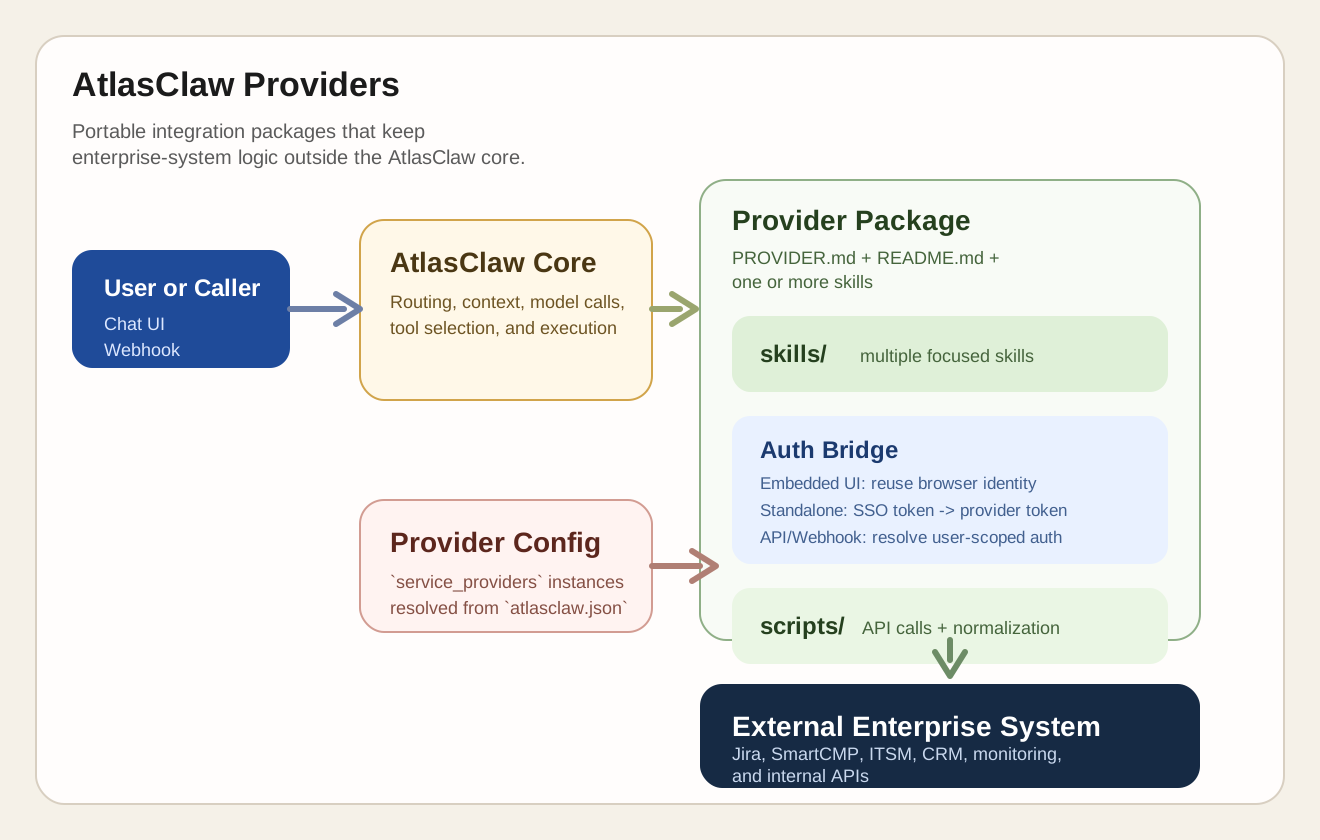
What Is a Provider?
A provider is a self-contained integration package for one external system. It owns:
- connection and authentication conventions
- one or more skills for different business capabilities
- skill definitions exposed to the agent
- executable scripts or handlers that call the target system
- provider-specific documentation and reference material
What Is in This Repository?
This repository contains reusable provider packages and reference implementations:
| Provider | Purpose | Status |
|---|---|---|
SmartCMP-Provider |
Context-aware cloud requests, approvals, resource analysis and operations, monitoring, compliance, and FinOps workflows | Reference implementation |
jira |
Jira issue operations and provider wiring patterns | Working example |
Weaver-Ecology |
Weaver Ecology OA workflow provider manifest and SSO configuration schema | Manifest scaffold |
If you are new to the model, start with:
providers/SmartCMP-Provider/README.mdproviders/SmartCMP-Provider/PROVIDER.mdproviders/jira/skills/jira-issue/SKILL.md
Provider Package Structure
AtlasClaw providers follow a simple package layout:
providers/<provider-name>/
├── PROVIDER.md              # LLM-facing provider contract
├── provider.schema.json     # Runtime/API/UI manifest
├── README.md                # Human-facing package docs
├── assets/                  # Optional icons/images
├── assistant_context/       # Optional context-aware embed routes and resolver
│   ├── routes.json          # Enterprise System path → page object → existing Skill
│   └── resolve.py           # Provider-owned object and action resolver
└── skills/
    ├── <skill-a>/
    │   ├── SKILL.md         # Skill metadata, trigger rules, entrypoints
    │   ├── scripts/         # Python handlers or helper scripts
    │   └── references/      # Provider-specific API mapping, workflows, examples
    └── <skill-b>/
        └── ...
File Responsibilities
provider.schema.json: machine-readable manifest for runtime/API/UI and code-analysis agents. It owns catalog display metadata, config fields, auth modes, defaults, aliases, sensitive flags, and optional icon paths.PROVIDER.md: natural-language provider contract for LLM context and provider usage rules. Runtime must never parse schema fromPROVIDER.mdbody tables.README.md: explains the provider package to human readersSKILL.md: declares the skill name, description, provider binding, and executable entrypointsscripts/: implements the actual integration logicreferences/: keeps API mappings, examples, and workflow notes close to the skill
Note: the directory name is a packaging concern, while the runtime identifier comes from provider_type in skill metadata and the corresponding key in service_providers. In this repository, SmartCMP-Provider/ maps to the runtime provider type smartcmp.
Embedded Menu and Floating UI
AtlasClaw Embedded mode provides two independent surfaces that can be deployed together or separately:
- the menu UI opens a full AtlasClaw conversation without page Context;
- the floating UI stays compact and follows supported Enterprise System pages.
Both surfaces receive the same Enterprise System Cookie authentication context.
AtlasClaw host_cookie authentication resolves the same signed-in user, while
the configured HostApp Provider's Cookie auth mode forwards the current request
Cookie to the existing system APIs. The surfaces can also share a
bootstrap-validated active Chat Session, but one does not open, replace, or
control the other.
For the menu surface, the Enterprise System only needs a menu entry that embeds
/atlasclaw/?embedded=1&surface=menu. It does not provide page Context. For the
floating surface, the Enterprise System additionally owns the launcher and
compact iframe lifecycle, supplies the exact Host Origin and a fresh nonce, and
reports normalized route paths with monotonically increasing generations.
Enterprise System code does not resolve business objects, choose a Provider or
Skill, call Agent/Tool APIs, or duplicate confirmation UI.
Core owns surface bootstrap, the secure embedding protocol, deterministic
matching, Context lifecycle, and permission revalidation. The HostApp Provider
owns the floating page semantics. For the floating surface, the optional
assistant_context/routes.json manifest maps normalized Enterprise System
paths to:
- a stable page type;
- a provider-owned object type;
- the existing Provider Skill that owns the page workflow.
Each route uses static path segments and single-segment placeholders such as
/main/items/{item_id}. AtlasClaw evaluates the manifest again whenever the
Enterprise System reports a newer page generation. This makes Context matching
dynamic at runtime while keeping it deterministic and auditable; an LLM does
not guess which page or Skill is active.
The single Provider-level resolver loads the current business object with the
request-scoped user credential and returns a bounded display projection plus
the object's current object_actions. Actions can vary with object state,
permissions, and available workflows. They enter the normal Chat path and the
matched Skill's normal Tool, schema, confirmation, Provider, and RBAC checks;
the browser does not select or invoke a Tool directly.
Use these extension rules:
- A new path for an already supported object and owning Skill normally adds one route entry.
- A new object API extends the Provider resolver's read adapter and the owning Domain Skill's action builder.
- Do not add provider-specific page mappings, action labels, or object fields to AtlasClaw Core or the generic floating UI.
- Do not put cookies, tokens, credentials, query strings, fragments, or business DTOs in route manifests or embedding messages.
See the Core Embedded integration guide for surface bootstrap, Cookie, Context, and page-message contracts.
Authentication Model
Authentication is a provider responsibility. AtlasClaw Core can pass user identity and runtime context, but each provider must obtain or derive credentials that the target system actually accepts.
That matters because one provider usually exposes multiple skills, and all of those skills must execute under the same user identity model for the target system.
Mode 1: Embedded UI
Embedded mode uses a two-layer Cookie contract:
- AtlasClaw
auth.provider: "host_cookie"reads the Enterprise System Cookie and identity cookies to resolve the signed-in AtlasClaw user. - The configured HostApp Provider uses
auth_type: "cookie"to receive the request-scoped Enterprise System Cookie when it calls existing system APIs.
The Cookie remains runtime-only and is not copied into Provider Tokens, route manifests, page messages, or persisted Provider configuration. This preserves the user's existing system permissions without asking for a second sign-in.
Mode 2: Standalone AtlasClaw Deployment
In standalone deployments, AtlasClaw Core may only hold an enterprise SSO token or upstream identity assertion. That token is not automatically usable against the target platform.
In this mode, the provider must exchange or transform the AtlasClaw-side identity into its own system token, for example by:
- token exchange against the target system
- SSO federation mapping
- backend session bootstrap
- user-scoped API token lookup or minting
The important boundary is: AtlasClaw identifies the user, but the provider is responsible for turning that identity into target-system authentication.
API Access Must Follow the Same Model
The same rule applies when skills are invoked through API or webhook access rather than a browser UI.
- if the request already includes target-system credentials, the provider must validate and use them safely
- if the request only includes AtlasClaw identity or SSO context, the provider must derive a target-system token before calling the external API
- provider scripts should never assume that AtlasClaw Core has already completed target-system login on their behalf
For external developers, the simplest design rule is:
every provider skill that calls an external API must run with a provider-native user credential, whether it came from browser context, token exchange, or API-side auth resolution
How AtlasClaw Loads Providers
AtlasClaw now loads providers from an external providers repository through providers_root.
1. Load provider templates and default skills through providers_root
Set providers_root in atlasclaw.json to the directory that contains provider folders such as jira/ or SmartCMP-Provider/.
At startup, AtlasClaw scans providers_root/<provider>/ for PROVIDER.md,
looks for a fixed sibling provider.schema.json, and loads Markdown skills
from providers_root/<provider>/skills/. If the manifest is missing, skills
still load, but provider definitions/config UI/defaults/schema validation are
unavailable for that provider.
Example:
{
  "providers_root": "../atlasclaw-providers/providers"
}
2. Use provider-qualified skills in webhook dispatch
For webhook-driven scenarios, AtlasClaw reuses the provider-qualified Markdown skills already loaded from providers_root.
No extra webhook skill path configuration is required.
Example:
{
  "providers_root": "../atlasclaw-providers/providers",
  "webhook": {
    "enabled": true,
    "systems": [
      {
        "system_id": "jira-webhook",
        "enabled": true,
        "sk_env": "JIRA_WEBHOOK_SK",
        "default_agent_id": "main",
        "allowed_skills": ["jira:jira-issue"]
      }
    ]
  }
}
Use this mode when the entrypoint is an external system calling AtlasClaw through a webhook, and you want a constrained set of provider-qualified skills such as jira:jira-issue.
Webhook robot execution is configured in AtlasClaw Core. Provider packages only
need to document which backend skills are safe to call this way and which
provider-native credential should be used. For SmartCMP, use
args.provider_instance and args.robot_profile in the webhook payload, and
allowlist the target skills on both the webhook system and the selected robot
profile.
Provider Configuration in atlasclaw.json
Provider instances are configured under service_providers. AtlasClaw resolves environment placeholders such as ${VAR_NAME} automatically at load time.
{
  "providers_root": "../atlasclaw-providers/providers",
  "service_providers": {
    "jira": {
      "cloud": {
        "base_url": "https://company.atlassian.net",
        "username": "[email protected]",
        "password": "${JIRA_API_TOKEN}",
        "api_version": "3",
        "default_project": "PROJ"
      }
    },
    "smartcmp": {
      "prod": {
        "base_url": "https://cmp.corp.com/platform-api",
        "cookie": "${CMP_COOKIE}"
      }
    }
  }
}
Recommended practice:
- keep secrets in environment variables, not committed JSON
- define multiple named instances such as
prod,dev, orcloud - let provider scripts normalize platform-specific fields before returning data to AtlasClaw
Writing a New Provider
1. Start with the provider contract
Create PROVIDER.md and document:
- the target system
- required connection parameters
- authentication mode for embedded UI
- authentication mode for standalone deployment
- how API and webhook calls obtain user-scoped target-system credentials
- example
service_providersconfiguration - the list of skills the provider offers
2. Define skills in SKILL.md
A provider skill is a Markdown file with frontmatter metadata plus usage guidance. For executable skills, AtlasClaw reads tool declarations such as:
---
name: "jira-issue"
description: "Jira issue skill for CRUD."
provider_type: "jira"
instance_required: "true"
tool_create_name: "jira_issue_create"
tool_create_entrypoint: "scripts/jira_issue_create.py:handler"
---
This pattern keeps the skill readable for both humans and the agent while still binding it to concrete handler code.
3. Keep scripts narrow and predictable
Provider scripts should:
- read connection context from provider configuration or runtime context
- resolve or refresh target-system credentials for the current user when needed
- call the external API
- normalize output into stable, agent-friendly fields
- map external errors into actionable messages
- avoid leaking tokens, cookies, or raw secrets into logs
4. Add references close to the skill
Put API mappings, workflows, parameter notes, and examples in references/ so the skill package remains understandable without opening a separate document set.
Recommended Design Patterns
The SmartCMP reference design in this repository highlights a few patterns worth reusing in new providers:
- dynamic discovery over hardcoded forms when the external platform already exposes schemas or catalogs
- provider-qualified naming to avoid collisions across providers
- one provider with multiple focused skills rather than one oversized general-purpose skill
- read-only lookup skills separated from write or approval skills
- two-step confirmation for risky write operations
- provider-owned user authentication that works consistently across embedded UI, standalone SSO, and API access
- shared Enterprise System Cookie authentication for independent menu and floating surfaces
- provider-owned Context routes, object resolution, and state-aware actions for the floating surface while the menu surface retains ordinary Chat
- script-level normalization so the LLM sees a stable interface even when the external API is inconsistent
These are design recommendations, not hard requirements for every provider.
SmartCMP as the Reference Architecture
SmartCMP-Provider is the most complete architecture reference in this repository. It demonstrates how to split a provider into business-facing skills instead of one large generic integration:
datasource: read-only reference data lookupresource: resource browsing, comprehensive analysis coordination, resource-first Security posture and exact associated-violation lookup, and day-2 operationsrequest: resource and application request submissionapproval: approval queue actionsalarm: alert workflows and component-model-driven resource health evidencecost-optimization: recommendation-first and direct resource-cost analysissecurity-compliance: CMP-wide Security posture plus policy-violation browsing, analysis, and confirmed status handlingpreapproval-agent: webhook-oriented review orchestrationrequest-decomposition-agent: converts free-form demand into structured request candidates
For the architecture rationale behind those boundaries, see:
Recommended Skill Layers
The SmartCMP provider suggests a practical three-layer skill model that works well for most non-trivial providers.
1. datasource skills
Use a datasource skill for read-only data access that other skills depend on.
Typical responsibilities:
- list catalogs, business groups, resource pools, templates, applications, or other reference data
- normalize raw API responses into stable, agent-friendly structures
- provide reusable lookup capability for both end-user conversations and higher-level orchestration skills
This kind of skill is useful in two ways:
- the agent can call it directly when a user needs to explore or inspect data
- other provider skills can rely on it to resolve IDs, validate inputs, and discover valid options before performing writes
If a provider has shared read-only scripts, keep them close to datasource or in a shared helper area that datasource owns conceptually.
2. Module execution skills
Use focused execution skills for concrete operations in each business module.
Examples:
requestfor provisioning or submission actionsapprovalfor approve/reject/list-pending flowsjira-issuefor issue CRUD
These skills should map closely to a stable action surface in the target system. They should:
- perform writes or state changes
- accept already-resolved business inputs
- call provider-native scripts or handlers
- return normalized success and failure results
Do not overload one execution skill with every capability in the system. Split by business module or operation family when that keeps prompts, scripts, and error handling simpler.
3. Scenario orchestration skills
Use orchestration skills for end-to-end business scenarios that span multiple module skills.
SmartCMP examples:
preapproval-agentrequest-decomposition-agent
These skills should not become a second low-level API layer. Their role is to:
- read context from the request or webhook payload
- call
datasourceskills to gather required data - call execution skills to perform bounded actions
- apply scenario logic, policy decisions, or decomposition rules
As a rule, orchestration skills should depend on lower-level provider skills instead of re-implementing target-system API logic directly.
Suggested Provider Composition
For a provider with moderate complexity, the default recommendation is:
- one
datasourceskill layer for read-only access - several module execution skills for core operations
- zero or more orchestration skills for scenario-specific workflows
This gives the agent both direct data access and reusable business operations, while keeping scenario logic separate from system-specific execution.
Typical Development Flow
- Define the LLM-facing provider contract in
PROVIDER.md. - Define the machine-readable runtime manifest in
provider.schema.json. - Start by identifying the
datasourcelayer, module execution skills, and any orchestration scenarios. - Implement script entrypoints under each skill package.
- Configure a test instance in
atlasclaw.json. - Load the provider in AtlasClaw and validate end-to-end prompts against the real system.
- Add provider-specific examples and failure guidance before sharing with users.
Repository Layout
atlasclaw-providers/
├── providers/
│   ├── SmartCMP-Provider/
│   └── jira/
├── docs/
│   └── images/
└── README.md
Related Documentation
providers/SmartCMP-Provider/README.md: SmartCMP package overviewproviders/jira/README.md: Jira provider example
No comments yet
Be the first to share your take.