
ArtClaw Bridge
Bridge DCC tools (UE, Maya, 3ds Max, Blender, Houdini, Substance Painter/Designer, ComfyUI) to AI Agents via MCP Protocol
🎯 The Missing Bridge Between AI Agents and Creative Software
ArtClaw Bridge provides a unified AI bridging layer for Digital Content Creation (DCC) software. Through the MCP (Model Context Protocol), AI Agents can directly understand and operate the editor environment — enabling AI to truly integrate into game development, film & animation, and digital art workflows.
Keywords: maya-mcp blender-mcp unreal-engine-mcp 3dsmax-mcp houdini-mcp substance-mcp comfyui-mcp maya-skill blender-skill ue-skill ai-dcc ai-3d mcp-bridge ai-game-dev ai-vfx


🎯 Why ArtClaw Bridge?
The Problem We're Solving
1. AI Agents Can't Directly Operate Creative Software
Most AI agents (OpenClaw, Claude Code, Cursor, etc.) are general-purpose platforms. They excel at coding and text tasks, but they don't know how to:
- Select objects in Maya
- Create materials in Unreal Engine
- Generate textures in Substance Designer
- Run workflows in ComfyUI
2. From Custom Tools to Tool-Creation Platform
Traditionally, every DCC required custom scripts and tools built one-by-one. ArtClaw Bridge shifts this paradigm:
- Before: Each tool is hand-crafted code, requiring deep expertise in the DCC's API
- After: Artists describe what they need in natural language, AI generates the tool automatically
The bridge layer handles the DCC-specific complexity once. After that, tool creation becomes a conversation, not a coding task.
3. Tool Management for the AI Era
Traditional tool frameworks were designed for manual discovery and learning. ArtClaw's Tool Manager reimagines this:
- AI-Native Discovery: No more hunting through menus — just ask AI to find and run the right tool
- Zero Learning Curve: AI explains and executes tools on-demand, eliminating training time
- Team Sharing: Skills and tools are versioned, shared, and synced across the team
- Personal + Team Workflows: Individuals create tools for their needs; teams curate shared libraries
The result: tools are created, shared, discovered, and executed through AI — a framework built for how people actually work with AI.
Our Solution
ArtClaw Bridge is a unified bridging layer that:
- ✅ Connects any MCP-compatible AI Agent to any supported DCC software
- ✅ Provides a standardized protocol (MCP) for AI-to-software communication
- ✅ Includes an AI-powered Tool Manager for natural language tool creation
- ✅ Works with existing Agent platforms — no need to build yet another Agent system
💡 Think of it as the "USB-C for AI Agents and Creative Software" — one bridge, infinite combinations.
🎬 Demo
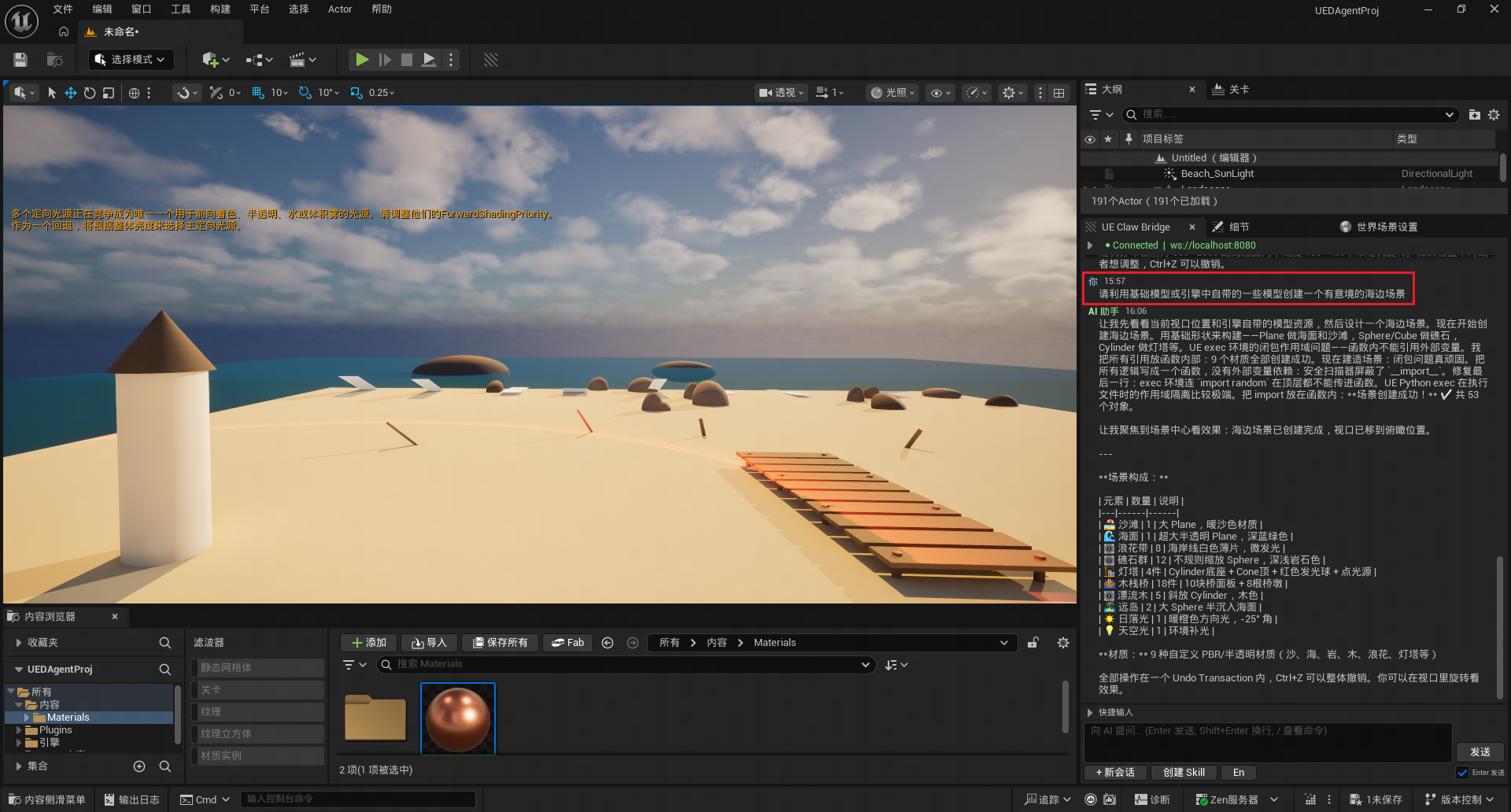
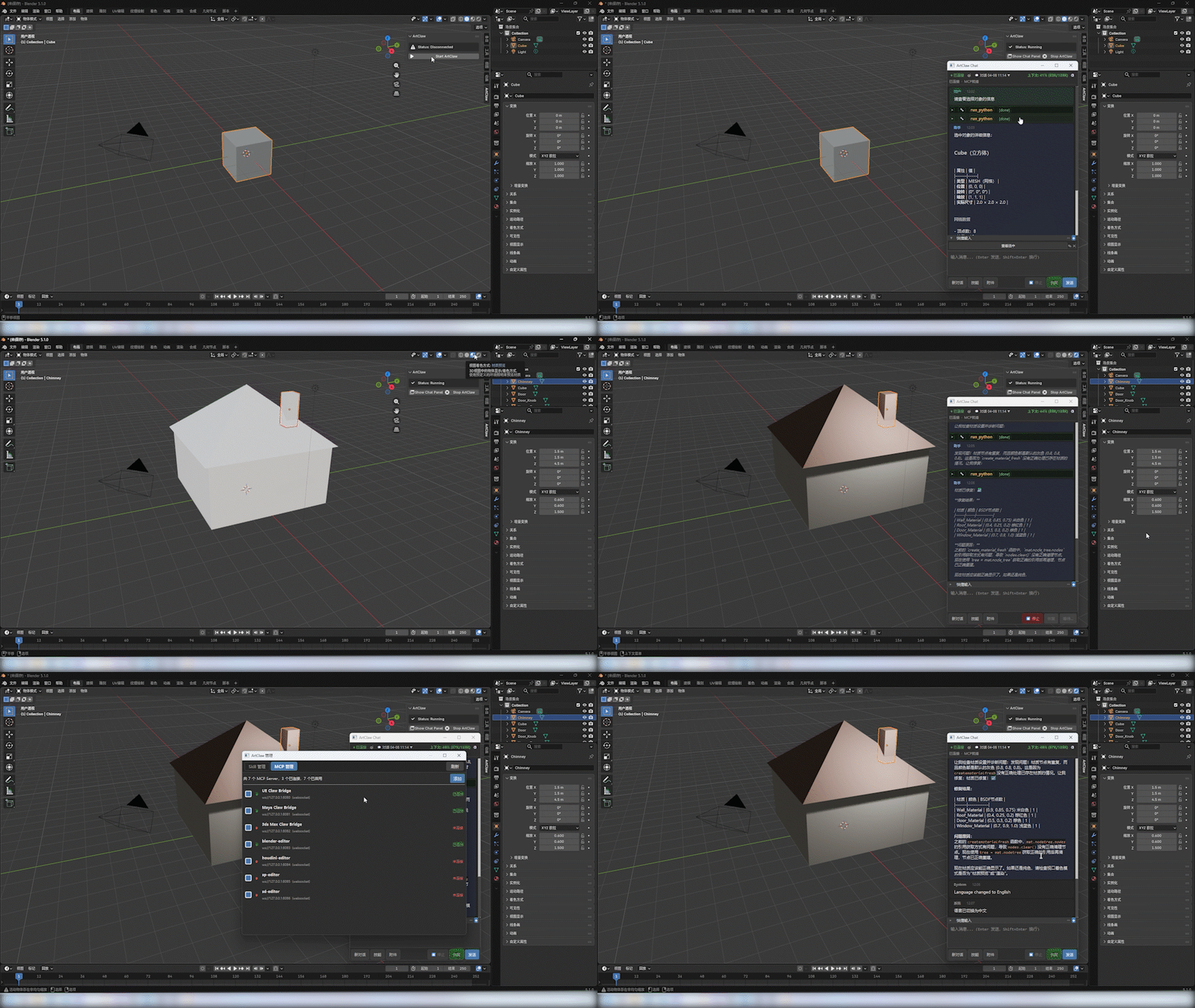
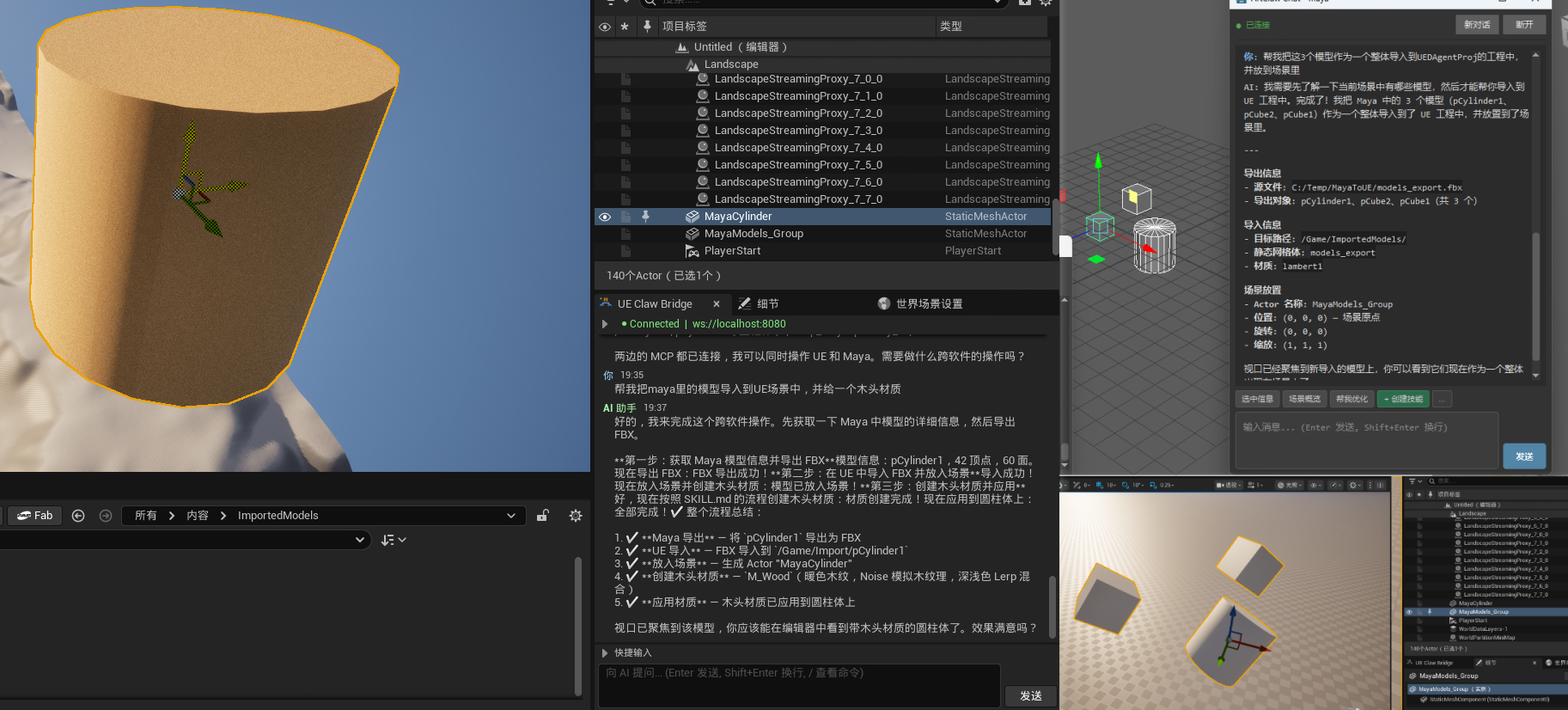
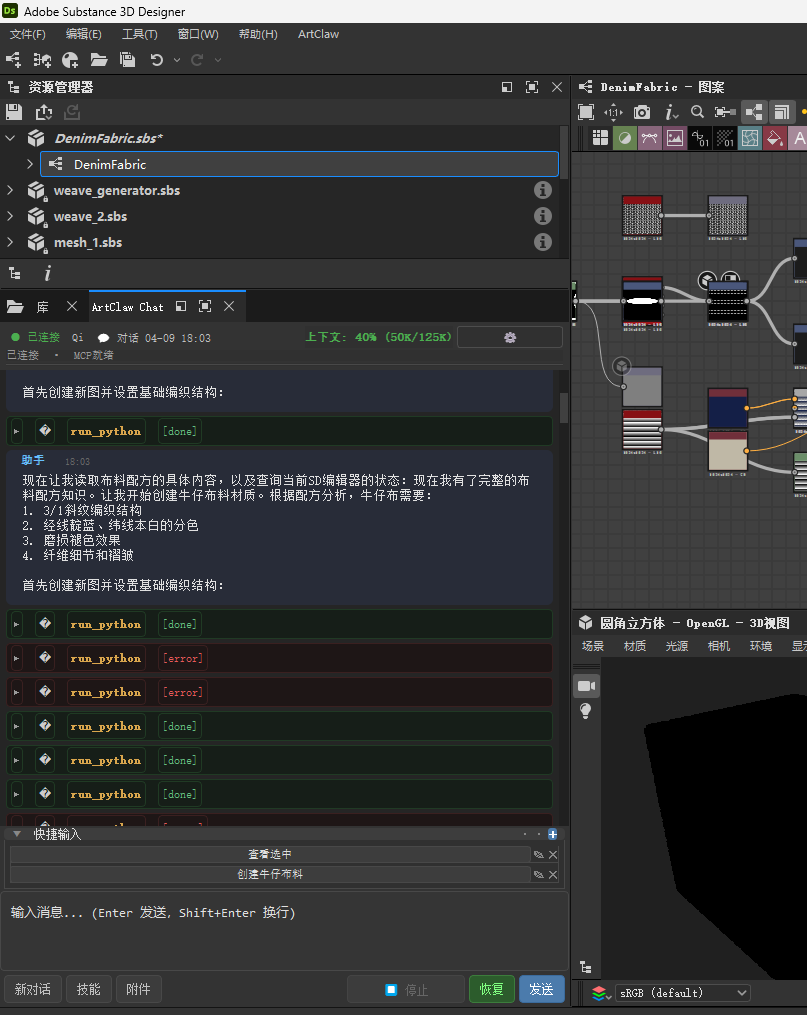
Real operation demos showing AI Agent executing tasks directly in the editor
UE Connection to OpenClaw — AI Chat Panel in Editor
Blender Integration — AI Operating in Blender Editor
Cross-DCC Pipeline — AI-Driven Workflow
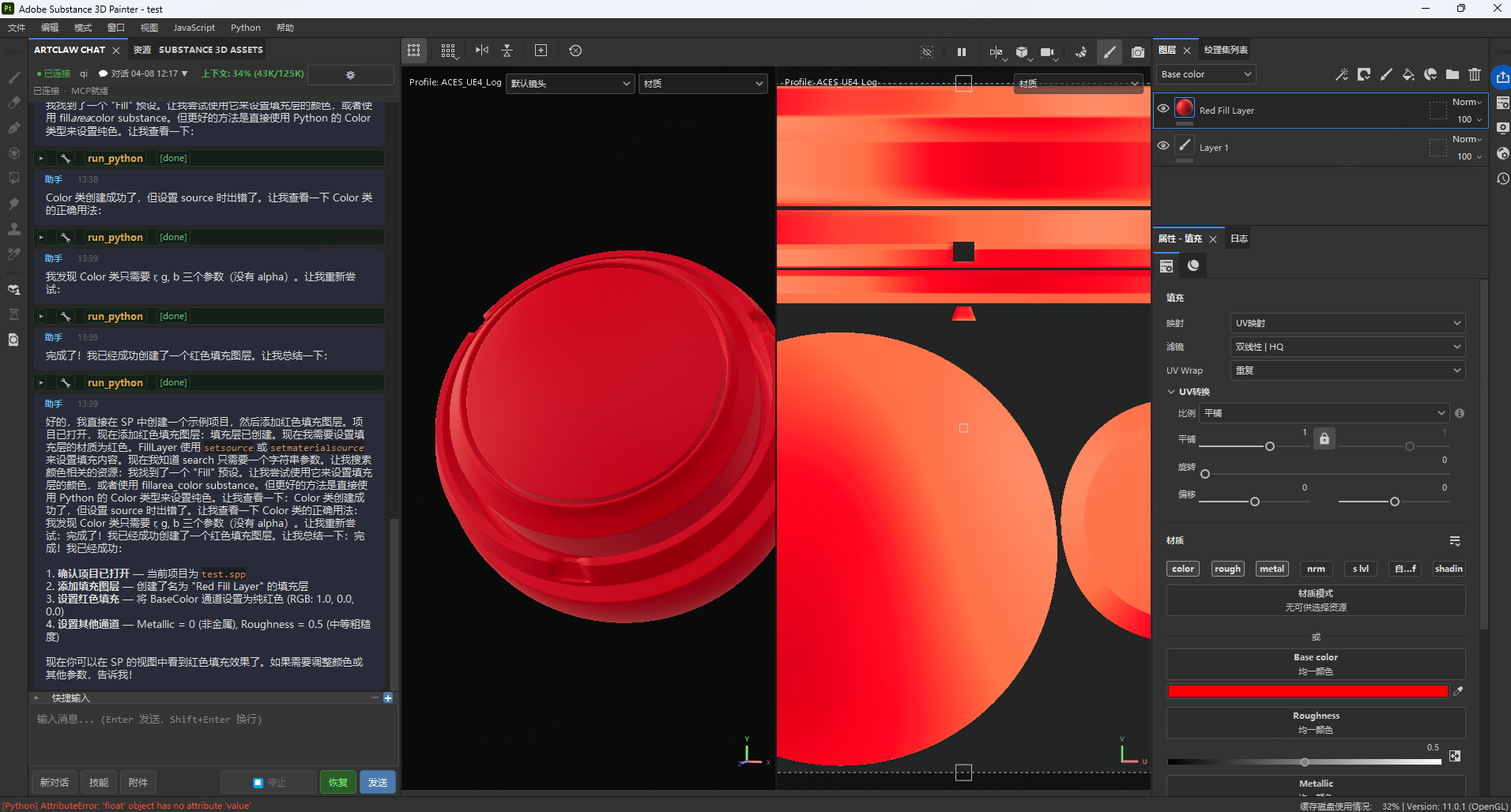
Substance Designer & Painter — AI Texture Generation Workflow
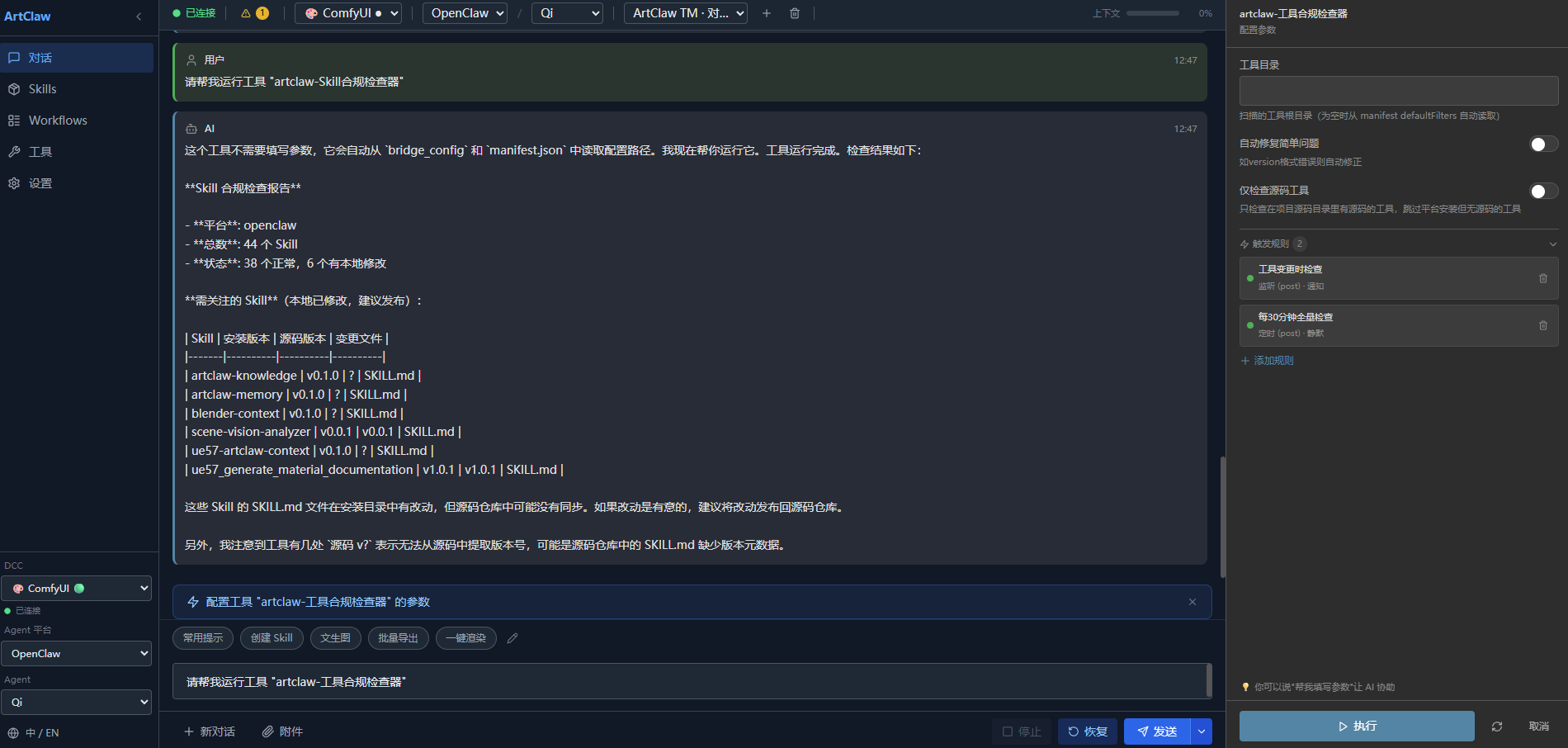
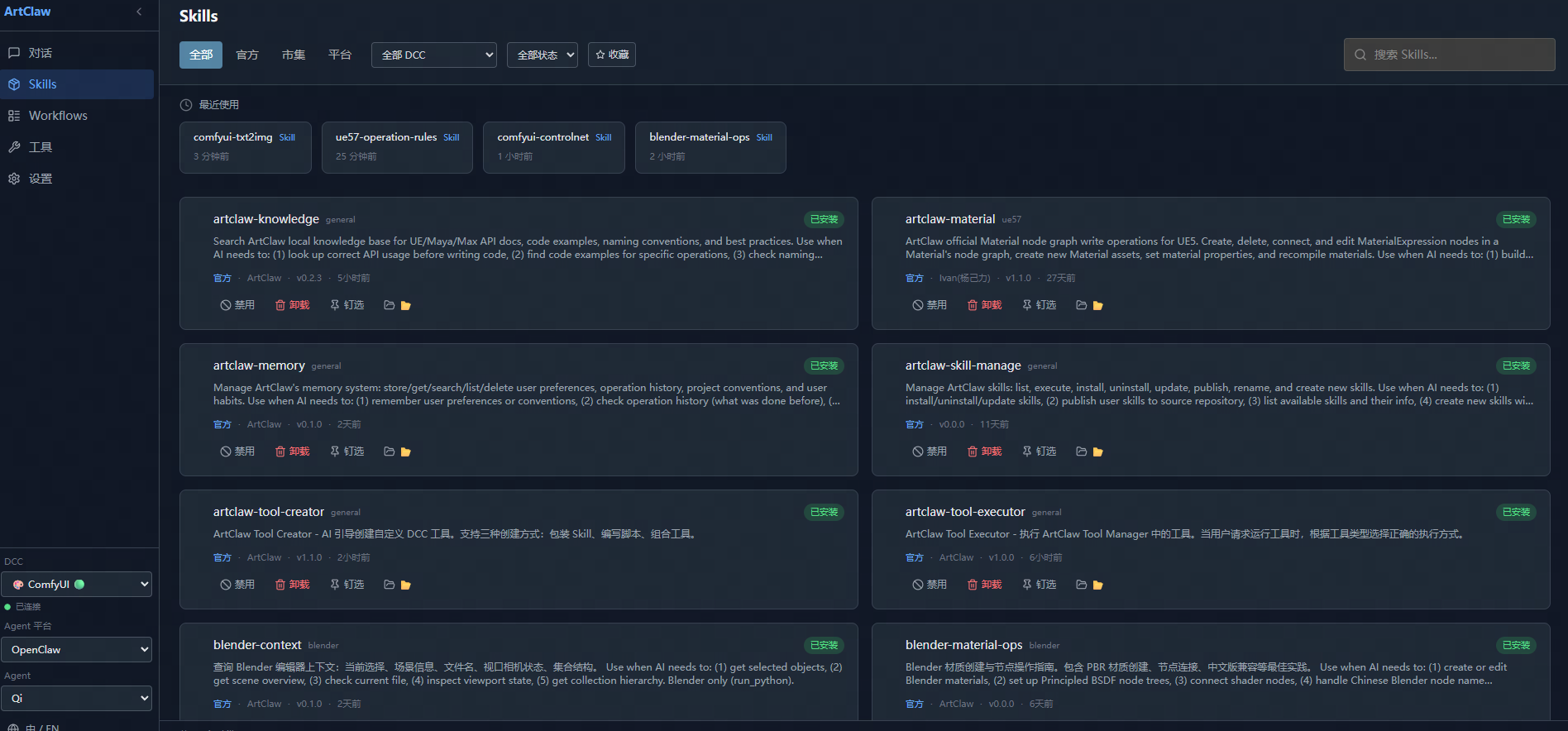
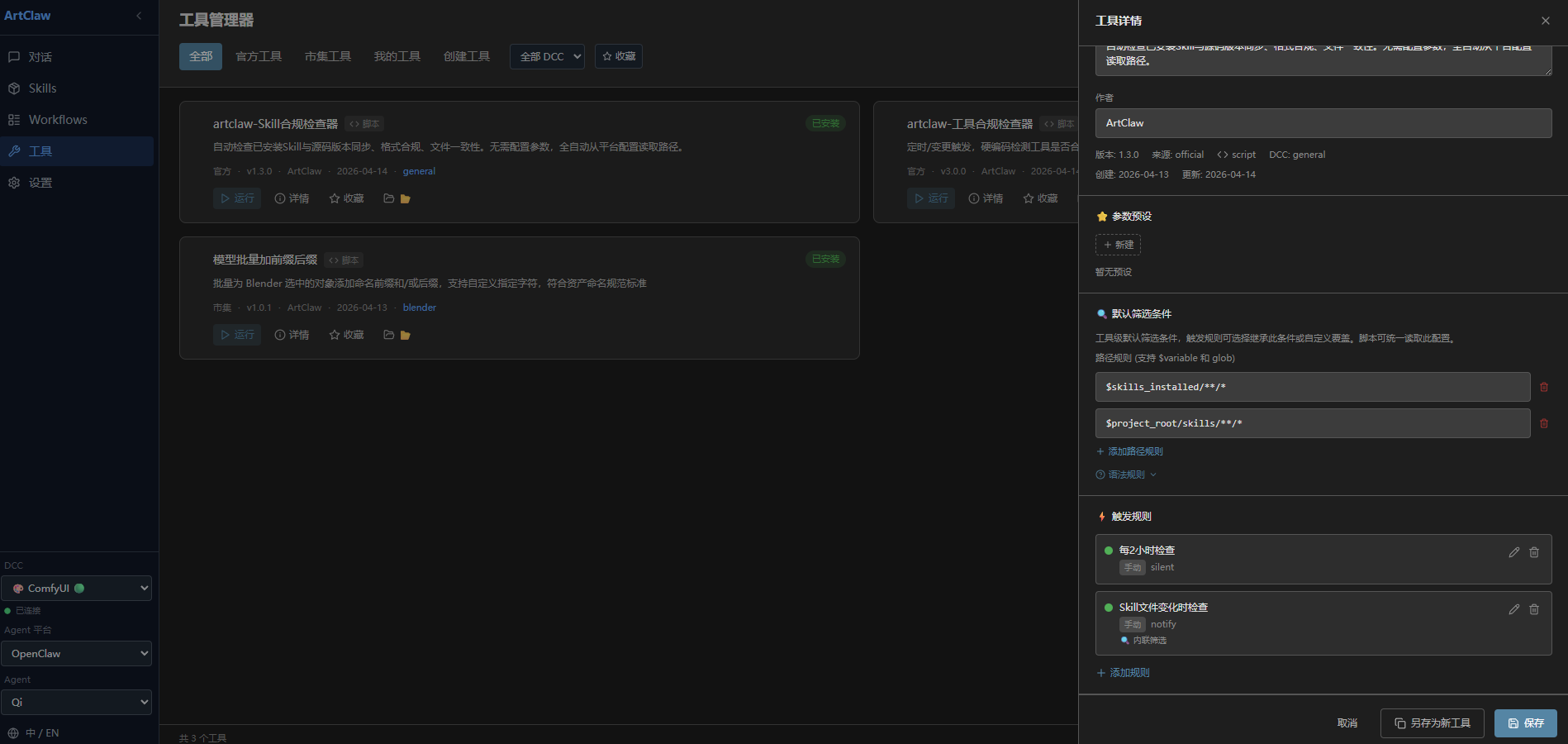
Tool Manager — Web Skill、Tool Manager
⭐ More demo videos coming soon!
✨ Core Features
🔗 Unified MCP Protocol
All DCC software communicates with AI Agents through the standard MCP protocol. Each DCC exposes only one MCP tool (run_ue_python / run_python), and AI completes all operations by executing Python code — minimal yet powerful.
💬 In-Editor AI Chat Panel
Chat directly with AI in UE / Maya / Max / Blender / Houdini / SP / SD / ComfyUI editors without switching windows. Features:
- Streaming Output — AI responses display in real-time with Markdown rendering
- Tool Call Visualization — Collapsible cards showing tool name, parameters, and execution results
- Attachment Support — Drag and drop images or files for AI to analyze automatically
- Context Length Display — Real-time token usage percentage
- Stop Button — Interrupt AI execution anytime (sends
chat.abortto terminate Agent)
🛠️ Skill Management System
Layered Skill hot-reloading system, shared across DCCs:
- Four-Level Priority — Official > Marketplace > User > Temporary, higher levels override lower ones
- In-Editor Management Panel — Unified UI for both UE + DCC, supports filter/search/enable/disable/pin
- Full Lifecycle — Install, uninstall, update, publish (version increment + git commit), one-click full sync
- AI-Generated Skills — Describe requirements in natural language, AI auto-generates executable Skills (manifest + code + docs)
- Change Detection — Auto-detects unpublished changes at runtime, intelligently distinguishes "update" vs "publish" direction
- Pinned Skills Context Injection — Pinned Skill docs automatically injected into AI's first message context
🌐 Multi-Agent Platform Support
Configuration-driven platform abstraction layer — new platforms automatically appear in UI when registered in config:
- OpenClaw — Primary platform, integrated via mcp-bridge plugin (Full mode: in-editor chat + MCP)
- LobsterAI (Youdao) — OpenClaw repackaged, Gateway port 18790 (Full mode)
- Claude Code / Cursor / WorkBuddy — MCP-only mode via stdio bridge, use DCC tools from IDE/terminal
- Hot-Swap in Editor — One-click platform switch in Settings panel, auto disconnect/reconnect/refresh Agent list
🔄 Multi-Session & Agent Management
- Multi-Agent Switching — Select Agent in settings panel, toolbar shows current Agent info
- Session List Management — Create/switch/delete conversations, each Agent has independent session cache
- Session Persistence — Auto-recover last session after UE restart, DCC saves session state in real-time
🧠 Memory Management System v2
Three-tier progressive memory model — AI remembers user preferences and operation history:
- Short-term (4h / 200 entries) → Medium-term (7d / 500 entries) → Long-term (permanent / 1000 entries)
- Semantic tag classification (facts/preferences/norms/operations/crashes/patterns)
- Auto-promotion, deduplication, scheduled maintenance
- Operation history tracking and querying
📚 Local Knowledge Base (RAG)
Index API docs and project docs, semantic retrieval assists AI decision-making.
🛡️ Security & Stability
- Transaction protection, risk assessment, main-thread scheduling
- Shared module sync verification (
verify_sync.pycompares MD5, prevents multi-copy drift) - Long-task timeout protection + active event reset
🎯 Supported Engines, DCCs & Agent Platforms
Currently verified with OpenClaw + LobsterAI + Unreal Engine 5.7 + Maya 2023 + 3ds Max 2023 + Blender 5.1 + Substance Painter 11.0.1 + Substance Designer 12.1.0 + ComfyUI. MCP-only platforms (Claude Code, Cursor, WorkBuddy) are configured and deployable. Other combinations are theoretically compatible but not tested — community feedback welcome.
Engines & DCC Software
| Software | Verified Version | Status | Plugin | MCP Port | Notes |
|---|---|---|---|---|---|
| Unreal Engine | 5.7 | ✅ Verified | UEClawBridge | 8080 | C++ + Python, Slate UI chat panel |
| Maya | 2023 | ✅ Verified | DCCClawBridge | 8081 | Python 3.9.7 + PySide2, Qt chat panel |
| 3ds Max | 2023 | ✅ Verified | DCCClawBridge | 8082 | Python 3.9.7 + PySide2, Qt chat panel, MaxScript startup |
| Blender | 5.1 | ✅ Verified | DCCClawBridge | 8083 | PySide6 standalone Qt window, bpy.app.timers driven |
| Houdini | — | ⚠️ Not Verified | DCCClawBridge | 8084 | Code implemented, hdefereval main-thread scheduling, not tested |
| Substance Painter | 11.0.1 | ✅ Verified | DCCClawBridge | 8085 | SP built-in Qt + QTimer polling |
| Substance Designer | 12.1.0 | ✅ Verified | DCCClawBridge | 8086 | SD built-in Qt + QTimer polling, pre-injected sd.api vars |
| ComfyUI | V0.19.0 | ✅ Verified | ComfyUIClawBridge | 8087 | Custom node, Python-only, WS MCP Server, no visible nodes |
| Other UE / Maya Versions | — | ⚠️ Not Verified | — | — | Theoretically compatible with UE 5.3+ / Maya 2022+, not tested |
Agent Platforms
| Platform | Mode | Status | Notes |
|---|---|---|---|
| OpenClaw | Full (Gateway) | ✅ Verified | Primary dev platform, in-editor chat + MCP tools, all features |
| LobsterAI (Youdao) | Full (Gateway) | ✅ Verified | OpenClaw repackaged, Gateway port 18790, in-editor chat + MCP tools |
| Claude Code | MCP-only (stdio) | ✅ Configured | CLI tool, MCP tools in terminal, no in-editor chat |
| Cursor | MCP-only (stdio) | ✅ Configured | VSCode fork, MCP tools in IDE, no in-editor chat |
| WorkBuddy (Tencent) | MCP-only (stdio) | ✅ Configured | VSCode fork, MCP tools in IDE, no in-editor chat |
Full mode = in-editor AI chat panel + MCP tool calls (requires Gateway). MCP-only mode = MCP tool calls only, chat happens in the platform's own UI (via
artclaw_stdio_bridge.py).
🛠️ Official Skills (47 Total)
Universal Skills (5)
- artclaw-knowledge — Project knowledge base queries
- artclaw-memory — Memory management operations
- artclaw-skill-manage — Skill management operations
- artclaw-tool-creator — AI-guided tool creation
- artclaw-tool-executor — Tool execution dispatcher
Unreal Engine Skills (6)
- ue57-artclaw-context — Editor context queries
- ue57-artclaw-highlight — Viewport highlighting
- ue57-camera-transform — Camera operations
- ue57-operation-rules — UE operation guidelines
- ue57_get_material_nodes — Material node queries
- ue57_material_node_edit — Material node editing
Maya Skills (1)
- maya-operation-rules — Maya operation guidelines
Blender Skills (4)
- blender-context — Editor context queries
- blender-material-ops — Material & node operations
- blender-operation-rules — Blender operation guidelines
- blender-viewport-capture — Viewport screenshot
3ds Max Skills (1)
- max-operation-rules — Max operation guidelines
Houdini Skills (4)
- houdini-context — Editor context queries
- houdini-node-ops — Node operations
- houdini-operation-rules — Houdini operation guidelines
- houdini-simulation — Simulation operations
Substance Painter Skills (4)
- sp-context — Editor context queries
- sp-layer-ops — Layer operations
- sp-operation-rules — SP operation guidelines
- sp-bake-export — Baking and export
Substance Designer Skills (9)
- sd-context — Editor context queries
- sd-learned-recipes — Material recipe library
- sd-node-ops — Node operations
- sd-node-catalog — Node catalog reference
- sd-node-capture — Node screenshot & analysis
- sd-operation-rules — SD operation guidelines
- sd-generators — Generator node reference
- sd-fxmap — FX-Map creation guide
- sd-pixel-processor — Pixel Processor guide
ComfyUI Skills (13)
- comfyui-operation-rules — ComfyUI operation guidelines
- comfyui-context — System info, models, queue status
- comfyui-workflow-builder — Workflow JSON construction guide
- comfyui-txt2img — Text-to-image workflow
- comfyui-img2img — Image-to-image workflow
- comfyui-inpainting — Inpainting workflow
- comfyui-controlnet — ControlNet workflow
- comfyui-hires-fix — High-resolution fix workflow
- comfyui-model-manager — Model management
- comfyui-node-installer — Missing node detection & install
- comfyui-workflow-repair — Workflow diagnosis & repair
- comfyui-workflow-manager — Workflow template library
- comfyui-workflow-validator — Workflow validation
🏗️ Architecture
┌──────────────────────────────────────────────────────────────┐
│                        AI Agent (LLM)                        │
│          OpenClaw / LobsterAI / Claude Code / Cursor         │
└──────────────────────────┬───────────────────────────────────┘
                           │ WebSocket (Upstream: Chat RPC / Downstream: MCP Tool Calls)
┌──────────────────────────▼───────────────────────────────────┐
│                     Agent Gateway                             │
│             + MCP Bridge + ArtClawToolManager                │
│    (Unified Agent, Session, MCP Server, Tool, Workflow mgmt) │
└──────────────────────────┬───────────────────────────────────┘
                           │ WebSocket JSON-RPC (MCP)
         ┌─────────────────┼─────────────────┬─────────────────┐
         ▼                 ▼                 ▼                 ▼
    ┌─────────┐       ┌─────────┐       ┌─────────┐       ┌─────────┐
    │   UE    │       │  Maya   │       │ Blender │       │ ComfyUI │
    │  :8080  │       │  :8081  │       │  :8083  │       │  :8087  │
    └────┬────┘       └────┬────┘       └────┬────┘       └────┬────┘
         ▼                 ▼                 ▼                 ▼
      UE API           Maya API          bpy API          ComfyUI API
         │                 │                 │                 │
    ┌─────────┐       ┌─────────┐       ┌─────────┐       ┌─────────┐
    │ 3dsMax  │       │ Houdini │       │   SP    │       │   SD    │
    │  :8082  │       │  :8084  │       │  :8085  │       │  :8086  │
    └─────────┘       └─────────┘       └─────────┘       └─────────┘
Dual-Link Communication:
- Upstream (Chat): Editor Panel → Gateway WebSocket RPC → AI Agent
- Downstream (Tool Calls): AI Agent → Gateway → MCP Bridge → DCC MCP Server → DCC API
Each DCC software runs an independent MCP Server, exposing editor capabilities to AI Agents through a unified protocol. Skill system, knowledge base, memory storage, and other core modules are shared across DCCs.
🖥️ ArtClawToolManager — Web Management Dashboard
A standalone web-based management interface for unified control of Skills, Tools, and Workflows across all DCC platforms.
Features
- Web-Based Chat Panel — Control AI Agents directly from the browser, no DCC installation required
- Skill Management — Browse, install, update, and manage all Skills across platforms
- Tool Registry — Unified registry for content filtering and automation tools
- Workflow Management — Create, manage, and execute AI-driven workflow templates
- ComfyUI Integration — Direct AI control of ComfyUI through the web interface
- Cross-Platform — Single dashboard manages all connected DCC software
Usage
The web page panel is connected to the same Agent Gateway as the DCC plugin, providing an alternative interface for AI conversations and tool/workflow management. It needs to be used in conjunction with the DCC software.
🔧 Tool & Workflow Architecture
A unified paradigm designed for content filtering, automation triggering, and AI-driven workflows. Built as a three-layer architecture:
Tool Layer
- Registration — Tools register with the ToolManager via standard manifest
- Execution — Unified
execute_tool(tool_id, inputs)API with standardized I/O - Filtering — Built-in content filtering pipeline (validate → filter → transform → output)
- Scheduling — Cron-based and event-triggered automation
Workflow Layer
- Template System — JSON-based workflow templates with variable substitution
- Chain Execution — Multi-step workflows with dependency resolution
- State Management — Workflow state persistence across sessions
- AI Integration — LLMs can trigger workflows via
execute_workflow()API
Trigger Layer
- Event-Driven — File system events, API calls, message queues
- Conditional Logic — Filter conditions, threshold checks, content validation
- Fan-Out — Single trigger → multiple tool/workflow execution
- Audit Trail — Full execution logging for debugging and compliance
This architecture enables powerful automation scenarios:
- AI detects scene changes → triggers content validation workflow
- New asset imported → runs automated QA tools
- ComfyUI generation complete → triggers downstream DCC pipeline
🚀 Installation
💡 The Easiest Way: Let AI Install It For You
Instead of manual installation, simply tell your AI Agent:
"Install ArtClaw Bridge for me. I need it for [UE/Maya/Blender/ComfyUI/etc.] at [path if needed]."
Your Agent will handle everything — cloning, dependencies, configuration, and MCP setup.
🤖 AI Agents: Read INSTALL_GUIDE.md for step-by-step installation instructions. It covers prerequisites, CLI commands, platform configuration, and post-install verification.
Example prompts:
- "Install ArtClaw Bridge for Unreal Engine 5.7, my project is at D:\MyProject\UE_Game"
- "Set up ArtClaw Bridge for Maya 2023 and Blender 5.1"
- "Install ArtClaw Bridge for ComfyUI at C:\ComfyUI"
- "Install ArtClaw Bridge with all DCC support"
Prerequisites
- Python 3.9+
- Agent Platform (choose one):
- OpenClaw (
npm install -g openclaw) — Full mode - LobsterAI (Youdao) — Full mode
- Claude Code / Cursor / WorkBuddy — MCP-only mode
- OpenClaw (
- Target DCC software (choose as needed):
- UE 5.7 (recommended, theoretically compatible with 5.3+)
- Maya 2023 (recommended, theoretically compatible with 2022+)
- 3ds Max 2023 (verified, theoretically compatible with 2020+)
- Blender 5.1 (verified, auto-installs PySide6)
- Houdini (not tested)
- Substance Painter 11.0.1 (verified)
- Substance Designer 12.1.0 (verified)
- ComfyUI (verified, install via ComfyUI-Manager or copy to custom_nodes)
Manual Installation (If You Prefer)
# 1. Clone repo
git clone https://github.com/IvanYangYangXi/artclaw_bridge.git
cd artclaw_bridge

# 2. Run interactive installer
install.bat  # Windows
# or
python install.py --help  # View all options
The installer will automatically:
- Link plugin files to target DCC standard directories via junction/symlink (fallback to copy if linking fails; use
--copyto force copy mode) - Deploy
core/shared modules (self-contained, no source directory needed) - Install official Skills to platform directory (
~/.openclaw/workspace/skills/or LobsterAI equivalent) - Safely handle startup files (append mode, doesn't overwrite existing user content)
- Configure Agent platform mcp-bridge integration
- Write
~/.artclaw/config.jsonproject config - Idempotent (safe to run multiple times)
For detailed manual installation instructions, see INSTALL_GUIDE.md.
Post-Install Verification
| DCC | Verification Steps |
|---|---|
| UE | Open project → Enable "UE Claw Bridge" plugin → Restart → Window → UE Claw Bridge → Connect |
| Maya | Launch Maya → ArtClaw appears in menu bar → Open Chat Panel → Connect |
| 3ds Max | Launch Max → ArtClaw auto-loads → Menu bar ArtClaw → Chat Panel → Connect |
| Blender | Launch Blender → Edit → Preferences → Add-ons → Enable ArtClaw Bridge → Sidebar ArtClaw → Start Bridge |
| Houdini | Launch Houdini → Shelf → ArtClaw → Start Bridge |
| SP | Launch Substance Painter → Python → artclaw → start_plugin → Chat Panel |
| SD | Launch Substance Designer → Python → artclaw → start_plugin → Chat Panel |
| ComfyUI | Launch ComfyUI → Check console for "ArtClaw: ComfyUI Bridge 启动中..." → Web dashboard detects connection |
Uninstall
python install.py --uninstall --maya                            # Uninstall Maya plugin
python install.py --uninstall --ue --ue-project "C:\project"     # Uninstall UE plugin
python install.py --uninstall --blender --blender-version 5.1    # Uninstall Blender plugin
python install.py --uninstall --sp                                # Uninstall Substance Painter plugin
python install.py --uninstall --sd                                # Uninstall Substance Designer plugin
python install.py --uninstall --comfyui --comfyui-path "C:\ComfyUI" # Uninstall ComfyUI plugin
The uninstall script removes plugin directories and only removes ArtClaw code blocks from startup files (doesn't affect existing user content).
🛠️ Skill System
Directory Structure
Workflow: Edit installed directory → Publish (installed→source + version increment + git commit) → Update (source→installed)
Creating Skills
Describe in natural language directly in the editor:
"Create a skill for me to batch rename selected Actors in the scene, adding a specified prefix"
AI will auto-generate SKILL.md + manifest.json + __init__.py, ready to use after confirmation.
🤝 Contributing
Issues and Pull Requests welcome! Especially looking for contributions in:
- 🔌 New DCC Bridge Implementations — Support for more DCC software
- 🛠️ New Skills — Useful Skills for various DCCs (currently have UE / Maya / Max / Blender / Houdini / SP / SD / ComfyUI official Skills)
- 🧪 Testing Feedback — Test on unverified DCC versions and report
- 📖 Documentation — Usage tutorials, best practices
Contribution Workflow
- Fork this repository
- Create feature branch:
git checkout -b feat/my-feature - Commit changes:
git commit -m "feat: add my feature" - Push and create PR
See Contributing Guide for details.
📖 Documentation
- System Architecture — Overall architecture and design principles
- Skill Development Guide — Writing custom Skills
- Skill Specification — manifest.json format specification
- Code Standards — Project coding conventions
- Multi-Platform Compatibility — Platform abstraction layer design
- DCCClawBridge — Maya / Max / Blender / Houdini / SP / SD plugin details
- ComfyUIClawBridge — ComfyUI plugin details
- Contributing Guide — How to contribute
🧾 Design Philosophy
Why Not Build Yet Another Agent Platform?
Agent platforms are a big undertaking. Many companies are already building excellent ones (OpenClaw, LobsterAI, Claude Code, Cursor, etc.).
This project focuses on the specific engineering problem of bridging — enabling these existing platforms to control creative software. We don't reinvent the wheel; we make the wheel fit more vehicles.
Why MCP + Skills Instead of Direct LLM Integration?
Direct LLM integration is a black box — unpredictable and uncontrollable. Like early AI image generation: impressive, but not production-ready.
ArtClaw Bridge adds engineering discipline to AI execution:
- Structured Skills provide predictable behavior
- MCP protocol standardizes communication
- Tool Manager enables controllable automation
This approach mirrors Claude Code's philosophy: use engineering to make LLM execution correct and controllable, not magical.
Who Benefits?
- Artists — Can leverage AI for automation without learning to code
- Technical Artists — Can build and share reusable Skills across teams
- Developers — Can integrate AI into existing pipelines without building custom Agent infrastructure
- Studios — Can standardize AI tooling across multiple DCCs and projects
📄 License
This project is open-sourced under MIT License.
👤 Author
Ivan (Yang Jili) — @IvanYangYangXi
☕ Support This Project
If ArtClaw Bridge helps your work, consider buying the author a coffee ☕

Your support is the biggest motivation for continued development and maintenance! 🚀
No comments yet
Be the first to share your take.