
AI Data Access Gateway
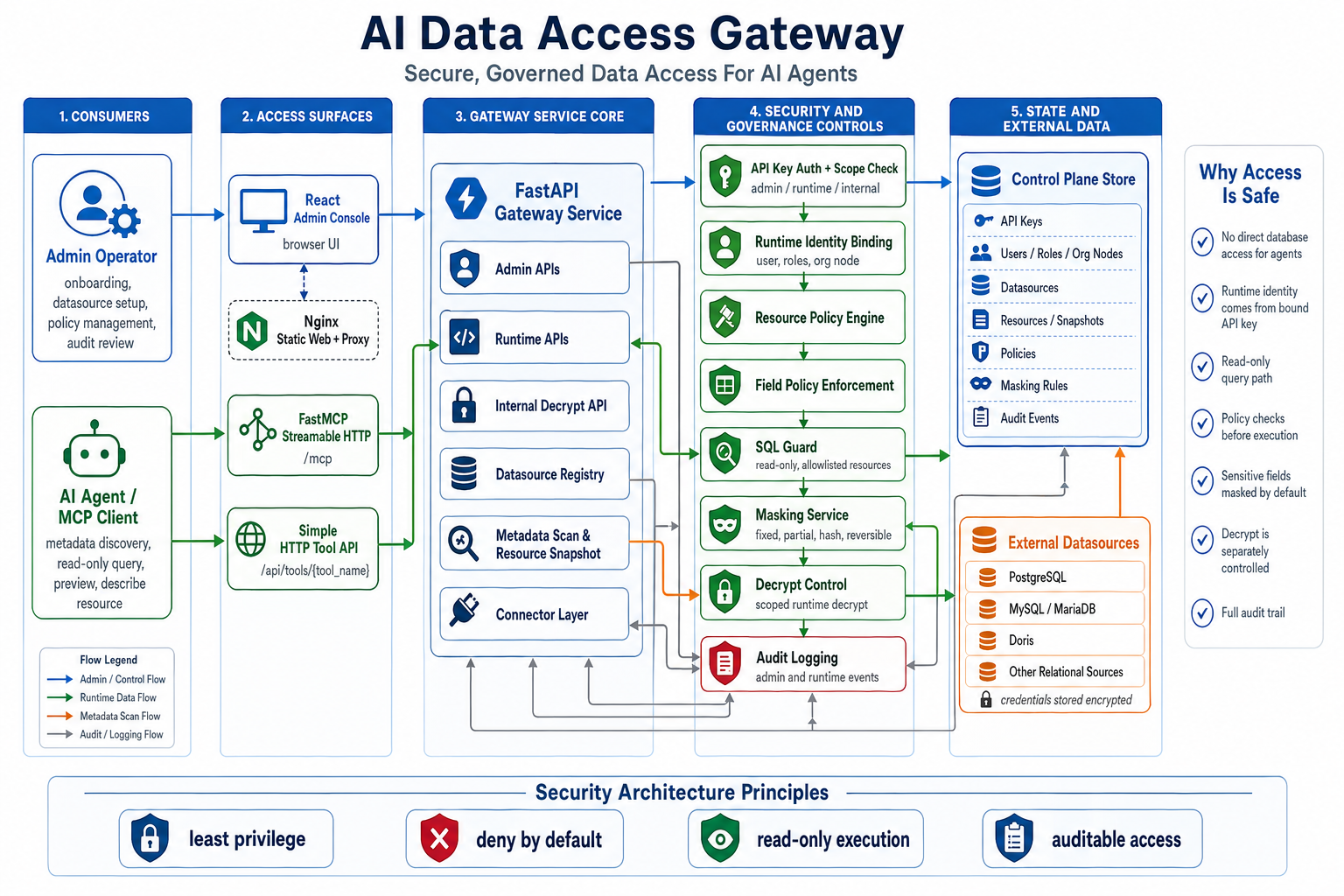
AI Data Access Gateway is an open-source secure data access gateway for AI agents. It provides database safety access services to AI agents through the MCP protocol. It sits between AI agents and real data sources, exposes governed metadata discovery and read-only data access, and enforces authorization, SQL safety checks, field-level policies, masking, data decrypt controls, and audit logging during AI-initiated data queries.
Architecture Overview
The project consists of a data security access layer and an admin console.
The runtime data access layer uses SQL Guard, resource policies, and field policies to constrain queries to controlled read-only paths. Resource policies can target data sources, databases, schemas, tables or views, tags, or global scope; field and masking policies remain field-level controls. The primary AI-agent integration is the FastMCP Streamable HTTP /mcp endpoint; POST /api/tools/{tool_name} is a supplemental plain HTTP tool API for traditional service integrations and is not an MCP transport. Connector dependency or execution failures return structured status: "error" responses with a stable error.type, a sanitized error.message, and query_id for log correlation; raw connector, driver, host, and SQLAlchemy exception text is not returned in runtime responses or audit metadata. Policy and SQL Guard denials continue to return status: "rejected".
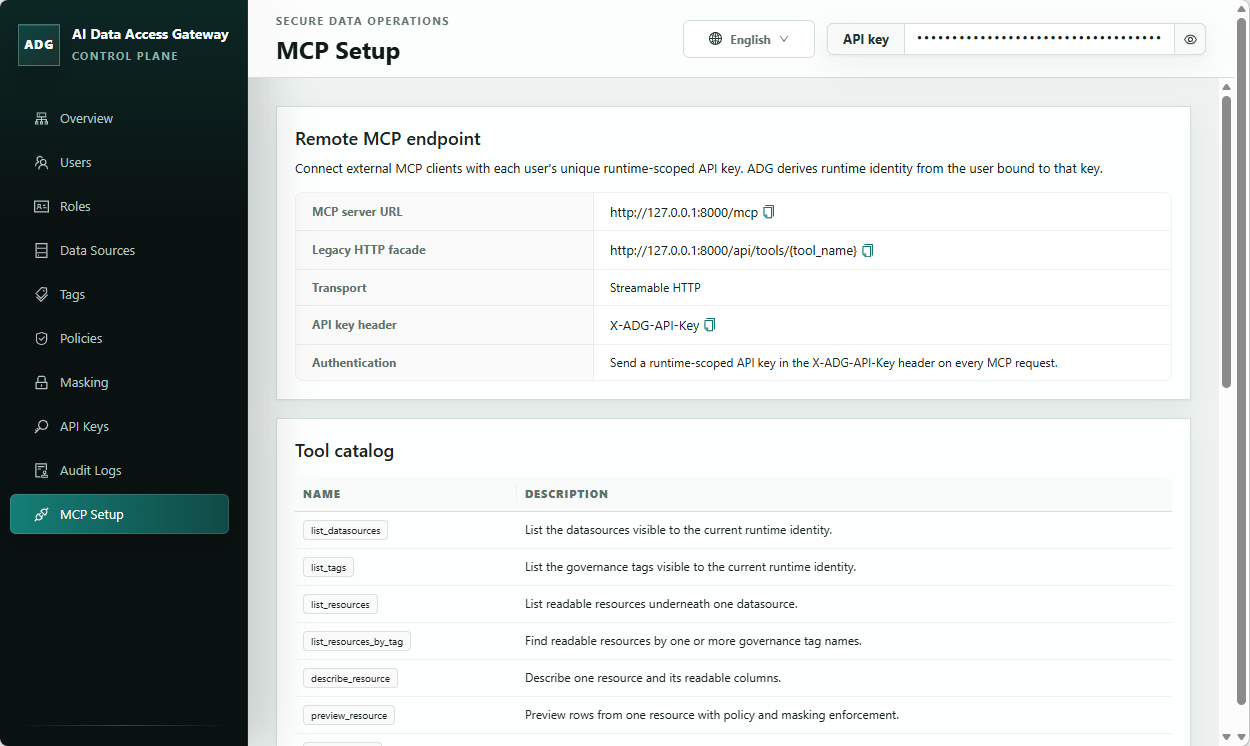
The admin console serves a single-admin trust model. It covers data source maintenance, resource governance, and audit review, and manages data source registration, directory identity mapping, resource metadata, field policies, masking configuration, API Key management, and enterprise organization structure management.
The repository also includes demo data initialization, Docker Compose startup, and minimal runtime HTTP call examples.
Admin UI Example
Repository Layout
src/adg/: backend application code, control plane, runtime, connectors, and security capabilitiestests/: backend unit and integration coverageweb/: React + Vite admin consoleexamples/: demo seed data and example client flowsdocs/: internal planning, design, acceptance, and repository memory docs
Quickstart
Prefer Docker Compose for a production-style runtime stack. If you run directly on the host, use non-development dependencies, keep reload disabled, and set production environment variables explicitly.
Backend
uv sync --frozen --no-dev --extra all
$env:ADG_ENV="production"
$env:ADG_CONTROL_PLANE_DATABASE_URL="sqlite:///./data/adg-control-plane.db"
$env:ADG_SECRET_KEY="<generate-a-long-random-secret>"
$env:ADG_CREDENTIAL_ENCRYPTION_KEY="<generate-a-second-long-random-secret>"
$env:ADG_MASKING_ENCRYPTION_KEY="<generate-a-third-long-random-secret>"
uv run --no-dev --extra all alembic upgrade head
uv run --no-dev --extra all init-admin --database-url sqlite:///./data/adg-control-plane.db
uv run --no-dev --extra all uvicorn adg.app.main:create_app --factory --host 0.0.0.0 --port 8000
init-admin prints a one-time admin API key for console onboarding and admin setup. Save it immediately and use it in the console. Runtime HTTP examples require a separate runtime-scoped API key bound to a directory user; create or reset that key after initialization.
MCP authentication
For /mcp, provide the same runtime-scoped API key using the configured API key Header or Bearer authentication:
- The default or configured API key header (default:
X-ADG-API-Key) Authorization: Bearer <runtime-api-key>
Query authentication is a disabled-by-default compatibility option for platforms that cannot set request headers. Enable it at deployment time with ADG_MCP_QUERY_API_KEY_ENABLED=true, then use /mcp?apikey=<runtime-api-key>. There is intentionally no runtime or admin-console toggle: authentication bootstrap policy must be fixed before requests reach the application.
If different non-empty credentials are provided from enabled sources, /mcp returns HTTP 400. Prefer Header or Bearer authentication. When query authentication is enabled, do not retain full query strings in proxies, access logs, or monitoring systems, because they can expose the API key.
Frontend
Set-Location web
npm ci
npm run build
The production build is written to web/dist. The Docker Compose path serves this static frontend with Nginx and exposes the web console at http://127.0.0.1:8080.
Docker Compose
Copy-Item docker-compose.example.yml docker-compose.yml
$env:ADG_SECRET_KEY="<generate-a-long-random-secret>"
$env:ADG_CREDENTIAL_ENCRYPTION_KEY="<generate-a-second-long-random-secret>"
$env:ADG_MASKING_ENCRYPTION_KEY="<generate-a-third-long-random-secret>"
docker compose up --build
docker compose exec backend init-admin
docker-compose.example.yml is the tracked template. Copy it to docker-compose.yml for local deployment changes, then edit the copied file for ports, volumes, or environment-specific settings. To build with package mirrors, set PYPI_INDEX_URL and/or NPM_REGISTRY_URL in .env; if they are omitted, the Docker build uses https://pypi.org/simple and https://registry.npmjs.org/. The Compose stack starts production backend and static frontend containers. The backend API and MCP endpoints are published at http://127.0.0.1:8000 by default; set ADG_BACKEND_HOST_PORT in .env if AI agents need a different host port. The admin console uses ADG_BACKEND_HOST_PORT when showing MCP connection URLs, and only omits the port for 80 or 443. The web console is published at http://127.0.0.1:8080 by default; set ADG_WEB_PORT if that host port is already allocated. Set ADG_BACKEND_PORT only when you need to change the backend container's internal listen port. SQL guard behavior is split into execution mode and strict validation: ADG_SQL_EXECUTION_MODE defaults to read_only and may be set to dml, schema, or admin for broader statement categories, while ADG_SQL_STRICT_VALIDATION defaults to true for function and projection restrictions. Admin list endpoints for resources, resource trees, and audit events return paginated objects with items, total, limit, and offset; tune defaults with ADG_ADMIN_PAGE_DEFAULT_LIMIT (default 50) and ADG_ADMIN_PAGE_MAX_LIMIT (default 500). API key authentication failure throttling is enabled by default with in-process memory storage; configure it with ADG_AUTH_RATE_LIMIT_ENABLED, ADG_AUTH_RATE_LIMIT_STORAGE, ADG_AUTH_RATE_LIMIT_WINDOW_SECONDS, ADG_AUTH_RATE_LIMIT_MAX_FAILURES, and ADG_AUTH_RATE_LIMIT_BLOCK_SECONDS. ADG_AUTH_RATE_LIMIT_MEMORY_MAX_BUCKETS (default 10000) bounds in-process tracking memory. Set ADG_AUTH_RATE_LIMIT_STORAGE=redis plus ADG_AUTH_RATE_LIMIT_REDIS_URL and install the optional redis extra for shared multi-process counters. Runtime datasource queries reuse SQLAlchemy engines through an in-process LRU/idle-TTL cache. Tune it with ADG_RUNTIME_DATASOURCE_POOL_CACHE_SIZE (default 32), ADG_RUNTIME_DATASOURCE_POOL_IDLE_TTL_SECONDS (default 300), ADG_RUNTIME_DATASOURCE_POOL_SIZE (default 5), and ADG_RUNTIME_DATASOURCE_POOL_MAX_OVERFLOW (default 0). Runtime query, datasource test, and metadata scan connections set DBAPI timeouts with ADG_RUNTIME_DATASOURCE_CONNECT_TIMEOUT_SECONDS (default 10), ADG_RUNTIME_DATASOURCE_READ_TIMEOUT_SECONDS (default 120, MySQL/Doris), and ADG_RUNTIME_DATASOURCE_WRITE_TIMEOUT_SECONDS (default 120, MySQL/Doris). Datasource credentials and reversible masking contexts use versioned Fernet envelopes derived with PBKDF2-HMAC-SHA256; tune the iteration count with ADG_SECRET_KDF_ITERATIONS (default 390000). Set ADG_SECRET_KEY, ADG_CREDENTIAL_ENCRYPTION_KEY, and ADG_MASKING_ENCRYPTION_KEY to three distinct long random values in production. When metadata scanning is requested without an explicit database, ADG scans at most ADG_METADATA_SCAN_MAX_DATABASES databases (default 25). Connector network boundaries reject loopback, link-local metadata IPs, multicast, and unspecified addresses before connecting while allowing common RFC1918 private database addresses; use ADG_DATASOURCE_NETWORK_ALLOWLIST for explicit comma-separated host, IP, or CIDR exceptions.
Runtime queries support non-recursive read-only CTEs only: every CTE and the final statement must be a SELECT; locking reads, SELECT INTO, wildcard projections, dynamic limits, and CTE limits above the runtime maximum are rejected. CTE queries that reference a resource with an applicable masking policy are rejected because cross-CTE masking lineage is not supported.
Complete resource-tree responses are capped by ADG_ADMIN_RESOURCE_TREE_MAX_NODES (default 10000). The budget includes resources, fields, and tag associations; requests above it fail with HTTP 413 instead of returning a partial tree.
Runtime query requests are capped by ADG_RUNTIME_QUERY_MAX_LIMIT (default 1000), and /runtime/decrypt batches are capped by ADG_RUNTIME_DECRYPT_MAX_VALUES (default 100). Requests above these limits are rejected rather than silently truncated.
Contributor Verification
uv sync --extra dev --extra all
uv run --extra dev pytest
uv run --extra dev ruff check .
uv run --extra dev mypy src tests
Set-Location web
npm test
npm run build
npm run audit:prod
Set-Location ..
uv export --frozen --extra dev --extra all --no-editable --no-hashes --no-emit-project --format requirements-txt --output-file .tmp-audit-requirements.txt
uv tool run --from pip-audit pip-audit -r .tmp-audit-requirements.txt --no-deps --vulnerability-service osv --progress-spinner off
Remove-Item .tmp-audit-requirements.txt
Documentation
License
This project is licensed under Apache 2.0. See LICENSE.
No comments yet
Be the first to share your take.