
A framework for running a distributed agent factory. Dispatch Claude, Codex, Antigravity, Grok, and more across your own machines, in parallel, on your existing subscriptions. Measure every run with agents perf / agents insights, fold what you learn back into AGENTS.md and skills, then put the loop on a schedule with routines and monitors. Spawn parallel teams in isolated terminals or dispatch to the cloud for a PR. Watch live state across the fleet, nudge stalled runs, and message agents mid-flight. Store secrets behind Touch ID, drive real browsers and Electron apps, and steer the whole fleet from a menu bar — all from one CLI.
Quickstart
npm install -g @phnx-labs/agents-cli   # or: curl -fsSL agi-cli.sh | sh
agents setup                           # first-time setup, or re-open the capability hub
agents setup status                    # readiness for browser, computer, fleet, and more
agents run claude "explain this repo"  # run any agent on your existing subscription
agents setup is interactive and idempotent -- safe to re-run on any machine. Once core setup exists, it opens a status-aware menu for browser, computer, secrets, fleet, share, watchdog, and device preferences; each choice delegates to the same wizard available under agents setup <capability>. In CI or another non-TTY, bare setup prints the checklist without prompting. The agi-cli.sh one-liner installs this same canonical @phnx-labs/agents-cli package. Prefer bun? bun install -g @phnx-labs/agents-cli works too.
Full path -- installing harnesses, logging in, smoke-testing agents teams, and setting up your own fleet: apps/cli/docs/QUICKSTART.md.
Learn (concepts): Loop + graph engineering · Teams as graph engineering · Sessions · index + cross-device · Distributed fleet execution. Also: harness engineering · visual longform.
Already installed? agents upgrade updates agi-cli itself to the latest version (agents upgrade 1.2.3 for a specific version or dist-tag, -y to skip the confirm prompt). The command is upgrade on every platform -- do not reach for agents update, which updates an installed agent harness, not agi-cli (and on macOS, agents helper update is a third thing: it reinstalls the keychain helper).
Source: github.com/phnx-labs/agi-cli
Also available as ag -- all commands work with both agents and ag.
- Factory loop
- One config, every agent
- Run any agent
- Sessions across agents
- Control the fleet
- Sync the fleet
- Pin versions per project
- Run open models through Claude Code
- Run on your own machines
- Teams
- Cloud
- Workflows
- Plugins
- Make it yours
- Browser
- Accounts
- Secrets
- Routines
- Monitors
- Share
- PTY
- Portable setup
- Menu bar
- Private skills
- Security & Privacy
- Compatibility
- FAQ
Factory loop
The same loop whether it's one agent on your laptop or a fleet across a dozen machines: dispatch work, measure what happened, fold the lesson back into the harness, then put it on a schedule.
# Dispatch a team across the fleet -- each teammate in its own worktree
agents teams create checkout --devices yosemite-s0,yosemite-s1
agents teams add checkout claude "Owns: app/payments/*" --name payments
agents teams add checkout codex  "Write tests for the new code" --name qa --after payments
agents teams start checkout --watch

# Measure what happened -- latency, friction, dead-weight skills
agents perf commands --days 7      # slowest CLI entrypoints
agents insights --since 30d        # friction, harness comparison, ranked actions

# Fold the lesson back into the harness -- every agent picks it up next run
agents rules add ~/lessons/payments-review.md --agents claude
agents skills add ~/skills/payments-review --agents claude

# Put it on a schedule so it runs itself
agents routines add nightly-payments-audit \
  --schedule "0 2 * * *" --agent claude --prompt "Audit payments/* for regressions"

# Steer the fleet this loop runs on from the menu bar
agents menubar setup
agents perf reads a disposable warehouse at ~/.agents/.cache/perf/perf.db -- hook, command, and run timing rollups, deletable any time. agents insights (alias agents sessions insights) is deterministic and offline: it caches per-session facets, compares harnesses, and ranks actions by evidence count -- no model call unless you pass --narrative. Routines put any of this on a cron (Routines); monitors fire it on a change instead of a clock (Monitors); the menu bar is the always-on control surface for the fleet these commands drive (Menu bar).
One config, every agent
# Set up the Notion MCP server once.
agents install mcp:com.notion/mcp

# It's now registered with Claude Code, Codex, Antigravity, and Cursor.
agents mcp list
Skills, slash commands, rules, hooks, and permissions work the same way -- install once in ~/.agents/, synced to every agent's native format automatically.
agents skills add gh:yourteam/python-expert     # Knowledge pack -> all agents
agents commands add gh:yourteam/commands         # Slash commands -> all agents
agents rules add gh:team/rules                   # AGENTS.md -> per-agent instruction files
agents permissions add ./perms                   # Permissions -> auto-converted per agent
Write one AGENTS.md. It becomes CLAUDE.md for Claude Code, AGENTS.md for Antigravity, and .cursorrules for Cursor.
Run any agent
agents run claude "Find all auth vulnerabilities in src/"
agents run codex "Fix the issues Claude found"
agents run antigravity "Write tests for the fixed code"
Each resolves to the project-pinned version with skills, MCP servers, and permissions already synced. Single-typo names auto-correct across every command — agents view cladue resolves to claude, agents add codx@latest to codex.
agents run claude "task" --lease reuses one shared warm crabbox pool across
repositories by default. Concurrent runs share the box but execute in isolated
~/workspaces/<repo>-<run> directories with separate agent homes and credential
files. Add leaseProfile: private-hot-box to
.crabbox.yaml only when a repo intentionally needs a dedicated warm pool;
cross-repo reuse trades re-sync latency for lower idle-compute cost.
Rate-limited? Keep working.
# Claude Code hits a rate limit -> Codex picks up automatically. Same project, same config.
agents run claude "refactor auth module" --mode edit --fallback codex,antigravity
Multiple accounts? Spread the load.
# Picks the signed-in account you haven't used recently.
agents run claude "summarize recent commits" --strategy balanced

# Or choose one account/version interactively for only this run.
agents run claude@
agents run codex@ "review this branch"
--strategy balanced spreads work across available versions of the same agent -- useful when you have multiple accounts and want to avoid burning through one. When every account is rate-limited, the run exits nonzero naming each excluded account and the earliest window reset (use --strategy pinned to force the default) -- it never launches into an exhausted account.
Don't care which harness? agents run auto
# Picks the host (14d usage affinity), the harness (installed CLIs weighted by
# best-account headroom), and the account (balanced) -- all three layers.
agents run auto "summarize recent commits"
agents run auto --device yosemite-s0 "fix the flaky test"   # pin the host layer
run auto excludes any harness whose accounts are all rate-limited or signed out, and exits nonzero with the earliest reset time when nothing anywhere is healthy.
A trailing @ opens an account picker before either an interactive or prompt-based run. Each installed version shows its account identity, exact version, login state, plan, and every available session, weekly, or monthly limit. Logged-out, rate-limited, and out-of-credit accounts remain visible with the reason they cannot be selected; signed-in accounts whose provider does not expose quota data stay selectable and say limits unavailable. The choice pins only that run and does not change your default version.
Account selection is available for Claude, Codex, Gemini, Cursor, Antigravity, Grok, Kimi, Droid, and OpenCode. It requires a terminal and cannot be combined with --resume, --strategy/--balanced, --lease, or --device; profiles and workflows must use their concrete host agent instead.
Chain agents
agents run claude "Review PRs merged this week, summarize risks" \
  | agents run codex "Write regression tests for the top 3 risks"
Supports plan (read-only), edit, auto, and skip modes, effort levels, JSON output for scripting, and timeout limits.
What does --mode skip actually do?
Treat skip as a last-resort escape hatch. In direct-exec runs (without --acp),
agi-cli forwards the harness's native no-prompt flag; it does not add another
safety layer. Prefer auto where it adds a safer automatic policy (smart classifier
on Claude/Copilot, native high-auto mode on Droid, or interactive Kimi), or edit
everywhere else. For headless Kimi, edit, auto, and skip all use the same
already-auto-approved -p behavior, so prefer edit rather than signaling a blanket
bypass. Harnesses without a native bypass flag reject direct-exec skip.
| Harness | Direct-exec --mode skip becomes |
|---|---|
| Claude Code | --dangerously-skip-permissions |
| Codex | --dangerously-bypass-approvals-and-sandbox (equivalent to --yolo) |
| Gemini | --yolo |
| Cursor | -f |
| OpenClaw | --mode full |
| GitHub Copilot | --allow-all (alias: --yolo) |
| Antigravity | --dangerously-skip-permissions |
| Grok | --always-approve |
| Kimi | --yolo interactively; no extra flag in headless -p runs, which already auto-approve |
| Droid | --skip-permissions-unsafe |
With --acp, these native flags are not used. agi-cli instead grants skip
permission requests at the ACP protocol layer: it selects allow_always when offered,
otherwise the first permission option offered by the server. The same last-resort
warning applies.
Codex has no native smart-classifier mode, so agents run codex --mode auto resolves
to sandboxed edit and can still prompt. When --mode is omitted for Codex, the same
safe writable mode is used: the workspace, ~/.agents, and regenerable toolchain caches
are writable; network access is enabled; and approvals are requested on demand. An
explicit --mode plan keeps the filesystem read-only while leaving network access on.
agents run codex --mode skip is different:
it bypasses approvals and removes the sandbox. full remains an alias for skip,
but new scripts should use the explicit skip name.
One protocol, every harness
# Typed event stream instead of raw stdout. Same command, any supported agent.
agents run claude "review this diff" --acp --json
--acp routes through the Agent Client Protocol so you get a unified event stream -- agent_message_chunk, tool_call, plan_update, stop_reason -- instead of writing a parser per CLI. File writes and shell commands flow through agi-cli, which means --mode plan becomes a real sandbox: the write RPC is denied, not just unused.
ACP adapters are documented for claude, codex, cursor, opencode, openclaw, and grok. Other harnesses keep running on the direct-exec path.
Sessions across agents
When you run multiple agents, conversations scatter across tools. Session search brings them together.
# Where was that auth conversation? Search Claude Code, Codex, legacy Gemini, OpenCode at once.
agents sessions "auth middleware"

# Filter by agent, project, or time window
agents sessions --agent codex --since 7d
agents sessions --project my-app

# Read a full conversation
agents sessions a1b2c3d4 --markdown

# Render a shareable, redacted Markdown transcript with the session preview on top
agents sessions render a1b2c3d4 -o session.md

# Or publish it as a link in one step (unlisted + redacted by default)
agents sessions share a1b2c3d4

# Just the last 3 turns, user messages only
agents sessions a1b2c3d4 --last 3 --include user

# Calls in recent Codex sessions on one device
agents sessions --include tools --agent codex --device mac-mini --since 7d

# One session where two different calls match; query every online device
agents sessions --include tools \
  --query 'program:git input:merge' \
  --query 'program:gh output:CONFLICT' \
  --fleet --json

# Count pre-indexed static git sites, containing calls, and sessions
agents sessions --include tools --query 'program:git' --count --fleet --json

# Populate historical tool rows once on each device
agents sessions backfill tools --fleet

# Which skills/commands you actually invoke -- and which installed ones are dead weight
agents sessions stats
agents sessions stats --zero            # only the never-invoked (dead weight)
agents sessions backfill resources      # fold historical sessions into the usage index

# Friction, owner corrections, repeated recipes, and ranked actions across harnesses
agents sessions insights --since 30d
agents sessions insights --agent claude --agent codex --json
# Top-level alias
agents insights --since 7d
sessions insights is deterministic and offline by default. It caches per-session facets, compares harnesses, and emits an actions table with evidence counts plus shortened sample session ids. --narrative is opt-in and receives aggregates only, never raw transcripts.
Interactive picker when you're in a terminal. Structured output (--json, --markdown, filtered by role or turn count) when piped.
Backed by a SQLite + FTS5 index at ~/.agents/.history/sessions/sessions.db with incremental scanning -- warm reads in ~100ms. Tool-call evidence is redacted and bounded before it is cached; repeated --query clauses must match distinct calls in one session. Tool queries read SQLite only: agents sessions backfill tools performs the one-time historical parse, while normal incremental scans index new and changed sessions. The index stores ordered static Bash program sites, so --count reports occurrences, containing tool calls, and distinct sessions without reparsing. --fleet executes one origin partition per device, so synced mirrors cannot duplicate compact evidence or counts returned over SSH; transcript bodies stay on their origin machine. This uses relational SQLite rows and literal FTS5 only, with no embeddings, vector database, or model calls. External tools can consume --json output as a programmatic observability layer; see docs/sessions.md for the schemas and docs/observability.md for the consumption patterns.
Live state, and catching up fast
Search is the past tense. --active is the present -- it infers what each running session is doing right now from the tail of its transcript.
agents sessions --active            # every live run across the fleet, with state
agents sessions --working           # actively producing work (fleet-wide)
agents sessions --idle              # stopped between turns (fleet-wide)
agents sessions --orphan            # agent outlived its terminal client
agents sessions --crashed           # terminal and agent disappeared uncleanly
agents sessions resume a1b2c3d4     # jump back into one — attach in place, or recover
agents sessions resume ag-claude-a1b2c3d4  # or by its tmux alias
On a terminal, agents sessions --active (and a bare agents sessions) open the interactive session browser — one filter you drive with single keys, re-pulled live across the fleet:
| key | filters by | flag it mirrors |
|---|---|---|
s |
search text | --query / positional |
r |
running only | --active |
b |
bookmarks only | --bookmarks |
* |
bookmark / unbookmark the highlighted session | agents sessions bookmark <id> |
f |
focus the highlighted session | agents sessions resume <id> |
c |
team sessions | --team (alias: --teams) |
a |
agent (cycles) | -a |
d |
device (cycles) | --device |
p |
this repo ↔ all dirs | --all |
w |
time window | --since |
tab |
toggle the preview pane | — |
⏎ |
resume / attach | resume / focus |
y |
copy the equivalent command | --print-cmd |
Bookmark the sessions you keep coming back to. * marks the highlighted row (a ★ shows in the listing), b narrows to bookmarks, and agents sessions bookmark <id> / --bookmarks do the same outside a TTY. Press f to focus the highlighted row through the same attach-or-recover flow as agents sessions resume <id>; Enter keeps its existing resume behavior. Bookmarks live in ~/.agents/.history/bookmarks.json keyed by session id, so they survive a reindex of the session cache. They're per-machine — session sync carries transcripts, not this file.
A session that lost its host says so. When an editor window or an SSH connection goes down hard, the agent it owned used to simply disappear from --active; when an agent outlived its window in tmux, it reported a plain idle. Both now carry their own status: ✗ crashed (the host went down and took the agent with it) and ◍ orphan (still alive, but no client is attached — nothing is showing it). Read from tmux's attached-client count and the editor window's registry heartbeat, so a deliberate agents sessions detach is never mistaken for one, and a session that is still working headlessly is left alone.
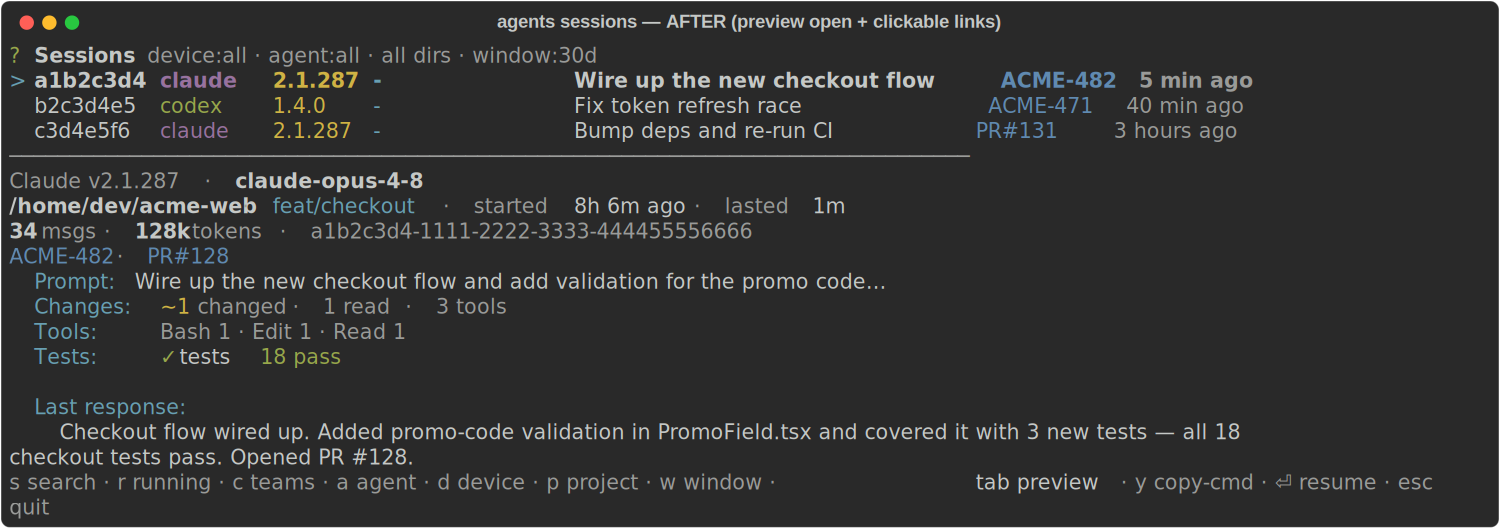
Filters stack (they AND together), the active set shows in the header, and the highlighted row previews below by default (tab hides it) — prompt, activity, last response, plus a links line where the worked-on ticket and the PR the session opened are clickable (OSC 8 hyperlinks: the ticket jumps to Linear, the PR# to GitHub, in terminals that support them). The Linear workspace is resolved from LINEAR_WORKSPACE or the linear-cli config, so tickets stay plain text when it's unknown. Because every hotkey has a flag, the view you build by hand is a real command: press y (or run --print-cmd) to get the exact ag sessions … line — explore interactively, hand the line to an agent. Piped output, --json, or --no-interactive keep the plain listing for scripts. Peek without opening the pager with agents sessions preview <uuid-or-8-char-id>; it resolves across the fleet and supports --json. The older agents sessions <id> --preview spelling remains available.
| before — preview hidden | after — preview open + clickable links |
|---|---|
 |
 |
Each live session resolves to working, waiting_input (with why -- a question, a plan review, or a permission prompt), idle, or a lifecycle state such as orphaned, crashed, closed, abandoned, queued, or unknown. Pass the matching flag (--working, --idle, --waiting, --orphan, --crashed, --closed, --abandoned, --queued, --unknown) directly; each implies --active, and several flags form a union. The fleet fan-out is already the default; --local opts out. --all instead widens historical directory and time scope. Rows also carry badges for the PR, worktree, and ticket. agents sessions resume [selector] accepts the same agent/version, device, time, team, project, skill/plugin, bookmark, and live-state filters as the session browser. A unique id or ag-<agent>-<shortid> tmux alias resolves directly; an agent/version or text selector always opens the preview picker. Immediately before attach it checks the tmux pane process: a living pane is joined in place, while a dead/missing pane enters recovery instead of showing tmux's Pane is dead screen.
Landing on a session cold? agents sessions <id> prints a catch-up digest: an inferred title, files changed grouped by directory (created / modified / deleted), a histogram of which tools did the work (including parsed Bash commands -- git, npm, ffmpeg, ssh, and so on), and the last test verdict -- the signals to reload a task in seconds.
Sharing a session uses agents sessions render <id> -o session.md, not the raw harness JSONL. The document starts with that same preview, then presents user and assistant turns, fenced commands, structured tool arguments, and bounded tool output. Credential-shaped values and local home paths are redacted by default; --no-redact is for local-only inspection.
agents sessions share <id> goes one step further and publishes that document as a self-contained web page on your own share endpoint, printing the link. It is unlisted unless you pass --public — a transcript carries file paths, command output, and error text that a plan does not, so it stays out of your public gallery by default, and emails are masked on top of the render's own redaction. The slug is session-<shortId>, so re-sharing one session updates one URL.
Resume anywhere — and stay resumed
Pick up any past conversation and drop it back into a terminal:
agents sessions resume                     # multi-select; packs two sessions per tab
agents sessions resume "auth middleware"   # pre-filter the pool, then choose
agents sessions resume --tmux              # into persistent tmux — survives editor restarts
agents sessions resume --device zion --tmux  # resume on another machine over SSH
agents sessions resume 019fd0c8-b3e9-77a2-a1a4-444698c4d897  # original harness/version/device/mode
agents run auto --resume 019fd0c8-b3e9-77a2-a1a4-444698c4d897  # adapt if its account is unavailable
agents sessions resume reopens several sessions in whatever terminal you're in -- auto-detected across iTerm, Ghostty, tmux, and the VSCodium agent-terminal, or forced with --iterm / --ghostty / --tmux / --vscodium. agents sessions resume <id> resumes one session without requiring you to name its harness: exact IDs take a local SQLite fast path, then resolve fleet-wide and recover on the source device. If the origin version is installed, signed in, healthy, and still owns the indexed transcript, its isolated home performs native resume. Claude launches that native resume from the original project directory recorded before the first turn, so its projects/<cwd-key> lookup reaches the conversation even when the session later changed directories. Otherwise a healthy version of the same harness starts with /continue <id>, which reads the indexed transcript even when the old version home is retained under version trash or the same version number was reinstalled into a new home. It never native-resumes from a different isolated home. Back them with tmux and the runs turn durable: detach, close your editor, reboot the GUI -- the session is still alive to agents tmux attach. The whole agents tmux subsystem (persistent multiplexer sessions that survive editor restarts and can be shared with other tools) sits underneath.
Send an agent to the background — and bring it back
Running 30 agents and drowning in terminal tabs? agents sessions detach <id> stops a session's interactive process and keeps it working headless in the background -- it drives its task to done unattended, no tab, lower cost. agents sessions resume <id> brings it back through the same origin-device recovery decision: native resume in the exact healthy origin home, or same-harness /continue when that home is unavailable, with the full indexed history (including whatever it did while backgrounded).
agents sessions detach a1b2c3d4     # go headless in the background, keep working
agents sessions resume a1b2c3d4     # bring it back interactively, right here
Both are agent-agnostic -- they route through the same agents run --resume path (native resume for Claude/Codex, /continue replay for the rest). agents sessions --active shows each session's owner (the human who launched it, resolved from the tailnet identity, or - for an unresolved local run) and its presence -- attached (you're watching it), background (running headless), or parked (its background run finished) -- so the menu bar and AGI EXT show who is running what, and where. In AGI EXT, Agents: Detach (Cmd/Ctrl+K B) and Agents: Attach (Cmd/Ctrl+K A) do the same over the focused terminal.
Control the fleet
Running agents aren't fire-and-forget. Steer them mid-run without opening their terminals.
Message a running agent
# Delivered at the agent's next tool call — no restart, no lost context.
agents message tester "also cover the null case"
agents message <target> <text> reaches any running agent by name or id -- a live local run, a teammate, a loop agent, or a cloud task -- and the text lands at its next tool call. Tag the sender with --from <who>.
See every open block
agents feed                         # grouped by outcome (ticket/PR/worktree) across the fleet
agents feed --flat                  # one row per agent (legacy)
agents feed --device mac-mini         # scope the view to one or more hosts
agents feed --local                 # skip the SSH fan-out
agents feed --json                  # blocks stamped with their outcome key
agents feed post --title "Halfway done" "CI green, watching merge"  # title + body
Top-level questions and waiting notifications publish one atomic open-block record per session, including the mailbox id, host, runtime, and every answer option. The default view collapses agents under the outcome they serve (Linear ticket, PR, worktree slug, or Unassigned) so a 1,100-agent fleet reads as dozens of deliverables. Answered, resumed, and stopped blocks clear automatically; Task subagents are excluded. The rendered reply command uses the same mailbox id with agents message, so the decision routes back to the agent that asked it.
Auto-nudge stalls
agents watchdog            # one tick, dry run — reports what it WOULD nudge and why
agents watchdog --verbose  # include healthy/non-actionable session inspections
agents watchdog --nudge    # actually inject "Continue." into the stalled split
agents watchdog --watch    # daemon loop: a tick every --interval
agents watchdog detects a stalled session, resolves the exact terminal split it lives in (tmux, iTerm, VSCodium, or a raw pty), and injects a nudge -- Continue. by default, or set --text. Its timestamped default output shows attention-worthy sessions with their agent, host app, machine, project, activity, age, path, latest preview, and decision reason; --verbose restores healthy/non-actionable inspections. It's dry by default; --nudge acts on a single tick. agents watchdog on|off controls the device-local daemon pass, which runs once every three minutes. Steer a single run with agents watchdog policy <id> off | keep | handsoff.
A stalled session whose tail shows a hard account limit ("You've hit your weekly limit · resets …") is rotated in place instead of nudged: the watchdog gates on the same healthy-account selection agents run auto makes (zero healthy → one skip event per cooldown window, terminal untouched), injects the harness's exit sequence, relaunches agents run auto --interactive --session-id <uuid> in the same tab, then replays the old session's resume once the new TUI is live. Default on; agents watchdog rotate off disables it (nudging stays on).
Sync the fleet
One machine is set up the way you like it. Make every other machine match -- same agents installed, same config -- in one command. Native OAuth logins stay on the box that minted them; portable provider accounts move only via agents accounts sync.
# agents.yaml -- add a fleet: block
fleet:
  devices: all              # every online registered device (minus this one)
  defaults:
    agents: [claude@latest, codex@latest, antigravity@latest]
    sync: [user]            # config scopes to reconcile
    login: sync             # surface needs-login; never copies native OAuth
agents apply --plan                 # device x dimension matrix; changes nothing
agents apply                        # reconcile the fleet (confirms first; -y to skip)
agents apply --device yosemite-s0   # scope to one device
agents apply --only agents,config   # limit dimensions (agents, config, login)
agents apply --no-login             # skip login propagation
agents apply (ag apply) probes every target over the existing SSH transport, then reconciles it to the profile: installs missing agents, upgrades agi-cli, syncs the named config scopes, and propagates logins so a host signed in once seeds the fleet -- turning "6 hosts x 8 harnesses = 48 OAuth flows" into one. Portable credential files (claude, codex, grok, kimi, opencode, droid, antigravity) stream to each target over encrypted SSH stdin, never shell-interpolated, and land at 0600. Honest boundary: macOS keychain-bound tokens (claude, antigravity on a Mac target) can't be extracted -- those surface as a one-time manual login, never faked. --plan / --dry-run shows the full matrix without touching anything.
See docs/fleet.md for the manifest schema and reconcile semantics.
Pin versions per project
# This project needs [email protected] -- newer versions changed tool calling.
agents use [email protected] -p

# The monorepo uses [email protected] across the team.
agents use [email protected] -p
This creates an agents.yaml at the project root:
# agents.yaml (commit this to your repo)
agents:
  claude: "2.0.65"
  codex: "0.116.0"
Think requirements.txt for CLI coding agents, on steroids. A shim reads agents.yaml from the project root and routes claude / codex / antigravity / grok (and others) to the right version automatically. Each version gets its own isolated home -- switching backs up config and re-syncs resources.
agents add [email protected]     # Install a specific version
agents add codex@latest       # Install latest
agents add codex@oldest       # Install the oldest published version
agents view                   # See everything installed
agents accounts add work --provider anthropic --auth setup-token
agents run claude --account work
Multiple provider accounts to juggle? See Accounts below.
Run open models through Claude Code (experimental)
Note: Profiles are experimental, but available by default — no enable step needed.
# Kimi K2.5 responding inside Claude Code's UI, tools, and skills.
# No proxy server. No LiteLLM. One OpenRouter key, stored in Keychain.
agents harness add kimi
agents run kimi "refactor this file"
Built-in presets (all via OpenRouter, one shared key):
| Preset | Model | Notes |
|---|---|---|
kimi |
Kimi K2.5 | #1 HumanEval. Reasoning -- interactive only. |
minimax |
MiniMax M2.5 | #1 SWE-bench Verified. Reasoning. |
glm |
GLM 5 | #1 Chatbot Arena (open-weight). |
qwen |
Qwen3 Coder Next | Latest coding Qwen. Print-safe. |
deepseek |
DeepSeek Chat V3 | Latest non-reasoning. Print-safe. |
A profile swaps the model while keeping Claude Code as the agent runtime -- same UI, slash commands, skills, MCP tools. Under the hood: ANTHROPIC_BASE_URL + ANTHROPIC_MODEL, auth from Keychain at spawn time.
Custom endpoints (Ollama, vLLM) work too -- drop a YAML in ~/.agents/profiles/:
name: local-qwen
host: { agent: claude }
env:
  ANTHROPIC_BASE_URL: https://ollama.example.com
  ANTHROPIC_MODEL: qwen3.6:35b
auth:
  envVar: ANTHROPIC_AUTH_TOKEN
  keychainItem: agents-cli.ollama.token
Profile YAML has no secrets -- safe to agents repo push to a shared repo. agents harness list lists the full catalog.
Named routers
A router is a reusable, task-typed allowlist -- which harnesses, which models/tiers per harness, and which linked accounts a task may be routed to. It's a generalization of a profile: a profile is a router pinned to one harness and one account.
# Scope a router to two harnesses, capped at a tier
agents route create research --harness gemini,kimi --tier cheap,default

# Narrow one harness's model set
agents route allow research kimi kimi-k2

# Only these accounts are eligible when routing under this router
agents route link-account research gemini personal
agents route link-account research kimi work

agents route show research
agents route list --json
Router YAML has no secrets -- safe to agents repo push to a shared repo. Harness ids and model/tier tokens are validated on create/allow: an unknown harness or an unverifiable model id fails loud and writes nothing. Routers resolve as a layered resource (project > user > system, same as profiles).
Run on your own machines
Dispatch any read-only or config command -- and agents run itself -- to another machine over SSH. No daemon.
# Enroll a machine (from ~/.ssh/config, or inline with user@address)
agents hosts add gpu-box
agents hosts check gpu-box              # reachable? which agi-cli version?

# Run there instead of locally
agents run claude --device gpu-box "profile this build"   # headless: follows live by default
agents run claude --device gpu-box                         # no prompt → interactive TTY over SSH (tmux-backed)
agents accounts sync work --device gpu-box               # portable provider account only; native OAuth stays local
agents run claude --device auto "…"                      # affinity-pick host from 14d usage (harness stays claude)
agents run claude --device auto "…"                        # same — auto is a host value, not a harness name
agents view kimi --device all                            # fan out across every registered device (grouped-by-OS roster)
agents insights output --device all                      # per-device burn vs shipped output across the fleet
agents view --device all --json
No comments yet
Be the first to share your take.