
AgentiBridge
MCP server that indexes your Claude Code sessions — searchable, resumable, dispatchable


flowchart LR
    E([Any AI Client]) -->|query| D{{MCP Tools}}
    D -->|read| C[(SessionStore)]
    C -->|indexed by| B[Collector]
    B -->|watches| A([Claude Code sessions])

    classDef sessions fill:#6366f1,stroke:#4338ca,color:#fff
    classDef collector fill:#f59e0b,stroke:#d97706,color:#fff
    classDef store fill:#10b981,stroke:#059669,color:#fff
    classDef tools fill:#8b5cf6,stroke:#7c3aed,color:#fff
    classDef client fill:#06b6d4,stroke:#0284c7,color:#fff

    class A sessions
    class B collector
    class C store
    class D tools
    class E client
Why AgentiBridge?
Your Claude Code sessions disappear when the terminal closes. AgentiBridge indexes every transcript automatically and makes them searchable, resumable, and dispatchable — from any MCP client.
- 🔎 Agentic search from the shell —
agentibridge search "<query>"spawns a headless Opus one-shot that reasons over your sessions, history, memory, and git log, streams live tool-call progress, and hands back a human-readable summary with aclaude --resumecommand. No TUI, no context switch. - 🔒 Security-first — OAuth 2.1 with PKCE, API key auth, Cloudflare Tunnel with zero inbound ports. Your data never leaves your infrastructure.
- 🤝 Agent-to-Agent registry — Built-in A2A: agents register, heartbeat, and discover each other by capability over Redis or filesystem fallback.
- 🔍 AI-powered search — Semantic search with pgvector embeddings. Ask natural language questions across all your past sessions.
- ⚙️ Automatic indexing & embedding — Background collector watches
~/.claude/projects/, incrementally indexes new transcripts, and auto-embeds them for semantic search. No manual exports. - 🌐 Multi-client — Works with Claude Code CLI, claude.ai, ChatGPT, Grok, and any MCP-compatible client.
- 🏠 Fully self-hosted — Your data stays on your machine. No SaaS, no vendor lock-in, no container image to maintain.
- 🚀 Background dispatch + handoff — Fire-and-forget task dispatch with session restore. Seed a conversation in any project with structured context.
- ⚡ Native pip package, single env file — No Docker image for the app. Install with pip, configure with
~/.agentibridge/agentibridge.env, done.
See it work — agentibridge search
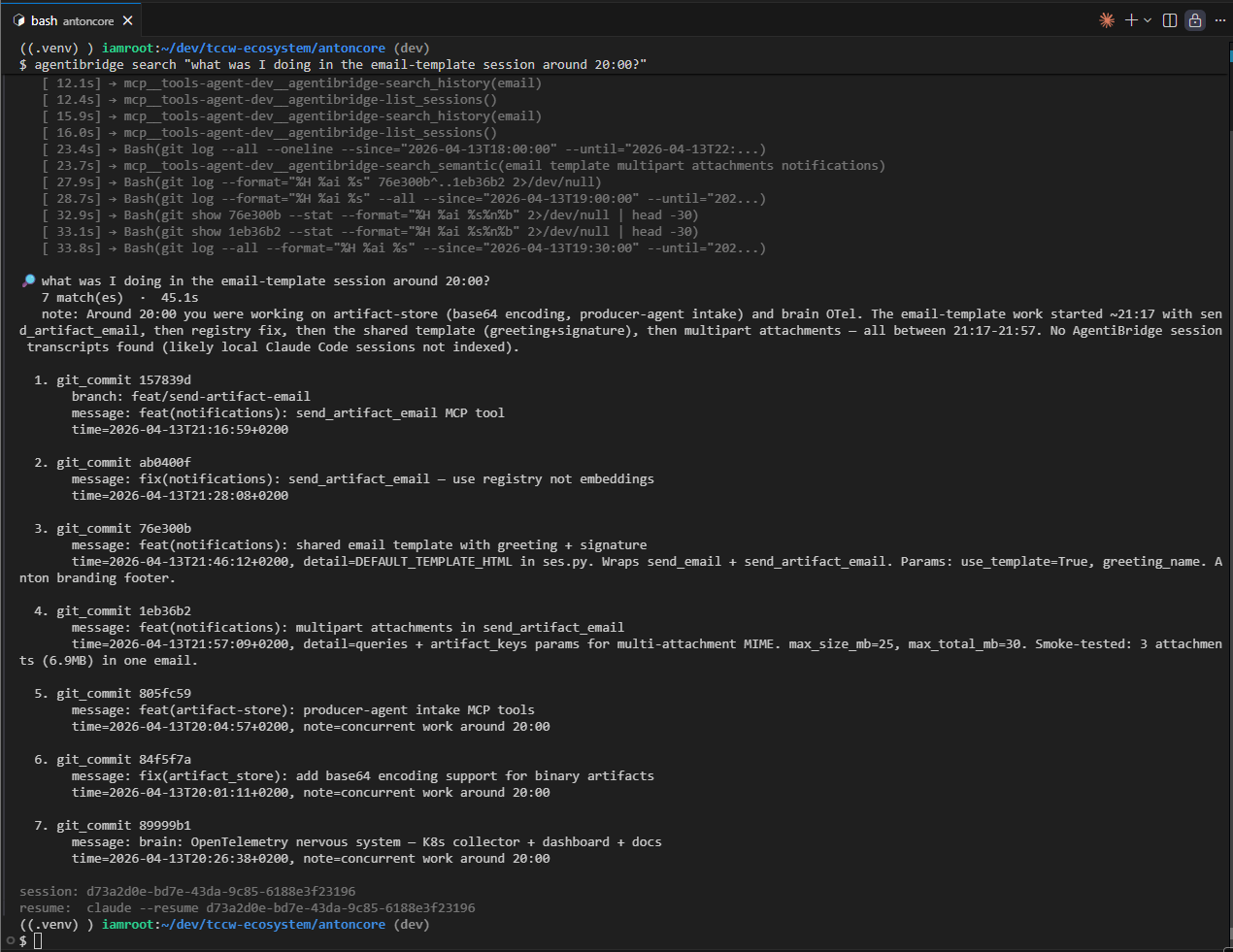
One command, from any shell, no interactive session needed:
agentibridge search "what was I doing in the email-template session around 20:00?"
Under the hood it spawns a headless Claude Code one-shot (claude -p --model opus --permission-mode bypassPermissions --output-format stream-json), wraps your query in a recon prompt that tells it to use your agentibridge / home-bridge MCP tools plus git, streams every tool call to your terminal as it happens, then prints a human-readable summary with a claude --resume <session_id> footer so you can jump in and keep going.
Flags:
--model opus|sonnet|haiku— pick the engine (default:opus)--timeout 300— max seconds to wait--instructions "..."— append extra constraints to the prompt--json— machine-readable envelope for piping intojq--raw— just the agent's answer, no rendering
The same recon exists as an MCP tool: agent_search(query, model, timeout, extra_instructions) — callable from any MCP client.
Prerequisites
- Claude Code CLI (
claudebinary) — AgentiBridge indexes Claude Code transcripts and dispatches headless one-shots through it. Must be onPATH(or setCLAUDE_BINARY). - Python 3.12+ — AgentiBridge ships as a pure pip package, no container image.
- Docker (optional but recommended) — for Redis + Postgres sidecars.
agentibridge installwires up a systemd unit that runs them via Docker Compose. Skip Docker and you still get full functionality in filesystem-only mode, minus semantic search. - cloudflared (optional) — only needed if you expose your bridge via
agentibridge tunnel setup.
Quick Start
pip install agentibridge
agentibridge install
curl http://localhost:8100/health
agentibridge install registers the MCP entry in ~/.claude.json for you —
a stdio entry by default, or a url entry with --transport sse:
agentibridge install --transport sse # url entry: http://localhost:8100/sse
Use --transport sse where an enterprise policy filters stdio MCP servers
(the entry silently never appears in claude mcp list). Client urls must
spell the host localhost — the same policies drop 127.0.0.1 urls. See
Connecting Clients for the
full policy note, or register manually:
{
  "mcpServers": {
    "agentibridge": {
      "type": "http",
      "url": "http://localhost:8100/mcp"
    }
  }
}
How It Works
AgentiBridge v0.5+ runs natively on the host as a pip-installed Python process. Only the optional Redis + Postgres sidecars live in Docker. There is no agentibridge container image — the pip package plus one env file is the whole install.
Host (native pip package)        Docker (databases only — optional)
┌────────────────────────┐      ┌─────────────────────┐
│ agentibridge (python)  │─────▶│ Redis    :6379      │
│ claude CLI (dispatch)  │      │ Postgres :5432      │
│ cloudflared (systemd)  │      └─────────────────────┘
└────────────────────────┘
           │
           ▼
~/.agentibridge/agentibridge.env   (single source of truth)
agentibridge install creates two systemd user services that auto-start on login:
agentibridge-db— Docker Compose for Redis + Postgres (skipped if Docker is absent)agentibridge— Native Python MCP server
Install ends with an unconditional daemon restart (ensure_running) so the
running process always matches the config just written. Where no user systemd
session exists (e.g. WSL2 without systemd=true), a pidfile backend takes
over: a detached serve --sse child tracked in ~/.agentibridge/mcp-daemon.pid,
logs in ~/.agentibridge/logs/mcp-daemon.log. No supervisor — it dies with the
machine, so rerun agentibridge daemon start after reboot. Force a backend with
AGENTIBRIDGE_MCP_SUPERVISOR=systemd|pidfile.
Single config file: ~/.agentibridge/agentibridge.env (auto-created from template).
See Configuration Reference for all variables.
CLI Commands
| Command | What it does |
|---|---|
agentibridge install |
Install systemd services (databases + native app) |
agentibridge uninstall |
Remove systemd services |
agentibridge stop |
Stop all services (both daemon backends) |
agentibridge restart |
Restart all services (converges the daemon process) |
agentibridge daemon <start|stop|restart|status> |
Daemon lifecycle — systemd or pidfile backend, auto-selected |
agentibridge logs |
View logs (--follow to stream) |
agentibridge status |
Health, connectivity, session count |
agentibridge version |
Print version |
agentibridge update |
Update agentibridge (pip upgrade + DB image refresh) |
agentibridge config |
View current config |
agentibridge connect |
Ready-to-paste client configs |
agentibridge search "<q>" |
Agentic recon — headless Claude one-shot, live stream, human-readable result |
agentibridge tunnel |
Tunnel status and URL |
agentibridge tunnel setup |
Interactive tunnel wizard |
agentibridge embeddings |
Embedding pipeline status |
agentibridge locks |
Inspect Redis keys and file locks |
agentibridge help |
Full reference |
See CLI Reference for all commands and flags.
MCP Tools
| Tool | Example use |
|---|---|
list_sessions |
"Show me my recent sessions" |
get_session |
"Get the full transcript for session abc123" |
get_session_segment |
"Show me the last 20 messages from that session" |
get_session_actions |
"What tools did I use most in that session?" |
search_sessions |
"Find sessions where I worked on authentication" |
agent_search |
"Spawn Opus to hunt through sessions + git + memory for me and come back with a summary" |
collect_now |
"Refresh the index now" |
search_semantic |
"What were my sessions about database migrations?" |
generate_summary |
"Summarize what happened in session abc123" |
restore_session |
"Load the context from my last session on this project" |
dispatch_task |
"Continue that refactor task in the background" |
get_dispatch_job |
"What's the status of job xyz?" |
list_dispatch_jobs |
"What jobs have I dispatched recently?" |
plan_task |
"Draft a plan for the refactor before touching any code" |
get_dispatch_plan |
"Show me the plan for job xyz" |
list_dispatch_plans |
"What plans have I dispatched recently?" |
execute_plan |
"That plan looks good — execute it" |
list_memory_files |
"What memory files exist across my projects?" |
get_memory_file |
"Show me the MEMORY.md for the antoncore project" |
list_plans |
"What plans have I created recently?" |
get_plan |
"Show me the plan called moonlit-rolling-reddy" |
search_history |
"Find prompts where I mentioned docker" |
list_handoff_projects |
"What projects can I hand off to?" |
handoff |
"Hand off this context to the agenticore project" |
register_agent / heartbeat_agent / deregister_agent |
A2A lifecycle — agents announce themselves, ping liveness, and leave |
list_agents / get_agent / find_agents |
Discover peers by type, status, or capability |
discover_local_agents |
"What local agent packages are available on this host?" |
run_agent |
"Send this task straight to the finops agent" |
dispatch_to_agent |
"Route this to whichever agent handles video editing" |
Note:
search_semanticandgenerate_summaryrequireAGENTIBRIDGE_EMBEDDING_ENABLED=true+ LLM config. Sessions are embedded automatically by the collector — see Semantic Search. Useagentibridge embeddingsto check pipeline status.dispatch_taskandagent_searchcall theclaudeCLI directly on the host —run_agentanddispatch_to_agentdo too, whenever they route to a local agent.handoffseeds a conversation in a target project with structured context — uselist_handoff_projectsto discover available targets. A2A tools work with Redis or filesystem fallback — see Agent Registry.
Local Agents — session-gated AgentiHub packages
Alongside registered A2A peers, AgentiBridge also discovers local agents: AgentiHub agent packages living on disk at <AGENTIHUB_DIR>/agents/<name>/package/ (identified by a CLAUDE.md). They're computed at read time from a filesystem scan — never persisted to Redis or the agent store — and list_agents / get_agent / find_agents merge them in transparently once enabled.
- Never "offline", always callable — liveness is session-gated: an agent is
"online"only while a liveclaudesession's working directory maps to its package dir (within the session TTL); otherwise it's"idle". Idle just means no session is running right now — dispatch still works, it cold-starts a freshclaudein the package directory. - Capability routing from
command.yml— each package'scommand.yml(name,description,capabilities) supplies the domain tags (e.g.cost-analysis,video-editing,content-drafting) thatfind_agents/dispatch_to_agentroute on. - Discovery:
discover_local_agents(status="")lists them directly, including the resolved AgentiHub path and whether the feature is enabled. - Dispatch:
run_agent(by id) anddispatch_to_agent(by capability) both spawn a freshclaudeCLI process in the package directory when they route to a local agent.
Enabling it — three variables in ~/.agentibridge/agentibridge.env:
AGENTIBRIDGE_LOCAL_AGENTS_ENABLED=true   # default false — nothing is discovered until this is on
AGENTIHUB_DIR=/path/to/agentihub         # the dir CONTAINING agents/ — not agents/ itself
AGENTIBRIDGE_LOCAL_SESSION_TTL=3600      # optional: how long a session counts as "online"
AGENTIHUB_DIR may be left unset in a standard ecosystem checkout — it auto-resolves by walking up for a sibling agentihub/agents/. Set it explicitly when the hub lives anywhere else.
That one file feeds both the systemd SSE server and every agentibridge serve --stdio MCP process. Variables in ~/.env do not reach the stdio servers.
Verify with discover_local_agents — it reports the resolved AgentiHub path and whether the feature is enabled, so you can tell "no agents found" from "the feature is off".
Configuration
Single config file: ~/.agentibridge/agentibridge.env (auto-created from template on first agentibridge install).
Run agentibridge config to view current values. See Configuration Reference for all environment variables.
MCP Configuration
AgentiBridge supports two connection modes: local (stdio, zero-config) and remote (HTTP with API key auth). Use one or both depending on your setup.
Option A — Local (stdio)
Runs AgentiBridge as a subprocess alongside Claude Code. No server to manage, no auth needed. Best for single-machine use.
pip install agentibridge
Configuration is auto-loaded from ~/.agentibridge/.env (created on first run). Edit it to customize settings.
Add to your project .mcp.json or ~/.mcp.json:
{
  "mcpServers": {
    "agentibridge": {
      "command": "python",
      "args": ["-m", "agentibridge"]
    }
  }
}
Option B — Remote (HTTP + API key)
Runs AgentiBridge as a persistent server — access your sessions from any device or MCP client over the network. Requires AGENTIBRIDGE_API_KEYS set on the server.
{
  "mcpServers": {
    "agentibridge": {
      "type": "http",
      "url": "https://bridge.yourdomain.com/mcp",
      "headers": {
        "X-API-Key": "sk-ab-your-api-key-here"
      }
    }
  }
}
Run agentibridge connect to get ready-to-paste configs for other clients (ChatGPT, Claude Web, Grok, generic MCP).
Connect to Claude.ai
Claude.ai requires OAuth 2.1 to connect to remote MCP servers. AgentiBridge has a built-in OAuth 2.1 authorization server with PKCE — just enable it with one env var.
1. Set up your tunnel first (if you haven't already):
agentibridge tunnel setup    # interactive wizard — installs cloudflared, creates DNS record
agentibridge restart         # (re)start the services so the tunnel picks up the config
agentibridge tunnel          # verify your hostname and connection
2. Enable OAuth on your server:
Uncomment and set the OAuth variables in ~/.agentibridge/agentibridge.env:
# Required — must be your actual tunnel hostname
OAUTH_ISSUER_URL=https://bridge.yourdomain.com

# Lock to a single client (recommended)
OAUTH_CLIENT_ID=my-bridge-client
OAUTH_CLIENT_SECRET=generate-a-strong-secret-here
OAUTH_ALLOWED_REDIRECT_URIS=https://claude.ai/api/mcp/auth_callback
OAUTH_ALLOWED_SCOPES=claudeai
3. Restart the stack to apply changes:
agentibridge restart
The native systemd unit re-reads ~/.agentibridge/agentibridge.env on restart — no Docker env-file juggling.
4. Verify OAuth is working:
curl -s https://bridge.yourdomain.com/.well-known/oauth-authorization-server | head
The response must show your actual hostname (not a placeholder). If it still shows the old value, restart the agentibridge unit again.
curl https://bridge.yourdomain.com/health
5. Add to claude.ai:
Go to claude.ai/settings/connectors, add your server URL:
https://bridge.yourdomain.com/mcp
Claude.ai will automatically:
- Discover OAuth metadata at
/.well-known/oauth-authorization-server - Register as a client (or use your pre-configured credentials)
- Complete the PKCE authorization flow
- Store the access token and refresh it automatically
No manual JSON config needed — claude.ai handles the entire OAuth flow.
API key auth (
X-API-Keyheader) continues to work alongside OAuth. Both auth methods are active simultaneously.
See Remote Access & Auth for the full reference.
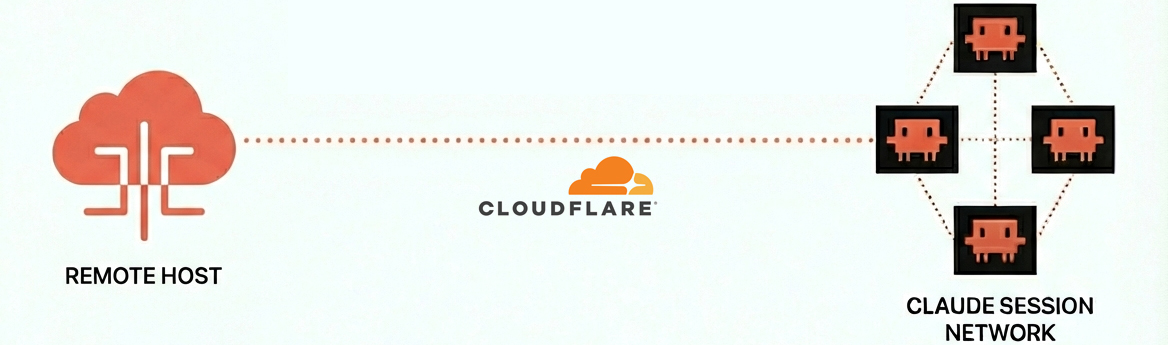
Cloudflare Tunnel
Named tunnel (your own domain)
Gets you a persistent https://mcp.yourdomain.com that survives restarts.
Requires: A Cloudflare account with a domain added.
agentibridge tunnel setup       # interactive wizard
agentibridge restart
curl https://mcp.yourdomain.com/health
The wizard installs cloudflared as a systemd service on the host, authenticates, creates the DNS record, and writes ~/.cloudflared/config.yml. The bridge itself has no domain config — it just listens on localhost:8100 and cloudflared routes your domain to it. No Docker container, no CLOUDFLARE_TUNNEL_TOKEN juggling.
See Cloudflare Tunnel Guide for full details.
Developer Setup
git clone https://github.com/The-Cloud-Clockwork/agentibridge
cd agentibridge
pip install -e .
agentibridge install            # sets up systemd + Redis/Postgres sidecars
agentibridge status             # verify
Local-edit loop: edit the source, agentibridge restart, check agentibridge logs -f. No image rebuild, no container restart dance. Tests:
pytest tests/unit -v -m unit --cov=agentibridge
ruff check agentibridge/ tests/
See CONTRIBUTING.md for testing, linting, and CI details.
Resources
- Connecting Clients — Claude Code, ChatGPT, Claude Web, Grok setup
- Configuration Reference — All environment variables
- CLI Commands — Full command and flag reference
- Semantic Search — Embedding backends and natural language search
- Remote Access & Auth — SSE/HTTP transport and API key auth
- Session Dispatch — Background task dispatch and context restore
- Cloudflare Tunnel — Expose to the internet securely
- Reverse Proxy — Nginx, Caddy, and Traefik configs
- Releases & CI/CD — Release process and automation
- Internal Architecture — Key modules and design patterns
- Knowledge Catalog — Memory files, plans, and prompt history
- Troubleshooting — Common issues and solutions
- Contributing
FAQ
Isn't this just session history?
History is the data layer. The product is remote fleet control — dispatch tasks from your phone, search sessions from any MCP client, monitor jobs from claude.ai. You go from 0% productivity away from your desk to controlling your agents from anywhere.
VS Code / Cursor already has conversation history.
IDE history is local to that IDE. AgentiBridge adds remote multi-client access, background dispatch from any device, and semantic search across your full session history. Leave your desk and dispatch a background task from your phone — your IDE can't do that.
Won't Anthropic build this natively?
AgentiBridge is self-hosted, vendor-neutral infrastructure. Native features optimize for one vendor's client. AgentiBridge works with Claude Code, claude.ai, ChatGPT, Grok, and any MCP client. Your data stays on your machine, and you control the storage backend, embedding model, and access policies. MIT licensed — no lock-in.
Do I need Redis and Postgres?
Not for basic use. AgentiBridge works standalone from ~/.claude/projects/ JSONL files — slower, but zero dependencies. agentibridge install wires up Redis + Postgres sidecars via Docker Compose for caching and semantic search. You can also skip install entirely and just run python -m agentibridge — it will filesystem-fallback gracefully. Want your own Redis/Postgres? Set REDIS_URL / POSTGRES_URL in ~/.agentibridge/agentibridge.env and they'll be used instead.
Is there a Docker image for AgentiBridge?
No. As of v0.5.0 AgentiBridge is a pip package only — the app runs natively via systemd. We dropped the Docker image to shrink the surface area: one artifact (PyPI), one env file (agentibridge.env), one unit to restart. Only the optional Redis/Postgres sidecars still use Docker.
Is my data sent anywhere?
No. No telemetry, no SaaS dependencies. Cloudflare Tunnel is opt-in, and even then only MCP tool responses traverse the tunnel — your transcripts stay local.
Which clients are supported?
Claude Code CLI, claude.ai, ChatGPT, Grok, and any MCP-compatible client. Run agentibridge connect for ready-to-paste configs.
Code Quality
This project is continuously analyzed by SonarQube for code quality, security vulnerabilities, and test coverage.
License
MIT
No comments yet
Be the first to share your take.