
Agent Skill Manager
A local dashboard for keeping agent skills under control across Codex, Claude Code, OpenClaw, Hermes, and public skill folders.
中文 | English
I built Agent Skill Manager because my local skills folder kept growing, and at some point it became hard to answer simple questions: which skills are still useful, which ones are duplicated, which ones are built in, which ones have not been used for a long time, and which copies are safe to update or remove.
This tool scans local skill directories, groups the same skill across platforms, shows usage and health information, and gives you a small local admin page for day-to-day cleanup.
What You Can Use It For
- See all local skills in one table instead of opening several hidden folders.
- Check which Agent platform a skill belongs to: Codex, Claude Code, OpenClaw, Hermes, or public.
- Find duplicate skills and inconsistent local versions.
- See 30-day usage counts imported from local session logs when those logs are available.
- Check health scores based on status, metadata, and file structure.
- Add your own skill source folders.
- Install new skills from GitHub, GitLab, Gitee, GitCode, skills.sh, or zip links.
- Export a simple management report.
- Review update candidates and unify local copies when versions differ.
- Disable or delete skills with confirmation and backup.
Who It Is For
This is mainly for people who already have a growing local skill library.
It is useful if you:
- use more than one Agent platform;
- install or write skills often;
- want to clean old skills without guessing;
- need a quick way to see where a skill is installed;
- want a Chinese/English local management UI.
If you only have a handful of skills, a file browser may be enough.
How It Works
Agent Skill Manager keeps its own local registry. A scan reads known local skill folders, detects skill-like folders, groups copies by name, imports usage records where possible, and stores the result in SQLite.
The dashboard is just a view over that local registry. When you scan again, it refreshes the installed copies, usage counts, health scores, source labels, and update hints. Update and delete operate on the actual local files. Disable moves editable skills into a matching .disabled folder, and enable moves them back.
Default roots include:
- public:
~/.agents/skills - Codex:
~/.codex/skills,~/.codex/plugins/cache - Claude Code:
~/.claude/commands,~/.claude/agents, project.claude/commands, project.claude/agents - OpenClaw:
~/.openclaw/skills,~/.openclaw/plugins,~/.openclaw/tools,~/.openclaw/workflows - Hermes:
~/.hermes
You can change these from the local dashboard after the first run.
Install
Install it like a normal local skill:
git clone https://github.com/chemny/agent-skill-manager.git ~/.agents/skills/skill-manager
After installation, start a new agent session and use it like any other skill.
Quick Start
Ask your agent:
Use skill-manager to scan my local skills and open the admin dashboard.
If you want to run it directly from the terminal:
python3 ~/.agents/skills/skill-manager/scripts/agent_skill_manager.py scan
python3 ~/.agents/skills/skill-manager/scripts/agent_skill_manager.py web --host 127.0.0.1 --port 8765 --open
The first command scans your local skills. The second command opens the dashboard.
Common Commands
python3 scripts/agent_skill_manager.py scan
python3 scripts/agent_skill_manager.py list
python3 scripts/agent_skill_manager.py search skill-manager
python3 scripts/agent_skill_manager.py show skill-manager
python3 scripts/agent_skill_manager.py usage --days 30
python3 scripts/agent_skill_manager.py health
python3 scripts/agent_skill_manager.py report
python3 scripts/agent_skill_manager.py web --open
On Unix-like systems:
bin/asm scan
bin/asm web --open
On Windows:
powershell -ExecutionPolicy Bypass -File ".\scripts\start-manager.ps1"
You can also double-click scripts\start-manager.cmd.
The Windows launcher checks for Python 3.9+ using py -3, python, then python3, and opens http://127.0.0.1:8765/ after the local server starts.
For a first-time Windows check:
powershell -ExecutionPolicy Bypass -File ".\scripts\install-windows.ps1"
The Dashboard
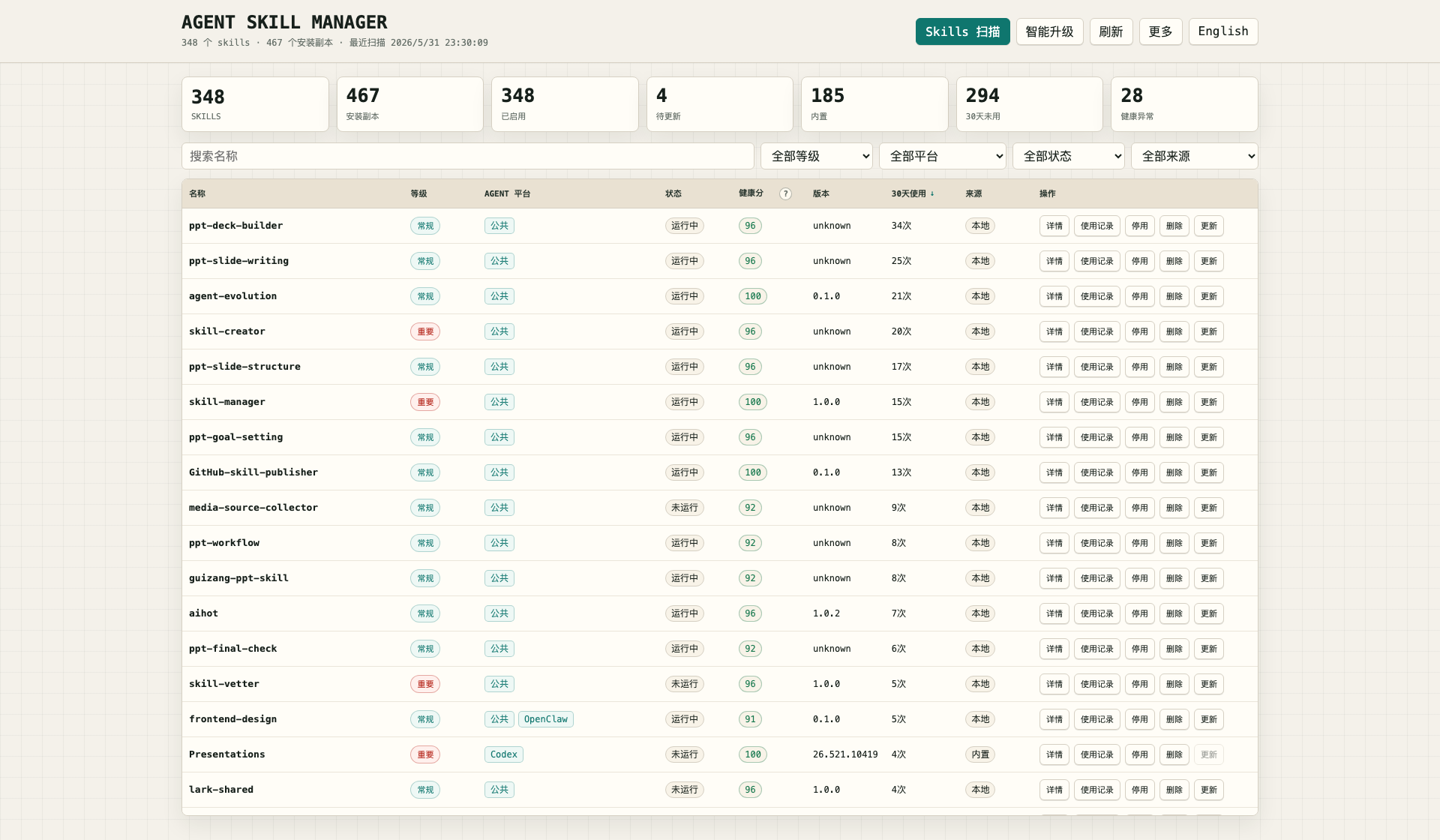
The local HTML dashboard is the easiest way to use the tool. It includes:
- Chinese and English UI switching;
- skill scan and refresh;
- filters for grade, platform, status, and source;
- name-only search;
- details and usage records;
- custom source management;
- update channel management with search, check, download, update, success-rate, and failure statistics;
- skill installation from GitHub, GitLab, Gitee, GitCode, skills.sh, or zip links;
- Smart Scan checks with a 24-hour cache and selectable full, platform, or grade scopes;
- local version unification;
- real enable/disable by moving editable skills in and out of
.disabledfolders; - delete with confirmation and backup;
- report export.
Update Source Order
When you click update or run Smart Scan, the manager looks for newer versions in this order:
- Read the local 24-hour cache first.
- Check the skill's bound repository source: GitHub, GitLab, Gitee, GitCode, or the GitHub repository behind a skills.sh link.
- If GitHub is unavailable, times out, or is rate-limited, try GitCode's GitHub mirror candidates and use them only after they pass validation.
- If no bound source exists, or that source is temporarily unavailable, search SkillsMP.
- If SkillsMP has no usable result or fails, continue with
find-skills/ skills.sh. - If no remote version can be found, compare local copies with the same name and offer local version unification.
A failing remote source is treated as a source problem, not a skill problem. For example, GitHub rate limits or SkillsMP timeouts do not become "incomplete metadata" recommendations. GitCode mirrors are used as GitHub download fallbacks; the canonical source remains GitHub.
More -> Update Channels records search, check, download, update, success, and failure counts for every channel. Channels are scored by enabled state, manual priority, success rate, and successful call volume; discovery channels with higher scores are tried first. Custom mirror channels may use {owner}, {repo}, {prefix2}, and {prefix3} placeholders for GitHub mirror fallback URLs.
Start it with:
python3 scripts/agent_skill_manager.py web --host 127.0.0.1 --port 8765 --open
Runtime Files
Runtime data is not stored in this repository.
- database:
~/.agent-skill-manager/skills.db - config:
~/.agent-skill-manager/config.json - reports:
~/.agent-skill-manager/reports/ - backups:
~/.agent-skill-manager/backups/ - logs:
~/.agent-skill-manager/logs/
Use ASM_HOME if you want a separate runtime directory:
ASM_HOME=/tmp/asm-test python3 scripts/agent_skill_manager.py list
Compatibility
Agent Skill Manager is designed to work across Codex, Claude Code, OpenClaw, Hermes, and public skill directories.
It uses local filesystem scans, SKILL.md metadata, SQLite, and the Python standard library. Platform paths are defaults, not hard requirements.
Windows support is built around PowerShell and Python 3.9+:
scripts\start-manager.ps1starts the dashboard and opens the browser.scripts\start-manager.cmdis a double-click launcher.scripts\skill-manager.ps1forwards actions to the Python CLI and auto-detectspy -3,python, orpython3.scripts\install-windows.ps1checks Python, creates the default%USERPROFILE%\.agents\skillsfolder, and prints the exact start command.- Git is optional for normal scanning and dashboard use, but some update and install sources need Git in
PATH.
Safety Notes
The tool is intentionally conservative:
- builtin and plugin-cache skills are treated as observe-only;
- disable moves editable skills out of the active source root into a matching
.disabledfolder; - delete asks for confirmation and backs up editable files first;
- remote update checks use a 24-hour cache;
- if no remote update is found, local copies can still be compared and unified;
- local databases, reports, backups, logs, and usage records are ignored by Git.
Update This Skill
If you installed with Git:
cd ~/.agents/skills/skill-manager
git pull
Then open a new agent session.
Repository Structure
skill-manager/
├── README.md
├── README.zh.md
├── CHANGELOG.md
├── LICENSE
├── SKILL.md
├── assets/
│   └── agent-skill-manager-dashboard.png
├── bin/
│   └── asm
└── scripts/
    ├── agent_skill_manager.py
    ├── release_check.sh
    └── skill-manager.ps1
Release Check
./scripts/release_check.sh
This checks Python syntax, embedded JavaScript when Node.js is available, temporary runtime creation, and leftover Python cache files.
License
MIT
No comments yet
Be the first to share your take.