
AgeniusDesk Community Edition
An open-source command center for n8n automation. Manage multiple instances, monitor errors, trace executions node by node, write workflow code with AI assistance, and connect knowledge sources, all from one dashboard.
Why AgeniusDesk CE
Running n8n for clients or multiple teams means juggling multiple logins, scattered logs, and no unified picture of what's broken. AgeniusDesk CE is a lightweight control plane that brings all your instances into one place.
n8n-first. Everything centers on your n8n workflows: the dashboard, the error feed, OpenTelemetry traces, Code Lab, and insights all revolve around them. There is also an optional agent layer (build and run your own LangGraph / PydanticAI agents), but it is off by default, so a default install is a focused n8n control plane, nothing extra to learn or run. Turn it on only if you want it (see With the Agent Fleet).
See it in action
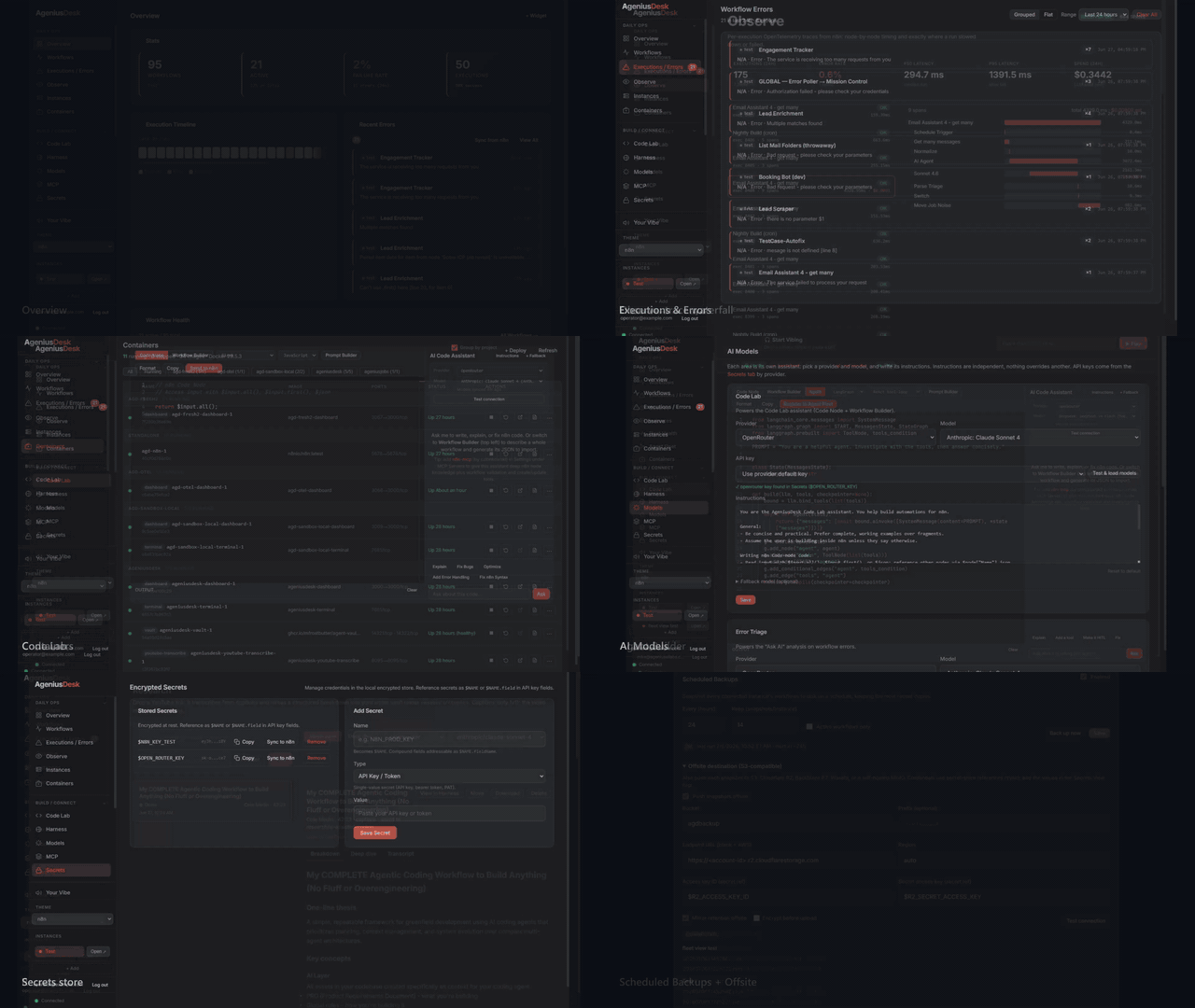
A quick tour of the dashboard (full-quality video). Prefer stills? A few highlights below.
Screenshots
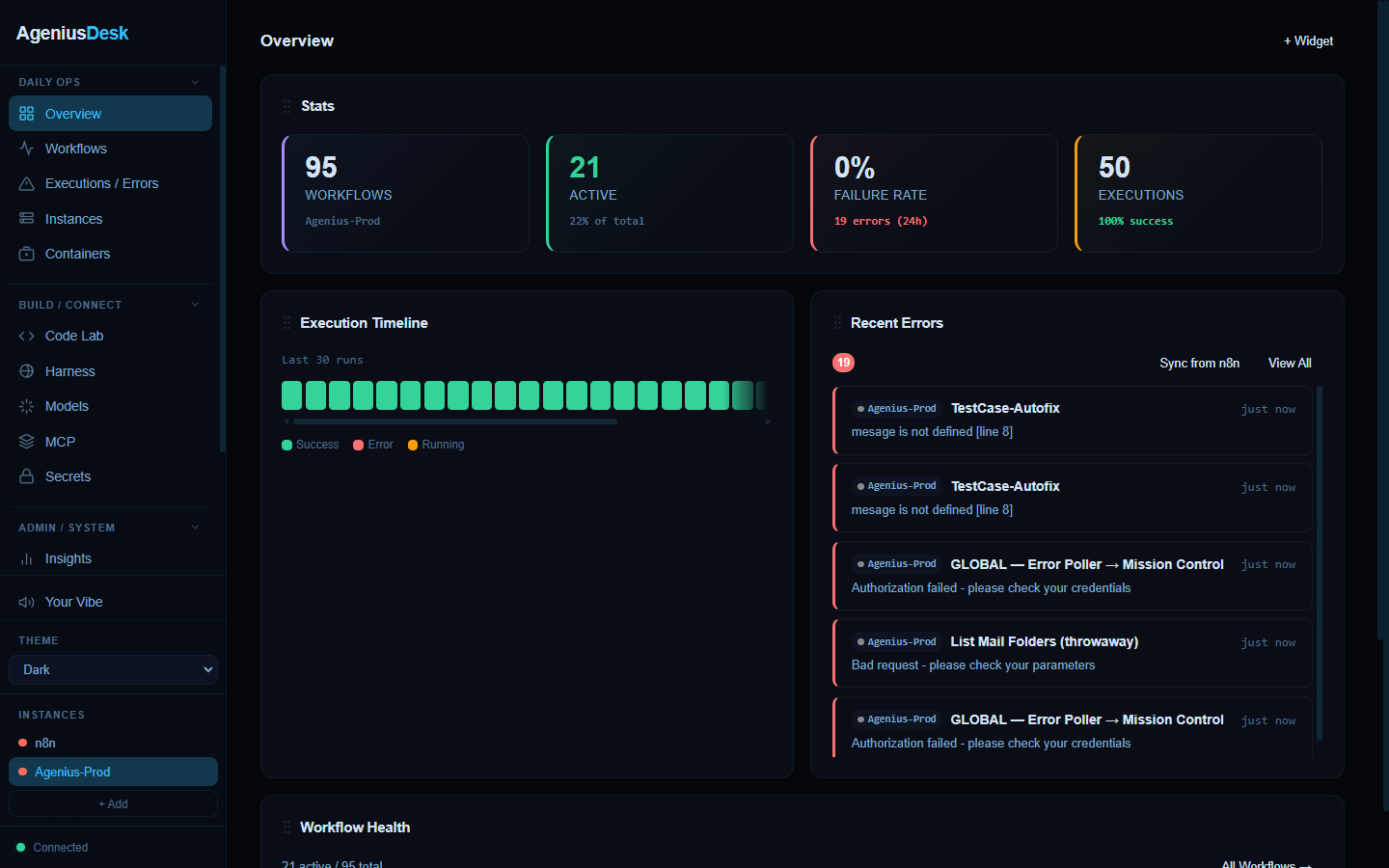
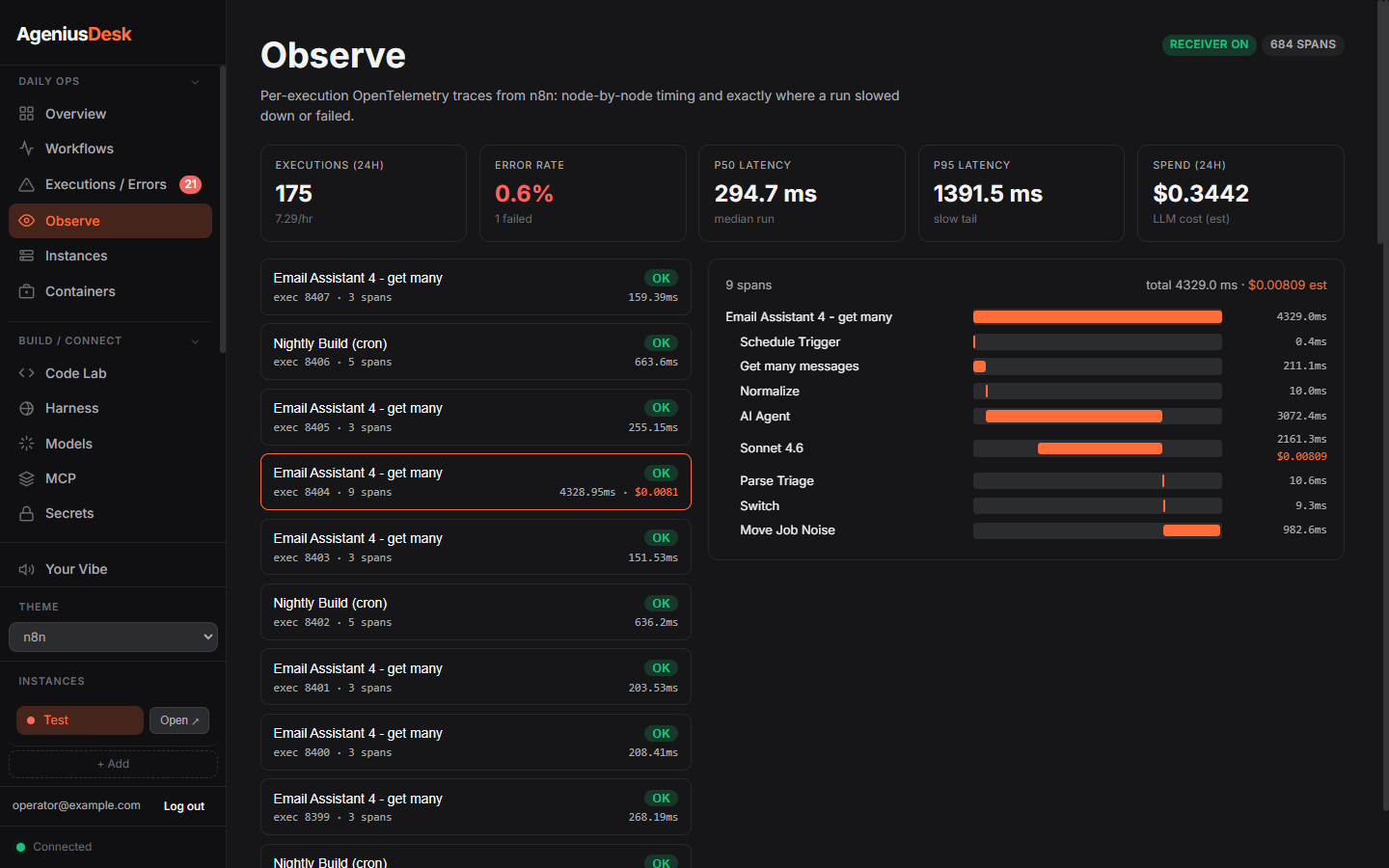
| Overview | Observe: node-by-node traces |
|---|---|
 |
 |
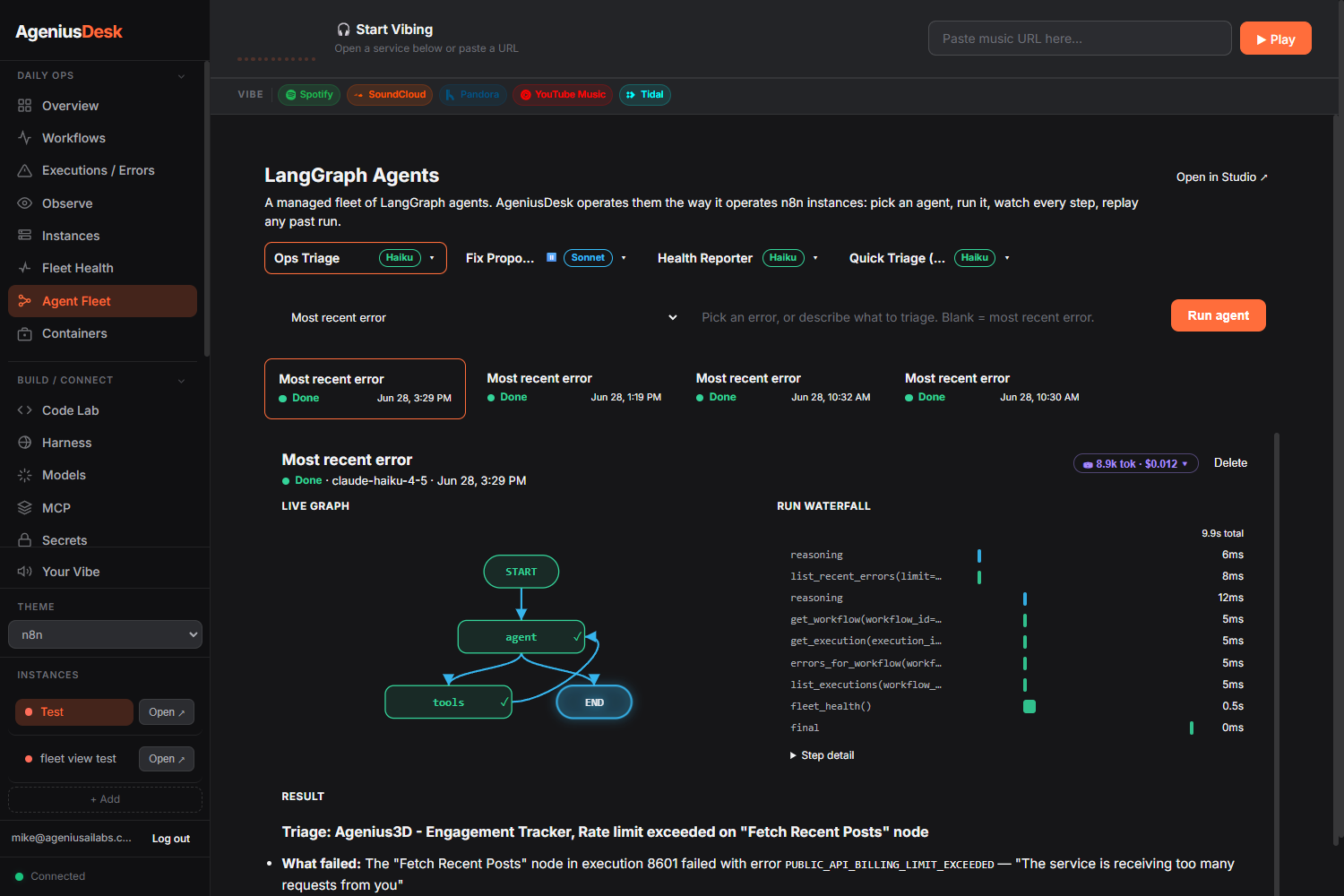
| Agent Fleet (optional) | Scheduled backups + offsite |
 |
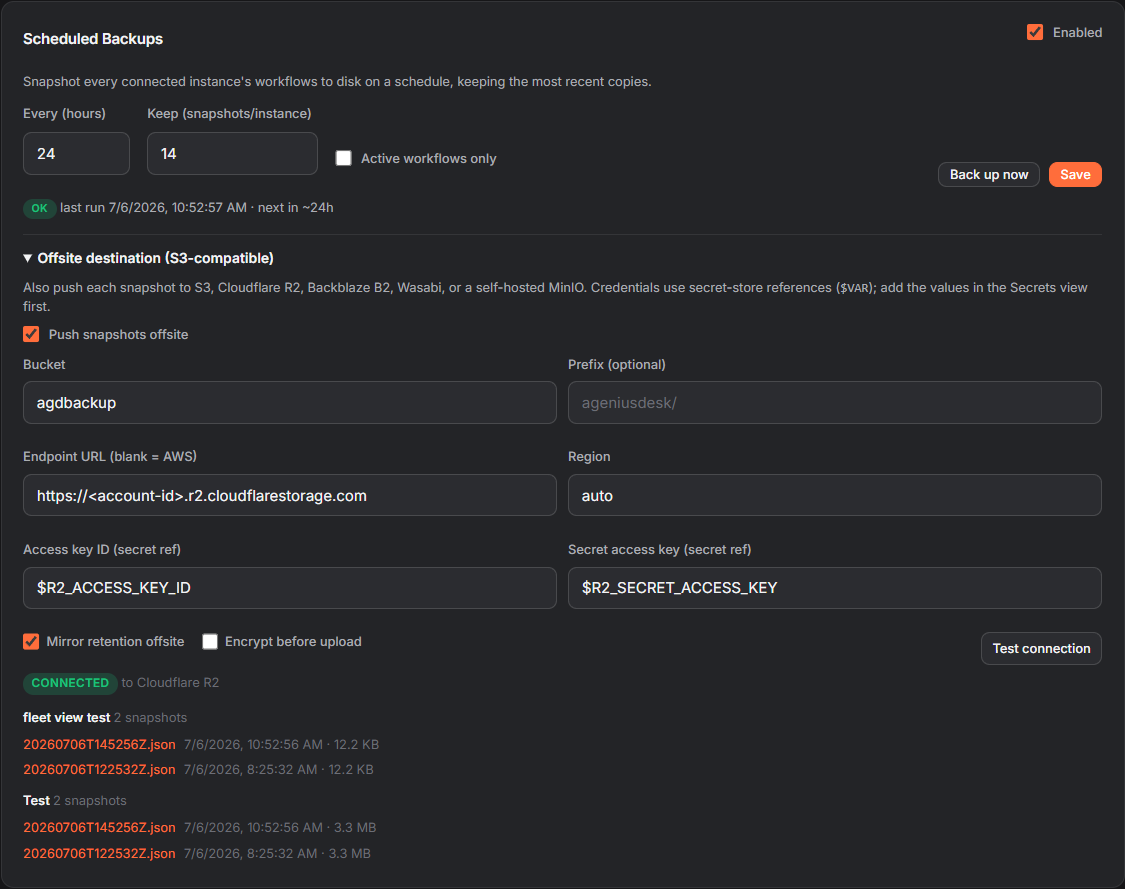 |
What's Included
Multi-Instance Management
- Add any number of n8n instances by URL and API key
- Switch between instances instantly
- View all workflows, recent executions, and error history in one place
- Fleet Health: workflow health and errors rolled up across every connected instance in one pane (per-instance active/total workflows, error rate over recent runs, and unhealthy workflows, plus a combined total). A degraded or unreachable instance is shown, not fatal
Error Visibility
- Real-time error feed across all instances
- Errors grouped by workflow, node, and error type with occurrence counts
- Full node-level details and last-seen timestamps
- Silent failures land in the same feed as their own
Silent failureclass: runs n8n reported as success but where a node errored under Continue-On-Fail or quietly stopped producing data, so "green but broken" runs show up where you already triage. See Silent-failure detection
Workflow Promotion (dev to staging to prod)
- Move a workflow from one registered instance to another, the open-source answer to n8n Enterprise environments
- A preflight runs first and reports every credential the workflow binds, whether the target already ships that credential type, and any duplicate-name collision, so you see what will break before anything is written
- Credential auto-provision reuses a credential already mirrored onto the target, or creates one from a matching entry in the Secrets store. Ambiguity is never guessed: a type with more than one mirror is surfaced for you to resolve, and provisioning is idempotent by reuse, so an already-promoted workflow never has its credential id pulled out from under it
- Activation is guarded. n8n binds a node credential by both id and name, so a workflow whose mapped credential has no name on the target is refused rather than imported to fail silently at run time, and a rejection surfaces n8n's own node-by-node explanation. See Workflow Promotion
Code Lab
- Monaco-based editor for writing n8n Code-node logic
- Syntax highlighting, autocomplete, and n8n node introspection
- AI assistance to generate or explain code
- One-click "Send to n8n" to deploy directly
- Agent Builder: build LangGraph or PydanticAI agents (ReAct, human-in-the-loop, and parallel fan-out starters) with AI assist, then Register them to the Agent Fleet
Agent Fleet (optional, off by default)
- A managed fleet of agents, operated the way AgeniusDesk operates n8n: a catalog, run with a live graph + a normalized run waterfall, human-in-the-loop approve/resume, and LangSmith tracing with per-call token/cost
- Built-ins out of the box (ops-triage, fix-proposer, health-reporter); build your own in Code Lab (LangGraph or PydanticAI) and Register them
- Your agents are files in your vault under
agents/that you own, edit, and export, discovered live with no restart - The LangGraph/PydanticAI stack is an opt-in dependency extra, so AgeniusDesk is n8n-only by default — the Agent Fleet and Agent Builder stay hidden until you opt in. Enable agents by building with the extra:
AGD_EXTRAS="assistant,langgraph"(orpip install '.[langgraph]').AGD_AGENTS_ENABLEDoverrides the auto-detect (falsekeeps it n8n-only even with the extra;trueforces it on)
AI Assistant
- Chat with context from your workflows and error history
- Works with OpenRouter (one key, hundreds of models), OpenAI, Anthropic, Perplexity, Groq, DeepSeek, Mistral, xAI (Grok), Together AI, local Ollama, or any OpenAI-compatible endpoint via a Custom base URL (Azure OpenAI, LiteLLM, vLLM, LocalAI, ...). Each area (Code Lab / Error Triage / Assistant) picks its own provider and model.
- Function calling to query workflows, run executions, view errors
- It asks before it acts. The assistant reads content you do not control (n8n error and execution payloads, RAG hits, MCP server output), so a prompt injection buried in any of it could otherwise steer a state-changing tool call. Those calls do not run inside the chat turn: they come back as a proposal on an approval card and nothing happens until you confirm it. MCP tools are classified per server from the server's own
readOnlyHintannotations, and a tool that cannot be classified fails closed. SetAGD_ASSISTANT_AUTORUNto restore unattended execution on a headless install - Attach MCP servers to extend the assistant with external tools
- n8n intelligence, installed for you. On first boot AgeniusDesk auto-installs n8n-mcp by czlonkowski (deep n8n node knowledge plus workflow search, validation, and create/update tools) as a running MCP server, and seeds a curated n8n skill library into your workspace, so Code Lab and the assistant build workflows correctly the first time. Both are best-effort and opt-out (
AGD_N8N_MCP_AUTO=false,AGD_SEED_SKILLS=false); the n8n-mcp card lives under Settings, MCP Servers - Optional RAG over your knowledge sources via Qdrant
Knowledge Management
- Register external knowledge sources (markdown files, APIs, documents)
- Write and organize markdown notes with full-text search and backlinks
- Folder tree structure compatible with Obsidian
- Tag-based organization and navigation
Container Management
- List, inspect, and manage Docker containers directly from the dashboard
- Deploy new services using one-click templates
- The n8n template deploys as a two-container bundle (n8n + a task-runner sidecar) so Python Code nodes work out of the box, standard library open by default
- Community template library (drop a JSON file into
data/templates/) - Workflow import, export, and backup
Secrets Store
- Fernet-encrypted credential storage
- Reference secrets as
$VAR_NAMEin instance API keys and MCP server configs - Resolution order: environment variable first, then encrypted store
Notifications
- Inbound webhook for dashboard messages displayed as toasts
- Optional Slack and Discord integrations (SLACK_WEBHOOK_URL, DISCORD_WEBHOOK_URL)
- No API keys baked into the code
Insights
- Execution analytics: success rates, error trends, busiest workflows
- Per-instance health status
Observability (OpenTelemetry)
- Embedded OTLP/HTTP receiver: point n8n's native OpenTelemetry exporter at AgeniusDesk, no external collector required
- Observe view: a live trace list and parent/child execution waterfall, plus a metrics strip (executions, error rate, p50/p95, throughput)
- LLM cost tracking folded into the trace layer: per-trace and per-call spend, enriched from token usage and a layered price book
- Per-execution trace links from Errors and Insights
- Silent-failure detection: flags "green but broken" runs that n8n reported as success (a node that errored under Continue-On-Fail, or a steady producer that quietly returned nothing or dropped far below its normal volume). It flags the origin node, not the downstream cascade, and surfaces everywhere you look: a toast, a per-run "silent" badge in Observe, its own
Silent failureclass in the Errors feed, and a count on the Overview and Insights. How it works, and why n8n's own status can't catch it, is written up in Silent-failure detection
Enabling OpenTelemetry on your n8n
Observability and silent-failure detection only work once n8n is exporting traces. Instances AgeniusDesk provisions for you are auto-wired (nothing to do). For an existing instance you connect by URL, you enable n8n's native OpenTelemetry export yourself, or the Observe view and silent-failure detection stay empty. Set these in the n8n instance's environment and restart it (n8n appends /v1/traces to the endpoint):
N8N_OTEL_ENABLED=true
N8N_OTEL_EXPORTER_OTLP_ENDPOINT=http://<dashboard-host>:<port>/api/otel
N8N_OTEL_EXPORTER_OTLP_HEADERS=authorization=Bearer <AGD_OTEL_TOKEN>
The receiver side also needs AGD_OTEL_ENABLED=true (and ideally AGD_OTEL_TOKEN) on AgeniusDesk. See CONFIG.md.
Community Modules
- Install third-party modules from a GitHub repo through a two-phase inspect then install flow
- A static code scan surfaces each module's declared capabilities (network hosts, filesystem write paths, subprocess) and flags risky calls before you consent
- Proportional consent, a per-install audit trail, and one-click restart to activate
- Optional out-of-process isolation (opt-in, Settings > Modules): run a module's backend in a sandboxed subprocess, or in its own hardened Docker container (read-only rootfs, all Linux capabilities dropped, no Docker socket, no host secrets). Privileged actions go through a loopback capability bridge: vault access scoped to the module's declared paths, plus a tool-free LLM call that runs host-side so provider keys never reach the module. The default stays in-process
- First module: YouTube Research (paste a link, get a structured breakdown auto-filed into your notes vault), which runs the same code in-process or isolated
- The default in-process mode is heuristic review, not a sandbox; install in-process modules only from sources you trust. For a real boundary, enable the container tier
Themes and Music
- 3 built-in themes (Dark, Light, n8n) plus custom theme support
- Integrated music player (Spotify, YouTube, SoundCloud, Apple Music, Tidal)
Quick Start
Setting up with an AI assistant? Give it AI-SETUP-PROMPT.md.
Docker (Recommended)
git clone https://github.com/Mfrostbutter/ageniusdesk-ce.git
cd ageniusdesk-ce
cp .env.example .env
docker compose up -d --build
Open http://localhost:3000. A setup wizard walks you through adding your first n8n instance.
Port 3000 already in use? It is a common dev port, so a collision is likely if you already run something there (often a prior AgeniusDesk). Pick a free host port with
PORT, in.envor inline:PORT=8080 docker compose up -d --build # then open http://localhost:8080The container always listens on 3000 internally;
PORTonly changes the host port. Ifdocker compose upprintsBind for 0.0.0.0:3000 failed: port is already allocated, that is the collision, setPORTto a free port and re-run.
With the Agent Fleet (LangGraph + PydanticAI agents)
Agents are opt-in; the install above is n8n-only. To build with the agent stack so the Agent Fleet and Code Lab's Agent Builder appear, add the extra before building:
git clone https://github.com/Mfrostbutter/ageniusdesk-ce.git
cd ageniusdesk-ce
cp .env.example .env
echo "AGD_EXTRAS=assistant,langgraph" >> .env
docker compose up -d --build
The surface auto-detects the extra (no extra flag needed). The built-in agents run on Claude, so set an Anthropic key: uncomment ANTHROPIC_KEY= in .env, or add it after first boot in Settings → Secrets. To force the n8n-only experience even with the extra installed, set AGD_AGENTS_ENABLED=false.
Bare Metal
Requires Python 3.10 or later.
git clone https://github.com/Mfrostbutter/ageniusdesk-ce.git
cd ageniusdesk-ce
pip install '.[assistant]'
cp .env.example .env
python -m uvicorn backend.main:app --host 0.0.0.0 --port 3000
Host it on a server (access from anywhere)
Want to reach AgeniusDesk from any device over HTTPS on your own domain? The deployment guide has a step-by-step walkthrough for a public VPS (DigitalOcean, Hostinger, etc.): provision the server, point a domain at it, run AgeniusDesk in Docker, and front it with Caddy for automatic HTTPS, plus a hardening checklist. See docs/DEPLOY.md.
Configuration
Configuration is controlled via environment variables and the .env file. The full reference is at docs/CONFIG.md.
Key variables:
PORT- Dashboard port (default 3000)SECRET_KEY- Master key for secrets encryption (auto-generated if not set)ANTHROPIC_KEY,OPEN_AI_KEY,OPEN_ROUTER_KEY,OLLAMA_URL- core AI provider credentialsPERPLEXITY_KEY,GROQ_KEY,DEEPSEEK_KEY,MISTRAL_KEY,XAI_KEY,TOGETHER_KEY,CUSTOM_LLM_KEY- additional OpenAI-compatible providers (the Custom one pairs with a base URL set in Models)QDRANT_URL,QDRANT_API_KEY- Optional Qdrant RAG backendSLACK_WEBHOOK_URL,DISCORD_WEBHOOK_URL- Optional notification sinks
See docs/CONFIG.md for all options.
Error Handler Setup
Wire your n8n instance to report failures into the dashboard in real time.
Auto-install on connect: adding a new instance now best-effort installs and activates the global error handler into it automatically, so errors flow from the moment it's connected. You still do the one step n8n requires (below). If your dashboard sets AGD_WEBHOOK_TOKEN, also set AGD_WEBHOOK_TOKEN in the n8n instance's environment so the handler's POST carries the matching token (otherwise errors are rejected and silently dropped).
One-click: once an instance is connected, open Settings > Error Handler > Install to active instance. This imports and activates the global error handler workflow (with the dashboard URL pre-filled). Then do the one step n8n requires: Settings > Workflows > Error Workflow and select the imported workflow. Repeat the install for each instance.
Manual: download the workflow JSON from the same tab (or backend/n8n_workflows/global-error-handler.json), import it via Workflows > Import from File in n8n, point the HTTP Request node at http://your-dashboard:3000/api/errors/webhook, then select it as the Error Workflow and activate it.
Security Notes
Authentication: AgeniusDesk now enforces local account login by default. On first visit, create the owner account and keep AGD_DISABLE_LOGIN=false for any shared or public deployment. Edge-auth headers are trusted only when AGD_TRUST_EDGE_AUTH=true; enable that only when the app is reachable exclusively through your trusted proxy.
Secrets: The encrypted secret store uses Fernet (AES-128-CBC + HMAC-SHA256). The master key is stored at data/.secret_key (mode 600). Back up this file alongside your data volume. Losing it makes all encrypted values unrecoverable.
Machine endpoints: New integrations should use /api/v1/... with an AgeniusDesk API key. If you expose the legacy /api/errors/webhook or /api/messages/webhook endpoints, set AGD_WEBHOOK_TOKEN.
Community Modules: Community modules can load and execute Python code from data/modules/. The default runs them in-process (fully trusted). v0.3 adds optional out-of-process isolation, selectable in Settings > Modules: a sandboxed subprocess, or a hardened Docker container with no host secrets, no Docker socket, and only scoped capability-bridge access. Install in-process modules only from sources you trust; use the container tier for an OS-level boundary.
Documentation
Full documentation lives in docs/: a task-oriented User Guide (getting started, instances, errors, Code Lab, AI assistant, secrets, and more) and an Architecture & Developer Reference (module system, data model, auth/RBAC, frontend, API, security posture).
Deployment
For production self-hosting, see docs/DEPLOY.md for:
- Prerequisites and system requirements
- TLS setup and reverse proxy configuration
- Authentication posture (built-in or via auth proxy)
- Data volume backup and recovery
- Update workflow
Contributing
Contributions are welcome. See CONTRIBUTING.md for dev setup, lint, and contribution guidelines.
Roadmap
See ROADMAP.md for planned features and current direction.
Relationship to the internal edition
AgeniusDesk CE is a one-way public fork of an internal codebase. Changes made here do not flow back upstream automatically, and the internal original remains canonical for internal deployments. This repo stands on its own for community use and contributions.
License
AgeniusDesk Community Edition is MIT licensed. See LICENSE for details.
Acknowledgments
- n8n-mcp by czlonkowski: the n8n MCP server we recommend pairing with the AI assistant for deep node knowledge and workflow tooling.
- n8n: the workflow automation engine AgeniusDesk manages.
No comments yet
Be the first to share your take.